CNiC Solutions

Step-by-Step Migration Guide

UCaaS Migration Checklist

Your Complete Guide to a Smooth Transition

Follow our proven 5-phase migration process to move from your legacy phone system to UCaaS with minimal disruption to your business.

Before You Begin

Ensure these prerequisites are in place

photo-1531746790731-6c087fecd65a

Stable Internet

Min 100 Kbps per concurrent call

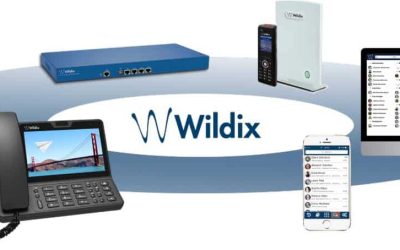
Seamless communications platform featuring smartphones, desktops, VoIP phones, and networking devices for enterprise use.

Network Assessment

QoS configuration for voice traffic

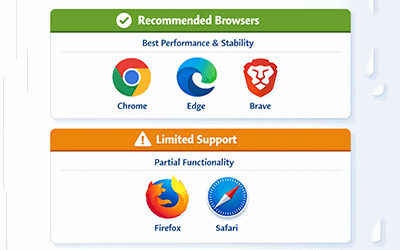
Recommended browsers for optimal performance: Chrome, Edge, Brave; Limited support for Firefox and Safari - for seamless IT services.

Browser Compatibility

Chrome, Firefox, Safari, or Edge

LDAP active directory synchronization for enterprise user management and simplified communication system integration.

User Directory

List of users, extensions, and roles

5-Phase Migration Process

Typical timeline: 4-6 weeks for mid-size organizations

1 📄

Discovery & Assessment

⏱ Week 1-2

Audit current phone system and infrastructure

Document existing phone numbers and extensions

Identify integration requirements (CRM, helpdesk, etc.)

Assess network readiness and bandwidth

Survey user requirements and pain points

Review current contracts and termination terms

2 ⚙️

Solution Design

⏱ Week 2-3

Design call routing and auto-attendant flows

Configure user groups and permissions

Plan number porting schedule

Set up integration configurations

Design disaster recovery and failover

Create user provisioning plan

3 👥

Pilot Deployment

⏱ Week 3-4

Deploy to pilot group (10-20% of users)

Test all features and integrations

Validate call quality and reliability

Gather user feedback and address issues

Refine configurations based on pilot results

Document any custom requirements

4

Training & Preparation

⏱ Week 4-5

Conduct end-user training sessions

Train administrators and super-users

Distribute quick reference guides

Set up support escalation procedures

Configure backup and monitoring

Final pre-launch checklist review

5 🚀

Full Deployment

⏱ Week 5-6

Execute number porting

Roll out to remaining users in phases

Monitor system performance

Provide go-live support

Address any migration issues promptly

Decommission legacy system

CNiC Handles the Heavy Lifting

While this checklist outlines the migration process, CNiC Solutions manages most of these tasks for you. Our certified team handles the technical complexities so you can focus on your business.

Project Management

Dedicated project manager coordinates your migration

Technical Configuration

We handle all system setup and integrations

Number Porting

We coordinate with carriers to transfer your numbers

Training & Support

Comprehensive training and ongoing support included

Migration Tips

Start with a Pilot Group

Test with a small group before rolling out company-wide. IT staff and power users make good pilot candidates.

Keep Legacy System Running

Maintain your old system for 2-4 weeks after migration as a fallback option.

Schedule During Low Volume

Plan number porting and cutover during evenings or weekends to minimize business impact.

Communicate with Stakeholders

Keep employees informed about the timeline and what to expect during the transition.

Ready to Start Your Migration?

Contact CNiC Solutions for a free migration assessment. We’ll evaluate your current system and create a customized migration plan for your business.