

An IT budget is a plan for what your business will spend on technology over a given period, across hardware, software, security, support, and more. Good IT budgeting turns scattered, reactive tech spending into a deliberate plan that aligns technology investment with your business goals, risk, and growth.
For most small businesses, technology spending sneaks up on you. A subscription here, a replacement laptop there, an emergency repair, a renewal you forgot was coming, and suddenly “IT” is a meaningful line item nobody actually planned. An IT budget fixes that. It turns a pile of surprises into a predictable plan, gives you visibility into what you are spending and why, and helps you put limited dollars where they matter most. This guide walks through how to build a practical IT budget for your small business: what to include, how to benchmark your spend, the hidden costs to plan for, and how to justify the investment.
Key Takeaways
- Build from needs, not just a percentage. Benchmarks are a useful reference, but the right number comes from your actual requirements and risk.
- Account for all the categories. Most businesses underestimate IT spend by tracking only the obvious line items and missing support, training, and contingency.
- Plan hardware refreshes as a rolling reserve, not a lump-sum emergency, especially now that Windows 10 support has ended.
- Favor predictable OpEx. Monthly, operating-expense models for cloud, SaaS, and managed IT make budgeting far more stable.
- Justify spend in business terms. Frame IT investment as risk reduction, productivity, and growth, not technical line items.
What’s in This Guide
What to Include: The IT Budget Categories
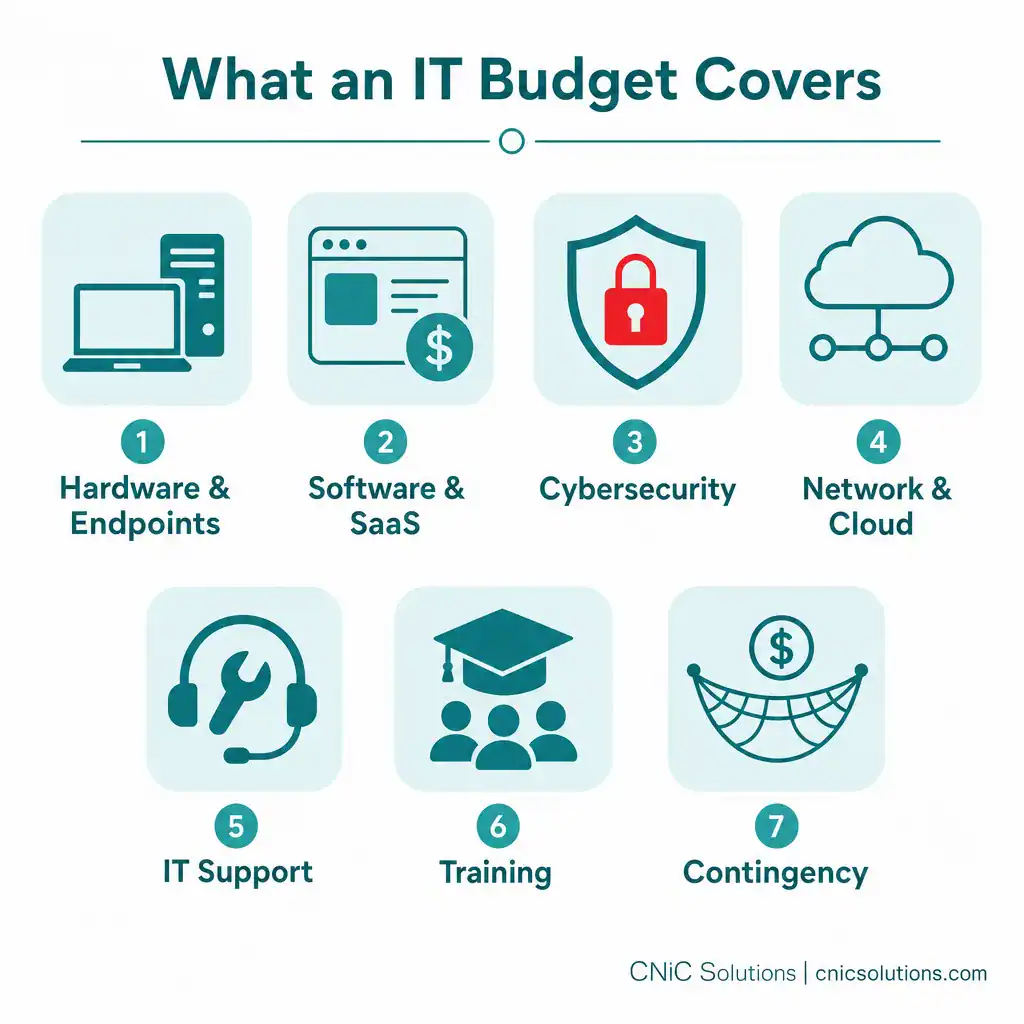
The first step is simply knowing what counts. Most businesses underestimate their IT spend because they only track the obvious items (a few software subscriptions and the occasional laptop) while the rest hides in scattered expenses. A complete IT budget groups everything into clear categories:
- Hardware and endpoints: Workstations, laptops, servers, networking equipment, phones, and peripherals, plus the reserve to replace them on schedule.
- Software and SaaS: Operating systems, productivity suites (like Microsoft 365), line-of-business applications, and the growing list of subscription tools your team uses.
- Cybersecurity: Security tools, monitoring, endpoint protection, email security, and compliance-related controls. This is increasingly the category you cannot afford to shortchange.
- Network and cloud: Internet connectivity, cloud infrastructure and storage, and the services that keep everything connected.
- IT support: Whether internal staff, a managed IT provider, or a mix, the cost of keeping systems running and getting help when something breaks.
- Training: Security awareness training for all employees, plus onboarding and skills development.
- Contingency: A reserve for the inevitable surprises, urgent repairs, failed hardware, migrations, or a security incident.
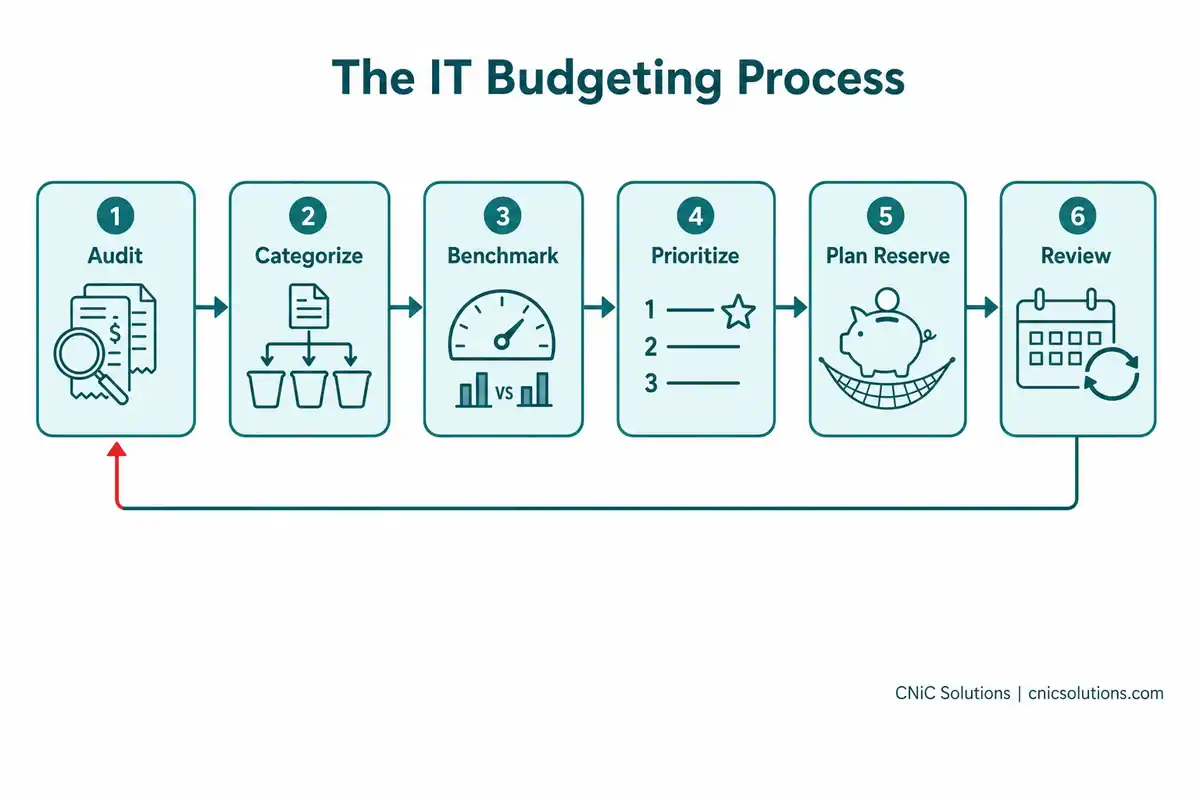
The exercise of auditing your last twelve months of technology payments and sorting them into these buckets is, on its own, one of the most clarifying things a small business owner can do. It almost always reveals spending you did not realize was there.
How Much Should You Spend? Benchmarking
Once you know what you are spending, the natural next question is whether it is the right amount. Benchmarks help you frame that, but they come with an important caveat.
The most common benchmark is technology spend as a percentage of annual revenue. Industry figures, commonly attributed to research from firms like Gartner and Deloitte, generally place most small businesses in the mid-single-digit percent of revenue range, with regulated and technology-dependent industries (healthcare, financial services) spending notably more, often into the higher single digits or low double digits, because of compliance and data-security demands. A per-employee view is another useful lens.
The Benchmark Caveat
A percentage is a starting reference, not a rule. A 20-person professional services firm and a 20-person manufacturing shop have very different technology needs, and applying a flat percentage to both is a mistake. The smarter approach is to build your budget from your actual requirements and risk, then use benchmarks to sanity-check whether you are dramatically over- or under-invested relative to peers. Notably, many small businesses systematically underspend on IT relative to the risks they carry, particularly on security.
To pressure-test your number, ask three questions: What breaks if we do not spend (aging servers, expired licenses, unsupported systems)? What compliance obligations do we face (HIPAA, PCI-DSS, and similar)? And where are we quietly losing productivity to slow systems and manual work?
The Hidden Costs Businesses Miss
Beyond the obvious line items, several real costs hide in most IT budgets until they bite. Planning for them up front is what separates a budget that holds from one that blows up mid-year:
- Downtime: When systems go down, you pay in lost productivity and lost revenue, a cost most owners never quantify until it happens.
- Deferred hardware: Postponing replacements feels like saving money, but aging machines cost more in support, lost productivity, and security exposure as they age.
- SaaS sprawl: Subscriptions accumulate quietly through team purchases and auto-renewals. An annual audit commonly uncovers tools that are duplicated, underused, or forgotten entirely.
- Security gaps: The cost of prevention is almost always a fraction of the cost of an incident, but only if it is budgeted before the incident.
- Migration and project costs: Moving to a new platform or upgrading systems carries labor and downtime costs beyond the sticker price of the software.
Planning for Hardware Refresh Cycles
Hardware is the budget item that is easiest to defer and most expensive to ignore. Equipment has a predictable lifespan, and planning replacements as a rolling reserve, rather than waiting for a device to fail, prevents nasty surprises. General guidelines:
- Workstations and laptops: roughly 4 to 5 years.
- Servers: roughly 5 to 7 years (and budget for migration and licensing, not just the hardware).
- Network switches and firewalls: roughly 5 to 7 years, but firmware and security-patch support matters more than age. A device the manufacturer no longer patches is a liability however well it runs.
A 2026 budget priority: Microsoft ended support for Windows 10 on October 14, 2025, which means those machines no longer receive security updates. Any computer in your fleet that cannot run Windows 11 should be prioritized for replacement (or enrolled in Microsoft’s paid Extended Security Updates as a short-term stopgap). For many small businesses, this is the single biggest hardware line item heading into 2026, and it is not optional from a security standpoint.
Source: Microsoft: Windows 10 End of Support
CapEx vs OpEx: How to Structure It
How you structure spending matters as much as how much you spend. Traditionally, IT meant large capital expenses (CapEx): buying servers and equipment outright. Today, most small businesses lean toward an operating-expense (OpEx) model, paying predictable monthly or annual fees for cloud services, SaaS, and managed IT support.
The appeal of OpEx for a small business is straightforward: it stabilizes cash flow, makes budgeting more predictable, and scales up or down with your needs rather than locking you into a big upfront purchase. Managed IT services are a prime example, turning what would be unpredictable repair bills and staffing costs into a flat, plannable monthly fee. Some hardware will always be a capital purchase, but an OpEx-dominant structure is why many growing businesses find their IT budget far easier to plan than it used to be.
How to Justify IT Spending
Whether you are presenting to a board, a partner, or just yourself, IT investments land better when framed in business terms rather than technical ones:
- Risk reduction: Weigh the cost of a potential incident (a breach, ransomware, extended downtime) against the cost of prevention. A security investment that prevents a far larger loss is an easy case to make.
- Productivity gains: Quantify time saved by faster systems and less downtime. Minutes saved per employee per day add up quickly across a workforce.
- Revenue enablement: Technology that lets you serve more customers, enter new markets, or offer new services has a direct revenue impact.
- Compliance: Frame regulatory spending as the cost of maintaining your license to operate in a regulated industry.
The through-line: technology is not a cost center to be minimized, it is an investment to be allocated wisely. The goal of budgeting is not to spend the least; it is to spend with intention.

Getting Help With Your IT Budget
Building a budget from a template is one thing; building one that genuinely matches your risk, your growth plans, and a multi-year technology roadmap is harder, and it is exactly the kind of strategic work most small businesses do not have the in-house expertise for. This is where strategic IT leadership pays for itself, by helping you benchmark accurately, eliminate waste, prioritize the investments that matter, and avoid the expensive mistakes of guessing.
That strategic budgeting and cost-optimization work is a core part of what a Virtual CIO does. CNiC Solutions’ Virtual CIO services include IT budget planning and cost optimization, helping you establish benchmarks, build a technology roadmap, and make sure every dollar supports your business goals, delivered alongside the managed IT services that turn unpredictable IT costs into a flat, plannable monthly expense.
Get expert help planning your IT budget
Frequently Asked Questions
What percentage of revenue should a small business spend on IT?
What should an IT budget include?
Should I budget IT as CapEx or OpEx?
How often should I replace business computers?
How do I justify IT spending to leadership?
About This Guide and Sources
The IT budget categories, benchmarking approach, hidden costs, hardware refresh guidelines, CapEx-versus-OpEx considerations, and investment-justification framing described here reflect standard, widely consistent guidance across the managed IT and technology industry. Specific spending figures (percentage of revenue, per-employee dollar amounts, and category allocations) vary considerably between sources and by industry, company size, and risk profile; they are presented here as general reference ranges rather than precise rules, and businesses should benchmark against their own requirements. The Windows 10 end-of-support date (October 14, 2025) is confirmed by Microsoft.
Primary source: Microsoft Windows End of Support.



related posts
What Is a DDoS Attack? How DDoS Attacks Work and How to…
October 4, 2026A DDoS attack (distributed denial-of-service attack) is an attempt to take a website, application, or network…
What Is a Data Center? Types, Components, and How They Work
October 4, 2026A data center is a physical facility that houses the servers, storage, and networking equipment a…
What Is a Checksum? How It Verifies Data Integrity
October 3, 2026A checksum is a small value calculated from a block of digital data, used to detect…
What Is a Brute Force Attack? How It Works and How to…
October 3, 2026A brute force attack is a trial-and-error method for cracking a password, PIN, or encryption key…