

A subnet, short for subnetwork, is a smaller network carved out of a larger IP network by dividing its address range into separate blocks. Subnetting lets an organization group devices logically, control how traffic flows between them, and use its pool of IP addresses efficiently instead of running everything on one flat network.
If every device in your office shares one large, undivided network, you are making it slower and less secure than it needs to be. Subnetting is the practice of splitting that single network into smaller, purpose-built segments, and it is one of the most fundamental decisions in how a business network is designed. This guide explains what a subnet is, how subnet masks and CIDR notation actually work, and why the way your network is divided directly affects performance, security, and how easily you can grow.
- A subnet is a slice of a larger network. Subnetting divides one IP network’s address range into smaller blocks, each acting as its own logical network.
- The subnet mask does the dividing. A 32-bit subnet mask marks which part of an IP address identifies the network and which part identifies the individual device.
- CIDR notation is just shorthand. A suffix like /24 tells you how many bits belong to the network, which in turn tells you how many addresses the subnet holds.
- Smaller networks perform and defend better. Subnetting shrinks broadcast traffic, limits how far a security incident can spread, and keeps device groups like VoIP, guest Wi-Fi, and workstations apart.
- It is not just an enterprise concern. Even a small office benefits from separating guests, payment systems, and staff devices onto their own subnets.
What’s in This Guide
What Is a Subnet?
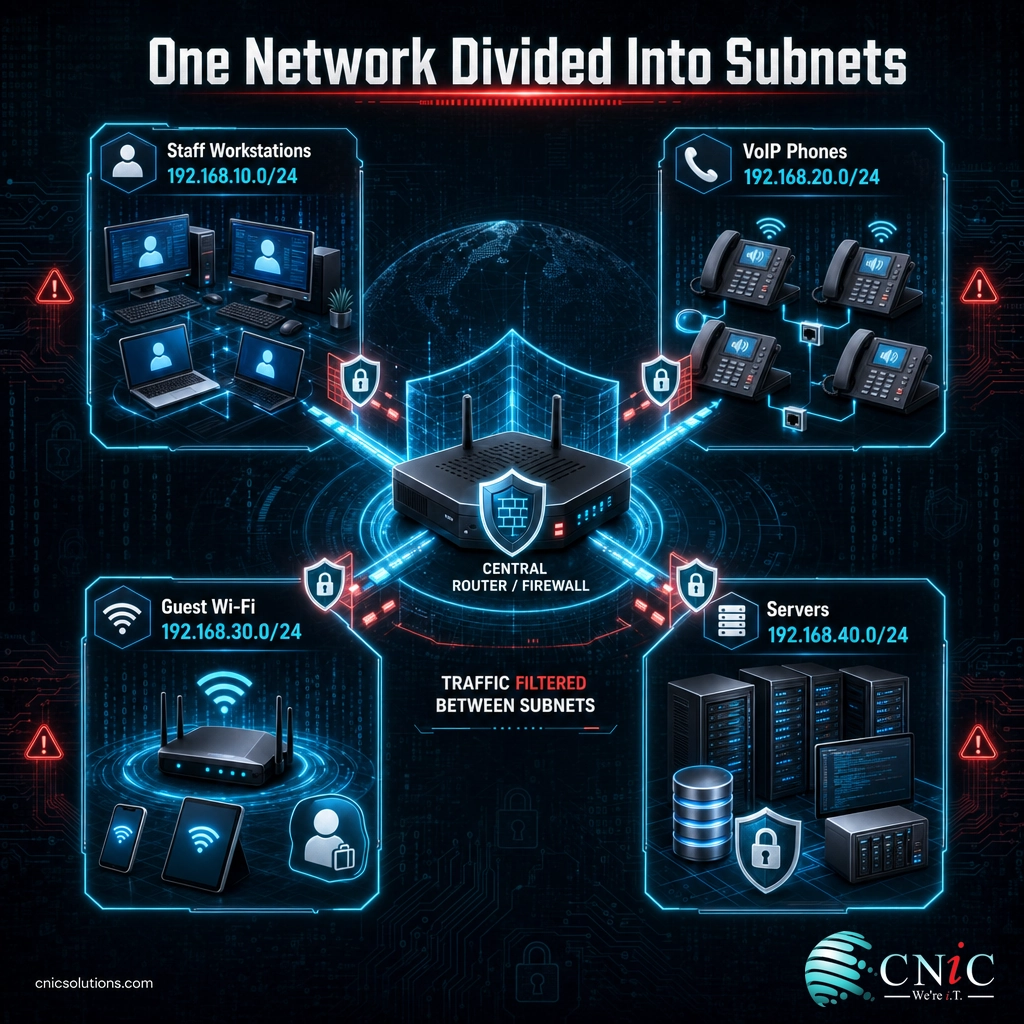
Every device on a network has an IP address, a numeric label that identifies it. A subnet is a way of taking the large range of addresses assigned to a network and dividing it into smaller, self-contained ranges. Each of those smaller ranges is a subnetwork, and devices inside one subnet communicate with each other directly, while traffic between subnets is handled by a router.
The idea is not new. It was formalized decades ago in RFC 950, the Internet standard subnetting procedure, published by the IETF in 1985. That document introduced the three-level view of an address that networks still use today: a network part, a subnet part, and a host part. Understanding a subnet really comes down to understanding that split.
Think of a public IP network as a large office building with a single street address. Every room in the building is a device. Without subnetting, an announcement meant for one room gets broadcast to the entire building, and there is nothing structural stopping someone in the lobby from wandering into a private office. Subnetting is like dividing that building into floors and departments, each with its own mailroom and its own locked door. Mail only travels where it is supposed to, and movement between areas is controlled at the stairwell instead of being wide open.
That structure is the whole point. A subnet groups devices that belong together, keeps their everyday traffic local, and forces communication with other groups to pass through a controllable checkpoint.
Source: IETF RFC 950, Internet Standard Subnetting Procedure
How Subnetting Works
To divide a network, you have to know where the “network” part of an address ends and the “device” part begins. That boundary is what subnetting sets, and it is controlled by the subnet mask.
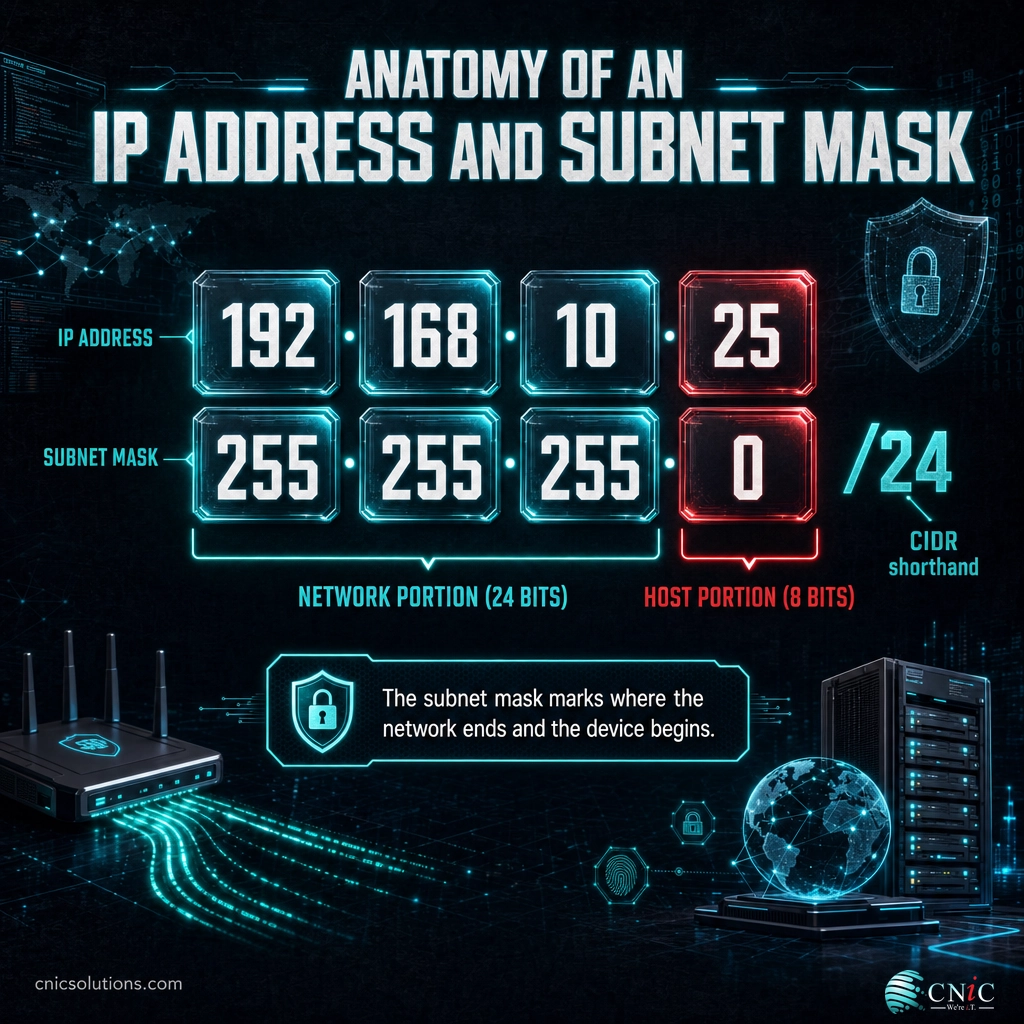
An IPv4 address is 32 bits long, usually written as four numbers separated by dots, such as 192.168.10.25. Some of those bits identify the network, and the rest identify the individual host (the device) on that network. Subnetting works by moving that boundary: you take bits that would normally identify hosts and reassign them to identify the subnet instead. Here is the process in plain terms.
- Start with a network and its address range. For example, a private range like 192.168.10.0 with room for 256 addresses.
- Decide how many subnets or hosts you need. A network for four departments has different requirements than one for a two-person office.
- Borrow bits from the host portion. Each bit you shift from “host” to “network” doubles the number of subnets you can create while halving the devices each subnet can hold.
- Let the subnet mask mark the boundary. The mask records exactly which bits now belong to the network and which are left for devices.
- Read off your subnets. Each resulting block is a subnet with its own network address, a range of usable host addresses, and a broadcast address.
Two addresses in every subnet are always reserved and cannot be assigned to a device: the first address identifies the subnet itself (the network address), and the last address is the broadcast address used to reach all devices at once. That is why a subnet with 256 total addresses only has 254 usable ones. It is a small detail that trips up a lot of people planning their first network.
Myth: subnetting is only for large enterprises. Plenty of small businesses run every device, including the guest Wi-Fi and the point-of-sale system, on one flat network because “it works.” It works right up until a guest laptop or an infected device has an open path to your accounting server. Even a ten-person office benefits from putting guests, payment systems, and staff workstations on separate subnets. Subnetting is about control and safety, not company size.
Source: IETF RFC 950, Internet Standard Subnetting Procedure
Subnet Masks and CIDR Notation Explained
The subnet mask is the tool that actually performs the division. Like an IP address, it is 32 bits long. Written in the familiar dotted format, a common mask looks like 255.255.255.0. The 255s mark the bits reserved for the network, and the 0 marks the bits left for host devices. So under a 255.255.255.0 mask, the first three numbers of an address define the network and the last number identifies the device.
Writing out full masks gets tedious, so modern networking uses a shorthand called CIDR notation. CIDR (Classless Inter-Domain Routing) was standardized in the IETF’s CIDR specification, RFC 4632, which replaced the older rigid Class A, B, and C system. In CIDR, you append a slash and a number to the address to show how many bits belong to the network. So 255.255.255.0 becomes /24, because 24 of the 32 bits are the network portion. A larger CIDR number means more network bits, which means a smaller subnet with fewer devices.
This table shows the most common subnet sizes, their masks, and how many devices each one actually holds. It is the reference most network admins keep close when planning address space.
| CIDR | Subnet Mask | Total Addresses | Usable Hosts | Typical Use |
|---|---|---|---|---|
| /30 | 255.255.255.252 | 4 | 2 | Point-to-point links between routers |
| /29 | 255.255.255.248 | 8 | 6 | Very small device groups |
| /28 | 255.255.255.240 | 16 | 14 | Small office segment |
| /27 | 255.255.255.224 | 32 | 30 | Small department |
| /26 | 255.255.255.192 | 64 | 62 | Medium department |
| /25 | 255.255.255.128 | 128 | 126 | Large department |
| /24 | 255.255.255.0 | 256 | 254 | Standard office LAN or floor |
| /23 | 255.255.254.0 | 512 | 510 | Large single segment |
| /16 | 255.255.0.0 | 65,536 | 65,534 | Whole-site private range |
The pattern is worth internalizing: every step up in CIDR number (from /24 to /25, for instance) cuts the subnet in half. The chart below shows how quickly the total address count grows across the most common office subnet sizes.
Total IP Addresses by Common Subnet Size
Each one-step increase in the CIDR prefix halves the size of the subnet. Subtract two addresses per subnet for the network and broadcast addresses to get usable hosts.
Most private business networks are built inside the reserved address ranges set aside for internal use in RFC 1918, the private internet address allocation: 10.0.0.0/8, 172.16.0.0/12, and 192.168.0.0/16. If you have ever seen a 192.168.x.x or 10.x.x.x address on your office or home network, that is why. Those ranges give organizations a huge private space to subnet however they need.
Source: IETF RFC 4632, Classless Inter-Domain Routing | IETF RFC 1918, Address Allocation for Private Internets
Subnet vs. VLAN: Clearing Up the Confusion
The single most common point of confusion around subnets is how they relate to VLANs. The two terms are often used almost interchangeably, and in practice they usually work together, but they are not the same thing and they operate at different layers of the network.
A subnet is a Layer 3 concept: it divides IP addresses. A VLAN, or virtual LAN, is a Layer 2 concept: it divides the switch itself, grouping physical ports into separate broadcast domains regardless of where they sit. In a typical business network, each VLAN is paired with its own subnet, so the two line up one to one. The VLAN keeps the traffic isolated on the switches, and the subnet gives that isolated group its own block of IP addresses.
| Aspect | Subnet | VLAN |
|---|---|---|
| Network layer | Layer 3 (IP / routing) | Layer 2 (switching) |
| What it divides | A range of IP addresses | Switch ports into broadcast domains |
| Defined by | Subnet mask / CIDR prefix | VLAN ID (802.1Q tag) |
| Main job | Organize and route IP traffic | Isolate traffic on the switch fabric |
| Configured on | Routers and Layer 3 devices | Managed switches |
| Common pairing | Usually one subnet per VLAN | Usually one VLAN per subnet |
The short version: you can have a subnet without a VLAN and a VLAN without a subnet, but on a well-designed business network they almost always come as a matched pair. If you want the deeper mechanics of how switches enforce that isolation, our explainer on virtual LANs and how they work picks up where this comparison leaves off. Using the two together is the foundation of isolating devices with network segmentation.

Why Subnetting Matters for Your Business
Subnetting can sound like a purely technical detail, but the way your network is divided has direct consequences for speed, security, and cost. Three points make the case.
First, subnetting improves performance by shrinking broadcast traffic. On a single flat network, certain types of messages are sent to every device at once. The more devices share that space, the more of this background chatter every machine has to process. Splitting a large network into subnets keeps those broadcasts local to each segment, so a busy subnet full of VoIP phones does not slow down the accounting department.
Second, subnetting is a core security control because it limits how far a problem can spread. If a device is compromised on a flat network, an attacker can often reach everything else on it. When devices are separated into subnets, movement between them passes through a router or firewall where it can be filtered, logged, and blocked. This containment is why subnetting is inseparable from a modern, layered security posture, and why sensitive systems like payment processing are kept on their own segment.
Third, subnetting is how organizations use a finite pool of addresses efficiently. The original IPv4 system provides a fixed total of about 4.3 billion addresses (2 to the 32nd power), and the world ran out of freely available new blocks years ago. IANA, the body that hands out address space to regional registries, allocated its last remaining blocks on February 3, 2011, exhausting its central free pool. Subnetting lets a business carve its allocated space into exactly the right-sized pieces instead of wasting it, which matters even more inside the large but not infinite private ranges.
Put together, subnetting is one of the most consequential decisions in a network design. Get it right and your network is faster, safer, and easier to grow. Get it wrong, or skip it entirely, and you inherit congestion, security exposure, and a rebuild later. It is also a key difference between a network that just happens to work and one that is intentionally designed from the ground up for a growing business.
Source: ICANN, IPv4 free pool exhaustion announcement | IETF RFC 1918, private address ranges
How to Get Started With Subnetting
You do not need to hand-calculate binary to benefit from good subnetting. What matters is having a deliberate plan for how your network is divided. A sound starting approach looks like this:
- Group devices by role and trust level. Staff workstations, servers, VoIP phones, printers, security cameras, payment systems, and guest devices each belong in their own segment.
- Right-size each subnet. Use the CIDR table above to pick a size that fits current devices with room to grow, without wasting a huge block on a handful of devices.
- Pair subnets with VLANs. Map each subnet to a VLAN so the isolation is enforced at both the switch and the routing layer.
- Isolate guests and untrusted devices first. If you do nothing else, get guest Wi-Fi off your main network. See why a separate guest Wi-Fi network is the easiest security win most offices are missing.
- Document the plan. Record which subnet is which, so troubleshooting and future growth do not turn into guesswork.
For a small office this can be straightforward. For a growing business with multiple locations, servers, and compliance requirements, the design decisions compound quickly, and a mistake in the address plan is painful to unwind later. This is where working with a team that designs networks for a living pays off. CNiC Solutions plans, builds, and manages business networks so the subnetting, VLANs, and security controls are right from day one.
Get Expert Help Designing Your Network
Plan Your Small Business Network Setup
Common Questions About Subnets
What is a subnet?
What is the purpose of subnetting?
What is a subnet mask?
What does /24 mean in an IP address?
Is a subnet the same as a VLAN?
Related Terms
- Subnet mask: the 32-bit value that marks which bits of an IP address identify the network and which identify the host.
- CIDR notation: the /number shorthand (like /24) that states how many bits of an address belong to the network.
- IP address: the numeric label assigned to each device, made up of a network portion and a host portion.
- VLAN: a Layer 2 grouping of switch ports into separate broadcast domains, usually paired one to one with a subnet.
- Network segmentation: the broader practice of dividing a network to contain traffic and threats, built on subnets and VLANs working together.
- LAN and WAN: the local and wide-area networks that subnets sit inside. Learn the difference between a LAN and a WAN.
- Broadcast domain: the set of devices that receive one another’s broadcast messages; subnetting makes these smaller.
- Default gateway: the router address a device uses to reach other subnets and the internet.
About This Guide
The subnetting model, subnet mask behavior, and address arithmetic in this guide follow the published Internet standards: RFC 950 (the Internet standard subnetting procedure), RFC 4632 (Classless Inter-Domain Routing), and RFC 1918 (private address allocation), all from the IETF. The total IPv4 address space (2 to the 32nd power, about 4.3 billion addresses) and the February 3, 2011 exhaustion of the IANA central free pool are documented by ICANN. Address counts per subnet are standard arithmetic. Figures are used to explain how subnetting works, not as guaranteed outcomes for any specific network.
Sources: IETF RFC 950 | IETF RFC 4632 (CIDR) | IETF RFC 1918 | ICANN, IPv4 free pool exhaustion
Get a Free Network Security Assessment



related posts
What Is a Distributed System? How It Works and Why It Matters
October 5, 2026A distributed system is a collection of independent computers, called nodes, that are connected over a…
What Is a Firewall? How It Protects Your Business Network
October 5, 2026A firewall is a network security device or software that monitors incoming and outgoing traffic and…
What Is a DDoS Attack? How DDoS Attacks Work and How to…
October 4, 2026A DDoS attack (distributed denial-of-service attack) is an attempt to take a website, application, or network…
What Is a Data Center? Types, Components, and How They Work
October 4, 2026A data center is a physical facility that houses the servers, storage, and networking equipment a…