

A single email that looks like a routine “You have a document to sign” request is one of the easiest ways for a criminal to walk into your inbox, because almost everyone trusts DocuSign and almost no one reads the sender line. Fake DocuSign emails are built to harvest your Microsoft 365 or Google password, plant malware, or trick you into paying a bogus invoice. Phishing and spoofing were the number one reported cybercrime by volume in the United States in 2024, with 193,407 complaints filed to the FBI, so knowing how to spot a fake in a few seconds is a genuine business skill. This guide gives you a repeatable, six-step check you can run on any DocuSign email before you click.
Before You Begin
- What you need: the suspicious email open in front of you (do not click anything yet) and, ideally, a separate browser tab.
- Time required: about 2 to 3 minutes per email.
- Skill level: beginner. No technical tools required, only a careful eye.
- Golden rule: if a single step fails the email, stop there and treat the whole message as fake. You do not need it to fail all six.
Key Takeaways
- Real DocuSign emails come only from docusign.net or docusign.com domains, and every genuine one carries a unique security code.
- DocuSign never sends the document as a file attachment and never asks you to download software to view it. Attachments are a fraud signal.
- The safest way to open any DocuSign document is to ignore the email link, go to docusign.com yourself, and enter the security code.
- Report fakes to verify@docusign.com and to your internal IT or security team, then delete the message.
- If you already clicked or entered credentials, change the password and enable MFA immediately, then escalate to IT. Speed matters more than anything else.
What’s in This Guide
- Why scammers love fake DocuSign emails
- Step 1: Check the sender’s address and domain
- Step 2: Hover over every link before you click
- Step 3: Look for a valid DocuSign security code
- Step 4: Treat attachments and urgency as red flags
- Step 5: Verify by going to DocuSign directly
- Step 6: Report the email and delete it
- When to call a professional
- Troubleshooting: I already clicked
- Maintain and monitor
- Frequently asked questions
Why scammers love fake DocuSign emails
DocuSign impersonation works for one simple reason: the real thing is everywhere. Contracts, NDAs, HR paperwork, vendor agreements, and closing documents all move through e-signature platforms, so a “document to sign” email rarely looks out of place. Attackers copy DocuSign’s exact logo, colors, and layout, then swap the button link for a page that steals your login or drops malware. Some campaigns skip the login theft entirely and send fake invoices dressed up as DocuSign requests, hoping an accounts-payable clerk pays a fraudulent bill directly.
The money behind this is not theoretical. Americans reported more than $16.6 billion in cybercrime losses to the FBI in 2024 across 859,532 complaints, a 33% jump from the year before. A large share starts exactly the way a fake DocuSign email does: a convincing message, a single click, and stolen credentials. Business email compromise, the category that fake signature requests most often feed into, accounted for $2.77 billion in reported losses on its own.
The good news: fake DocuSign emails almost always fail one of the checks below, because criminals cannot fake the two things that matter most, the sending domain and the genuine security code. If you want the wider pattern, our guide on the warning signs in any phishing email covers the same instincts applied beyond one brand.
Source: FBI IC3 2024 Internet Crime Report
Step 1: Check the sender’s address and domain
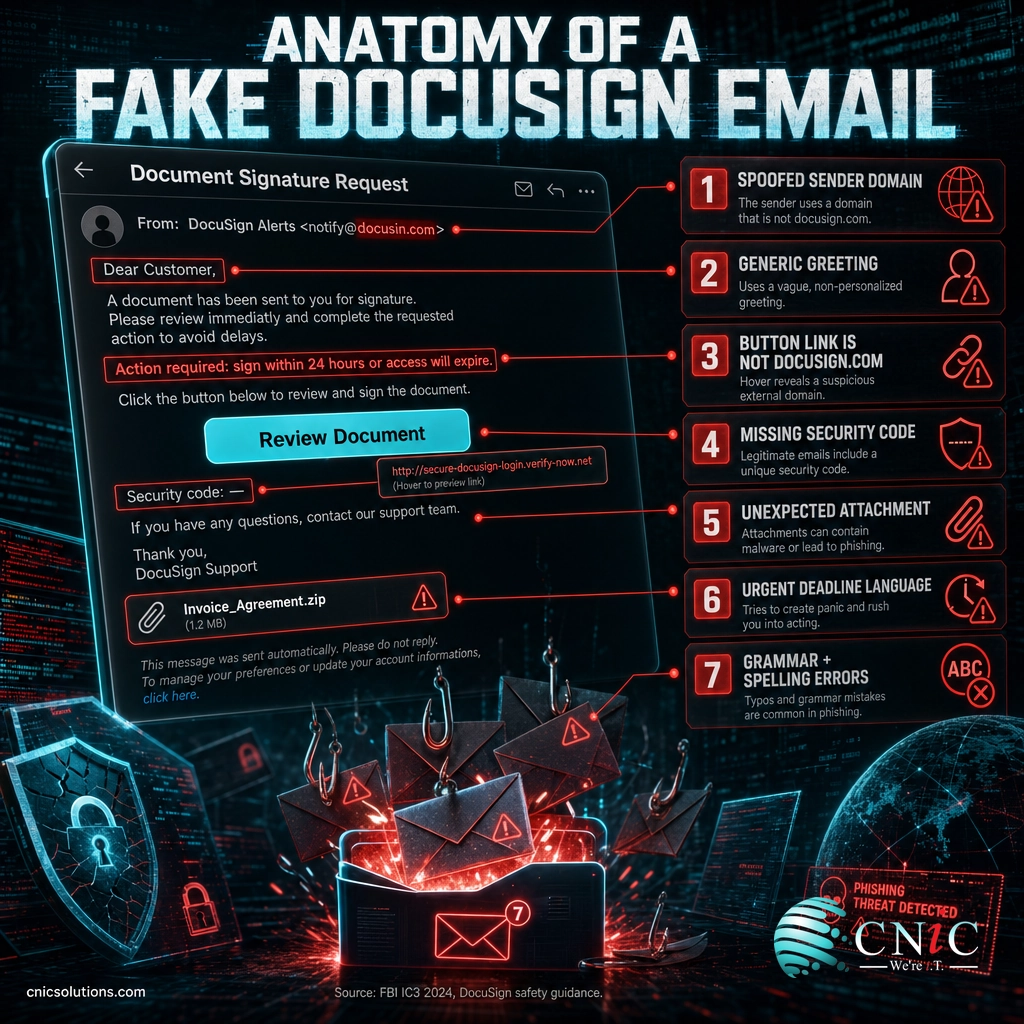
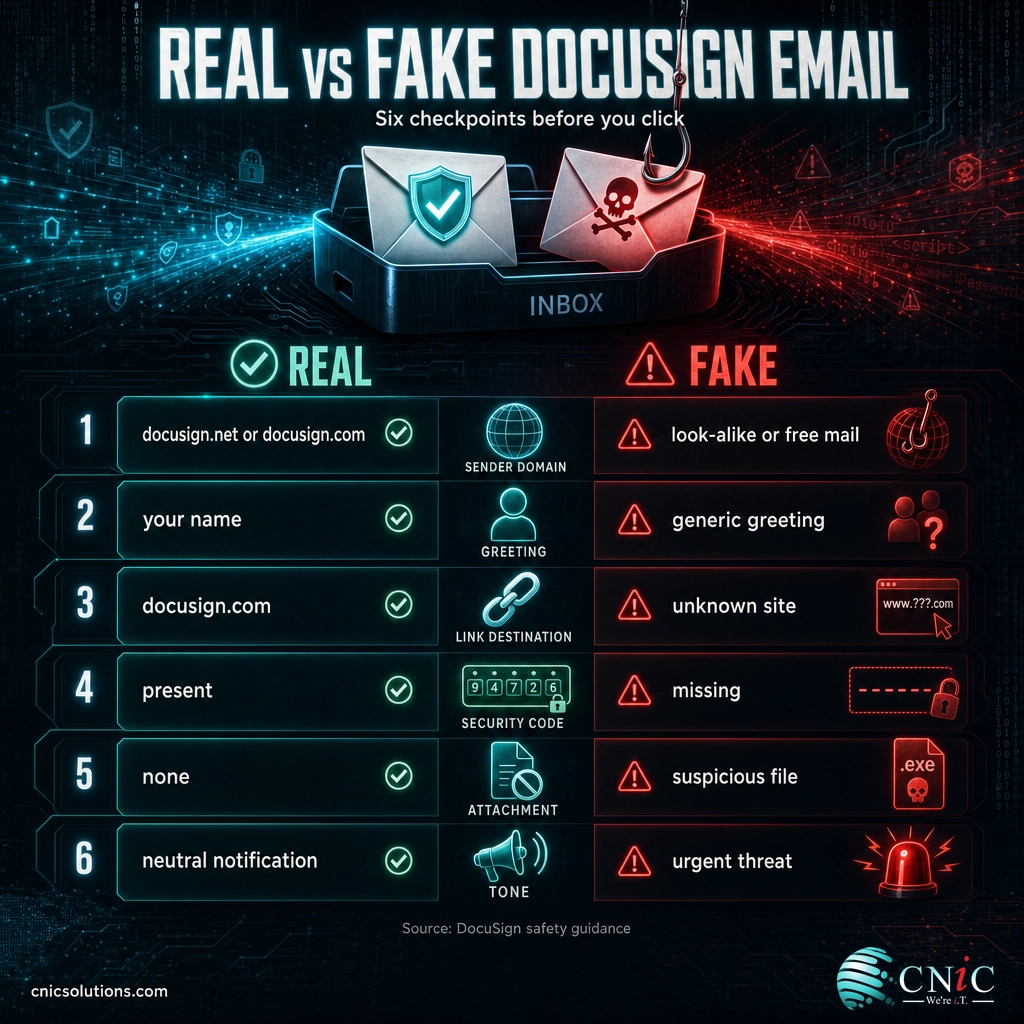
What to do: Do not trust the display name. Click or tap the sender name to expand the full email address behind it. Read the part after the @ symbol carefully. A legitimate DocuSign notification is sent from a docusign.net or docusign.com domain. Anything else fails this step.
Why this step matters: The display name is the single easiest field for an attacker to fake. “DocuSign” in the from line means nothing on its own. The domain is far harder to spoof convincingly, which is why it is your strongest single signal.
What success looks like: The full address ends in @docusign.net or @docusign.com, with no extra words, hyphens, or misspellings before the real domain.
Common mistakes to avoid
Watch for near-misses designed to pass a quick glance: docusin.com, docu-sign.com, docusign-secure.com, or docusign.net.verify-login.com. The trick in that last one is the extra domain tacked on the end. The real domain is always the piece immediately before the final .com or .net, so verify-login.com is the true sender there, not DocuSign. A free-mail address such as Gmail, Outlook, or Yahoo is an automatic fail.
Step 2: Hover over every link before you click
What to do: On a computer, rest your cursor over the “Review Document” or “View Documents” button without clicking. The real destination appears in the bottom corner of your screen or in a small tooltip. On a phone, press and hold the link to preview the URL. A genuine DocuSign link points to docusign.com, account.docusign.com, or docusign.net.
Why this step matters: The visible button text and the actual link are two different things. Scammers show you “docusign.com” as button text while the underlying link goes somewhere else entirely. Hovering reveals the truth before you commit.
What success looks like: The previewed URL starts with https:// and its domain is a real DocuSign domain, with no shortened link (bit.ly and similar), no raw IP address, and no unfamiliar host.
Tip: If the email is about a topic you were not expecting, or from a company you have no dealings with, do not even hover. Unexpected is itself a warning sign. When a message arrives “out of the blue,” the odds it is real drop sharply, and there is no cost to verifying it independently in Step 5.

Step 3: Look for a valid DocuSign security code
What to do: Read the body of the email for a security code, sometimes labeled an access code. Every legitimate DocuSign envelope includes one. It exists so you can open the document without clicking the email at all, which is exactly how you should use it (see Step 5).
Why this step matters: The security code is the one element a criminal cannot forge, because it is tied to a real envelope inside DocuSign’s system. A fake email either omits it, invents a code that does not work, or tells you to “click here” instead. That mismatch is a reliable tell.
What success looks like: There is a clearly presented security code in the email that you can later enter on docusign.com to reveal a genuine, waiting document.
Step 4: Treat attachments and urgency as red flags
What to do: Notice how the email tries to make you act. Does it include a file attachment? Does it demand you sign “within 24 hours” or warn that your account will be closed? Both are pressure tactics that legitimate DocuSign emails do not use.
Why this step matters: DocuSign delivers documents inside its secure platform, not as attachments. It never sends the contract itself as a .pdf, .zip, .htm, or executable file, and it never asks you to install software or an “unlocking” tool to view a document. Any of those is a strong sign of malware. Manufactured urgency is designed to stop you thinking, which is the whole point of this guide.
What success looks like: No attachment, no request to download anything, and no artificial deadline. The tone is a neutral notification, not a threat.
Myth: “It has the DocuSign logo, so it must be real”
The logo proves nothing. Logos, brand colors, footer text, and even fake “secured by” badges are trivial to copy, and modern phishing kits reproduce DocuSign’s template pixel for pixel. Some fraudsters go a step further and send from a real, paid DocuSign account they control, so the envelope truly is a DocuSign envelope but the document inside is a scam invoice or a link to a malicious site. Appearance is never proof. The domain, the security code, and independent verification are what actually tell you the truth. Related lures reuse the same playbook, which is why we cover clone phishing, where attackers copy a real message you already trust.
Step 5: Verify by going to DocuSign directly
What to do: This is the step that settles every doubt. Do not click the email. Open a new browser tab, type docusign.com yourself (or use a bookmark you saved earlier), and log in to your account. Choose “Access Documents” or the “Alternate Signing Method” option and enter the security code from the email. If a genuine document is waiting, you will see it. If nothing is there, the email was fake.
Why this step matters: Typing the address yourself removes the attacker’s link from the equation entirely. You reach the real DocuSign no matter how convincing the email was. This single habit defeats the large majority of brand-impersonation phishing, not just DocuSign.
What success looks like: You are logged in on a real docusign.com page (check the address bar), and the security code either reveals a legitimate document or confirms nothing is pending.
If the “sender” is a colleague or vendor you know: confirm through a second channel. Call them, or start a fresh message using a number or address you already have, not the reply button. Never verify a suspicious email by replying to that same email, because you may be talking to the attacker instead.
Step 6: Report the email and delete it
What to do: Once you have decided an email is fake, report it before you delete it. Forward the entire message as an attachment to verify@docusign.com. DocuSign also provides a “Report Abuse” feature and a “Report this email” link in the footer of its genuine notifications. Then report it to your own IT or security team so they can warn other staff, and finally delete it.
Why this step matters: Reporting helps DocuSign take down the fraudulent infrastructure and helps your organization block the sender and check whether anyone else was targeted. A phishing email almost never lands in just one inbox.
What success looks like: The message is reported to DocuSign and to your IT team, and removed from your inbox. You did not reply, and you did not click any “unsubscribe” link (those can confirm your address is live).
Source: DocuSign official incident reporting guidance | DocuSign Safety Center
When to call a professional
Spotting one fake email is a personal skill. Making sure your whole team catches them every time, on every device, is an operational one, and that is where most small and midsize businesses need help. If you reach the point where fake DocuSign or invoice emails are arriving regularly, where staff have clicked before, or where you cannot be confident every inbox is protected, it is time to bring in a managed IT and security partner.
A good partner layers protection so a single click is not catastrophic: email filtering that quarantines look-alike domains before delivery, multi-factor authentication so a stolen password alone is not enough, and ongoing staff phishing training so recognition becomes automatic. CNiC Solutions builds exactly this kind of layered defense for businesses across Texas and nationally.
Talk to CNiC’s managed IT team
Troubleshooting: I already clicked. Now what?
If you clicked a fake DocuSign link, do not panic, but do act quickly. The table below maps the most common situations to the immediate action that limits the damage.
| What happened | Do this now |
|---|---|
| I clicked the link but did not enter anything | Close the tab, run a full antivirus or endpoint scan, and clear your browser session. Watch for follow-up emails. |
| I entered my email password on the fake page | Change that password immediately, plus anywhere you reused it. Turn on multi-factor authentication. Tell IT to check for new mailbox forwarding rules. |
| I downloaded or opened an attachment | Disconnect the device from the network, do not shut it down, and call IT. Malware may be active and needs containment, not a reboot. |
| I approved an MFA prompt I did not start | Assume the attacker is in. Change the password, revoke active sessions and tokens, and escalate to IT or security right away. |
| Finance paid an invoice from the email | Contact your bank immediately to attempt a recall, then report to the FBI at ic3.gov. The first few hours matter most for recovering funds. |
Recovering cleanly often depends on having good backups and a rehearsed response ready before anything goes wrong. If a click leads to ransomware or data loss, tested backups are what get you running again.
See how backup and recovery limits the damage
Maintain and monitor
The six-step check works best as a habit, not a one-time effort. A few practices keep you ahead of the next wave of fakes:
- Bookmark the real DocuSign. Reach documents through your own bookmark or by typing the address, never through an email link.
- Turn on multi-factor authentication on email, DocuSign, and any financial systems, so a stolen password alone cannot open the door.
- Train the whole team. The person who forwards a fake to a colleague is more dangerous than the fake itself. Regular, short refreshers keep recognition sharp.
- Set a payment-change rule. Any request to change bank details or pay an unexpected invoice gets verified by phone, every time, no exceptions.
- Report internally. Make it easy and blame-free for staff to flag suspicious emails, so IT sees patterns early.
For a longer view of how these attacks are trending and where to focus, our roundup of the latest phishing statistics and attack data puts the DocuSign lure in context, and our library of real phishing email examples broken down side by side sharpens the eye for the next one.
Ongoing protection is not a checklist you finish, it is a program you run. A virtual CIO gives a growing business that oversight without the cost of a full-time security executive, setting the policies, monitoring, and training that keep fakes from ever reaching a decision-maker.
Get a virtual CIO security assessment
Frequently asked questions
Is DocuSign itself safe to use?
What does a real DocuSign email look like?
What is the DocuSign security code and where do I find it?
What should I do if I clicked a fake DocuSign link or entered my password?
What email address do I use to report a fake DocuSign email?
Sources and methodology
Cybercrime figures in this guide come directly from the FBI Internet Crime Complaint Center (IC3) 2024 Annual Report, the primary U.S. government source for reported internet crime volume and losses. Guidance on verifying and reporting DocuSign emails follows DocuSign’s own official incident-reporting and safety documentation, corroborated by established security-vendor advisories on DocuSign impersonation. No figures were estimated or invented; every statistic is traceable to the linked primary source.
Sources: FBI IC3 2024 Internet Crime Report | DocuSign incident reporting | DocuSign Safety Center | Norton DocuSign scam breakdown



related posts
What Is IT Asset Management (ITAM)? A Guide for Businesses
October 22, 2026IT asset management (ITAM) is the practice of tracking and managing an organization's hardware, software, and…
What Is ISO 27001? A Guide to the Information Security Standard
October 22, 2026ISO 27001 is the world's best-known standard for managing information security, and increasingly the certification customers…
What Is Infrastructure as Code (IaC)? A Guide for Businesses
October 21, 2026Infrastructure as Code (IaC) is the practice of managing and provisioning IT infrastructure, such as servers,…
What Is Infrastructure Security? A Guide for Businesses
October 21, 2026Infrastructure security is the practice of protecting the core technology systems a business runs on: its…