

Phishing works because a good fake looks exactly like a real email you were already expecting. In 2024, phishing and spoofing were the most-reported crime type to the FBI’s Internet Crime Complaint Center, with 193,407 complaints, and the Verizon Data Breach Investigations Report found the median victim clicks a phishing link about 21 seconds after opening the message. The fix is not fear, it is recognition. Below are 12 real phishing email examples, one for each type attackers use against businesses, with annotated screenshots and the specific red flags that give each one away.
Key Takeaways
- Phishing is a request problem, not a spelling problem. Modern lures are well written and correctly branded, so judge the sender address and the ask, not the grammar.
- The costliest attacks impersonate people you trust: an executive, a vendor, or a coworker, asking you to move money or change payment details.
- Credential-harvest emails send you to a fake login page. A real service almost never makes you sign in through a link in an email.
- Every example here shares the same tells: urgency, a mismatched sender, an unexpected link or attachment, and a payment or password request.
- Verify out of band. A 30-second phone call to a known number stops nearly every scam on this list.
What’s in This Guide
- 1. CEO Fraud: The Urgent Wire Request
- 2. The Fake Invoice and Payment-Change Scam
- 3. The Microsoft 365 Fake Login
- 4. The Package Delivery Notice
- 5. MFA Fatigue and Push Bombing
- 6. The Tax or Government Notice
- 7. The HR Direct-Deposit Change
- 8. The E-Signature Document Lure
- 9. The Shared Cloud File
- 10. The Gift-Card Request
- 11. Account Suspended and Fake Tech Support
- 12. Vendor Email Compromise and Thread Hijacking
Recognize and prevent:
Anatomy of a Phishing Email
Almost every phishing email is built from the same parts, whether it targets a shipping clerk or a CFO. There is a trusted sender the attacker impersonates, a reason to act now, and a single action that hands over money, credentials, or access. The brand and the wording change, but the machine underneath does not.
Attackers spoof the display name so your inbox shows “Microsoft Account Team” or your CEO’s name, while the real address behind it is a lookalike domain or a free mailbox. They borrow real logos and email templates, so the message looks routine. Then they add pressure: a deadline, a threat of suspension, or a favor that only you can do quietly. The goal is to get you past the one moment of doubt that would otherwise save you.
Once you know the pattern, the 12 examples below stop looking like clever tricks and start looking like variations on one script. For a deeper walkthrough of the tells, see the warning signs that apply to every phishing email.
Source: FBI Internet Crime Complaint Center | Verizon Data Breach Investigations Report
The 12 types fall into four families. Financial fraud asks you to move money or change payment details (examples 1, 2, 7, 12). Credential theft pushes you toward a fake login or approval (examples 3, 5, 9). Lures and delivery use a package, document, or file to get a click (examples 4, 8). Impersonation and pressure pose as an authority or helper (examples 6, 10, 11). The screenshots below are illustrative recreations with fictional senders and domains.
1. CEO Fraud: The Urgent Wire Request
Also called business email compromise, this is the attack that drains the most money. The sender poses as your CEO, owner, or a senior partner, usually claiming to be traveling or in a meeting, and asks you to move funds fast and keep it quiet. It targets anyone who can initiate a payment.
The example: An email from “Robert Hale, CEO” lands with the subject “Quick favor, are you at your desk?” The body reads that a confidential acquisition payment must go out today, the accounting team is looped in later, and please send the wire now and reply once done. The reply-to address is robert.hale@ceo-hale-corp.com, not the real company domain.
Business email compromise accounted for roughly $2.77 billion in reported losses to the FBI IC3 in 2024, more than nearly any other category, because a single approved wire is hard to claw back.
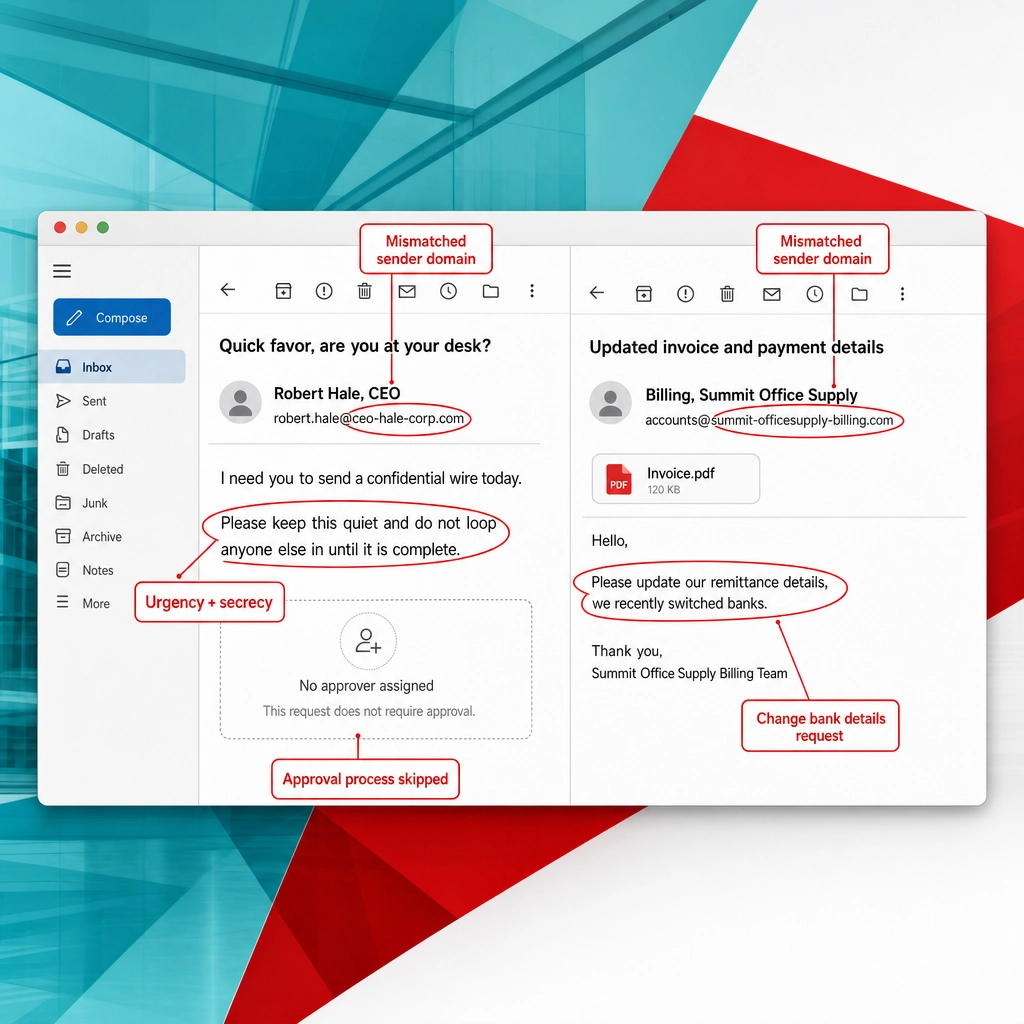
Red flags to recognize it:
- Urgency plus secrecy: act now, do not discuss it with anyone.
- A reply-to or sender domain that is close to, but not exactly, your company’s real domain.
- A payment request that skips your normal approval process.
- A writing style or signature that is slightly off for that executive.
The rule that stops it: any first-time or changed payment gets verified by phone to a number you already have, never a number in the email.
Source: FBI Internet Crime Complaint Center
2. The Fake Invoice and Payment-Change Scam
Here the attacker impersonates a supplier you already pay. Sometimes it is a brand-new invoice for services you never bought, and sometimes it is a real vendor’s invoice with one detail changed: the bank account. It targets accounts payable and anyone who handles vendor billing.
The example: A message from “Billing, Summit Office Supply” attaches an invoice that matches your usual format and adds a friendly note: “Please update our remittance details, we recently switched banks.” The new account and routing number are in the PDF. The sender address is accounts@summit-officesupply-billing.com rather than the vendor’s normal domain.
Because the invoice looks familiar, this scam often succeeds without any obvious threat or urgency. The only thing that changed is where the money goes.
Red flags to recognize it:
- Any request to change bank, routing, or remittance details by email.
- An invoice you were not expecting, or an amount that does not match a real order.
- A sender domain that adds words like “billing” or “payments” to the vendor’s name.
- Pressure to pay before a discount window closes.
The rule that stops it: confirm every banking change with the vendor using a phone number from a prior invoice or your records, not the new email. If a payment does slip through, fast recovery limits the damage.
Recover quickly with data backup and recovery
Source: FBI Internet Crime Complaint Center
3. The Microsoft 365 Fake Login
This is the classic credential-harvest attack. The email claims something is wrong with your account and sends you to a page that looks exactly like a Microsoft 365, Outlook, or Google sign-in screen. Whatever you type goes straight to the attacker. It targets every employee with an email account.
The example: “Your password expires today. Re-verify to avoid losing access.” The button leads to a page that mirrors the real sign-in screen, hosted at login-microsftonline-verify.com. The look is convincing, but the address bar shows a domain that only pretends to be Microsoft.
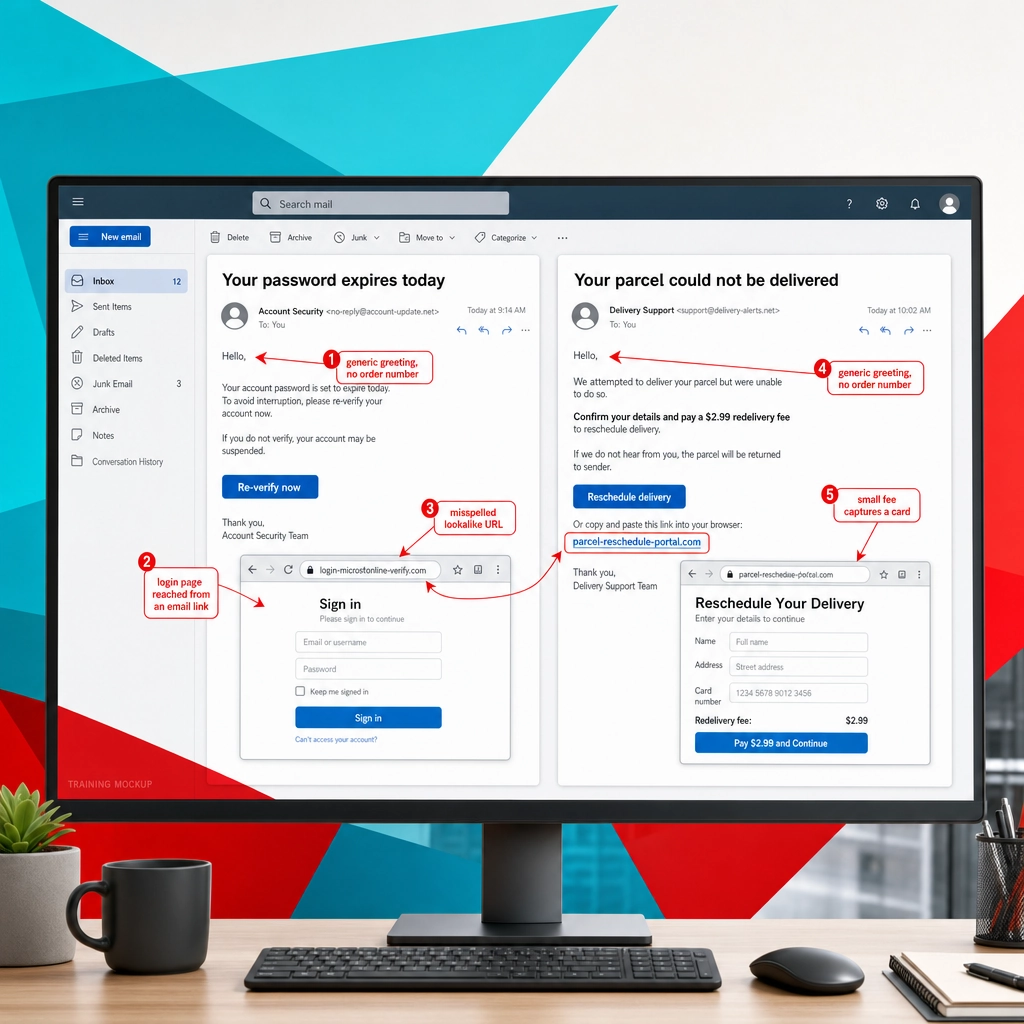
Red flags to recognize it:
- A login page reached by clicking an email link. Real services want you to sign in the way you always do.
- A URL that misspells or pads the brand name (microsftonline, office365-secure, and so on).
- Threats of lost access, expired passwords, or unusual sign-in activity.
- A page that asks for your password immediately, before showing anything else.
The rule that stops it: never sign in from an email link. Open a new tab, type the address yourself or use a saved bookmark, and let your password manager confirm the site is genuine.
4. The Package Delivery Notice
Delivery scams work because almost everyone is waiting on a shipment. The email or text claims a package is held, a fee is due, or an address needs confirming, then links to a form that captures personal or payment details. It targets employees and consumers alike, and it spikes around busy shipping seasons.
The example: “Your parcel could not be delivered. Confirm your details and pay a $2.99 redelivery fee.” The link goes to parcel-reschedule-portal.com, which asks for your name, address, and card number. The small fee is a trick to harvest a working card, not to collect $2.99.
Red flags to recognize it:
- A delivery notice for a package you cannot place, or from a carrier you did not use.
- A small “fee” or “customs charge” that requires entering card details.
- A tracking link to a random domain instead of the carrier’s real site.
- Generic greetings with no real order number.
The rule that stops it: track shipments only on the carrier’s official website or app, using the tracking number from your actual order confirmation.
5. MFA Fatigue and Push Bombing
Multi-factor authentication stops most stolen passwords, so attackers who already have a password try to defeat the second step. In an MFA fatigue attack, they trigger approval prompt after approval prompt to your phone, hoping you tap “approve” out of annoyance or confusion. It targets any employee using push-based MFA.
The example: Your phone buzzes with a sign-in approval you did not request. Then another, and another. Minutes later an email or chat arrives: “IT here, we are fixing your account, please approve the prompt to finish.” The prompts and the friendly nudge are the same attacker working two channels at once.
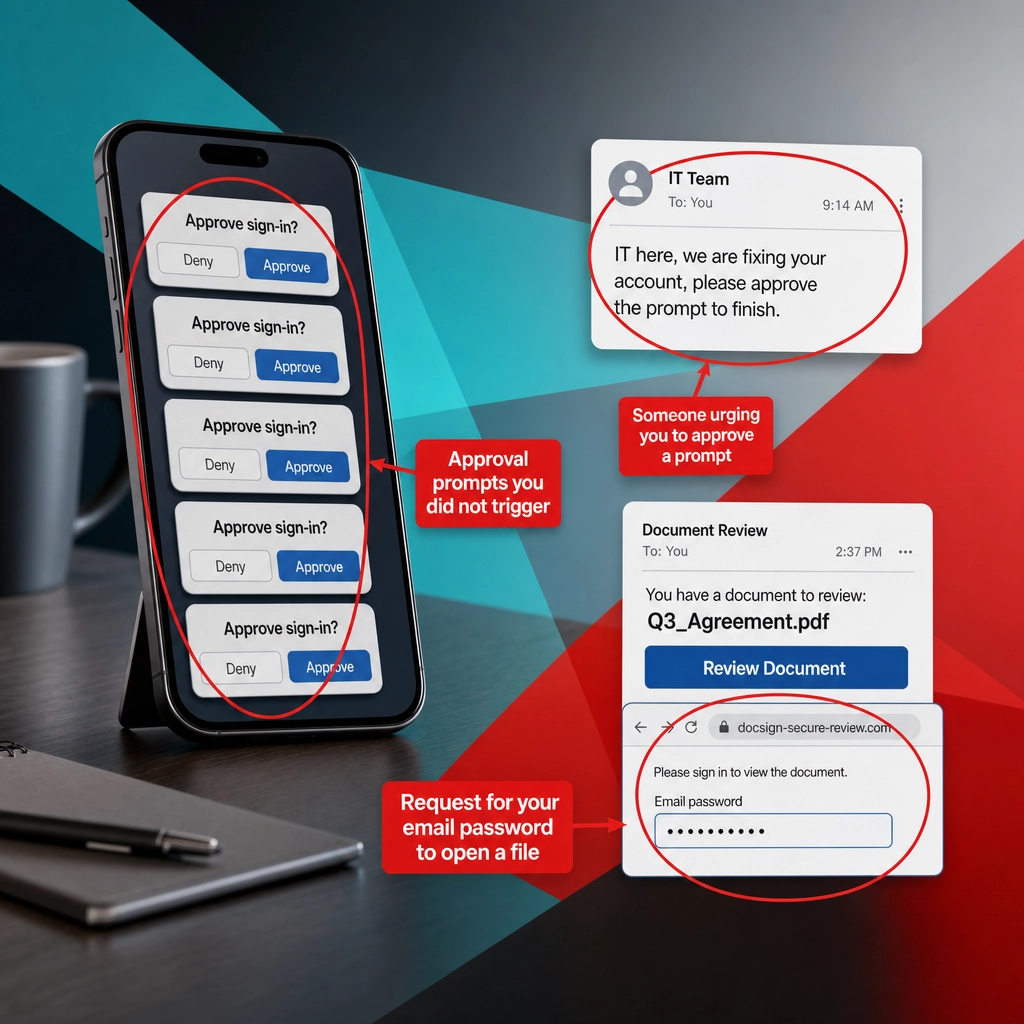
Red flags to recognize it:
- MFA approval requests you did not start, especially several in a row.
- Anyone contacting you to “approve the prompt” or read back a code.
- Prompts arriving at odd hours or from unfamiliar locations.
The rule that stops it: never approve a prompt you did not trigger, and report repeated prompts to IT immediately, since they mean your password is already known. CISA recommends moving to number-matching or phishing-resistant MFA to shut this down.
Source: Cybersecurity and Infrastructure Security Agency
6. The Tax or Government Notice
Fear of a fine or an audit makes people act fast, which is exactly what these emails count on. The sender impersonates a tax authority or a government agency, claims you owe money or are due a refund, and links to a fake portal. It targets business owners, finance staff, and payroll teams, and it peaks around tax deadlines.
The example: An email branded as the “IRS Online Account” warns of an unpaid balance and threatens penalties unless you “verify and resolve” today. The link goes to irs-gov-secure-portal.com and asks for your tax ID and banking information. The real IRS does not initiate contact by email to demand payment or personal details.
Red flags to recognize it:
- An unsolicited email from a tax or government body asking for payment or personal data.
- Threats of arrest, penalties, or immediate legal action.
- A portal link on a domain that is not the agency’s official .gov address.
- A demand for payment by an unusual method.
The rule that stops it: agencies like the IRS contact businesses by mail first. Verify any notice through the agency’s official .gov site or your accountant, never through the email link.
Source: IRS Tax Scams and Consumer Alerts

7. The HR Direct-Deposit Change
This is payroll fraud by impersonation. The attacker poses as an employee emailing HR or payroll to update their direct-deposit account, quietly rerouting that person’s paycheck to an attacker-controlled account. It targets HR and payroll staff, and the loss is often not noticed until payday.
The example: “Hi, I switched banks and need to update my direct deposit before the next run.” The email carries a real employee’s name but comes from a personal address like jordan.employee.payroll@gmail.com, with a voided-check image attached showing the new account. The tone is polite and routine, which is the point.
Red flags to recognize it:
- A payroll or direct-deposit change requested by email, especially from a personal address.
- Timing right before a pay run, adding gentle pressure.
- A reluctance to talk by phone or in person.
- A sender name that matches an employee but an address that does not match your directory.
The rule that stops it: require every banking or direct-deposit change to be confirmed in person or by a call to the employee’s known number, and treat email-only requests as unverified.
8. The E-Signature Document Lure
Signing documents online is normal now, so a “please review and sign” email rarely raises an eyebrow. Attackers imitate e-signature and document services, sending a notification that a contract or file is waiting for your signature. The button leads to a credential-harvest page or a malicious file. It targets anyone who signs or reviews documents.
The example: A branded notice reads “You have a document to review: Q3_Agreement.pdf” with a “Review Document” button. The button goes to docsign-secure-review.com, which asks you to sign in with your email password to “verify your identity” before viewing the file. A genuine e-signature request does not need your email password.
Red flags to recognize it:
- A document notification you were not expecting, from a sender you do not recognize.
- A prompt to enter your email or network password to “view” a file.
- A vague document name and no context about who sent it or why.
- A link on a domain that only resembles the real e-signature service.
The rule that stops it: if you were not told a document was coming, confirm with the supposed sender before clicking, and never enter your email password to open a file.
9. The Shared Cloud File
Cloud storage sharing is another everyday action attackers hide inside. The email says a colleague or contact shared a file with you on a service like SharePoint, OneDrive, Dropbox, or Google Drive, and the link leads to a fake login or a malicious document. It targets teams that collaborate in shared drives, which is nearly all of them.
The example: “Alex shared ‘Vendor_Pricing_2026’ with you.” The preview looks like a real cloud-storage notification, but the “Open” link points to a lookalike sign-in page at drive-share-access.com that captures your credentials before showing a blurred, fake preview.
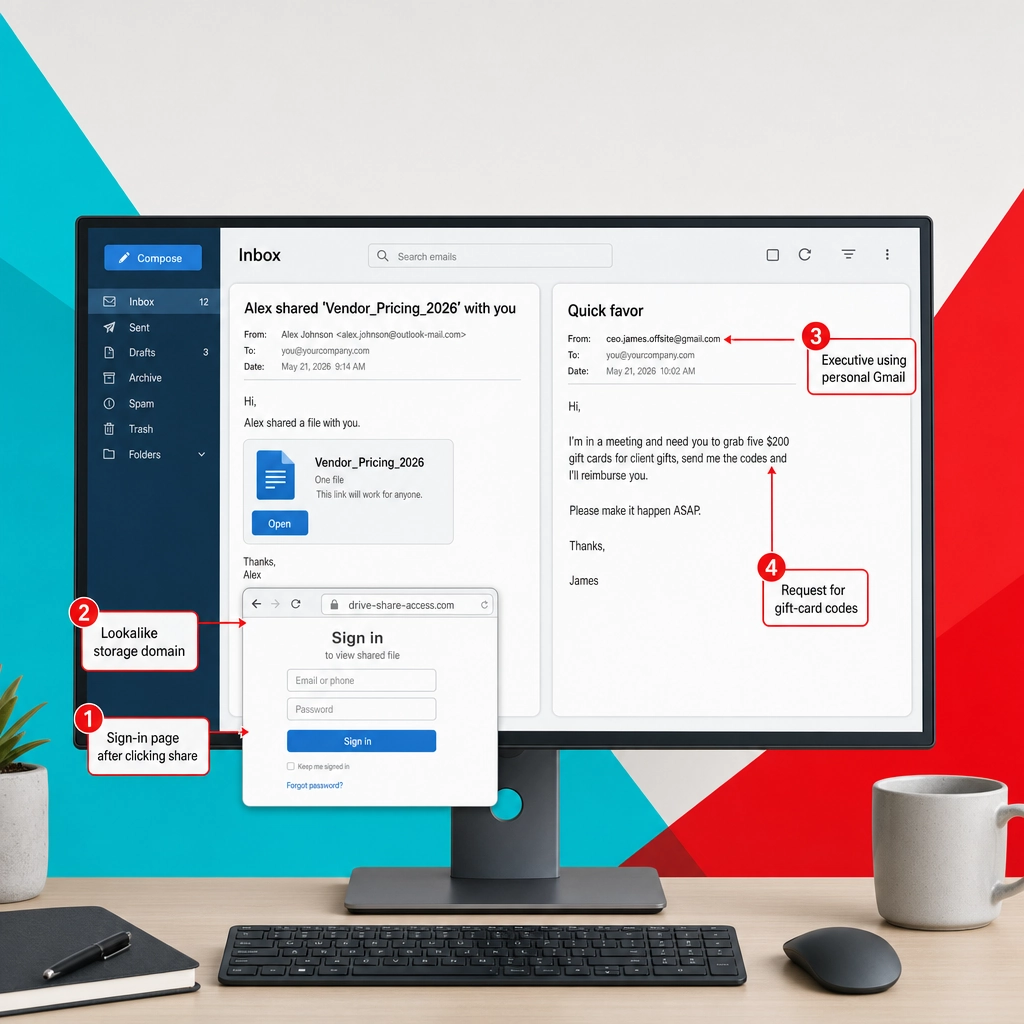
Red flags to recognize it:
- A shared file from someone you do not work with, or a file you were not expecting.
- A sign-in page that appears after clicking, asking for your work password.
- A share notification whose link domain is not the real storage provider.
- A file name designed to make you curious about money, pricing, or HR.
The rule that stops it: open shared files from inside the service itself, not from the email link, and confirm with the sender if the share seems out of place.
10. The Gift-Card Request
Gift-card scams are impersonation with a twist: instead of a wire, the attacker asks you to buy gift cards and send the codes. The sender poses as a boss, an executive, or a board member with an urgent, private errand. It targets assistants, new employees, and anyone eager to help a leader.
The example: “Are you available? I’m in a meeting and need you to grab five $200 gift cards for client gifts. Send me the codes and I’ll reimburse you.” The message comes from ceo.james.offsite@gmail.com and stresses that it is time-sensitive and confidential. Once the codes are sent, the money is gone.
Red flags to recognize it:
- Any request to buy gift cards and share the codes.
- A boss or executive emailing from a personal or unfamiliar address.
- Urgency, secrecy, and a promise to reimburse you later.
- A reason you cannot easily verify, such as “I’m in a meeting.”
The rule that stops it: no legitimate business errand is paid with gift-card codes emailed to someone. The FTC is blunt about this: a gift-card payment request is always a scam.
Source: Federal Trade Commission, Gift Card Scams
11. Account Suspended and Fake Tech Support
These emails manufacture a crisis and then offer to solve it. The sender claims an account is suspended, a subscription failed, or a device is infected, and provides a link or a phone number for “support.” The link harvests credentials or payment details, and the phone number connects you to a fake technician who wants remote access. It targets anyone who uses online accounts.
The example: “Your account has been suspended due to unusual activity. Call our support line or click to restore access within 24 hours.” The link leads to account-restore-center.com, and the phone number reaches a “technician” who asks you to install remote-control software so they can “fix” the problem.
Red flags to recognize it:
- A sudden suspension or infection warning with a countdown to act.
- A support phone number provided inside the alarming email.
- A request to install remote-access software or read out a code.
- A restore link on a domain unrelated to the real service.
The rule that stops it: reach support only through the company’s official website or app, and never give remote access to someone who contacted you first. This is the digital cousin of physical social engineering like tailgating, where an attacker talks their way past your defenses.
12. Vendor Email Compromise and Thread Hijacking
This is the hardest example to catch because it comes from a real, trusted account. After compromising a vendor’s or partner’s mailbox, the attacker replies inside an existing email thread, using genuine history and context to slip in a malicious link or a payment-change request. It targets everyone who corresponds with outside partners.
The example: A live thread with your supplier about a delivery suddenly continues: “Following up, here’s the updated invoice, please note our new payment details.” The reply quotes the earlier messages and comes from the vendor’s real address, because the attacker is inside that account. Nothing looks spoofed, which is what makes it dangerous.
Red flags to recognize it:
- A payment or banking change introduced into an otherwise normal conversation.
- A sudden shift in tone, timing, or writing style from a known contact.
- An attachment or link that does not fit the thread’s context.
- A reply that reopens a finished topic to request money or credentials.
The rule that stops it: treat payment and banking changes as high-risk no matter who sends them, and verify by phone even when the email comes from a real, familiar account.
Source: Verizon Data Breach Investigations Report
The Red Flags Every Phishing Email Shares
Across all 12 examples, the same handful of signals keep appearing. Learn these and you do not need to memorize every scam, because you will feel the pattern before you finish reading the email.
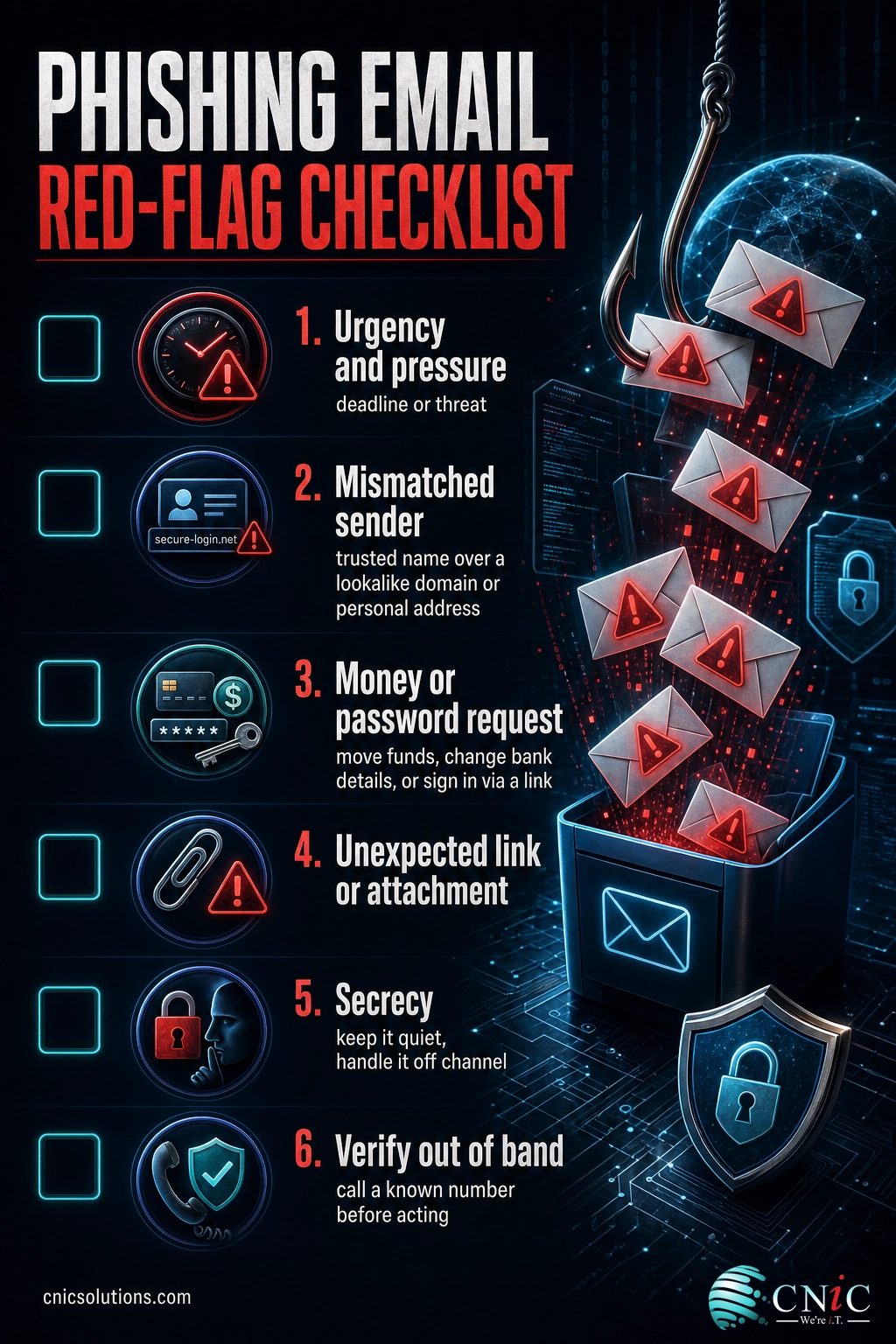
- Urgency and pressure: a deadline, a threat, or a countdown designed to stop you thinking.
- A mismatched sender: a trusted display name over a lookalike domain or a personal address.
- A money or password request: move funds, change bank details, or sign in through a link.
- An unexpected link or attachment: a file or button you did not ask for and cannot fully verify.
- Secrecy: a request to keep it quiet or handle it outside normal channels.
Myth: real spelling and a real logo mean a real email
The old advice was to look for typos and clumsy graphics. That test fails today. Attackers use polished templates, correct branding, and AI writing tools, so a flawless, professional email is not evidence that it is safe. Judge the request and the sender address, not the presentation. A perfect-looking email asking you to change a bank account is more dangerous than a sloppy one, not less.
Lessons Across All 12 Examples
Two lessons cut across every type on this list. First, the most damaging attacks impersonate trust, not technology: a person, a vendor, or a workflow you already rely on. Second, almost every one collapses the moment you verify through a separate, known channel. A phone call to a saved number defeats CEO fraud, invoice changes, direct-deposit swaps, and thread hijacking alike.
The other lesson is that people are trainable, and it works. In its 2025 industry benchmarking, KnowBe4 found that the share of employees likely to fall for a simulated phish dropped from 33.1% to 4.1% after a year of regular security-awareness training. Recognition is a skill, and it improves fast when a business practices it.
Employees Likely to Fall for a Phishing Test, Before and After Training (KnowBe4 2025)
Pair that training with core defenses like multi-factor authentication, email filtering, and clear payment-verification rules, and most of these emails never reach a person, or never get the click they need.
Build layered defenses with managed IT services
Source: KnowBe4 Phishing by Industry Benchmarking Report
Could This Happen to Your Business?
If your company approves payments, runs payroll, uses cloud email, or talks to outside vendors, then yes, every example above is aimed at you. Attackers do not need to breach your firewall when one convincing email can do the job. The businesses that stay safe are not the ones that never get targeted, they are the ones that made verification a habit and gave employees the training to recognize the pattern.
CNiC helps businesses close these gaps with layered email security, multi-factor authentication, security-awareness training, and payment-verification controls that neutralize social engineering before it costs you. The best time to build those defenses is before an attacker tests them.
Get help defending against phishing and social engineering
Quick-Reference Table
| Phishing Type | The Lure | Top Red Flag | Family |
|---|---|---|---|
| 1. CEO fraud | Urgent, secret wire request from a leader | Payment that skips normal approval | Financial fraud |
| 2. Fake invoice | Vendor bill or banking-detail change | Bank change requested by email | Financial fraud |
| 3. Fake login | Account alert linking to a sign-in page | Login reached via an email link | Credential theft |
| 4. Delivery notice | Held package needing a fee or details | Fee that requires card details | Lures and delivery |
| 5. MFA fatigue | Repeated approval prompts plus a nudge | Prompts you did not trigger | Credential theft |
| 6. Tax or government notice | Owed balance or refund from an agency | Agency demanding payment by email | Impersonation and pressure |
| 7. Direct-deposit change | Employee updating payroll bank details | Payroll change from a personal address | Financial fraud |
| 8. E-signature lure | Document waiting for your signature | Password prompt to view a file | Lures and delivery |
| 9. Shared cloud file | Colleague shared a file with you | Sign-in page after clicking the share | Credential theft |
| 10. Gift-card request | Buy gift cards and send the codes | Any gift-card code request | Impersonation and pressure |
| 11. Account suspended | Suspension or infection needing support | Support number inside the alert | Impersonation and pressure |
| 12. Thread hijacking | Reply in a real thread from a real account | Payment change in a normal conversation | Financial fraud |
Frequently Asked Questions
What is the most common type of phishing email?
How can you tell if an email is a phishing attempt?
Are phishing emails always full of spelling mistakes?
What should I do if I clicked a link in a phishing email?
Why do phishing emails target businesses specifically?
Sources
For the core defenses that stop these attacks before they reach a person, see the core security controls every business should have in place, and for volume and trend data review the latest phishing statistics.
- FBI Internet Crime Complaint Center (IC3), 2024 Internet Crime Report
- Verizon Data Breach Investigations Report
- KnowBe4 Phishing by Industry Benchmarking Report, 2025
- Cybersecurity and Infrastructure Security Agency (CISA)
- IRS Tax Scams and Consumer Alerts
- Federal Trade Commission, Gift Card Scams



related posts
What Is BYOD? Bring Your Own Device Explained for Businesses
October 13, 2026BYOD (Bring Your Own Device) is a policy that lets employees use their own personal devices,…
What Is Calendar Phishing and How to Prevent It
October 13, 2026Calendar phishing is a scam that hides a malicious link inside a calendar invitation instead of…
What Is an Evil Twin Attack? How Fake Wi-Fi Hotspots Steal Your…
October 12, 2026An evil twin attack is a fake Wi-Fi hotspot that copies the name of a network…
What Is an IP Address? A Plain-English Guide for Business
October 12, 2026An IP address (Internet Protocol address) is a unique number assigned to every device on a…