

Passkey, defined: A passkey is a phishing-resistant login credential that replaces your password with a cryptographic key pair tied to one specific website or app. You sign in with the same fingerprint, face scan, or PIN you already use to unlock your device. Because the secret never leaves that device, a passkey cannot be phished, guessed, or stolen in a data breach.
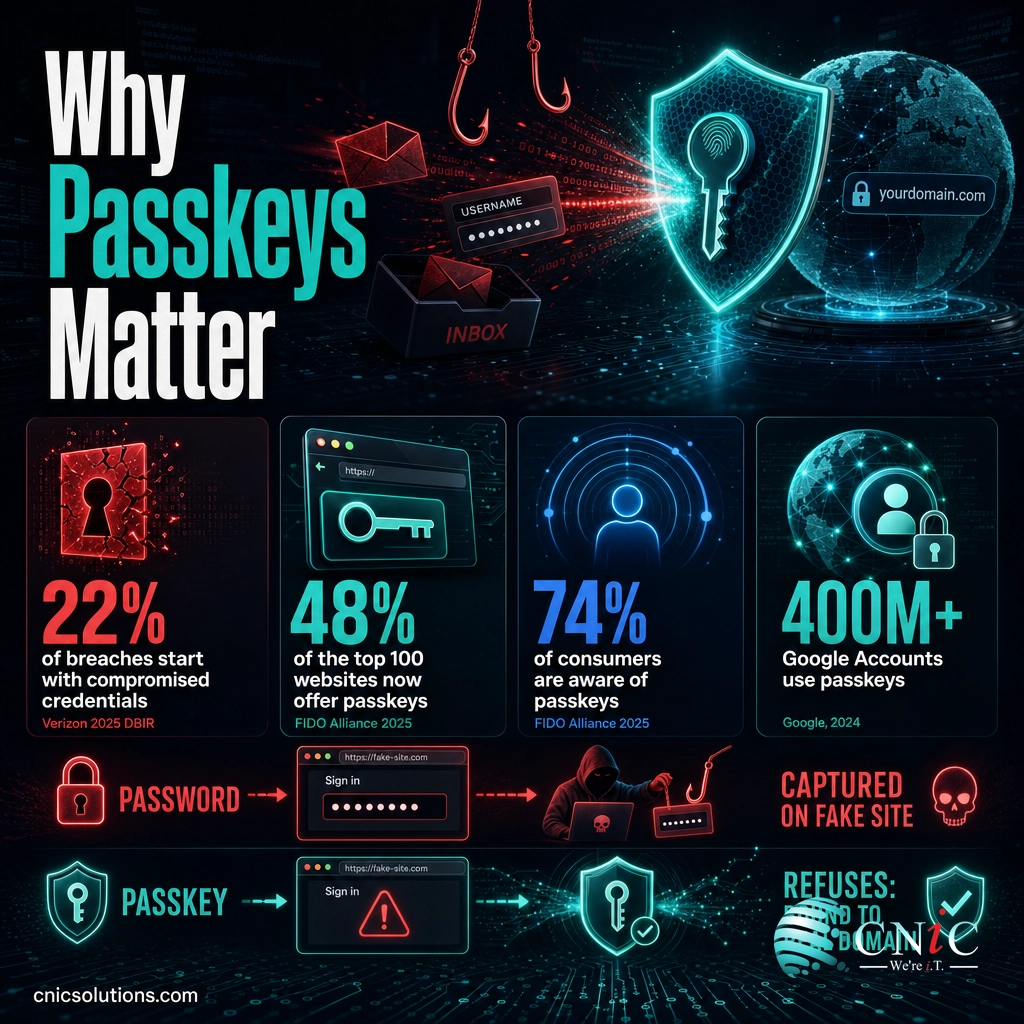
Passwords have quietly become the weakest link in business security. Compromised credentials were the way in for 22% of all breaches studied in Verizon’s 2025 Data Breach Investigations Report, and the human element, mostly phishing and stolen logins, showed up in the majority of incidents. Passkeys are the industry’s answer: a passwordless sign-in method that the FIDO Alliance, Apple, Google, and Microsoft have already shipped to billions of accounts. This guide explains what a passkey is, how passwordless login actually works, and what it means for protecting your company.
- A passkey replaces your password with a pair of cryptographic keys. The private key stays locked on your device; the website only ever sees the public key.
- Passkeys cannot be phished. There is no secret to type into a fake page, no code to read aloud, and nothing reusable to steal from a breached server.
- Adoption is already mainstream. 48% of the world’s top 100 websites now offer passkeys, and 74% of consumers are aware of them, per the FIDO Alliance’s 2025 research.
- They are faster, too. Google reports passkey sign-ins are roughly 50% faster than passwords across more than 400 million Google Accounts.
- For business, the win is the attack surface. Passkeys neutralize the credential-theft and phishing vectors behind most breaches, which is why CISA and NIST call FIDO-based passkeys the gold standard.
What’s in This Guide
How Passkeys Work, in Plain English
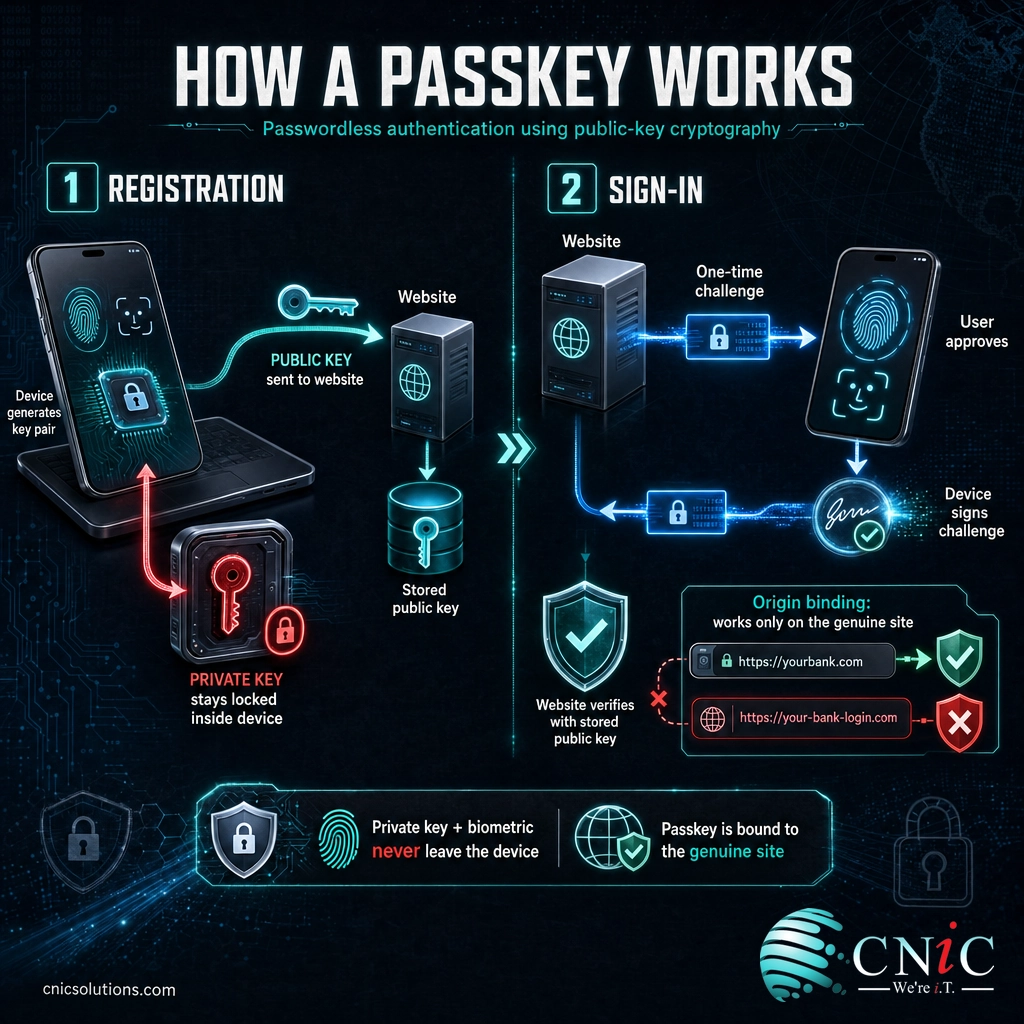
A password is a shared secret. You know it, the website stores a version of it, and anyone who copies or guesses that secret can log in as you. A passkey works nothing like that. Instead of a secret you both hold, your device generates two mathematically linked keys the first time you create a passkey for a site.
Think of it like a wax seal on a letter. The website hands you a unique stamp (the private key) that only you keep, and it keeps a picture of what the seal should look like (the public key). When you sign in, your device presses a fresh seal that the site checks against its picture. Anyone can look at the picture, but only your stamp can make a matching seal, and you never hand the stamp over.
The two-step flow
Under the hood, every passkey follows the same open standard, called WebAuthn, developed by the W3C’s Web Authentication specification and the FIDO Alliance:
- Registration. When you create a passkey, your phone, laptop, or security key generates a key pair. The private key is stored in the device’s secure hardware. Only the public key is sent to the website, so a future breach of that site exposes nothing usable.
- Sign-in. The site sends your device a one-time challenge. Your device asks you to confirm with a fingerprint, face scan, or PIN, then uses the private key to sign that challenge. The site verifies the signature with the public key it already has. No secret ever travels across the internet.
Two design choices make this powerful. First, the passkey is bound to the exact web domain that created it, a property called origin binding, so it will not fire on a look-alike phishing site at all. Second, the biometric you use never leaves your device either; the fingerprint or face scan only unlocks the local key, it is never sent to the website. This is the same public-key cryptography that protects encrypted traffic, applied to login. If you want the fuller picture of how key pairs protect data, our explainer on how encryption keeps business data unreadable to outsiders covers the same math from a different angle.
Source: W3C Web Authentication (WebAuthn) | FIDO Alliance passkey standard
Passkeys vs. Passwords vs. Traditional MFA
The term passkeys is most often confused with two things: the passwords they replace, and the text-message or app codes people already think of as “two-factor.” The table below shows why a passkey is a category change, not just a stronger password.
| Property | Password | Password + SMS / App Code | Passkey |
|---|---|---|---|
| Can be phished | Yes, typed into fake pages | Yes, codes can be relayed or intercepted | No, bound to the real domain |
| Reused across sites | Commonly, a top breach cause | Password half is still reused | No, unique key pair per site |
| Stolen in a server breach | Yes, hashes get cracked | Password half still exposed | No, only a useless public key is stored |
| Vulnerable to SIM swap | Not applicable | Yes, for SMS codes | No |
| Sign-in speed | Type and remember | Type, wait for code, type again | One tap or glance |
SMS and app-based one-time codes were a real improvement over passwords alone, and they still beat no second factor. But attackers adapted: modern phishing kits proxy the login in real time and capture the one-time code the moment a user enters it. That is exactly the attack a passkey defeats by design, because there is no code to capture and the credential refuses to work anywhere but the genuine site. If your team still relies on spotting bad emails as the main line of defense, it is worth reviewing the warning signs of a phishing email alongside a move to passwordless login.
Myth: “A passkey is just my password stored more securely.” It is not. There is no password behind a passkey at all, and no shared secret sitting on the company’s servers waiting to be cracked. A related myth is that losing your phone means losing the account. In practice, consumer passkeys sync across your signed-in devices through iCloud Keychain, Google Password Manager, or your password manager, and businesses register more than one passkey plus a recovery method per account. A lost device is a nuisance, not a lockout.
Source: CISA, Implementing Phishing-Resistant MFA

Why Passkeys Matter for Your Business
The case for passkeys is not about convenience, though they are more convenient. It is about removing the single most exploited path into a company’s systems. When you look at where breaches actually begin, the same two culprits dominate: stolen credentials and phishing. Passkeys take both off the table.
Put those initial-access vectors side by side and the pattern is hard to miss. Credentials and phishing are not edge cases; they are the front door.
How breaches begin, share of breaches (Verizon 2025 DBIR)
Passkeys directly neutralize the credential-theft and phishing vectors, which together outweigh any other entry point. Source: Verizon 2025 DBIR.
CNiC Solutions Analysis: In the 2025 DBIR, compromised credentials (22%) and phishing (16%) are counted as separate initial-access vectors, yet a single control, phishing-resistant passkeys, addresses both. Combined, they account for a larger slice of breach entry points than vulnerability exploitation. For a small or midsize business weighing where to spend the next security dollar, that makes passkey rollout one of the highest-impact moves available. Calculation and interpretation original to CNiC Solutions, based on Verizon 2025 DBIR figures.
There is a productivity dividend on top of the security one. Password resets are one of the most common help-desk tickets in any office, and forgotten-password friction costs real sales; the FIDO Alliance found 47% of consumers will abandon a purchase when they cannot remember a password. Faster, cleaner sign-ins mean fewer lockouts, fewer tickets, and less time lost. That combination, stronger security and lower support load, is why passwordless authentication has moved from a nice-to-have to a board-level topic. It pairs naturally with the broader controls covered in our guide to the cybersecurity fundamentals every business owner should have in place.
Making passwordless part of a coherent security posture, rather than a one-off toggle, is where an experienced partner earns its keep.
Build phishing-resistant defenses with CNiC
Source: FIDO Alliance, World Passkey Day 2025 research | IBM Cost of a Data Breach Report 2025
How to Roll Passkeys Out at Your Company
Passkeys do not require ripping anything out. Most businesses layer them in gradually, starting with the accounts that would hurt most if compromised. A practical rollout looks like this:
- Inventory what already supports passkeys. Microsoft 365 (Entra ID), Google Workspace, and a growing list of SaaS tools already offer passkey sign-in. Map which of your critical apps are ready today.
- Start with high-value accounts. Enroll passkeys first for email, administrator, and finance logins, the accounts attackers want most. These deliver the biggest risk reduction per hour of effort.
- Register a backup and set recovery policy. Add a second passkey (a phone plus a hardware security key, for example) and define how a lost device is re-enrolled before you scale to the whole team.
- Phase out weak factors. As passkeys land, retire SMS one-time codes where you can. They are the factor most exposed to SIM-swap and real-time phishing.
- Train and document. A five-minute walkthrough turns a new sign-in method into a non-event. Clear documentation keeps the help desk quiet.
For most small and midsize businesses, the hard part is not the technology, it is sequencing the rollout without disrupting daily work or leaving a recovery gap. That is a natural fit for a fractional identity strategist and a managed team to run the enrollment. A cybersecurity risk assessment is a sensible first step, and we cover what one involves in our guide on how a formal risk assessment reveals your real exposure.
Set your identity strategy with a virtual CIO
Talk to a managed IT team about passwordless
Source: FIDO Alliance passkey resources | NIST SP 800-63B Digital Identity Guidelines
Related Access and Identity Terms
- WebAuthn: the W3C browser standard that lets websites request and verify passkeys. It is the plumbing behind every passkey prompt you see.
- FIDO2: the FIDO Alliance framework that, together with WebAuthn, defines how passkeys and hardware security keys work across platforms.
- Multi-factor authentication (MFA): requiring two or more proofs of identity. A passkey satisfies this in one step by combining a device and a biometric or PIN.
- Phishing-resistant MFA: the strongest MFA category, recognized by CISA’s phishing-resistant MFA guidance. Passkeys and PKI meet this bar; SMS codes do not.
- Single sign-on (SSO): signing in once to reach many apps. Passkeys make the SSO login itself phishing-resistant.
- Public-key cryptography: the key-pair math that makes passkeys work. The website holds a public key that can verify your signature but can never produce one, so it is useless to a thief.
- Credential stuffing: attackers replaying stolen username and password pairs at scale. Passkeys make stuffing pointless because there is no reusable secret to replay.
- Zero trust: the “never trust, always verify” model. Strong, phishing-resistant identity is its foundation.
Frequently Asked Questions
Are passkeys really safer than passwords?
What happens if I lose the phone or laptop that holds my passkey?
Do passkeys work across Apple, Google, and Windows devices?
Do passkeys replace multi-factor authentication (MFA)?
Can my business use passkeys with Microsoft 365 and Google Workspace?
Methodology and Sources
How we sourced this guide
Every statistic in this article comes from a primary, Tier 1 source: government agencies, standards bodies, and named annual industry reports. We do not cite blog-to-blog claims or unverifiable figures. Definitions of passkeys, WebAuthn, and FIDO2 are drawn from the standards bodies that maintain them.
- FIDO Alliance, World Passkey Day 2025: consumer awareness (74%), passkeys enabled on at least one account (69%), top-100 website adoption (48%), convenience and abandonment figures.
- Verizon 2025 Data Breach Investigations Report: compromised credentials as an initial access vector (22%) and related breach-entry data.
- Google Security: 400M+ accounts using passkeys, more than one billion authentications, and roughly 50% faster sign-in.
- IBM Cost of a Data Breach Report 2025: global average breach cost and credential-breach containment time.
- CISA, Implementing Phishing-Resistant MFA and NIST SP 800-63B: phishing-resistant authentication guidance.
- W3C Web Authentication (WebAuthn) and FIDO Alliance: technical definitions of passkeys, key pairs, and origin binding.



related posts
What Does Cyber Insurance Cover? A Guide for Small Businesses
October 2, 2026Cyber insurance is a business insurance policy that pays for the financial fallout of a cyberattack…
What Are TTPs in Cybersecurity? Tactics, Techniques, and Procedures Explained
October 2, 2026TTPs, short for tactics, techniques, and procedures, describe how a cyber attacker behaves: the goal they…
What Are Standard Operating Procedures (SOPs) for IT and Why They Matter
October 1, 2026An IT standard operating procedure (SOP) is a documented, step-by-step set of instructions for performing a…
USPS Scam Texts: How to Spot Fake Delivery Messages
September 30, 2026Fake USPS delivery texts are not a minor nuisance, they are the single most-reported text scam…