

An IT standard operating procedure (SOP) is a documented, step-by-step set of instructions for performing a routine IT task the same way every time, no matter who does it. SOPs turn expert knowledge into repeatable process, which reduces errors, speeds up training, and keeps IT operations consistent, secure, and audit-ready.
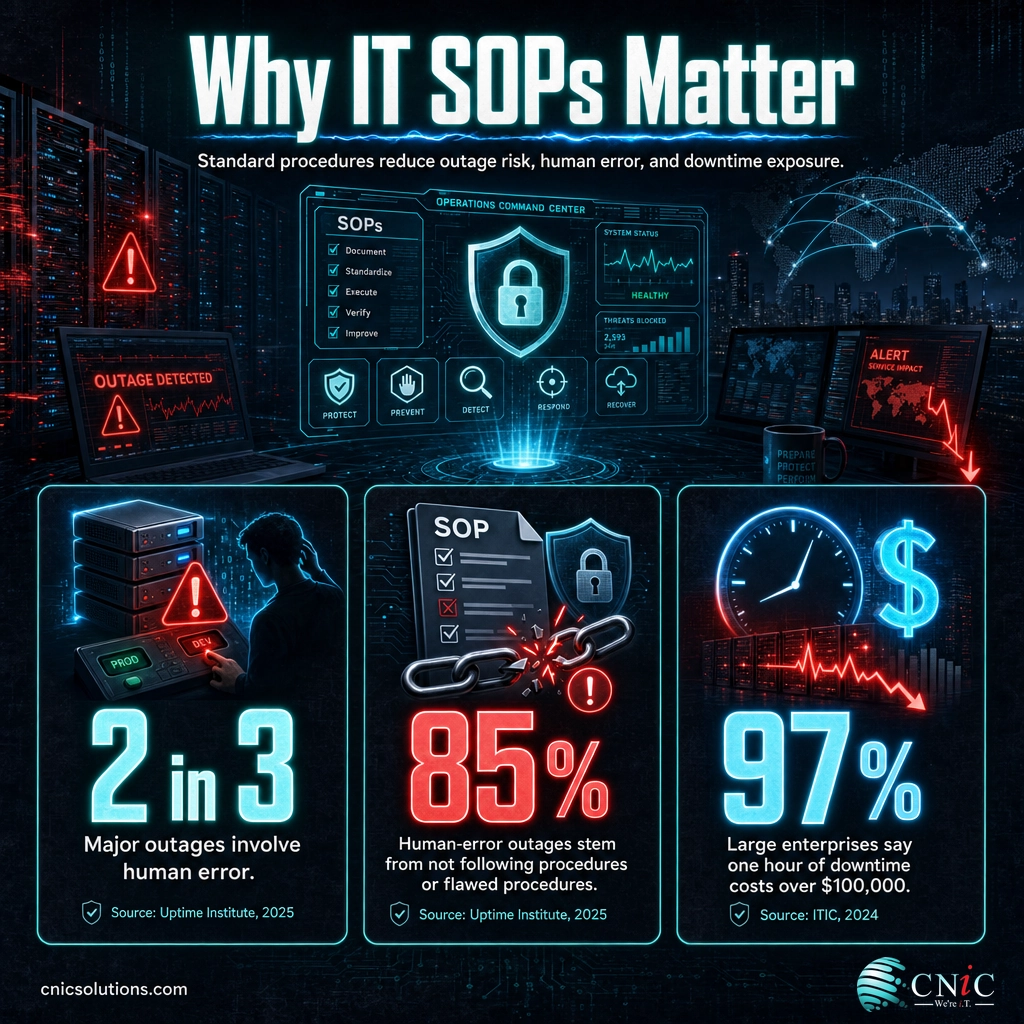
Most IT work is not heroics. It is the same tasks done over and over: setting up a new hire, patching servers, restoring a file, responding to an alert. When those tasks live only in one person’s head, quality swings wildly and a single sick day can stall the business. Standard operating procedures fix that by writing the task down so anyone can follow it and get the same result. It is not busywork. Uptime Institute’s research finds that human error plays a role in about two-thirds of all major outages, and the most common cause is staff not following established procedures. This guide explains what IT SOPs are, how they differ from policies and runbooks, why they matter, and how to write one that people actually use.
Key Takeaways
- An SOP is the “how,” step by step. It documents a routine IT task so the outcome is the same regardless of who performs it or when.
- SOPs are not policies. A policy sets the rule and the intent; an SOP is the exact sequence of steps that carries it out.
- Procedures are the hidden cause of downtime. Uptime Institute attributes 85% of human-error outages to staff failing to follow procedures or to flaws in the procedures themselves.
- The value is consistency and resilience. Good SOPs cut errors, shorten onboarding, and keep the business running when a key person is out.
- An unmaintained SOP is a liability. A wrong procedure is worse than none, because people follow it anyway. SOPs need an owner and a review date.
What’s in This Guide
How IT SOPs Work
An SOP takes a task that an experienced person can do from memory and breaks it into explicit, ordered steps that someone less experienced can follow without guessing. The goal is uniformity: the same input and the same procedure produce the same output every time. That is exactly how a managed IT team scales service without needing an expert at every seat.
Think of it like a recipe. A skilled cook can improvise, but a written recipe lets anyone in the kitchen produce the same dish, and it lets the head chef guarantee quality without standing over every pan. An IT SOP does the same for tasks like provisioning a laptop to a security baseline or failing a service over to a backup server.
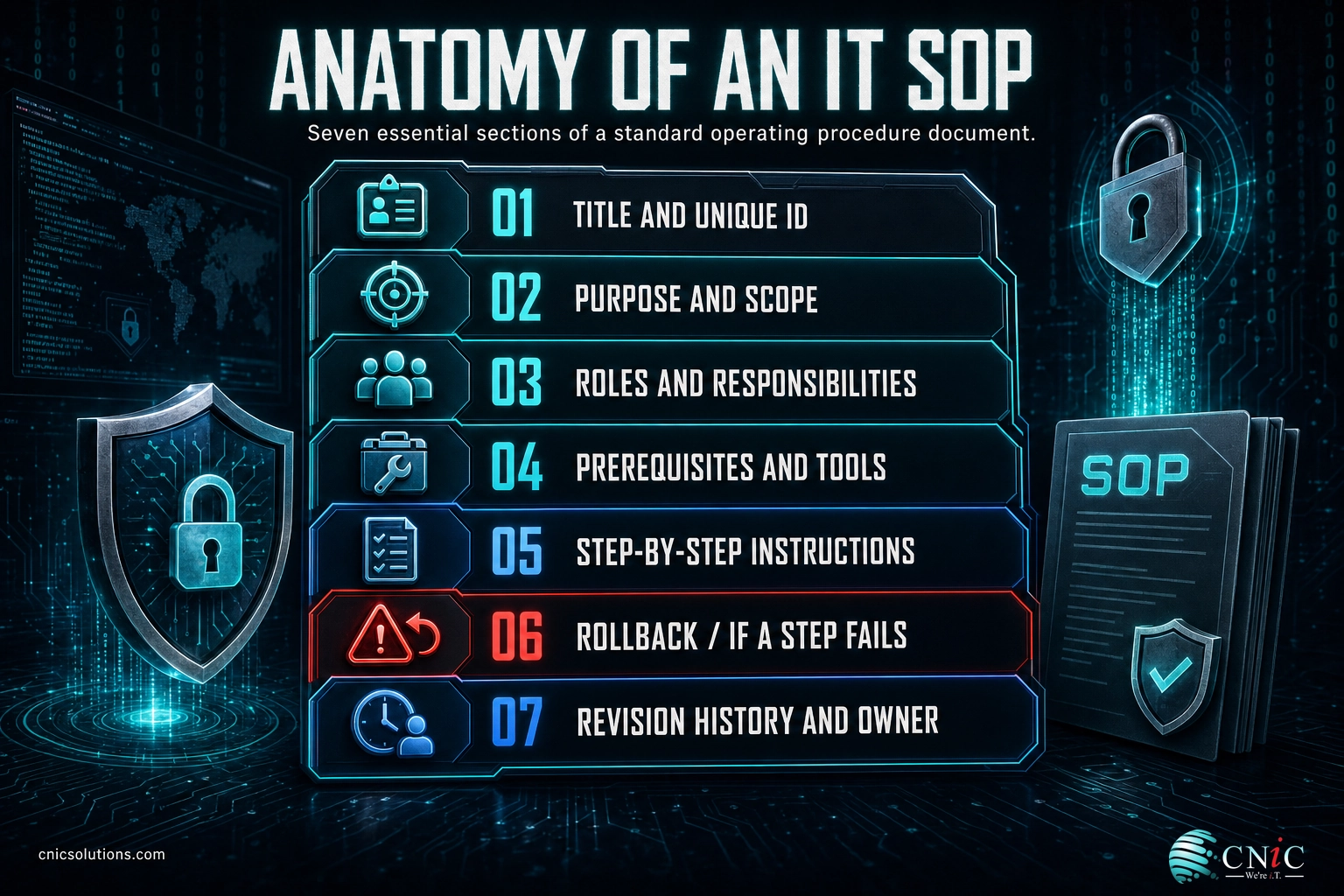
A complete IT SOP is more than a list of steps. The components that make it reliable are:
- Title and unique ID so it can be referenced, searched, and version-controlled.
- Purpose and scope: what this procedure covers, and just as importantly, what it does not.
- Roles and responsibilities: who performs it, who approves it, who is notified.
- Prerequisites and tools: the access, credentials, systems, and equipment needed before starting.
- Step-by-step instructions in plain language, numbered and in order, with screenshots or exact commands where they help.
- Rollback / failure handling: what to do if a step fails or the change must be undone.
- Revision history and owner: who owns it, when it was last reviewed, and what changed.
Source: NIST: Standard operating procedures (glossary) | CISA: Standard Operating Procedures guidance
SOP vs. Policy vs. Process vs. Runbook
These four terms are used interchangeably in everyday conversation, but they sit at different levels and mixing them up leads to documents that try to be everything and end up useful for nothing. Here is how they relate.
| Term | What it answers | Example |
|---|---|---|
| Policy | The rule and the intent (what must be true, and why) | “All company data must be backed up daily and backups tested monthly.” |
| Process | The high-level flow (which stages happen, in what order, and who owns each) | Backup management: schedule, run, monitor, test, report. |
| SOP | The detailed steps for one task within that process | “How to run and verify a monthly restore test,” step by step. |
| Runbook | The specific, often technical, procedure for one system or scenario | “Restore the accounting database from last night’s backup on Server DB-02.” |
In practice the lines blur, and that is fine. Many teams treat “runbook” as a technical SOP for a specific system, which is a reasonable shorthand. What matters is the relationship: a policy says what must happen, a process describes the overall flow, and SOPs and runbooks are the ground-level instructions that make the policy real. A policy requiring tested backups is only as good as the SOP that tells someone exactly how to test them.
Source: NIST: glossary definition
Why IT SOPs Matter for Your Business
SOPs can feel like overhead until you look at what happens without them. The data on IT failures points squarely at process, not just technology, as the thing that breaks.
CNiC Solutions Analysis: Combining two Uptime Institute figures shows how central procedures are to reliability. If human error is a factor in about 66% of major outages, and 85% of those human-error outages trace to procedures (either not followed or poorly designed), then roughly 56% of major outages (0.66 × 0.85) come back to a procedure problem that better documentation and discipline could have prevented. Calculation and interpretation original to CNiC Solutions, based on published Uptime Institute data.
Beyond avoiding outages, SOPs deliver three business benefits that compound over time:
- Consistency and quality. The same task produces the same result whether it is handled by a senior engineer or a new hire, which is what lets a team grow without quality sliding.
- Resilience and continuity. When knowledge lives in documents instead of one person’s memory, a resignation, vacation, or sick day does not become a crisis. This is the same principle behind a solid business continuity and disaster recovery plan.
- Speed and compliance. New staff get productive faster, audits go smoother because you can show documented, repeatable controls, and frameworks like HIPAA, PCI-DSS, and SOC 2 expect exactly this kind of documented procedure.
Myth: “SOPs are bureaucratic red tape that slow us down.”
The opposite is usually true. Ad-hoc, undocumented work is what actually slows teams down: every task gets re-figured-out from scratch, mistakes get repeated, and the same questions land on your most senior person all day. A good SOP is short, practical, and removes decisions that do not need to be made twice. The red-tape version happens when SOPs are written to impress an auditor instead of to help the person doing the job. Write them for the technician at 2 a.m., not the binder on the shelf.
Get consistent, documented IT operations with managed IT
Source: Uptime Institute: Outages and the human factor | ITIC: 2024 Hourly Cost of Downtime
Common IT SOPs Every Business Should Have
You do not need to document everything at once. Start with the tasks that are done often, carry real risk if done wrong, or are known to depend on one person. The highest-value IT SOPs for most small and midsize businesses are:
- Employee onboarding and offboarding. Creating accounts, assigning access, provisioning devices to a security baseline, and, critically, revoking everything the moment someone leaves.
- Backup and restore. How backups run, and the exact steps to restore and verify them. Untested backups fail when you need them most, which is why documented backup and recovery procedures belong in every backup and disaster recovery program.
- Patch and update management. How systems are tested, approved, deployed, and rolled back. See patch management best practices for the full workflow.
- Security incident response. The step-by-step containment, investigation, and recovery playbook to run when an alert fires. This is the operational core of any incident response plan.
- User support and troubleshooting. Repeatable fixes for the tickets you see most, so common issues get resolved the same fast way every time.
- Change management. How changes to production systems are requested, tested, approved, and documented, so nothing goes live without a rollback path.
A useful signal for where to start: any time a problem recurs, the fix belongs in an SOP. Pairing SOPs with root cause analysis is powerful, because every root cause you find becomes a procedure that stops the problem from coming back.
Turn your security response into a documented, tested playbook
Source: CISA: Standard Operating Procedures

How to Write an IT SOP People Actually Use
The difference between an SOP that gets used and one that gathers dust is usually clarity and maintenance, not length. Follow these steps.
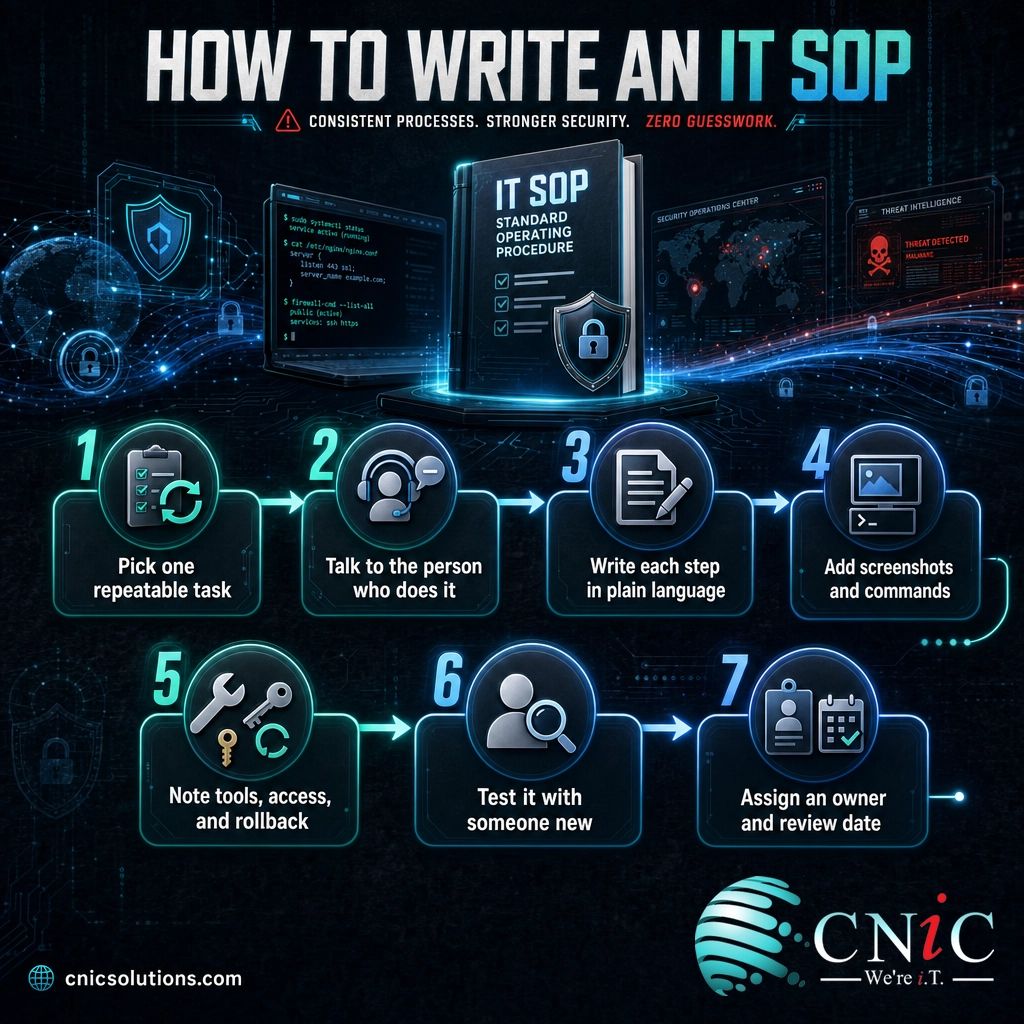
- Pick one high-value, repeatable task. Do not try to boil the ocean. Choose a task that is frequent, risky, or one-person-dependent, and scope the SOP to that single task.
- Talk to the person who actually does it. Watch them work and capture the real steps, including the small “everybody knows to do this” details that are usually where things go wrong.
- Write each step in plain language. Number the steps, keep them in order, and write for someone competent but new. One action per step. Avoid jargon that only the author understands.
- Add screenshots, commands, and links. Show, do not just tell. Exact commands and screen images remove ambiguity and cut the time to follow the procedure.
- Document tools, access, and rollback. List what the person needs before they start, and spell out what to do if a step fails or the change must be reversed.
- Test it with someone who has never done the task. If a new person can follow it start to finish without help, it works. If they get stuck, the SOP has a gap, not the person.
- Assign an owner and a review date. Every SOP needs a named owner and a scheduled review (typically every 6 to 12 months, and immediately after any change or incident). Store it where people work, not in a folder no one opens.
The hardest part is not writing the first SOP; it is keeping a whole library current as systems change. That is where many businesses stall, and it is a large part of what a managed IT partner or a Virtual CIO provides: building the procedures, keeping them accurate, and holding the team to them so the documentation stays real.
Have a Virtual CIO build your IT operations playbook
Source: CISA: developing and maintaining SOPs
Frequently Asked Questions
What is a standard operating procedure (SOP) in IT?
What is the difference between an SOP and a policy?
What should an IT SOP include?
Why are SOPs important for IT operations?
How often should IT SOPs be reviewed and updated?
Related Terms
- Policy: A rule and its intent, stating what must be true and why, without the step-by-step detail.
- Runbook: A specific, often technical procedure for one system or scenario; effectively a technical SOP.
- Process: The high-level flow of stages and owners that a set of SOPs supports.
- Change management: The controlled way changes to systems are requested, approved, and documented.
- Root cause analysis: The practice of finding the underlying cause of a problem so it can be fixed permanently, often feeding a new SOP.
- Incident response plan: The documented playbook for detecting, containing, and recovering from a security incident.
- Business continuity: The broader discipline of keeping the business running through disruptions, which SOPs and runbooks support.
Methodology & Sources
This explainer defines IT standard operating procedures using authoritative references and grounds its claims in primary research. The definition and term relationships align with NIST’s glossary (drawn from CNSSI 4009 and NIST SP 800-100) and CISA’s guidance on developing and maintaining standard operating procedures. The human-error and procedure statistics come from Uptime Institute’s Annual Outage Analysis, which draws on more than two decades of outage data. The downtime cost figure is from ITIC’s 2024 Hourly Cost of Downtime survey of over 1,000 organizations. The 56% figure is a CNiC Solutions calculation derived by combining two published Uptime Institute percentages, and is labeled as original analysis where it appears.
Primary and authoritative sources: NIST CSRC Glossary, CISA SAFECOM SOPs, Uptime Institute 2025 Annual Outage Analysis, ITIC 2024 Hourly Cost of Downtime.



related posts
What Does Cyber Insurance Cover? A Guide for Small Businesses
October 2, 2026Cyber insurance is a business insurance policy that pays for the financial fallout of a cyberattack…
What Are TTPs in Cybersecurity? Tactics, Techniques, and Procedures Explained
October 2, 2026TTPs, short for tactics, techniques, and procedures, describe how a cyber attacker behaves: the goal they…
What Are Passkeys? How Passwordless Login Works and Why It Matters
October 1, 2026Passkey, defined: A passkey is a phishing-resistant login credential that replaces your password with a cryptographic…
USPS Scam Texts: How to Spot Fake Delivery Messages
September 30, 2026Fake USPS delivery texts are not a minor nuisance, they are the single most-reported text scam…