

Containerization is a form of operating system virtualization that packages an application together with everything it needs to run, its code, libraries, and configuration, into a single isolated unit called a container. Because containers share the host operating system’s kernel, they start in seconds and run the same way on a laptop, a server, or the cloud.
Containerization solves one of the oldest frustrations in software: an application that works perfectly on one computer and breaks on another. By bundling an app with its exact dependencies into a portable container, teams get software that runs identically everywhere, deploys faster, and uses far fewer resources than the older approach of running full virtual machines. This guide explains what containers are, how they work, how they differ from virtual machines, and what the benefits mean for your business, all in plain language.
Key Takeaways
- A container bundles an app with its dependencies into one portable unit that runs the same way in any environment, ending the “it works on my machine” problem.
- Containers share the host operating system’s kernel, which is why they are much smaller and faster to start than virtual machines.
- Docker made containers mainstream after its 2013 launch, and Kubernetes became the standard for running them at scale.
- The core benefits are portability, efficiency, speed, and scalability, which translate into lower infrastructure costs and faster releases.
- Containers still need security and management. They share a kernel, so isolation is weaker than a virtual machine’s, making configuration and oversight essential.
What’s in This Guide
How Containerization Works
To understand containers, start with the problem they solve. A modern application is never just one file. It depends on a specific programming language version, a set of software libraries, configuration files, and environment settings. Move that application to a different computer where any one of those pieces is missing or a different version, and it fails. Containerization fixes this by packaging the application and all of those dependencies together, so the bundle carries its own environment with it wherever it goes.
A useful analogy is a shipping container. Before standardized steel containers, cargo was loaded piece by piece, and every ship, truck, and crane handled it differently. The shipping container standardized the box so any vessel could carry it without caring what was inside. A software container does the same for applications: it standardizes the package so any server can run it without caring how the app was built.
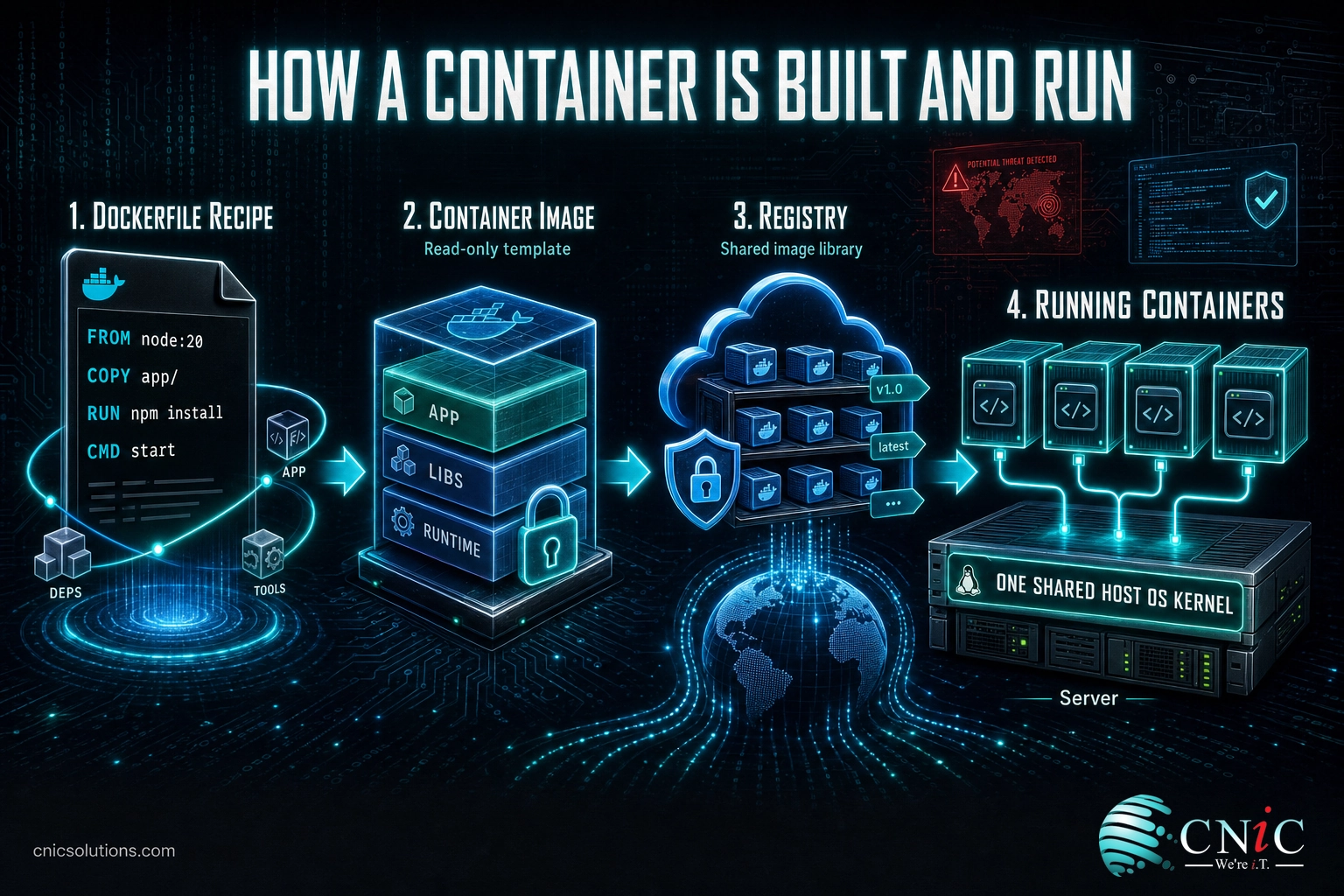
Technically, containerization is a form of operating system virtualization. According to the definition from NIST’s Application Container Security Guide, application container technologies combine operating system virtualization with application software packaging. Here is the process in plain steps:
- Build an image. A developer writes a short recipe (in Docker, a Dockerfile) that lists the application and every dependency it needs. Running that recipe produces a container image, a read-only template of the fully packaged app.
- Store and share the image. The image is pushed to a registry, a shared library of images that any authorized machine can pull from.
- Run the container. A container runtime on the host takes the image and starts it as a running container, an isolated process with its own files, libraries, and network view.
- Share the kernel. Rather than booting its own operating system, the container uses the host operating system’s kernel while staying walled off from other containers. That shared kernel is the reason containers are so lightweight.
Because the image already contains everything the app needs, the same image runs identically on a developer’s laptop, a company server, or a cloud platform. Nothing is installed or configured differently between environments, which is exactly what makes containers so portable and predictable.
Source: NIST SP 800-190, Application Container Security Guide
Containers vs. Virtual Machines
The single most common point of confusion is how containers differ from virtual machines. Both let you run isolated workloads on shared hardware, but they do it at different layers, and the difference matters.
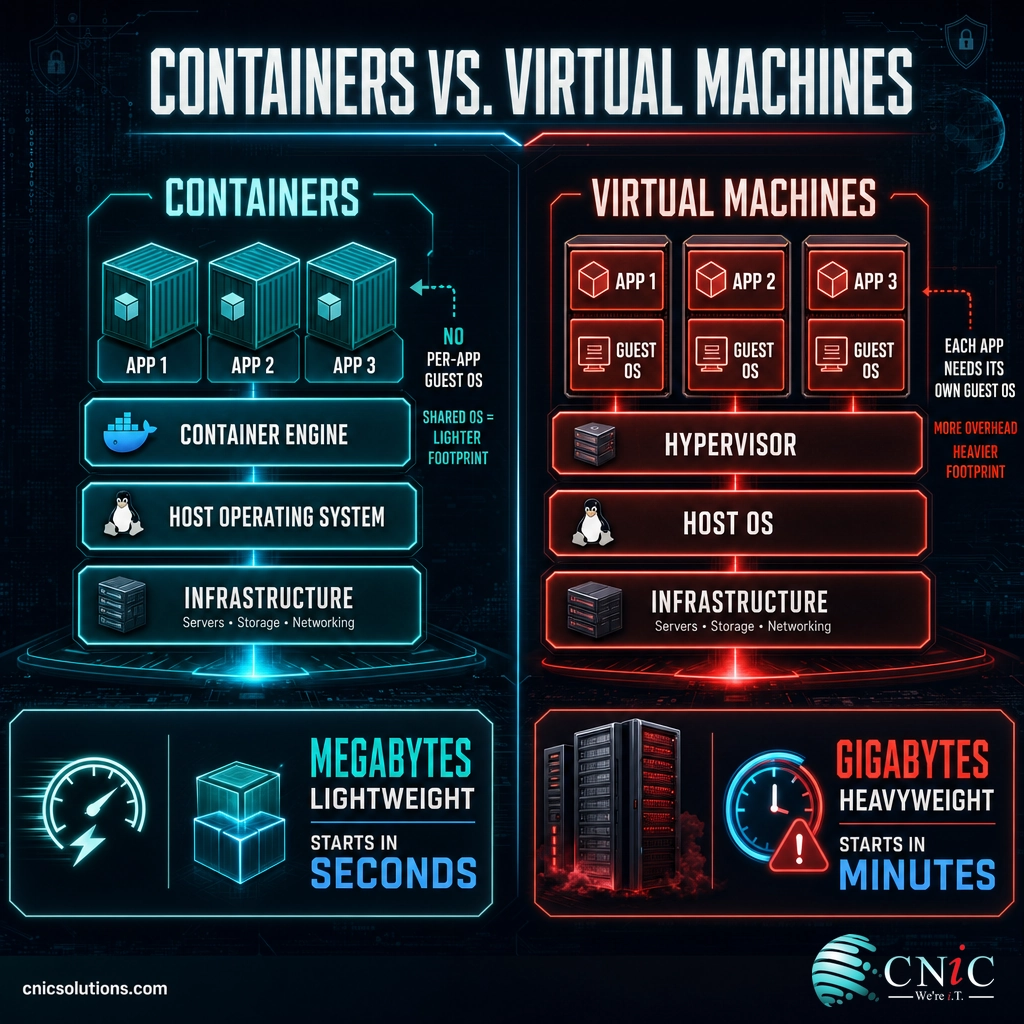
A virtual machine uses a hypervisor to run a complete guest operating system, kernel and all, on top of the physical host. Every virtual machine carries its own full operating system, which can be many gigabytes and takes minutes to boot. A container skips the guest operating system entirely. It shares the host’s kernel and packages only the application and its dependencies, so a container is often measured in megabytes and starts in seconds.
| Characteristic | Container | Virtual Machine |
|---|---|---|
| What it virtualizes | The operating system (shares the host kernel) | The hardware (runs a full guest OS on a hypervisor) |
| Typical size | Megabytes | Gigabytes |
| Startup time | Seconds | Minutes |
| Resource use | Lightweight, high density per server | Heavier, fewer per server |
| Isolation | Strong, but shares a kernel | Stronger, fully separate OS |
| Best suited for | Portable, scalable, fast-moving apps | Running different operating systems or maximum isolation |
The trade-off is isolation. Because containers share the host kernel, the separation between them is not as complete as the separation a hypervisor gives virtual machines. NIST notes that the degree of segmentation between containers is less than that provided to virtual machines by a hypervisor. That does not make containers unsafe, it means their security depends more on correct configuration and management. In practice, many organizations use both: containers for portability and speed, running inside virtual machines for an added layer of separation.
Myth: “Containers are just lightweight virtual machines.”
This is the misconception that causes the most trouble. A virtual machine emulates hardware and runs a whole operating system, while a container shares the host’s operating system and isolates a single application. Treating a container like a tiny virtual machine (for example, stuffing many services and a full OS into one) throws away the very efficiency and simplicity that make containers worth using. A container should package one application, cleanly.
Source: NIST SP 800-190, Application Container Security Guide
Benefits of Containerization for Business
Containerization is not just a developer convenience. It changes the economics of running software, which is why adoption has become close to universal in modern IT. The benefits fall into four practical areas.
Portability and consistency
Because a container carries its own environment, the same image runs identically across development, testing, and production, and across on-premises servers and any major cloud. This ends the “it works on my machine” problem and removes an entire category of deployment failures. It also means you are not locked into one vendor’s infrastructure: a containerized application can move between clouds or back on-premises with far less rework.
Efficiency and lower cost
Containers share the host kernel instead of each running a full operating system, so a single server can run many more containers than virtual machines. Higher density means you get more out of the hardware you already pay for, which lowers infrastructure and cloud spending. Containers also start and stop in seconds, so capacity can follow demand closely rather than sitting idle.
Speed and scalability
Fast startup and a standard package make containers ideal for automated deployment pipelines, so teams can release updates more frequently and with less risk. When traffic spikes, an orchestration platform can spin up more copies of a container in seconds and remove them when demand falls, so the application scales smoothly without over-provisioning.
How widely has this been adopted? The Cloud Native Computing Foundation’s annual surveys track exactly that, and the numbers show containers have moved firmly into the mainstream.
The takeaway for a business leader is simple: containers are no longer experimental. They are the default way modern applications and cloud platforms are built and run, which is why understanding them, even at a high level, helps you make better infrastructure and vendor decisions.
Source: CNCF Annual Cloud Native Survey

The Container Ecosystem: Docker, Kubernetes, and Standards
Containerization is a concept, not a single product. A handful of tools and standards make it work, and the names come up constantly, so it helps to know what each one actually does.
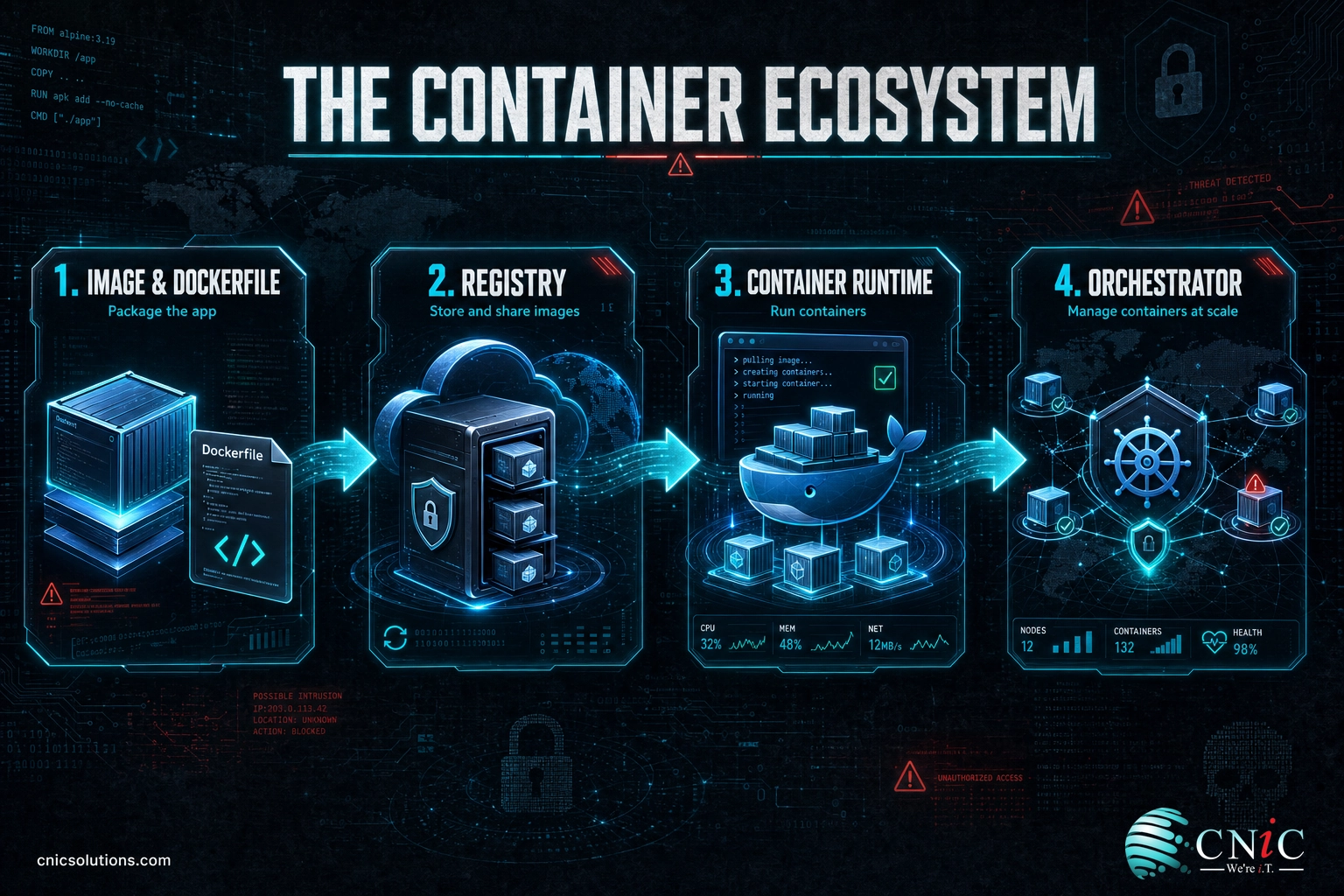
Docker: building and running containers
Docker is the platform most people mean when they say “containers.” When Docker Engine launched in 2013, it packaged container technology into tools that were genuinely easy for developers to use, along with a standard way to build and share images. That combination is what turned containers from a niche Linux capability into a mainstream standard. Docker handles building an image, running it as a container, and pushing it to a registry.
Kubernetes: orchestrating containers at scale
Running one container is easy. Running hundreds of them across many servers, keeping them healthy, and scaling them up and down is not. That is the job of an orchestrator, and Kubernetes is the standard. Originally developed at Google and now stewarded by the Cloud Native Computing Foundation, Kubernetes automatically schedules containers onto servers, restarts ones that fail, distributes traffic, and adds or removes copies as demand changes. It is the control system that makes large-scale container deployments manageable.
Open standards: the OCI
To keep containers portable across different tools and vendors, the industry agreed on common formats through the Open Container Initiative, a project under the Linux Foundation. These standards define how images are structured and how containers run, so an image built with one tool works with another. Open standards are a big part of why containers avoid vendor lock-in.
Container registries
A registry is the shared library where container images are stored, versioned, and distributed. Teams push finished images to a registry, and any authorized server pulls them to run. Registries can be public or kept private inside a company, and securing them is an important part of a safe container strategy.
Source: CNCF Annual Cloud Native Survey | Open Container Initiative
How to Get Started With Containerization
You do not need to become a container engineer to benefit from this technology. For most small and midsize businesses, the practical path looks like this:
- Identify a good first candidate. A single application that your team builds, updates often, or struggles to deploy consistently is an ideal starting point, rather than trying to containerize everything at once.
- Package it as a container image so it runs the same way in testing and production, and validate that it behaves identically in both.
- Choose where it runs. Managed cloud container services remove most of the operational burden, so you get the benefits without hiring a specialized team to run the underlying platform.
- Build in security from the start. Use trusted base images, scan images for vulnerabilities, lock down your registry, and apply the shared-kernel isolation and configuration guidance in the NIST guide above.
- Plan for orchestration only when you need it. A handful of containers may not need Kubernetes; a large, scaling deployment will.
The hardest part is rarely running a single container. It is making the right architecture, security, and platform choices so that containers actually lower your costs and risk instead of adding a new layer to manage. This is where an experienced partner earns its keep. Whether you are modernizing an existing application or building something new, the right infrastructure and security decisions up front save far more than they cost.
Get expert help managing your IT infrastructure
If your workloads are moving to containers, they are usually moving to the cloud too, and the two decisions are best made together. A well-planned cloud environment built around your applications is what lets containerization deliver its promised savings and scalability. For businesses without an in-house technology strategist, a Virtual CIO can weigh whether containers fit your roadmap and how to adopt them without disruption.
Plan a cloud environment built for your business
Related Terms
- Container image: A read-only template that packages an application and its dependencies, used to start containers.
- Container runtime: The software on a host that runs containers from images (for example, Docker or containerd).
- Kubernetes: The standard platform for orchestrating containers across many servers at scale.
- Orchestration: Automatically deploying, scaling, healing, and managing large numbers of containers.
- Microservices: An architecture that splits an application into small, independent services, each often run in its own container.
- Registry: A shared repository where container images are stored, versioned, and distributed.
- Hypervisor: The layer that creates and runs virtual machines by virtualizing hardware, the counterpart to a container engine.
- Cloud native: A way of building applications designed from the start to run in the cloud, typically using containers and orchestration.
Frequently Asked Questions
What is containerization in simple terms?
What is the difference between containers and virtual machines?
What is Docker and how does it relate to containerization?
What is Kubernetes used for?
Does a small or midsize business need containerization?
Sources
This explainer grounds its technical claims in primary standards and industry research. The definition of containerization as operating system virtualization combined with application packaging, the shared-kernel model, and the note that container segmentation is weaker than a hypervisor’s follow NIST Special Publication 800-190. Adoption figures for Kubernetes in production, cloud native adoption, and AI inference workloads come from the CNCF Annual Cloud Native Survey. The 2013 Docker Engine launch and the role of open standards reflect the Open Container Initiative and established container history.
Primary and authoritative sources: NIST SP 800-190, CNCF Annual Cloud Native Survey, Open Container Initiative.



related posts
What Is Cyber Safety? Staying Safe Online at Work
October 16, 2026Cyber safety is the everyday habits and precautions people use to protect themselves, their information, and…
What Is Cybersecurity? A Business Guide
October 16, 2026Cybersecurity is the practice of protecting computers, networks, data, and accounts from digital attacks and unauthorized…
What Is Cloud Security Posture Management (CSPM)?
October 15, 2026Cloud Security Posture Management (CSPM) is a category of security tools that continuously scan cloud environments…
What Is Cloud Computing? A Beginner’s Guide for Businesses
October 14, 2026Cloud computing is the on-demand delivery of computing resources (servers, storage, databases, software, and networking) over…