
Multi-factor authentication (MFA) is a security method that requires two or more separate proofs of identity before granting access to an account. Instead of relying on a password alone, you also confirm something you have or something you are, so a stolen password is not enough for an attacker to get in.
Almost every serious account takeover starts the same way: someone gets your password. Passwords leak in breaches, get guessed, and get handed over in phishing scams every single day. MFA is the control that makes a stolen password nearly worthless, because the attacker still has to prove they are you in a second way they cannot fake. This guide explains what MFA is, how it works, the difference between MFA and 2FA, and how to put it to work protecting your business.
Key Takeaways
- MFA requires two or more independent factors to log in, so one stolen credential is not enough to break in.
- The three factor categories are: something you know (password), something you have (phone or key), and something you are (biometric). Real MFA combines at least two different categories.
- The security gain is enormous. Microsoft found MFA blocks over 99.9% of account compromise attacks, and CISA says it makes you 99% less likely to be hacked.
- 2FA is just MFA with exactly two factors. Every 2FA setup is MFA; not all MFA stops at two.
- Not all MFA is equal. SMS codes are the weakest form; phishing-resistant MFA like FIDO security keys and passkeys is the standard to aim for.
What’s in This Guide
- How Multi-Factor Authentication Works
- The Three Authentication Factors
- MFA vs. 2FA: Clearing Up the Confusion
- Why MFA Matters for Your Business
- Types of MFA Methods, Weakest to Strongest
- Is MFA Foolproof? What It Does and Doesn’t Stop
- How to Get Started with MFA
- Related Terms
- Frequently Asked Questions
How Multi-Factor Authentication Works
In a password-only login, you present one piece of evidence and the system trusts it completely. If that single secret is stolen, the door is open. MFA closes that gap by asking for a second, independent proof before it lets anyone in.
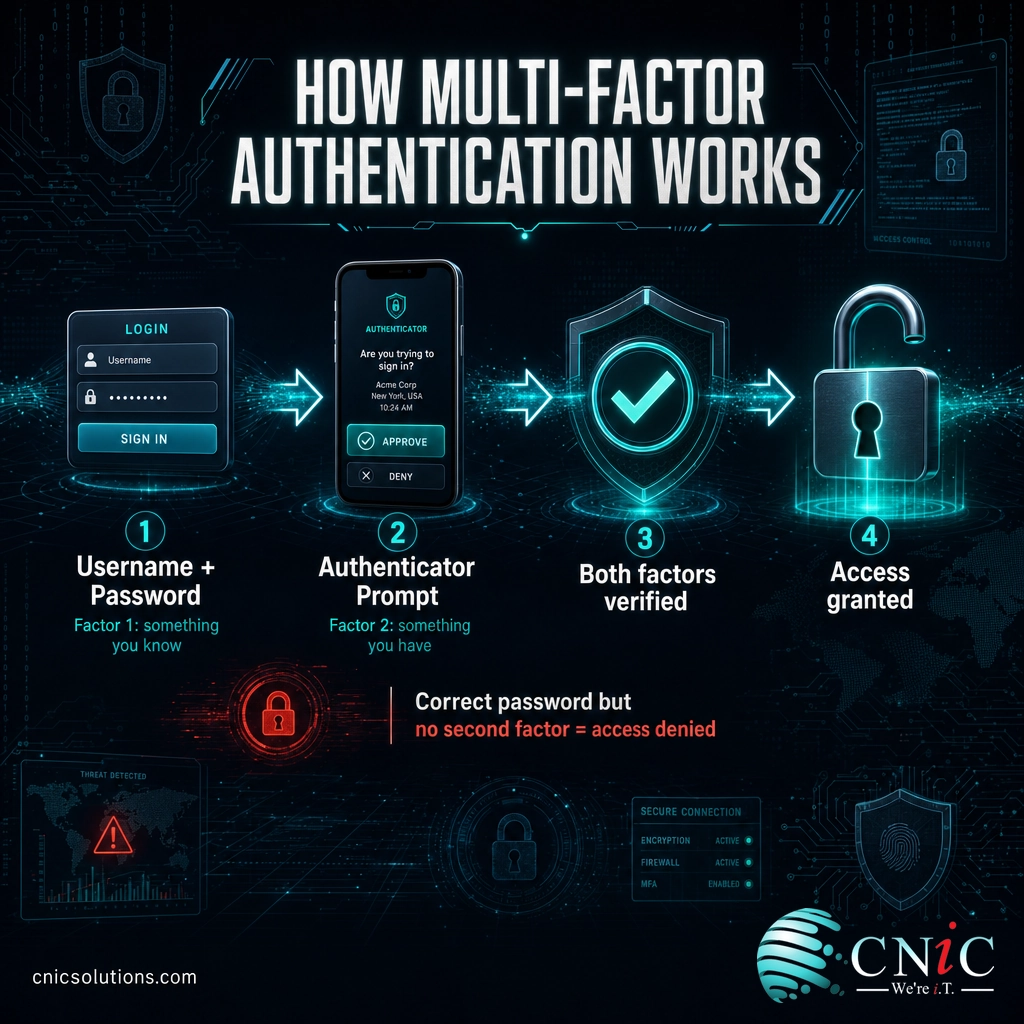
A typical MFA login runs in four steps:
- You enter your username and password as usual. This is the first factor, something you know.
- The system asks for a second factor, such as a code from an authenticator app, a tap on a push notification, or a touch of a fingerprint.
- You provide that second factor, proving you also have your phone or your enrolled device in hand.
- Access is granted only when both proofs check out. Fail the second step and the login stops, even with the correct password.
The everyday analogy is a bank ATM. Your debit card alone will not get you cash, and neither will your PIN alone. You need the card (something you have) and the PIN (something you know) together. Steal one without the other and it is useless. MFA applies that same two-lock logic to your email, cloud apps, and business systems.
The power of the approach comes from independence. The two factors have to come from different categories, so an attacker cannot compromise both with a single trick. Knowing your password does nothing to put your phone or your fingerprint in their pocket.
Source: CISA: Multifactor Authentication
The Three Authentication Factors
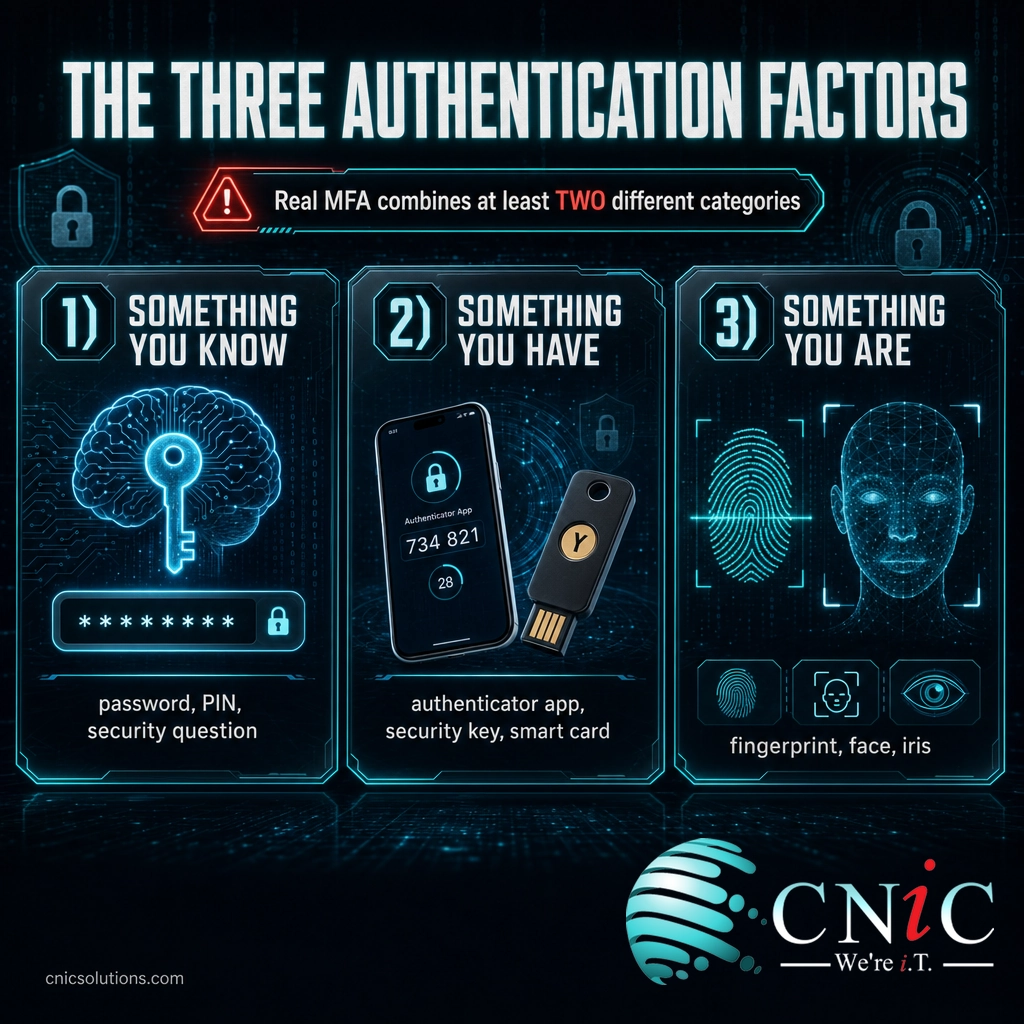
Every authentication method falls into one of three categories, or “factors.” True MFA means combining at least two of these different categories, not two of the same kind. Two passwords are not MFA; a password plus a phone code is.
| Factor | What it means | Everyday examples |
|---|---|---|
| Something you know | A secret stored in your memory | Password, PIN, security question answer |
| Something you have | A physical item in your possession | Smartphone, authenticator app, hardware security key, smart card |
| Something you are | A unique physical trait (biometric) | Fingerprint, face scan, iris scan |
Why does mixing categories matter so much? Because each category fails in a different way. A password can be guessed or phished from a distance. A phone has to be physically taken or cloned. A fingerprint has to be forged in person. Requiring evidence from two separate categories forces an attacker to defeat two fundamentally different defenses at once, which is far harder than stealing one password. This three-factor model is the foundation of the NIST Digital Identity Guidelines that shape modern authentication standards.
Source: NIST SP 800-63B: Digital Identity Guidelines
MFA vs. 2FA: Clearing Up the Confusion
The most common question about MFA is how it differs from 2FA, and the answer is simpler than most people expect. Two-factor authentication (2FA) is just MFA that uses exactly two factors. MFA is the umbrella term for any login requiring two or more factors; 2FA is the specific, most common case where the number is two.
| 2FA (Two-Factor) | MFA (Multi-Factor) | |
|---|---|---|
| Number of factors | Exactly two | Two or more |
| Relationship | A specific type of MFA | The broad category that includes 2FA |
| Typical example | Password + phone code | Password + phone code + fingerprint |
| Where you’ll see it | Most consumer and business logins | High-security systems, sensitive data, regulated environments |
Put plainly: all 2FA is MFA, but not all MFA is 2FA. When a bank adds a text-message code to your password, that is 2FA. When a hospital system asks for a password, a hardware key, and a fingerprint, that is MFA with three factors. For most businesses, well-implemented two-factor authentication is the practical baseline, with stronger multi-factor setups reserved for the most sensitive systems.

Why MFA Matters for Your Business
MFA is not a nice-to-have. It is consistently ranked as one of the highest-impact security controls a business can turn on, and the data explains why. The reason attackers keep going after passwords is that passwords keep working, right up until MFA takes them off the table.
Those numbers point at one conclusion: the password is the weak link, and MFA is the reinforcement. Verizon’s investigators found stolen credentials remain the single most common way attackers break in, and phishing was the starting point in another large share of breaches. MFA directly neutralizes both. Even when a criminal phishes or buys a working password, they hit a wall at the second factor.
There is also a compliance dimension. Cyber-insurance carriers increasingly require MFA before they will write or renew a policy, and frameworks that regulated CNiC clients answer to, including HIPAA, PCI-DSS, and SOC 2, expect MFA on systems that touch sensitive data. For many businesses, MFA has moved from best practice to a documented requirement.
Source: Microsoft Security | Verizon 2025 Data Breach Investigations Report
Types of MFA Methods, Weakest to Strongest
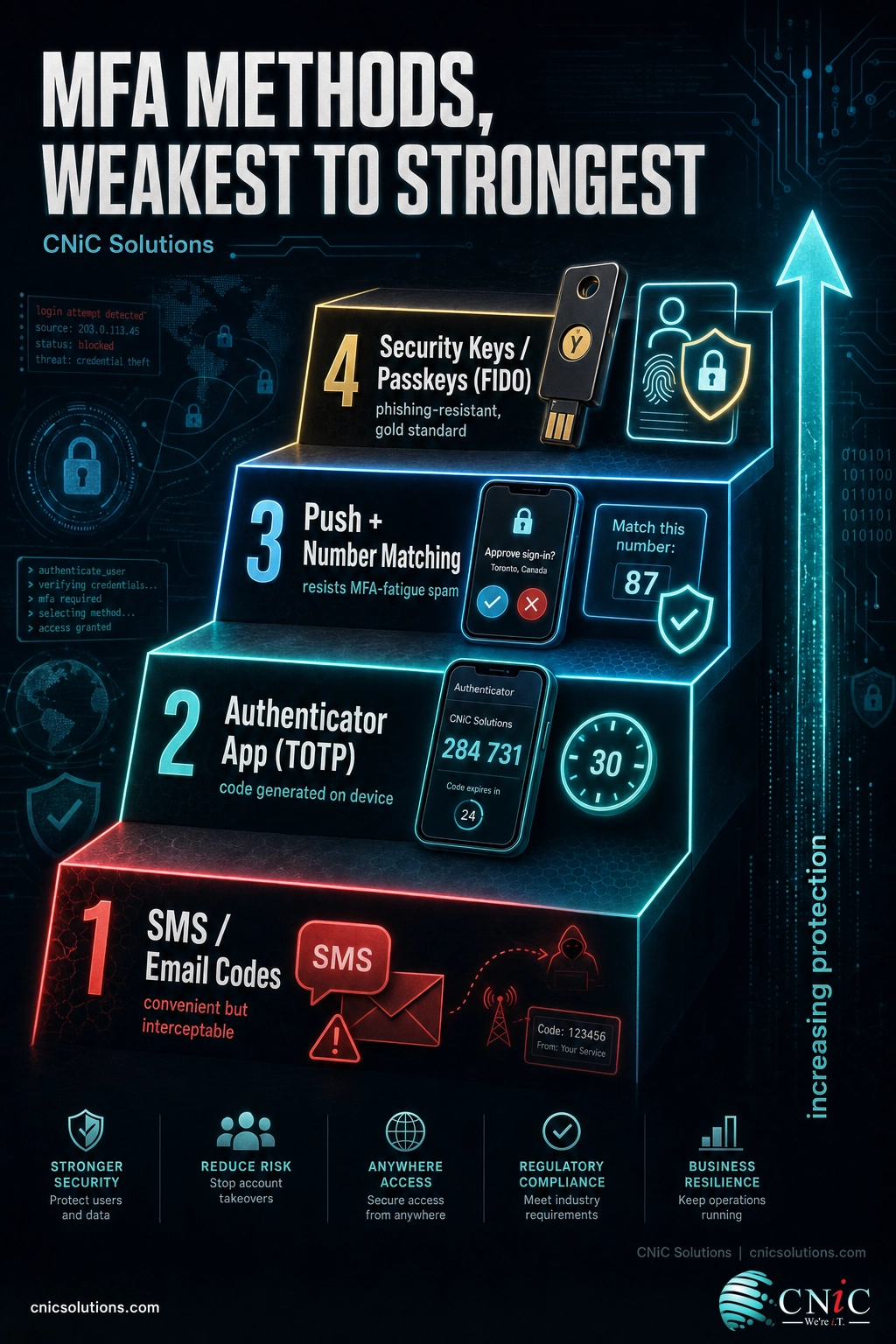
All MFA raises the bar, but the methods are not equally strong. Understanding the ladder helps you choose the right level of protection for the right systems. Here they are, roughly from most convenient-but-weakest to most secure.
SMS and Email One-Time Codes
A code texted or emailed to you after your password. This is the most familiar form and far better than nothing, but it is the weakest option. Text messages can be intercepted, and attackers use SIM-swapping (hijacking your phone number) to steal the code. Use it where nothing stronger is offered, but do not treat it as your ceiling.
Authenticator App Codes (TOTP)
An app such as Microsoft Authenticator or Google Authenticator generates a rotating six-digit code every 30 seconds. Because the code is created on your device rather than sent over the network, it sidesteps the interception and SIM-swap weaknesses of SMS. This is a strong, low-cost baseline for most business accounts.
Push Notifications and Number Matching
Instead of typing a code, you approve a prompt on your phone. It is fast and user-friendly, but simple “approve/deny” prompts can be defeated by MFA-fatigue attacks, where an attacker spams requests hoping you tap approve. Number matching, where you type a number shown on the login screen into the app, closes that gap and is now the recommended configuration.
Hardware Security Keys and Passkeys (FIDO)
A physical security key (such as a YubiKey) or a passkey built on the FIDO/WebAuthn standard is the gold standard. These methods are phishing-resistant: they are cryptographically tied to the real website, so they will not authenticate against a fake lookalike page at all. CISA specifically urges organizations to move toward phishing-resistant MFA for their most important accounts.
Source: CISA: More Than a Password
Is MFA Foolproof? What It Does and Doesn’t Stop
MFA is one of the best returns on effort in all of security, but it is a layer, not a force field. Understanding its limits is what separates a checkbox rollout from real protection.
Myth: “I have MFA, so my accounts can’t be hacked.”
MFA dramatically reduces risk, but it does not make an account invincible. Weaker methods are the vulnerable ones. SMS codes can be stolen through SIM swapping, and simple push prompts can be worn down by MFA-fatigue spam. More advanced adversary-in-the-middle phishing kits can even relay a login session in real time to slip past standard MFA. The fix is not to abandon MFA; it is to use stronger, phishing-resistant MFA on the accounts that matter most and to configure the rest well. Any MFA beats no MFA, and phishing-resistant MFA beats the rest.
The practical takeaway is that how you deploy MFA matters as much as whether you deploy it. Rolling out authenticator apps instead of SMS, turning on number matching for push prompts, and reserving hardware keys for administrators and high-value accounts turns MFA from a speed bump into a genuine wall. This is exactly the kind of configuration and oversight that gets missed when MFA is switched on ad hoc and never revisited.
Source: CISA: More Than a Password
How to Get Started with MFA
You do not need to protect everything at once. A sensible rollout follows the risk, starting with the accounts an attacker would most want.
- Protect email first. Email is the master key: it resets passwords for everything else. Enabling MFA on Microsoft 365 or Google Workspace is the highest-value first move.
- Cover your critical apps. Extend MFA to cloud storage, financial and accounting systems, your CRM, and remote-access or VPN logins.
- Prioritize privileged accounts. Administrators and anyone with elevated access should be on the strongest, phishing-resistant methods.
- Choose the right method per system. Prefer authenticator apps or hardware keys over SMS, and enable number matching for push notifications.
- Enforce it, don’t just offer it. Require MFA through policy so it is on by default, and plan for account recovery so a lost phone does not lock people out.
The hard part for most businesses is rarely turning MFA on for one account. It is deploying it consistently across every employee and system, choosing the right method for each, and keeping it enforced as staff and tools change. A single unprotected admin login or a legacy app left on SMS can undo an otherwise solid posture. That fleet-wide consistency is precisely what managed IT and cybersecurity services exist to deliver: rolling out MFA everywhere, hardening the configuration, and verifying it holds up under a compliance audit.
Roll out MFA with managed cybersecurity
For businesses without an in-house security team, MFA is best handled as part of a managed program rather than a one-time project. The same partner that deploys it can align it with your compliance obligations and build it into a broader access strategy. A Virtual CIO can set that policy, and day-to-day managed IT support keeps it enforced across every device and user.
Get MFA managed across your whole business
Related Terms
- 2FA (Two-Factor Authentication): MFA that uses exactly two factors, the most common everyday form.
- Authentication factor: A category of proof: something you know, have, or are.
- TOTP (Time-Based One-Time Password): The rotating 30-second code produced by an authenticator app.
- FIDO2 / Passkeys: A modern, phishing-resistant standard that replaces or backs up passwords with cryptographic keys.
- Phishing-resistant MFA: Methods like security keys that cannot be tricked by fake login pages.
- SSO (Single Sign-On): One secure login that grants access to many apps, often paired with MFA at the front door.
- Zero Trust: A security model that verifies every request; MFA is a core building block of it.
- Credential: A username-and-password pair, the exact thing MFA is designed to protect. See our guide to how encryption protects stored data and the latest phishing attack data MFA defends against.
Frequently Asked Questions
What is MFA in simple terms?
What is the difference between MFA and 2FA?
What are the three factors of authentication?
Is MFA really necessary if I have a strong password?
Can MFA be hacked or bypassed?
Sources
This explainer grounds its claims in primary and government sources. The three-factor authentication model and authenticator definitions follow the NIST Digital Identity Guidelines (SP 800-63B). The MFA effectiveness figures come from Microsoft’s published security research and CISA’s “More Than a Password” guidance. The share of breaches involving stolen credentials is drawn from the Verizon 2025 Data Breach Investigations Report. Phishing-resistant MFA guidance reflects CISA’s official recommendations.
Primary and authoritative sources: CISA More Than a Password, CISA Multifactor Authentication, NIST SP 800-63B, Microsoft Security, Verizon 2025 DBIR.



related posts
What Is Mobile Device Management (MDM)? A Guide for Businesses
October 24, 2026Mobile Device Management (MDM) is software that lets an organization remotely enroll, configure, secure, and monitor…
What Is Log Analysis? How It Works and Why It Matters
October 23, 2026Log analysis is the practice of reviewing and interpreting the log files that computers, applications, and…
What Is IT Monitoring? A Guide for Businesses
October 23, 2026IT monitoring is the continuous practice of collecting and analyzing data from a business's technology, its…
What Is ISO 27001? A Guide to the Information Security Standard
October 22, 2026ISO 27001 is the world's best-known standard for managing information security, and increasingly the certification customers…