

Mobile Device Management (MDM) is software that lets an organization remotely enroll, configure, secure, and monitor the smartphones, tablets, and laptops its employees use for work. From one console, IT can enforce security policies, push updates and apps, and lock or wipe a lost device, turning a scattered collection of devices into a managed, protected fleet.
Every phone and laptop your team uses for work is also a door into your business. Mobile Device Management is how you put a lock on that door. As work has spread across personal phones, company laptops, and tablets that leave the office every night, the old approach of trusting each device to look after itself stopped being safe. MDM gives a business a single place to see every device, enforce the same security rules on all of them, and act fast when one goes missing. This guide explains what MDM is, how it actually works, how it differs from the related terms it gets confused with (EMM and UEM), why it matters for a business right now, and how to get started.
Key Takeaways
- MDM manages the whole device. It enrolls phones, tablets, and laptops, then enforces security policy on them from one central console.
- Remote lock and wipe is the core protection. A lost or stolen device should never become a data breach.
- MDM, EMM, and UEM are layers, not rivals. Each adds scope: MDM the device, EMM the apps and content, UEM every endpoint.
- It protects personal devices without invading them. Containerization separates work data from personal data on BYOD phones.
- You do not have to run it yourself. Many businesses have a managed IT partner deploy and operate MDM for them.
What’s in This Guide
What MDM Is
Mobile Device Management is a category of software that gives an organization centralized control over the mobile devices its people use for work. The U.S. National Institute of Standards and Technology (NIST) defines it plainly as the administration of mobile devices such as smartphones, tablets, and laptops, usually delivered through a third-party product with management features for those devices. In practice, that means one administrator can set the rules for hundreds of devices at once instead of touching each one by hand.
The “mobile” in the name is now a little misleading. Early MDM was built for company-issued smartphones, but modern platforms manage laptops and desktops too, which is why the market has largely moved toward broader terms like endpoint management. The core idea has stayed the same: a business needs to know which devices touch its data, hold them all to a consistent security standard, and be able to step in remotely when something goes wrong.
How MDM Works
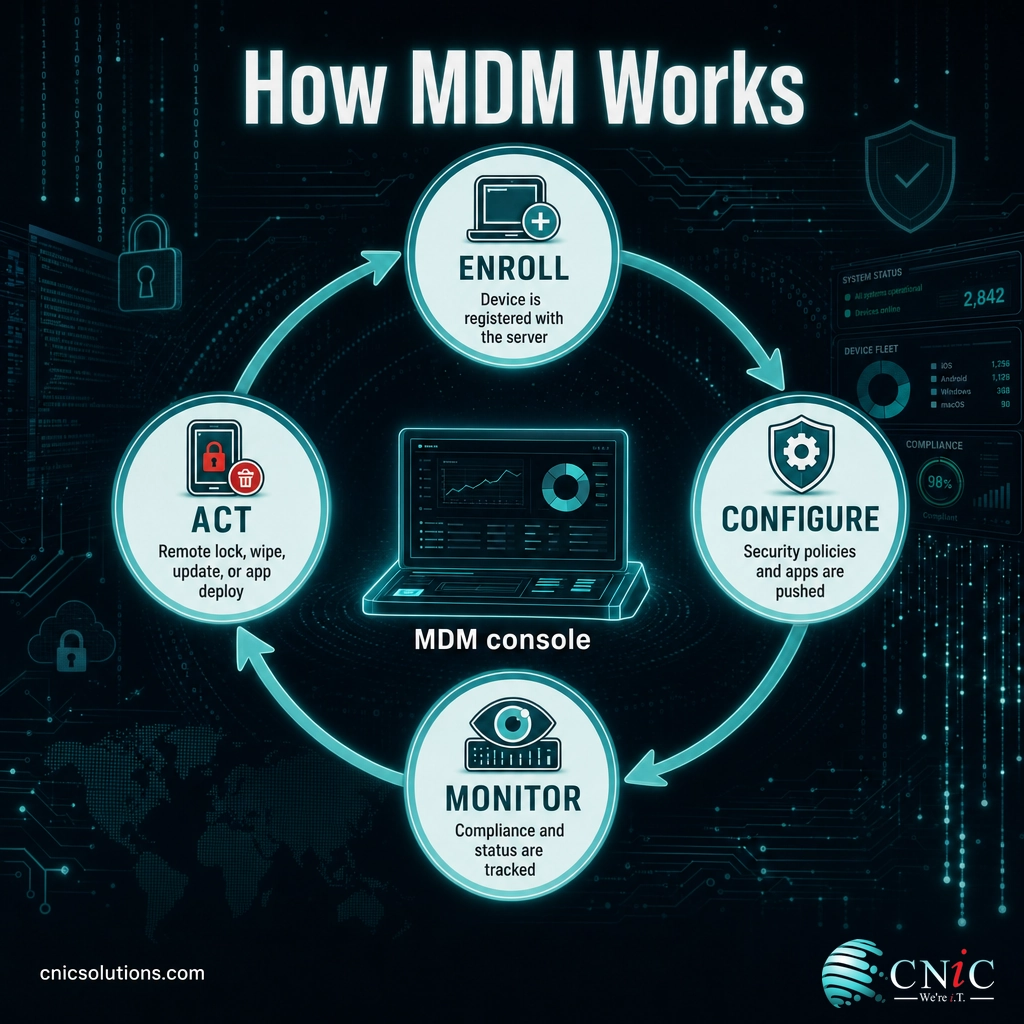
Under the hood, every MDM platform follows the same basic loop. A device is brought under management, given its rules, watched for compliance, and acted on when needed.
- Enrollment: The device is registered with the MDM server, either by the employee following a short setup, or automatically through programs like Apple Business Manager or Windows Autopilot that enroll a device the moment it is switched on. Enrollment links the device to your management console.
- Configuration and policy: IT pushes a profile that sets the rules: require a passcode and encryption, install the apps the role needs, connect corporate Wi-Fi and email, and block risky settings. Every enrolled device inherits the same baseline automatically.
- Monitoring: The console continuously reports each device’s status, whether it is compliant with policy, up to date, and healthy, so IT can spot a device that has fallen out of line before it becomes a problem.
- Remote action: When something changes, IT acts from the console: push an update, deploy or remove an app, reset a passcode, and, most importantly, remotely lock or wipe a device that is lost or stolen so the data on it cannot be reached.
That last capability is the one that earns MDM its place. Without it, a laptop left in a taxi is a potential breach; with it, the device is locked or erased before anyone can open it.
MDM vs. MAM vs. EMM vs. UEM
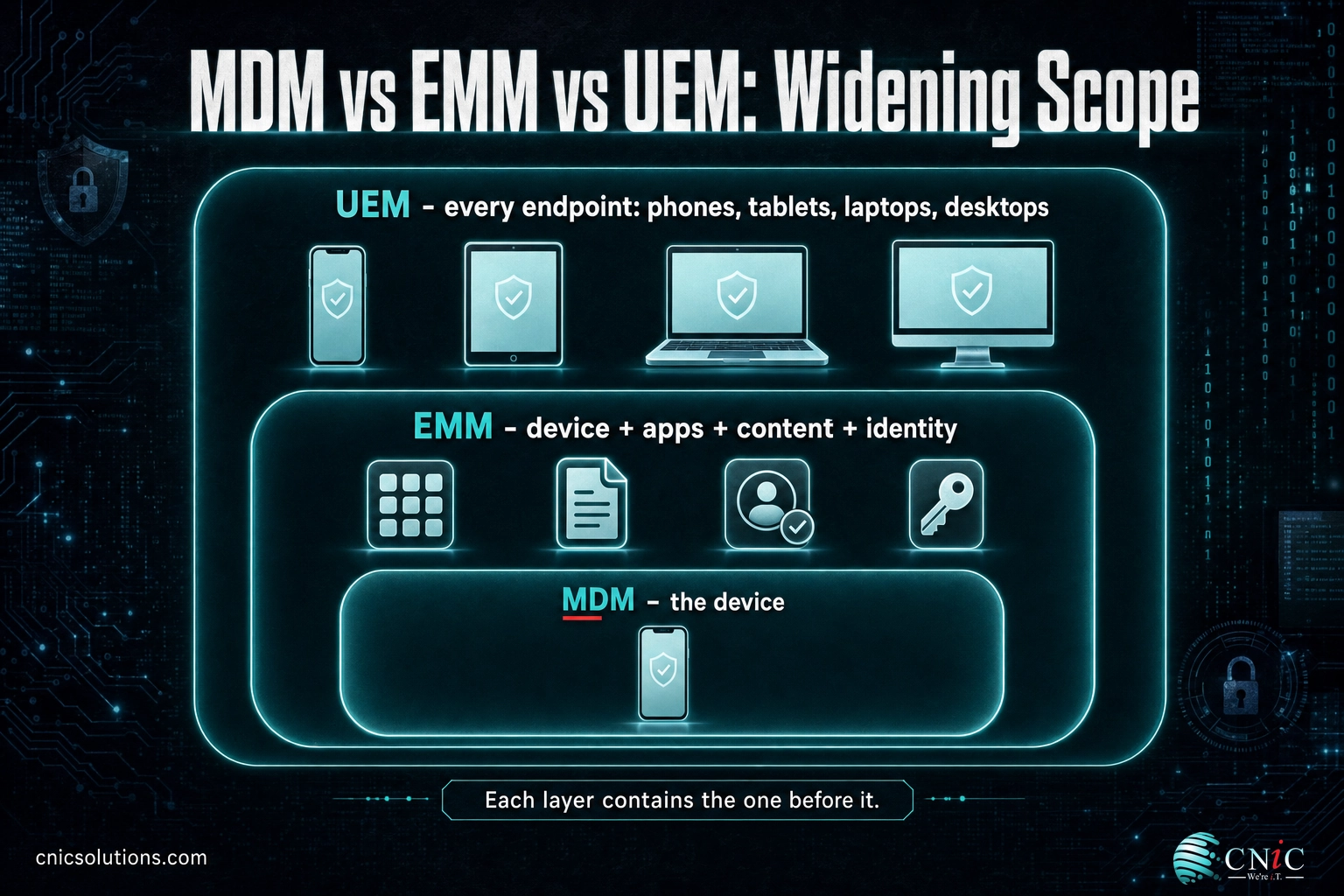
These four acronyms cause more confusion than anything else in this space, largely because vendors use them loosely. They are not competing products so much as widening circles of scope. Here is the distinction that clears it up:
| Term | What it manages | Best thought of as |
|---|---|---|
| MDM (Mobile Device Management) | The device as a whole: settings, security policy, enrollment, remote lock/wipe | Control of the device |
| MAM (Mobile Application Management) | Only the work apps and their data, not the whole device | Control of the apps |
| EMM (Enterprise Mobility Management) | MDM plus app, content, and identity management around the device | The device and everything on it |
| UEM (Unified Endpoint Management) | Phones, tablets, laptops, and desktops, all from one console | Every endpoint, unified |
The simplest way to hold it in your head: MDM manages the device, MAM manages just the apps on it, EMM wraps the device and its apps, content, and users together, and UEM stretches that same management across every kind of endpoint a business runs. Most platforms sold today as “MDM” are really EMM or UEM tools; the older label has just stuck. For a business, the label matters far less than confirming a platform covers your actual device mix and the controls you need.
With the vocabulary sorted out, the real question for a business owner is not which acronym to buy, but why any of this belongs on the priority list at all.

Why MDM Matters for Businesses
The case for MDM comes down to a simple shift: work no longer happens on devices the business fully controls. Company data now sits on personal phones, home laptops, and tablets that travel everywhere, and attackers have noticed. Mobile has become a front line, not an afterthought.
The risk is not only malware. The way employees use their devices keeps widening the surface an attacker can reach, and much of that use is invisible to a business without a way to see and manage its fleet.
Managed devices are measurably more in control than unmanaged ones. The same research found that organizations using MDM are far more likely to have basic governance in place, a stand-in for a wider truth: you cannot enforce what you cannot see.
Beyond raw risk reduction, MDM increasingly shows up as a requirement rather than a nice-to-have. Cyber insurers ask whether devices are centrally managed before they write or renew a policy, and compliance frameworks such as HIPAA and PCI-DSS expect enforceable controls like encryption, access restrictions, and the ability to remove data from a lost device. MDM is how a business proves those controls exist and are actually applied.
Myth: “MDM is surveillance, and we’re too small to need it”
Two misconceptions keep businesses from adopting MDM. The first is that MDM lets an employer spy on personal phones. On a bring-your-own-device setup, MDM manages only a separated work container, not personal texts, photos, or browsing. The second is that MDM is enterprise-only. In reality, smaller businesses are the more exposed target precisely because they often lack centralized control, and modern MDM is priced and packaged for teams of any size, including managed options that require no in-house IT at all.
Source: NIST glossary definition of mobile device management | Verizon 2025 Mobile Security Index
Types of MDM: Ownership Models
MDM is not one-size-fits-all, and the biggest fork is who owns the device. The right policies, and how far the business’s control reasonably extends, depend on that answer. Three ownership models cover almost every situation:
| Model | Who owns the device | Best for |
|---|---|---|
| BYOD (Bring Your Own Device) | The employee | Teams using personal phones for work; relies on containerization to separate work and personal data |
| COPE (Corporate-Owned, Personally Enabled) | The business | Company-issued devices employees may also use personally; full management with reasonable personal use |
| COBO (Corporate-Owned, Business Only) | The business | Single-purpose or high-security devices, such as frontline or kiosk hardware, locked to work use only |
Most small and midsize businesses end up with a blend, often BYOD phones alongside company-owned laptops, and a good MDM setup handles them under different policies from the same console. The key with BYOD in particular is separation: work data lives in a managed container the business can secure and wipe, while the employee’s personal side stays private and untouched.
How to Get Started with MDM
Rolling out MDM is less about the tool and more about the plan behind it. A sensible path looks like this:
- Inventory your devices. List what actually touches company data, by platform (Apple, Windows, Android) and by ownership (personal or company-owned). This decides what a platform must cover.
- Define your policies. Decide the baseline before you enforce it: passcode and encryption requirements, which apps are allowed, how BYOD is separated, and what happens when a device is lost.
- Choose a platform that fits your mix. The best MDM is the one that manages your real device fleet and the controls you need, not the one with the longest feature list.
- Enroll, test, and monitor. Enroll a small group first, confirm the policies behave as intended, then roll out fleet-wide and keep an eye on compliance.
If you are ready to compare specific platforms, our companion guide to the best MDM solutions for small business ranks the leading options by the kind of business each one fits. And because MDM is one layer of a wider security posture, it is worth seeing where it sits alongside encryption and access control in an IT compliance checklist for small business.
The honest catch is that choosing the tool is the easy part. Enrolling every device, writing sensible policies, keeping them enforced, and responding when a device goes missing is ongoing work a lean team rarely has spare time for. This is where a managed IT partner earns its place. As a Houston managed IT and cybersecurity provider, CNiC Solutions deploys and operates MDM for businesses, so you get centralized device security without running the console yourself, and our managed IT services fold device management into a single, supported IT operation. For businesses weighing where device security fits in a broader technology plan, our Virtual CIO services help align it with overall risk and budget.
Let CNiC secure and manage your business devices
Frequently Asked Questions
What is Mobile Device Management (MDM)?
How does MDM work?
What is the difference between MDM, EMM, and UEM?
Can MDM see everything on my personal phone?
Does a small business need MDM?
Related Terms
- UEM (Unified Endpoint Management): The broadest form of device management, covering phones, tablets, laptops, and desktops from one console. Most modern MDM platforms are really UEM tools.
- BYOD (Bring Your Own Device): A policy letting employees use personal devices for work, secured through containerization that separates work data from personal data.
- Endpoint protection and EDR: Software that detects and stops threats on individual devices; a close partner to MDM. See our guide to the best endpoint protection for SMBs.
- Data encryption: Scrambling data so only authorized users can read it, one of the core controls MDM enforces on managed devices. See data encryption explained.
- Containerization: Separating work apps and data into a managed “container” on a device, so the business can secure or wipe work data without touching personal content.
- Zero trust: A security model that verifies every user and device before granting access, rather than trusting anything inside the network by default. Device compliance signals from MDM feed directly into it.
About This Guide and Sources
The definition and framework in this guide reflect standard, widely consistent characterizations of mobile device management, anchored to the U.S. National Institute of Standards and Technology (NIST) glossary definition of MDM. The management workflow (enroll, configure, monitor, act), the MDM/MAM/EMM/UEM scope distinction, and the BYOD, COPE, and COBO ownership models are industry-standard concepts described here as such. The statistics cited, on the rise in mobile-device attacks, employee use of generative AI on mobile, and audit practices among organizations with and without MDM, come from the Verizon 2025 Mobile Security Index. Specific product capabilities and pricing vary by vendor and tier and are not quoted here; confirm current details with each vendor.
Primary sources: NIST glossary: mobile device management | Verizon 2025 Mobile Security Index.



related posts
What Is MFA? How Multi-Factor Authentication Protects Your Accounts
October 24, 2026Multi-factor authentication (MFA) is a security method that requires two or more separate proofs of identity…
What Is Log Analysis? How It Works and Why It Matters
October 23, 2026Log analysis is the practice of reviewing and interpreting the log files that computers, applications, and…
What Is IT Monitoring? A Guide for Businesses
October 23, 2026IT monitoring is the continuous practice of collecting and analyzing data from a business's technology, its…
What Is ISO 27001? A Guide to the Information Security Standard
October 22, 2026ISO 27001 is the world's best-known standard for managing information security, and increasingly the certification customers…