

The most effective IT cost reduction strategies start with eliminating waste you are already paying for, not with cutting the technology your business depends on. Reclaim over-provisioned cloud resources, cancel unused software licenses, consolidate overlapping tools and vendors, and shift unpredictable, reactive spending into planned managed support. Done in that order, most businesses trim their tech bill meaningfully without touching security, performance, or the tools people actually use.
Technology spending keeps climbing. Gartner projects worldwide IT spending will reach roughly 6.4 trillion dollars in 2026, and for most businesses IT is now a permanent, growing line item rather than an occasional purchase. The good news is that a large share of that spend is recoverable. Industry research consistently shows that companies waste a meaningful percentage of their cloud and software budgets on resources nobody uses. This guide walks through eight practical strategies to cut tech spend, in the order that produces the fastest, safest results, and it is just as clear about what you should never cut, because the cheapest IT decision is not always the one that saves money.
Key Takeaways
- Start with waste, not capability. Unused cloud capacity and idle software licenses are the fastest, safest cuts, and you are already paying for them.
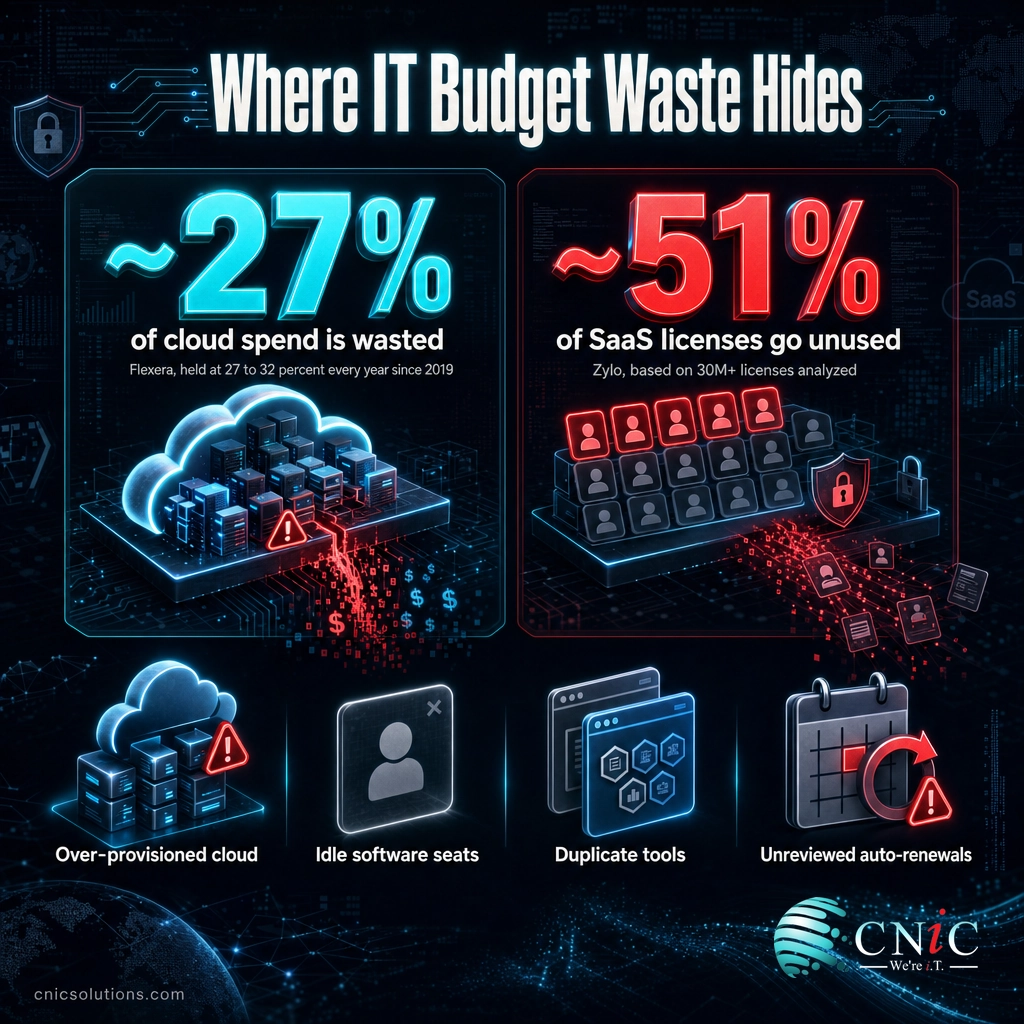
- Cloud and SaaS are the biggest leaks. Flexera puts wasted cloud spend near 27 percent; Zylo finds about half of SaaS licenses sit unused.
- Consolidation compounds. Fewer overlapping tools and vendors means lower licensing, less admin overhead, and stronger negotiating power.
- Predictable beats cheap. Moving from reactive break-fix to managed IT trades volatile, surprise costs for one planned expense, and prevents costly downtime.
- Never cut security, backups, or patching to save money. The cost of a breach or a day of downtime almost always exceeds the savings.
What’s in This Guide
- Where Your IT Budget Actually Leaks
- Reclaim Wasted Cloud Spend
- Cancel Unused Software Licenses
- Consolidate Overlapping Tools and Vendors
- Trade Reactive Break-Fix for Proactive Managed IT
- Shift from Big Purchases to Predictable OpEx
- Automate Repetitive IT Work
- Review Contracts Before They Auto-Renew
- Put a Strategy Behind the Spend
- Hidden Costs That Quietly Inflate Your Bill
- Cutting Costs Without Cutting Capability
- How to Build Your Cost-Reduction Plan
- IT Cost Reduction Strategies at a Glance
- Frequently Asked Questions
Where Your IT Budget Actually Leaks
Before you cut anything, it helps to know where technology budgets actually leak, because the biggest savings almost never come from the line items owners worry about first. The pattern across independent research is consistent: the largest recoverable waste hides in cloud infrastructure and software subscriptions, precisely the areas that grow quietly month over month without anyone deciding to spend more.
Those two numbers alone explain why so many cost-reduction efforts succeed without anyone losing a tool they rely on. When roughly a quarter of cloud spend and half of software licenses deliver no value, the first job is not cutting, it is reclaiming. The strategies below are ordered so the fastest, lowest-risk moves come first, and the bigger structural changes follow once the easy waste is gone.
Source: Flexera 2025 State of the Cloud report | Zylo 2024 SaaS Management Index
Strategy 1: Reclaim Wasted Cloud Spend
Cloud is usually the single largest source of recoverable waste, and it is recoverable precisely because it is easy to overspend without noticing. Teams provision generous instances “to be safe,” spin up test environments they forget to shut down, and keep storage tiers far more expensive than the data needs. None of it triggers an alarm; it just shows up as a slightly bigger bill each month.
The fix is disciplined right-sizing. Match compute and storage to real usage rather than peak-day guesses, schedule non-production environments to shut down nights and weekends, delete orphaned resources, and move cold data to cheaper storage tiers. Reserved or committed-use pricing can cut the rate on workloads you know you will run continuously. Because Flexera has found that 84 percent of organizations struggle to manage cloud spend, this is rarely a one-time cleanup; it works best as a standing review. A well-run cloud environment should be sized to what you use, not what you provisioned a year ago.
Source: Flexera 2025 State of the Cloud report
Strategy 2: Cancel Unused Software Licenses
Software subscriptions are the second great leak, and often the easier one to fix. Zylo’s analysis found companies use only about 49 percent of the SaaS licenses they pay for, meaning roughly half sit idle. It happens naturally: an employee leaves but the license lingers, a department buys a tool the whole company already has, or a plan auto-upgrades to a tier nobody needed.
Start with a full software inventory. List every subscription, who owns it, how many seats you pay for, and how many are actually active. The gaps are usually obvious once they are on one page. Reclaim licenses from departed employees, downgrade over-sized plans, and cancel tools with near-zero usage. Pay special attention to “shadow IT,” the apps bought on individual credit cards outside of procurement, because they hide both cost and security risk. A recurring license true-up, done quarterly, keeps this waste from creeping back.
Source: Zylo 2024 SaaS Management Index
Strategy 3: Consolidate Overlapping Tools and Vendors
Most businesses accumulate tools faster than they retire them. Over a few years you end up with two overlapping project trackers, three ways to store files, and a handful of point solutions that each do one slice of what a single platform could handle. Every one of those carries its own license, its own admin time, and its own security surface.
Consolidation attacks all three at once. Standardizing on fewer, broader platforms lowers total licensing, cuts the hours spent administering and integrating redundant systems, and reduces the number of vendors you have to manage and secure. It also strengthens your position at renewal: concentrating spend with fewer vendors gives you real negotiating power that a scatter of small contracts never will. The goal is not the fewest possible tools, it is no duplication, every platform earning its place.
Strategy 4: Trade Reactive Break-Fix for Proactive Managed IT
Paying for IT only when something breaks feels frugal, but it is usually the most expensive model over time. Break-fix means unpredictable invoices, slower response when you are already down, and no one steadily preventing the next failure. The costs that hurt most are the ones that never appear on an IT invoice at all: lost productivity, missed orders, and idle staff during an outage.
That is where the real math lives. ITIC reports that for more than 90 percent of mid-size and large enterprises, a single hour of downtime now costs over 300,000 dollars. Smaller businesses face smaller absolute numbers, but the same principle holds: prevention is far cheaper than recovery. Proactive managed IT support replaces surprise repair bills with one predictable monthly fee and, more importantly, invests continuously in monitoring, patching, and maintenance that keeps small problems from becoming outages. You are not just smoothing the cost curve, you are shrinking the expensive events that break budgets. If you are weighing this against hiring internally, our breakdown of in-house versus outsourced IT costs works through the full total-cost comparison.
Source: ITIC 2024 Hourly Cost of Downtime report
Strategy 5: Shift from Big Purchases to Predictable OpEx
Large upfront hardware and software purchases (the capital-expense, or CapEx, model) tie up cash, age on a fixed schedule, and force replacement decisions all at once. Shifting toward operating-expense (OpEx) models, where you pay a predictable subscription or per-user fee for cloud services, software, and managed support, smooths cash flow and makes budgeting far more stable. Instead of a painful hardware refresh every few years, you carry a steady, plannable monthly cost.
This is not about spending less on paper every single month; it is about predictability and cash efficiency, which for most small and midsize businesses is worth more than a lumpy capital cycle. It also aligns spending with actual use: you scale up or down as headcount changes rather than paying for capacity you bought in advance. For the full framework on structuring spend this way, see our IT budget planning guide, which covers hardware refresh timing and the CapEx-versus-OpEx decision in detail.
Strategy 6: Automate Repetitive IT Work
A surprising share of IT cost is just time spent on repetitive tasks: onboarding and offboarding users, resetting passwords, applying routine patches, provisioning accounts, and answering the same handful of support questions. None of it is complicated, but at volume it consumes hours that cost money whether an internal employee or a provider performs them.
Automation reclaims that time. Automated user provisioning and deprovisioning, scripted patching, self-service password resets, and templated workflows handle routine work faster and more consistently than a person doing it by hand, and they reduce the human errors that create their own costly cleanups. The savings are twofold: fewer labor hours spent on low-value work, and fewer expensive mistakes. Freed-up capacity then goes to work that actually moves the business forward instead of keeping the lights on.
Strategy 7: Review Contracts Before They Auto-Renew
Auto-renewal is where quiet overspending becomes permanent. Contracts for software, connectivity, phone systems, and hardware maintenance renew on schedules nobody is tracking, often at rates that no longer reflect the market or your actual usage. The vendor has every incentive to let a good deal for them roll over untouched.
Build a simple renewal calendar that flags every contract 60 to 90 days before it renews, enough runway to actually renegotiate or switch. At each renewal, ask three questions: are we still using this, are we paying the right amount for our current usage, and is there a better rate available now. Bundling services, committing to longer terms where it makes sense, and asking for a better price all work more often than businesses expect. The single discipline of never letting a contract auto-renew unreviewed pays for itself repeatedly.
Strategy 8: Put a Strategy Behind the Spend
The most overlooked cost-reduction strategy is not a tactic at all, it is oversight. Technology spending drifts when no one owns the big picture: each purchase makes sense on its own, but nobody is asking whether the whole portfolio aligns with where the business is going. That is how companies end up funding tools that no longer fit and underfunding the ones that would actually move the needle.
Strategic oversight connects every IT dollar to a business outcome. It means planning technology spend against a roadmap, catching redundancy before it is purchased, and directing budget toward the investments with the clearest return. For businesses without a full-time technology executive, a Virtual CIO provides exactly this: senior-level planning and cost discipline without the cost of a C-level hire. Interestingly, Deloitte’s 2024 Global Outsourcing Survey found that cost reduction as the top reason to outsource fell to 34 percent while access to specialized talent rose to 42 percent, a sign that the real value of outside expertise is now capability and cost together, not cost alone.
Source: Deloitte 2024 Global Outsourcing Survey
Get a strategic review of your IT spend
Hidden Costs That Quietly Inflate Your Bill
The costs that never make it onto an IT quote
Some of the biggest budget leaks are invisible until you go looking for them. Watch for these:
- Auto-renewing contracts rolling over at above-market rates because no one reviewed them in time.
- Cloud egress and over-provisioning fees, the charges for moving data out and for capacity you reserved but never use.
- Shadow IT, subscriptions bought on employee cards outside procurement, which inflate spend and create security gaps at the same time.
- Downtime, the most expensive hidden cost of all. Lost productivity, stalled sales, and idle staff during an outage rarely appear on any invoice, yet they can dwarf every other line item.
- Deferred maintenance, the failure you postpone today that arrives later as an emergency, at emergency prices.
None of these show up when you compare tool prices, which is exactly why they persist. A genuine cost-reduction effort accounts for total cost, not sticker cost.
Cutting Costs Without Cutting Capability
There is a wrong way to reduce IT costs, and it is the tempting one: cut the protective, unglamorous spending because nothing bad is happening right now. Trimming security controls, skipping backups, delaying patches, or dropping monitoring all lower this month’s bill. They also quietly raise your exposure, and the eventual cost of that exposure is on a completely different scale from the savings.
Set that number against what businesses typically spend on the protection that prevents downtime, and the return on prevention is obvious. The same holds for security and backups: the cost of a single serious incident, in recovery, lost business, and reputation, routinely exceeds years of the spending that would have prevented it. This is the difference between cutting cost and cutting value.
Myth: the cheapest IT is the best value
The lowest-priced option is not the same as the lowest total cost. Cheap IT that leaves you exposed to a breach, an extended outage, or constant productivity loss ends up far more expensive than a slightly higher, well-managed budget. Real cost reduction lowers waste while protecting the capabilities that keep the business running. Chase total cost of ownership, not the smallest invoice.
The discipline, then, is surgical. Cut the waste (idle cloud, unused licenses, duplicate tools, unreviewed contracts) aggressively, and protect the core (security, backups, patching, monitoring) deliberately. That combination is what lets a business spend less on IT and be more resilient at the same time, rather than trading one for the other.

How to Build Your Cost-Reduction Plan
Strategies only save money when they turn into a sequence you actually run. Here is a practical order of operations that captures the fast wins first and builds toward lasting control:
- Inventory everything. Put every cloud resource, software subscription, vendor contract, and hardware asset on one page, with owner, cost, and real usage. You cannot cut what you cannot see.
- Reclaim the obvious waste. Right-size cloud, cancel idle licenses, and kill duplicate tools. These are the fastest, lowest-risk savings and they fund the rest of the effort.
- Consolidate and renegotiate. Standardize on fewer platforms, then work your renewal calendar so no contract rolls over unreviewed.
- Restructure the model. Where it fits, move from reactive break-fix and big capital purchases toward predictable managed support and OpEx.
- Protect the core. Confirm security, backups, patching, and monitoring are funded. These are never the place to save.
- Make it recurring. Schedule a quarterly review so reclaimed waste does not creep back. Cost control is a habit, not a project.
Most businesses can run the first two steps themselves and see quick results. The structural steps, and the ongoing discipline, are where outside expertise pays for itself. A managed provider or Virtual CIO can run this whole cycle for you, and can tell you where your specific spend is leaking rather than where the average business leaks.
Talk to CNiC about cutting your IT costs
IT Cost Reduction Strategies at a Glance
| Strategy | What it targets | Typical effort | Where the savings come from |
|---|---|---|---|
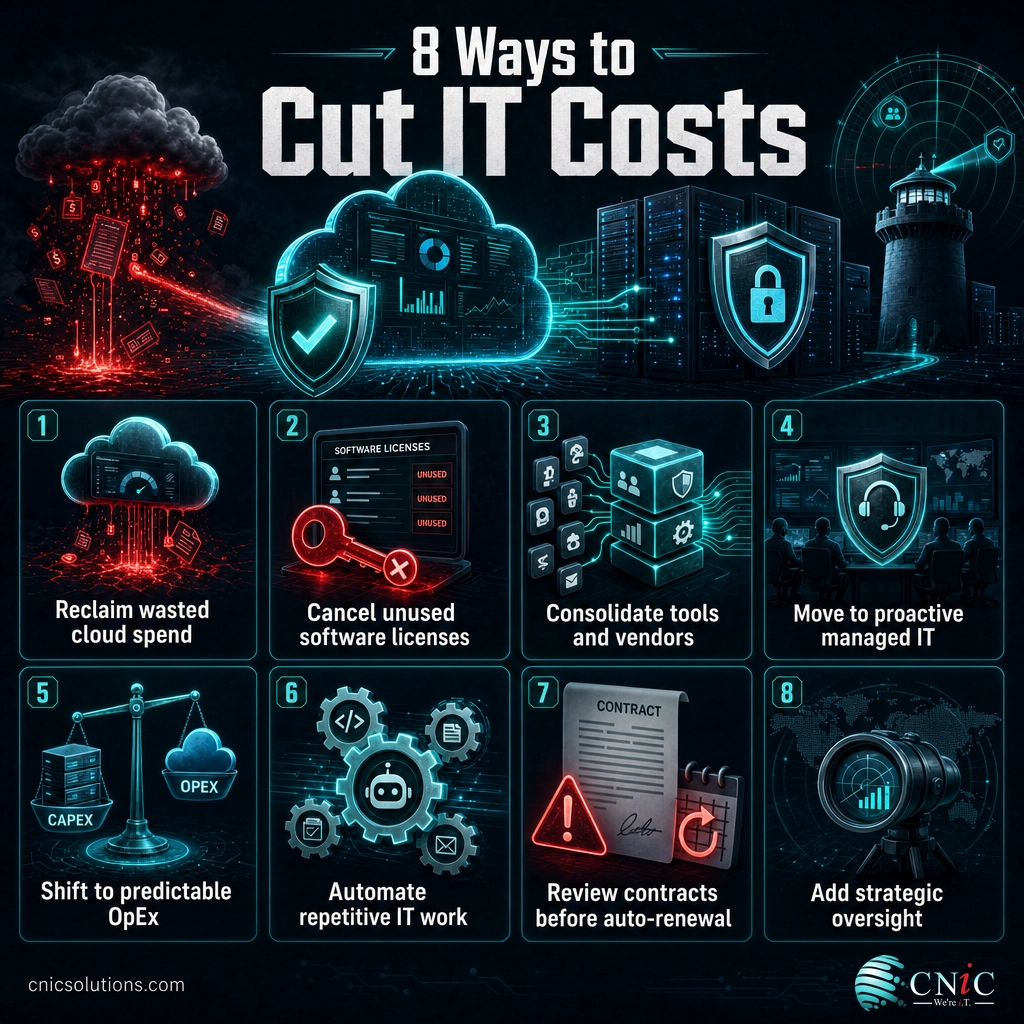
| Reclaim cloud waste | Over-provisioned, idle cloud resources | Low to medium | Right-sizing, shutting down idle environments, cheaper storage tiers |
| Cancel unused licenses | Idle and duplicate SaaS seats | Low | Reclaiming and downgrading licenses nobody uses |
| Consolidate tools and vendors | Overlapping platforms and contracts | Medium | Lower licensing, less admin time, stronger negotiating power |
| Proactive managed IT | Reactive break-fix and downtime | Medium | Predictable cost plus fewer expensive outages |
| Shift to OpEx | Large upfront capital purchases | Medium | Smoother cash flow, spending matched to actual use |
| Automate routine work | Repetitive manual IT tasks | Medium | Fewer labor hours and costly manual errors |
| Review before auto-renewal | Contracts renewing unreviewed | Low | Renegotiated rates and dropped services you no longer use |
| Strategic oversight | Misaligned, drifting spend | Ongoing | Spend directed to real business outcomes; redundancy caught early |
Frequently Asked Questions
What is the fastest way to reduce IT costs?
How can a small business cut IT costs without hurting security?
Does outsourcing IT actually save money?
What are the hidden IT costs businesses miss?
Should IT cost reduction be a one-time project or ongoing?
About This Guide and Sources
The statistics in this guide come from independent primary research: Flexera’s 2025 State of the Cloud report (wasted cloud spend near 27 percent; 84 percent of organizations struggle to manage cloud spend), Zylo’s 2024 SaaS Management Index (about 49 percent of provisioned SaaS licenses actively used), ITIC’s 2024 Hourly Cost of Downtime report (over 90 percent of mid-size and large enterprises put an hour of downtime above 300,000 dollars), Deloitte’s 2024 Global Outsourcing Survey (outsourcing driver mix), and Gartner’s 2026 worldwide IT spending forecast. Savings from any given strategy depend on your business size, current setup, and how much waste exists today, so treat these figures as direction, not a promise. The reliable takeaway is the order of operations: reclaim waste first, protect the core always, and make the review recurring.



related posts
What Is ZTNA (Zero Trust Network Access)?
November 3, 2026Zero Trust Network Access (ZTNA) is a security service that grants a verified user access to…
Zero Trust Statistics for 2026: Adoption, Maturity, and Breach Impact
November 3, 2026Zero trust has become the default security strategy on paper, but not yet in practice. Okta's…
What Is XDR (Extended Detection and Response) and How Does It Protect…
November 2, 2026Extended detection and response (XDR) is a security platform that collects and correlates threat data from…
What Is Zero Trust Security? A Guide for Small Businesses
November 2, 2026Zero Trust security is a cybersecurity model built on one rule: never trust, always verify. Instead…