

A backup is the difference between a bad afternoon and a closed business. When ransomware hits, hardware fails, or someone deletes the wrong folder, the only thing that gets your company running again is a clean, recent copy of your data that the attack could not touch. Yet backup is also where businesses quietly cut corners. Veeam’s 2024 Data Protection Trends Report found that cyber-attacks were the single most common and most impactful cause of business outages for the fourth year running, and IBM put the global average cost of a data breach at USD 4.44 million in 2025. This guide ranks the best cloud backup services for business by the type of business each one fits best, so you can shortlist the right platform, or decide to have it designed and managed for you.
How We Evaluated Cloud Backup Services
We assessed these platforms against what actually matters to a business protecting real data with a lean (or no) in-house IT team, not a Fortune 500 data center:
- What it protects: Endpoints, servers, virtual machines, and cloud apps (Microsoft 365, Google Workspace) each need different coverage.
- Recovery speed: How fast you are actually running again. A backup you cannot restore quickly is a false sense of security.
- Ransomware resilience: Immutable or air-gapped copies that malware cannot encrypt or delete.
- Ease of operation: Can a small team, or an MSP on your behalf, run it day to day and prove it works?
- Cost fit: A pricing model (per device, per user, per terabyte, or appliance-plus-cloud) that matches your size and data.
An important note on our approach: CNiC Solutions is not a backup software vendor, so this ranking is genuinely vendor-neutral. We are a Houston managed IT and cybersecurity partner that helps businesses select, deploy, and manage backup and disaster recovery. We have also avoided quoting specific prices, which change often and vary by tier and data volume; we describe each platform’s pricing model instead and recommend confirming current rates with the vendor.
Key Takeaways
- The best cloud backup is the one that fits what you run. Endpoints, servers, virtual machines, and SaaS apps each point to a different natural choice.
- Recovery speed beats storage price. The question that matters is how fast you are back to work, not how cheap the gigabytes are.
- Backups are now a ransomware target. In 2025 only 54% of ransomware victims restored from backups, the lowest rate Sophos has recorded in six years, so immutability and testing are essential.
- File sync is not backup. Google Drive, OneDrive, and Dropbox mirror your live data; they do not keep the independent, point-in-time copies a real recovery needs.
- You do not have to run it yourself. Many businesses have a managed IT partner design, operate, and test backup, getting reliable recovery without the admin burden.
What’s in This Guide
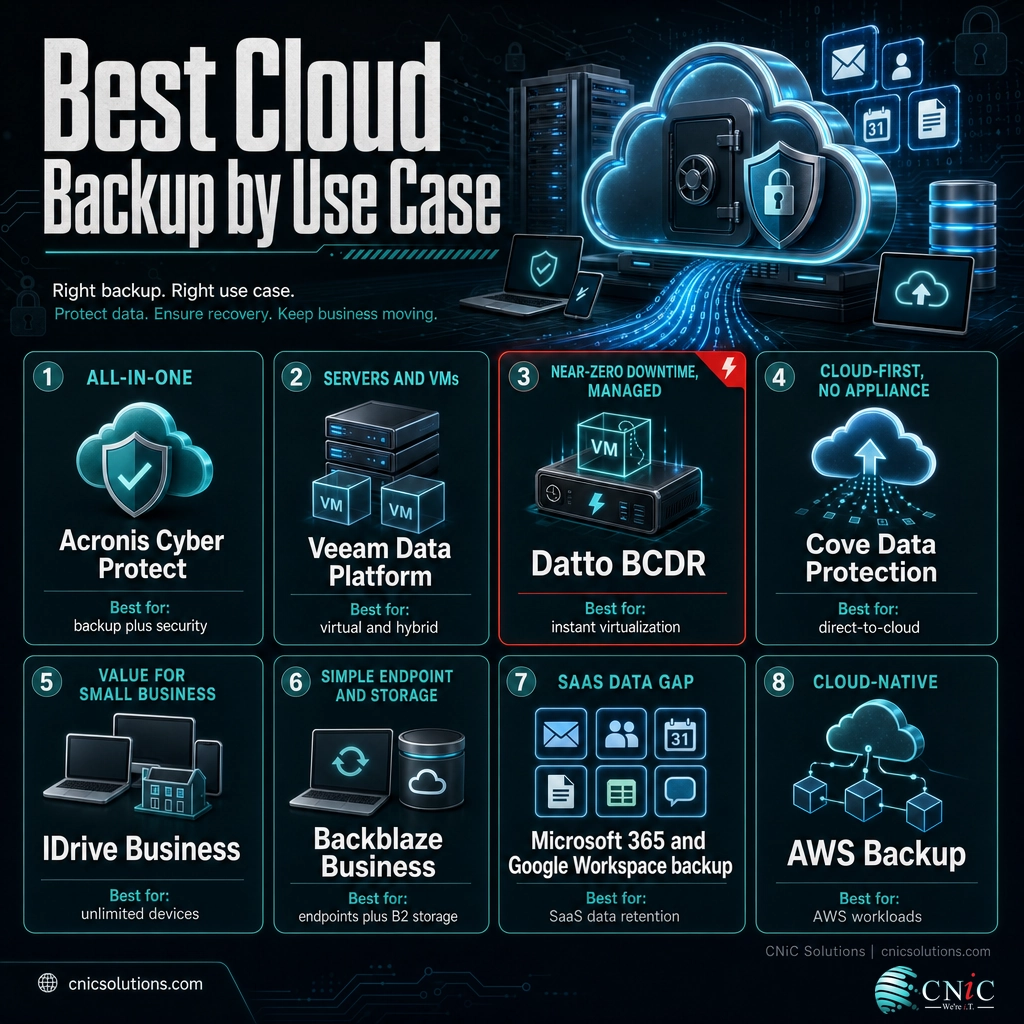
- 1. Acronis Cyber Protect: Best All-in-One Backup and Security
- 2. Veeam Data Platform: Best for Servers and Virtual Machines
- 3. Datto BCDR: Best for Near-Zero Downtime, Managed
- 4. Cove Data Protection: Best Cloud-First, No Appliance
- 5. IDrive Business: Best Value for Small Business
- 6. Backblaze Business: Best Simple Endpoint Backup and Storage
- 7. Microsoft 365 and Google Workspace Backup: Best for the SaaS Gap
- 8. AWS Backup: Best for Cloud-Native Teams
Choose and protect:
1Acronis Cyber Protect: Best All-in-One Backup and Security
Best for: Businesses that want backup and cybersecurity delivered through one integrated platform.
Acronis Cyber Protect Cloud combines full-image and file-level backup with anti-malware, anti-ransomware, and endpoint management in a single agent. For a business tired of stitching together separate backup and security tools, that consolidation is the draw: the same product that protects the data also actively defends it, and can roll back files a ransomware attempt managed to touch. It covers physical machines, virtual machines, and cloud workloads including Microsoft 365 and Google Workspace, with flexible storage in the Acronis cloud, your own storage, or a hybrid of both.
Strengths:
- Backup and integrated security (anti-ransomware, URL filtering, patch management) in one agent.
- Broad workload coverage: servers, workstations, virtual machines, and major SaaS apps.
- Flexible storage targets, including hybrid local-plus-cloud and immutable options.
- Active ransomware defense with automated rollback of affected files.
Fit considerations:
- The breadth can be more than the smallest shop needs, and it is frequently delivered and tuned through a managed provider rather than run solo.
| Criterion | Rating | Notes |
|---|---|---|
| Backup and security | Excellent | Unified in one agent |
| Workload coverage | Strong | Physical, virtual, cloud, SaaS |
| Ease of operation | Moderate | Feature-rich; often MSP-delivered |
| Ransomware resilience | Excellent | Active defense plus rollback |
The bottom line: if you would rather buy backup and security as one thing, Acronis is the natural pick. Learn more on the Acronis Cyber Protect Cloud product page.
2Veeam Data Platform: Best for Servers and Virtual Machines
Best for: Businesses running servers and virtualized infrastructure (VMware, Hyper-V) that need dependable, fast recovery.
Veeam is the reference standard for backing up virtual and hybrid environments, and it is the platform many IT teams and MSPs standardize on. It backs up virtual machines, physical servers, cloud workloads, and Microsoft 365, and it is built around recovery: instant VM restore, granular file and application recovery, and immutable backups that ransomware cannot alter. Given that Veeam’s own research found only about 57% of the data compromised in a cyberattack is typically recovered, its emphasis on tested, immutable, fast restores is exactly the right focus.
Strengths:
- Deep virtualization support with instant VM recovery to minimize downtime.
- Immutable backup options that resist ransomware encryption and deletion.
- Broad coverage across virtual, physical, cloud, and SaaS workloads.
- A mature ecosystem that most IT professionals and MSPs already know.
Fit considerations:
- Its power shows most in server and VM-heavy environments; it is typically operated by IT staff or a managed partner rather than a non-technical owner.
| Criterion | Rating | Notes |
|---|---|---|
| Server and VM backup | Excellent | Category standard |
| Recovery speed | Excellent | Instant VM and granular restore |
| Ransomware resilience | Excellent | Immutable backup support |
| Ease of operation | Moderate | Best run by IT or an MSP |
The bottom line: if you have servers or virtual machines, Veeam belongs on your shortlist. See the Veeam Data Platform product page for capabilities.
Myth: File Sync Is a Backup
Google Drive, OneDrive, and Dropbox are excellent at what they do, but they are not backup. They keep a single, live copy that mirrors every change. If ransomware encrypts your files, an employee overwrites a document, or someone empties a shared folder, that change syncs to every device and to the cloud almost instantly. A true backup is different: it keeps separate, point-in-time copies you can roll back to after the damage is done. If your entire data-protection plan is a sync-and-share tool, you do not have a backup, you have a faster way to lose data everywhere at once.
3Datto BCDR: Best for Near-Zero Downtime, Managed
Best for: Businesses that want business continuity, not just backup, delivered and managed by an IT partner.
Datto is a business continuity and disaster recovery (BCDR) platform sold and delivered through managed service providers. Its SIRIS solution pairs a local backup appliance with the Datto cloud: image-based backups run on-site for fast local recovery and replicate to the cloud for offsite protection. The standout is instant virtualization: if a server dies, the workload can spin up on the local appliance or in the Datto cloud so the business keeps operating while the original is rebuilt. That is the difference between minutes of disruption and days.
Strengths:
- Instant local and cloud virtualization to keep running during an outage.
- Image-based backups with automated recovery testing and verification.
- Hybrid local-plus-cloud design that balances fast restores with offsite safety.
- Delivered as a fully managed service, so someone else owns the outcome.
Fit considerations:
- It is not a self-serve product; you buy and run it through an MSP, and it is appliance-based rather than purely software.
| Criterion | Rating | Notes |
|---|---|---|
| Downtime protection | Excellent | Instant virtualization |
| Managed delivery | Excellent | Sold and run via MSPs |
| Recovery testing | Strong | Automated verification |
| Self-serve simplicity | N/A | Partner-delivered by design |
The bottom line: when downtime is expensive and you want continuity handled for you, Datto is built for it. See the Datto SIRIS business continuity page.
4Cove Data Protection: Best Cloud-First, No Appliance
Best for: Businesses and MSPs that want simple, cloud-native backup without buying or maintaining local hardware.
Cove Data Protection, from N-able, takes a direct-to-cloud approach: backups go straight to Cove’s cloud storage without a separate on-site backup appliance to buy, power, and maintain. It protects servers, workstations, and Microsoft 365, using small, fast incremental backups to keep bandwidth and storage in check. For a business that wants offsite protection by default and would rather not manage backup hardware, that cloud-first model is refreshingly low-friction, and standby image recovery still lets you restore a full system when you need it.
Strengths:
- Direct-to-cloud design with no local backup appliance required.
- Efficient incremental backups that reduce bandwidth and storage use.
- Coverage for servers, workstations, and Microsoft 365 from one console.
- Included cloud storage across a global network of data centers.
Fit considerations:
- The cloud-first model means very fast local restores of huge data sets depend on your internet, and it is most often delivered through MSPs.
| Criterion | Rating | Notes |
|---|---|---|
| Cloud-first design | Excellent | No local appliance needed |
| Storage efficiency | Strong | Small, fast incrementals |
| Coverage | Strong | Servers, workstations, M365 |
| Ease of operation | Strong | Simple, often MSP-managed |
The bottom line: if you want offsite backup without hardware to babysit, Cove is a clean fit. See the Cove Data Protection product page.
Average Ransomware Recovery Cost, Excluding Any Ransom (Sophos)
Recovery costs fell year over year, but read the number carefully: even in 2025 the average business spent USD 1.53 million recovering from ransomware, and that figure excludes any ransom paid. The way you avoid most of that bill is a clean, tested, immutable backup you can restore from without negotiating. For the full picture of how long recovery takes and what it costs, see our breakdown of ransomware recovery timelines and costs. Source: Sophos State of Ransomware 2025.
Protect your business from ransomware
The first four services suit businesses with servers, virtual machines, or a managed partner. The next four are where smaller teams, endpoint-heavy offices, and cloud-native businesses will often find their best fit.
5IDrive Business: Best Value for Small Business
Best for: Small businesses that want broad device coverage at an affordable, predictable price.
IDrive Business is a strong value play: a single account can back up an unlimited number of devices, servers, PCs, Macs, and mobile devices, into one generous storage pool, with file versioning and a workable admin console. For a small business that wants everything protected without buying separate products for laptops, servers, and phones, IDrive’s all-in-one, device-agnostic model is easy to justify. It also supports Microsoft 365 backup, so a growing team can consolidate protection in one place.
Strengths:
- Unlimited devices per account, covering servers, computers, and mobile.
- Generous storage tiers at competitive, predictable pricing.
- File versioning and retention to recover earlier copies.
- Central web console for managing users and devices.
Fit considerations:
- It leans toward file and device backup rather than instant full-business-continuity failover; confirm current storage tiers for your data volume.
| Criterion | Rating | Notes |
|---|---|---|
| Value | Excellent | Unlimited devices, one account |
| Device coverage | Strong | Servers, computers, mobile |
| Ease of operation | Strong | Self-serve friendly |
| Continuity failover | Moderate | Backup-focused, not instant BCDR |
The bottom line: for broad coverage on a small-business budget, IDrive is hard to beat. Compare tiers on the IDrive pricing page and the IDrive business page.
6Backblaze Business: Best Simple Endpoint Backup and Storage
Best for: Businesses wanting dead-simple computer backup, plus affordable cloud storage to point other tools at.
Backblaze offers two things a business cares about. Backblaze Computer Backup is famously simple, unlimited per-computer backup that runs quietly in the background, ideal for protecting laptops and desktops without configuration. B2 Cloud Storage is low-cost, S3-compatible object storage that many businesses use as the offsite destination for Veeam, Cove, or other backup software. Together they let you cover endpoints cheaply and give your existing backup tools an inexpensive, reliable place to store data.
Strengths:
- Genuinely simple, unlimited per-computer endpoint backup.
- Low-cost, S3-compatible B2 object storage for backups and archives.
- Works as a storage target for many third-party backup tools.
- Transparent, predictable pricing that is easy to budget.
Fit considerations:
- Computer Backup is endpoint-focused rather than full server BCDR, and B2 is storage you pair with backup software, not a complete backup application on its own.
| Criterion | Rating | Notes |
|---|---|---|
| Endpoint simplicity | Excellent | Unlimited, set-and-forget |
| Storage cost | Excellent | Low-cost S3-compatible B2 |
| Server BCDR | Moderate | Pair B2 with backup software |
| Value | Excellent | Transparent pricing |
The bottom line: for simple endpoint protection and cheap storage, Backblaze is a workhorse. See Backblaze backup and archive solutions and B2 storage pricing.
7Microsoft 365 and Google Workspace Backup: Best for the SaaS Gap
Best for: Any business that lives in Microsoft 365 or Google Workspace, which is nearly all of them.
This is the layer most businesses miss. Microsoft and Google run resilient platforms, but under the shared responsibility model they protect the infrastructure, not your data inside it. Accidental deletion, a departing employee, ransomware, or a retention-policy gap can permanently erase email, SharePoint, OneDrive, or Google Drive content, and native recycle bins only hold so much for so long. A dedicated SaaS backup, such as Veeam Data Cloud for Microsoft 365 or Datto SaaS Protection, keeps independent, point-in-time copies you can restore granularly. This is not either-or with the services above; it is a category to add so your cloud apps are as protected as your servers.
Strengths:
- Independent, restorable copies of Microsoft 365 and Google Workspace data.
- Granular recovery of a single email, file, or entire mailbox.
- Protection against accidental deletion, ransomware, and retention gaps.
- Long-term retention beyond native recycle-bin limits.
Fit considerations:
- It is an added layer with its own per-user cost; the win is closing a gap most businesses do not know they have.
| Criterion | Rating | Notes |
|---|---|---|
| Closes the SaaS gap | Excellent | Protects your cloud data |
| Granular recovery | Excellent | Item-level restore |
| Retention | Strong | Beyond native limits |
| Necessity | Excellent | Applies to almost every business |
The bottom line: if your business runs on cloud apps, back them up. Compare Veeam’s Microsoft 365 backup and Datto SaaS Protection.
8AWS Backup: Best for Cloud-Native Teams
Best for: Cloud-native businesses and technical teams already running workloads on Amazon Web Services.
If your infrastructure already lives in AWS, AWS Backup centralizes and automates protection across services like EC2, EBS, RDS, DynamoDB, and S3 from one policy-driven console. You define backup plans and retention once, apply them by tag, and pay only for what you store and restore. Vault Lock adds immutable, write-once retention that resists tampering, and cross-region copies give you geographic separation. For a technical team that wants native, automated backup without adding a third-party product, it is the logical choice.
Strengths:
- Native, centralized backup across many AWS services from one console.
- Policy-based automation applied by resource tags.
- Immutable retention with Vault Lock and cross-region copy for resilience.
- Pay-as-you-go pricing with no upfront commitment.
Fit considerations:
- It protects AWS workloads specifically, not your on-site servers or laptops, and it assumes a technical administrator to configure and monitor it.
| Criterion | Rating | Notes |
|---|---|---|
| AWS-native coverage | Excellent | Many services, one console |
| Automation | Excellent | Tag-based backup policies |
| Immutability | Strong | Vault Lock, cross-region |
| Ease for non-technical teams | Moderate | Needs a technical admin |
The bottom line: for workloads already in AWS, keep backup native. See the AWS Backup product page and AWS Backup pricing.
Explore managed cloud solutions for your business
How to Choose the Right Cloud Backup Service
The right cloud backup follows from a few honest answers about your business. Work through these before committing to any platform:
- What are you protecting? Mostly laptops and files points to Backblaze or IDrive; servers and virtual machines point to Veeam or Datto; heavy Microsoft 365 or Google Workspace use means you also need SaaS backup; AWS workloads point to AWS Backup.
- How much downtime can you survive? If an hour offline is costly, prioritize instant-recovery options like Datto or Veeam over slower file-restore tools.
- Who will run and test it? With no IT staff, weight simplicity heavily, or have a managed IT partner operate and verify it for you.
- What are your compliance needs? Regulated data (HIPAA, PCI-DSS) raises the bar on retention, encryption, and provable, tested recovery, so favor platforms with strong reporting and immutability.
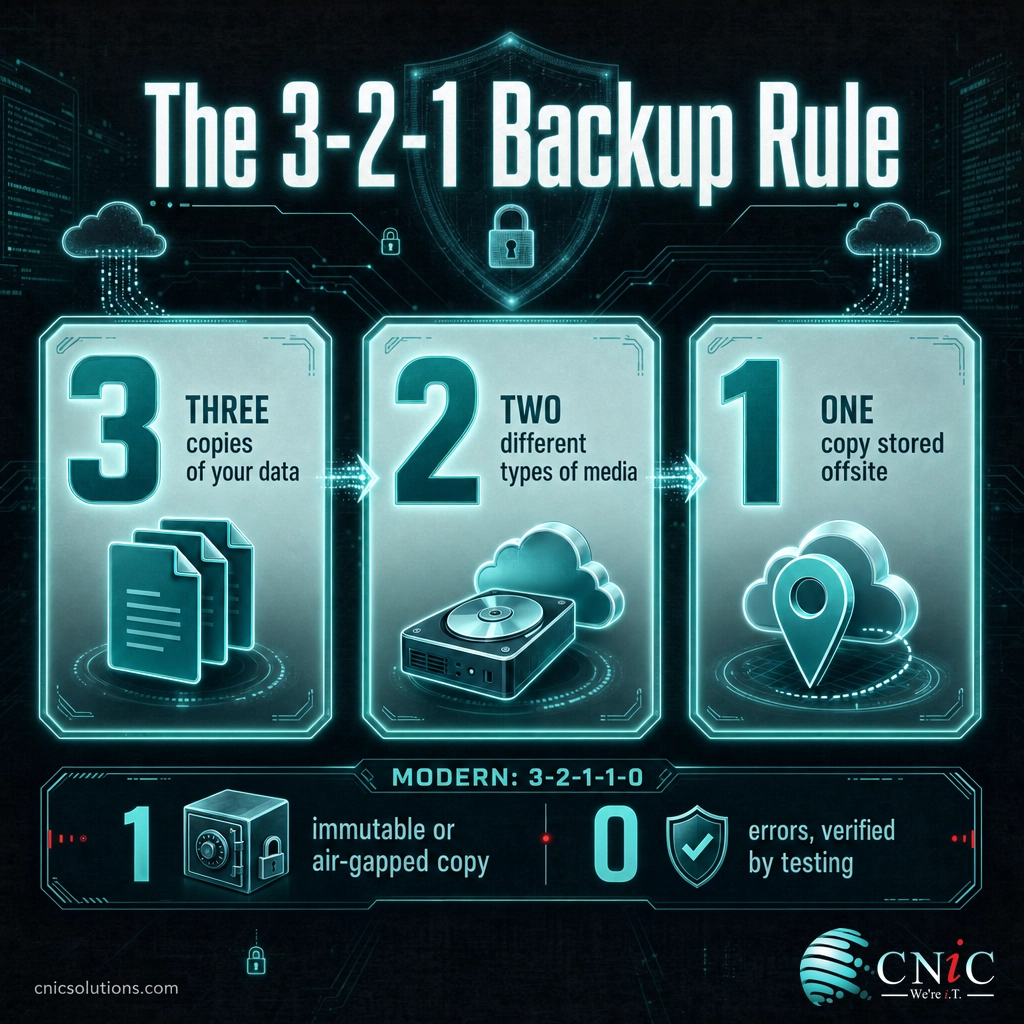
Whatever platform you choose, architect it around a proven standard rather than hoping one copy in the cloud is enough.
The 3-2-1 Rule (and Why Modern Backups Go Further)
The baseline every business should meet is the 3-2-1 rule, cited by CISA and reinforced by NIST: keep three copies of your data, on two different types of media, with one copy stored offsite. Because ransomware now hunts for backups specifically, modern practice extends this to 3-2-1-1-0: add one immutable or air-gapped copy the malware cannot alter, and verify zero errors by regularly testing that your backups actually restore. A backup you have never test-restored is a hope, not a plan. See CISA’s #StopRansomware guidance.
How to Prioritize: Where to Start
You do not have to do everything at once. If your data protection is thin today, this order gives you the most safety for the least effort first.
| Step | Priority | Difficulty | Impact |
|---|---|---|---|
| Back up servers and critical data offsite | Critical | Medium | Very High |
| Add Microsoft 365 / Google Workspace backup | Critical | Low | High |
| Protect endpoints (laptops, desktops) | High | Low | Medium |
| Add an immutable or air-gapped copy | High | Medium | High |
| Schedule and document recovery testing | High | Medium | Very High |
If you only do three things from this list: get your servers and critical data backed up offsite with an immutable copy, turn on backup for Microsoft 365 or Google Workspace, and schedule a real test restore. Those three close the gaps that turn an incident into a disaster.
Side-by-Side Comparison
| Service | Best For | Protects | Standout |
|---|---|---|---|
| Acronis Cyber Protect | All-in-one backup and security | Servers, endpoints, VMs, SaaS | Backup plus active security |
| Veeam Data Platform | Servers and virtual machines | VMs, servers, cloud, M365 | Instant recovery, immutability |
| Datto BCDR | Near-zero downtime, managed | Servers (appliance plus cloud) | Instant virtualization |
| Cove Data Protection | Cloud-first, no appliance | Servers, workstations, M365 | Direct-to-cloud, no hardware |
| IDrive Business | Value for small business | Servers, computers, mobile | Unlimited devices, one account |
| Backblaze Business | Simple endpoint backup and storage | Computers; B2 object storage | Simplicity and low storage cost |
| M365 / Workspace Backup | The SaaS data gap | Cloud email, files, apps | Independent SaaS copies |
| AWS Backup | Cloud-native teams | AWS workloads | Native, automated, immutable |
The Managed Option: Let Someone Else Own Recovery
Here is what most “best backup” lists leave out: choosing the tool is the easy part. Configuring it for every server and endpoint, setting sensible retention, keeping an immutable offsite copy, and, above all, regularly test-restoring so you know it works, is ongoing work a lean team rarely has time for. That gap is exactly why only 54% of ransomware victims managed to restore from backups in 2025. As a Houston managed IT and cybersecurity partner, CNiC Solutions designs, runs, and tests backup and disaster recovery for businesses, so recovery is a managed outcome rather than a box someone hopes is still checked. Because we are vendor-neutral, we deploy the platform that genuinely fits your environment, not the one we happen to sell.

Backup is one layer of a resilient business. To see where it sits alongside prevention and response, and what an incident really costs, see what a data breach actually costs a business, or browse our data protection and disaster recovery guides.
Frequently Asked Questions
What is the best cloud backup service for a business?
Is cloud storage like Google Drive or OneDrive the same as a backup?
Do I need to back up Microsoft 365 or Google Workspace?
What is the 3-2-1 backup rule?
How much does business cloud backup cost?
Methodology and Sources
Services are ranked by best-fit use case rather than a single overall score, because the right cloud backup depends heavily on what you protect, how much downtime you can tolerate, your IT resources, and your budget. Platform characterizations reflect each vendor’s documented positioning and capabilities. We intentionally avoid quoting specific prices, which change frequently and vary by tier and data volume; confirm current pricing directly with each vendor. Data points come from primary sources: the Veeam 2024 Data Protection Trends Report (cyber-attacks as the leading cause of outages; data-recovery rates), the IBM Cost of a Data Breach Report 2025 (global average breach cost of USD 4.44 million), and the Sophos State of Ransomware 2025 report (recovery costs and the share of victims restoring from backups). CNiC Solutions is a managed IT and cybersecurity partner, not a backup software vendor, so this comparison is vendor-neutral.
Primary sources: Veeam 2024 Data Protection Trends Report | IBM Cost of a Data Breach Report 2025 | Sophos State of Ransomware 2025 | CISA #StopRansomware.
related posts
Browser Push Notification Scam Explained: Examples & How to Avoid
September 1, 2026A browser push notification scam hijacks a real, useful browser feature (the small alerts that news…
Business Email Compromise (BEC) Statistics for 2026: Losses, Trends, and Who Gets…
September 1, 2026Business email compromise is the quiet giant of cybercrime. It rarely involves malware or a dramatic…
25 Email Scams to Watch Out For (and How to Spot Each…
August 31, 2026Email is still the front door attackers knock on first. In 2024 the FBI's Internet Crime…
Why Your Business Needs a Separate Guest Wi-Fi Network
August 30, 2026Yes: almost every business that offers Wi-Fi to customers, clients, or visitors needs a separate guest…