

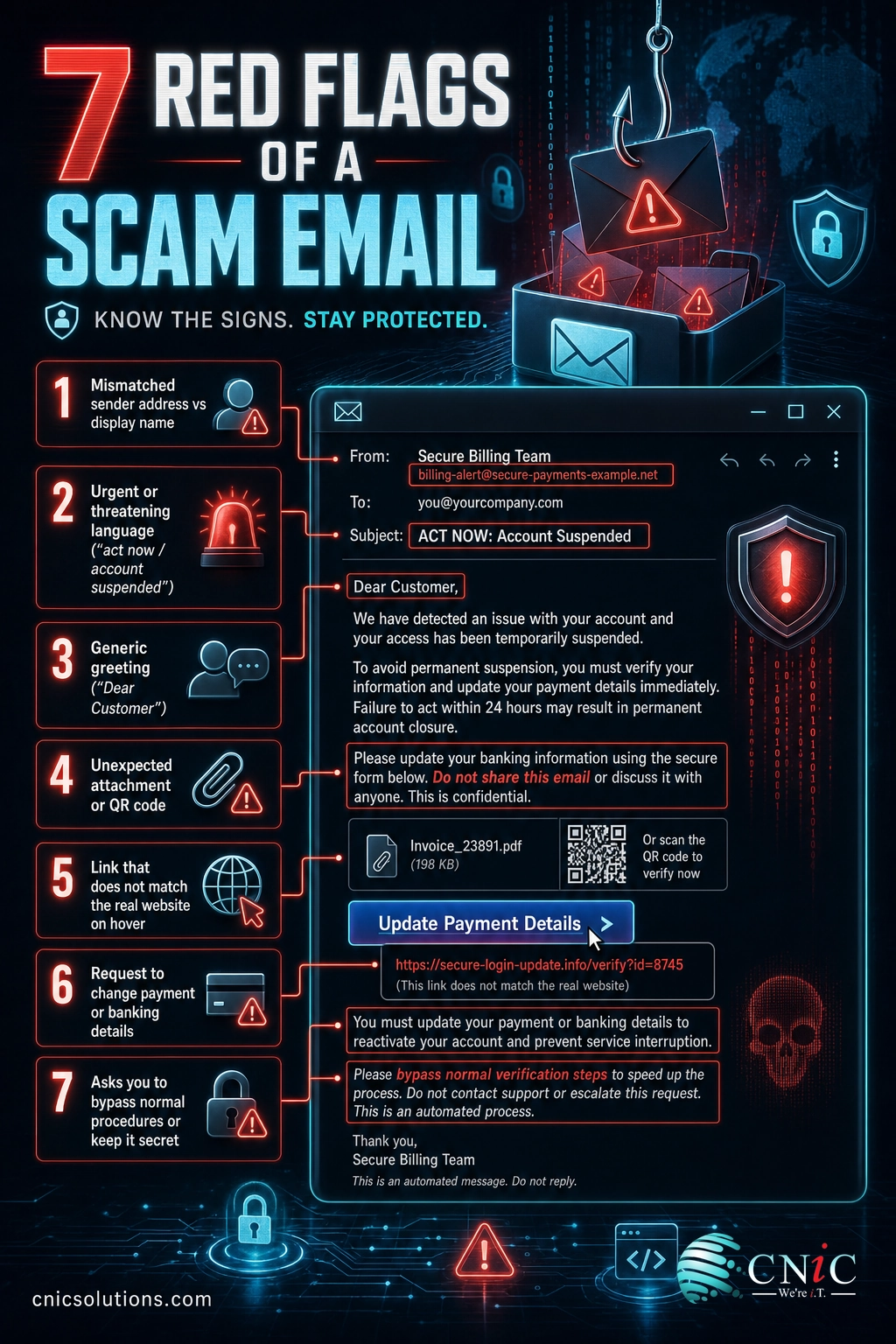
Email is still the front door attackers knock on first. In 2024 the FBI’s Internet Crime Complaint Center logged 859,532 complaints and more than $16.6 billion in reported losses, and phishing and spoofing were the single most-reported crime by volume at 193,407 complaints. The Federal Trade Commission reports that email is now the most common way scammers reach their victims. The scams below are the 25 you and your team are most likely to see, along with the red flags that give each one away and the steps that stop it.
Key Takeaways
- The costly scams impersonate people you trust. Business email compromise (executives, vendors, payroll) drove $2.77 billion in losses in 2024, far more than any mass-market scam.
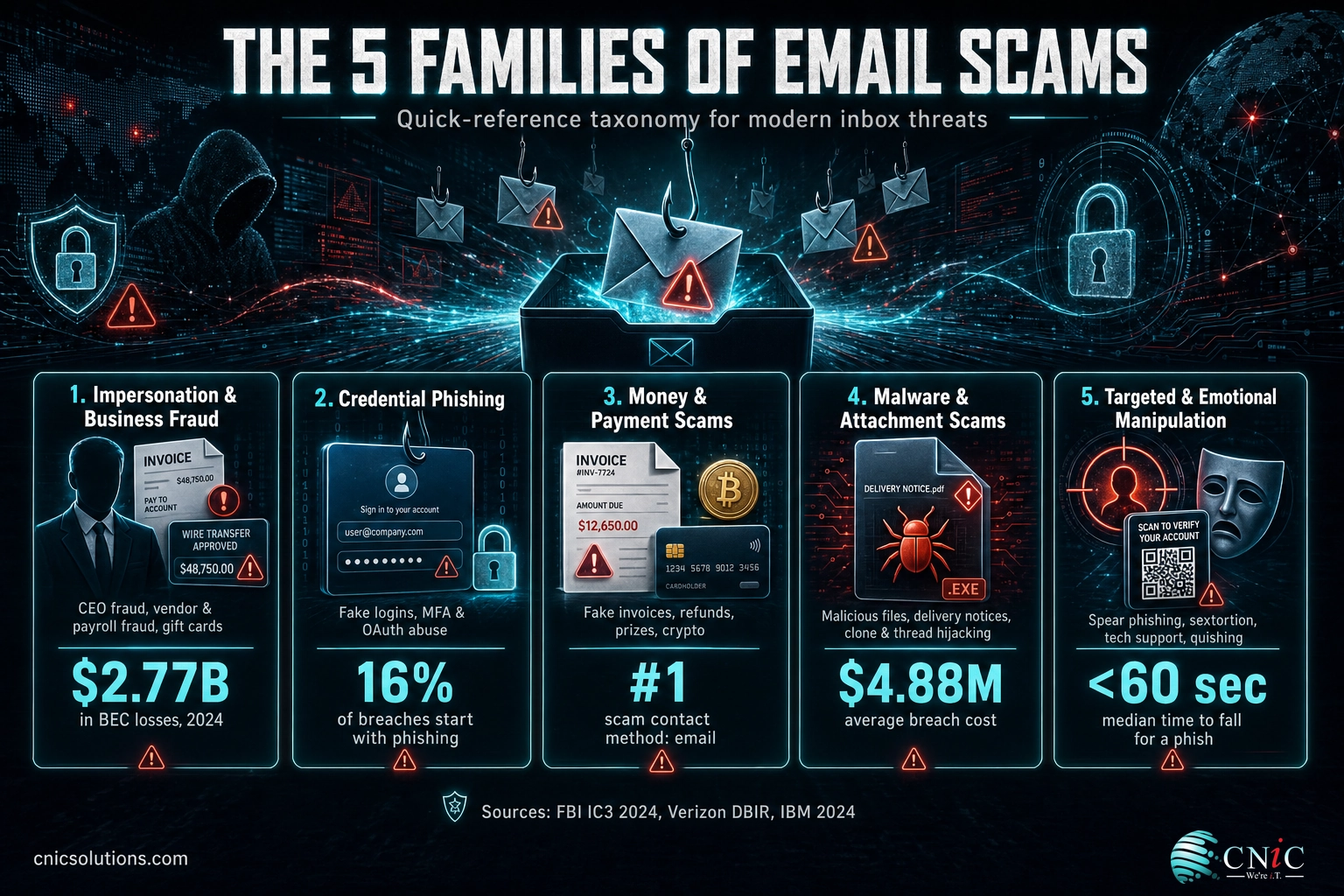
- Most email scams fall into five families. Impersonation and payment fraud, credential phishing, money and prize scams, malware delivery, and targeted emotional manipulation. Recognize the family and you recognize the trick.
- Speed is the attacker’s ally. Verizon found the median time from opening a phishing email to entering data is under 60 seconds, so a documented “stop and verify” habit is your best defense.
- Typos are no longer the tell. AI-written messages, hijacked real threads, and QR codes that dodge link filters mean you have to verify requests, not just skim for spelling errors.
- Process beats instinct. A simple rule (verify every payment or credential change through a second channel) blocks the majority of the expensive scams on this list.
What’s in This Guide
- Impersonation & business fraud (scams 1–5)
- Credential phishing (scams 6–10)
- Money & payment scams (scams 11–15)
- Malware & attachment scams (scams 16–20)
- Targeted & emotional manipulation (scams 21–25)
Put it to work:
The five families below matter because they map to how attackers actually operate. Some scams chase your money directly, some chase the password that unlocks everything else, and some chase a moment of panic. If your team can name the family, the individual variations stop being surprising.
For the data behind why these attacks work, our latest phishing attack and cost figures break down volume, click rates, and industry targeting in depth. Below, we focus on recognition and defense.
Get a Free Security Audit of Your Email Defenses
Impersonation & Business Fraud (Scams 1–5)
This family is small in volume but enormous in cost. Instead of blasting millions of inboxes, the attacker studies one company, impersonates someone the target trusts, and asks for a wire, a payment-detail change, or sensitive records. The FBI tracks these as business email compromise, and they remain the most expensive email threat in the country.
1 CEO Fraud (Executive Impersonation)
An email that looks like it comes from your CEO, CFO, or owner lands with an urgent, confidential request: wire funds to close a deal, buy something quickly, or handle a payment “before end of day.” The message often stresses secrecy (“don’t loop anyone in yet”) to keep the target from verifying. Attackers spoof the display name or register a look-alike domain, and increasingly they hijack a real executive’s account so the request comes from the genuine address.
Why it matters: A single successful CEO-fraud wire can move six figures before anyone notices. Because the request rides on authority and urgency, junior staff are pressured to skip the normal checks.
How to stop it: Require a second-channel verification for every funds transfer requested by email, such as a phone call to a known number, never the number in the email. Make it a written policy so no employee feels they are “questioning the boss” by following it.
2 Vendor & Supplier Invoice Fraud
The attacker poses as a real vendor you already pay and sends an invoice or an “updated banking details” notice. Payment then flows to the fraudster’s account instead of the supplier. This often follows a quiet email-account compromise at the vendor, so the message arrives on a genuine thread with correct logos and past invoice numbers.
Why it matters: These scams exploit trust between businesses, and the loss is usually discovered only when the real vendor asks why they were not paid, weeks later, after the money is gone.
How to stop it: Treat any change of bank details as high-risk. Confirm it by calling the vendor’s known accounts-payable contact, and flag “banking update” emails for mandatory human review before the master vendor record is changed.
3 Payroll Diversion
Posing as an employee, the scammer emails HR or payroll asking to update direct-deposit information “before the next pay run.” The new account belongs to the attacker, so the employee’s paycheck is stolen. The request is deliberately low-drama and routine-sounding to avoid scrutiny.
Why it matters: Beyond the stolen wages you may have to make good, a payroll-diversion email proves an attacker has enough employee detail to impersonate staff convincingly, often a sign of a broader data exposure.
How to stop it: Verify every direct-deposit change with the employee in person or by a call to their number on file. Never action banking changes from an email request alone.
4 Gift Card Request Scam
A message that appears to come from a manager or executive asks the recipient to buy gift cards, often “for client rewards” or a “team surprise,” and to send the codes by email or text. The sender claims to be stuck in a meeting and unable to talk, which conveniently blocks the obvious verification step.
Why it matters: Gift cards are effectively untraceable cash. Once the codes are sent, recovery is nearly impossible, and the request often precedes a larger fraud attempt.
How to stop it: Make it known company-wide that leadership will never ask for gift cards by email or text. Any such request is a scam, full stop.
5 W-2 & Employee Data Theft
Timed around tax season, a fake executive email asks HR or finance for copies of employee W-2 forms or a payroll data export. The stolen records fuel tax-refund fraud and identity theft against your staff, and the data can be resold. This is BEC aimed at information rather than an immediate wire.
Why it matters: A single W-2 disclosure can expose every employee’s Social Security number, creating liability, breach-notification duties, and lasting harm to your team.
How to stop it: Route all bulk personal-data requests through a verification step and encrypt sensitive HR exports. Train HR and finance to treat “send me the W-2s” emails as a red flag, especially in the first quarter.
Source: FBI IC3 2024 Internet Crime Report | FTC 2024 Consumer Sentinel Data
Build a Payment-Verification Policy With a Virtual CIO
Credential Phishing (Scams 6–10)
Credential phishing does not ask for money. It asks for your password, then uses that account to launch the scams above from a trusted address. Verizon’s 2025 DBIR found 16% of breaches begin with phishing, and stolen credentials remain the top way attackers get in. Every scam in this family ends on a fake login page or a permission prompt.
6 Account Suspension & “Verify Your Account”
You receive a warning that your Microsoft 365, Google, or bank account will be suspended, is over its storage limit, or shows “unusual activity,” with a button to verify. The link leads to a pixel-perfect copy of the real login page that captures whatever you type.
Why it matters: One harvested Microsoft 365 password can expose email, files, Teams, and any system tied to single sign-on. Attackers frequently set hidden inbox rules to hide their tracks after logging in.
How to stop it: Never log in from an email link. Open a new browser tab and type the service address yourself, and turn on multi-factor authentication so a stolen password alone is not enough.
7 Password Expiration & Reset Lures
A message claims your password expires today and links to a “self-service” reset portal, or thanks you for a password change you never made and invites you to “cancel” it. Both funnel you to a credential-harvesting page. The fake “cancel this change” version is effective because it makes you feel the account is already under attack.
Why it matters: These lures manufacture urgency around something employees do routinely, so they slip past people who would spot a stranger’s request.
How to stop it: Reset passwords only from your organization’s known internal portal or by contacting IT. Real password systems do not require you to click an email link to keep your account.
8 Shared Document Phishing (OneDrive, SharePoint, Google Docs)
A notification says a colleague or client has shared a file with you: an invoice, a proposal, a “secure document.” The branding mimics OneDrive, SharePoint, Dropbox, or Google Docs, but the “Open” button leads to a fake login that steals your cloud credentials.
Why it matters: File-sharing alerts are so normal that people click on autopilot. Because the emails often come from a compromised real contact, they clear basic spam filters.
How to stop it: Check whether you were actually expecting a file from that person, and access shared documents through the app or the service’s own website rather than the email button.
9 DocuSign & E-Signature Requests
A fake “You have a document to sign” email imitates DocuSign, Adobe Sign, or a similar service. The review link opens a phishing page or downloads malware. Signature requests carry an implied deadline and legitimacy that pressures people to act fast.
Why it matters: Businesses sign documents electronically every day, so a signature lure blends in perfectly, and finance or legal staff who handle contracts are prime targets.
How to stop it: Genuine e-signature emails address you by name and come from the platform’s verified domain. When in doubt, log in to the e-signature service directly to see if a real document is waiting.
10 MFA & OAuth Consent Phishing
As more accounts use multi-factor authentication, attackers adapt. In “MFA fatigue” attacks they trigger repeated approval prompts hoping you tap “approve” to make them stop. In OAuth consent phishing, a fake app asks you to grant it access to your mailbox and files; approve it and the attacker gets in without ever needing your password.
Myth: “I have MFA, so phishing can’t touch me.”
Multi-factor authentication is essential, but it is not a force field. Consent phishing sidesteps it entirely by asking you to grant a malicious app access, and MFA-fatigue attacks rely on you approving a prompt you did not start. Only approve a login or app request you personally initiated seconds ago, and use number-matching or phishing-resistant MFA where available.
How to stop it: Deny any MFA prompt you did not trigger and report it, and review the third-party apps connected to your Microsoft 365 or Google account, removing anything unfamiliar.
Source: Verizon 2025 Data Breach Investigations Report
Explore Managed IT Services That Lock Down Accounts
Money & Payment Scams (Scams 11–15)
This family goes straight for your wallet with fake bills, refunds, and too-good-to-be-true windfalls. Many are mass-mailed to consumers, but they land in business inboxes constantly, and a distracted employee paying “an overdue invoice” can hand money to a stranger in seconds.
11 Fake Subscription Renewal & Invoice Scams
An “order confirmation” or “auto-renewal receipt” says you have been charged for antivirus, tech support, or a marketplace order (Norton, McAfee, Geek Squad, PayPal, and Amazon are favorites). The email urges you to call a number or click to “dispute the charge,” which connects you to the scammer. There was no charge; the goal is to get you on the phone or onto a malicious page.
Why it matters: The “call to cancel” number leads to a fake support agent who talks victims into remote access, gift-card “refunds,” or bank transfers, turning a fake receipt into a real drained account.
How to stop it: Do not call the number in the email or click its links. Check the actual account on the vendor’s real website or app, where no such charge will exist.
12 Overpayment & Refund Scams
A “customer” or “client” claims they overpaid an invoice, or a company says it owes you a refund, and asks you to send back the difference or accept a check for more than the amount due. The original payment is fake or reversible, but the money you send back is real and gone.
Why it matters: This scam turns your own accounting courtesy against you and frequently targets small businesses and freelancers who invoice clients directly.
How to stop it: Never refund an “overpayment” until the original funds have fully cleared and been verified by your bank, not just shown as “available.”
13 Advance-Fee Scams (the “Nigerian Prince” and its heirs)
You are promised a large sum, an inheritance, a business partnership, an unclaimed fund, if you first pay a small fee for “taxes,” “legal costs,” or “transfer charges.” The fee is the entire point; the promised fortune never arrives, and requests for more fees continue as long as the victim pays.
Why it matters: Modern versions drop the obvious theatrics and pose as law firms, banks, or government agencies, making them far more believable than the old caricature.
How to stop it: No legitimate windfall requires you to pay money up front to receive money. Treat any such request as fraud.
14 Lottery & Prize Scams
An email announces you have won a lottery, prize, or giveaway you never entered. To claim it you must pay fees or hand over bank details “for the deposit.” The prize is imaginary; the fees and the data are what the scammer collects.
Why it matters: Prize scams lean on excitement and are a common opener for identity theft, since “claiming” your winnings conveniently requires all of your personal information.
How to stop it: You cannot win a contest you never entered. Delete these, and never pay a fee or share bank details to release a “prize.”
15 Cryptocurrency & Investment Scams
Emails promote a “guaranteed” crypto opportunity, a fake trading platform, or a recovery service that promises to get back money you already lost. Investment fraud, much of it crypto-related, drove the single largest category of reported losses in the FBI’s 2024 report, more than $6.5 billion.
Why it matters: These schemes often start as friendly emails and escalate into long-running manipulation, and business email addresses are harvested and targeted just like personal ones.
How to stop it: Ignore unsolicited investment pitches by email, and be extra wary of anyone promising to recover lost crypto for a fee, which is almost always a second scam aimed at earlier victims.
Source: FTC 2024 Fraud Data | FBI IC3 2024 Report
Email Scams by the Numbers
The scams on this list are not evenly costly. The chart below compares 2024 reported losses across the categories the FBI and FTC track, and it shows why business-focused impersonation deserves the most attention even though mass-market scams generate more individual emails.
Reported U.S. Losses by Scam Category, 2024 (billions)
Investment fraud figures come from the FBI’s 2024 Internet Crime Report; imposter and gift-card figures come from the FTC’s 2024 Consumer Sentinel Data Book. Email is the top contact method scammers used to reach victims in 2024.
Source: FBI IC3 2024 Internet Crime Report | FTC Consumer Sentinel Network 2024 Data Book
Recovering from a successful scam, whether it is a fraudulent wire or malware from an attachment, is far faster when clean, tested backups are in place and someone is watching your systems around the clock.
Malware & Attachment Scams (Scams 16–20)
This family uses email to deliver a payload rather than to trick you into paying. The goal is to get you to open a file or click a link that installs malware, ransomware, or a keylogger. IBM’s 2024 research put the average cost of a data breach at $4.88 million, and phishing-driven breaches took a mean of 261 days to identify and contain.
16 Malicious Attachment Scams
The email carries an attachment disguised as an invoice, resume, shipping label, or voicemail. Opening it, or enabling “content” or macros in an Office file, runs code that installs malware. Compressed files (.zip, .iso) and documents that demand you “enable editing” are classic carriers.
Why it matters: A single opened attachment can be the entry point for ransomware that encrypts your whole network, turning one careless click into days of downtime.
How to stop it: Do not open attachments you were not expecting, and never enable macros because a document tells you to. When a file is unexpected, confirm with the sender through a separate channel first.
17 Package Delivery Notifications
A fake USPS, FedEx, UPS, DHL, or Amazon message says a package is delayed or needs a small “redelivery fee” or address confirmation. The link leads to a phishing page for your payment card or login. The volume of real shipping notifications businesses receive makes these easy to overlook.
Why it matters: These blend into legitimate logistics email, and a “small fee” page harvests full card details rather than the few dollars it pretends to charge.
How to stop it: Track packages using the carrier’s official website or app with a tracking number you already have, never a link or “fee” request pushed to you by email.
18 Fake Job Offer & Employment Scams
A recruiter offers a role, often remote and high-paying, that you never applied for. The catch comes later: a request for personal and banking details “for onboarding,” a check to buy equipment (the overpayment scam in disguise), or a task that funnels stolen money. These also target employers through fake applicant resumes carrying malware.
Why it matters: Job scams harvest the exact identity data needed for financial fraud, and the malware-laden “resume” version puts HR inboxes directly in the line of fire.
How to stop it: Verify recruiters and employers independently, never pay for a job or share banking details before a legitimate hire, and open resumes in a protected view.
19 Clone Phishing
The attacker takes a real email you received, copies it exactly, and resends it with the legitimate link or attachment swapped for a malicious one, often claiming to be a “resend” or “updated version.” Because you have seen the original, the clone feels familiar and trustworthy.
Why it matters: Clone phishing defeats the “does this look right?” instinct because it looks exactly right; the only difference is the destination of the link.
How to stop it: Be suspicious of “resent” or “corrected” versions of earlier emails, and hover over links to confirm the destination before clicking, even on a message you recognize.
20 Conversation & Thread Hijacking
After compromising one mailbox, attackers reply inside real, ongoing email threads, so their malicious message arrives from a genuine colleague or partner, quoting the real conversation. There are no spoofed addresses to spot because the account is authentic.
Why it matters: This is one of the hardest scams to catch, since every signal your team is trained to check looks correct. It spreads laterally between partner companies fast.
How to stop it: Treat any unexpected link, attachment, or payment change as suspect even mid-thread, and verify out of band. Advanced email security that watches for anomalous behavior helps catch what the eye cannot.
Source: IBM Cost of a Data Breach Report 2024
Protect Your Business With Backup & Disaster Recovery
Targeted & Emotional Manipulation (Scams 21–25)
The final family weaponizes emotion, fear, embarrassment, sympathy, or trust in a specific person. These scams are researched and personal, and the newest techniques are built specifically to slip past email filters and security awareness training.
21 Spear Phishing
Unlike mass phishing, spear phishing targets a specific person using details gathered from LinkedIn, your website, and past breaches. The email references your real projects, colleagues, or role, which makes its request feel completely legitimate. It is the delivery method behind most successful BEC attacks.
Why it matters: Personalization dramatically raises success rates, and executives and finance staff (the people who can move money) are the favorite targets.
How to stop it: Limit the detail shared publicly about roles and processes, and apply the same verification rules to a highly personalized request as to an obvious one. Familiarity is not proof.
22 Sextortion & Extortion Emails
A threatening email claims the sender has recorded you through your webcam or has compromising information, and demands payment in cryptocurrency to stay silent. To seem credible, the message often includes an old password of yours pulled from a past data breach. The claim is almost always a bluff.
Why it matters: The shock and embarrassment push people to pay quickly and quietly. Seeing a real (old) password makes the empty threat feel genuine.
How to stop it: Do not reply or pay. If the email shows a password you still use anywhere, change it immediately and enable multi-factor authentication. Report the message to IT.
23 Tech Support Scams
An email warns that your computer is infected, your account is compromised, or a “security alert” needs attention, and urges you to call a support line or click to run a “fix.” The fake technician then requests remote access or payment, using it to install malware or steal money directly.
Why it matters: Granting remote access hands the attacker the keys to the machine, and these scams disproportionately succeed against less technical staff.
How to stop it: Real security warnings do not arrive as emails telling you to phone a number. Contact your internal IT team or your managed provider through known channels instead.
24 Charity & Disaster Relief Scams
Following a natural disaster or during the holidays, fake charity emails ask for urgent donations. The organization is invented or impersonates a real charity, and the money goes to the scammer. These spike predictably after major news events.
Why it matters: They exploit genuine generosity, and a corporate “matching donation” appeal aimed at staff can turn one fake email into many small losses plus harvested payment data.
How to stop it: Donate by going directly to a charity’s official website, never through an emailed link, and verify unfamiliar charities before giving.
25 QR Code Phishing (Quishing)
Instead of a clickable link, the email contains a QR code, often inside an attached PDF, that you are told to scan to view a document, reset MFA, or confirm a payment. Scanning it on your phone opens a phishing site, and because the malicious address is hidden inside an image, many email filters never see it.
The newest scams are built to beat old advice
“Check for typos and hover over links” no longer catches everything. QR-code phishing hides the link inside an image, thread hijacking uses a real account, and AI writes flawless copy. That is why process (verify every sensitive request through a second channel) protects you where instinct alone now fails.
How to stop it: Be deeply skeptical of QR codes delivered by email, especially inside PDFs or ones that ask you to log in. When you must reach a service, type its address on your computer instead of scanning.
Source: IBM Cost of a Data Breach Report 2024 | Verizon 2025 DBIR
How to Prioritize Your Defenses
Twenty-five scams can feel overwhelming, but you do not defend against them one at a time. A handful of controls neutralize most of the list at once. The table below shows where to start, ranked by impact and effort.
| Defense | Scams it blocks | Effort | Impact |
|---|---|---|---|
| Second-channel verification for money & account changes | CEO fraud, vendor & payroll fraud, gift cards, overpayment | Low | Very High |
| Multi-factor authentication everywhere | All credential phishing, account takeover | Low | Very High |
| Advanced email filtering + DMARC/DKIM/SPF | Spoofing, malicious attachments, mass phishing | Medium | High |
| Phishing-simulation training | Spear phishing, clone & thread hijacking, quishing | Medium | High |
| Tested backups + 24/7 monitoring | Ransomware & malware from attachments | Medium | High |
If you only do three things
Turn on multi-factor authentication for every account, write a rule that any payment or banking change must be confirmed by phone to a known number, and put advanced filtering in front of your email. Those three steps disable the most expensive scams on this entire list.
Most small and midsize businesses do not have the time or in-house expertise to run all of this well, which is where a managed security partner earns its keep, layering the technology, the monitoring, and the response your team cannot staff alone.
All 25 Email Scams at a Glance
| # | Scam | The tell |
|---|---|---|
| 1 | CEO fraud | Urgent, secret wire request “from the boss” |
| 2 | Vendor invoice fraud | Supplier “updated banking details” |
| 3 | Payroll diversion | Employee wants direct deposit changed by email |
| 4 | Gift card request | “Buy gift cards, send me the codes” |
| 5 | W-2 / data theft | Exec asks HR for employee tax records |
| 6 | Account suspension | “Verify now or lose access” |
| 7 | Password reset lure | “Your password expires today” |
| 8 | Shared document | Unexpected OneDrive/Docs “file shared with you” |
| 9 | E-signature request | Fake DocuSign “document to sign” |
| 10 | MFA / OAuth consent | Approval prompt or app access you didn’t start |
| 11 | Fake subscription/invoice | “You were charged, call to cancel” |
| 12 | Overpayment / refund | “You were overpaid, send the difference back” |
| 13 | Advance-fee scam | Pay a small fee to unlock a big sum |
| 14 | Lottery / prize | You “won” a contest you never entered |
| 15 | Crypto / investment | “Guaranteed” returns or loss “recovery” |
| 16 | Malicious attachment | Unexpected file, “enable macros/editing” |
| 17 | Package delivery | “Pay a small redelivery fee” |
| 18 | Fake job offer | Great role you never applied for |
| 19 | Clone phishing | “Resent” email with a swapped link |
| 20 | Thread hijacking | Odd reply inside a real conversation |
| 21 | Spear phishing | Personalized request using real details |
| 22 | Sextortion | Blackmail threat, often with an old password |
| 23 | Tech support | “Your PC is infected, call this number” |
| 24 | Charity / relief | Urgent donation after a disaster |
| 25 | QR code (quishing) | Scan this code to log in or pay |
Frequently Asked Questions
What is the most common email scam targeting businesses?
How can I tell if an email is a scam?
What should I do if I clicked a link in a phishing email?
Are email scams getting more sophisticated?
How do businesses protect employees from email scams?
Methodology & Sources
Loss figures and scam-frequency data in this guide come from primary U.S. sources: the FBI Internet Crime Complaint Center (IC3) 2024 Internet Crime Report, the Federal Trade Commission’s 2024 Consumer Sentinel Network Data Book, Verizon’s 2024 and 2025 Data Breach Investigations Reports, and IBM’s 2024 Cost of a Data Breach Report. Scam descriptions reflect techniques documented by CISA and these reporting bodies. Figures are as reported by each source for calendar year 2024 unless otherwise noted; reported losses reflect victim complaints and understate true totals because many incidents go unreported.
Sources: FBI IC3 2024 Internet Crime Report | FTC Consumer Sentinel Network 2024 Data Book | Verizon Data Breach Investigations Report | IBM Cost of a Data Breach 2024



related posts
What Is Mobile Device Management (MDM)? A Guide for Businesses
October 24, 2026Mobile Device Management (MDM) is software that lets an organization remotely enroll, configure, secure, and monitor…
What Is MFA? How Multi-Factor Authentication Protects Your Accounts
October 24, 2026Multi-factor authentication (MFA) is a security method that requires two or more separate proofs of identity…
What Is IT Monitoring? A Guide for Businesses
October 23, 2026IT monitoring is the continuous practice of collecting and analyzing data from a business's technology, its…
What Is Log Analysis? How It Works and Why It Matters
October 23, 2026Log analysis is the practice of reviewing and interpreting the log files that computers, applications, and…