

Antivirus and EDR are not two names for the same thing, and the real choice is not one or the other. Antivirus stops known, file-based malware. EDR watches how your devices behave, catches the attacks that never touch a file, and gives you the tools to investigate and shut them down. The businesses that stay resilient run both ideas together as layers: prevention that blocks the obvious threats, plus detection and response that catches what slips past. This guide compares four real options, from legacy antivirus to fully managed EDR, so you can match the right layer to your actual risk.
- Antivirus is prevention; EDR is detection and response. They solve different halves of the same problem, and modern defense needs both halves covered.
- Signature-based antivirus is going blind. CrowdStrike reports that 79% of its 2024 detections were malware-free, meaning no file for a signature to match.
- Speed is the whole game. The average attacker moved from a first foothold to a second machine in 48 minutes in 2024, and the fastest did it in 51 seconds.
- There are really four options, not two: traditional antivirus, next-generation antivirus (NGAV/EPP), EDR, and managed EDR (MDR). Each fits a different size and risk profile.
- Most small and midsize businesses are best served by managed EDR, which pairs the technology with a 24/7 team to actually act on the alerts.
What’s in This Guide
- Understanding the Endpoint Security Landscape
- Option 1: Traditional Antivirus (Signature-Based)
- Option 2: Next-Generation Antivirus / EPP
- Option 3: Endpoint Detection and Response (EDR)
- Option 4: Managed EDR / MDR
- EDR vs. Antivirus at a Glance: The Comparison Table
- Criterion by Criterion: Where Each Option Wins
- Decision Framework: Which Do You Need?
- What CNiC Solutions Recommends
- Frequently Asked Questions
- Methodology and Sources
Understanding the Endpoint Security Landscape
Every laptop, server, and phone that touches your network is an endpoint, and endpoints are where most attacks land. For two decades, the answer to protecting them was antivirus software. That answer is no longer complete, and the reason is a shift in how attacks actually work.
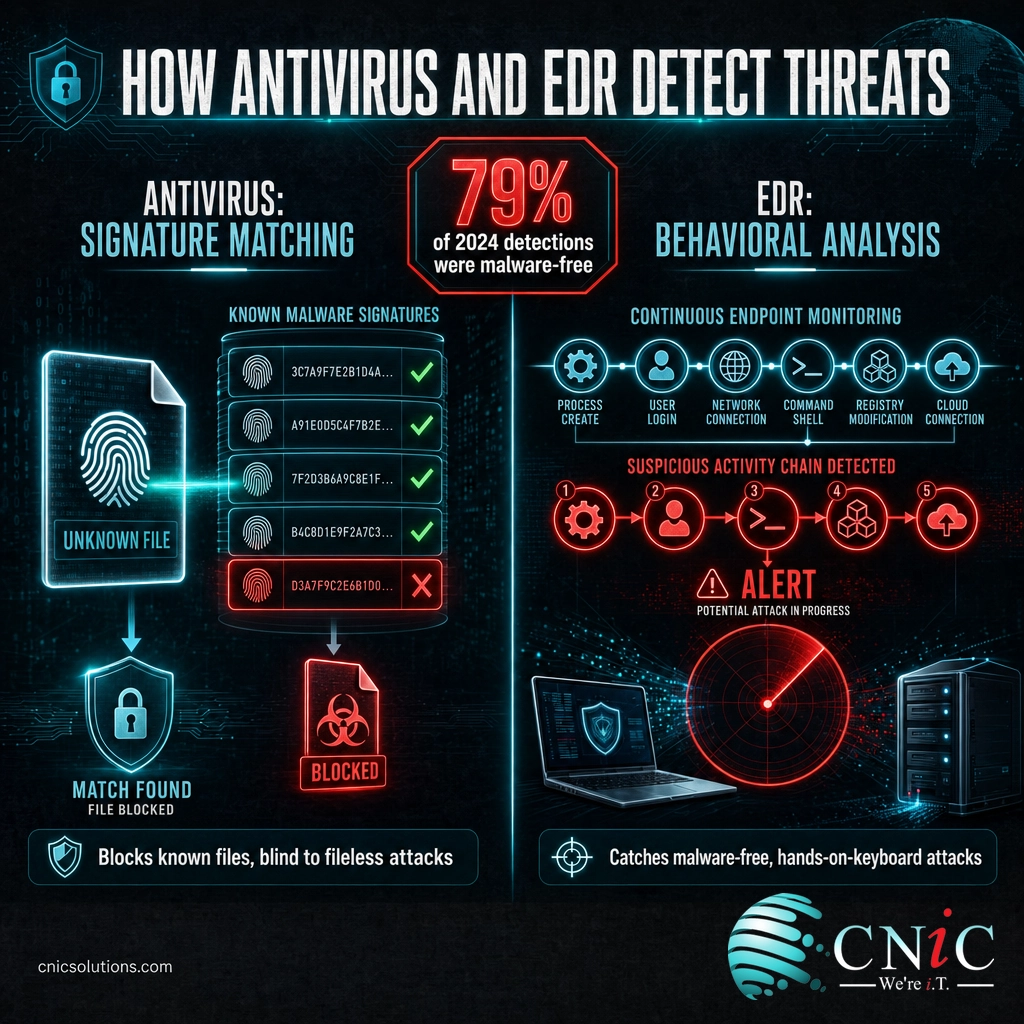
Old-school antivirus is a bouncer with a photo book of known troublemakers. It checks each file against a list of known malware signatures and blocks the matches. That works beautifully against threats it has seen before. The problem is volume and evasion. The AV-TEST Institute registers more than 450,000 new malware and unwanted-application samples every single day, and its total library has passed 1.56 billion known samples. No signature list keeps up with that in real time.
Worse for the old model, many modern intrusions do not use a malware file at all. Attackers log in with stolen credentials, abuse legitimate tools already on the machine, and move by hand. CrowdStrike reported that 79% of the threats it detected in 2024 were malware-free. There is no file for a signature scanner to catch, which is exactly why detection and response became a separate discipline.
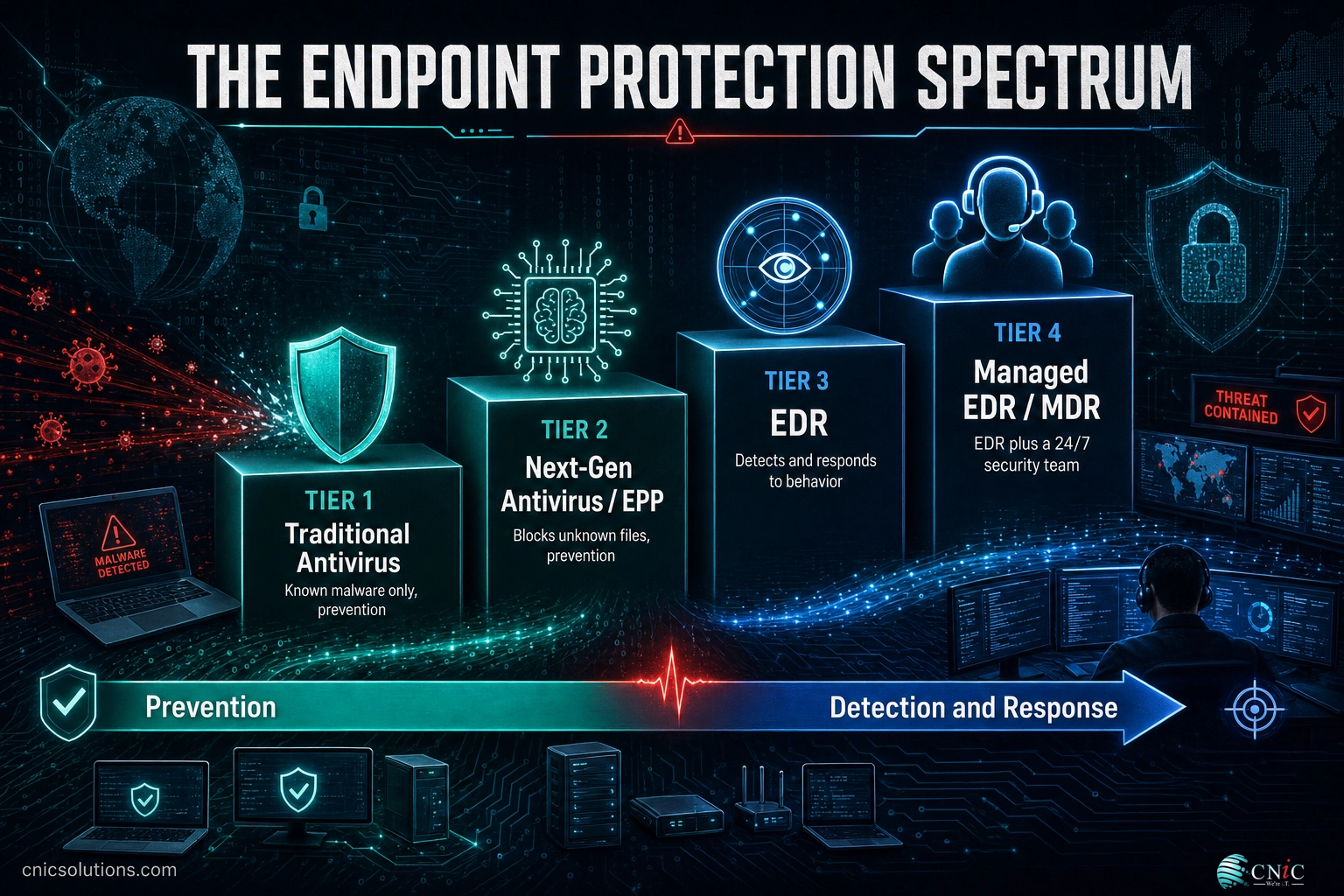
So the honest way to frame the choice is not “EDR or antivirus.” It is a spectrum of four options, each adding capability on top of the last:
The endpoint protection spectrum:
- Traditional antivirus catches known, file-based malware. Prevention only.
- Next-generation antivirus (NGAV / EPP) adds machine learning and behavior rules to block never-before-seen files. Still prevention.
- EDR records everything the endpoint does, detects suspicious behavior, and lets a responder investigate and contain it. Detection and response.
- Managed EDR (MDR) is EDR plus a 24/7 human security team that watches and responds for you.
Myth: “I have antivirus, so I’m protected.” Antivirus protects you from the category of threat it was built for: known, file-based malware. It was never designed to catch an attacker using valid credentials at 2 a.m. or a fileless script that lives only in memory. Believing antivirus alone is full coverage is how breaches go undetected for months. In 2025, the average breach still took 241 days to identify and contain (IBM and Ponemon Institute, Cost of a Data Breach Report 2025). Antivirus is a necessary layer, not a finished defense.
Source: AV-TEST Institute Malware Statistics | CrowdStrike 2025 Global Threat Report
Option 1: Traditional Antivirus (Signature-Based)
Traditional antivirus is the original endpoint defense and still the foundation of the category. It compares files on a device against a database of known malware signatures. When a file matches, it is blocked, quarantined, or deleted. It runs quietly, costs little, and asks nothing of the user.
How it works
The engine maintains a constantly updated list of signatures, which are essentially fingerprints of known malicious files. Some products add basic heuristics to flag files that look similar to known threats. Detection is reactive by design: a threat generally has to be discovered and cataloged somewhere in the world before your antivirus can recognize it on your machine.
Best use case
A baseline prevention layer on low-risk personal devices, or as one component inside a larger security stack. It is rarely the right sole defense for a business today.
Key strengths
- Excellent against known malware. For threats already in the signature database, detection is fast and reliable.
- Low cost and low overhead. Cheap per device and light on system resources.
- Simple to run. Install it and let it update. No security expertise required.
Key limitations
- Blind to fileless and identity-based attacks. If there is no malicious file, there is nothing to match.
- Always one step behind new threats. Brand-new or heavily modified malware can walk past until a signature exists.
- No visibility or response. It blocks or it does not. It cannot tell you what happened, how far it spread, or how to undo it.
Best for: home users and as a low-cost prevention component, not as a business’s only line of defense.
Option 2: Next-Generation Antivirus / EPP
Next-generation antivirus (NGAV), usually delivered as part of an Endpoint Protection Platform (EPP), is what most people now mean when they say “modern antivirus.” It keeps signature matching for known threats but adds machine-learning file analysis, behavioral rules, and exploit protection so it can block files it has never seen before. This is the true modern successor to legacy antivirus.
How it works
Instead of relying on a signature alone, NGAV models what malicious files and behaviors look like. It can flag a program because of how it is structured or what it tries to do (encrypt files rapidly, disable backups, inject into another process), even with no matching signature. It is still fundamentally a prevention layer: its job is to stop the bad thing before it runs.
Best use case
The prevention foundation for any business. In most real deployments, NGAV is not bought separately; it comes bundled inside an EDR or managed EDR platform as the first layer.
Key strengths
- Stops unknown malware. Machine learning and behavior rules catch novel and modified files that signatures miss.
- Strong ransomware prevention. Rapid-encryption and backup-tampering behaviors are common triggers.
- Cloud-managed and lightweight. Most modern EPPs are centrally managed with a small endpoint agent.
Key limitations
- Still prevention, not response. When something does get through, NGAV does not investigate or contain the spread.
- Limited forensic trail. It records far less about endpoint activity than EDR, so reconstructing an incident is hard.
- Quiet on hands-on-keyboard attacks. An attacker using legitimate credentials and built-in tools may not trip a prevention rule at all.
Best for: every business, as the prevention layer, but paired with detection and response rather than trusted on its own.
Option 3: Endpoint Detection and Response (EDR)
EDR is where the security model flips from “block the bad file” to “assume something will get through, and be ready to catch and contain it.” An EDR agent continuously records endpoint activity, processes launched, network connections, files changed, logins, then analyzes that stream for suspicious patterns and gives responders the tools to act.
How it works
Think of EDR as a flight recorder plus an alarm system for every device. It watches behavior in real time and flags sequences that look like an attack even when no known malware is involved, for example a trusted process suddenly spawning a script that reaches out to an unfamiliar server. When it detects a threat, a responder can isolate the machine from the network, kill the malicious process, trace exactly how the attacker got in, and in many cases roll the device back to a clean state.
Best use case
Any organization that needs to catch and stop the attacks prevention misses, and to prove what happened afterward for compliance or cyber insurance.
Key strengths
- Catches fileless and identity-based attacks. Behavioral detection sees the malware-free intrusions that antivirus cannot.
- Full visibility and forensics. A recorded timeline shows the entry point, the spread, and the blast radius.
- Active response, not just blocking. Isolate, terminate, and roll back to contain damage in minutes instead of months.
- Threat hunting. The telemetry lets analysts proactively search for hidden threats.
Key limitations
- It needs someone to run it. EDR generates alerts; those alerts only help if a skilled person triages and acts on them.
- Alert volume can overwhelm small teams. Without expertise, real threats get buried in noise.
- Higher cost and complexity than antivirus, in both licensing and the staffing to operate it.
That breakout number is the case for EDR in a single statistic. Once an attacker is inside, the window to contain them before they spread is measured in minutes. Prevention tools that only block files do nothing during that window. EDR is built to see the movement and stop it.
Source: CrowdStrike 2025 Global Threat Report
Best for: businesses with an in-house IT or security team that can monitor alerts and respond quickly around the clock.
Not sure whether you have the internal capacity to watch EDR alerts 24/7? That gap is exactly what the next option closes, and it is the most common reason businesses turn to a partner for backup and rapid recovery alongside detection.
Option 4: Managed EDR / MDR
Managed EDR, commonly sold as Managed Detection and Response (MDR), solves the biggest weakness of EDR: it needs experts watching it. With managed EDR, you get the same detection and response technology plus a 24/7 security operations center (SOC) that monitors the alerts, investigates them, and responds on your behalf. It is the practical way for a business without a full security team to get enterprise-grade protection.
How it works
The EDR platform is deployed on your endpoints and connected to a provider’s SOC. Trained analysts triage every meaningful alert, separate real threats from noise, hunt for hidden activity, and take containment action, isolating a device or stopping an attack, often before anyone at your business is even awake. You get the outcome (threats stopped) without staffing a night shift of security analysts.
Best use case
Small and midsize businesses that need round-the-clock protection but cannot justify hiring and retaining an in-house security team.
Key strengths
- 24/7 human coverage. Real analysts respond at 3 a.m., closing the gap between an alert and an action.
- No hiring required. You rent an expert team instead of building one.
- Faster containment. Because someone is always watching, threats get stopped inside that critical breakout window.
- Compliance and insurance ready. Documented monitoring and response help satisfy auditors and cyber-insurance requirements.
Key limitations
- Highest ongoing cost of the four, though still far below the cost of a single serious breach.
- You are choosing a partner. Quality depends on the provider’s SOC, so the vendor decision matters.
Best for: the typical small or midsize business that wants enterprise-level detection and response without building an internal security operation. For a deeper look at specific platforms, see our guide to the best endpoint protection solutions for small businesses.
Source: IBM Cost of a Data Breach Report
EDR vs. Antivirus at a Glance: The Comparison Table
The four options build on one another, so the useful question for each capability is “which layer introduces it?” This table lines them up on the criteria that matter most for a business buyer.
| Capability | Traditional Antivirus | Next-Gen AV / EPP | EDR | Managed EDR (MDR) |
|---|---|---|---|---|
| Primary function | Prevention | Prevention | Detection and response | Detection and response, fully managed |
| Detection method | Known signatures | Signatures + machine learning + behavior | Continuous behavioral analysis | Behavioral analysis + human threat hunting |
| Known malware | Yes | Yes | Yes | Yes |
| Unknown / fileless attacks | No | Partial | Yes | Yes |
| Response actions (isolate, kill, roll back) | Block / quarantine only | Block / quarantine only | Yes | Yes, performed for you |
| Visibility and forensics | Minimal | Limited | Full endpoint timeline | Full timeline + expert analysis |
| Who operates it | Runs on its own | Your IT staff | Your security team | Provider’s 24/7 SOC |
| 24/7 monitoring and response | No | No | Only if you staff it | Yes, included |
| Relative cost | Lowest | Low | Higher | Highest (still below breach cost) |
| Best fit | Home / low-risk devices | Prevention layer for any business | Businesses with a security team | Most small and midsize businesses |
Criterion by Criterion: Where Each Option Wins
A single “winner” is misleading because these tools are layers, not rivals. But on each individual criterion, one option clearly leads. Here is where each earns its place.
1. Threat coverage
Traditional antivirus covers known malware and nothing else. NGAV extends that to unknown files. Only EDR and managed EDR cover the malware-free, hands-on-keyboard attacks that now make up the majority of serious intrusions. When 79% of detected threats involve no file, behavioral detection is not optional. Winner: EDR and managed EDR.
2. Speed of response
The average attacker needs under an hour to spread from the first machine to the next, and prevention tools take no action once a threat is already executing inside your environment. EDR gives your team the controls to contain it; managed EDR guarantees someone is watching to use those controls at any hour. Given the 48-minute average breakout time, unmonitored tooling loses the race.
Average attacker breakout time (first host to second host)
Source: CrowdStrike 2025 Global Threat Report. Faster attackers make round-the-clock response the deciding factor.
Winner: Managed EDR, because a 24/7 SOC is the only option that reliably responds inside the breakout window.
3. Cost and resource requirements
On sticker price alone, traditional antivirus wins, followed by NGAV. But price per device is the wrong lens. The cost that matters is the cost of a breach that a cheaper tool fails to catch. With the U.S. average breach at $10.22 million and the global average at $4.44 million, the spread between an antivirus license and a managed EDR subscription is a rounding error against a single serious incident.
Average data breach cost, 2025
Source: IBM and Ponemon Institute, Cost of a Data Breach Report 2025.
Winner: NGAV on raw cost; managed EDR on value, because it targets the expense that actually breaks businesses.
4. Visibility and forensics
When something goes wrong, antivirus can tell you it blocked a file, and little else. EDR records a full timeline of endpoint activity, so you can see how an attacker got in, what they touched, and whether they are truly gone. That evidence is essential for regulators, insurers, and rebuilding trust after an incident. Winner: EDR and managed EDR.
5. Compliance and cyber insurance
Requirements are moving in one direction. A growing number of cyber-insurance carriers and compliance frameworks now expect continuous monitoring and endpoint detection and response, not just antivirus, before they will underwrite or certify a business. Managed EDR produces the documented monitoring and response records those reviews ask for. Winner: EDR and managed EDR.
Decision Framework: Which Do You Need?
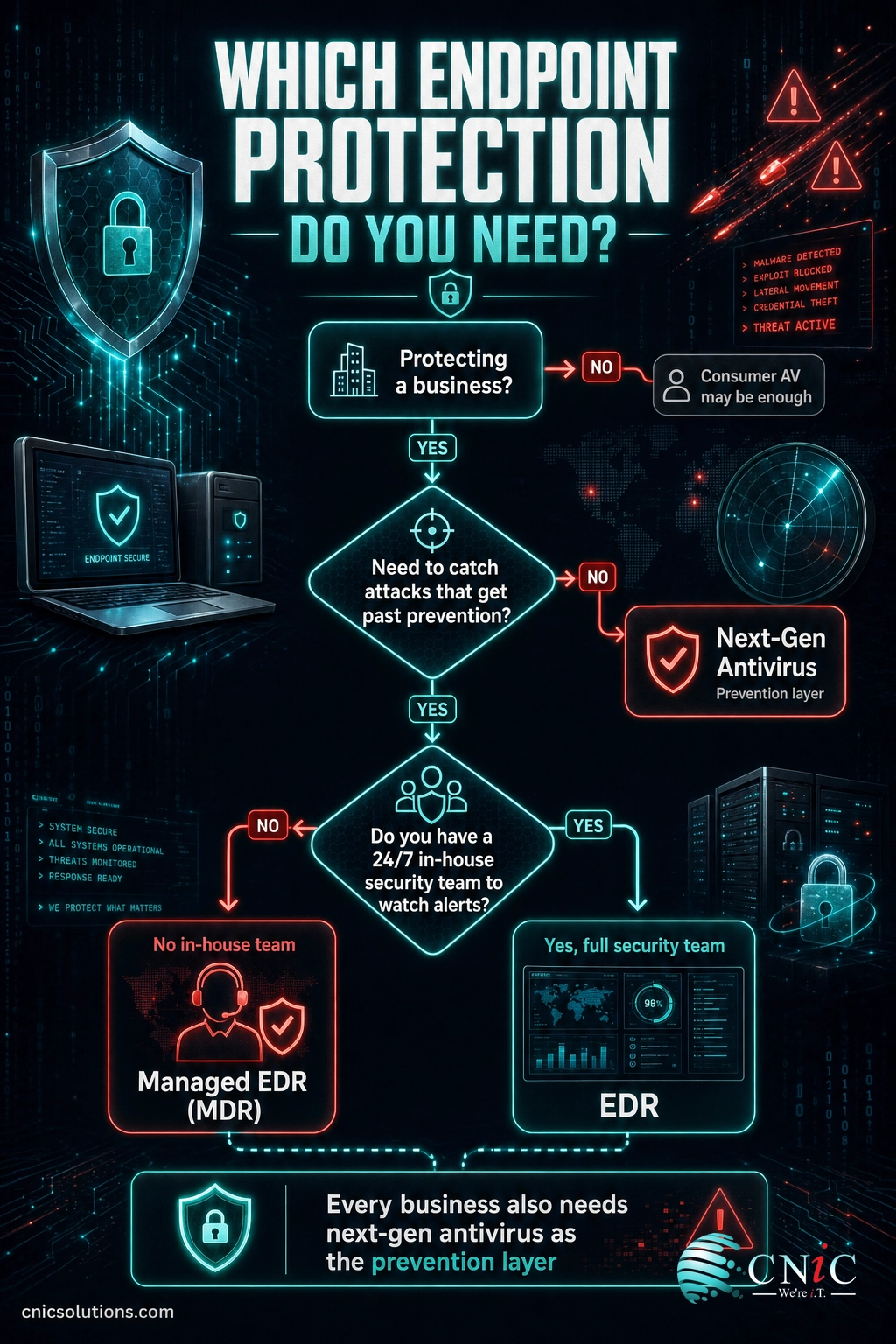
Match your situation to the option that fits. In almost every business case, the answer includes a prevention layer plus detection and response; the real question is whether you run the response yourself or have it managed.
Choose traditional antivirus if you are protecting a personal, low-risk device and cost is the only concern. This is not a business-grade defense on its own.
Choose next-generation antivirus (NGAV/EPP) if you need a strong prevention foundation and you understand it is one layer, not the whole stack. Realistically, you will get NGAV bundled inside an EDR platform anyway.
Choose EDR if you have an in-house IT or security team with the skills and the staffing to monitor alerts and respond around the clock. The technology is only as good as the people watching it.
Choose managed EDR (MDR) if you are a small or midsize business that needs 24/7 detection and response but cannot hire, train, and retain a full security team. This is the right fit for most companies.
What CNiC Solutions Recommends
For the small and midsize businesses we protect across Texas and nationwide, the recommendation is consistent: run next-generation antivirus as your prevention layer and back it with managed EDR for detection and response. That combination covers the full attack lifecycle, prevention that stops the known and the file-based, plus a 24/7 team that catches and contains the malware-free intrusions prevention was never built to see.
The reason we lead with managed rather than standalone EDR is simple: the statistics that define modern risk, a 48-minute breakout time and 79% malware-free attacks, are only answered by someone actively watching and responding. A tool that alerts an empty office at midnight does not stop a breach. A SOC does. CNiC delivers that as part of our managed cybersecurity services, so you get the technology and the team as one service.
Not sure which layers you already have, or where the gaps are? A short assessment usually surfaces them quickly, and a Virtual CIO engagement can turn the findings into a prioritized security roadmap rather than a pile of alerts.
Get a Free Security Assessment
Frequently Asked Questions
Is EDR a replacement for antivirus?
Do small businesses really need EDR, or is antivirus enough?
What is the difference between EDR and MDR?
Does Windows Defender count as EDR or antivirus?
How much does EDR cost compared to antivirus for a small business?
Methodology and Sources
How we compiled this comparison
This guide compares four categories of endpoint protection using vendor-neutral definitions and current threat data from primary sources. Statistics are drawn from published annual reports by recognized security research organizations, cited inline and listed below. No figures were estimated or invented; every number links to its original source.
Threat behavior data (malware-free detection rate and attacker breakout time) is from the CrowdStrike 2025 Global Threat Report. Breach cost and lifecycle data is from the IBM and Ponemon Institute Cost of a Data Breach Report 2025. Malware volume data is from the AV-TEST Institute. Product-tier definitions reflect publicly documented capabilities of endpoint protection platforms.
- CrowdStrike 2025 Global Threat Report (malware-free detections, breakout time)
- IBM and Ponemon Institute, Cost of a Data Breach Report 2025 (breach cost and lifecycle)
- AV-TEST Institute Malware Statistics (new malware volume)



related posts
What Is IT Asset Management (ITAM)? A Guide for Businesses
October 22, 2026IT asset management (ITAM) is the practice of tracking and managing an organization's hardware, software, and…
What Is ISO 27001? A Guide to the Information Security Standard
October 22, 2026ISO 27001 is the world's best-known standard for managing information security, and increasingly the certification customers…
What Is Infrastructure as Code (IaC)? A Guide for Businesses
October 21, 2026Infrastructure as Code (IaC) is the practice of managing and provisioning IT infrastructure, such as servers,…
What Is Infrastructure Security? A Guide for Businesses
October 21, 2026Infrastructure security is the practice of protecting the core technology systems a business runs on: its…