

Most VoIP problems are not really phone problems. When calls sound choppy, drop mid-sentence, echo, or go silent in one direction, the fault almost always sits in the network the calls ride on, not the cloud platform behind them. That is genuinely good news: a problem your network causes is a problem you can fix, usually without new hardware or a new provider. This guide walks through the eight most common VoIP problems businesses hit, the real cause behind each one, and the specific steps that resolve it, with the actual thresholds and standards your network needs to meet.
- Bad audio is a network symptom. Choppy or robotic calls point to jitter over 30 ms, packet loss over 1 percent, or missing Quality of Service, not to a shortage of megabits.
- QoS is the single highest-impact fix. Marking voice as Expedited Forwarding (DSCP 46) so it beats data traffic during congestion resolves the largest share of quality complaints.
- Disable SIP ALG first. This well-meaning router feature is behind a huge share of dropped calls, one-way audio, and failed registrations.
- Wire the desk phones. Wi-Fi introduces jitter and roaming gaps that voice is sensitive to; wired connections remove a whole category of complaints.
- Latency has a hard ceiling. Keep one-way delay at or under 150 ms (ITU-T G.114); past 400 ms conversation becomes unusable.
- Upload is the hidden limit. Voice sends as much as it receives, so an oversubscribed upload link is the classic cause of calls that degrade at the busiest hour.
- Default settings are a security hole. Factory passwords and exposed ports invite toll fraud; change credentials and put voice behind a firewall.
- Measure, do not guess. A network readiness test reports real latency, jitter, and loss so you fix the actual weak link instead of throwing bandwidth at it.
What’s in This Guide
- Quick Check: Is It Your Network?
- Problem #1: Choppy, Robotic, or Garbled Audio
- Problem #2: Dropped Calls
- Problem #3: One-Way Audio
- Problem #4: Echo on Calls
- Problem #5: Lag and Talking Over Each Other
- Problem #6: Calls Degrade During Busy Hours
- Problem #7: Phones Will Not Register or Connect
- Problem #8: Spam Calls and Toll Fraud
- Every Problem, Cause, and Fix at a Glance
- What Happens If You Ignore These Problems
- What to Do Next
- Frequently Asked Questions
- Methodology and Sources
Quick Check: Is It Your Network?
Before you open a support ticket with your provider, run through this short list. Almost every VoIP complaint below is a network condition you can measure and correct, so the fastest path to a fix is to confirm which layer is failing.
If three or more of these sound familiar, your call quality is a network problem you can fix:
- Calls sound fine early in the day and break up in the afternoon.
- Audio is choppy or robotic on a connection that tests as fast.
- You can hear callers but they cannot always hear you.
- Phones drop calls or show as unregistered without warning.
- Desk phones are connected over Wi-Fi rather than a cable.
- No one has ever configured Quality of Service on your router or switch.
Each of these maps to a specific cause and fix below. The single thread running through most of them is that voice is a real-time, unforgiving traffic type: if a web page loads a half-second late nobody notices, but if voice packets arrive a half-second late the conversation falls apart. That is why the network settings that never mattered for email suddenly decide whether your phones work.
Have Your Network Assessed for Voice
Problem #1: Choppy, Robotic, or Garbled Audio
You are on a call and the other person’s voice breaks into a stuttering, metallic mess. Words drop out, syllables clip, and it sounds like they are talking through a fan. This is the most reported VoIP complaint, and it is the one most often misdiagnosed as a platform fault.
Why it matters: Garbled audio makes you look unprofessional to customers and forces staff to repeat themselves or fall back to cell phones, which quietly undoes the value of the phone system you are paying for.
What it probably indicates: Choppy audio is a quality problem, not a capacity problem. The two direct causes are jitter (the variation in how evenly voice packets arrive) and packet loss (packets that never arrive at all). Voice has no time to re-request a lost packet the way a file download does, so a lost packet is just a missing slice of sound. Cisco’s Quality of Service design guidance for voice sets the working ceilings at under 30 ms of jitter and under 1 percent packet loss; drift past either and the audio degrades exactly this way.
How to fix it: Enable Quality of Service so voice packets are prioritized over ordinary data (covered in detail under Problem #6), move desk phones off Wi-Fi and onto a wired connection to remove wireless interference and jitter, and check for an oversubscribed upload link during the times the problem appears. Most importantly, measure jitter and packet loss under real load before spending anything: a network readiness test tells you whether the culprit is jitter, loss, or congestion so you fix the actual fault instead of guessing.
The myth that “more bandwidth fixes bad calls.” Businesses routinely upgrade their internet plan to cure choppy audio and are baffled when nothing changes. Bandwidth is only the capacity layer. Jitter and packet loss are quality problems that a bigger pipe does not touch. Choppy calls on a fast connection point to congestion timing, wireless interference, or missing Quality of Service, so measure the quality metrics before you buy more megabits.
Source: Cisco: Quality of Service for Voice over IP
Problem #2: Dropped Calls
Calls disconnect part way through, or a phone that looked fine suddenly will not make or take calls until you reboot it. Dropped calls erode trust fast, because the customer on the other end assumes you hung up on them.
Why it matters: A dropped sales call can be a lost deal, and a dropped support call is a frustrated customer who has to start over. Frequent drops push staff back to personal mobiles, which fragments your records and your caller ID.
What it probably indicates: There are three usual causes. The first is a registration timeout, where the phone loses its authenticated session with the platform and does not renew it cleanly. The second is an unstable or intermittently saturated internet connection, common on consumer-grade or asymmetric links. The third, and a frequent hidden offender, is SIP ALG, a router feature that tries to rewrite call-setup messages and often breaks the session instead.
How to fix it: Start simple by power-cycling the affected phone and the router, which forces a fresh registration and clears the most common transient faults. Then disable SIP ALG on the router (nearly every business VoIP guide recommends turning it off). Confirm the internet link is stable and not dropping out, and if outages are recurring, add a secondary internet circuit with automatic failover so a dead primary link no longer means dead phones. If drops persist on a single site, a business-grade firewall that handles SIP properly usually ends them.
Talk to a Telecommunications Specialist
Problem #3: One-Way Audio
You answer a call, you can hear the caller perfectly, but they cannot hear a word you say (or the reverse). One-way audio is disorienting because the call connects normally and only the sound is missing in one direction.
Why it matters: A call where one side is mute is worse than no call at all, because both people waste time before realizing the problem, and the customer often hangs up assuming a bad line.
What it probably indicates: One-way audio is a textbook NAT or firewall problem. The call signaling gets through and the two phones agree to connect, but the actual audio stream (RTP media) is blocked or misrouted on the way back. The number one cause is SIP ALG on a consumer router mangling the media path. Firewalls that block the RTP media port range, or overly aggressive NAT, produce the same symptom.
How to fix it: Disable SIP ALG first, since it resolves the majority of one-way audio cases on its own. Make sure the firewall permits both the SIP signaling and the RTP media ports your provider specifies. Where a consumer-grade router is doing the NAT, replace it with a business-grade firewall that handles SIP and NAT predictably. This class of problem is exactly why the underlying network readiness matters so much before you cut over: our companion guide to the bandwidth, latency, and hardware VoIP actually requires walks through the firewall and NAT setup that prevents it.
Source: FCC: VoIP and Cyber Security
Problem #4: Echo on Calls
You hear your own voice bounce back a fraction of a second after you speak, or callers complain that they hear themselves. Echo is distracting enough to derail a conversation and makes long calls genuinely tiring.
Why it matters: Persistent echo undermines the polished impression a cloud phone system is supposed to create, and it is one of the fastest ways to make a caller cut a conversation short.
What it probably indicates: Unlike the previous three, echo is usually acoustic or hardware related rather than a core network fault. A speakerphone feeding its own output back into the microphone, a cheap or loose headset, a faulty analog telephone adapter, or a damaged cable are the common sources. Latency makes any echo more noticeable, because the delayed return of your own voice is what the ear registers as an echo in the first place.
How to fix it: Work from the handset outward. Swap the speakerphone for a quality wired headset, lower the speaker or microphone volume if it is set high, and reseat or replace loose and aging cables. Test with a different phone to isolate a failing device. Finally, keep one-way latency under the 150 ms ITU-T threshold, because a network that keeps delay low keeps residual echo below the point where the ear notices it.
Source: ITU-T Recommendation G.114

Problem #5: Lag and Talking Over Each Other
There is an awkward delay between one person finishing a sentence and the other hearing it, so both people keep starting to talk at the same time and then stopping. The conversation feels like a satellite interview from decades ago.
Why it matters: Conversational lag makes negotiation, support, and any back-and-forth exhausting. It also reads as a bad connection to customers, even when audio quality itself is perfect.
What it probably indicates: This is a latency problem. Latency is the one-way time a voice packet takes to travel from your mouth to the other person’s ear. ITU-T Recommendation G.114 sets 150 milliseconds as the ceiling below which conversation feels natural. Between 150 and 400 ms calls are usable but degraded, and the talk-over effect sets in because the natural pause feels wrong. Above 400 ms the delay is unacceptable. Causes include long or inefficient network routing, an overworked jitter buffer adding delay to smooth out jitter, and distant data centers.
How to fix it: Measure real one-way latency to your provider under load. Choose a provider point of presence or data center geographically close to your offices, prioritize voice with QoS so it is not queued behind bulk traffic that adds delay, and use a wired connection to avoid the extra latency Wi-Fi introduces. If a jitter buffer is set unnecessarily large, tuning it down can recover delay, though that trades against jitter tolerance.
Source: ITU-T Recommendation G.114
Problem #6: Calls Degrade During Busy Hours
Calls are crisp first thing in the morning and fall apart around mid-afternoon, or every time someone runs a large backup or a video meeting. The timing is the tell: quality tracks how busy the network is.
Why it matters: Voice quality that collapses at your busiest hour hits you exactly when call volume is highest, so the damage lands on peak-value customer conversations.
What it probably indicates: This is congestion without Quality of Service. When backups, cloud sync, video, and large uploads saturate the connection, voice packets sit in the same queue as everything else and lose the race. It is compounded by upload capacity: voice is symmetric and continuous, so your phones send as much as they receive, and the small upload numbers on typical asymmetric plans are the hidden ceiling on how many calls you can run. Cisco’s per-call analysis puts a single uncompressed G.711 stream at 87.2 kbps each way once protocol overhead is added, so a busy sales floor adds up quickly against a thin upload link.
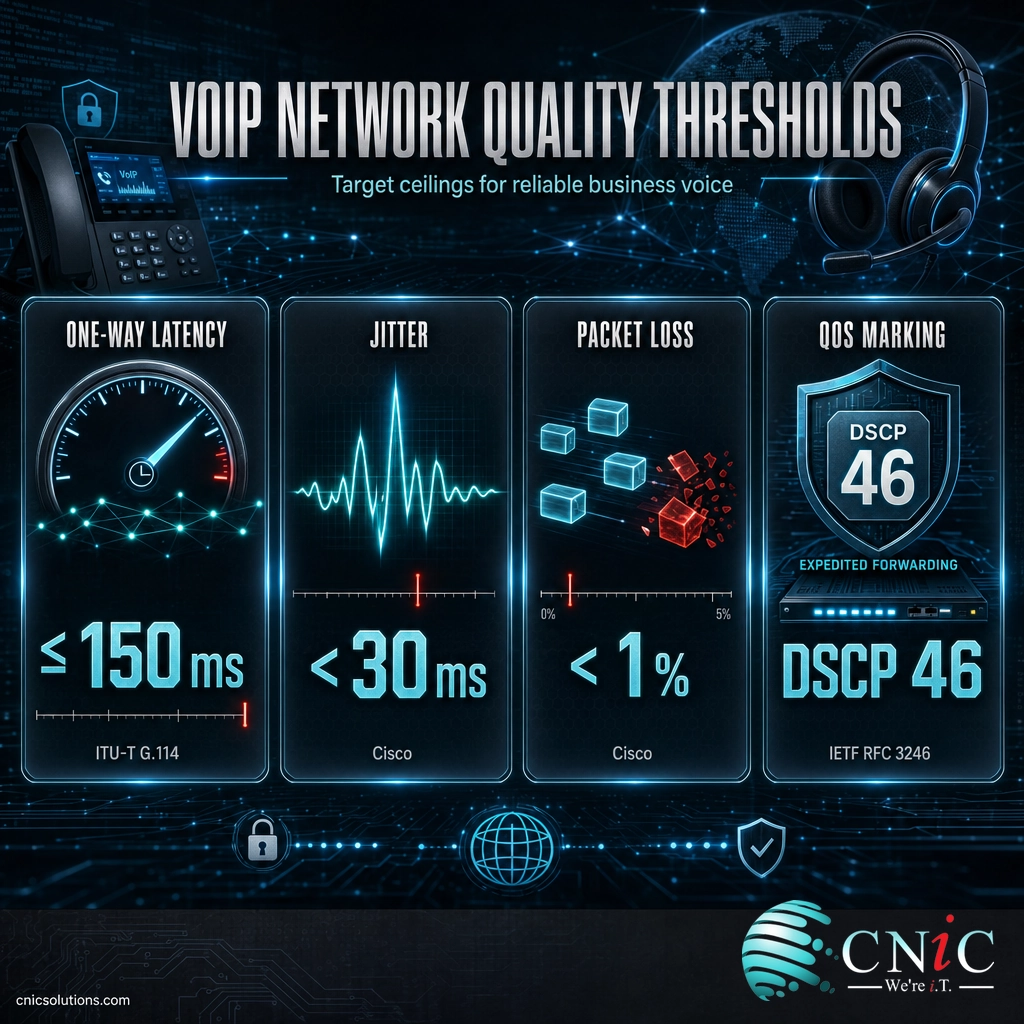
How to fix it: The definitive fix is Quality of Service applied end to end. QoS tags voice packets with the Expedited Forwarding marking, carried in the DSCP field as value 46 and defined by the IETF in RFC 3246, so switches and routers move voice ahead of data whenever a link is busy. With QoS in place a saturated connection slows your file uploads instead of your phone calls. QoS has to be honored on the phones, the switches, and the router, because one device that ignores the marking becomes the weak link. Pair it with a voice VLAN to isolate phones from data traffic, and size your upload bandwidth to your peak concurrent calls (not your headcount) plus 20 to 30 percent headroom.
Source: IETF RFC 3246: An Expedited Forwarding PHB | Cisco: Voice Over IP Per-Call Bandwidth Consumption
Problem #7: Phones Will Not Register or Connect
A phone shows as unregistered, a softphone will not sign in, or a newly shipped handset never comes online. Nothing about the audio matters yet, because the call cannot even start.
Why it matters: An unregistered phone is a dead phone. When this hits a whole site, you have no inbound or outbound calling at all until it is resolved.
What it probably indicates: Registration failures usually come from the firewall blocking the SIP signaling ports, the router’s SIP ALG interfering with registration, wrong or expired SIP credentials, or a broken supporting service. Two quiet offenders are worth naming: a DHCP scope on the voice VLAN that has run out of addresses, and inaccurate time on the device, which makes certificate validation for encrypted signaling fail and produces mysterious registration errors that have nothing to do with voice quality. Cloud platforms that auto-provision phones by MAC address also need outbound access to the provisioning servers, so content filtering can block a phone from ever configuring itself.
How to fix it: Confirm the firewall allows the SIP and RTP ports your provider uses and that SIP ALG is off. Re-enter or reset the SIP credentials, verify the phone is pulling a valid IP address and that the voice VLAN’s DHCP scope is not exhausted, and check that the device has accurate NTP time. For auto-provisioned phones, make sure firewall rules and web filtering permit access to the provider’s provisioning servers. If you are planning a move or a fresh deployment, our step-by-step VoIP migration checklist covers the provisioning and firewall prep that prevents these failures on day one.
Problem #8: Spam Calls and Toll Fraud
Your phones ring with a flood of robocalls, or you discover unexpected international charges from calls no one on your team placed. Both are security problems, and the second can get expensive fast.
Why it matters: Spam calls drain staff time and desensitize teams to real callers, while toll fraud (an attacker hijacking your system to place premium-rate calls) can run up serious charges before anyone notices.
What it probably indicates: Because VoIP runs over the internet, it inherits internet risks. The most common failures are not sophisticated attacks; they are systems left on factory passwords with management ports exposed to the internet, which automated bots scan for around the clock. The definitive reference is NIST Special Publication 800-58, “Security Considerations for Voice Over IP Systems,” which lays out the controls that close these gaps.
How to fix it: Change every default credential to strong, unique SIP passwords, and close management ports that do not need to be open. Put voice behind a firewall or Session Border Controller that understands SIP and can rate-limit abusive traffic, and isolate phones on their own VLAN. Turn on toll-fraud monitoring with alerts for unusual volume or calls to unexpected international destinations, and set a spend cap or geographic call restriction so a compromised extension cannot run wild. For robocalls specifically, enable your provider’s spam-call filtering and STIR/SHAKEN caller verification. Voice security is strongest when it is designed in alongside the rest of your defenses rather than bolted on later.
Source: NIST SP 800-58: Security Considerations for Voice Over IP Systems | FCC: VoIP and Cyber Security
Every Problem, Cause, and Fix at a Glance
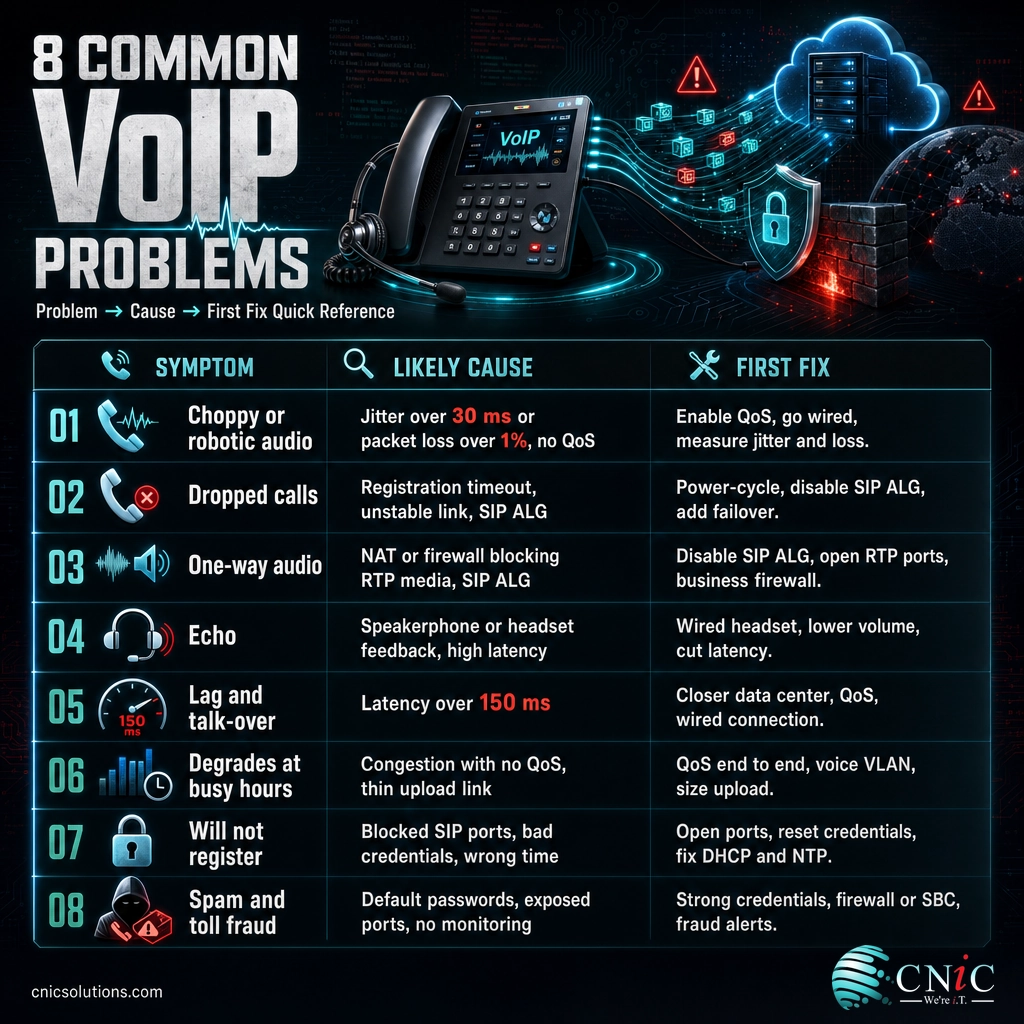
The full troubleshooting map in one place. Work top to bottom: the first several problems share a small set of root causes (jitter, packet loss, latency, SIP ALG, and missing QoS), so fixing those foundations resolves most complaints at once.
| Symptom | Most likely cause | First fix to try |
|---|---|---|
| Choppy or robotic audio | Jitter > 30 ms or packet loss > 1%; no QoS | Enable QoS, go wired, measure jitter and loss |
| Dropped calls | Registration timeout, unstable link, SIP ALG | Power-cycle, disable SIP ALG, add failover |
| One-way audio | NAT or firewall blocking RTP media; SIP ALG | Disable SIP ALG, open RTP ports, business firewall |
| Echo | Speakerphone or headset feedback; high latency | Quality wired headset, lower volume, cut latency |
| Lag and talk-over | Latency over 150 ms | Closer data center, QoS, wired connection |
| Degrades at busy hours | Congestion with no QoS; thin upload link | QoS end to end, voice VLAN, size upload bandwidth |
| Will not register | Blocked SIP ports, bad credentials, wrong time | Open ports, reset credentials, fix DHCP and NTP |
| Spam calls and toll fraud | Default passwords, exposed ports, no monitoring | Strong credentials, firewall or SBC, fraud alerts |
Sources: Cisco: QoS for Voice over IP | ITU-T G.114 | NIST SP 800-58
What Happens If You Ignore These Problems
None of these issues heal on their own. Left alone, they compound, and the cost shows up in places that rarely get traced back to the phone system.
Small quality problems become business problems. Staff quietly route around a flaky system by using personal cell phones, which fragments your caller ID, your call records, and your compliance trail. Customers who hit dropped or garbled calls do not file a complaint; they quietly form an impression and sometimes take their business elsewhere. And an unsecured system left on default credentials is not a hypothetical risk: automated scanners find exposed VoIP endpoints continuously, and toll fraud can accumulate real charges before the first invoice raises a flag.
The pattern across all eight problems is that the fixes are cheap relative to the cost of living with them. Enabling QoS, disabling SIP ALG, wiring the desk phones, and changing default passwords cost little more than an afternoon of configuration, while the productivity drain and reputational damage of bad calls accrue every single day. The expensive path is doing nothing and blaming the provider.
What to Do Next
If you recognize your phones in several of these problems, the highest-impact move is not to troubleshoot each symptom in isolation but to measure the network once and fix the foundations. A network readiness test reports your real latency, jitter, and packet loss under load, confirms your upload capacity against peak concurrent calls, and checks whether QoS markings survive the trip through every switch and router. From there, the fix list is short and known: QoS end to end, a voice VLAN, SIP ALG off, wired desk phones, and hardened credentials.
That measure-then-fix sequence is exactly what a managed IT partner runs day in and day out, and it is the same readiness discipline covered in our guide to what a network needs before you route a single call over it. If you are still weighing platforms rather than fixing an existing one, our comparison of a dedicated VoIP system versus Microsoft Teams Phone covers how the underlying network demands differ. Either way, the goal is the same: a phone system your team trusts and your customers never have to think about.
Fix Your Business Phone System
Frequently Asked Questions
Why does my VoIP call sound choppy or robotic?
What causes VoIP calls to drop?
How do I fix one-way audio on VoIP where only one person can hear?
Why is there an echo on my VoIP calls?
Why do my VoIP calls get worse during busy hours?
Methodology and Sources
How this guide was built
Every threshold in this guide is drawn from primary technical standards and government sources rather than secondary write-ups. Jitter and packet-loss targets follow Cisco’s Quality of Service design guidance for voice. Latency guidance follows ITU-T Recommendation G.114, which sets 150 ms of one-way delay as the ceiling for transparent conversation and 400 ms as the point of unacceptable quality. Per-call bandwidth figures come from Cisco’s per-call bandwidth consumption analysis, measured on Ethernet with standard packetization. The Expedited Forwarding (DSCP 46) marking is defined by IETF RFC 3246. Security recommendations follow NIST Special Publication 800-58, “Security Considerations for Voice Over IP Systems.” The problems and fixes reflect the issues that recur across professional VoIP troubleshooting practice, mapped to the network conditions that cause them.
- Cisco: Quality of Service for Voice over IP
- Cisco: Voice Over IP Per-Call Bandwidth Consumption
- ITU-T Recommendation G.114: One-Way Transmission Time
- IETF RFC 3246: An Expedited Forwarding PHB
- NIST SP 800-58: Security Considerations for Voice Over IP Systems
- FCC: VoIP and Cyber Security
Last Updated: August 2026

related posts
What Is Calendar Phishing and How to Prevent It
October 13, 2026Calendar phishing is a scam that hides a malicious link inside a calendar invitation instead of…
What Is BYOD? Bring Your Own Device Explained for Businesses
October 13, 2026BYOD (Bring Your Own Device) is a policy that lets employees use their own personal devices,…
What Is an IP Address? A Plain-English Guide for Business
October 12, 2026An IP address (Internet Protocol address) is a unique number assigned to every device on a…
What Is an Evil Twin Attack? How Fake Wi-Fi Hotspots Steal Your…
October 12, 2026An evil twin attack is a fake Wi-Fi hotspot that copies the name of a network…