
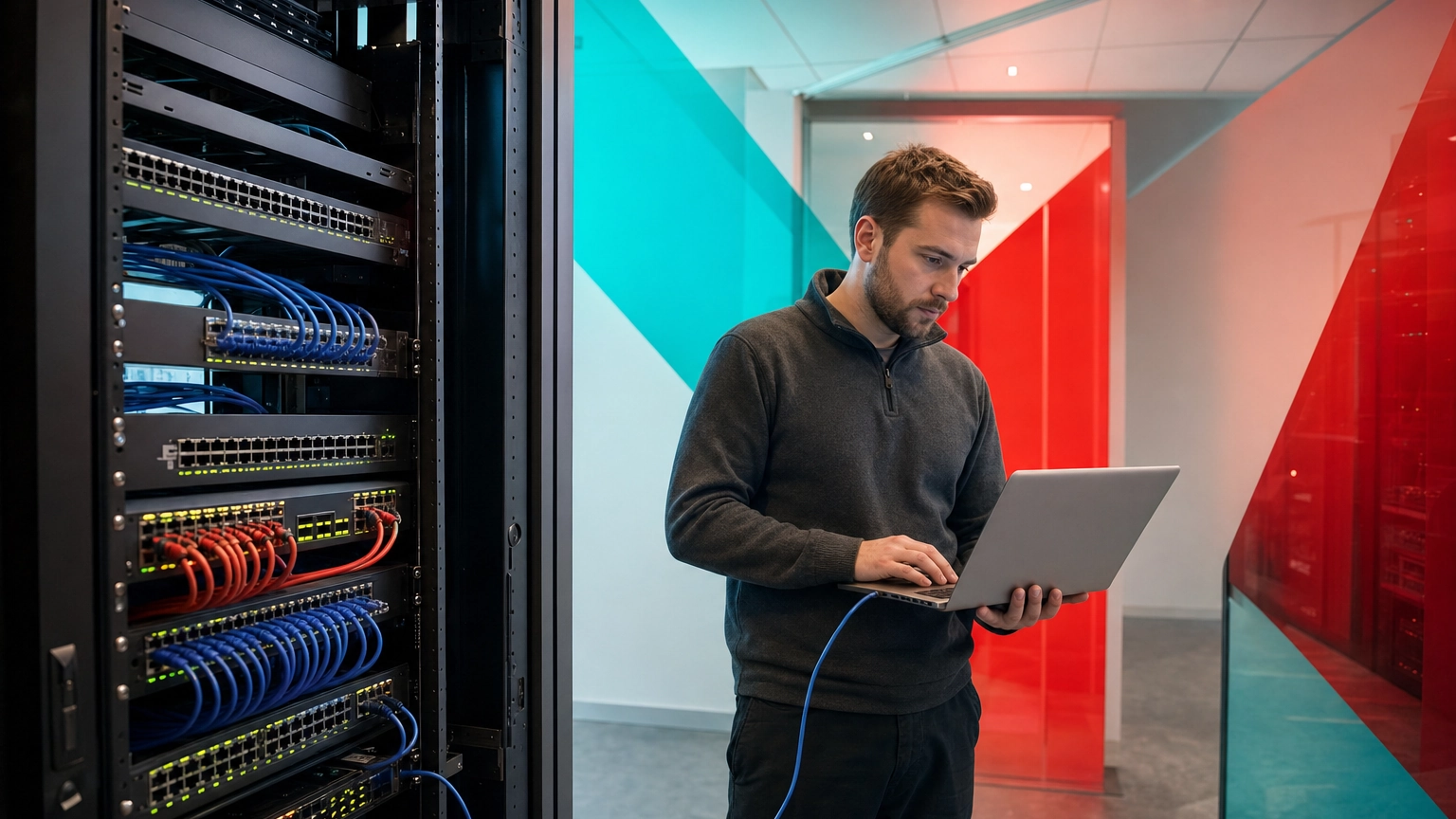
An IP address (Internet Protocol address) is a unique number assigned to every device on a network so information can be routed to the right place. It works like a mailing address for your computer, server, or phone, telling the network exactly where to deliver each piece of data. Every device that connects to the internet has one.
You rely on IP addresses every time you send an email, join a video call, or open a website, even though you almost never see one. For a business, they are not just technical trivia: the way your addresses are assigned, secured, and managed affects your uptime, your security, and how easily your network can grow. This guide explains what an IP address actually is, how it works in plain English, the difference between IPv4 and IPv6, the main types you will encounter, and why any organization running a network should understand them.
- An IP address is a device’s location on a network. It identifies where a device sits so data can be delivered to it and traffic can be routed back.
- There are two versions in use. IPv4 offers about 4.3 billion addresses and has run out; IPv6 offers a practically unlimited pool and is now used by roughly half of all internet traffic.
- Addresses come in types. Public vs. private and static vs. dynamic each serve a different purpose, and choosing correctly matters for servers, cameras, and remote access.
- IP is not the same as MAC. An IP address is assigned by the network and can change; a MAC address is a fixed hardware ID built into the device.
- Address management is a real business concern. Poorly planned addressing causes outages, security gaps, and painful troubleshooting as a company grows.
What’s in This Guide
How an IP Address Works
Every device that joins a network, whether a laptop, a phone, a server, a printer, or a security camera, is given an IP address. That address does two jobs at once: it identifies the device, and it describes where the device sits on the network so traffic can find its way to and from it. The whole system is defined by the Internet Protocol, first standardized by the IETF in RFC 791, the original Internet Protocol specification published in 1981.
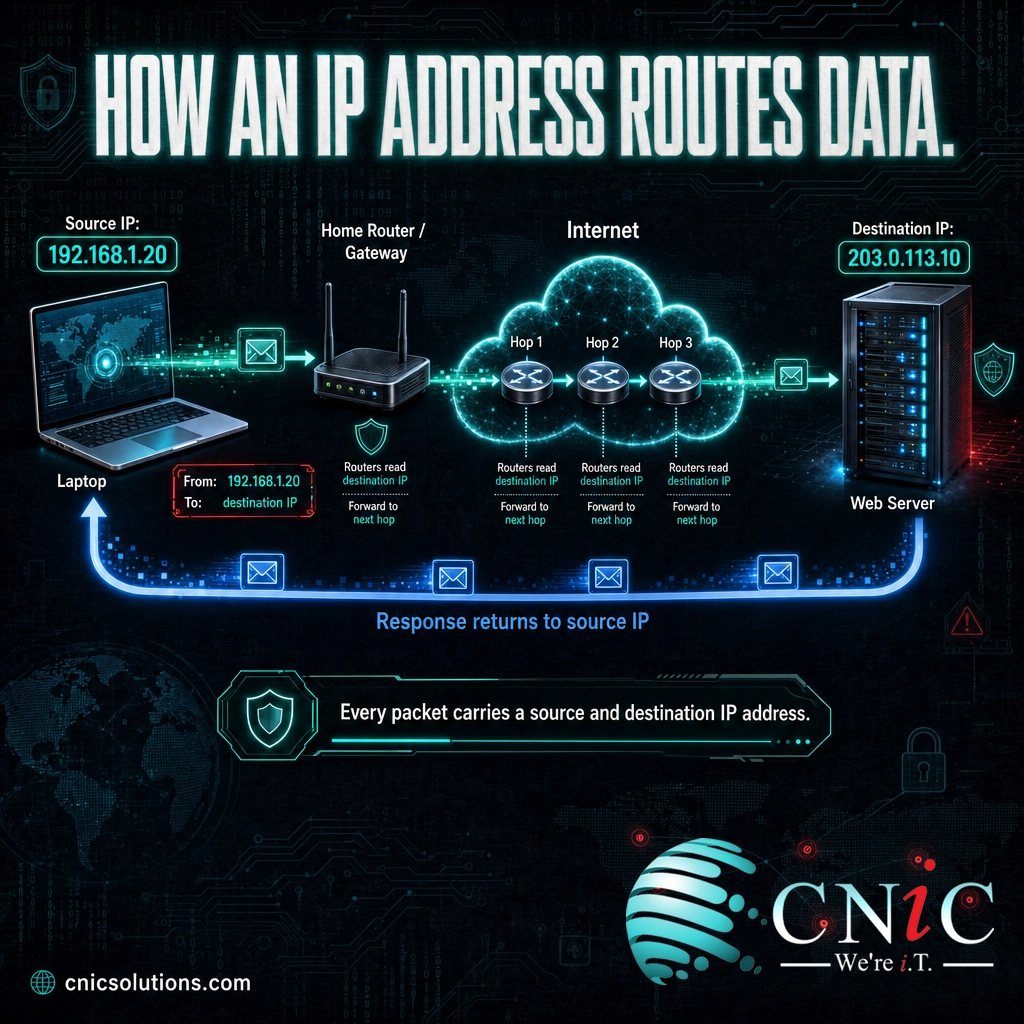
The easiest way to picture it is the postal system. Your street address does not describe you; it describes where to deliver your mail. An IP address works the same way. When your computer requests a web page, it stamps the request with two addresses, its own (the return address) and the destination server’s (where the request is going). The network reads those addresses and relays the data hop by hop until it arrives, then uses the return address to send the answer back.
Here is the process in plain terms, from clicking a link to seeing the page load.
- Your device gets an address. When it joins the network, it is assigned an IP address, usually automatically.
- A name is translated into a number. You type a website name, and the Domain Name System looks up the numeric IP address behind it, because the network routes on numbers, not names.
- Data is packaged with two addresses. Your request is broken into packets, each stamped with the source IP (yours) and the destination IP (the server’s).
- Routers relay the packets. Routers between you and the destination read each packet’s destination address and forward it toward its target, one hop at a time.
- The response comes back. The server sends the page back to your source address, and your device reassembles the packets into what you see on screen.
All of this happens in a fraction of a second, thousands of times a day, for every user in your office. The addresses are the part that makes the routing possible. Without them, the network would have no way of knowing which of the millions of devices online should receive any given piece of data.
Source: IETF RFC 791, Internet Protocol
IPv4 vs. IPv6: What’s the Difference?
The single most common question about IP addresses is the difference between IPv4 and IPv6. They are two versions of the same addressing system, and the gap between them comes down to one thing: how many addresses each can provide.
IPv4 is the original format, defined in RFC 791. It uses a 32-bit address, which you see written as four numbers separated by dots, such as 192.168.1.1. That 32-bit design allows for roughly 4.3 billion unique addresses. In 1981 that seemed like far more than the world would ever need. It was not. IPv6, standardized by the IETF in RFC 8200, the current Internet Protocol version 6 specification, uses a 128-bit address written in hexadecimal, such as 2001:0db8:85a3::8a2e:0370:7334. That expands the pool to about 340 undecillion addresses, a number so large it is effectively unlimited.
| Aspect | IPv4 | IPv6 |
|---|---|---|
| Address length | 32-bit | 128-bit |
| Written format | Dotted decimal (192.168.1.1) | Hexadecimal, colon-separated (2001:0db8::7334) |
| Total addresses | About 4.3 billion | About 340 undecillion |
| Address supply | Exhausted; traded on a resale market | Effectively unlimited |
| Configuration | Manual or DHCP | Auto-configuration (SLAAC) or DHCPv6 |
| Security (IPsec) | Optional, added later | Part of the original design |
| Standardized in | RFC 791 (1981) | RFC 8200 (2017) |
Both versions run side by side across the internet today, and most business networks quietly use a mix of the two. You do not have to choose one; well-managed networks support both. The practical takeaway is that IPv6 exists because IPv4 addresses ran out, and adoption has been climbing steadily. By 2026, IPv6 accounted for close to half of all traffic reaching Google.
Myth: IPv6 is optional and you can ignore it. Because IPv4 still works, it is tempting to treat IPv6 as a someday problem. But your customers, cloud providers, and mobile carriers are already using it heavily, and IPv6-only networks are becoming more common. A network that silently mishandles IPv6 can leak traffic outside your security controls or fail to reach IPv6-only services. Ignoring it is a decision with consequences, not a neutral default.
Source: IETF RFC 8200, Internet Protocol Version 6 | Google IPv6 adoption statistics
Types of IP Addresses
Beyond the IPv4 and IPv6 versions, IP addresses are also grouped by how they are used. Two distinctions matter most for a business: public versus private, and static versus dynamic. Understanding them is the difference between a network that just works and one you can actually secure and troubleshoot.
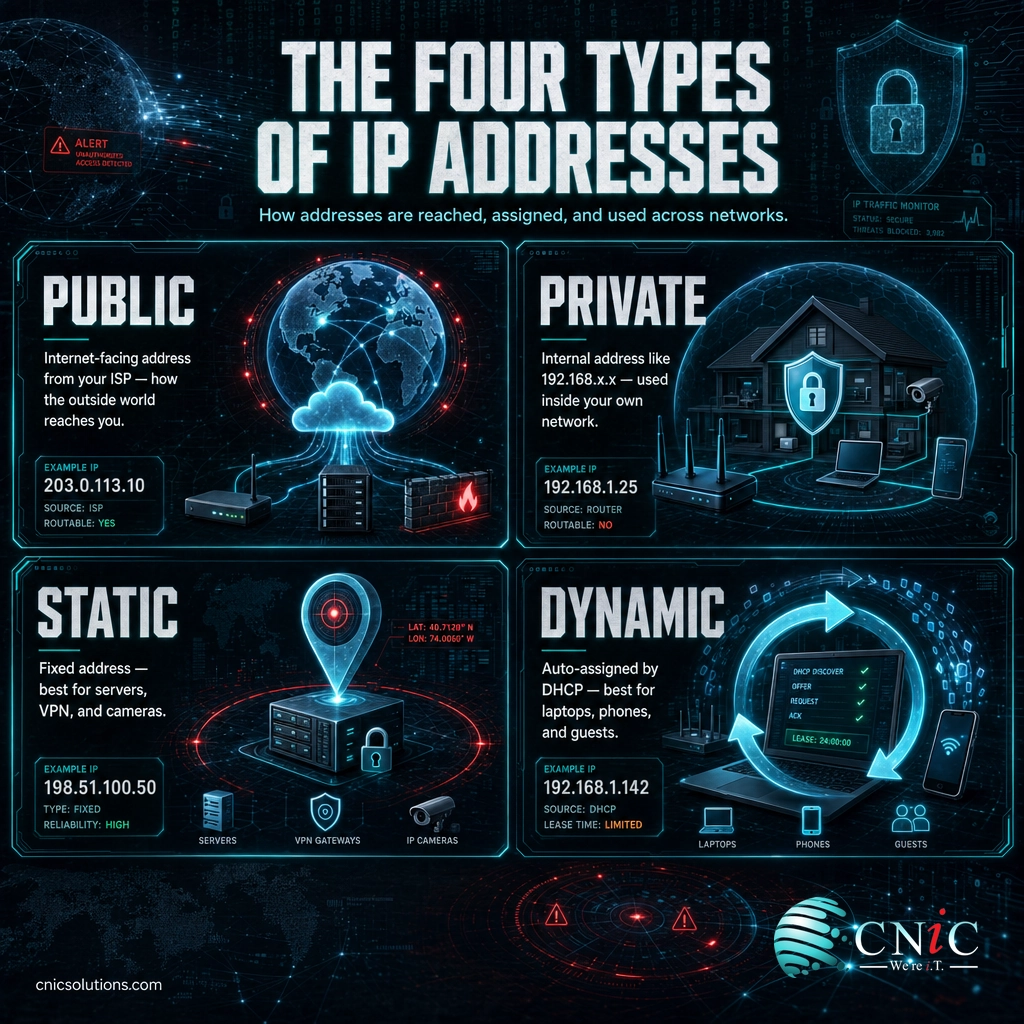
Public vs. private. A public IP address is the internet-facing address your internet provider assigns to your connection; it is unique across the entire internet and is how the outside world reaches you. A private IP address comes from reserved internal ranges, defined in RFC 1918, the private address allocation standard, and is only meaningful inside your own network. If you have ever seen a 192.168.x.x or 10.x.x.x address on an office device, that is a private address. Your router uses a process called NAT to let many private addresses share a single public one.
Static vs. dynamic. A dynamic IP address is assigned automatically and can change over time, which is fine for the majority of devices. A static IP address is fixed and never changes, which matters for anything other systems need to find reliably. The table below shows where each type fits.
| Type | What it is | Where it fits |
|---|---|---|
| Public | Internet-facing address assigned by your ISP | Your organization’s connection to the outside world |
| Private | Internal address from reserved RFC 1918 ranges | Workstations, printers, and devices inside your LAN |
| Static | Fixed address that does not change | Servers, email, VPN, remote access, security cameras |
| Dynamic | Auto-assigned by DHCP, changes over time | Everyday laptops, phones, and guest Wi-Fi devices |
These categories overlap rather than compete. A single device might have a private, dynamic IPv4 address on your internal network while your organization also holds a public, static address for its servers. Getting the assignments right, static where reliability matters and dynamic everywhere else, is a core part of designing a network that stays stable as you add devices.
Managing these correctly at scale is one of the everyday jobs of a well-run business network infrastructure, where address assignments, routing, and security have to stay consistent across every device.
Source: IETF RFC 1918, Address Allocation for Private Internets
Why IP Addresses Matter for Your Business
IP addressing can sound like something to leave entirely to the IT department, but the way your addresses are planned and protected has direct effects on cost, security, and growth. A few numbers make the case.
First, addresses are a finite resource that shaped the internet you run on. IPv4’s 32-bit design caps the entire world at about 4.3 billion addresses, and that ceiling was reached years ago. IANA, the body that hands out address space, allocated its final blocks on February 3, 2011, and the North American registry, ARIN, ran its own free pool to zero on September 24, 2015. Businesses that need additional public IPv4 addresses today often have to buy them on a transfer market. Address space is no longer free or infinite.
Second, the number of devices needing an address keeps climbing far faster than IPv4 could ever accommodate. IoT Analytics counted about 21.1 billion connected devices worldwide at the end of 2025 and projects roughly 39 billion by 2030, several times more than IPv4’s entire address space. Every phone, sensor, camera, and smart appliance in your office needs to be addressed and, ideally, organized so it can be secured. This is exactly why IPv6 and disciplined internal addressing exist.
Addresses vs. Devices: Why IPv4 Ran Out
The number of devices needing to connect long ago passed the entire IPv4 address space. Sources: IoT Analytics (device counts); IETF RFC 791 (IPv4 address total).
Third, and most immediate for most businesses, IP addresses are a security and troubleshooting tool. Firewalls allow or block traffic based on addresses. Security logs record the source IP of a login attempt or an attack, which is how incidents get investigated. Access controls decide which devices can reach sensitive systems by their address and segment. When addressing is haphazard, so is your ability to see and control what is happening on your network. Sound addressing underpins the segmentation and monitoring that a strong subnetting plan delivers, keeping guest devices, payment systems, and staff workstations apart.
Put together, IP addressing is not a background detail. It determines whether your network is secure, whether it can grow without a rebuild, and whether you can actually find and fix problems when they happen. That is why it is one of the first things a competent IT partner reviews.
Source: ARIN, IPv4 free pool reaches zero | IoT Analytics, State of IoT 2025
How to Find and Manage Your Business IP Addresses
You do not need to memorize binary to run a healthy network, but you do need a deliberate plan for how addresses are assigned and protected. Here is a practical starting point.
- Know your public address. Your internet-facing IP is what the outside world sees. You can find it by searching “what is my IP” from any office device, or in your router or firewall settings. Note whether it is static or changes.
- Map your private ranges. Decide which internal ranges (from the RFC 1918 space) your network uses and stick to a consistent scheme instead of letting devices land wherever.
- Reserve static addresses deliberately. Give servers, printers, cameras, VPN endpoints, and anything accessed remotely a fixed address so it can always be found.
- Let DHCP handle the rest. Everyday laptops, phones, and guests should get dynamic addresses automatically, which reduces conflicts and manual work.
- Segment for security. Group devices by role and trust level so addressing supports your security controls rather than working against them. Learn how VLANs pair with your address plan to isolate traffic.
- Document everything. Record which address belongs to what, so troubleshooting and future growth are not guesswork.
For a small office this can be straightforward. For a growing business with servers, multiple locations, cameras, and compliance requirements, the decisions compound quickly, and an address plan that was never really designed becomes the root cause of outages and security gaps. This is where a team that builds and manages networks for a living pays off. CNiC Solutions designs, secures, and manages business networks so addressing, routing, and segmentation are right from day one.
Get Expert Help With Your Business Network
Explore Fully Managed IT Services
Common Questions About IP Addresses
What is an IP address in simple terms?
What is the difference between IPv4 and IPv6?
What is the difference between an IP address and a MAC address?
What is the difference between a public and a private IP address?
Should my business use a static or dynamic IP address?
Related Terms
- Subnet: a smaller network carved out of a larger IP range to organize devices and contain traffic. See our guide to subnetting explained.
- Subnet mask: the value that marks which part of an IP address identifies the network and which part identifies the device.
- DNS (Domain Name System): the service that translates human-readable website names into the numeric IP addresses networks route on.
- DHCP: the protocol that automatically hands out dynamic IP addresses to devices as they join a network.
- NAT (Network Address Translation): the process a router uses to let many private addresses share one public IP address.
- VLAN: a switch-level grouping of devices, usually paired with a subnet. Learn how virtual LANs work.
- Proxy server: an intermediary that forwards traffic on a device’s behalf, often masking the original IP. See what a proxy server does.
- LAN and WAN: the local and wide-area networks that IP addresses operate within. Read the difference between a LAN and a WAN.
About This Guide
The Internet Protocol model, IPv4 and IPv6 address structures, and private address ranges described here follow the published Internet standards from the IETF: RFC 791 (Internet Protocol / IPv4), RFC 8200 (Internet Protocol Version 6), and RFC 1918 (private address allocation). The IPv4 total of about 4.3 billion addresses is the 2-to-the-32nd-power address space defined by RFC 791; the IPv6 total of about 340 undecillion is the 2-to-the-128th-power space. IPv4 exhaustion dates are documented by ARIN (September 24, 2015 free-pool depletion) and IANA (February 3, 2011). IPv6 adoption figures are from Google’s public IPv6 statistics, and connected-device counts are from IoT Analytics’ State of IoT 2025. Figures are used to explain how IP addressing works, not as guaranteed outcomes for any specific network.
Sources: IETF RFC 791 | IETF RFC 8200 (IPv6) | IETF RFC 1918 | ARIN, IPv4 free pool reaches zero | Google IPv6 statistics | IoT Analytics, State of IoT 2025
Get a Free Network Security Assessment



related posts
What Is Calendar Phishing and How to Prevent It
October 13, 2026Calendar phishing is a scam that hides a malicious link inside a calendar invitation instead of…
What Is BYOD? Bring Your Own Device Explained for Businesses
October 13, 2026BYOD (Bring Your Own Device) is a policy that lets employees use their own personal devices,…
What Is an Evil Twin Attack? How Fake Wi-Fi Hotspots Steal Your…
October 12, 2026An evil twin attack is a fake Wi-Fi hotspot that copies the name of a network…
What Is Allowlisting? How It Works and Why It Matters
October 11, 2026Allowlisting is a security approach that permits only pre-approved applications, files, or connections to run, and…