

BYOD (Bring Your Own Device) is a policy that lets employees use their own personal devices, such as smartphones, laptops, and tablets, to do their jobs and connect to company systems. It can cut hardware costs and lift productivity, but it only works safely when paired with a clear policy and real security controls.
If half your team already checks work email on a personal phone, you are running a BYOD program, whether you planned one or not. The question is no longer whether employees use their own devices for work. It is whether your business has a policy that captures the savings and productivity of BYOD without handing sensitive data to an unmanaged phone. This guide explains what BYOD means, how it works, where it differs from MDM, the deployment models to choose from, the security risks that matter, and the steps to build a program you can actually control.
Key Takeaways
- BYOD means employees use personal devices for work. Company email, apps, and files live alongside personal photos and texts on the same phone or laptop.
- The upside is real. Cisco measured about 350 dollars in annual value per mobile employee from a basic BYOD program, rising to roughly 1,650 dollars when the program is fully built out.
- The risk is data, not the device. A lost phone is replaceable. The company data on it is not, which is why unmanaged personal devices are a leading source of mobile security incidents.
- BYOD is the policy; MDM is the tool. Mobile device management software enforces the rules your BYOD policy sets.
- A written policy is non-negotiable. Eligible devices, required controls, data ownership, and remote-wipe rights all need to be defined before the first device connects.
What’s in This Guide
How BYOD Works
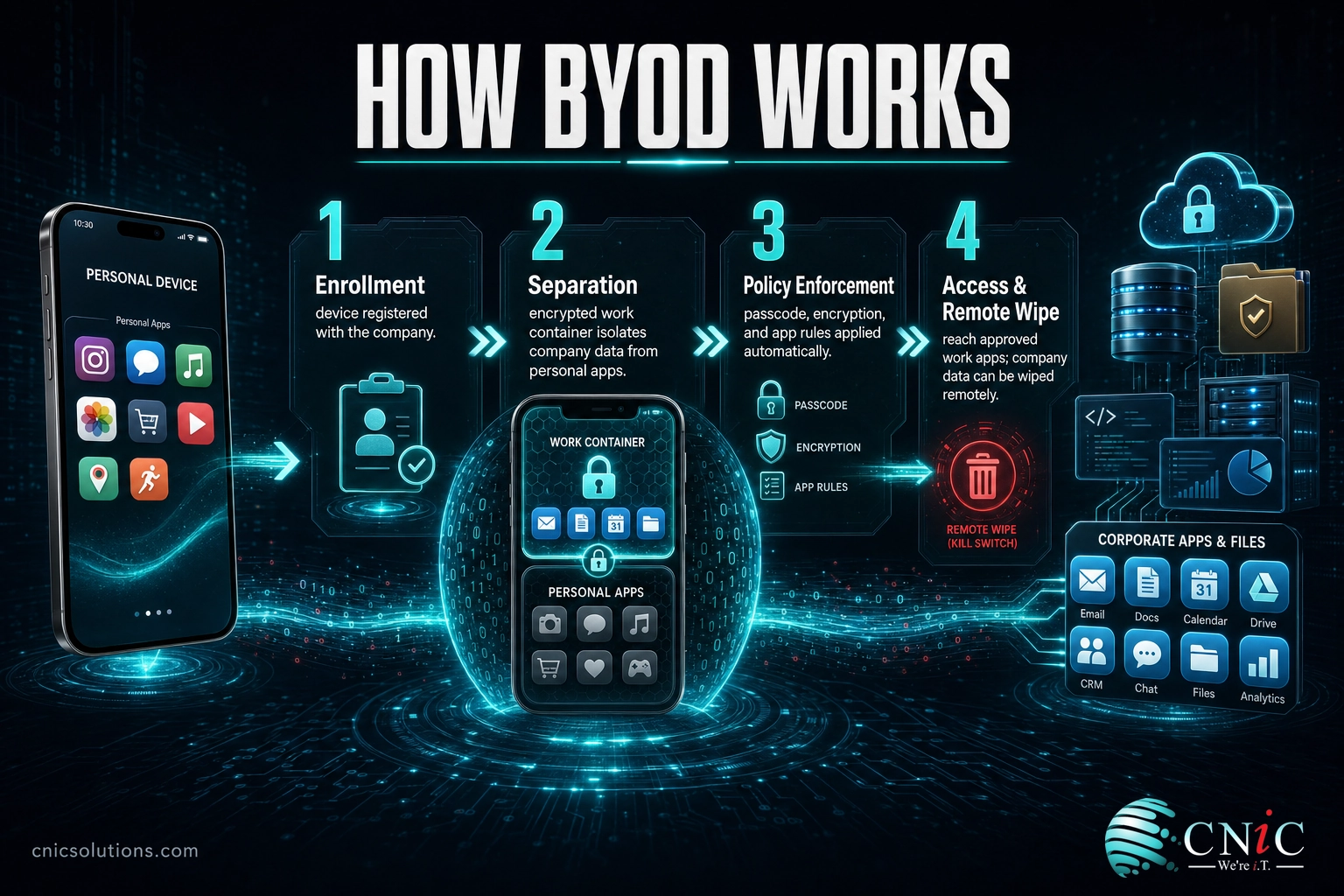
BYOD sounds informal, but a well-run program follows a clear path from a personal device to protected company data. Think of it like a guest badge at a secure building. The visitor keeps their own coat and phone, but they only get through the doors the badge allows, and security can revoke that badge the moment they leave. BYOD does the same thing for a personal device: it grants controlled access to work resources without taking ownership of the whole device.
In practice, a business BYOD program moves through four stages:
- Enrollment. The employee registers their device with the company, usually by installing a management profile or a work app. This is the moment the device is identified and the ground rules are accepted.
- Separation. Work data is walled off from personal data, most often through containerization, which creates a secure, encrypted space on the device for company email, files, and apps. Personal photos, texts, and apps stay private and untouched.
- Policy enforcement. Security rules are applied automatically: a device passcode, encryption, screen-lock timeouts, and blocks on risky actions like copying work files into personal cloud storage.
- Access and revocation. The employee reaches the company apps and data they are cleared for. If the device is lost or the employee leaves, the company can remotely wipe only the work container, removing corporate data while leaving personal content alone.
The U.S. National Institute of Standards and Technology defines BYOD as the practice of performing work activities on personally owned devices, and its practice guide stresses that the same flexibility that makes personal devices useful also creates security and privacy challenges for both the business and the employee. That tension, convenience on one side and control on the other, is the whole design problem BYOD has to solve.
Source: NIST SP 1800-22, Mobile Device Security: Bring Your Own Device
BYOD vs. MDM: Clearing Up the Confusion
The single most common mix-up is treating BYOD and MDM as the same thing. They are not. BYOD is a policy decision: are employees allowed to use their own devices for work? MDM, or mobile device management, is the technology that makes that decision safe to act on. One is the rule. The other is the enforcement.
| BYOD | MDM | |
|---|---|---|
| What it is | A policy allowing personal devices for work | Software that secures and manages devices |
| Who owns the device | The employee | Owner varies; MDM manages either personal or company devices |
| Main purpose | Enable flexible, lower-cost device use | Enforce security, compliance, and remote control |
| Example capability | Sets who may use what and how | Enforces encryption, passcodes, and remote wipe |
The practical takeaway: a BYOD policy without MDM is a rule with no way to enforce it. Most businesses running BYOD pair it with an MDM or a lighter-weight mobile application management tool so the policy has teeth. If you are weighing platforms, our guide to the best MDM solutions for small business walks through how containerization keeps work and personal data separate on the same phone.

Why BYOD Matters for Businesses
BYOD is not a fringe experiment. Personal devices have quietly become core business infrastructure, and the numbers explain why leaders keep saying yes to it.
Cisco’s economic analysis of BYOD found that a basic program returns about 350 dollars in annual value per mobile employee, driven by productivity gains and reduced hardware spending. Build the program out fully, with the right tools and support, and that figure climbs to roughly 1,650 dollars per employee. More than a third of employees in the study saved at least two hours a week by using a device they already knew well. When people use hardware they chose and are comfortable with, they get more done and they carry one device instead of two.
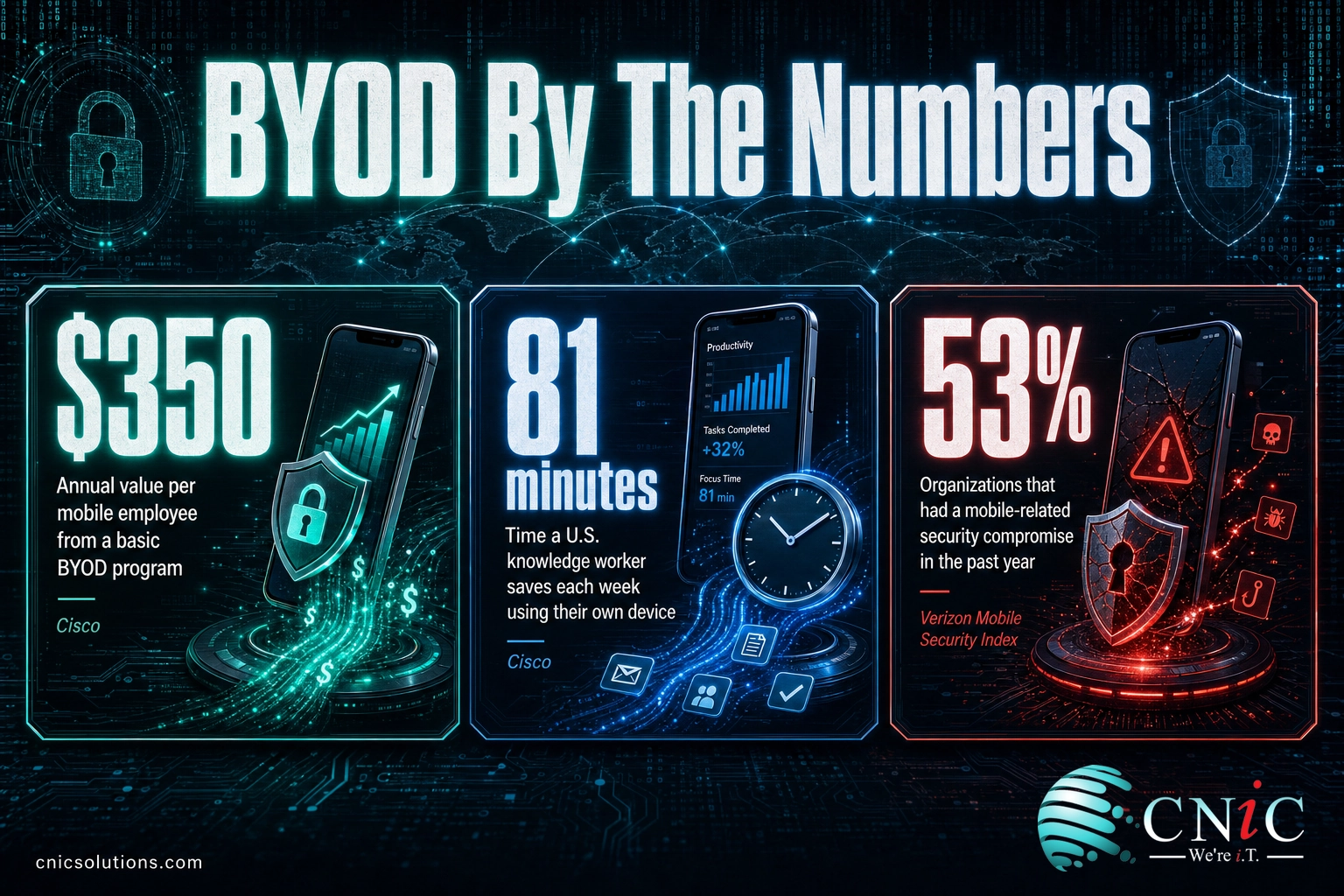
The catch sits in the third stat. The same personal devices that save time also sit outside the company’s direct control. Verizon’s Mobile Security Index reports that a majority of organizations now experience a mobile or endpoint security compromise in a given year, and a large share of the devices leaking corporate credentials are unmanaged, most likely personal phones and home laptops with no security oversight. BYOD earns its savings only when the security side is handled, which is where a real data backup and recovery plan and endpoint protection become part of the program, not an afterthought.
Source: Cisco, The Financial Impact of BYOD | Verizon Mobile Security Index
Types of BYOD: Deployment Models Compared
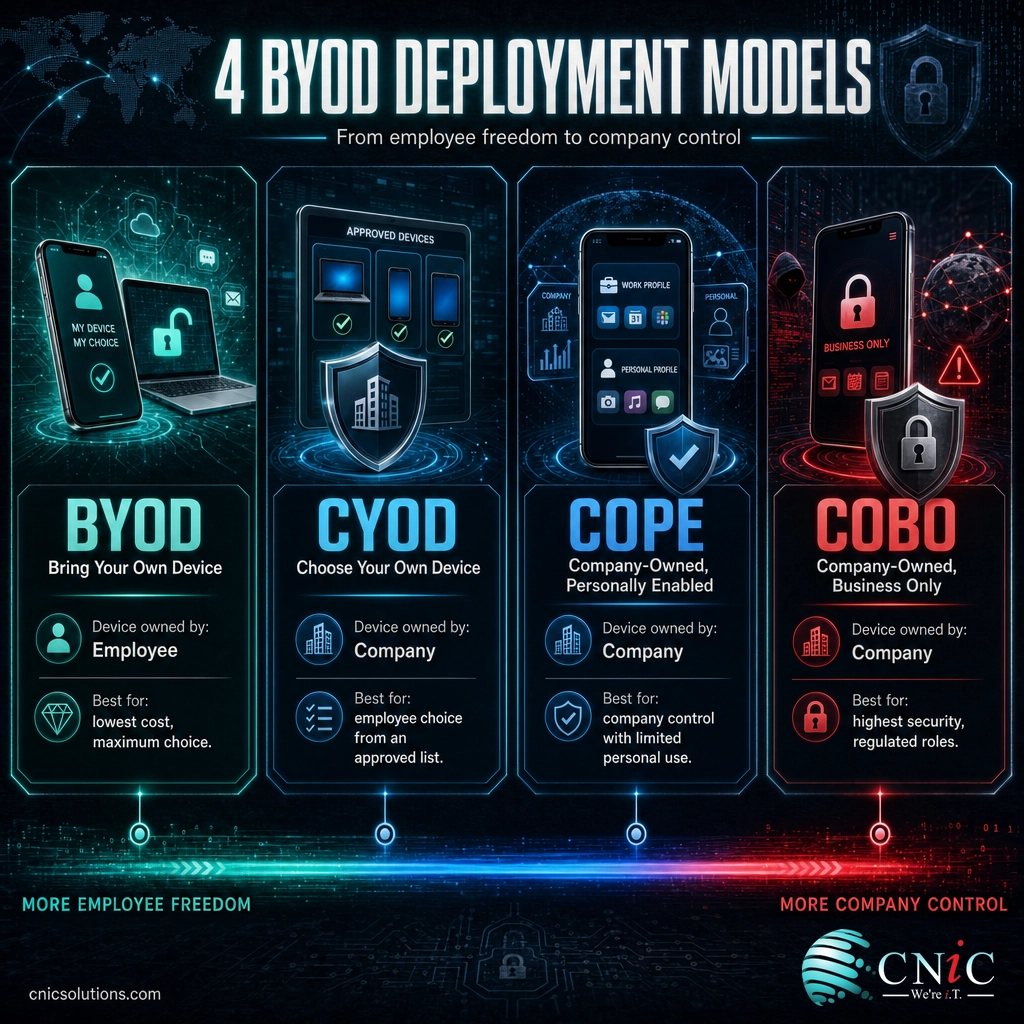
“BYOD” is often used as shorthand for any personal-device arrangement, but there are actually four distinct device-ownership models, and choosing the right one is a strategy decision. They trade off employee freedom against company control.
| Model | Stands for | Who owns the device | Best for |
|---|---|---|---|
| BYOD | Bring Your Own Device | Employee | Lowest hardware cost, maximum employee choice |
| CYOD | Choose Your Own Device | Company | Employee choice from an approved, company-owned list |
| COPE | Company-Owned, Personally Enabled | Company | Company control with limited personal use allowed |
| COBO | Company-Owned, Business Only | Company | Highest security, regulated or sensitive roles |
Many businesses run more than one model at once: strict COBO or COPE devices for finance and executives who handle sensitive data, and lighter BYOD for staff who mainly need email and calendar access. There is no single correct answer. The right mix depends on your industry, your compliance obligations, and how much support your IT team can provide. Mapping the right model to each role, rather than forcing one policy on the whole company, is exactly the kind of decision a virtual CIO is built to guide.
Match a device policy to every role
BYOD Security Risks You Cannot Ignore
The convenience of BYOD comes with a genuinely wider attack surface. Every personal device that touches company data is another endpoint you have to account for, and personal devices tend to be less patched, less monitored, and more exposed to risky networks and apps than company hardware. The main risks fall into a few buckets:
- Data leakage. Company files copied into personal cloud storage, messaging apps, or email are the most common way sensitive data slips out of your control.
- Lost and stolen devices. A phone left in a rideshare is a data breach if the work data on it is not encrypted and remotely wipeable.
- Unpatched software. Personal devices update on the owner’s schedule, not yours, leaving known vulnerabilities open for weeks or months.
- Shadow IT and risky apps. Employees install whatever they like, and a malicious or over-permissioned app can reach the work data sharing the device.
- Blurred offboarding. When someone leaves, their personal phone leaves with them. Without remote wipe of the work container, your data walks out the door.
Myth: A passcode on the phone is enough to protect company data.
A screen lock stops a casual snoop, but it does nothing about data synced to a personal cloud account, a phishing link opened in a personal browser, or credentials stolen by malware already on the device. Real BYOD security separates work data into an encrypted container, enforces multi-factor authentication, and lets you wipe company data remotely, none of which a personal passcode provides. Treating a passcode as your BYOD security strategy is how unmanaged devices become the leak.
None of this makes BYOD a bad idea. It makes an ungoverned BYOD program a bad idea. The fix is layered controls, the kind of managed cybersecurity built for businesses that let staff work from their own devices.
Protect company data on personal devices
Source: Verizon Mobile Security Index | NIST SP 1800-22
How to Get Started with BYOD
Rolling out BYOD safely is less about buying software and more about deciding the rules before anyone connects a device. A workable starting sequence looks like this:
- Write the policy first. Define which devices qualify, which security controls are mandatory, what data may be accessed, who pays for what, and your right to remotely wipe work data. Every participating employee should read and acknowledge it.
- Pick a deployment model per role. Match BYOD, CYOD, COPE, or COBO to the sensitivity of each team’s work rather than applying one rule to everyone.
- Deploy management and containerization. Use an MDM or mobile application management tool to separate work from personal data and enforce the policy automatically.
- Require strong authentication. Multi-factor authentication and single sign-on cut off the most common path attackers take onto an unmanaged device.
- Plan for exits. Build offboarding into the process so that when someone leaves, the work container is wiped and access is revoked the same day.
Most small and midsize businesses do not have the internal bandwidth to build and monitor all of this, which is where a managed IT partner earns its keep by running the program day to day. Our team handles BYOD enrollment, security, and support end to end.
Get help running your BYOD program
Common Questions About BYOD
What does BYOD stand for?
Is BYOD safe for businesses?
What is the difference between BYOD and MDM?
Does BYOD save money?
What should a BYOD policy include?
Related Terms
- MDM (Mobile Device Management): Software that enrolls, secures, and remotely manages the devices a BYOD policy allows.
- MAM (Mobile Application Management): A lighter approach that secures specific work apps rather than the whole device, common in BYOD.
- Containerization: Creating a separate, encrypted work space on a personal device so company data never mixes with personal apps.
- CYOD / COPE / COBO: Alternative device-ownership models that trade employee choice for greater company control.
- Zero Trust: A security model that verifies every user and device on every request rather than trusting anything by default, a strong fit for BYOD.
- Shadow IT: Apps and services employees use for work without IT’s knowledge or approval, a frequent BYOD side effect.
- Endpoint security: Protecting the individual devices, or endpoints, that connect to a network, a core part of any BYOD defense.
- Remote wipe: Erasing company data from a lost, stolen, or offboarded device, ideally just the work container on a personal phone.
Sources



related posts
What Is Calendar Phishing and How to Prevent It
October 13, 2026Calendar phishing is a scam that hides a malicious link inside a calendar invitation instead of…
What Is an Evil Twin Attack? How Fake Wi-Fi Hotspots Steal Your…
October 12, 2026An evil twin attack is a fake Wi-Fi hotspot that copies the name of a network…
What Is an IP Address? A Plain-English Guide for Business
October 12, 2026An IP address (Internet Protocol address) is a unique number assigned to every device on a…
What Is Allowlisting? How It Works and Why It Matters
October 11, 2026Allowlisting is a security approach that permits only pre-approved applications, files, or connections to run, and…