
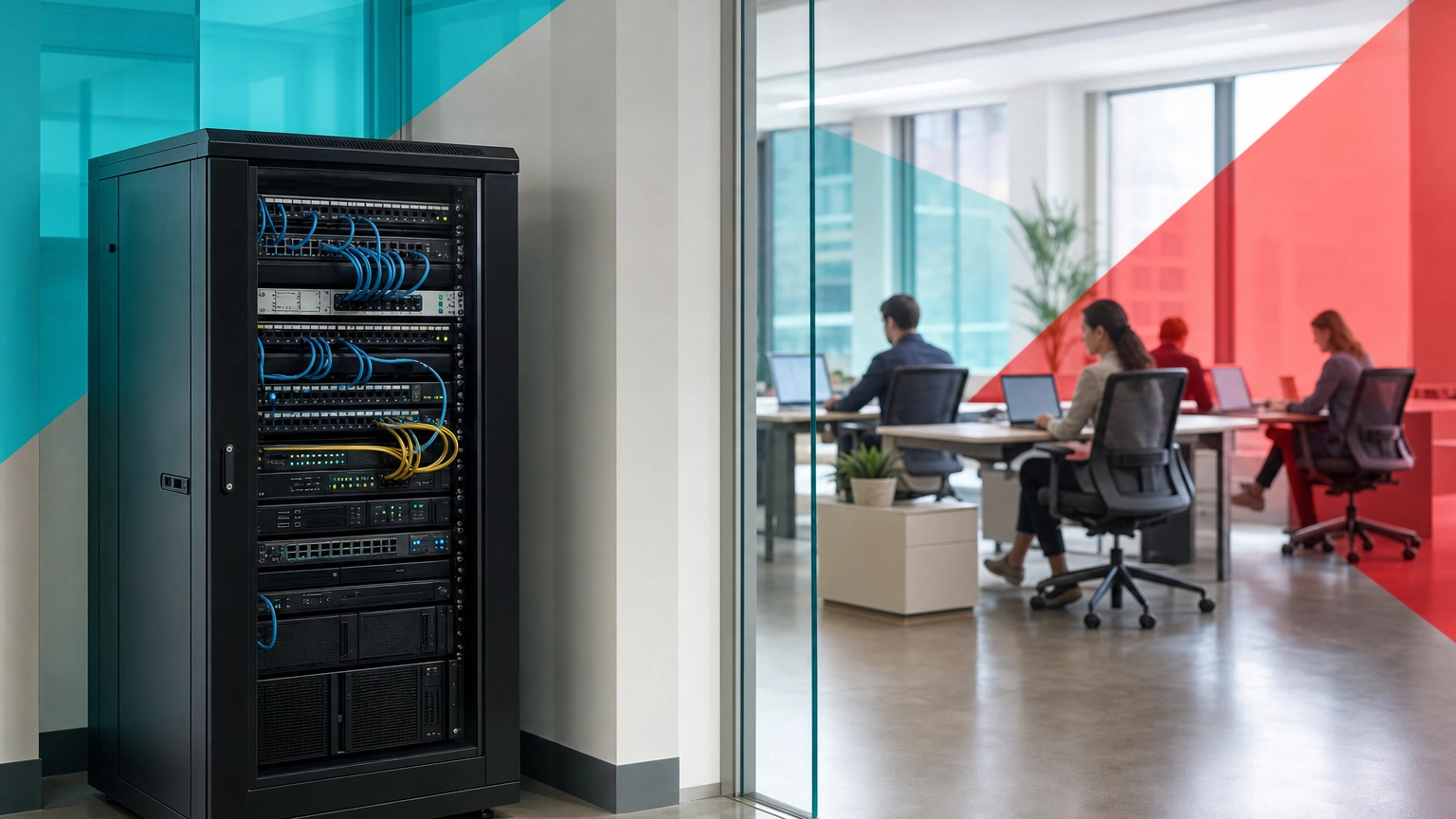
Choosing between cloud and on-premise infrastructure is one of the highest stakes technology decisions a small business makes, because it shapes your costs, your security posture, and how fast you can grow for years. Get it right and your systems scale quietly in the background. Get it wrong and you either overspend on hardware you barely use or lose control of a cloud bill that climbs every month. This guide compares both models across the criteria that actually decide the outcome, cost, security, scalability, control, reliability, and compliance, so you can match the model to your business instead of following a trend.
Key Takeaways
- Cloud wins on speed and low startup cost. No hardware purchase, fast scaling, and provider managed maintenance make it the default starting point for most small teams.
- On-premise wins on control and predictable heavy usage. Owned hardware pays off for stable, resource heavy workloads and strict local control needs.
- Security is a tie decided by setup, not model. IBM tied cloud misconfiguration to 15 percent of breaches, a human error, not a cloud flaw.
- Cost is not automatic. 84 percent of organizations say managing cloud spend is their top challenge, so cloud savings require discipline.
- Hybrid is a legitimate answer. Keeping one or two workloads local while moving the rest to the cloud is common and often optimal.
What’s in This Guide
- Cloud vs On-Premise at a Glance
- Understanding Cloud Infrastructure
- Understanding On-Premise Infrastructure
- Cost: Upfront Investment vs Predictable Monthly Spend
- Security: Who Owns Which Risk
- Scalability: How Fast You Can Grow
- Control and Customization
- Reliability, Uptime, and Disaster Recovery
- Compliance and Data Residency
- Master Comparison Table
- Hybrid Infrastructure: The Middle Path
- Who Should Choose Cloud
- Who Should Choose On-Premise
- Final Verdict
- Frequently Asked Questions
Cloud vs On-Premise at a Glance
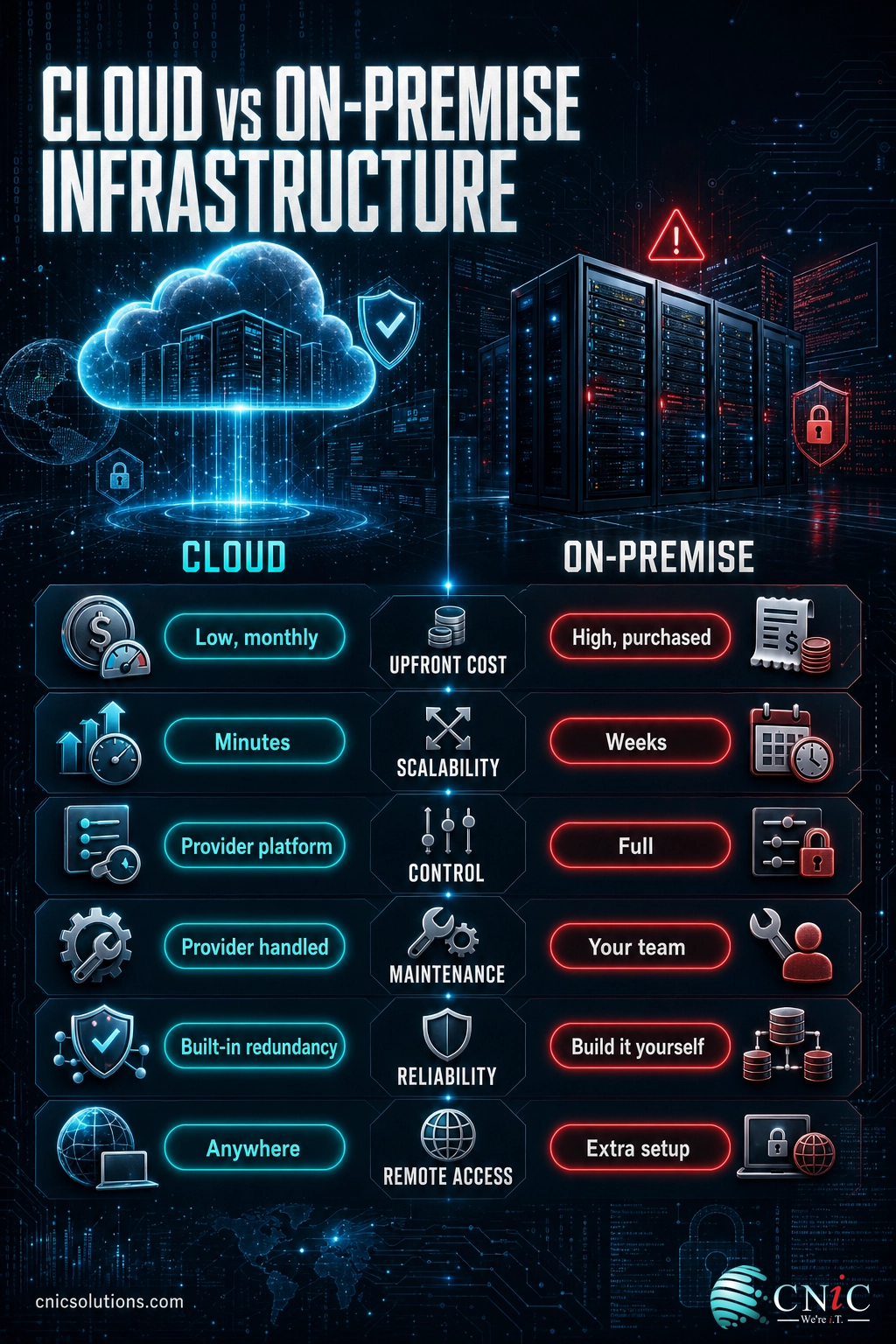
Before the detailed breakdown, here is the short version. Cloud infrastructure rents computing power, storage, and software from a provider and delivers it over the internet. On-premise infrastructure runs on hardware your business owns and houses on site. The debate is rarely about which one is better in the abstract. It is about which one fits your workload, your budget structure, and your appetite for hands on control.
- Low upfront cost, paid as a monthly operating expense
- Scales up or down in minutes without buying hardware
- Provider handles hardware maintenance, patching, and redundancy
- Access from anywhere with an internet connection
- Ongoing cost can climb without active management
On-premise infrastructure
- High upfront hardware and licensing cost, owned as a capital asset
- Full physical control of servers, data, and configuration
- Predictable cost once purchased, no monthly per user surprises
- Scaling requires buying and installing more hardware
- Your team owns maintenance, security, and disaster recovery
The rest of this guide takes each of these tradeoffs and shows where the real dividing lines fall, backed by current data on cost, breaches, and downtime. For a foundation on what infrastructure management covers day to day, see our overview of how IT infrastructure management works.
Understanding Cloud Infrastructure
Cloud infrastructure means your servers, storage, and networking live in a provider’s data centers and you reach them over the internet. Instead of buying a server, you rent a virtual one and pay for what you use. The model has moved from novelty to norm. Gartner forecasts worldwide public cloud end user spending will reach 723.4 billion dollars in 2025, up from 595.7 billion in 2024, a growth rate of roughly 21.5 percent in a single year.
Worldwide Public Cloud End-User Spending (Gartner Forecast)
How cloud works for a small business
Most small businesses use cloud in three forms. Software as a service delivers finished applications like email, accounting, and collaboration. Infrastructure as a service rents raw servers and storage you configure yourself. Platform as a service sits between them and gives developers a place to build without managing the underlying machines. You can use all three at once, and most companies do.
Genuine strengths
The cloud removes the largest barrier to good infrastructure, the upfront hardware bill. It lets a five person company use the same enterprise grade servers, backup, and security tooling that a large firm uses, billed monthly. It scales in minutes, keeps software current automatically, and gives staff access from any location. For a deeper look at the model, our complete guide to cloud computing for business covers the service types and use cases in detail.
Genuine limitations
Cloud costs are recurring and can drift upward as usage grows. You depend on an internet connection and on the provider’s uptime. You also give up some low level control, and you inherit real responsibility for account security and configuration. None of these are dealbreakers, but they are the reasons the cloud is not automatically the right answer for every workload.
Source: Gartner Public Cloud Forecast
Understanding On-Premise Infrastructure
On-premise infrastructure runs on servers your business buys, owns, and houses in your own space, whether that is a dedicated server room or a single rack in a closet. Your team, or a provider you hire, installs the hardware, configures it, secures it, and keeps it running. You own the asset outright and you control every layer of it.
How on-premise works for a small business
A typical on-premise setup includes one or more physical servers, local storage, networking gear, a backup system, and the software licenses to run it all. The business pays a large sum at purchase, then absorbs ongoing costs for power, cooling, maintenance, and eventual replacement. Hardware is usually refreshed on a three to five year cycle. Some businesses spread the hardware cost through hardware as a service arrangements that turn a purchase into a monthly payment while keeping equipment on site.
Genuine strengths
On-premise gives you complete control. You decide exactly how systems are configured, where data physically sits, and who touches the hardware. Once the equipment is paid off, per user costs do not climb the way a cloud subscription can. For workloads that are stable, heavy, and always on, owned hardware can be the cheaper option over its lifespan, and it removes any dependence on an internet link for internal systems.
Genuine limitations
The upfront cost is significant, and it lands before the business sees any benefit. Scaling is slow because it means buying and installing more hardware. Your team owns every responsibility the cloud provider would otherwise handle, including patching, physical security, and disaster recovery. If you lack internal IT depth, those responsibilities become a real risk rather than a benefit.
Cost: Upfront Investment vs Predictable Monthly Spend
Cost is where most decisions start, and it is more nuanced than cloud is cheap. The real difference is the shape of the spending. On-premise is a capital expense: a large purchase up front, then lower running costs. Cloud is an operating expense: little or nothing up front, then a steady monthly bill that scales with use.
For a small business under roughly twenty users, an honest three to five year comparison usually favors the cloud, because avoiding the hardware purchase outweighs years of subscription fees. As user counts grow, or when workloads are heavy and stable, on-premise can pull ahead because owned hardware has no per user monthly charge. The catch is discipline. Flexera’s State of the Cloud research found that 84 percent of organizations name managing cloud spend as their single biggest cloud challenge, and that a meaningful share of cloud spending is wasted on idle or oversized resources.
Myth: The cloud always saves money
The cloud lowers the cost to get started, but it does not manage itself. Left unwatched, subscriptions multiply, test servers run overnight, and storage piles up. The savings are real only when someone actively right sizes resources and shuts down what is not in use. Our guide to cloud cost optimization strategies walks through how to keep a cloud bill under control.
To compare the true cost of running IT internally against outsourcing it, our breakdown of in-house versus outsourced IT costs puts real numbers on the staffing side of the decision.
Source: Flexera State of the Cloud
Security: Who Owns Which Risk
The instinct that on-premise is safer because the servers are in the building, or that the cloud is safer because a large provider runs it, are both half true. Security is decided by how a system is configured and monitored, not by where the hardware sits. Both models can be locked down, and both can be left exposed.
In the cloud, security runs on a shared responsibility model. The provider secures the physical data center and the platform, while you remain responsible for account access, user permissions, and how your data and applications are configured. That last part is where things go wrong. IBM’s Cost of a Data Breach research tied cloud misconfiguration to 15 percent of breaches, a setup mistake rather than a flaw in the cloud itself. The same report put the global average cost of a breach at 4.88 million dollars, with 70 percent of breached organizations reporting significant disruption.
On-premise, you own the entire security stack: physical access, patching, firewalls, monitoring, and response. That is full control, but it is also full responsibility, and it demands real expertise to do well. Whichever model you choose, layered protection is what actually keeps data safe, and it applies to cloud and owned hardware alike.
Explore our cybersecurity services
Source: IBM Cost of a Data Breach
Scalability: How Fast You Can Grow
Scalability is the criterion with the clearest winner. In the cloud, adding capacity is a settings change. You increase computing power, storage, or user seats in minutes and pay for the new level going forward. You can also scale back down when demand falls, which matters for seasonal businesses or unpredictable workloads.
On-premise scaling is a project. Growth means specifying, buying, installing, and configuring new hardware, which can take weeks and requires spending ahead of need. That works when growth is slow and predictable. It becomes a bottleneck when the business needs to move quickly or when demand spikes are hard to forecast. For a fast growing small business, this single factor often settles the decision in favor of the cloud.
Control and Customization
This is on-premise territory. When you own the hardware, you control every layer: the operating system, the network configuration, the exact physical location of your data, and who has hands on access. For businesses running specialized or legacy software that needs specific hardware, or that have strict internal rules about data handling, that control is the deciding advantage.
The cloud trades some of that control for convenience. You work within the provider’s platform, its available configurations, and its maintenance windows. For the vast majority of small business workloads, that tradeoff is invisible and worthwhile. For a narrow set of specialized cases, the loss of low level control is exactly why some workloads stay on owned hardware, or move back to it. Our look at when cloud repatriation makes sense covers those cases.
Reliability, Uptime, and Disaster Recovery
Reliability is not just about how often something fails. It is about how much a failure costs and how fast you recover. Downtime is expensive at any size. Uptime Institute’s annual outage analysis found that 54 percent of operators said their most recent significant outage cost more than 100,000 dollars, and one in five said it cost more than 1 million dollars.
Cloud platforms build in redundancy by default. Reputable providers replicate data across multiple data centers, so a single hardware failure does not take you offline, and backup and recovery features are part of the service. On-premise redundancy is possible and often excellent, but you have to build and pay for it yourself, which means a second set of hardware, an off site backup location, and a tested recovery plan.
Whichever model you run, recovery depends on tested backups, not hope. A managed backup approach protects both cloud and on-premise systems. For cloud native recovery, our explainer on disaster recovery as a service shows how providers deliver failover without a second server room. Continuous infrastructure monitoring is what catches problems early in either environment.
See our data backup and recovery services
Source: Uptime Institute Annual Outage Analysis
Compliance and Data Residency
For businesses in regulated industries, compliance can override every other factor. Frameworks like HIPAA in healthcare, PCI DSS for payment data, and SOC 2 for service providers set rules about how data is stored, accessed, and protected. Both cloud and on-premise can meet these standards, but they get there differently.
Reputable cloud providers offer compliant environments and will sign the agreements regulated businesses need, including a business associate agreement for protected health data. What they cannot do is take responsibility for how you configure and use that environment. On-premise gives you direct control over data residency, which matters when rules require data to stay in a specific location or under specific physical safeguards. The right choice depends on which framework applies and how much of the compliance burden you want to own directly. Our guide to managed IT pricing explains how compliance support factors into the cost of either model.
Master Comparison Table
| Criterion | Cloud | On-Premise | Better Fit |
|---|---|---|---|
| Upfront cost | Little to none, paid monthly | High hardware and licensing purchase | Cloud |
| Long-term cost (heavy, stable use) | Recurring, can climb with usage | Lower once hardware is paid off | On-Premise |
| Scalability | Minutes, up or down | Weeks, requires new hardware | Cloud |
| Control and customization | Limited to provider platform | Full control of every layer | On-Premise |
| Security responsibility | Shared with provider | Entirely your team’s | Tie (setup decides) |
| Maintenance | Handled by provider | Owned by your team | Cloud |
| Reliability and redundancy | Built in across data centers | You build and pay for it | Cloud |
| Remote access | Anywhere with internet | Requires extra setup | Cloud |
| Data residency control | Provider regions | Exact, physical control | On-Premise |
Hybrid Infrastructure: The Middle Path
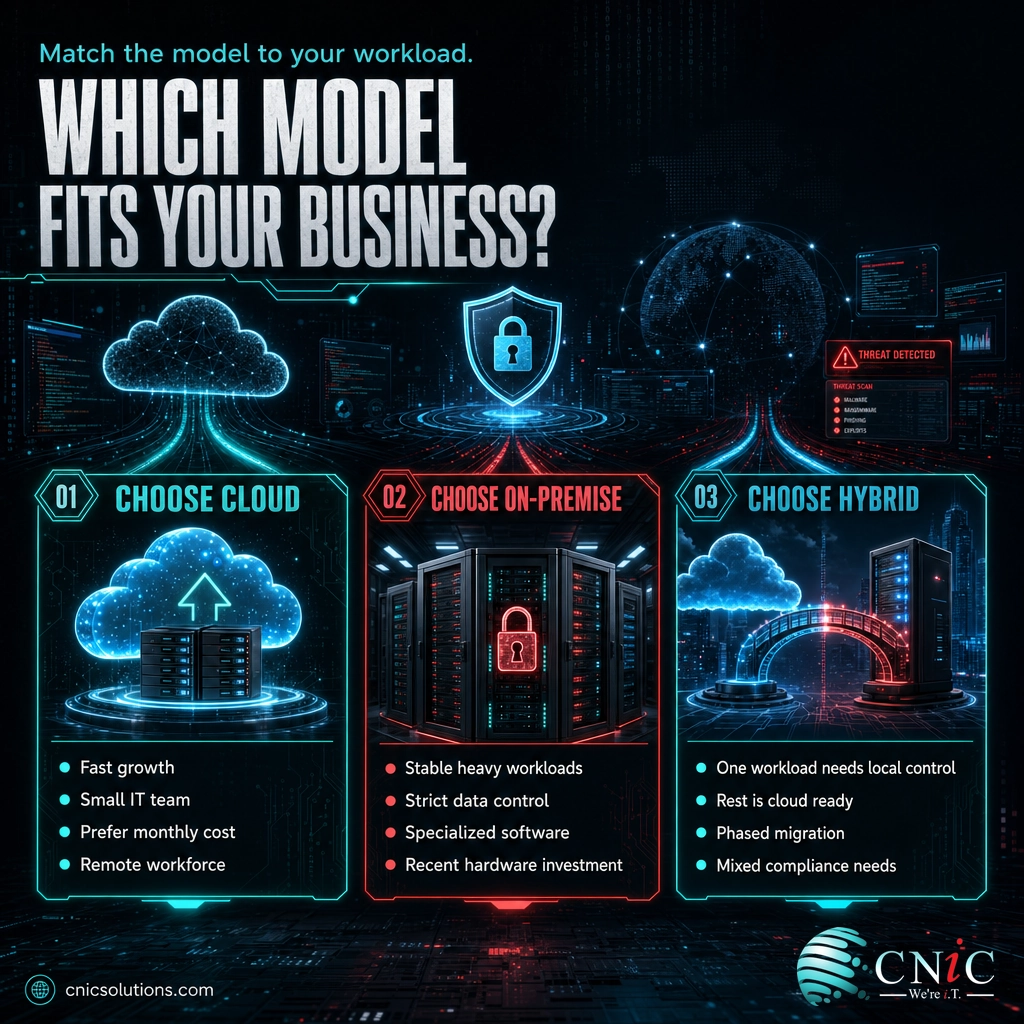
The cloud versus on-premise framing suggests you must pick one. In practice, many small businesses run both, and that is often the smartest answer. Hybrid infrastructure keeps some systems on owned hardware and runs others in the cloud, letting each workload sit where it fits best.
A common pattern keeps a latency sensitive or compliance sensitive application on-premise, where control is tightest, while moving email, file storage, collaboration, and backup to the cloud, where flexibility and redundancy are cheapest. Hybrid lets a business protect the one or two workloads that genuinely need local control without forcing everything else onto expensive owned hardware. It is not a compromise so much as a way to stop treating every workload the same.
When hybrid is the right call
- You run one industry specific or legacy application that needs local hardware, but the rest of the business is cloud ready.
- Compliance requires certain data to stay on site, while other systems have no such restriction.
- You have a recent hardware investment to use up, but you want cloud flexibility for new projects.
- You are migrating gradually and want to move workloads to the cloud in phases rather than all at once.
Who Should Choose Cloud
Cloud infrastructure is the right starting point for most small businesses. It fits especially well when:
- You are growing or growth is unpredictable. The ability to scale in minutes without buying hardware is a decisive advantage.
- You want to avoid a large upfront purchase. Trading a capital expense for a predictable monthly cost preserves cash for the business.
- Your team is small or lacks deep IT staff. Provider managed maintenance, patching, and redundancy remove work your team would otherwise own.
- Your people work remotely or across locations. Built in access from anywhere is native to the cloud.
- You need enterprise grade backup and recovery without building it. Redundancy across data centers comes standard.
Who Should Choose On-Premise
On-premise still earns its place for a specific profile of business. Choose it, or a hybrid built around it, when:
- Your workloads are heavy, stable, and always on. Owned hardware can be cheaper over its lifespan when usage does not fluctuate.
- You require strict, direct control of data location. Regulatory or internal rules that demand physical control point to on-premise.
- You run specialized software that needs specific hardware. Some industry and legacy applications perform best on local machines.
- You have a recent hardware investment. If you just bought servers, running them to end of life is sound economics.
- You have the internal IT depth to run it well. On-premise rewards businesses that can staff or outsource real expertise.
Final Verdict
There is no universal winner, only the right fit for your business. For most small businesses, especially those that are growing, cash conscious, or short on internal IT, the cloud is the stronger default. It lowers the barrier to good infrastructure, scales instantly, and builds in the redundancy that protects against costly downtime. On-premise remains the better answer for stable heavy workloads, strict control requirements, and specialized software, and hybrid lets you have both where that makes sense.
The decision comes down to matching the model to your workload, your growth plans, and your team, not to what is trending. If you want that mapped out against your actual systems and budget, our team can assess your environment and recommend the model, or the mix, that fits.
Explore our cloud infrastructure solutions
For businesses that would rather hand off the running of it entirely, whether cloud, on-premise, or hybrid, our managed IT services keep the whole environment monitored, patched, and supported.
Frequently Asked Questions
Is cloud cheaper than on-premise for a small business?
Is on-premise more secure than the cloud?
What is hybrid infrastructure, and is it right for a small business?
How do I decide between cloud and on-premise?
Can I move from on-premise to the cloud later, or back again?
Does on-premise infrastructure still make sense in 2026?
Methodology and Sources
This comparison draws on primary industry research current as of 2026. Cloud spending figures are from Gartner’s worldwide public cloud end user spending forecast. Breach cost and cloud misconfiguration figures are from IBM’s Cost of a Data Breach research. Cloud spend management figures are from Flexera’s State of the Cloud report. Downtime cost figures are from the Uptime Institute Annual Outage Analysis. Sources: Gartner | IBM | Flexera | Uptime Institute.



related posts
What Is Single Sign-On (SSO)? How It Works and Its Business Benefits
October 30, 2026Single sign-on (SSO) is a login method that lets one person use a single set of…
What Is SIP Trunking? How It Modernizes Business Phone Systems
October 30, 2026SIP trunking is a technology that connects a business phone system to the public telephone network…
What Is SIEM? Security Information and Event Management Explained
October 29, 2026A SIEM (security information and event management) is a security platform that collects log and event…
What Is Shadow IT? Risks, Examples, and How to Manage It
October 29, 2026Shadow IT is any hardware, software, cloud service, or AI tool that employees use for work…