

You don’t need a computer science degree to protect your business from cyber threats. But you do need to understand the basics — because cybersecurity decisions happen at the business level, not just the IT level. Whether it’s approving a security budget, setting expectations for your team, or knowing when something looks wrong, business owners who understand cybersecurity fundamentals make better decisions, spend money more wisely, and recover faster when something goes wrong. This guide covers what you actually need to know: the threats, the controls, and the mindset that separates businesses that get hit hard from businesses that barely feel it.
- You run or manage a small or midsize business and feel unsure about your cybersecurity exposure
- You’ve heard terms like “MFA,” “ransomware,” and “endpoint protection” but aren’t sure what they mean for your business
- You want to have informed conversations with your IT provider instead of just nodding along
- You’ve been meaning to take cybersecurity seriously but don’t know where to start
- 46% of all data breaches involve small businesses — being small is not protection against being targeted
- Six foundational controls address the vast majority of real-world cyber risk for SMBs
- MFA alone blocks over 99.9% of automated account attacks and is free on most platforms
- Attackers now target backup systems before deploying ransomware — tested, offsite backups are essential
- Employee training reduces phishing click rates from 30-40% to under 5% for well-trained teams
- Without active monitoring, the average time to detect a breach is 194 days
- Cybersecurity is a continuous practice, not a one-time setup
What’s in This Guide
- Why Cybersecurity Basics Matter for Business Owners
- What You Need to Know First: Key Terms Defined
- The Threats You’re Actually Defending Against
- The Six Cybersecurity Basics Every Business Must Master
- Turning Basics Into Habits: Best Practices
- Common Mistakes Beginners Make
- Where to Start: Your Action Plan
- Glossary of Terms Used in This Guide
- Frequently Asked Questions
- Next Steps
Why Cybersecurity Basics Matter More Than Ever for Business Owners
Cybersecurity used to feel like an enterprise concern — something for banks and government agencies, not a 25-person accounting firm or a regional construction company. That assumption has been dismantled by a decade of attack data.
According to Verizon’s 2025 Data Breach Investigations Report, 46% of all confirmed data breaches involve small businesses. The FBI’s 2024 Internet Crime Report logged over $12.5 billion in losses from cybercrime, with a significant share affecting small and midsize organizations. Attackers have shifted focus to smaller targets precisely because those targets tend to have weaker defenses, less experienced staff, and faster willingness to pay when ransomware hits.
The good news: most successful attacks exploit basic, preventable failures — weak passwords, unpatched software, untrained employees, absent backups. Mastering the basics addresses the vast majority of real-world risk. You don’t need to understand advanced persistent threats or zero-day exploits. You need to understand and consistently apply six foundational controls.
Source: Verizon Data Breach Investigations Report 2025 | FBI Internet Crime Report 2024
See How CNiC Protects Houston Businesses From Cyber Threats
What You Need to Know First: Key Terms Defined
Before going further, here are five terms that appear throughout this guide. Each definition is under 30 words and includes an analogy to make it concrete.
Phishing
A fraudulent message — usually email — that impersonates a trusted source to trick you into clicking a link or handing over credentials. Think of it as a scammer calling pretending to be your bank.
Ransomware
Malicious software that encrypts your files and demands payment to unlock them. Like a thief who breaks in, changes all your locks, and demands money for the new keys.
Multi-Factor Authentication (MFA)
A second verification step beyond your password — like an ATM requiring both your card and your PIN. Even if someone steals your password, they still can’t get in without the second factor.
Patch
A software update that fixes a known security vulnerability. Think of it as repairing a crack in your building’s foundation before someone uses it to break in.
Endpoint
Any device that connects to your network — laptops, phones, tablets, servers. Each one is a potential entry point. Think of each device as a door that needs its own lock.
Source: NIST Cybersecurity Framework Getting Started Guide | CISA Cybersecurity Best Practices
The Threats You’re Actually Defending Against
A clear picture of what you’re defending against makes every security decision easier. The threats targeting small businesses in 2026 fall into a handful of categories.
Phishing and Social Engineering
Phishing is the leading attack entry point for small business breaches. An attacker sends a message impersonating your bank, a vendor, or a colleague — tricking someone into clicking a link, entering credentials, or wiring money. Modern phishing emails are increasingly AI-generated, making them grammatically flawless and contextually convincing. The FBI reported $2.77 billion in losses from business email compromise alone in 2024.
Analogy: Phishing is the digital equivalent of a con artist showing up at your office in a convincing uniform, asking your receptionist to let them into the server room.
Ransomware
Ransomware encrypts your files and demands payment. It usually gets in through phishing, weak remote desktop credentials, or unpatched software. Once inside, it moves quickly through your network — targeting backups before encrypting everything else. According to Sophos, the median ransom payment in 2024 reached $2 million. The average total recovery cost, including downtime and remediation, was $2.73 million.
Credential Theft and Account Takeover
Attackers purchase stolen username and password combinations from previous breaches, then try them against your business accounts. If employees reuse passwords across sites, one breach of an unrelated service can hand attackers access to your email, cloud storage, or financial accounts. Verizon found compromised credentials were involved in 80% of hacking-related breaches.
Insider Threats
Not all threats come from outside. Careless employees, disgruntled staff, and contractors with excessive access all represent real risk. The Ponemon Institute found insider threats cost organizations an average of $16.2 million per incident in 2024 — and negligent insiders, not malicious ones, caused 55% of those incidents.
Leading Cyber Threats Facing Small Businesses (2025)
Sources: Verizon DBIR 2025 | Sophos State of Ransomware 2024 | Ponemon Institute Cost of Insider Risks 2024
The Six Cybersecurity Basics Every Business Must Master
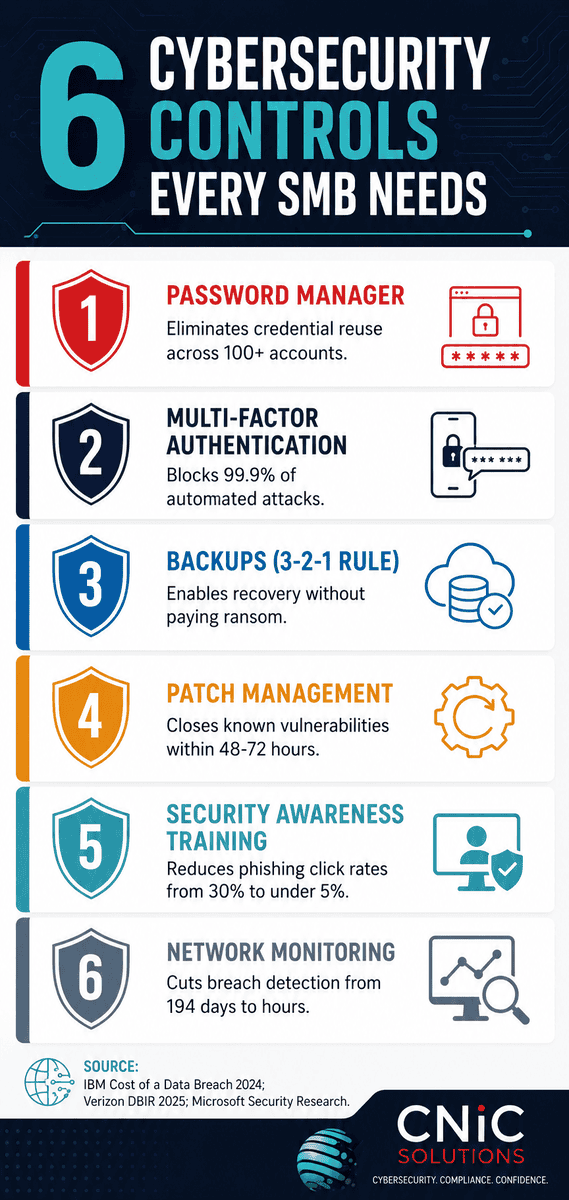
These six controls address the overwhelming majority of attack vectors targeting small businesses. They are not complex. They do not require a dedicated security team. They require consistency — and that is exactly where most businesses fall short.
1. Password Manager
Without a password manager, the inevitable result is reused passwords. And reused passwords mean one breach anywhere becomes a breach everywhere. A password manager generates a unique, complex password for every account and stores them all behind a single master password. Your team remembers one password. Every account gets its own.
For businesses, look at 1Password Teams, Bitwarden Business, or Keeper. Deployment is straightforward, onboarding takes an afternoon, and the security benefit is immediate.
If your 20-person team each manages 50 accounts with reused passwords, one breach of any single account potentially exposes all 1,000. A password manager reduces that to one well-protected master credential per employee — roughly 98% risk reduction per user. Source: Derived from Verizon DBIR 2025 credential compromise rates and NordPass 2024 average account count data.
Quick action: Sign up for a free business trial of 1Password or Bitwarden today and migrate your email and banking passwords first.
Source: Verizon DBIR 2025 | NordPass Password Report 2024
2. Multi-Factor Authentication
MFA requires a second verification step beyond your password — a code from an authenticator app, a biometric check, or a hardware key. Even if an attacker steals your password, MFA stops them from using it. Microsoft’s security research shows MFA blocks over 99.9% of automated account attacks. CISA lists it as a top recommendation for every organization regardless of size.
Analogy: MFA is like a bank vault that requires both a key and a fingerprint. Stealing the key alone gets you nowhere.
Quick action: Enable MFA on your email accounts today. Use an authenticator app (Microsoft Authenticator or Google Authenticator) rather than SMS codes — apps are more secure.
Source: Microsoft Security Blog — Account Protection Research | CISA — More Than a Password: MFA
3. Data Backups
Backups are your last line of defense against ransomware — and your primary defense against hardware failure, accidental deletion, and natural disasters. The 3-2-1 rule is the standard: three copies of your data, on two different media types, with one stored offsite or in the cloud.
Critically, backups must be tested regularly. An untested backup is not a backup. Sophos found that in 96% of ransomware attacks, attackers actively targeted backup systems before deploying encryption. Immutable or air-gapped backups that cannot be modified or deleted by ransomware are the gold standard.
Quick action: Ask whoever manages your IT when your backups were last tested. If the answer is “I’m not sure,” that’s your starting point.
Source: Sophos State of Ransomware 2024
4. Software Patching
When vendors release security patches, they are publishing the locations of known vulnerabilities — and attackers move fast. The average time between a vulnerability being disclosed and being actively exploited dropped to 12 days in 2024, according to Mandiant. Enable automatic updates wherever possible. For business-critical systems where testing is required, establish a patching schedule with critical security patches applied within 48-72 hours of release.
Analogy: Skipping patches is like knowing there’s a broken lock on your back door and deciding to fix it next month.
Quick action: Check that Windows Update is enabled on all business computers and confirm your router firmware is current.
Source: Mandiant M-Trends 2024
5. Employee Security Awareness Training
Since phishing drives the majority of breaches, training your team to recognize suspicious messages, verify unexpected requests, and report incidents promptly is one of the highest-return security investments available. According to the SANS Institute, well-trained employees click on phishing simulations at rates below 5% — compared to 30-40% for untrained staff. The difference between those two numbers is the difference between a near-miss and a six-figure incident.
Quick action: Send your team a real phishing example from Have I Been Pwned’s breach list and walk through what made it convincing. Making it concrete is more effective than any compliance video.
Source: SANS Institute Security Awareness Research
6. Network Monitoring
You cannot respond to what you cannot see. Network monitoring watches your systems for unusual activity — unauthorized logins, odd data transfers, devices connecting at strange hours, or known malicious indicators. The average breach detection time without monitoring was 194 days in 2024 according to IBM. Businesses with active monitoring cut that dramatically — and faster detection means significantly lower recovery costs.
Analogy: Network monitoring is a security camera system for your digital infrastructure. Most people wouldn’t run a business without physical cameras. The same logic applies here.
Quick action: Ask your IT provider what monitoring is currently in place and what would trigger an alert. If the answer is unclear, that gap needs closing.
Source: IBM Cost of a Data Breach Report 2024
Learn How CNiC’s Managed IT Includes Proactive Security Monitoring
Turning Cybersecurity Basics Into Habits
Knowing the six controls is step one. Building them into your organization’s habits is step two. Here’s how to make that shift.
Create a Security Policy Your Team Will Actually Follow
A security policy doesn’t need to be a 50-page document. It needs to answer three questions for every employee: what am I allowed to do, what am I not allowed to do, and what do I do when something looks wrong? An acceptable use policy covering devices, internet use, password requirements, and incident reporting takes an afternoon to write. Every employee and contractor with system access should sign it.
Establish a Clear Incident Reporting Process
Most breaches are discovered by employees — but employees won’t report them if they fear being blamed. Make it explicitly clear that clicking a phishing link or noticing something unusual should be reported immediately, without judgment. Early reporting gives your response team the time to contain damage. Late reporting turns containable incidents into catastrophic ones.
Conduct Regular Security Reviews
Security is not a one-time setup. At minimum, review your security posture quarterly: confirm backups are working and tested, check that MFA is enabled on all accounts, verify software is patched, and audit who has access to what. An annual third-party assessment is worthwhile for any business handling sensitive client data.
Source: IBM Cost of a Data Breach Report 2024 | CISA Free Cybersecurity Resources
Common Mistakes Beginners Make (and How to Avoid Them)
These mistakes are extremely common and completely understandable — but they leave businesses unnecessarily exposed. Each one is fixable.
Source: Sophos State of Ransomware 2024 | CISA Cybersecurity Best Practices
Where to Start: Your 30-Day Action Plan
Feeling overwhelmed is normal. Here’s a prioritized sequence — start here, then this, then this.
Week 1: The Non-Negotiables
- Enable MFA on every business email account and any cloud storage your team uses
- Sign up for a business password manager and migrate your highest-risk accounts first (email, banking, cloud platforms)
- Confirm your backup system is running and schedule a test restore
Week 2: Policies and People
- Draft a simple one-page acceptable use policy and share it with your team
- Hold a 20-minute team meeting to walk through one real phishing example and clarify what to do when something looks wrong
- Audit who has admin access to your key systems and remove access for anyone who doesn’t need it
Week 3: Systems and Visibility
- Check that automatic updates are enabled across your devices
- Ask your IT provider what monitoring is in place and what would trigger an alert
- Review which third-party apps have access to your business accounts and revoke anything unused
Week 4: Assessment and Next Steps
- Schedule an annual security review with a cybersecurity professional
- Identify whether your business has regulatory compliance obligations (HIPAA, PCI DSS, GLBA) and confirm your controls address them
- Set a calendar reminder to repeat this review in 90 days
When you’re ready for professional support with any of these steps, our team at CNiC Solutions works with Houston-area businesses at every stage of this journey.
Get a Free Cybersecurity Assessment for Your Houston Business
Glossary of Terms Used in This Guide
A quick reference for every technical term that appeared above.
| Term | Plain-English Definition |
|---|---|
| Credential stuffing | Using stolen username/password pairs from one breach to try to access accounts on other services |
| Endpoint | Any device that connects to your network — laptops, phones, tablets, servers |
| MFA / Multi-Factor Authentication | A second verification step beyond your password — an app code, fingerprint, or hardware key |
| Patch | A software update that fixes a known security vulnerability |
| Phishing | A fraudulent message impersonating a trusted source to steal credentials or money |
| Ransomware | Malware that encrypts your files and demands payment for the decryption key |
| Social engineering | Manipulating people rather than systems to gain unauthorized access or information |
| 3-2-1 backup rule | Three copies of data, on two different media types, with one stored offsite |
| Least privilege | Giving each user only the minimum access they need to do their job — nothing more |
| Business email compromise (BEC) | An attack where criminals impersonate a trusted contact to trick you into sending money or credentials |
| Network monitoring | Continuous surveillance of your network for unusual or malicious activity |
Frequently Asked Questions
What are the most important cybersecurity basics for small businesses?
How long does it take to learn cybersecurity basics as a business owner?
What is the single most effective cybersecurity step a small business can take?
Do small businesses really need cybersecurity protection?
What is the difference between cybersecurity and IT support?
Next Steps: Continue Learning
Mastering the basics is the foundation. These resources will help you build on it.
- Go deeper on threats: Cybersecurity Statistics 2026 — the data behind every threat category covered in this guide
- Understand ransomware in depth: Ransomware Statistics 2026 — frequency, costs, and recovery data from Sophos, IBM, and Verizon
- Learn about backup strategy: Ransomware Recovery Statistics 2026 — why tested backups are the difference between paying and recovering
- Understand phishing in depth: Phishing Statistics 2026 — volume, costs, and AI-generated attack trends
- When you’re ready for professional support: CNiC Solutions works with Houston-area businesses at every stage of their cybersecurity journey — from initial assessments to fully managed security monitoring.
Explore CNiC’s Data Backup and Recovery Services
All statistics cited in this article are sourced from Tier 1 primary sources only. No blog-to-blog citations are used. Sources include: Verizon 2025 Data Breach Investigations Report; FBI Internet Crime Complaint Center 2024 Annual Report; IBM Cost of a Data Breach Report 2024; Sophos State of Ransomware 2024; Ponemon Institute 2024 Cost of Insider Risks Global Report; Microsoft Security Intelligence Research; CISA guidance publications; SANS Institute security awareness research; Mandiant M-Trends 2024; NordPass Password Report 2024. All statistics reflect the most recently published data available as of May 2026. Readers are encouraged to consult primary sources directly for complete methodology and findings.



related posts
Password Statistics for 2026: Reuse, Cracks, and the Passkey Shift
September 22, 2026Weak and stolen passwords are still the number one way attackers get in. In 2025, stolen…
OKRs vs. KPIs: What’s the Difference?
September 22, 2026An OKR (Objective and Key Results) is a goal-setting framework that pairs an ambitious objective with…
15 Microsoft Teams Tips and Tricks to Boost Team Productivity
September 21, 2026Microsoft Teams is where most of the workday now happens: it passed 320 million monthly active…
Mobile Security Software for Business: A Buyer’s Guide
September 21, 2026Choosing mobile security software for business comes down to two decisions: how you will manage the…