

A bot is an automated software program that carries out predefined tasks without human intervention, working far faster than a person could. Some bots are helpful, like the search engine crawlers that index the web; others are malicious, like programs that hammer login pages with stolen passwords. A botnet is a network of malware-infected devices that an attacker controls remotely to launch large-scale attacks. Telling good bots from bad ones, and keeping the bad ones out, is a core part of modern security.
Roughly half of all internet traffic is not human. It comes from bots, and they are not all bad. The same basic technology that lets Google index your website and a chatbot answer a customer at 2 a.m. also lets a criminal try thousands of stolen passwords a minute or flood your site until it collapses. For a business, the practical questions are simple: which bots are helping you, which are attacking you, how do you tell them apart, and how do you keep the harmful ones out? This guide walks through what bots are, the good-versus-bad split, what a botnet is and why it is dangerous, how to spot malicious bot activity, and how to defend against it.
Key Takeaways
- A bot is automated software that performs tasks without human input. The technology itself is neutral; intent makes a bot good or bad.
- Good bots index the web, monitor systems, and power chat and automation. Bad bots steal credentials, scrape data, commit fraud, and flood sites.
- A botnet is a network of infected “zombie” devices controlled by a bot-herder, used for large-scale attacks like DDoS and credential stuffing.
- Bot activity leaves signs: odd-hour traffic spikes, failed-login surges, strange IPs, and server slowdowns.
- Defense is layered: WAF, rate limiting, CAPTCHA and behavioral detection, MFA, endpoint security, patching, and log monitoring.
What’s in This Guide
What a Bot Is
The word “bot” is short for “robot.” In computing, a bot is a software program built to perform automated, usually repetitive, tasks without a person driving it. The defining trait that makes bots matter in security is scale and speed: a bot can do something thousands of times a minute, around the clock, without tiring. That same capability is what makes a well-behaved bot useful and a malicious one dangerous.
It is important to understand up front that a bot is not inherently good or bad. The technology is neutral. What matters is who built it, what it was told to do, and whether it has permission to do it. A program that automatically checks whether your website is online is a bot. So is a program that automatically tries to break into your customers’ accounts. The mechanics are similar; the intent is the difference.
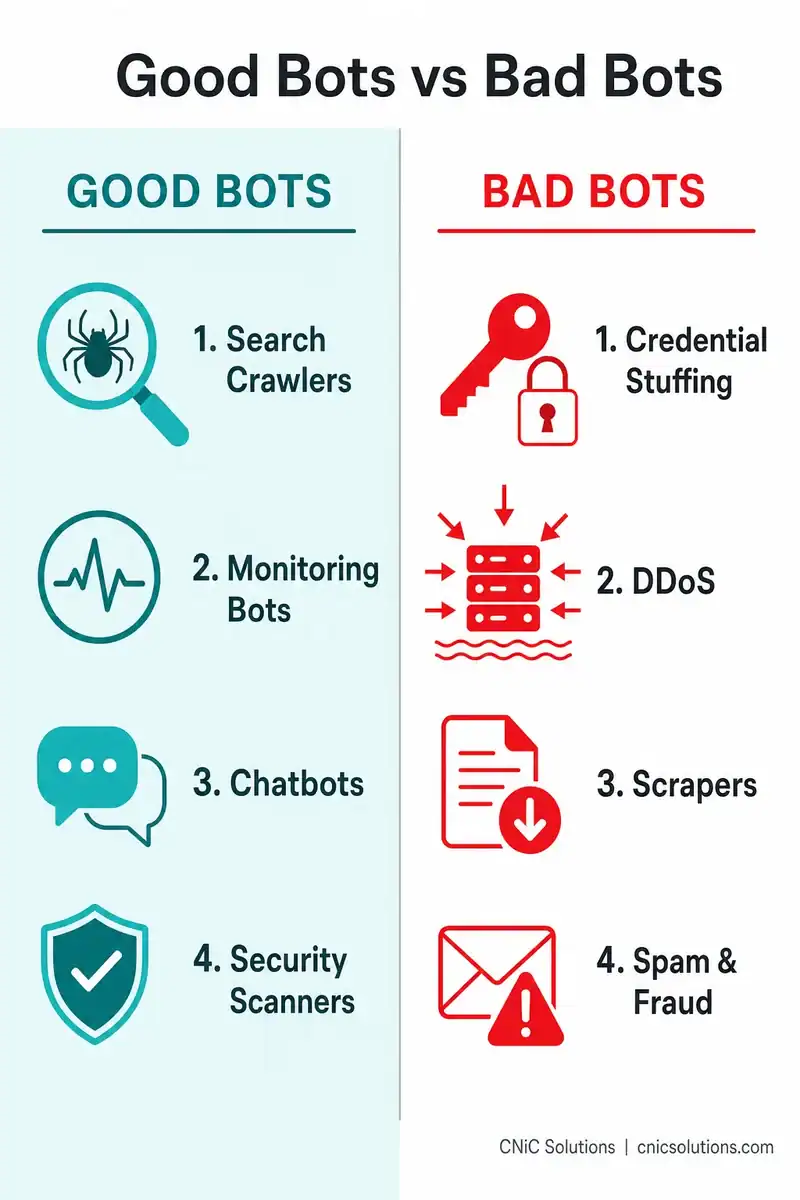
Good Bots: The Useful Half
A large share of bot traffic is legitimate and even essential to how the internet works. These “good bots” perform authorized, beneficial tasks. Common examples include:
- Search engine crawlers: Bots like Googlebot crawl and index websites so they can appear in search results. Without them, search engines could not function.
- Monitoring bots: Programs that continuously check whether websites, servers, and services are online and performing well, alerting teams when something breaks.
- Chatbots and customer-service bots: Automated assistants that answer common questions and provide support outside business hours.
- Security bots: Tools that scan systems for vulnerabilities, analyze traffic for threats, and help defenders respond faster.
- Aggregator and feed bots: Bots that gather public information, such as price comparison or news aggregation, when done with permission.
The takeaway is that you do not want to block all bots. Blocking Googlebot would make your site disappear from search. The goal is not to stop automation, but to separate the bots that help from the bots that harm.
Bad Bots: The Threat
Malicious bots are built to do harm or to act without authorization. Because they operate at machine speed and scale, they can do damage no human attacker could manage by hand. The most common types a business will encounter include:
- Credential stuffing bots: These take username and password pairs stolen in previous data breaches and automatically try them against login pages across many sites. Because people reuse passwords, a single botnet can make hundreds of thousands of login attempts and quietly break into real accounts.
- DDoS bots: Used in distributed denial-of-service attacks, these flood a website or service with so many requests that it slows to a crawl or goes offline entirely, blocking legitimate users.
- Scraper bots: These copy content, pricing, or data from your site at scale, often to undercut you, steal intellectual property, or feed it elsewhere without permission.
- Spam and phishing bots: These post junk links in forms and comment sections or send large volumes of spam and phishing email, sometimes to spread malware further.
- Click and ad-fraud bots: These generate fake clicks or page views to drain advertising budgets and distort analytics, so you pay for engagement that never happened.
- Scalping and inventory-hoarding bots: These buy up limited inventory or tickets instantly to resell at a markup, or tie up stock so real customers cannot buy.
Sophisticated bad bots are designed to hide. Advanced ones cycle through different IP addresses, switch identities, and even mimic human behavior such as mouse movements to slip past simple defenses, which is exactly why telling them apart from real users has become a security discipline of its own.
What a Botnet Is
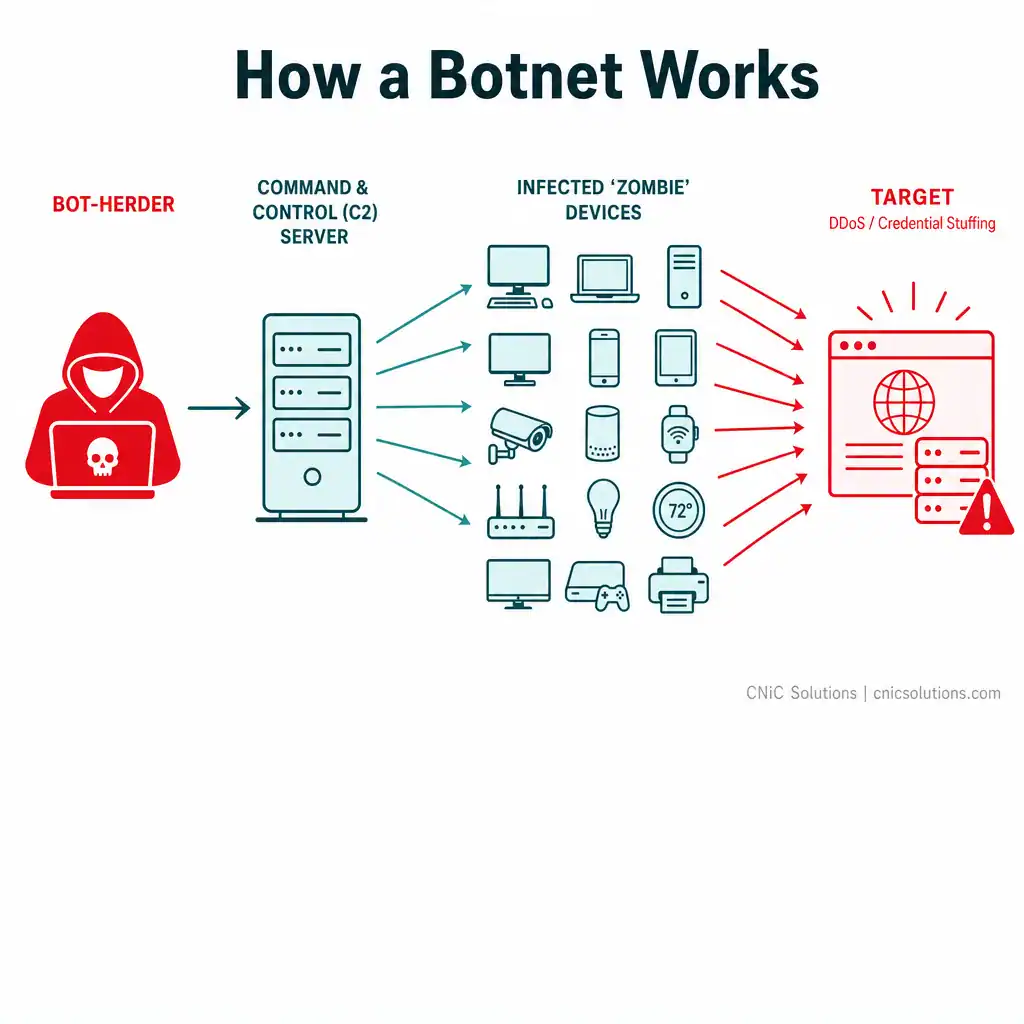
A single bot is one program. A botnet is an army of them. The term combines “robot” and “network,” and it describes a collection of internet-connected devices, computers, phones, servers, even IoT gadgets like cameras and thermostats, that have been infected with malware and are secretly controlled by an attacker.
Here is how it works. An attacker, often called a bot-herder, infects devices with malware, usually by exploiting unpatched software or tricking users into installing it. Each infected device becomes a “bot” or “zombie.” The bot-herder controls all of them remotely through a command-and-control (C2) server, sending instructions that every infected device carries out at once. Because a botnet can span thousands or even millions of devices, it lets one attacker conduct attacks at a scale no individual machine could.
What are botnets used for? The big ones include:
- DDoS attacks: pointing all those devices at one target to overwhelm and crash it.
- Credential stuffing: distributing login attempts across many devices so they are harder to block.
- Spam and malware distribution: sending huge volumes of malicious email, which infects more devices and grows the botnet.
- Cryptomining: quietly using victims’ computing power and electricity to mine cryptocurrency.
There is a second risk worth naming: your own devices can be conscripted. An unpatched office computer or an overlooked IoT device can be infected and quietly added to a botnet, using your bandwidth and resources to attack others, often without anyone noticing. That is one more reason endpoint security and patching matter.
How to Spot Malicious Bot Activity
Bad bots try to blend in, but at scale they leave traces. You usually cannot identify a single bot by eye, but patterns in your traffic and logs give them away. Watch for:
- Unexplained traffic spikes, especially during odd hours or from regions where you have no customers.
- Surges in failed login attempts, a classic signature of credential stuffing or brute-force activity.
- Traffic from unusual or rapidly changing IP addresses, or a flood of brand-new users and sessions arriving as “direct” traffic.
- Server slowdowns that do not match any real increase in legitimate business.
- Abnormal bounce rates in analytics, for example a page that suddenly shows a near-100% bounce as bots hit it and leave.
- Devices behaving oddly, such as running when no one is using them or generating unexpected network traffic, which can indicate they have been recruited into a botnet.
Why this is harder than it sounds
Modern bad bots are deliberately built to evade simple checks. They rotate IP addresses, imitate real browsers, and mimic human behavior. That means a basic block-by-IP approach catches the clumsy ones and misses the dangerous ones. Reliable detection increasingly depends on behavioral analysis, comparing how a visitor acts against how a real human acts, rather than any single obvious tell.
How to Defend Against Bad Bots
No single tool stops every bot. Effective defense is layered, combining controls that filter traffic, verify humans, protect accounts, and keep your own devices from being conscripted. The core building blocks:
- Web application firewall (WAF): Sits in front of your website and inspects incoming traffic, blocking patterns typical of bot activity before they reach your servers.
- Rate limiting: Caps how many requests a single source can make in a given time, blunting brute-force and scraping attempts.
- CAPTCHA and challenge tests: Ask visitors to prove they are human at sensitive points like logins and checkout. Useful, though advanced bots increasingly work around basic versions.
- Behavioral bot management: Establishes a baseline of normal human behavior and flags visitors that deviate from it, the most effective approach against bots that mimic humans.
- Multi-factor authentication (MFA): Even if a credential-stuffing bot guesses a correct password, MFA blocks the login without the second factor. This is one of the highest-value defenses against account takeover.
- Endpoint security and patching: Keeping devices protected and software up to date stops malware that would otherwise turn your own computers and IoT devices into botnet members.
- Log monitoring: Regularly reviewing access and network logs surfaces the traffic patterns that reveal bot activity early, before it becomes a breach or an outage.
The pattern across all of these is that they work together. A WAF and rate limiting reduce the volume, behavioral detection catches the sophisticated bots, MFA neutralizes the payoff of credential stuffing, and endpoint hygiene keeps you from unwittingly joining the problem.
What This Means for Your Business
For most small and midsize businesses, the challenge is not understanding that bots exist, it is that bot defense touches several layers at once, website, network, accounts, endpoints, and email, and each is its own area of expertise. Bad bots also evolve constantly to defeat yesterday’s defenses, so this is not a set-it-and-forget-it problem. It needs ongoing monitoring, current patching, and tuning as attacks change.
That is where managed security earns its keep. CNiC Solutions helps Texas businesses build and maintain layered defenses through cybersecurity services, combining threat monitoring, endpoint protection, patching, and account security so the bad bots are filtered out while the good ones, and your real customers, get through. Because bot defense is part of overall security posture rather than a standalone product, it also fits naturally into broader managed IT services that keep your systems monitored, updated, and resilient.
Talk to CNiC about protecting your business from bots and automated threats
For more on how automation cuts both ways in security, see our look at the role of artificial intelligence in cybersecurity defense. And because botnet-driven DDoS attacks are ultimately a threat to uptime, it is worth understanding how disaster recovery as a service (DRaaS) helps keep a business running when an attack does cause an outage.
Frequently Asked Questions
What is a bot in cybersecurity?
What is the difference between a good bot and a bad bot?
What is a botnet?
How can I tell if bots are hitting my website or network?
How do businesses defend against malicious bots?
About This Guide and Sources
The definitions and framework in this guide, what a bot is, the good-bot and bad-bot taxonomy, the botnet and command-and-control model, the bot-herder and zombie-device terminology, the signs of bot activity, and the layered defenses, reflect standard, widely consistent characterizations across the cybersecurity industry. The often-cited figure that roughly half of all internet traffic is automated comes from Imperva’s annual Bad Bot Report, which tracks this share year over year; the exact percentage shifts annually, so it is given here as an approximation rather than a fixed number. Specific vendor traffic-volume and attack-size figures vary by source and are not cited here. Businesses should assess their own exposure and defenses against their specific systems and risk profile.



related posts
What Is a Hypervisor? Types and How They Work
October 7, 2026A hypervisor is software that lets a single physical computer run many separate virtual machines at…
What Is a Load Balancer? How It Keeps Applications Fast and Reliable
October 7, 2026A load balancer is a device or piece of software that sits in front of your…
What Is a Firmware Update and Why It Matters for Security
October 6, 2026A firmware update is a manufacturer-issued revision to the low-level software built into a device, such…
What Is a Human Firewall? Turning Employees Into Your Best Defense
October 6, 2026A human firewall is the group of employees who, through security awareness and good habits, act…