
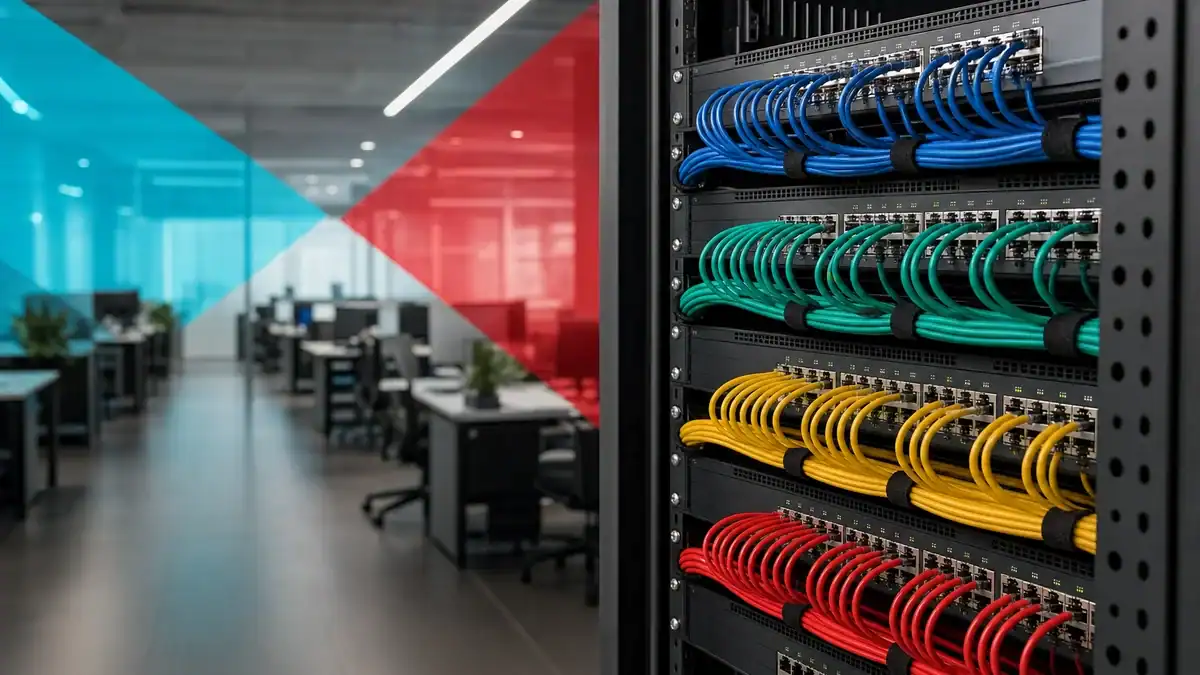
A VLAN (virtual local area network) is a way to divide one physical network into several separate logical networks using software on your network switches. Devices grouped into the same VLAN behave as though they have their own private network, even when they share the same cabling and switches as everyone else. In short, a VLAN gives you the isolation of a separate network without the cost of separate hardware.
- A VLAN is a network inside your network. One set of switches can host many VLANs, each acting like its own isolated network.
- It is defined by software, not wiring. You group devices by function (accounting, guests, cameras) instead of by which cable they plug into.
- The 802.1Q standard makes it work. A small 4-byte tag added to each Ethernet frame labels which VLAN the traffic belongs to, and the standard supports up to 4,094 usable VLANs.
- Security is the headline benefit. Separating sensitive systems from general traffic limits how far an intruder or infection can spread, the segmentation CISA recommends.
- VLANs also improve performance and management. Smaller broadcast domains mean less network noise, and grouping by role makes the network easier to run.
- VLAN is not the same as subnet. A VLAN separates traffic on the switch (Layer 2); a subnet groups IP addresses (Layer 3). They usually pair up one-to-one.
Picture an open-plan office where everyone shares one big room. A VLAN is like putting up soundproof partitions so each team has a private space, even though the room, the floor, and the walls are all the same building. Nothing physical moved. You just told the network which desks belong to which group, and now the accounting team’s conversations stay with accounting, the guest Wi-Fi stays with guests, and the cameras stay on their own segment. It is the same hardware, logically divided.
What’s in This Guide
How a VLAN Works
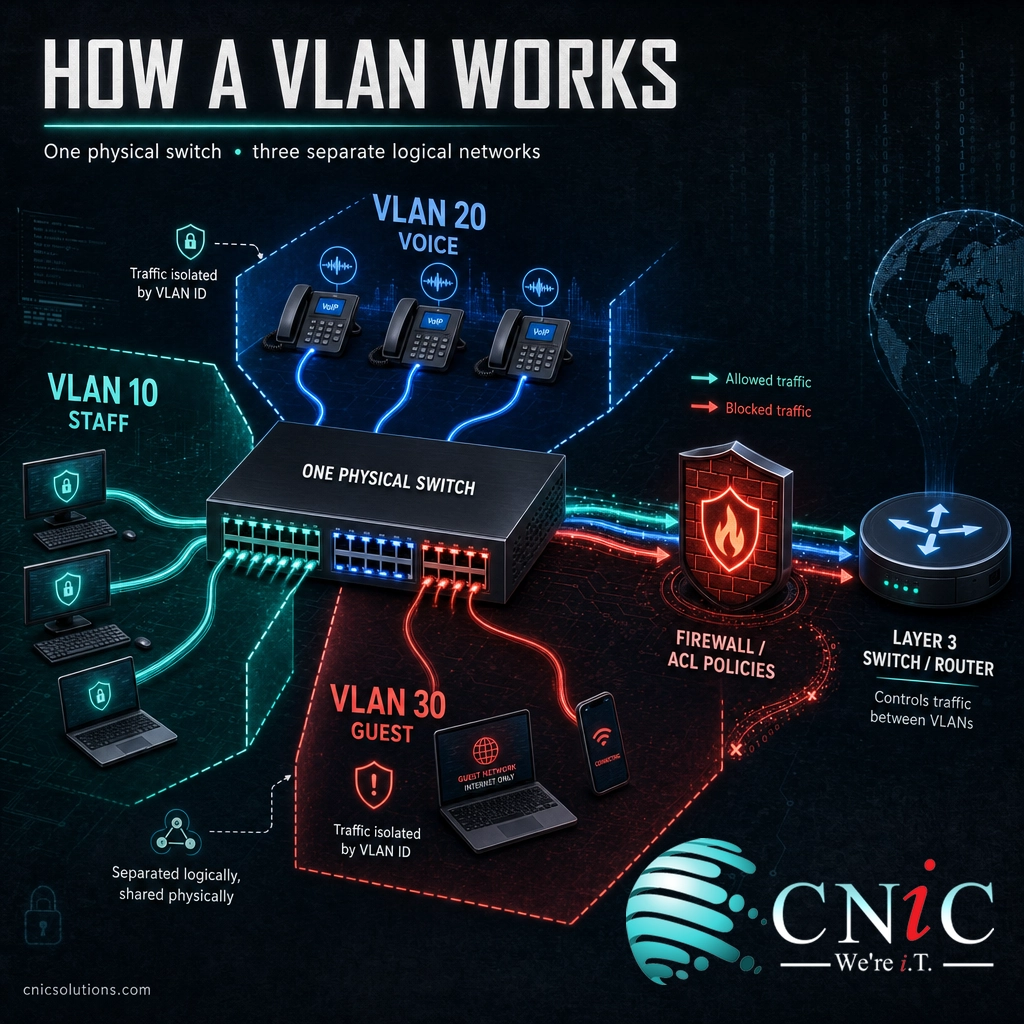
Without VLANs, every device plugged into your switches sits on one flat network. They all share the same broadcast domain, which means when one device sends a broadcast (a message meant for everyone), every other device has to hear it. A guest laptop, the CEO’s workstation, a warehouse camera, and the accounting server all mingle in the same space. That is simple to set up and increasingly risky as a business grows.
A VLAN changes that by labeling traffic. Here is the process in plain steps:
- You define groups. On the switch, you create VLANs and give each one a number, called a VLAN ID. For example: VLAN 10 for staff, VLAN 20 for VoIP phones, VLAN 30 for guest Wi-Fi.
- You assign ports or devices. Each switch port is placed in a VLAN, or devices are assigned to a VLAN based on their identity. A camera plugged into a VLAN 40 port is now on the camera network, no matter where it sits in the building.
- The switch tags the traffic. When data needs to travel between switches, the switch inserts a small tag into each Ethernet frame that says which VLAN it belongs to. This tag follows the IEEE 802.1Q standard and adds just 4 bytes to the frame.
- Traffic stays in its lane. Switches only deliver a VLAN’s traffic to ports in that same VLAN. Guest traffic never reaches the accounting segment, because the switch will not send it there.
- A router or Layer 3 switch connects VLANs when needed. If a device on one VLAN legitimately needs to reach another, that traffic passes through a router or Layer 3 switch, where firewall rules decide what is allowed.
The tagging detail is worth understanding, because it defines the boundaries of the whole system. The 802.1Q tag carries a VLAN ID in a 12-bit field. That field size is why a single switching domain supports 4,094 usable VLANs: the 12 bits allow 4,096 values, and two of them (0 and 4095) are reserved. Most small and midsize businesses will never need more than a dozen, but the ceiling is high enough for very large networks.
Source: IEEE 802.1Q VLAN Bridging Standard | TechTarget: Virtual LAN definition
VLAN vs. Subnet: Clearing Up the Confusion
The single most common mix-up is VLAN versus subnet. People often use the words as if they mean the same thing, and in day-to-day conversation they nearly line up. But they operate at different layers of the network, and understanding the split makes everything else click.
A VLAN works at Layer 2, the switching layer. Its job is to separate traffic so that devices in different VLANs cannot talk to each other directly through the switch. A subnet works at Layer 3, the IP layer. Its job is to group a range of IP addresses so routers know how to move traffic between them. In practice, businesses map one VLAN to one subnet: VLAN 10 gets the 192.168.10.0 range, VLAN 20 gets the 192.168.20.0 range, and so on. Because they pair up so neatly, it is easy to assume they are the same thing. They are not. The VLAN keeps the traffic apart on the switch; the subnet gives that separated traffic its own addressing.
| Factor | VLAN | Subnet |
|---|---|---|
| Network layer | Layer 2 (switching) | Layer 3 (IP routing) |
| What it separates | Traffic and broadcast domains on the switch | Ranges of IP addresses |
| Defined by | A VLAN ID configured on switches | An IP address range and subnet mask |
| Primary purpose | Isolation, security, less broadcast noise | Organizing and routing addresses efficiently |
| How they relate | Usually one VLAN maps to one subnet | Usually one subnet maps to one VLAN |
Common myth: “I have VLANs, so my network is automatically secure.” A VLAN separates traffic, but it does not inspect it. If you allow a router or firewall to pass traffic freely between VLANs, or misconfigure a trunk port, the separation you built can be bypassed. VLANs are a foundation for security, not the finished wall. Real protection comes from pairing VLANs with firewall rules, access control lists, and monitoring, so that the traffic allowed between segments is only what the business actually needs.
The Business Benefits of VLANs
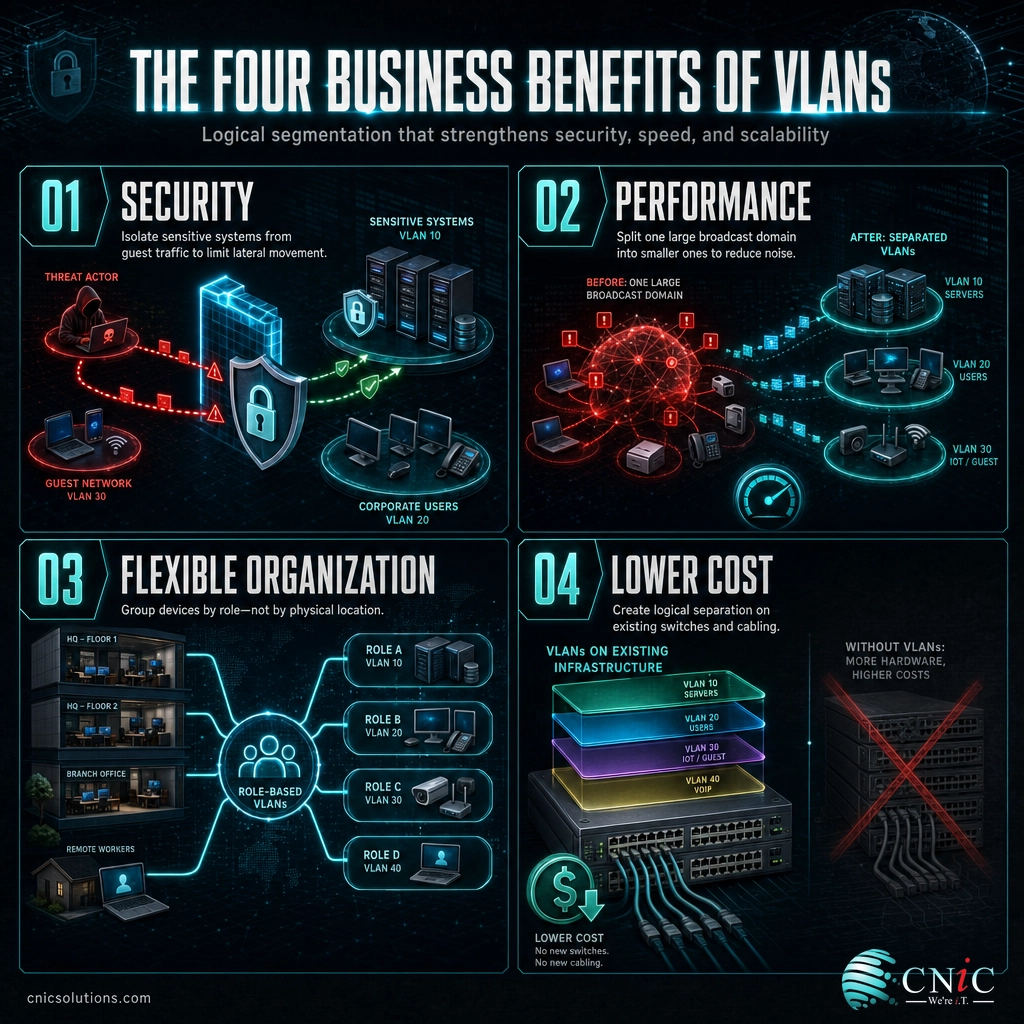
VLANs earn their place for four practical reasons. None of them require new hardware, which is a large part of the appeal.
1. Security through segmentation
This is the reason most businesses reach for VLANs. By separating sensitive systems (finance, HR, servers) from general traffic and from higher-risk segments like guest Wi-Fi, you shrink the area an attacker or a piece of malware can reach. If a guest device or an infected laptop is isolated on its own VLAN, it cannot freely move to the systems that matter. This is the exact idea behind network segmentation, which CISA recommends specifically to limit an intruder’s lateral movement across a network.
2. Better performance
Every device on a flat network hears every broadcast. As you add computers, phones, printers, and cameras, that background noise grows and eats into performance. VLANs split one large broadcast domain into several smaller ones, so devices only process the broadcasts relevant to their group. The result is a cleaner, more responsive network, especially as the device count climbs.
3. Flexible organization
VLANs let you group people and devices by role instead of by physical location. The accounting team can share one VLAN whether they sit on the second floor, the third floor, or work from a satellite desk. When someone moves offices, you change a port assignment instead of rewiring anything. The network follows the org chart, not the floor plan.
4. Lower cost
The alternative to a VLAN is building a genuinely separate physical network, which means duplicate switches, duplicate cabling, and duplicate maintenance. VLANs deliver that separation logically on the equipment you already own. You get isolated networks without buying isolated hardware.
Source: CISA guidance on network segmentation | TechTarget on VLAN benefits

Types of VLANs You’ll Encounter
Not every VLAN does the same job. When you or your IT provider set up a network, a few standard roles come up again and again. Knowing the names helps you follow any configuration conversation.
| VLAN type | What it does |
|---|---|
| Default VLAN | The VLAN every switch port belongs to out of the box, typically VLAN 1. Best practice is to move real traffic off VLAN 1 for security. |
| Data VLAN | Carries ordinary user traffic (workstations, laptops). Often split further by department or trust level. |
| Voice VLAN | A dedicated VLAN for VoIP phones so call quality is protected from data traffic and prioritized for low latency. |
| Management VLAN | Used to administer the switches and network gear themselves, kept separate from user traffic for security. |
| Native VLAN | On a trunk link, the one VLAN whose traffic travels untagged. It needs careful handling to avoid security gaps. |
| Guest VLAN | Isolates visitor Wi-Fi from the internal network so guests reach the internet but nothing private. |
You will also hear two ways VLANs are assigned. A static (port-based) VLAN ties a VLAN to a specific switch port: whatever plugs into that port joins that VLAN. A dynamic VLAN assigns membership based on the device or user identity, so the same person lands on the right VLAN wherever they connect. Static is simpler and most common in small networks; dynamic is more flexible for larger or more mobile workforces.
One more pair of terms rounds this out. An access port connects a single device and carries traffic for one VLAN. A trunk port connects switches to each other and carries traffic for many VLANs at once, using those 802.1Q tags to keep each VLAN’s traffic distinct. Trunks are how VLANs span more than one switch across a building.
Why VLANs Matter for Your Business
It is easy to file VLANs under “technical detail the IT team handles.” But the reason they matter is not technical, it is financial and operational. The whole point of segmentation is to contain damage, and the cost of not containing it is well documented.
When an intruder gets into a flat network, they can move sideways to reach more valuable systems, and that movement is what turns a minor incident into a major breach. The average cost of a data breach reached 4.88 million dollars in 2024, according to IBM’s Cost of a Data Breach report, and breaches took an average of 258 days to identify and contain. Segmentation with VLANs is one of the most direct, low-cost ways to make that lateral movement harder and shrink the blast radius when something does get in.
The other side of the coin is uptime. A network that is a tangle of unsegmented traffic is harder to troubleshoot, harder to secure, and quicker to grind to a halt under a broadcast storm or a spreading infection. Downtime is expensive: ITIC’s 2024 survey found that a single hour of downtime now costs more than 300,000 dollars for over 90 percent of midsize and large enterprises. A clean VLAN design reduces the noise, contains faults to one segment, and makes problems faster to isolate and fix.
For a fuller picture of where the local network fits into the bigger connectivity story, our explainer on how local and wide area networks differ pairs naturally with this one. And because VLAN separation is only as strong as the rules enforced between segments, it works hand in hand with layered protection that inspects the traffic crossing those boundaries.
Source: IBM Cost of a Data Breach 2024 | ITIC 2024 Hourly Cost of Downtime survey
How to Get Started with VLANs
You do not need to VLAN everything on day one. A sensible rollout starts with the highest-value separations and grows from there. The overview looks like this:
- Inventory what is on the network. List your devices and group them by function and sensitivity: staff computers, servers, VoIP phones, cameras, point-of-sale, and guest devices.
- Decide your segments. Start with the obvious wins. Guest Wi-Fi on its own VLAN and cameras or point-of-sale on their own VLAN are almost always the first two, because the security payoff is immediate.
- Assign VLAN IDs and subnets. Give each segment a VLAN number and a matching IP subnet so addressing stays clean and predictable.
- Configure the switch ports. Set access ports for single devices and trunk ports between switches, and move real traffic off the default VLAN 1.
- Control what crosses between VLANs. Use a router, Layer 3 switch, or firewall with clear rules so only necessary traffic passes from one VLAN to another. This is where the security actually lives.
- Test and document. Confirm each segment can reach what it should and nothing it should not, then write it down so the design survives staff changes.
This is the point where many businesses bring in help, because a misconfigured trunk or a too-permissive inter-VLAN rule can quietly undo the whole benefit. A well-designed VLAN scheme is worth doing carefully once rather than patching repeatedly. If you would rather have it designed and managed correctly from the start, our team manages business network infrastructure end to end, VLANs included.
Get a free assessment of your network setup
Frequently Asked Questions
What is a VLAN in simple terms?
What is the difference between a VLAN and a subnet?
How many VLANs can a network have?
Do VLANs improve network security?
Does my small business need VLANs?
Related Networking Terms
- LAN vs. WAN: The difference between the network inside one location and the connections that link locations across distance, covered in our LAN vs. WAN explainer linked above.
- Broadcast domain: The set of devices that all receive each other’s broadcast traffic. A VLAN creates a separate broadcast domain for each group.
- Trunk port: A switch link that carries traffic for many VLANs at once using 802.1Q tags, connecting VLANs across multiple switches.
- Subnet: A Layer 3 range of IP addresses, usually mapped one-to-one with a VLAN so separated traffic gets its own addressing.
- Power over Ethernet (PoE): Delivering power and data over one cable, common for the VoIP phones and cameras that often get their own VLANs.
- Cat6 vs. Cat6a cabling: The physical Ethernet cabling that carries all your VLAN traffic between devices and switches.
- Managed firewall: The service that enforces the rules deciding which traffic is allowed to cross between your VLANs.
About This Guide
This explainer relies on primary technical standards and authoritative sources rather than secondary write-ups. VLAN tagging, the 12-bit VLAN ID field, and the 4,094 usable-VLAN limit reference the IEEE 802.1Q standard, corroborated by TechTarget’s networking definition. Network segmentation guidance follows CISA. Breach cost and lifecycle figures come from IBM’s Cost of a Data Breach 2024 report, and downtime cost figures come from the ITIC 2024 Hourly Cost of Downtime survey. CNiC Solutions is a Houston-based managed IT and networking provider; this article is educational and not a substitute for a network assessment of your specific environment.
Sources:
IEEE 802.1Q VLAN Standard |
TechTarget: Virtual LAN |
CISA: Network Segmentation Guidance |
IBM Cost of a Data Breach 2024 |
ITIC 2024 Hourly Cost of Downtime



related posts
What Is a Distributed System? How It Works and Why It Matters
October 5, 2026A distributed system is a collection of independent computers, called nodes, that are connected over a…
What Is a Firewall? How It Protects Your Business Network
October 5, 2026A firewall is a network security device or software that monitors incoming and outgoing traffic and…
What Is a Data Center? Types, Components, and How They Work
October 4, 2026A data center is a physical facility that houses the servers, storage, and networking equipment a…
What Is a DDoS Attack? How DDoS Attacks Work and How to…
October 4, 2026A DDoS attack (distributed denial-of-service attack) is an attempt to take a website, application, or network…