

DRaaS (Disaster Recovery as a Service) is a cloud-based model in which a third-party provider replicates an organization’s servers, applications, and data to a secondary cloud environment and orchestrates failover. If the primary systems go down, the business can quickly switch to the cloud environment and keep operating. DRaaS turns disaster recovery from a costly capital project into a managed, subscription service.
Disaster recovery used to be a luxury. Doing it properly meant building and maintaining a second data center that mostly sat idle, an expense only large enterprises could justify. DRaaS changed that. By delivering recovery from the cloud as a managed service, it puts enterprise-grade disaster recovery within reach of small and midsize businesses, without the second site or the capital outlay. This guide explains what DRaaS is, how it actually works, how it differs from ordinary backup (a distinction that trips up a lot of businesses), the two metrics that drive every DR decision, the different DRaaS models, and how to tell whether your business needs it.
Key Takeaways
- DRaaS recovers running systems, not just data. That is the core difference from backup.
- It is cloud-delivered and managed, so there is no need to build and maintain a secondary data center.
- Two metrics drive everything: RTO (how fast you must recover) and RPO (how much data you can afford to lose).
- It works in three stages: replication, failover, and failback.
- It shifts DR from CapEx to OpEx, making enterprise-grade recovery affordable for smaller businesses.
What’s in This Guide
What DRaaS Is
DRaaS stands for Disaster Recovery as a Service. It is a model in which a provider continuously copies your critical systems, applications, and data into a secure cloud environment and stands ready to bring those systems online if your primary infrastructure becomes unavailable. As TechTarget describes it, DRaaS shifts disaster recovery from a capital expense to an operational expense: instead of owning and maintaining a rarely-used secondary site, you pay for the recovery service on a subscription or pay-per-use basis, with the provider’s responsibilities defined in a service-level agreement (SLA).
The “disaster” can be anything that takes your systems offline: a ransomware attack, a hardware failure, a fire or flood at your facility, an extended power outage, or simple human error. DRaaS exists so that when one of those events happens, you are not starting recovery from scratch, you are failing over to an environment that is already there, already replicated, and already tested.
DRaaS vs Backup: The Key Distinction
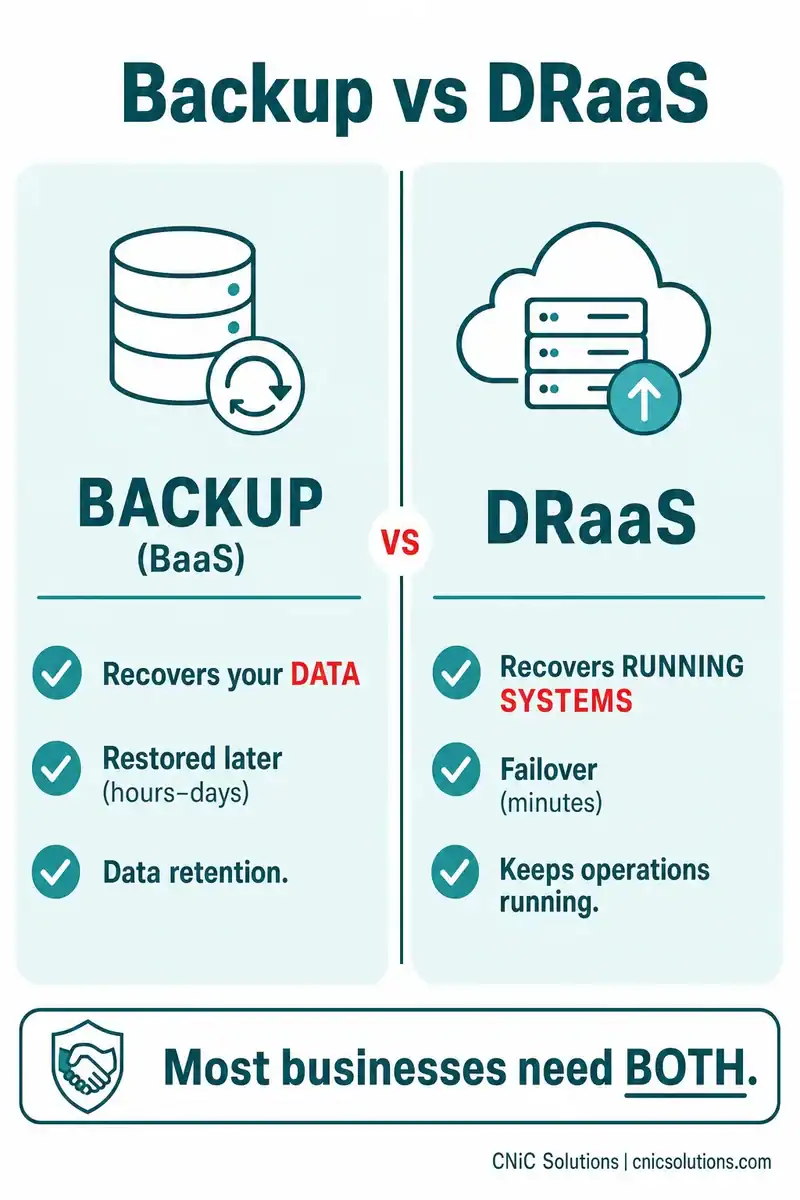
This is the single most important thing to understand about DRaaS, and the place businesses most often go wrong. Many organizations believe they have disaster recovery when what they actually have is backup. They are not the same.
| Backup (BaaS) | DRaaS | |
|---|---|---|
| What it protects | Copies of your data | Your entire running environment |
| What it recovers | Files and data, restored later | Live systems and applications |
| Recovery speed | Hours to days (restore from copy) | Minutes (failover to standby) |
| Main purpose | Data retention and restoration | Keeping operations running |
Put simply: backup recovers your data; DRaaS recovers your operations. Backup copies and stores your files off-site so you can retrieve them if data is lost or corrupted, but it does not, on its own, get your business running again quickly. DRaaS provides a standby infrastructure you can fail over to, so the business keeps operating during the disaster, not just after you have rebuilt.
Crucially, these are not competing choices. Most businesses need both: backup for everyday data protection and long-term retention, and DRaaS for the subset of mission-critical systems that must come back fast. They fit together inside a broader business continuity and disaster recovery (BCDR) strategy.
RTO and RPO: The Two Metrics That Matter
Every serious disaster recovery conversation comes down to two metrics. They define what you actually need, and they are business decisions before they are technical settings.
- RTO (Recovery Time Objective): The maximum acceptable length of time your systems can be offline after a failure. An RTO of four hours means the business can tolerate up to four hours of downtime before the impact becomes unacceptable. It answers: how fast must we be back?
- RPO (Recovery Point Objective): The maximum acceptable amount of data loss, measured in time. An RPO of one hour means you can tolerate losing up to one hour’s worth of data. It answers: how much data can we afford to lose?
Picture a timeline with the disaster in the middle. RPO sits in the past, the most recent point you can recover data to, so the gap between that point and the disaster is what you lose. RTO sits in the future, the moment you are back up and running. The tighter you need each one (minutes instead of hours), the more capable, and typically more expensive, your recovery solution has to be.
Here is the key insight: many businesses carry implicit RTO and RPO requirements driven by their business model without ever having formally defined them. Figuring out your real numbers, ideally through a business impact analysis, is where disaster recovery planning should start. Guidance from Ready.gov makes the same point: the recovery time for an IT resource should match the recovery time the dependent business function actually requires.
How DRaaS Works
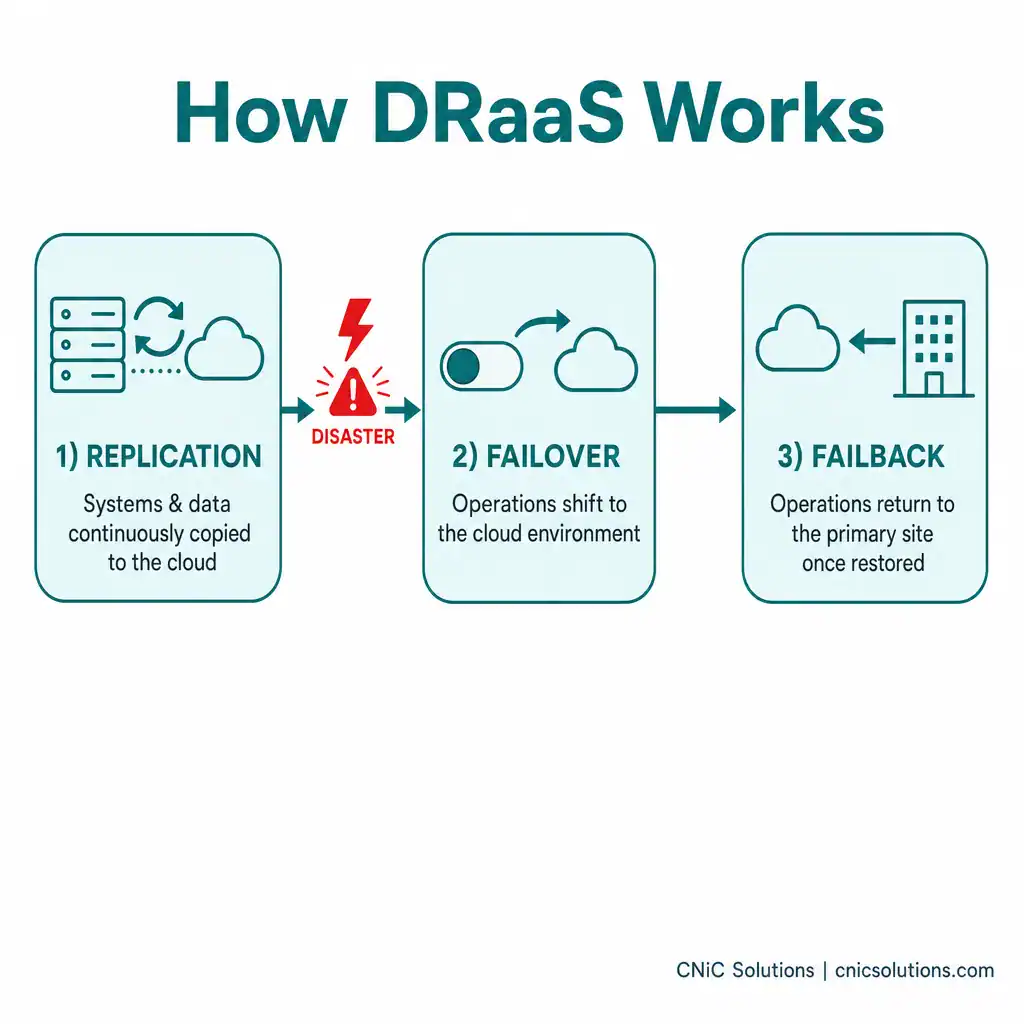
Under the hood, DRaaS typically runs in three stages:
- Replication: Your selected systems, applications, and data are continuously copied from your environment to the provider’s cloud. Replication agents capture changes as they happen, so the standby copy stays current, which is what enables a tight RPO.
- Failover: When a disaster makes your primary systems unavailable, orchestration tools shift operations to the provider’s cloud environment. Pre-configured recovery plans define the order in which systems come up and which applications depend on one another, so a multi-tier environment recovers correctly, not piecemeal.
- Failback: Once your primary site is restored, operations return to it, and any changes made during the outage are synchronized back, ideally with minimal manual effort.
The provider plans, automates, and (critically) tests these procedures. That testing matters more than it sounds: many disaster recovery programs fail not because they lack tooling, but because they assume replication equals readiness and never run a real drill. A credible DRaaS arrangement includes non-disruptive testing so you can verify the plan actually works before you need it.
The Three DRaaS Models
DRaaS is not one-size-fits-all. Providers generally offer it in three levels, distinguished by how much of the recovery work you keep versus hand off:
- Self-service DRaaS: The provider supplies the cloud platform and tools, but your team plans, tests, and executes the recovery. Best for organizations with experienced internal DR staff.
- Assisted DRaaS: You still own the disaster recovery plan, but the provider offers guidance and expertise to configure, optimize, and maintain it. A middle ground for teams that want help without giving up control.
- Managed DRaaS: The provider takes full responsibility for disaster recovery, planning, testing, and execution. Best for businesses that lack the internal time or expertise and want recovery handled end to end.
You may also hear about warm versus cold standby (how ready the recovery environment is to run) and hybrid DRaaS (mixing on-premises and cloud recovery). The right configuration depends on your RTO/RPO targets and budget.
Benefits and Trade-Offs
DRaaS earns its place for clear reasons, but it is worth being honest about both sides.
- No secondary data center: You get a recovery environment without building, equipping, and refreshing a second site, the expense that historically put real DR out of reach for smaller businesses.
- CapEx becomes OpEx: Disaster recovery shifts to a predictable operating cost instead of a large capital investment, which ties directly into how a business plans its overall IT budget.
- Faster recovery and geographic redundancy: Cloud failover can restore operations far faster than rebuilding from backups, and providers replicate to geographically separate regions, so a regional disaster cannot take out both your primary and recovery sites.
- Ransomware resilience and compliance: An independently maintained, tested recovery environment is a strong defense against ransomware, and the built-in testing and reporting help satisfy auditors in regulated industries.
The trade-offs: DRaaS can still be a meaningful cost depending on the service level, and you are placing trust in the provider to execute when it counts, which is exactly why the SLA, the security controls, and the testing discipline of the provider matter so much.
Does Your Business Need DRaaS?
DRaaS is not mandatory for everyone, but it becomes the right call when certain conditions apply. Consider it seriously if:
- Your business cannot tolerate more than a few hours of downtime for certain systems (a tight RTO that ordinary backup-and-restore cannot meet).
- Downtime is genuinely expensive for you, in lost revenue, productivity, or reputation.
- You face ransomware risk and want an independently maintained, clean recovery environment.
- You have compliance obligations (such as HIPAA or PCI-DSS) that require a documented, tested recovery capability.
- Your physical site is exposed to regional risks (storms, flooding, outages) that could make it unavailable for days.
- Your internal IT team does not have the bandwidth to build and maintain a reliable recovery site on its own.
If several of those describe your situation, the gap between “we have backups” and “we can actually keep running through a disaster” is a real risk worth closing.
CNiC Solutions helps small and midsize businesses build that capability through data backup and recovery services, defining realistic RTO and RPO targets, designing the right mix of backup and disaster recovery, and making sure the plan is tested rather than assumed. For businesses weighing where disaster recovery fits in a broader technology strategy, our Virtual CIO services help align continuity planning with overall business risk and budget.
Talk to CNiC about backup and disaster recovery for your business
Frequently Asked Questions
What is DRaaS (Disaster Recovery as a Service)?
What is the difference between DRaaS and backup?
What are RTO and RPO?
How does DRaaS work?
Does a small business need DRaaS?
About This Guide and Sources
The definitions and framework in this guide, the DRaaS model, the distinction between DRaaS and backup (BaaS), the RTO and RPO metrics, the replication/failover/failback workflow, and the self-service, assisted, and managed delivery models, reflect standard, widely consistent characterizations across the disaster recovery industry, including TechTarget’s DRaaS definition and general best-practice guidance from sources such as Ready.gov and AWS Well-Architected on defining and testing recovery objectives. Specific recovery times, cost figures, and savings percentages vary widely by provider, environment, and service level and are not cited here; RTO and RPO values mentioned (such as a four-hour RTO) are illustrative examples of the concept, not benchmarks. Any business should define its own RTO and RPO through a business impact analysis.



related posts
What Is a DDoS Attack? How DDoS Attacks Work and How to…
October 4, 2026A DDoS attack (distributed denial-of-service attack) is an attempt to take a website, application, or network…
What Is a Data Center? Types, Components, and How They Work
October 4, 2026A data center is a physical facility that houses the servers, storage, and networking equipment a…
What Is a Checksum? How It Verifies Data Integrity
October 3, 2026A checksum is a small value calculated from a block of digital data, used to detect…
What Is a Brute Force Attack? How It Works and How to…
October 3, 2026A brute force attack is a trial-and-error method for cracking a password, PIN, or encryption key…