

Power over Ethernet (PoE) is a networking technology that delivers both electrical power and data to a device over a single Ethernet cable. It removes the need for a separate power outlet at the device, which makes equipment like IP cameras, wireless access points, and VoIP phones faster and cheaper to install anywhere a network cable can reach.
If you have ever mounted a security camera on a ceiling, hung a wireless access point in a warehouse, or set up a desk phone with only one cable running to it, you have used Power over Ethernet, whether you knew it or not. PoE quietly powers a huge share of the connected devices in modern offices, and it is one of the reasons a business network can grow without an electrician being called for every new device. This guide explains what PoE is, how it works, the standards that define it, and where it earns its keep.
- One cable, two jobs. PoE carries data and DC electrical power together over standard Ethernet cabling, so a device needs no nearby power outlet.
- Four power tiers. The IEEE 802.3af, 802.3at, and 802.3bt standards deliver 15.4, 30, 60, and up to 90 watts per port at the switch.
- 100 meters is the limit. A PoE run follows the normal Ethernet distance cap of 100 meters (about 328 feet) before it needs an extender.
- It is safe by design. A PoE port checks each device with a handshake before sending power, so it will not damage non-PoE equipment.
- It powers the modern office. Cameras, access points, phones, access control, and even LED lighting increasingly run on PoE.
What’s in This Guide
- What Is Power over Ethernet?
- How Power over Ethernet Works
- PoE vs. Standard Ethernet
- PoE Standards: 802.3af, 802.3at, and 802.3bt
- What Can PoE Power?
- Why PoE Matters for Your Business
- PoE Cabling and Distance Requirements
- PoE Myths and Limitations
- How to Get Started with PoE
- Common Questions About PoE
- Related Terms
What Is Power over Ethernet?
Power over Ethernet is a method for sending low-voltage DC electrical power along the same twisted-pair copper cable that already carries network data. Instead of running a data cable to a device and then finding an electrical outlet for it, you run one Ethernet cable that does both. The technology is defined by the IEEE 802.3 family of standards, the same body that defines Ethernet itself, which is why PoE works reliably across equipment from different manufacturers.
Two roles make PoE possible. The device that supplies power, usually a network switch or a small injector, is called Power Sourcing Equipment, or PSE. The device that receives power, such as a camera or phone, is called a Powered Device, or PD. The PSE and PD talk to each other over the cable to agree on how much power the device needs before any voltage flows. That short negotiation is what keeps PoE both flexible and safe.
How Power over Ethernet Works
The idea sounds like it should cause problems, since sending electricity down a data cable seems risky. In practice it works cleanly because power and data occupy the cable in a controlled, agreed-upon way. Here is the sequence a PoE connection follows every time a device is plugged in:
- Detection. The PSE sends a small probing voltage down the cable to check whether the device on the other end is PoE-capable. A non-PoE device, like a laptop, does not respond correctly, so the port stays powered off. This is why PoE will not fry your regular gear.
- Classification. Once a valid device is detected, the PSE and PD negotiate a power class. The device effectively says how much power it needs, and the switch reserves that amount from its power budget.
- Power up. The PSE applies the agreed voltage (nominally 44 to 57 volts DC) and the device boots. Data continues to flow over the same cable at full network speed the entire time.
- Monitoring. The switch watches the connection. If the device is unplugged or draws too much power, the port shuts off power automatically, then goes back to looking for a valid device.
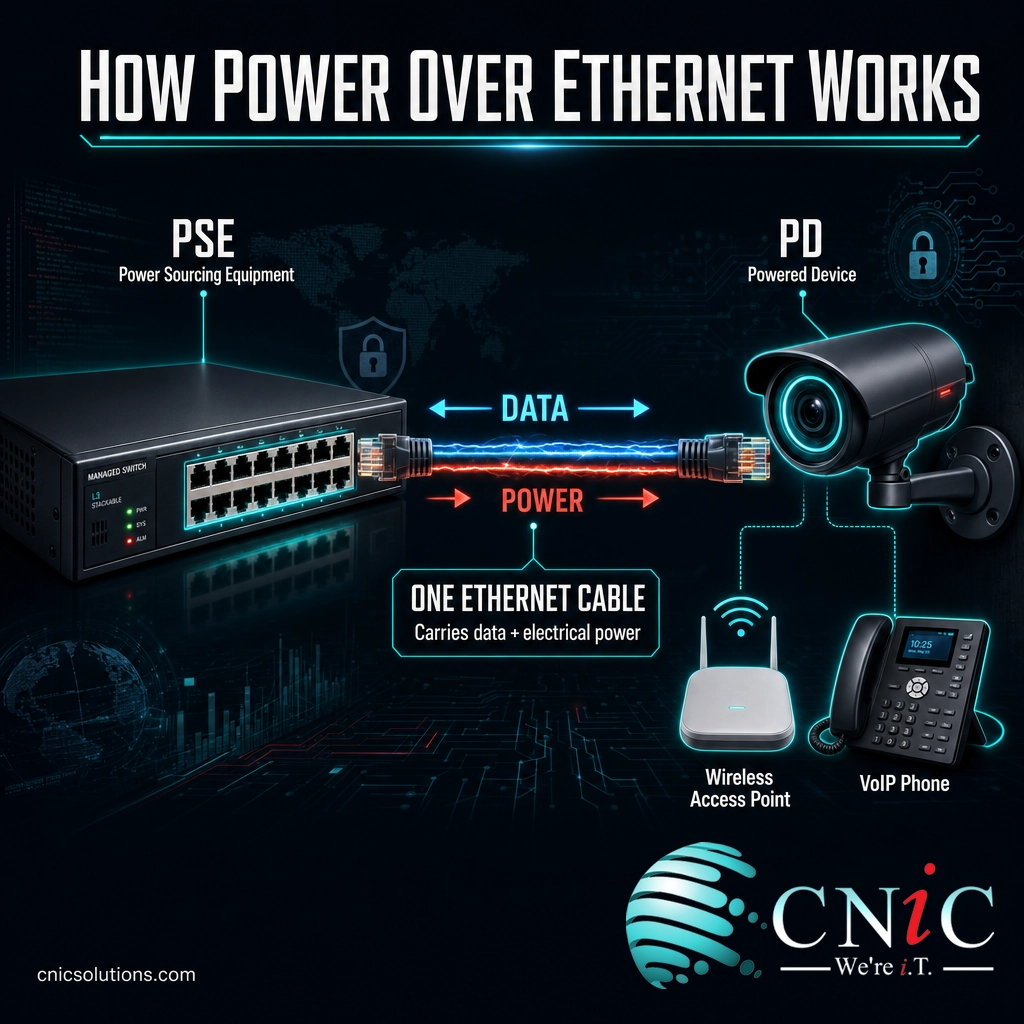
The power itself can travel on the cable in a couple of ways. In the original standards, some equipment used the two data pairs of the cable, and other equipment used the spare pairs. The newest high-power standard, 802.3bt, uses all four pairs of the cable at once to move more wattage. As an installer or buyer you rarely have to think about which pairs are used, because the standards handle it, but it explains why higher-power PoE needs a cable with all four pairs in good condition.
Source: Cisco: What Is Power over Ethernet? | IEEE 802.3bt Standard
PoE vs. Standard Ethernet
The most common point of confusion is how PoE differs from the regular Ethernet cabling most people already know. The honest answer is that PoE is standard Ethernet, with one addition: the ability to carry power alongside the data. Everything else, the connectors, the cable, the network speed, stays the same. The table below shows where the two part ways in practice.
| Feature | Standard Ethernet | Power over Ethernet |
|---|---|---|
| Cable carries | Network data only | Network data plus DC power |
| Separate power outlet | Required at each device | Not needed at the device |
| Typical devices | Desktops, servers, printers | Cameras, access points, VoIP phones |
| Install flexibility | Limited to spots near an outlet | Anywhere a network cable reaches |
| Extra hardware | None | PoE switch or PoE injector |
| Connector and cable | RJ45 on Cat5e or better | RJ45 on Cat5e or better |
Put simply, if a device needs both a network connection and power, and it sits somewhere awkward to wire, PoE is usually the better choice. If a device has its own power supply and lives at a desk, plain Ethernet is fine. Most business networks use a mix of both on the same switches.
PoE Standards: 802.3af, 802.3at, and 802.3bt
PoE is not a single specification but a series of IEEE standards that have raised the available power over the years. Each new standard is backward compatible, so a newer switch can still power an older device. The names can be confusing because manufacturers use friendly labels (PoE, PoE+, PoE++) alongside the official IEEE numbers and “Type” designations. Here is how they line up.
| IEEE standard | Common name | Year | Power at switch (PSE) | Power to device (PD) |
|---|---|---|---|---|
| 802.3af | PoE (Type 1) | 2003 | 15.4 W | 12.95 W |
| 802.3at | PoE+ (Type 2) | 2009 | 30 W | 25.5 W |
| 802.3bt | PoE++ (Type 3) | 2018 | 60 W | 51 W |
| 802.3bt | Type 4 | 2018 | 90 W | 71.3 W |
Notice that the power a device actually receives is always lower than what the switch sends. That gap is not waste in the usual sense, it is the power lost as heat over up to 100 meters of copper. The standards account for that loss up front, which is why the device-side figure is the number that matters when you are checking whether a switch can run a given camera or access point.
PoE Power by Standard (Switch Output, Watts per Port)
Maximum power sourced per port under each IEEE 802.3 PoE standard. Source: IEEE 802.3 / Ethernet Alliance.
Source: IEEE 802.3bt
For most offices, PoE+ (30 watts) is the workhorse tier, comfortably powering access points and standard cameras. You step up to 802.3bt when devices get hungrier, for example a heated outdoor PTZ camera, a videoconferencing phone, or a Wi-Fi 6E access point with several radios. Choosing the right switch tier is really a question of adding up the power draw of everything you plan to plug in.
Source: Ethernet Alliance PoE resources | IEEE 802.3bt Standard
What Can PoE Power?
PoE started as a way to power simple IP phones, but the list of devices it feeds has grown a lot as the available wattage climbed. Anything that needs a network connection and a modest amount of power is a candidate. The most common categories in a business setting are:
- IP security cameras. Fixed and PTZ cameras are the classic PoE use case, since they often mount where no outlet exists, like a parking lot pole or a warehouse rafter.
- Wireless access points. Ceiling-mounted Wi-Fi access points are almost always PoE, which lets you place them for coverage rather than near power.
- VoIP and video desk phones. A single cable to each desk carries the call and the power, which simplifies office moves and cabling.
- Access control and intercoms. Door controllers, badge readers, and video doorbells run cleanly on PoE at the edge of the building.
- IoT sensors and building systems. Occupancy sensors, environmental monitors, and connected controls increasingly draw power from the network.
- PoE lighting and digital signage. Higher-power 802.3bt has opened the door to LED lighting panels and display screens powered straight from the switch.
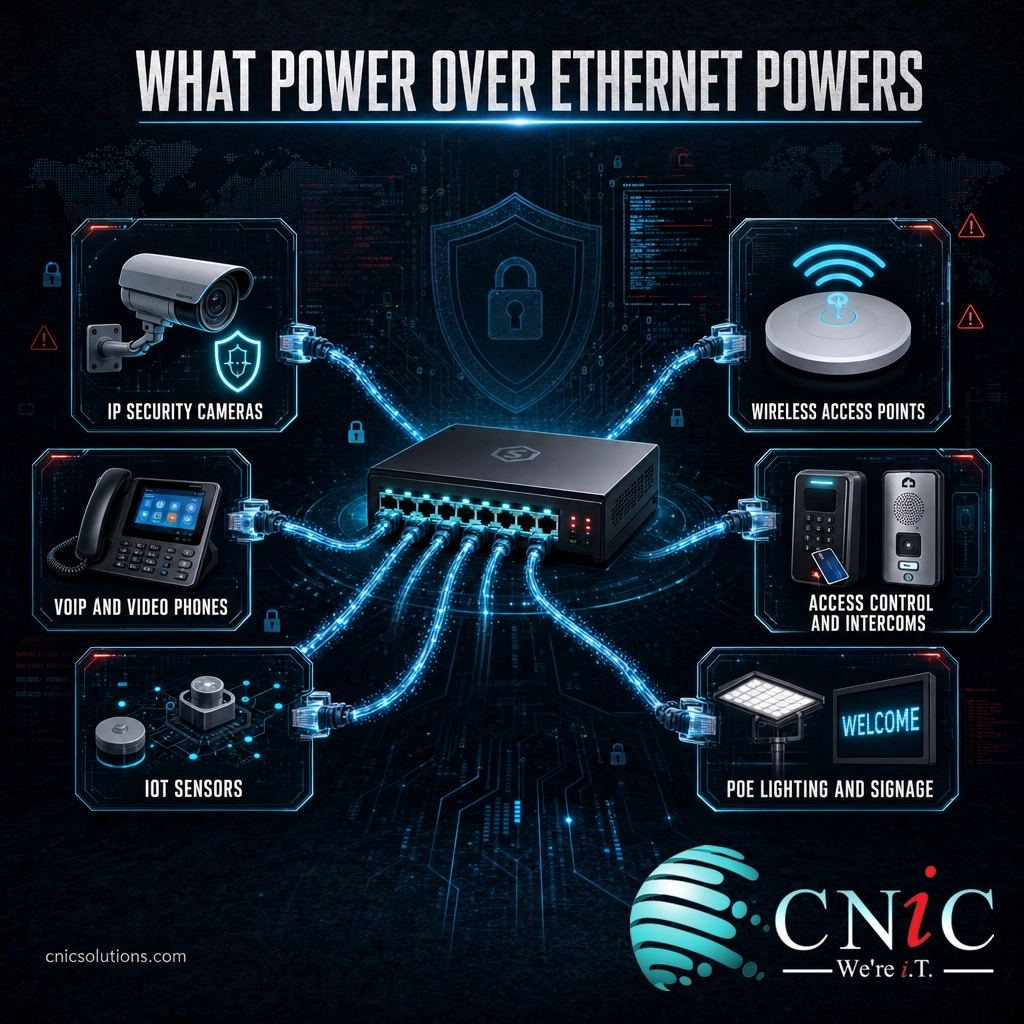
The common thread is that all of these sit at the edge of the network, often in places that would be expensive or impossible to reach with electrical conduit. PoE turns “we would need an electrician there” into “we just need to pull a cable there,” which is a meaningful difference for both cost and speed of deployment.
Why PoE Matters for Your Business
The appeal of PoE is not the technology for its own sake, it is what it removes from a project: electrical work, clutter, and rigidity. For a growing business, those savings add up every time you add a camera, a phone, or an access point. The market has responded accordingly, with steady double-digit growth as more device categories move to network power.
Source: Grand View Research
The practical business benefits break down into a few clear wins:
- Lower installation cost. One low-voltage cable, run by a network technician, replaces a data cable plus an electrician-installed outlet. Fewer trades and fewer materials on every device.
- Placement freedom. Devices go where they work best, not where an outlet happens to be. That matters for camera angles and Wi-Fi coverage.
- Centralized power and backup. Because power comes from the switch, a single uninterruptible power supply on the network rack keeps every PoE device running during an outage. No scattered battery backups.
- Easier moves and changes. Relocating a phone or camera means moving one cable, not coordinating an electrician.
- Safer low voltage. PoE operates at low DC voltage under a controlled handshake, which is generally safer to work with than mains wiring.
For a company standardizing its network, the biggest gain is often operational simplicity: one team, using one type of cable, can deploy and manage cameras, phones, Wi-Fi, and access control together. That is the kind of consolidation a managed IT partner is built to deliver.
Source: Grand View Research: Power over Ethernet Market Report
PoE Cabling and Distance Requirements
PoE runs on the same structured cabling as any other Ethernet connection, but a few physical realities shape a good install. Getting these right at the cabling stage prevents the flaky-power problems that are frustrating to diagnose later.
Source: IEEE 802.3
- Cable grade. Cat5e is the practical minimum and works for most PoE. For 802.3bt high-power runs, Cat6 or Cat6A is recommended because thicker conductors carry more current with less heat and voltage drop.
- Distance. Stay within 100 meters per run. If a device sits farther away, use a PoE extender, a repeater, or fiber with a media converter and a local power source.
- Bundling and heat. Large bundles of high-power PoE cables generate heat, which can raise resistance. Good installers plan bundle sizes and pathways to keep temperatures in check.
- Full four-pair integrity. High-power PoE uses all four pairs, so a damaged or poorly terminated pair that a data-only link might tolerate can starve a device of power.
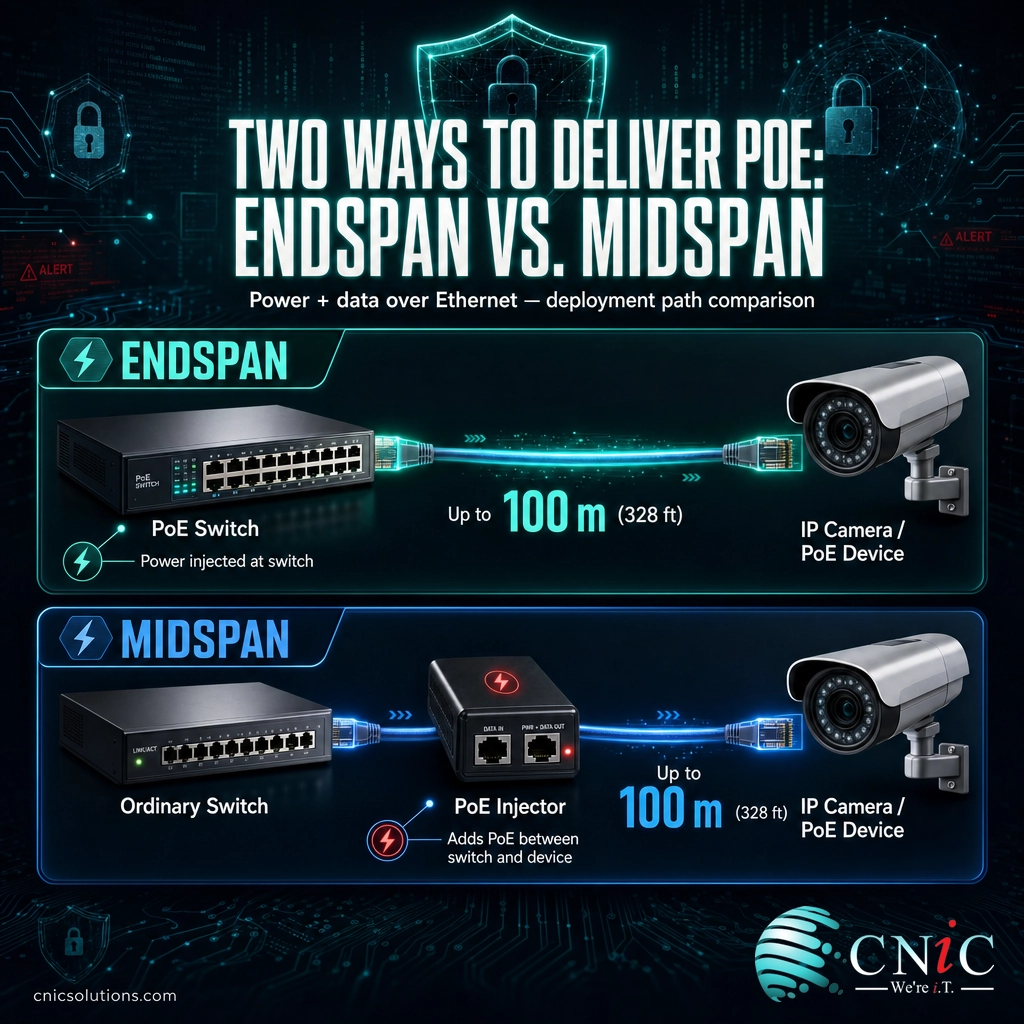
There are two ways to source the power. An endspan is a PoE switch that supplies power directly from its ports, which is the cleanest option for a new build. A midspan is an injector that sits between an ordinary switch and the device, adding power to the cable, which is handy for adding PoE to one or two ports without replacing the switch. Both are valid, and the right pick depends on how many devices you are powering and whether your switch already does PoE.
Get Structured Cabling Done Right
PoE Myths and Limitations
Myth: PoE will send power down any cable and could damage devices that are not built for it. This is the fear that stops people from using PoE, and it is wrong. A PoE port runs a detection and classification handshake first, and only powers a port when it confirms a compatible Powered Device is attached. Plug in a laptop or a plain switch and the port simply stays unpowered. The standard was designed specifically so PoE and non-PoE gear can share the same network safely.
PoE is powerful, but it is not the answer to everything, and it helps to know its limits before you design around it:
- There is a power ceiling. Even Type 4 tops out near 90 watts at the switch. Desktops, monitors, and heavy equipment still need their own power.
- Distance is capped. The 100-meter limit is real. Long outdoor runs need extenders, fiber, or local power.
- Switch power budgets are finite. A switch has a total power budget shared across all ports. Filling every port with high-power devices can exceed it, so the budget, not just the per-port rating, has to be sized correctly.
- Cheap cable causes trouble. Copper-clad aluminum and out-of-spec cable are a common source of PoE failures. Certified, full-copper cable is worth it.
None of these are dealbenders, they are simply design inputs. A properly specified PoE switch and a certified cable plant handle them without drama, which is exactly why the planning stage matters.
How to Get Started with PoE
Rolling out PoE well is mostly a matter of doing the math and the cabling correctly up front. A practical path looks like this:
- Inventory the devices. List every device you want to power (cameras, access points, phones) and note each one’s PoE standard and wattage draw.
- Size the switch. Pick a PoE switch whose per-port tier and total power budget comfortably cover your device list, with headroom for growth.
- Plan the cabling. Confirm every run is within 100 meters, choose Cat6 or Cat6A for high-power devices, and use certified full-copper cable.
- Add a UPS. Put the switch on an uninterruptible power supply so cameras and phones survive a power blip.
- Test and document. Certify each cable run and record which device is on which port for easy troubleshooting later.
If that sounds like a lot to coordinate, it is the sort of work a managed IT and cabling provider handles routinely. CNiC Solutions designs and installs PoE networks end to end, from the structured cabling and switches to the cameras, phones, and access points that ride on them, so the whole system is planned as one.
Explore PoE Camera Installation
See Business VoIP Phone Systems
Common Questions About PoE
Is PoE safe for my network devices?
How far can Power over Ethernet run?
What is the difference between PoE, PoE+, and PoE++?
Do I need special cable for PoE?
Can I add PoE to a network that does not have it?
Related Terms
- Ethernet: The wired networking standard that PoE is built on, carrying data over twisted-pair copper cable.
- Network switch: The central device that connects wired equipment and, when PoE-capable, supplies power to it. See professional network setup and switch configuration.
- Structured cabling: The organized cable infrastructure that PoE and all network traffic run through. Learn about structured cabling installation.
- RJ45: The standard eight-pin connector used on Ethernet and PoE cables.
- Cat6 / Cat6A: Cable grades recommended for higher-power PoE thanks to better heat and interference performance.
- Wireless access point: A ceiling or wall device that broadcasts Wi-Fi, one of the most common PoE-powered devices.
- IP camera: A network security camera that both sends video and receives power over one PoE cable. See security camera installation.
- Managed IT services: Ongoing design, support, and management of the network and devices that PoE connects. Explore managed IT support.
Sources and Methodology
Technical specifications in this article, including per-standard wattage, power classes, and the 100-meter distance limit, are drawn from the IEEE 802.3 Ethernet standards and industry technical resources. Market figures are attributed to the cited research firm. All figures reflect the referenced standards as of 2026.



related posts
What Is ZTNA (Zero Trust Network Access)?
November 3, 2026Zero Trust Network Access (ZTNA) is a security service that grants a verified user access to…
Zero Trust Statistics for 2026: Adoption, Maturity, and Breach Impact
November 3, 2026Zero trust has become the default security strategy on paper, but not yet in practice. Okta's…
What Is XDR (Extended Detection and Response) and How Does It Protect…
November 2, 2026Extended detection and response (XDR) is a security platform that collects and correlates threat data from…
What Is Zero Trust Security? A Guide for Small Businesses
November 2, 2026Zero Trust security is a cybersecurity model built on one rule: never trust, always verify. Instead…