

Clone phishing is a type of phishing attack in which a scammer copies a real, previously delivered email, replaces a legitimate link or attachment with a malicious version, and resends it so it appears to come from the original trusted sender. Because it imitates a message you already received, it is far harder to spot than a typical scam email.
Most phishing advice trains you to look for red flags: bad grammar, odd formatting, a sender you do not recognize. Clone phishing defeats that instinct on purpose. Instead of writing a fake message, the attacker copies a genuine one you already trusted, swaps the safe link for a dangerous one, and sends it back to you looking almost identical to the original. This guide explains exactly how clone phishing works, how it differs from the attacks it is often confused with, and the practical steps a business can take to stop it.
Key Takeaways
- Clone phishing copies a real email, then swaps its link or attachment for a malicious one and resends it as a trusted-looking duplicate.
- It beats normal phishing instincts because the branding, wording, and formatting are already legitimate. The usual warning signs are missing.
- Phishing is the most-reported cybercrime. The FBI’s IC3 logged 193,407 phishing and spoofing complaints in 2024, more than any other crime type.
- It is a common on-ramp to bigger fraud, including Business Email Compromise, which drove $2.77 billion in reported losses in 2024.
- Defense is layered, not a single tool: email authentication, filtering, multi-factor authentication, out-of-band verification, and ongoing staff training working together.
What’s in This Guide
How Clone Phishing Works
Clone phishing is a form of social engineering: it manipulates a person into acting against their own interest, using trust rather than technical exploits. What makes the clone variant distinct is where that trust comes from. The attacker does not invent a convincing message. They start with one that was already convincing because it was real.
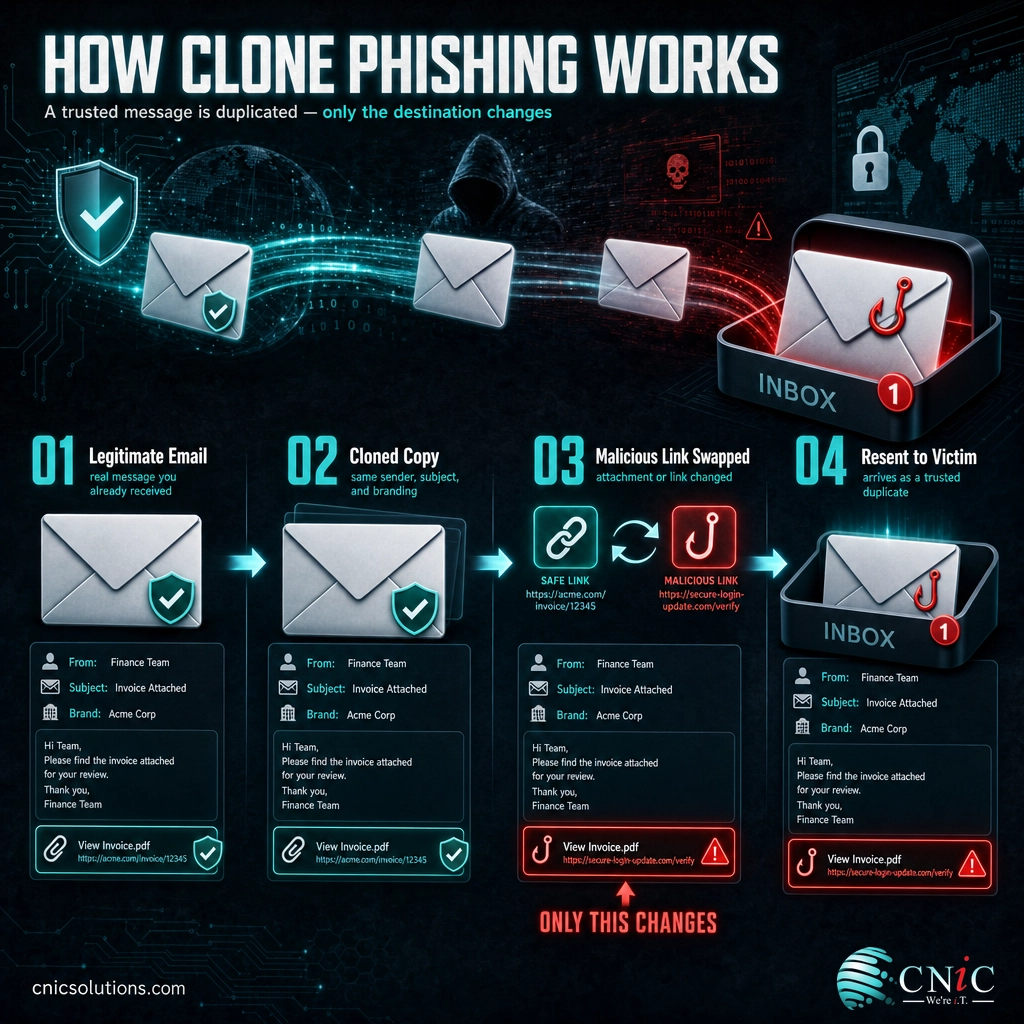
The attack usually follows five steps:
- Obtain a legitimate email. The attacker gets hold of a real message, often by compromising a mailbox, capturing a forwarded copy, or pulling one from data exposed in a breach.
- Clone it. They duplicate the original almost perfectly: the same sender name, subject line, logos, signature, and body text.
- Swap the payload. The one meaningful change is the dangerous one. A legitimate link is replaced with a malicious lookalike, or a safe attachment is swapped for a weaponized file.
- Spoof the sender. The message is set up to appear to come from the original sender, sometimes from a near-identical address that is easy to overlook.
- Resend with a pretext. It arrives with a believable reason to look again: “resending with the corrected file,” “updated invoice attached,” or “please re-verify your details.”
Think of it like receiving a second copy of a letter your bank already mailed you. It is on the same letterhead, in the same envelope, with the same wording you remember. The only difference is that the reply form inside now routes to a scammer’s address instead of the bank’s. Nothing looks off, which is exactly the point.
Source: NIST Computer Security Resource Center: Phishing | CISA: Recognize and Report Phishing
Clone Phishing vs. Spear Phishing
Clone phishing is most often confused with spear phishing, and the two do overlap. Both can be highly targeted, and a single attack can use techniques from each. The core difference is where the message comes from.
Spear phishing builds a custom message from scratch, using details researched about a specific person: their name, role, projects, or vendors. Clone phishing skips the writing and copies an email that genuinely existed, borrowing the credibility of the real thing rather than manufacturing it.
| Aspect | Clone Phishing | Spear Phishing |
|---|---|---|
| Source of the message | A copy of a real, previously sent email | A new message written for the target |
| Where trust comes from | Imitating a message the victim already received | Personalized detail and researched context |
| Typical hook | A “resend,” “update,” or “correction” of something familiar | A tailored request tied to the victim’s role or relationships |
| Main giveaway | Unexpected duplicate and a swapped link or attachment | An unusual or out-of-character request from a known contact |
| Relationship | A technique that can be used to make spear phishing more convincing | A broader targeting strategy that may borrow cloning |
In practice, the labels matter less than the defense, which is largely the same for both: verify unexpected or unusual requests through a channel other than the email itself before you act.
Myth: “I’ll know a phishing email because it will look wrong.”
This is the assumption clone phishing is built to exploit. Because the attacker reuses a genuine email, the logos, signature, tone, and formatting are already correct. There are no telltale typos or clumsy graphics to catch. The real tells are contextual: an email you did not expect to receive again, a link or attachment that quietly changed, or a sender address that is off by one character. Train people to question the context, not just the appearance.
Source: NIST Computer Security Resource Center: Phishing

Why Clone Phishing Matters for Your Business
Phishing is not a fringe threat. It is the single most-reported type of cybercrime, and clone phishing is one of its most effective forms precisely because it slips past the instincts that catch cruder attempts. The scale of the underlying problem is documented in the FBI’s most recent annual crime data.
For a small or midsize business, the danger of clone phishing is rarely the single click itself. It is what the click unlocks: stolen credentials that give an attacker access to a mailbox, which then becomes the launch point for the next clone sent to your staff, your clients, and your vendors. A compromised account is also the classic first move in Business Email Compromise, where a criminal quietly monitors real conversations and inserts a fraudulent payment request at exactly the right moment.
Source: FBI IC3: 2024 Internet Crime Report
Where Clone Phishing Shows Up
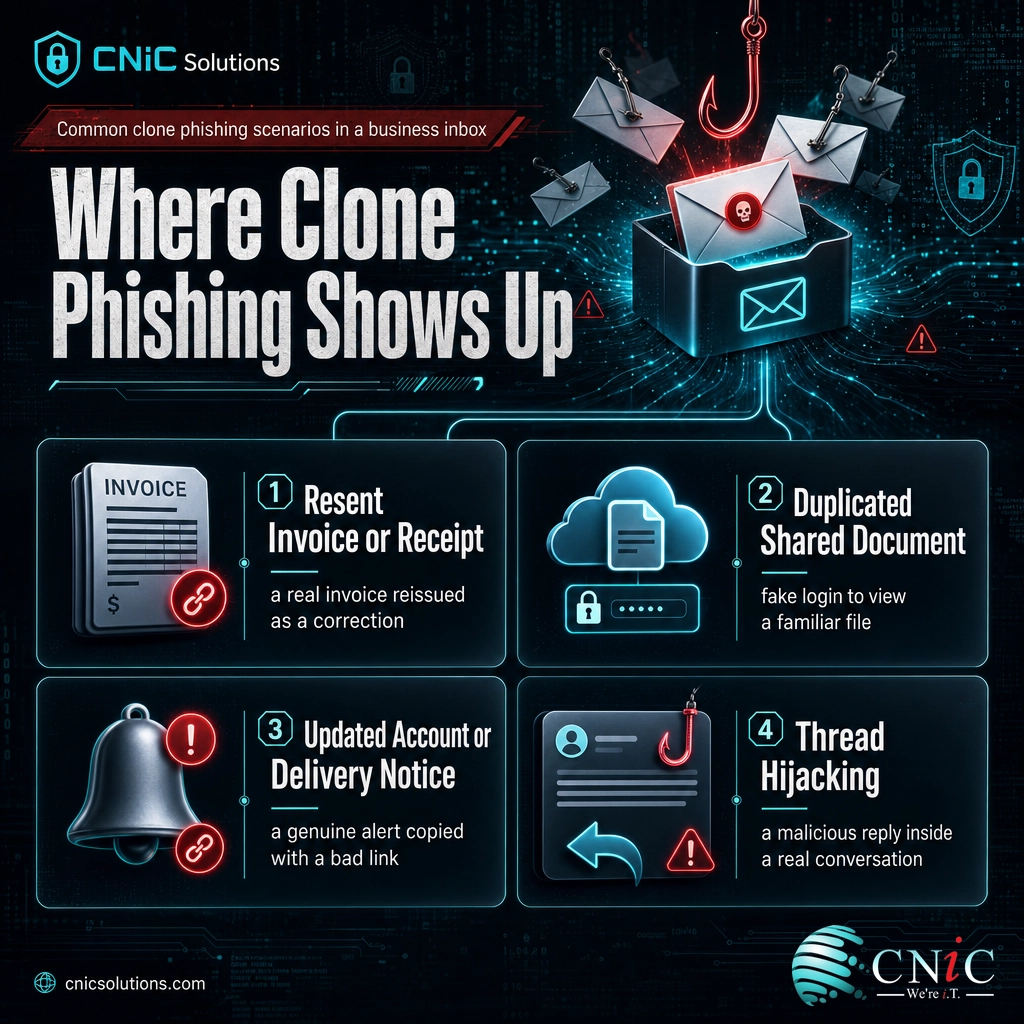
Clone phishing is a technique, not a single script, so it appears in whatever email traffic is routine enough not to raise suspicion. A few patterns come up repeatedly in business settings:
- The “resent” invoice or receipt. A copy of a real invoice you already received arrives again, framed as a correction, with the payment link or attachment swapped for a malicious one.
- The duplicated shared document. A cloned notification from a familiar file-sharing or collaboration service asks you to log in again to view a document, sending your credentials to a fake sign-in page.
- The updated delivery or account notice. A shipping update, password reset, or account alert you have genuinely seen before is copied and reissued with a dangerous link.
- Thread hijacking. After compromising one mailbox, the attacker replies inside a real, ongoing email thread with a cloned-style message, so the malicious link arrives in a conversation you already trust.
The common thread is familiarity. Each scenario imitates something so ordinary that stopping to scrutinize it feels unnecessary, which is the reaction the attacker is counting on.
Source: CISA: Recognize and Report Phishing
How to Spot and Stop Clone Phishing
Because clone phishing hides in normal-looking email, defense works best in two layers: habits that help people catch it, and technical controls that stop most of it before it ever reaches an inbox.
What people should watch for
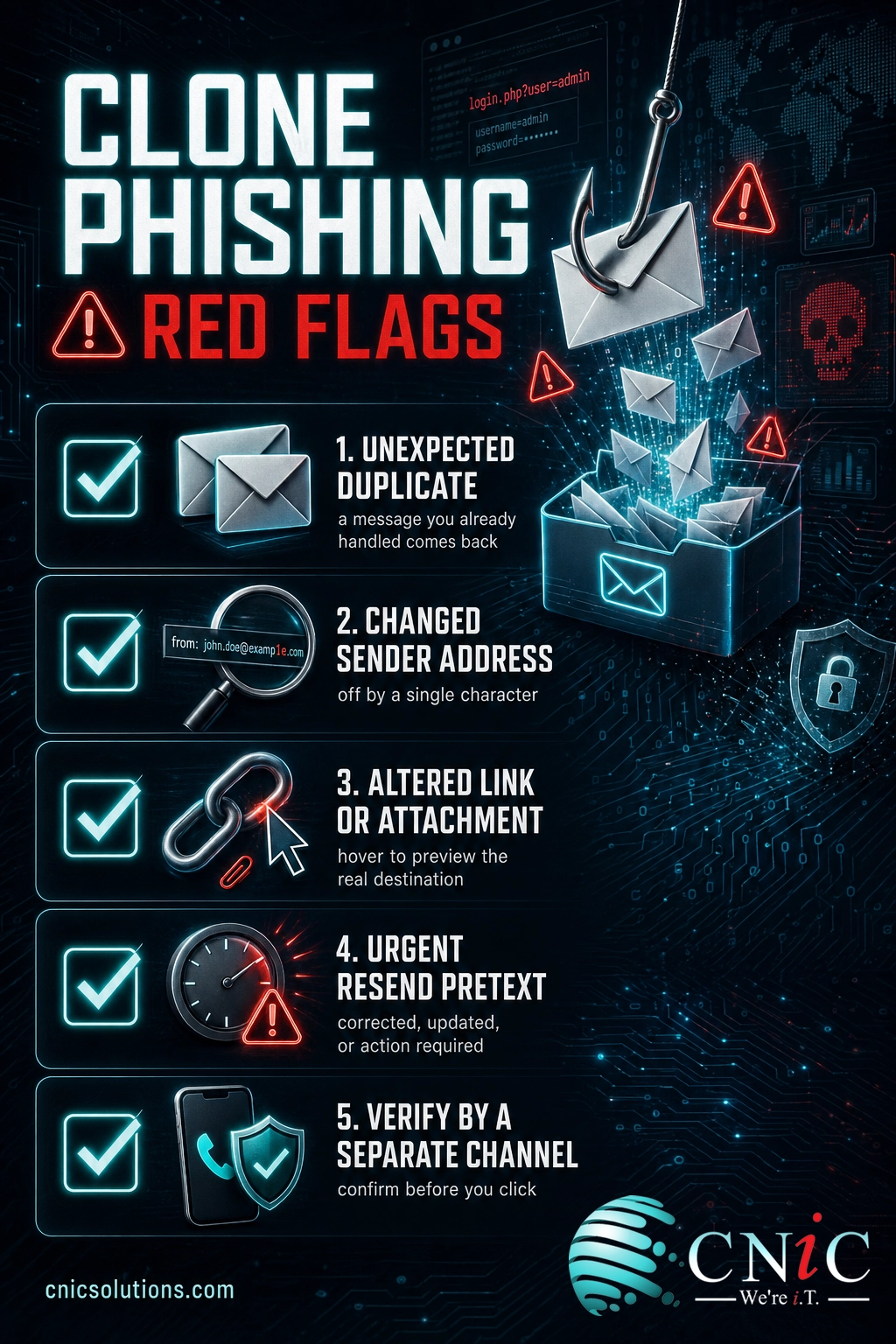
- An unexpected duplicate. You already received, read, or acted on this message. Why is it back?
- A changed sender address. Inspect the full address, not just the display name. Attackers use lookalikes that swap or add a single character.
- Altered links or attachments. Hover over a link to preview the real destination before clicking, and be wary of a file type or name that differs from the original.
- Pressure and pretext. Words like “urgent,” “corrected,” “updated,” or “action required” that push you to move quickly are a prompt to slow down instead.
- The verify-first rule. For any unexpected request involving payment, credentials, or sensitive data, confirm it through a separate channel, such as a phone call to a known number, before acting.
What technical controls should be in place
Habits alone are not enough, because clone phishing is designed to bypass human judgment. The reliable defense is a stack of controls that reduce how many malicious messages arrive and limit the damage when someone does slip:
- Email authentication (SPF, DKIM, and DMARC) to make it far harder for attackers to spoof your domain and to filter out messages that fail those checks.
- Advanced email filtering that inspects links and attachments and flags messages that duplicate prior threads or point to newly created lookalike domains.
- Multi-factor authentication on every account, so a stolen password alone is not enough to take over a mailbox.
- Regular, realistic security awareness training so staff recognize the contextual tells, reinforced with simulated phishing that reflects tactics like cloning.
Setting these up once is straightforward. Keeping them correctly configured, current, and consistent across every mailbox as your team and tools change is the hard part, and it is where gaps quietly open. That ongoing discipline is exactly what managed email security and a well-run security program provide. A Virtual CIO can build phishing defense and staff training into a broader security strategy rather than leaving it to chance.
Get email security managed across your business
Related Terms
- Phishing: The broad category of fraudulent messages that trick people into revealing information or clicking malicious links.
- Spear phishing: A targeted phishing attack customized for a specific individual using researched details.
- Whaling: Spear phishing aimed at high-value targets such as executives or finance leaders.
- Business Email Compromise (BEC): Fraud that uses a compromised or spoofed business account to trigger fraudulent payments or data disclosure.
- Email spoofing: Forging an email’s sender information so a message appears to come from someone it does not.
- Pretexting: Inventing a believable scenario or reason to lower a victim’s guard before making a request.
- Thread hijacking: Inserting a malicious reply into a genuine, ongoing email conversation to exploit existing trust.
Frequently Asked Questions
What is clone phishing in simple terms?
How is clone phishing different from spear phishing?
How can you tell if an email is a clone phishing attempt?
Why is clone phishing so hard to detect?
How can businesses prevent clone phishing?
Build phishing defense into your security strategy
Sources
Statistics in this article come from the FBI Internet Crime Complaint Center (IC3) 2024 Internet Crime Report: phishing and spoofing were the most-reported crime type at 193,407 complaints, Business Email Compromise accounted for $2.77 billion in reported losses, and total reported losses reached $16.6 billion across 859,532 complaints, a 33 percent year-over-year increase. The definition of phishing and its classification as social engineering follow NIST’s Computer Security Resource Center glossary. Detection guidance and phishing tactics align with CISA’s phishing recognition resources. Clone phishing mechanics are described as an established, recognized phishing variant, not from any single fabricated figure.
Primary and authoritative sources: FBI IC3 2024 Internet Crime Report, NIST CSRC: Phishing, CISA: Recognize and Report Phishing.



related posts
What Is a Hypervisor? Types and How They Work
October 7, 2026A hypervisor is software that lets a single physical computer run many separate virtual machines at…
What Is a Load Balancer? How It Keeps Applications Fast and Reliable
October 7, 2026A load balancer is a device or piece of software that sits in front of your…
What Is a Human Firewall? Turning Employees Into Your Best Defense
October 6, 2026A human firewall is the group of employees who, through security awareness and good habits, act…
What Is a Firmware Update and Why It Matters for Security
October 6, 2026A firmware update is a manufacturer-issued revision to the low-level software built into a device, such…