

A load balancer is a device or piece of software that sits in front of your servers and distributes incoming network traffic across them. By spreading requests and routing around servers that are down or overloaded, it keeps applications fast when demand is high and available even when an individual server fails.
When an application slows to a crawl during a busy morning, or goes dark because one server crashed, the fix is rarely a bigger server. It is a smarter way to use the servers you already have. That is what a load balancer does. It acts as a traffic controller in front of your application, sending each request to a server that can actually handle it and steering traffic away from any server that is struggling or offline. This guide explains what a load balancer is, how it works in plain terms, how it differs from a reverse proxy (the concept it is most often confused with), why it matters for reliability and speed, the main types and algorithms, and how to tell whether your business needs one.
Key Takeaways
- A load balancer distributes traffic across multiple servers so no single server becomes a bottleneck or a single point of failure.
- It improves both speed and reliability. Requests go to the least busy healthy server, and traffic reroutes automatically when a server fails.
- Health checks are the key mechanism. The balancer constantly tests each server and only sends traffic to the ones that respond.
- Types split two ways: by form (hardware, software, cloud) and by network layer (Layer 4 versus the smarter Layer 7).
- It is not only for giant websites. Any business whose app, portal, or phone system must stay up can benefit.
What’s in This Guide
How a Load Balancer Works
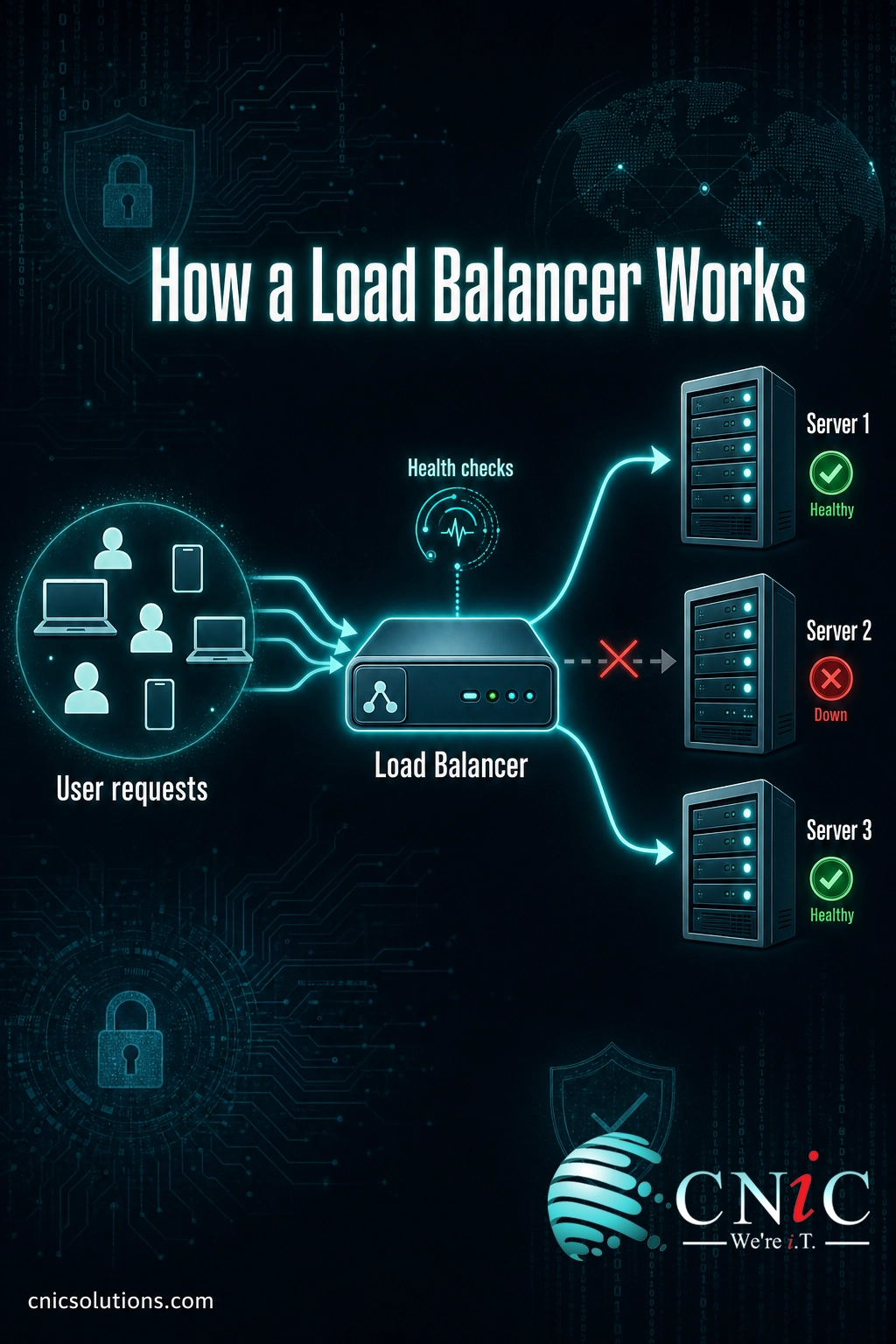
Think of a load balancer as the host at a busy restaurant. Diners (user requests) arrive at the door, and instead of everyone crowding one waiter, the host seats each party with a server who has capacity. If a waiter goes on break, the host stops seating new tables in that section. Guests are served faster, and no single waiter gets buried. A load balancer does the same job for your application, thousands of times a second.
Here is what actually happens on each request:
- A request arrives at the load balancer, not directly at a server. Users connect to a single address (a domain or virtual IP), and the load balancer sits behind that address as the front door to a pool of servers.
- The load balancer picks a server. Using a load balancing algorithm (covered below), it selects one server from the pool that can handle the request, usually the least busy healthy one.
- It forwards the request and returns the response. The chosen server does the work, and the load balancer passes the answer back to the user, who never sees which server actually responded.
- It runs continuous health checks. In the background, the balancer regularly tests each server. If a server stops responding, it is pulled out of rotation automatically, and traffic flows only to the servers that are up. When the server recovers, it is added back.
That fourth step is the heart of it. Health checks are what turn a group of separate servers into a resilient system: the load balancer notices a failure in seconds and reroutes around it, so users keep getting served instead of hitting an error page.
Load Balancer vs Reverse Proxy
This is the distinction that trips people up most, because the two overlap. A reverse proxy is a server that receives requests from clients and forwards them to one or more back-end servers, then returns the response. A load balancer is essentially a reverse proxy with one extra, defining job: it spreads requests across many servers and tracks their health to decide where each one should go.
| Reverse Proxy | Load Balancer | |
|---|---|---|
| Core job | Forward requests to a back-end server | Distribute requests across many servers |
| Number of back ends | Works with one or more | Purpose-built for many |
| Health checks | Not required | Central to how it works |
| Typical extras | Caching, SSL termination, hiding servers | All of that, plus traffic distribution and failover |
The clean way to remember it: every load balancer is a reverse proxy, but not every reverse proxy is a load balancer. If a proxy sends traffic to a single server, it is just proxying. Once it splits traffic across a pool of servers and health-checks them, it is load balancing. Many products, including Nginx and cloud services, can act as either, depending on how you configure them.

Why Load Balancers Matter for Your Business
Two things break customer trust faster than almost anything else: an application that is slow, and an application that is down. Load balancing attacks both problems at once, which is why it sits at the core of nearly every reliable online service.
On speed: by spreading requests so no single server is overwhelmed, a load balancer keeps response times low even when traffic surges. Instead of one server queueing up requests and making everyone wait, the work is shared across the pool. When demand grows, you add another server to the pool rather than replacing the one you have.
On reliability: this is where the business case gets sharp. A single-server application has a single point of failure. When that server goes down, so does the application. A load balancer in front of several servers removes that fragility, because the failure of one server no longer means an outage. And outages are expensive.
Load balancing does not eliminate downtime by itself, but it removes one of the most common and avoidable causes of it: a single overloaded or failed server taking the whole application with it. For a customer portal, an e-commerce checkout, a booking system, or a hosted phone platform, that difference is measured directly in revenue and reputation.
Myth: A load balancer automatically makes your application highly available. Not on its own. If you run a single load balancer in front of your servers, the balancer itself becomes the new single point of failure. Genuine high availability means running the load balancers in a redundant pair (so one can take over if the other fails), backing them with multiple healthy servers, and actually testing that failover works. The load balancer is the foundation of high availability, not the whole building.
Source: Uptime Institute Annual Outage Analysis 2024
Types of Load Balancers
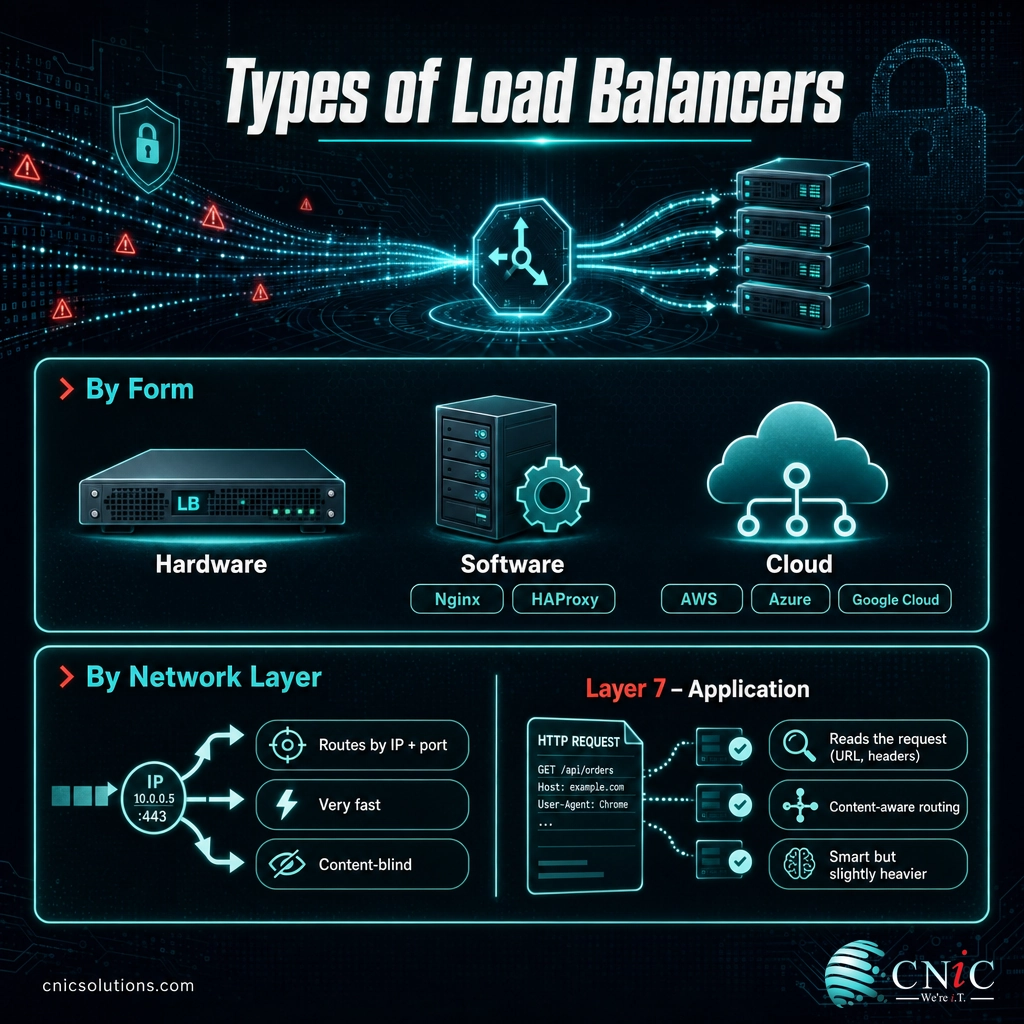
Load balancers are categorized two different ways, and both matter when you are choosing one. The first is the form it takes. The second is the network layer it operates on.
By Form: Hardware, Software, and Cloud
- Hardware load balancers are physical appliances installed in your own data center or server room. They deliver very high performance and are common in large on-premises environments, but they cost more up front and you maintain them yourself.
- Software load balancers run on standard servers or virtual machines. Nginx and HAProxy are the best-known examples. They are flexible and cost-effective, and they are the default choice for most modern applications.
- Cloud load balancers are fully managed services from providers such as AWS, Microsoft Azure, and Google Cloud. You configure them and the provider runs the underlying infrastructure, scaling capacity up and down automatically. For businesses already running applications in the cloud, this is usually the simplest path.
By Network Layer: Layer 4 vs Layer 7
Load balancers also differ by how deeply they inspect traffic, described using the OSI networking model:
| Layer 4 (Transport) | Layer 7 (Application) | |
|---|---|---|
| Routes based on | IP address and port (TCP/UDP) | The actual request (URL, headers, cookies) |
| Speed | Extremely fast, low overhead | Slightly more processing per request |
| Smart routing | Limited, it does not read the content | Can send /api and /images traffic to different pools |
| Best for | Raw throughput, simple distribution | Web apps needing content-aware routing |
A Layer 4 balancer is fast and simple: it moves packets based on network address and port without looking inside. A Layer 7 balancer understands the application traffic itself, so it can make smarter decisions, such as routing requests for one part of your site to a dedicated group of servers, or holding a user’s session on the same server. Most modern web applications use Layer 7 balancing for exactly that flexibility.
How Load Balancers Choose a Server
When a request arrives, the load balancer has to decide which server in the pool should handle it. That decision follows a load balancing algorithm. The main ones are simpler than they sound:
- Round robin: requests go to each server in turn, one after another, then back to the first. Simple and even, best when your servers are roughly identical.
- Weighted round robin: the same rotation, but more powerful servers are given a higher weight and receive proportionally more requests. Useful when your servers are not all the same size.
- Least connections: each new request goes to the server currently handling the fewest active connections. This adapts to real load, so a server stuck on slow requests does not keep getting more.
- Least response time: traffic goes to the server that is both responding fastest and least busy, favoring the best current performer.
- IP hash: the client’s IP address determines which server it is sent to, so the same user consistently reaches the same server. Handy when a session needs to stay in one place.
There is no single best algorithm. Round robin is a sensible default for uniform servers, while least connections tends to perform better when request times vary. The right choice depends on how your servers and application actually behave.
How to Get Started With Load Balancing
You do not need a massive infrastructure to benefit from load balancing. The starting point is a straightforward question: which of your applications would hurt the business if they slowed down or went offline? Those are the candidates. From there, adding load balancing generally follows a few steps:
- Identify the critical application and confirm it can run on more than one server (most web apps, portals, and hosted phone systems can).
- Stand up a pool of servers behind the application rather than relying on one.
- Put a load balancer in front, choosing hardware, software, or a cloud service based on where the application runs and your performance needs.
- Configure health checks and an algorithm so the balancer knows what a healthy server looks like and how to distribute traffic.
- Make the balancer itself redundant and test a failure, so you know the safety net actually works before you need it.
The design decisions (Layer 4 or 7, which algorithm, how to handle sessions, how to make the whole thing redundant) are where load balancing goes from a concept to a reliable system, and where getting it wrong can quietly reintroduce the single point of failure you were trying to remove.

CNiC Solutions designs and manages the networks behind business-critical applications, including traffic distribution, redundancy, and failover for high availability. If you are weighing how to keep an application fast and online as it grows, our team can help you design the right approach and run it for you.
Explore CNiC networking and high-availability services
Frequently Asked Questions
What is a load balancer?
What is the difference between a load balancer and a reverse proxy?
What are the main types of load balancers?
How does a load balancer decide which server to use?
Does a small business need a load balancer?
Related Terms
- Proxy server: a server that sits between clients and other servers, forwarding requests; a load balancer is a specialized reverse proxy.
- Reverse proxy: a proxy that sits in front of your servers and forwards inbound requests to them, often adding caching and SSL termination.
- Network infrastructure: the hardware, software, and services that connect and route traffic across a business network.
- High availability (HA): a design goal of keeping an application running with minimal downtime, usually through redundancy and automatic failover.
- Failover: the automatic switch to a standby server or system when the primary one fails.
- Health check: a periodic test the load balancer runs on each server to confirm it is able to handle requests.
- SSL termination: decrypting HTTPS traffic at the load balancer so back-end servers do not each have to, simplifying certificate management.
About This Guide and Sources
The definitions and framework in this guide reflect standard, widely consistent characterizations of load balancing across the networking industry, including the load balancer’s role as a traffic-distributing reverse proxy, the use of health checks, the Layer 4 versus Layer 7 distinction, the hardware/software/cloud forms, and the common algorithms (round robin, weighted round robin, least connections, least response time, and IP hash). The outage cost figures are from the Uptime Institute Annual Outage Analysis 2024: 54 percent of respondents said their most recent significant outage cost more than $100,000, and 20 percent said theirs cost more than $1 million, a four-percentage-point year-over-year increase. Specific performance gains from load balancing vary widely by application, traffic pattern, and configuration and are not quantified here.



related posts
What Is a Hypervisor? Types and How They Work
October 7, 2026A hypervisor is software that lets a single physical computer run many separate virtual machines at…
What Is a Firmware Update and Why It Matters for Security
October 6, 2026A firmware update is a manufacturer-issued revision to the low-level software built into a device, such…
What Is a Human Firewall? Turning Employees Into Your Best Defense
October 6, 2026A human firewall is the group of employees who, through security awareness and good habits, act…
What Is a Distributed System? How It Works and Why It Matters
October 5, 2026A distributed system is a collection of independent computers, called nodes, that are connected over a…