

Desktop as a Service (DaaS) is a cloud model in which a third-party provider hosts, secures, and manages virtual desktops and applications, then streams them to any device over the internet. Instead of buying and maintaining the hardware yourself, you subscribe per user and reach your full desktop, files, and apps from anywhere. It is the managed, cloud-delivered version of virtual desktop infrastructure (VDI).
Hybrid work made one question unavoidable for a lot of businesses: how do people get to a secure, consistent company desktop from a home office, a laptop on the road, or a personal device, without IT chasing every machine? Virtual desktops answer it by moving the desktop off the device and into a data center. Desktop as a Service takes that idea and hands the heavy lifting to a cloud provider. This guide explains what virtual desktops are, what DaaS actually is, how it differs from VDI (the distinction that trips up most buyers), the main types, the benefits and trade-offs, and how to tell whether it fits your business.
Key Takeaways
- A virtual desktop runs in a data center, not on the device. The screen is streamed to whatever you are working on, so the device becomes a window, not the computer.
- VDI is self-managed; DaaS is a managed cloud service. Same virtual desktops, different ownership of the servers and upkeep.
- DaaS turns desktops from a capital purchase into a per-user subscription, which scales up and down with headcount.
- Desktops come in persistent and non-persistent flavors, a choice between personalization and simplicity.
- Centralizing desktops improves control and security, but backup, disaster recovery, and access policies are still separate decisions.
What’s in This Guide
Virtual Desktops, In Plain English
Start with the building block. A virtual desktop is a complete desktop operating system, almost always Windows, that runs on a server in a data center instead of on the machine in front of you. As TechTarget’s definition of VDI puts it, the desktop image is delivered over a network to an endpoint device, and you interact with the operating system and applications as if they were running locally.
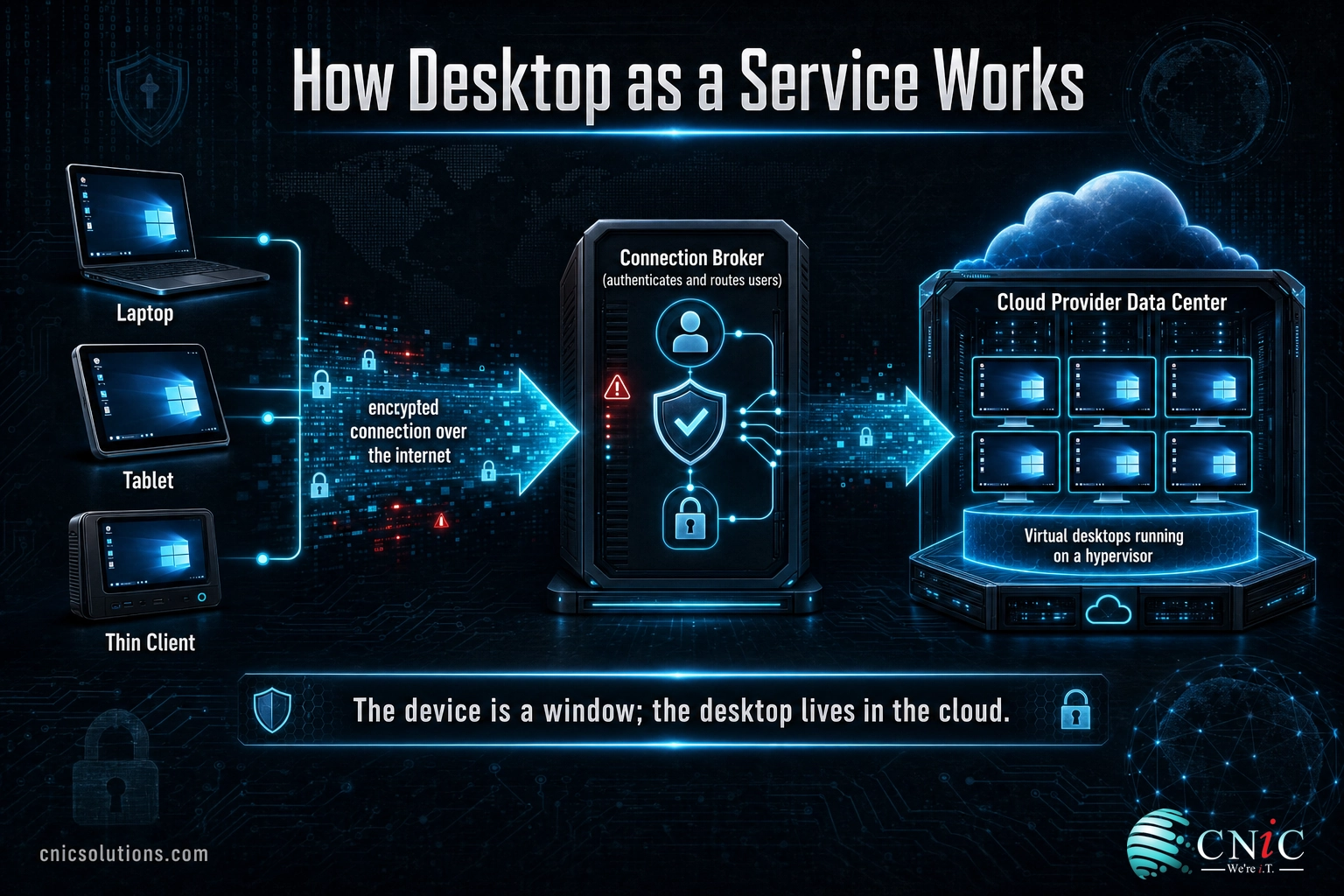
A useful analogy: think of a streaming service. The movie is not stored on your television, it plays from a data center somewhere and streams to your screen. A virtual desktop works the same way. The Windows desktop, your files, and your business applications live on the server, and only the picture of that desktop (plus your keystrokes and mouse movements going back) travels over the connection. The laptop, thin client, tablet, or home PC you are touching becomes a window into the real desktop rather than the place the work actually happens.
That single shift has big consequences. Because the desktop lives centrally, IT can build, secure, patch, and back up desktops in one place rather than one machine at a time. And because the device is only a window, a lost or stolen laptop does not take company data with it, the data never left the data center.
What Desktop as a Service Is
Delivering virtual desktops takes real infrastructure: servers, storage, virtualization software, networking, and licensing, all of which someone has to buy, configure, secure, and keep running. That is the part Desktop as a Service takes off your plate.
DaaS is a cloud offering in which a provider runs that entire back end for you and delivers finished virtual desktops as a subscription. Citrix describes DaaS as a cloud computing offering that securely delivers virtual apps and desktops from the cloud to any device, on a pay-per-user model where you scale up or down as needed. TechTarget frames it the same way: a third party hosts the back end of a virtual desktop deployment and runs it as a managed cloud service.
The practical effect is that virtual desktops stop being a big infrastructure project and become an operating expense. You are not sizing servers or planning a hardware refresh, you are adding and removing users. That is what put enterprise-style desktop virtualization within reach of small and midsize businesses that could never justify building it themselves.
How DaaS Works
Under the hood, a DaaS service generally follows the same pattern regardless of provider:
- The provider hosts the desktops. Virtual machines running your desktop image live in the provider’s cloud, on a hypervisor that hosts many desktops on shared server hardware.
- A broker connects users to desktops. When someone logs in, a connection broker authenticates them and routes them to the right desktop, applying your access policies along the way.
- The desktop streams to the device. A lightweight client or a browser displays the desktop over an encrypted connection. Only screen images travel down and input travels up, so even a modest device can run a powerful desktop.
- You manage the image; the provider manages the plumbing. You decide what the desktop looks like and which apps it carries. The provider keeps the servers, storage, and platform healthy and available under a service-level agreement.
The division of labor is the whole point. You keep control of what your people see and use, while the provider owns the parts that are expensive and time-consuming to run well.
DaaS vs VDI: The Key Distinction
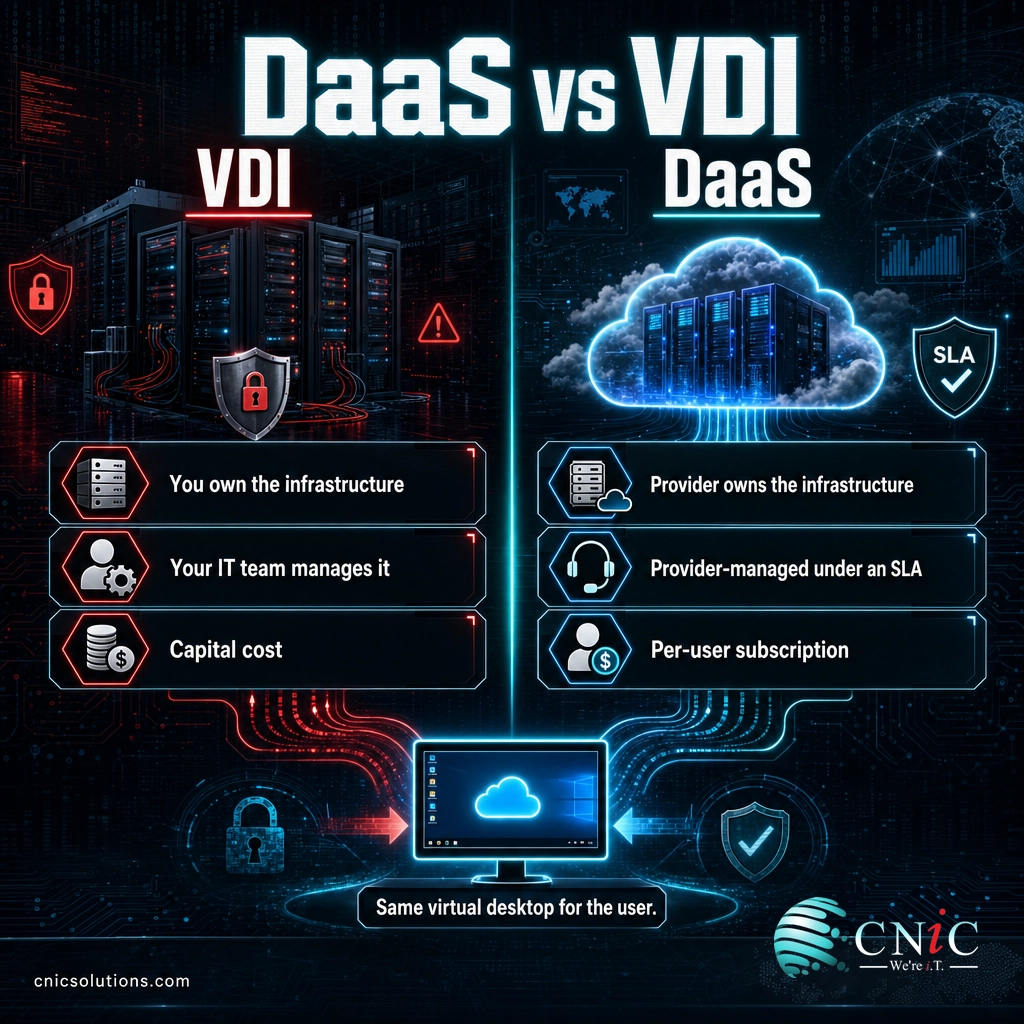
This is the comparison buyers ask about most, and the source of the biggest confusion. DaaS and VDI deliver the same thing to the end user, a virtual desktop, so people assume they are interchangeable. The difference is not what the user gets. It is who owns and runs the infrastructure behind it.
VDI (virtual desktop infrastructure) is the technology you deploy and operate yourself, typically in your own data center. Your team buys the servers, runs the hypervisor and broker, handles licensing, patches, capacity, and availability. You own everything, and you carry the operational burden that comes with it.
DaaS is that same virtual desktop capability delivered from a provider’s cloud as a managed subscription. The provider owns and runs the back end. As TechTarget notes, running VDI on public cloud servers alone does not make it DaaS, what makes it DaaS is that a third party manages it as a service.
| VDI | DaaS | |
|---|---|---|
| Who owns the infrastructure | You do, usually on-premises | The cloud provider |
| Who manages it | Your IT team | The provider, under an SLA |
| Cost model | Capital purchase plus ongoing upkeep | Per-user subscription |
| Scaling | Buy and provision more hardware | Add or remove users on demand |
| Best suited to | Teams with in-house virtualization expertise and control needs | Businesses that want the outcome without running the platform |
Put plainly: VDI is do-it-yourself; DaaS is done-for-you. Neither is universally better. VDI gives maximum control to organizations that have the staff and reasons to run it. DaaS gives the same result to businesses that would rather subscribe than operate a virtualization platform, which describes most small and midsize companies.
Types of Virtual Desktops
Virtual desktops are not one-size-fits-all. Two distinctions matter most when you plan a deployment.
Persistent vs non-persistent
This is the choice between personalization and simplicity, and it shapes the whole experience.
- Persistent desktops assign each user a dedicated desktop that saves everything between sessions: files, settings, installed shortcuts, the works. It behaves like a personal PC, which users like, at the cost of more storage and management per seat.
- Non-persistent desktops hand every user a fresh copy of a standard image at each login and discard the changes at logout. IT maintains a small number of master images instead of hundreds of individual machines, which is simpler and cheaper, and well suited to task workers, shift workers, or shared stations.
Many organizations mix the two, giving persistent desktops to power users and non-persistent desktops to roles that only need a clean, standard environment.
Single-tenant vs multi-tenant
DaaS is usually delivered on a multi-tenant cloud, where many customers share the underlying platform but each customer (each tenant) is logically isolated so their data, applications, and policies stay separate and secure. Some providers also offer single-tenant or dedicated options for organizations with stricter isolation or compliance requirements. The right choice depends on your regulatory obligations and how much dedicated capacity you need.
Why DaaS Matters for Small and Midsize Businesses
For a smaller business, DaaS is less about chasing technology and more about removing headaches that have real costs. The benefits cluster in a few places.
- Work from anywhere, on almost anything. Because the desktop lives in the cloud, the same secure environment reaches a home office, a laptop on the road, or a personal device. This is the hybrid-work enabler that pushed many businesses to look at DaaS in the first place.
- Predictable, scalable cost. Desktops become a per-user subscription instead of a capital purchase and refresh cycle. Onboarding a seasonal hire or a new location is a matter of adding users, not buying and imaging machines.
- Centralized control and stronger security posture. Data sits in a hardened data center rather than on endpoints, so a lost or stolen laptop is an inconvenience, not a breach. Patching and configuration happen centrally, and access can be tightened in one place.
- Simple, fast device provisioning. A new employee can be productive on day one from an inexpensive device, and offboarding is as clean as disabling an account.
- Business continuity built in. If an office is unreachable, people keep working from anywhere with an internet connection, because the desktops were never tied to the building.
The security angle is worth a caution, because it is widely misunderstood.
Myth: moving desktops to the cloud means they are automatically backed up and secure. Centralizing desktops improves your security posture, but it does not, by itself, protect you from ransomware, accidental deletion, or a bad configuration. Access controls and multi-factor authentication still have to be enforced, and virtual desktops still need a real backup and recovery plan, the same as any other system. If continuity is a concern, pair DaaS with a tested disaster recovery as a service approach rather than assuming the cloud has it covered.
Getting the security and access design right is exactly where a managed provider earns its keep. CNiC Solutions helps businesses layer the right protections around virtual desktops through dedicated cybersecurity services, so the move to the cloud tightens your posture instead of quietly loosening it.
Does Your Business Need DaaS?
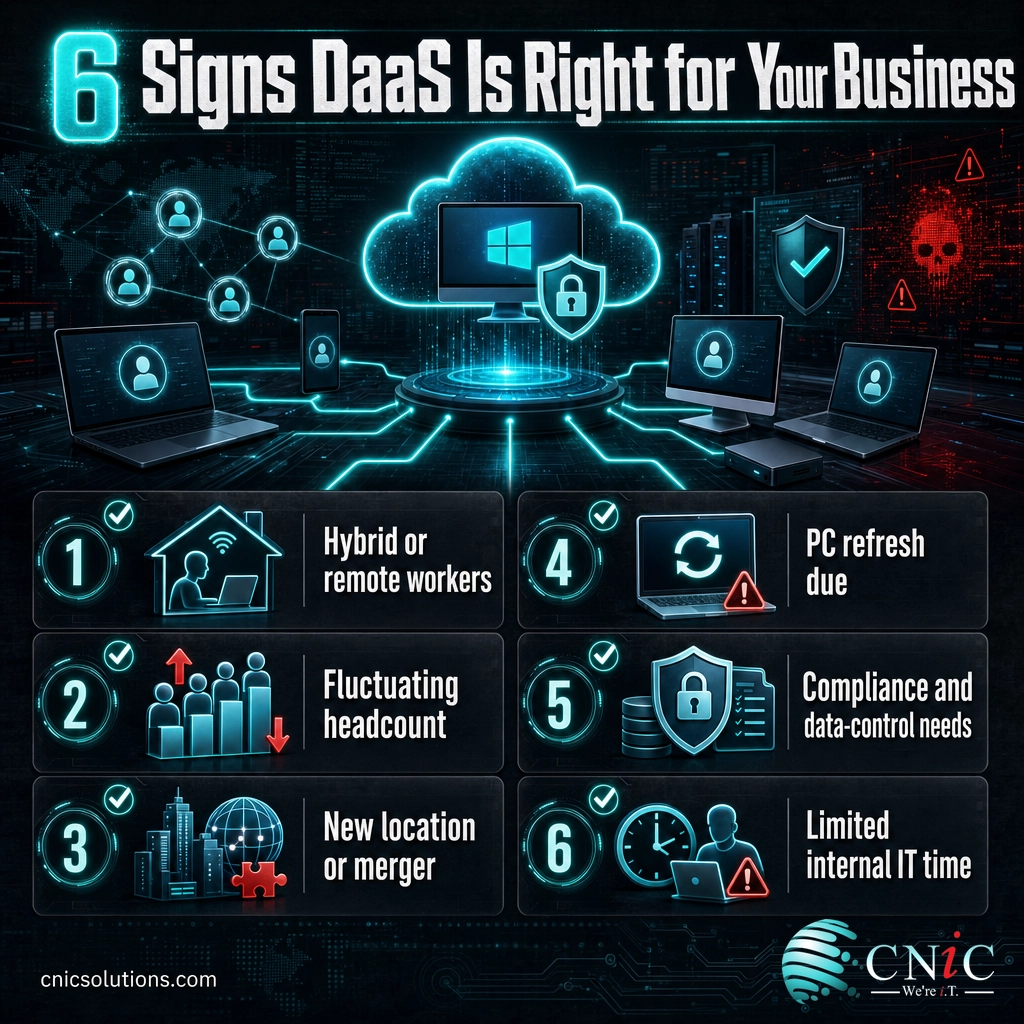
DaaS is not mandatory, but it becomes a strong option when certain conditions describe your situation. Consider it seriously if:
- You support hybrid or remote workers and want everyone on the same secure, consistent desktop regardless of device or location.
- Your headcount rises and falls (seasonal staff, contractors, project teams) and you want to add or remove desktops without buying hardware.
- You are opening a new location, going through a merger, or running a bring-your-own-device program and need people productive quickly.
- Aging PCs are due for a refresh, and you would rather shift from a big capital outlay to a predictable subscription.
- You have compliance or data-control requirements that are easier to meet when data stays in a managed data center rather than on endpoints.
- Your internal team does not have the time or specialized expertise to build and run a virtualization platform of your own.
If several of those ring true, DaaS is worth a serious look. And because it touches your infrastructure, security, budget, and continuity plan all at once, it is a decision worth making with a provider that can see the whole picture rather than piece by piece.
CNiC Solutions helps small and midsize businesses evaluate, deploy, and run virtual desktops as part of a well-designed environment. Our managed IT services keep the desktops, users, and day-to-day support handled, while infrastructure management makes sure the underlying platform stays healthy, secure, and right-sized. For businesses weighing where virtual desktops fit in a broader technology roadmap and budget, our Virtual CIO services help align the decision with real business goals.
Frequently Asked Questions
What is Desktop as a Service (DaaS)?
What is the difference between DaaS and VDI?
What is a virtual desktop?
What are persistent and non-persistent desktops?
Is DaaS secure for a small business?
Related Terms
- VDI (Virtual Desktop Infrastructure): The self-managed technology that hosts virtual desktops in your own data center. DaaS is essentially VDI delivered from a provider’s cloud as a service.
- Virtual desktop: A desktop operating system that runs on a server and streams to your device, whether delivered through VDI or DaaS.
- Thin client: A low-cost, low-power device whose main job is to connect to a virtual desktop rather than run applications locally.
- Persistent vs non-persistent desktop: Whether a user’s changes are saved between sessions (persistent) or reset to a standard image each login (non-persistent).
- Cloud computing: Delivering computing resources over the internet as a service, the broader category DaaS belongs to. See our cloud solutions for how this applies to a business.
- UCaaS (Unified Communications as a Service): Cloud-delivered phone, messaging, and meetings, a natural companion to virtual desktops for remote and hybrid teams. Learn more about cloud communications.
- Backup and disaster recovery: The separate discipline of protecting and restoring data and systems, which virtual desktops still require. See backup and recovery.
About This Guide and Sources
The definitions and framework in this guide, what a virtual desktop is, the distinction between self-managed VDI and provider-managed DaaS, the connection-broker and hypervisor model, multi-tenant delivery, and the persistent versus non-persistent desktop types, reflect standard, widely consistent characterizations across the desktop virtualization industry, including TechTarget’s DaaS definition, TechTarget’s VDI definition, and Citrix’s DaaS glossary. Specific provider pricing, performance figures, and savings percentages vary widely by provider, environment, and desktop type and are not cited here. Any business should validate its own requirements, security controls, and backup plan before adopting DaaS.



related posts
What Is MFA? How Multi-Factor Authentication Protects Your Accounts
October 24, 2026Multi-factor authentication (MFA) is a security method that requires two or more separate proofs of identity…
What Is Mobile Device Management (MDM)? A Guide for Businesses
October 24, 2026Mobile Device Management (MDM) is software that lets an organization remotely enroll, configure, secure, and monitor…
What Is IT Monitoring? A Guide for Businesses
October 23, 2026IT monitoring is the continuous practice of collecting and analyzing data from a business's technology, its…
What Is Log Analysis? How It Works and Why It Matters
October 23, 2026Log analysis is the practice of reviewing and interpreting the log files that computers, applications, and…