

Vishing, short for voice phishing, is a scam in which criminals use phone calls or voicemail to trick people into revealing sensitive information, such as passwords or bank details, or into sending money. It relies on a trusted-sounding caller and manufactured urgency rather than a malicious link, which makes it hard to catch in the moment.
Most people have learned to be wary of a suspicious email. A phone call is different. A live voice feels personal, it can answer your questions, and it can push you to act before you have time to think. That is exactly why vishing works. Instead of a link in your inbox, the attack comes through your phone: a caller claiming to be your bank, the IRS, a software vendor, or even your own IT department, steering you toward handing over money or access. This guide explains what vishing is, how it works, how it differs from the scams it is confused with, and the practical steps a business can take to shut it down.
Key Takeaways
- Vishing is phishing by phone. The goal is the same as email phishing, but the channel is a call or voicemail, which adds real-time pressure and a human voice.
- Phone fraud is expensive. The FBI logged 53,369 call center scam complaints in 2024, accounting for $1.9 billion in reported losses.
- Caller ID is not proof. Spoofing lets attackers display any number they want, including your bank’s real one. Never trust the number on your screen.
- Older adults are hit hardest. People age 60 and older reported $4.8 billion in losses in 2024, with tech support vishing a leading driver.
- Defense is habit plus controls. A verify-by-callback rule, multi-factor authentication, and clear payment procedures beat any single tool.
What’s in This Guide
How Vishing Works
Vishing is a form of social engineering: it manipulates a person into acting against their own interest by exploiting trust, fear, or urgency rather than a technical flaw. The phone is the delivery method, and the human voice is the weapon. A skilled caller can react to hesitation, invent reassuring details, and keep you on the line long enough to override your instincts.
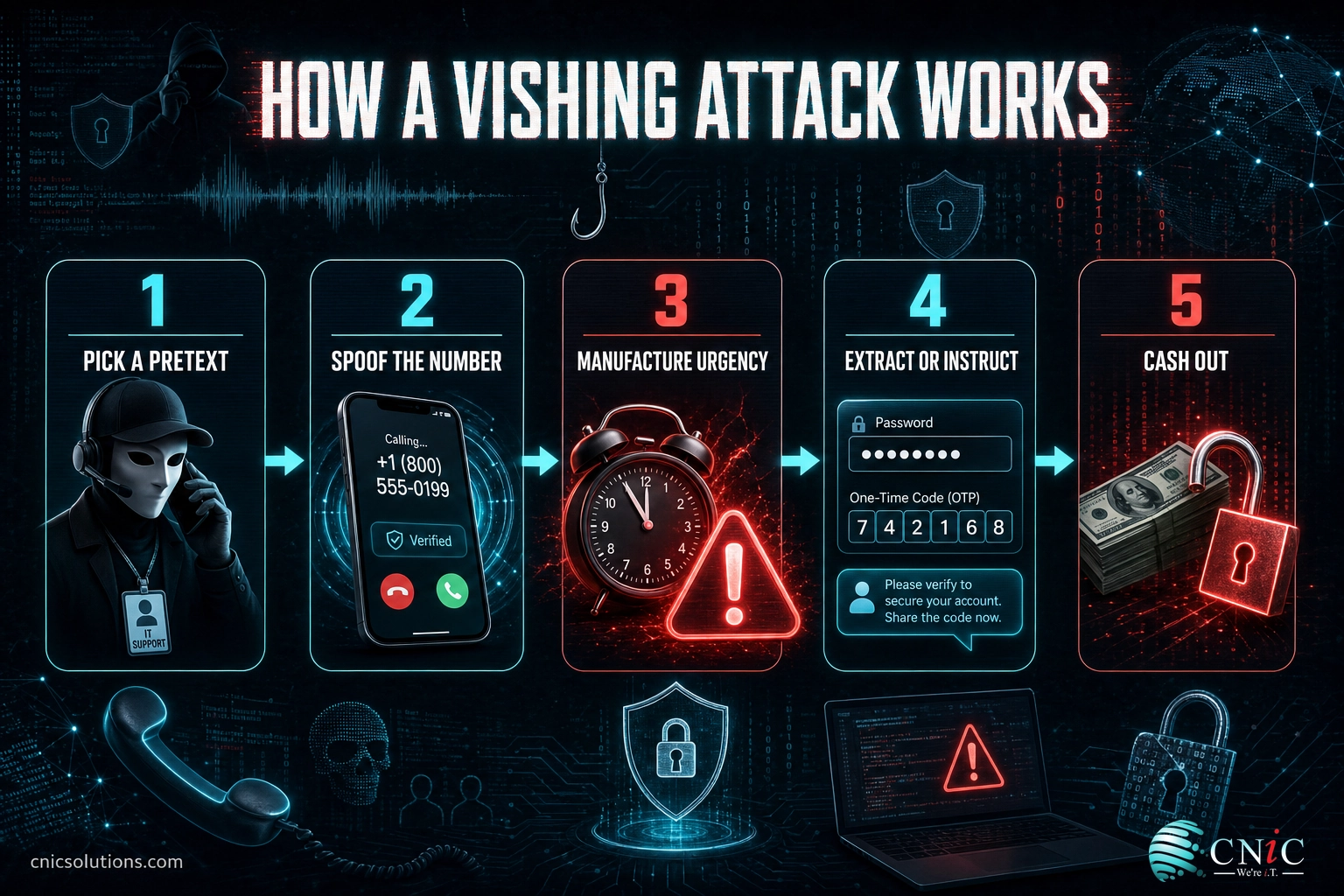
A typical vishing attack follows five steps:
- Pick a pretext. The attacker chooses an identity you are likely to trust: your bank’s fraud department, a government agency, a well-known software company, or an internal help desk.
- Spoof the number. Using caller ID spoofing, they make the call appear to come from a legitimate or local number, so the display on your phone reinforces the lie.
- Manufacture urgency. They open with a problem that demands immediate action: suspicious activity on your account, an overdue tax bill, a virus on your computer, or a payment that must go out today.
- Extract or instruct. They ask you to confirm a password, read back a one-time passcode, install remote-access software, or move money, framing each request as the fix for the problem they invented.
- Cash out. With credentials, a code, or a transfer in hand, they drain an account, take over a mailbox, or unlock the next stage of a larger fraud.
Think of it like a stranger who calls your house, says they are from the power company, and warns your service will be shut off within the hour unless you pay right now. The pressure is designed to stop you from doing the one thing that would end the scam: hanging up and calling the real company on a number you look up yourself.
Source: NIST Computer Security Resource Center: Phishing | CISA: Recognize and Report Phishing
Vishing vs. Phishing vs. Smishing
Vishing, phishing, and smishing are three branches of the same tree. All three are social engineering attacks that impersonate a trusted party to steal information or money. The only difference is the channel each one travels through.
Phishing arrives by email. Smishing arrives by SMS text message. Vishing arrives by phone call or voicemail. The channel matters more than it sounds, because a live phone call removes the pauses that help people catch a scam. There is no link to hover over, no time to forward the message to IT, and a real person on the line can adapt the moment you push back.
| Aspect | Vishing | Phishing | Smishing |
|---|---|---|---|
| Channel | Phone call or voicemail | SMS text message | |
| Main pressure | A live voice and real-time urgency | A convincing link or attachment | A short, urgent link |
| Common disguise | Bank, IRS, tech support, internal help desk | Vendor, colleague, service provider | Delivery notice, bank alert, toll notice |
| Main giveaway | Unsolicited call demanding action, codes, or payment | Mismatched sender and links | Unexpected text with a link to tap |
| Why it works | A human voice is hard to second-guess in the moment | Looks like routine email | Feels quick and low-risk to tap |
These channels are often combined. A text message that tells you to call a number, or an email with a support line to dial, is a hybrid attack that starts as smishing or phishing and finishes as vishing once you are on the phone. The defense is the same across all three: slow down and verify an unexpected request through a channel you control before you act.
Myth: “I would know a scam call when I heard one.”
This is the assumption vishing is built to beat. Attackers spoof caller ID so your bank’s real number appears on the screen, they use professional scripts and hold music, and increasingly they use AI voice tools to sound polished or even to imitate a specific person. The tells are not a bad accent or an obvious lie. They are the situation itself: an unexpected call, pressure to act now, and a request for a password, a code, remote access, or a payment. Judge the request, not how convincing the voice sounds.
Understanding the label matters less than recognizing the pattern, because a single fraud campaign will happily use whichever channel gets a response.
Source: NIST Computer Security Resource Center: Phishing

Why Vishing Matters for Your Business
Vishing is not just a consumer nuisance. It is a well-funded criminal industry, and the numbers behind it are large and growing. The clearest measure of its cost comes from the FBI’s Internet Crime Complaint Center, which tracks fraud run through illegal call centers as its own category.
The FBI notes that two categories of call center fraud dominate: tech and customer support scams, and government impersonation. Both are pure vishing, and both are aimed heavily at older victims who are pressured into sending cash, wiring money, or buying gift cards.
Reported Losses to Call Center Fraud, 2024 (FBI IC3)
Tech support and government impersonation are the two call center fraud categories the FBI tracks. Together they make up the bulk of the $1.9 billion in call center scam losses. Source: FBI IC3 2024 Internet Crime Report.
For a small or midsize business, the risk is rarely a single employee losing money on one call. It is what a successful vishing call unlocks. A caller who talks a staff member into reading back a multi-factor code can take over a mailbox. That mailbox becomes the launch point for a cloned email sent to your team, clients, and vendors, and for Business Email Compromise, the fraud category that drove $2.77 billion in reported losses in 2024. Finance teams are a favorite target: a convincing call from a “vendor” or “executive” asking to redirect a payment can move real money in minutes.
Source: FBI IC3: 2024 Internet Crime Report
The Main Types of Vishing Attacks
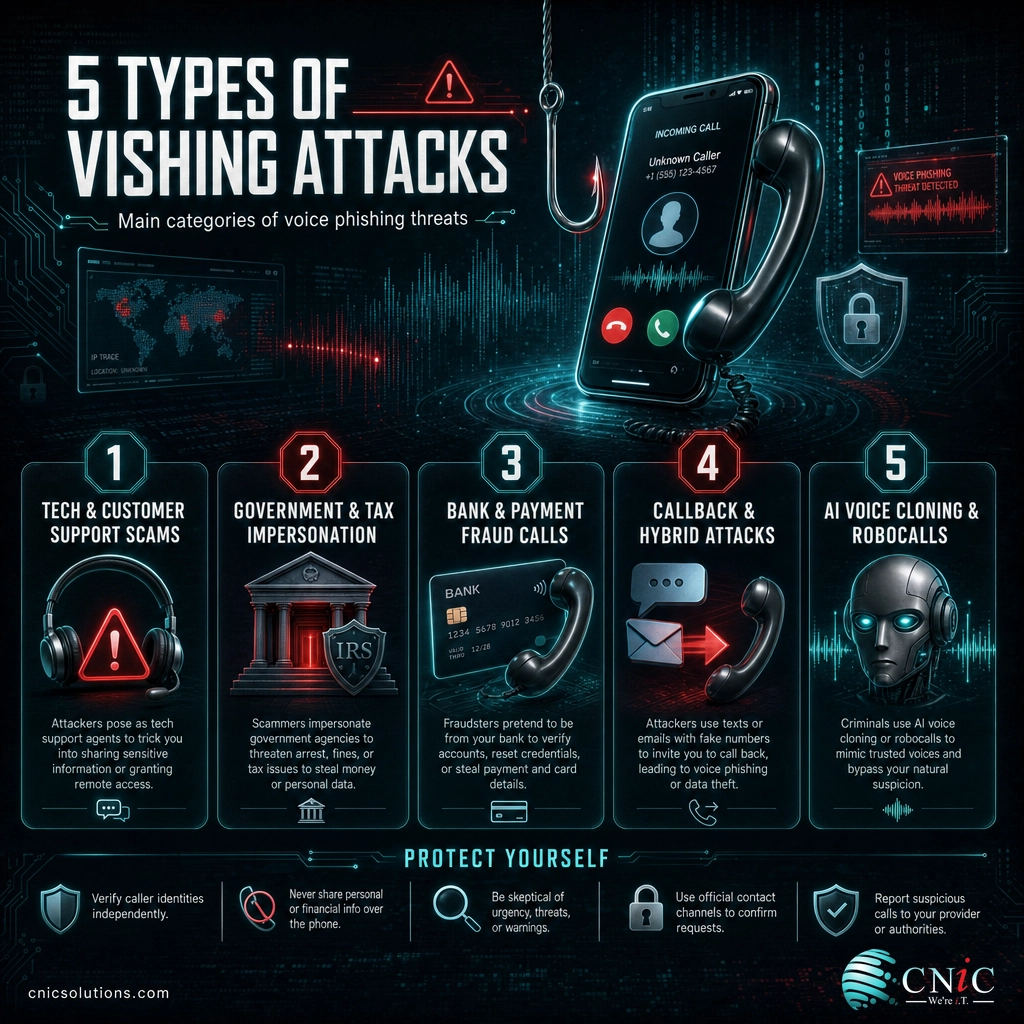
Vishing is a technique, not a single script, so it takes the shape of whatever call would feel routine to the target. A handful of patterns account for most business and personal cases.
1Tech and Customer Support Scams
The caller claims to be from a well-known software or hardware company and says your computer is infected or your account is compromised. The goal is to get you to install remote-access software or pay for fake “support.” These often begin with a browser pop-up or an unsolicited call, and they are the single largest category of call center fraud the FBI tracks.
2Government and Tax Impersonation
The caller poses as the IRS, the Social Security Administration, or law enforcement, and threatens arrest, fines, or a suspended benefit unless you pay immediately. Real agencies do not demand payment by phone in gift cards or cryptocurrency, and they do not threaten arrest over the line. Urgency plus a threat is the signature of this type.
3Bank and Payment Fraud Calls
The caller claims to be your bank’s fraud department, says there is suspicious activity, and asks you to “verify” your identity by reading back a one-time code, a card number, or your online banking password. A real bank will never ask for a full password or a one-time code over the phone, because those are the exact keys the caller needs to drain the account.
4Callback and Hybrid Attacks
Here the phone call is stage two. An email or text arrives, often a fake invoice or subscription renewal, urging you to call a number to dispute a charge. When you call, a live “agent” walks you into installing software or handing over details. Because you placed the call, it feels safe, which is exactly the trap. This callback technique is a common on-ramp to larger fraud.
5AI Voice Cloning and Robocalls
Attackers now use automated robocalls to reach volume, and AI voice tools to sound more human or to imitate a specific person from a short audio sample. A cloned voice of a manager or family member asking for an urgent transfer is a growing threat. The defense does not change: verify any unexpected request for money or access through a known, separate channel, no matter how familiar the voice.
Source: FBI IC3: 2024 Internet Crime Report | CISA: Recognize and Report Phishing
How to Protect Your Business from Vishing
Because vishing targets people, not just systems, defense works best in two layers: habits that help your team catch a call, and controls that limit the damage when someone is fooled. Neither alone is enough.
What your team should do on every suspicious call
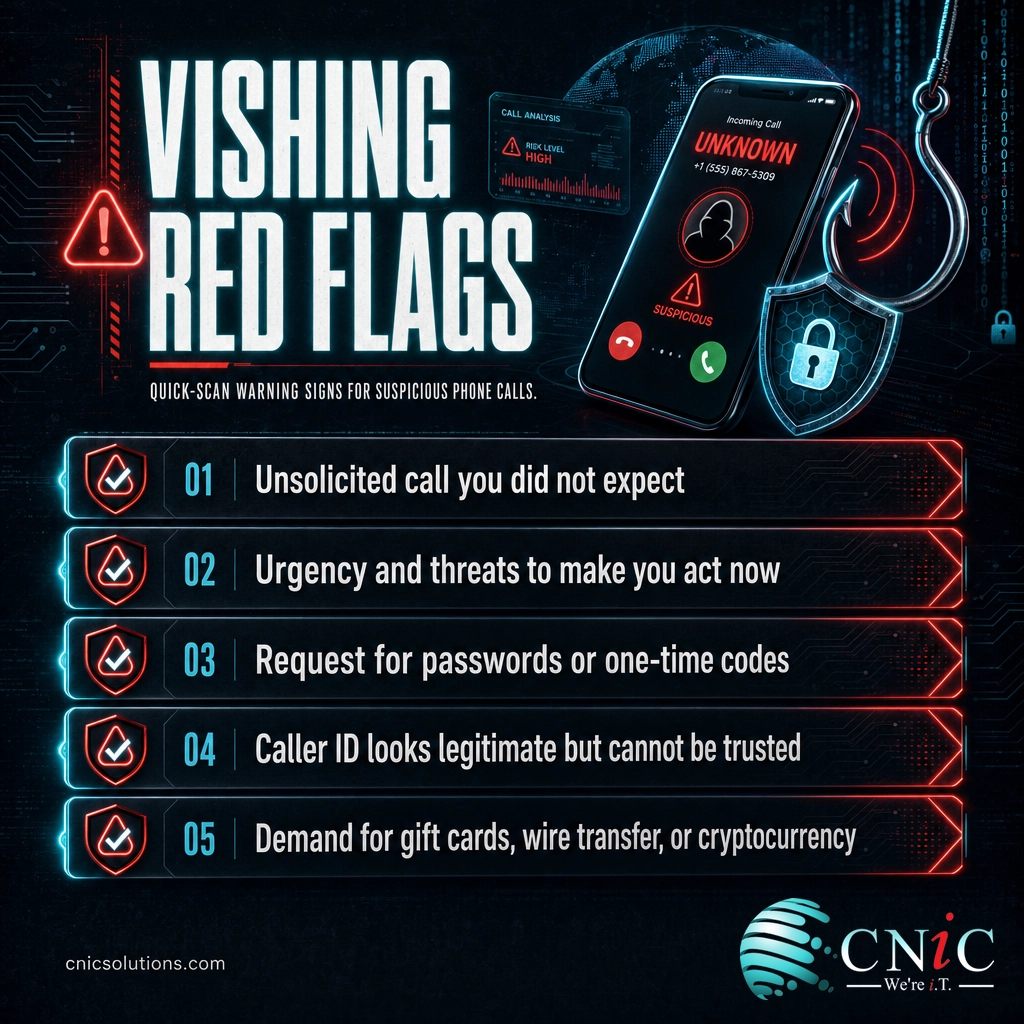
- Use the verify-by-callback rule. Hang up and call the organization back on a number you look up independently, never the number the caller gives you or the one on your screen.
- Never share codes or passwords by phone. No legitimate bank, agency, or vendor needs your password or a one-time passcode read aloud. Those requests are the scam.
- Treat urgency as a warning, not a reason to hurry. Threats, deadlines, and “act now” pressure are tools to stop you thinking. Slowing down is the correct response.
- Distrust caller ID. A familiar name or number on the screen is not proof of who is calling. Spoofing makes it trivial to fake.
- Refuse unusual payment methods. Gift cards, wire transfers, and cryptocurrency demanded over the phone are near-certain signs of fraud.
What controls should be in place
Habits catch some calls, but people are human and attackers are persistent. Technical and procedural controls contain the damage when a call gets through:
- Multi-factor authentication on every account, so a password spoken to a scammer is not enough to log in. Pair it with policies that check the device and location of each sign-in.
- Clear payment and password procedures, including mandatory second-person approval and out-of-band verification for any change to payment details or wire instructions.
- Security awareness training that includes simulated vishing calls, not just phishing emails, so staff practice the verify-by-callback habit under realistic pressure.
- Account and email monitoring so a mailbox takeover triggered by a leaked code is caught quickly, before it becomes the next attack.
Standing these controls up once is straightforward. Keeping them configured correctly, current, and consistent across every employee and device as your team changes is the hard part, and it is where gaps quietly open. That ongoing discipline is what a managed security program and a Virtual CIO provide, folding phone-scam defense and staff training into a broader security strategy rather than leaving it to chance. A regular cybersecurity risk assessment also surfaces the accounts and processes a vishing caller would target first.
Get a Free Security Consultation
See How Managed IT Protects Your Team
Related Terms
- Phishing: The broad category of fraudulent messages that trick people into revealing information or clicking malicious links. Learn how to spot a phishing email.
- Smishing: Phishing delivered by SMS text message, often a link disguised as a delivery, bank, or toll notice.
- Clone phishing: A copy of a real email you already trusted, resent with a malicious link swapped in, a close cousin of the callback tactic vishing relies on.
- Spear phishing: A targeted attack customized for a specific person using researched details.
- Caller ID spoofing: Faking the name or number shown on a recipient’s phone to appear as a trusted caller.
- Social engineering: Manipulating people into giving up information or access by exploiting trust and urgency rather than a technical flaw.
- Business Email Compromise (BEC): Fraud that uses a compromised or spoofed business account to trigger fraudulent payments, frequently seeded by a vishing or phishing attack.
- Callback phishing: A hybrid attack that uses an email or text to get the victim to call a fraudulent number, turning the scam into vishing. Compare it to real phishing email examples.
Frequently Asked Questions
What is vishing in simple terms?
What is the difference between vishing, phishing, and smishing?
How do you recognize a vishing call?
Can scammers fake the phone number that shows on caller ID?
How can businesses protect employees from vishing?
Build phone-scam defense into your security strategy
Sources
Loss and complaint figures in this article come from the FBI Internet Crime Complaint Center (IC3) 2024 Internet Crime Report: call center scams accounted for 53,369 complaints and $1.9 billion in reported losses; tech support scams totaled 36,002 complaints and $1.46 billion in losses; government impersonation reached $405.6 million; victims age 60 and older reported $4.8 billion in losses; and Business Email Compromise drove $2.77 billion in reported losses. Total 2024 losses reported to IC3 were $16.6 billion across 859,532 complaints, a 33 percent year-over-year increase. Definitions of phishing and social engineering follow NIST’s Computer Security Resource Center glossary, and detection guidance aligns with CISA’s phishing recognition resources. Figures are cited to their original sources and used to illustrate the scale and mechanics of voice phishing, not as guaranteed outcomes for any specific business.
Primary and authoritative sources: FBI IC3 2024 Internet Crime Report, NIST CSRC: Phishing, CISA: Recognize and Report Phishing.



related posts
What Is ZTNA (Zero Trust Network Access)?
November 3, 2026Zero Trust Network Access (ZTNA) is a security service that grants a verified user access to…
Zero Trust Statistics for 2026: Adoption, Maturity, and Breach Impact
November 3, 2026Zero trust has become the default security strategy on paper, but not yet in practice. Okta's…
What Is XDR (Extended Detection and Response) and How Does It Protect…
November 2, 2026Extended detection and response (XDR) is a security platform that collects and correlates threat data from…
What Is Zero Trust Security? A Guide for Small Businesses
November 2, 2026Zero Trust security is a cybersecurity model built on one rule: never trust, always verify. Instead…