

QoS (Quality of Service) is a set of network technologies that prioritize important traffic, such as voice calls and video meetings, over less urgent traffic like file downloads and backups. It works by managing four things: bandwidth, latency, jitter, and packet loss. In plain terms, QoS gives your most time-sensitive applications a dedicated lane so they stay smooth even when the network is busy.
- QoS is traffic prioritization, not extra speed. It decides what goes first when the connection is congested, rather than making the connection bigger.
- It manages four metrics. Bandwidth, latency (delay), jitter (uneven delay), and packet loss are the levers that make or break a phone call or video meeting.
- Voice and video are the reason most businesses need it. Real-time traffic is unforgiving: a half-second delay or a burst of dropped packets is instantly audible.
- Marking is how QoS labels traffic. Packets are tagged with a priority using DSCP (6 bits, 64 values) at Layer 3 or Class of Service at Layer 2, so every device along the path knows how to treat them.
- Two models exist. DiffServ marks and sorts traffic into classes and is the practical standard; IntServ reserves bandwidth end to end with RSVP but scales poorly.
- More bandwidth is not a substitute. A fatter pipe still lets a large upload crowd out a live call the moment the link saturates. Only QoS protects the call.
Think of your internet connection as a single-lane road that every application shares. Most of the day there is room for everyone. Then someone kicks off a huge cloud backup, three people join video calls, and the road jams. Without QoS, every vehicle waits in the same line, so the phone call (which cannot wait) gets stuck behind the backup (which easily could). QoS is the traffic officer that recognizes the ambulance, waves it into a priority lane, and holds the delivery trucks a moment longer. Nothing about the road changed. You simply told the network which traffic cannot afford to wait.
What’s in This Guide
How QoS Works
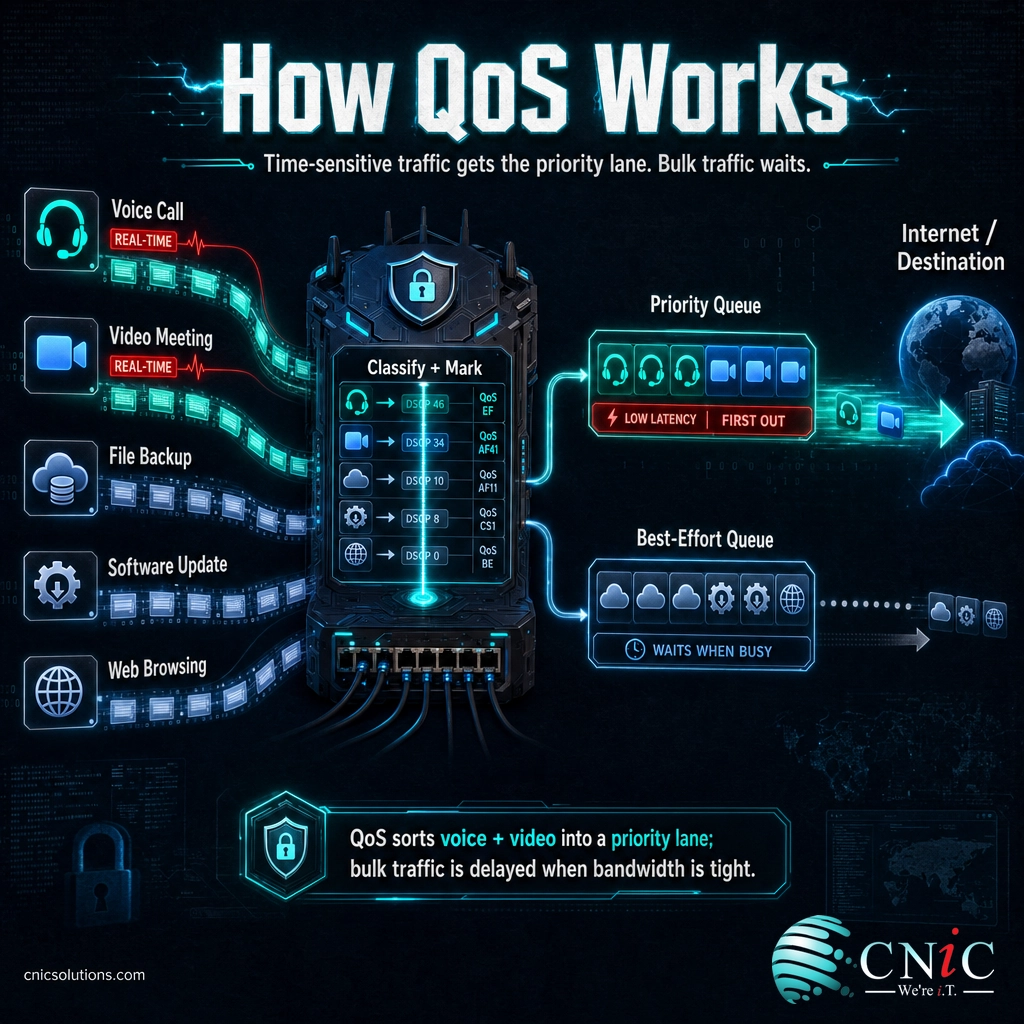
Without QoS, a network treats every packet the same way. This is called best-effort delivery: traffic is handled first-come, first-served, and when the link fills up, whatever arrives when the queue is full gets dropped. That is fine for email or a file transfer, which can quietly resend a lost packet a moment later. It is a problem for a phone call, where a dropped or delayed packet turns into a gap, a robotic voice, or an echo that everyone on the call hears immediately.
QoS changes that by sorting traffic and giving each type the treatment it needs. The process runs in a few clear stages:
- Classification. The network identifies what each packet is, for example a VoIP call, a video stream, a web page, or a backup, based on the application, port, protocol, or source.
- Marking. Each packet is tagged with a priority label so every device along the path knows how to treat it. At Layer 3 this uses DSCP in the IP header; at Layer 2 it uses Class of Service (CoS) inside the Ethernet frame.
- Queuing. Marked packets are placed into separate queues by priority. High-priority voice traffic gets its own queue that is serviced first, while bulk traffic waits in a best-effort queue.
- Congestion management. When a link is busy, the device decides which queue to drain next. Priority queues are emptied ahead of lower ones, so real-time traffic keeps moving.
- Shaping and policing. Traffic shaping smooths bursts by buffering and releasing traffic at a steady rate, and policing caps how much a given class may use, so no single application can starve the rest.
The marking stage is the one worth understanding, because it is what lets priority follow a packet across every switch and router on the way. The most common markings are DSCP at the IP layer and CoS at the Ethernet layer. Voice traffic, for example, is typically marked with the Expedited Forwarding value so it is recognized and prioritized consistently from the phone to the far end of the call.
Source: IETF RFC 2474 (Differentiated Services Field) | Fortinet on QoS marking and queuing
QoS vs. Bandwidth: Why a Bigger Pipe Isn’t Enough
The single most common misunderstanding about call quality is the belief that buying more bandwidth will fix it. It usually will not, and understanding why makes everything else about QoS click into place.
Bandwidth is capacity: how much traffic your connection can carry at once. QoS is priority: which traffic goes first when that capacity runs short. They answer different questions. A faster connection has more room, but the moment something fills it (a cloud sync, a large upload, a dozen simultaneous downloads) every packet is back to waiting in the same line. Without QoS, the live phone call waits behind the backup just as it did on a slower link. You did not remove the traffic jam; you built a wider road that still jams at rush hour. QoS is what reserves a lane for the traffic that cannot wait, at any link speed.
| Factor | Bandwidth | QoS |
|---|---|---|
| What it is | Total capacity of the connection | Rules for which traffic gets priority |
| Problem it solves | Not enough room for everything at once | The wrong traffic going first when the link is full |
| Analogy | Number of lanes on the road | The dedicated lane for emergency vehicles |
| Helps voice quality? | Only until the link saturates | Yes, especially during congestion |
| When you need it | Growing overall usage | Real-time voice and video on a shared link |
Common myth: “We just upgraded our internet, so our call quality problems are solved.” A larger connection helps only until it fills up, and shared business links fill up constantly with backups, updates, cloud sync, and video. The instant the link saturates, unprioritized voice packets queue and drop right alongside everything else, and the calls break up again. Bandwidth and QoS are complementary, not interchangeable. You provision enough capacity, then use QoS to make sure the capacity is spent on the traffic that matters most when demand spikes.
The Four Metrics QoS Manages
QoS exists to keep four network measurements inside the range that real-time applications can tolerate. Data traffic barely notices when these slip. Voice and video notice instantly.
1. Bandwidth
Bandwidth is the capacity of the link, usually measured in megabits per second. QoS does not create bandwidth, but it allocates it, guaranteeing a minimum share to priority traffic and capping lower-priority classes so they cannot consume everything. Modern voice codecs are efficient: Microsoft lists a recommended bandwidth of roughly 58 kilobits per second for a Teams audio call, a tiny slice of a business connection, which is exactly why protecting that slice with priority matters more than sheer volume.
2. Latency
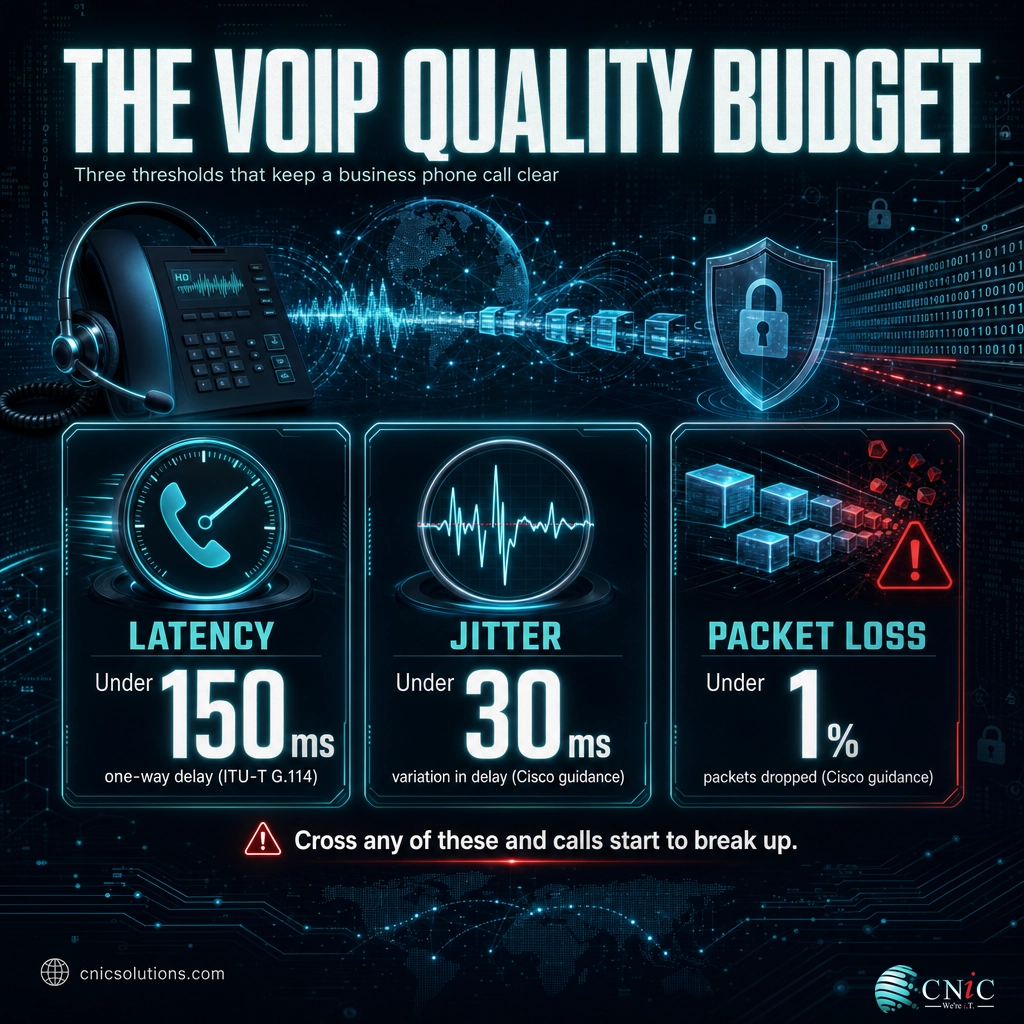
Latency is the delay between a packet leaving its source and arriving at its destination. For a live conversation, too much latency causes the awkward talk-over effect where both people pause and then speak at once. The long-standing benchmark comes from ITU-T Recommendation G.114 on one-way transmission time, which sets 150 milliseconds one-way as the target for good voice quality. Beyond that, conversations begin to feel unnatural.
3. Jitter
Jitter is the variation in latency, the difference in arrival time between one packet and the next. Voice packets are meant to arrive in an even stream; when they arrive unevenly, the receiving device has to buffer or discard them, producing choppy or garbled audio. A common engineering target is to keep jitter under about 30 milliseconds for clean voice, per Cisco’s QoS design guidance.
4. Packet loss
Packet loss is the percentage of packets that never arrive, usually because a congested device dropped them. A file transfer simply resends a lost packet, but a real-time call cannot wait for a resend, so a lost voice packet is a permanent gap in the audio. Cisco’s voice QoS guidance targets keeping packet loss under roughly 1 percent for acceptable call quality.
Source: ITU-T Recommendation G.114 | Cisco Enterprise QoS Design Guide | Microsoft Teams network requirements
Types of QoS: DiffServ, IntServ, and Marking
QoS is not a single switch you flip on. It is a family of techniques, and a few standard names come up whenever you or your IT provider configure it. Knowing them helps you follow any design conversation.
At the highest level, there are two models for delivering QoS across a network.
| Model | How it works | Best suited to |
|---|---|---|
| DiffServ (Differentiated Services) | Marks each packet with a DSCP value and sorts traffic into a handful of priority classes that each device handles independently. | Almost every business network. Simple and highly scalable. |
| IntServ (Integrated Services) | Reserves a guaranteed path for a specific flow end to end using the RSVP protocol before traffic is sent. | Narrow cases needing strict guarantees. Scales poorly on large networks. |
In practice, DiffServ is what nearly all businesses use, because it does not require every device to track every individual conversation. It simply reads the marking on each packet and applies the matching policy. That marking happens at two layers, and both are worth recognizing:
- DSCP (Layer 3). The Differentiated Services Code Point is a 6-bit field in the IP header, defined by RFC 2474, offering 64 possible values. It is the primary way traffic is prioritized across routers and the wider network.
- Class of Service, or CoS (Layer 2). A 3-bit priority field inside the Ethernet frame (part of the 802.1Q tag), giving 8 priority levels. It is used to prioritize traffic as it moves between switches on the local network.
Underneath the models sit the mechanisms that actually enforce priority: classification and marking to identify and label traffic, queuing to separate it, congestion management to decide what drains first, and traffic shaping and policing to smooth bursts and cap greedy applications. A well-designed QoS policy combines these so that a voice call is classified, marked as high priority, placed in a priority queue, and protected from being crowded out, at every hop from the desk phone to the internet.
One point of confusion is worth clearing up here. QoS is not the same as QoE (Quality of Experience). QoS is the set of technical controls on the network; QoE is how the call or meeting actually feels to the person on it. Good QoS is how you deliver good QoE, but they are measured differently, one in milliseconds and percentages, the other in whether the customer could hear you clearly.
Source: TechTarget on DiffServ and IntServ | Fortinet on QoS mechanisms and RSVP

Why QoS Matters for Your Business
It is tempting to file QoS under “network plumbing the IT team handles.” But the reason it matters is not technical, it is about the conversations your business runs on. Almost every company now depends on real-time traffic that shares a connection with everything else: hosted phone systems, video meetings, screen sharing, and cloud applications all compete with backups, updates, and downloads on the same link.
That shared connection is where quality is won or lost. When bandwidth tightens, Microsoft notes that Teams deliberately protects audio quality ahead of video, which is the same logic QoS applies across your whole network: keep the most conversation-critical traffic moving even when the link is under strain. A hosted phone system or a dedicated voice segment on your network only delivers reliable call quality if the underlying network prioritizes that traffic. QoS is the mechanism that makes the promise of clear calls actually hold up on a busy Tuesday.
The stakes are commercial. A dropped or garbled customer call is a lost impression at best and a lost sale at worst. A sales demo that stutters, a support line that echoes, a leadership meeting where half the room cuts out, each one quietly erodes trust and productivity. For any business that runs on cloud phone and unified communications, QoS is not an optional refinement. It is the difference between a phone system that works and one that works only when nobody else is using the internet.
This is also why QoS pairs so naturally with the rest of a well-run network. Prioritization only works if the network underneath is designed for it, which is why voice quality, network segmentation, and the design and management of the switches and routers that carry your traffic are really one connected problem.
Source: Microsoft Teams network requirements | ITU-T G.114 one-way transmission time
How to Get Started with QoS
You do not need to prioritize everything at once. A sensible QoS rollout starts with the traffic that hurts most when it breaks (voice and video) and grows from there. The overview looks like this:
- Inventory your real-time traffic. Identify what genuinely cannot tolerate delay: VoIP calls, video meetings, and any interactive cloud application. Everything else is a candidate for lower priority.
- Define your priority classes. Most businesses need only a few: a top class for voice, a high class for video and interactive apps, and a best-effort class for bulk traffic like backups and downloads.
- Mark the traffic consistently. Apply DSCP and CoS markings so the priority is recognized end to end, from the phone or app through every switch and router to the internet edge.
- Configure queuing and policing on your equipment. Set your switches, routers, and firewall to honor those markings, give voice its own priority queue, and cap bulk traffic so it cannot starve the rest.
- Extend QoS across the whole path. Prioritization has to be honored on every segment, including Wi-Fi. A policy that stops at one device leaves a gap where quality can still collapse.
- Test and monitor. Verify that calls hold up under load, then keep watching latency, jitter, and loss so the policy stays tuned as usage grows.
This is the point where many businesses bring in help, because QoS only works when it is applied consistently across every device in the path, and a single misconfigured switch or an internet provider that ignores your markings can quietly undo the whole effort. A well-designed policy is worth doing carefully once rather than guessing at. If you would rather have your voice and network traffic prioritized correctly from the start, our team designs and manages business phone systems built for reliable call quality.
Frequently Asked Questions
What is QoS in simple terms?
What is the difference between QoS and bandwidth?
What are the main QoS metrics?
What is DSCP in QoS?
Does my small business need QoS?
Related Networking Terms
- DSCP (Differentiated Services Code Point): The 6-bit IP-header marking, defined in RFC 2474, that QoS uses to label each packet’s priority across the network.
- Class of Service (CoS): The 3-bit Layer 2 priority field inside the Ethernet 802.1Q tag, used to prioritize traffic as it moves between switches.
- Latency: The delay between a packet leaving its source and reaching its destination, the metric voice traffic is most sensitive to.
- Jitter: The variation in latency from one packet to the next; high jitter is what makes a call sound choppy or garbled.
- VLAN and the Voice VLAN: A dedicated voice VLAN separates phone traffic from data, and QoS then prioritizes it, the two techniques usually work together.
- LAN vs. WAN: QoS behaves differently on your local network than across the wider connections that link locations and reach the cloud.
- Power over Ethernet (PoE): The single-cable power and data delivery that commonly feeds the VoIP phones QoS is built to protect.
- Auto attendant / IVR: A hosted phone feature whose caller experience depends on the same prioritized voice traffic QoS delivers.
About This Guide
This explainer relies on primary technical standards and authoritative sources rather than secondary write-ups. The DSCP 6-bit field, its 64 codepoints, and the Differentiated Services model reference IETF RFC 2474. The 150-millisecond one-way latency target for voice references ITU-T Recommendation G.114 on one-way transmission time. The commonly used jitter (under 30 ms) and packet loss (under 1 percent) targets for VoIP follow Cisco’s enterprise QoS design guidance. QoS definitions, metrics, and the DiffServ and IntServ (RSVP) models are corroborated by TechTarget and Fortinet. Bandwidth figures and the principle of prioritizing audio over video come from Microsoft’s Teams network requirements. CNiC Solutions is a Houston-based managed IT, networking, and UCaaS provider; this article is educational and not a substitute for a network assessment of your specific environment.
Sources:
IETF RFC 2474 (DiffServ / DSCP) |
ITU-T G.114 One-Way Transmission Time |
Cisco Enterprise QoS Design Guide |
TechTarget: QoS Definition |
Fortinet: QoS Cyberglossary |
Microsoft Teams Network Requirements



related posts
What Is Network Penetration Testing? Types and Process
October 25, 2026Network penetration testing is a controlled, authorized simulation of a real cyberattack on your network, run…
What Is NIST Compliance? Frameworks, Requirements, and Who Needs It
October 25, 2026NIST compliance means aligning your organization's security program with the cybersecurity standards published by the National…
What Is MFA? How Multi-Factor Authentication Protects Your Accounts
October 24, 2026Multi-factor authentication (MFA) is a security method that requires two or more separate proofs of identity…
What Is Mobile Device Management (MDM)? A Guide for Businesses
October 24, 2026Mobile Device Management (MDM) is software that lets an organization remotely enroll, configure, secure, and monitor…