

Conditional Access is an identity-driven security feature, built into Microsoft Entra ID, that brings together signals about each sign-in: who the user is, what device and location they are using, and how risky the attempt looks. It then decides whether to allow access, require multifactor authentication, or block the sign-in outright.
A stolen password used to be the whole game. Once an attacker had it, they were in. Conditional Access changes that math. Instead of trusting anyone who types the right password, it inspects the context of every sign-in and applies a rule before granting access, so a valid password from an unmanaged laptop in another country does not get the same welcome as the same login from a company device at the office. For any business running Microsoft 365, it is one of the highest-impact security controls you already own.
- It is a policy engine, not a single setting. Conditional Access weighs signals (user, device, location, application, and real-time risk) and then enforces a decision on each individual sign-in.
- Every policy is an if-then rule. If a user wants to reach a resource, then they must satisfy a control, such as passing multifactor authentication or using a compliant device.
- It is the enforcement layer for Zero Trust. Microsoft describes Conditional Access as its Zero Trust policy engine, which verifies each request explicitly instead of trusting the network.
- The security payoff is large. A Microsoft-led study found MFA reduces the risk of account compromise by 99.22%, and Conditional Access is how you require MFA intelligently rather than everywhere at once.
- You may already be licensed for it. Conditional Access is included with Microsoft Entra ID P1 and Microsoft 365 Business Premium, so many businesses can turn it on without buying anything new.
What’s in This Guide
How Conditional Access Works
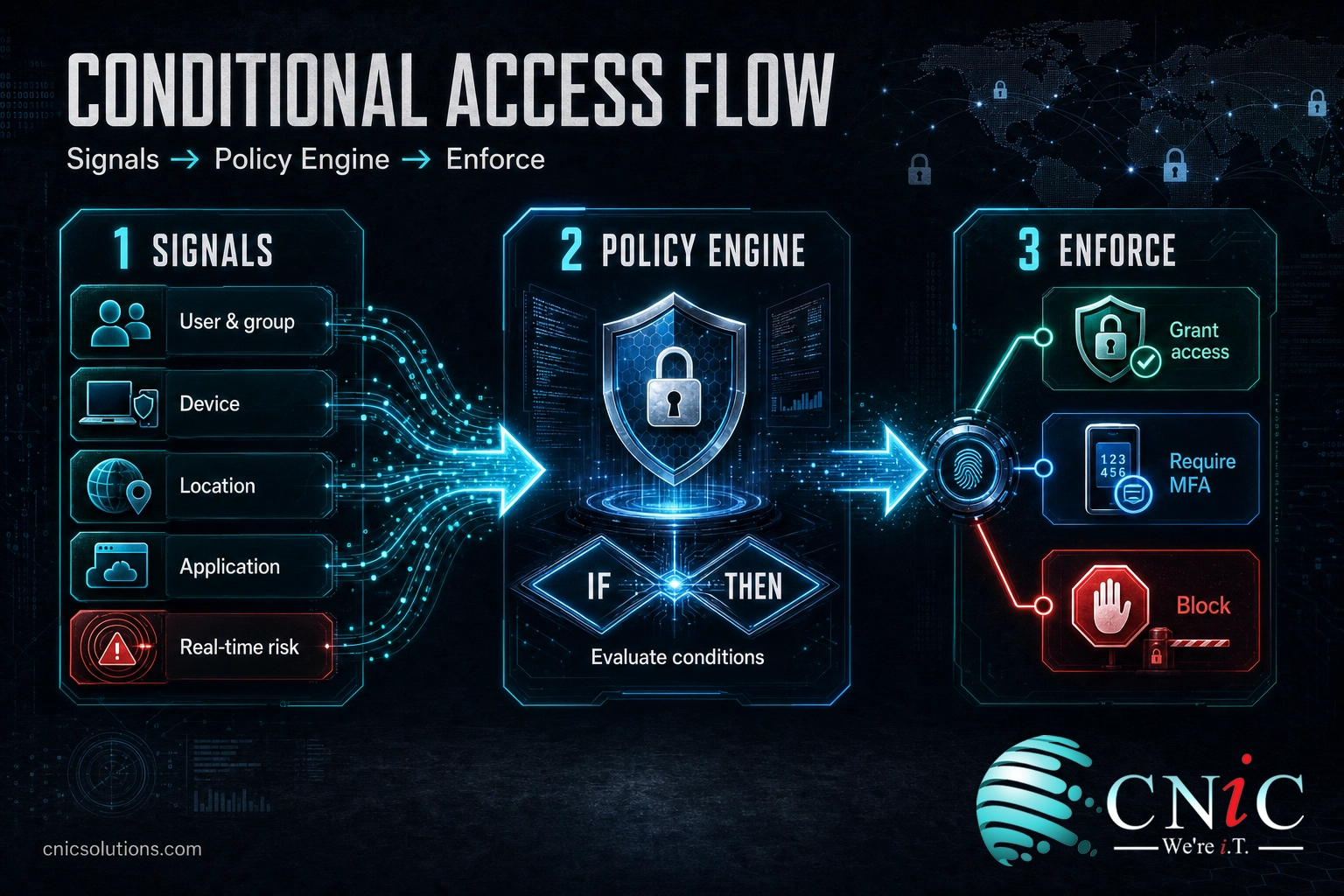
Conditional Access sits between a successful password entry and actually getting into an application. It does not replace your password or passkey. It runs immediately after that first factor and asks a second question: given everything I can see about this sign-in, should I let it through as-is, ask for more proof, or stop it?
Microsoft describes a Conditional Access policy, at its simplest, as an if-then statement. In its own words, “if a user wants to access a resource, then they must complete an action.” A plain example: if a user wants to open Microsoft 365, then they must perform multifactor authentication. The power comes from how specific those conditions can be.
Think of it like airport security that adjusts to the traveler. A known passenger with a trusted-traveler pass, a valid boarding pass, and no red flags walks through quickly. Someone with a last-minute one-way ticket, no checked bag, and a passport from a watchlisted route gets pulled aside for extra screening. The gate is the same. The scrutiny changes based on the signals. Conditional Access does the same thing for every login.
Under the hood, the process runs in three stages:
- Collect signals. The engine gathers context about the attempt: the user or group, the application being accessed, the device and its compliance state, the IP address and country, and real-time risk detections from Microsoft Entra ID Protection.
- Evaluate against policy. Those signals are checked against the if-then rules you have defined. Multiple policies can apply to a single sign-in, and the most restrictive outcome wins.
- Enforce a decision. The engine grants access, grants access only after a control is met (such as MFA, a compliant device, or an approved app), or blocks the sign-in entirely.
One important detail businesses often miss: Conditional Access is enforced after first-factor authentication. It is not a frontline defense against something like a denial-of-service flood. It is the checkpoint that decides what a validated identity is actually allowed to do, which is exactly where stolen-password attacks get stopped.
Source: Microsoft Entra Conditional Access documentation
Conditional Access vs. MFA
This is the single biggest point of confusion, so it is worth settling directly. People use “Conditional Access” and “MFA” as if they mean the same thing. They do not. Multifactor authentication is a control, one of the actions a sign-in can be asked to complete. Conditional Access is the engine that decides when that control, or a different one, should fire.
Put another way: MFA answers “prove it is really you.” Conditional Access answers “under these circumstances, what do I need you to prove, and should I even let you try?” You can turn on MFA without Conditional Access, and you can use Conditional Access to require far more than MFA. They work best together.
| Attribute | Multifactor Authentication (MFA) | Conditional Access |
|---|---|---|
| What it is | A verification control (a second proof of identity) | A policy engine that decides which controls apply |
| What it does | Confirms the user is who they claim to be | Weighs signals, then grants, challenges, or blocks |
| Flexibility | On or off for a user or app | Conditional: reacts to device, location, and risk |
| Example | Enter a code from your authenticator app | Require MFA only when signing in from a new country |
| Relationship | One of the actions Conditional Access can require | The layer that requires MFA at the right moment |
The practical upside of using them together is a better balance of security and productivity. Requiring MFA on every single sign-in all day gets fatiguing and trains users to approve prompts on autopilot. With Conditional Access, you can trust a compliant device on the corporate network and step up to MFA only when something looks unusual, so protection tightens exactly where the risk is. If your team is planning or reviewing a Microsoft 365 rollout, mapping these policies early keeps the switch smooth.
Source: Microsoft Entra Conditional Access documentation
Why Conditional Access Matters for Your Business
Attackers rarely “hack in” through some Hollywood exploit. They log in. According to the Verizon 2024 Data Breach Investigations Report, the human element (people being tricked, making mistakes, or reusing weak passwords) was a component of 68% of breaches, and stolen credentials remained the top way attackers took their first step into a network. A password, by itself, is a single point of failure.
This is exactly the gap Conditional Access closes. Because it evaluates context rather than trusting the password alone, a credential an attacker phished or bought is far less useful to them. When they try to use it from an unrecognized device in an unexpected location, the policy can demand MFA they cannot pass, or block the sign-in before it starts.
The numbers on that second factor are striking. A study conducted by Microsoft researchers, published in 2023, analyzed real-world sign-in data and found that multifactor authentication reduces the risk of account compromise by 99.22% across all accounts, and by 98.56% even when the attacker already has the leaked credentials. Conditional Access is the mechanism that lets you require that MFA intelligently, at the moments that matter, instead of blasting every user with prompts.
Myth: “We turned on MFA, so we are covered.” MFA is powerful, but flat MFA-for-everyone leaves gaps. Legacy authentication protocols can bypass modern MFA entirely, and constant prompts push users toward blind approval, which is what MFA-fatigue attacks exploit. Conditional Access is what closes those gaps: it can block legacy protocols outright, require a compliant device, and reserve step-up prompts for genuinely risky sign-ins. MFA is the lock. Conditional Access decides when to use it.
There is also a governance benefit. Conditional Access gives you provable, centrally managed rules about who can reach what, from where, and under what conditions. That is the kind of access control auditors look for and that frameworks reward. If you are working through a structured review of where your risks actually live, identity policy is almost always near the top of the list.
Source: “How effective is multifactor authentication at deterring cyberattacks?” (Microsoft research) | Verizon 2024 Data Breach Investigations Report

Common Conditional Access Policies
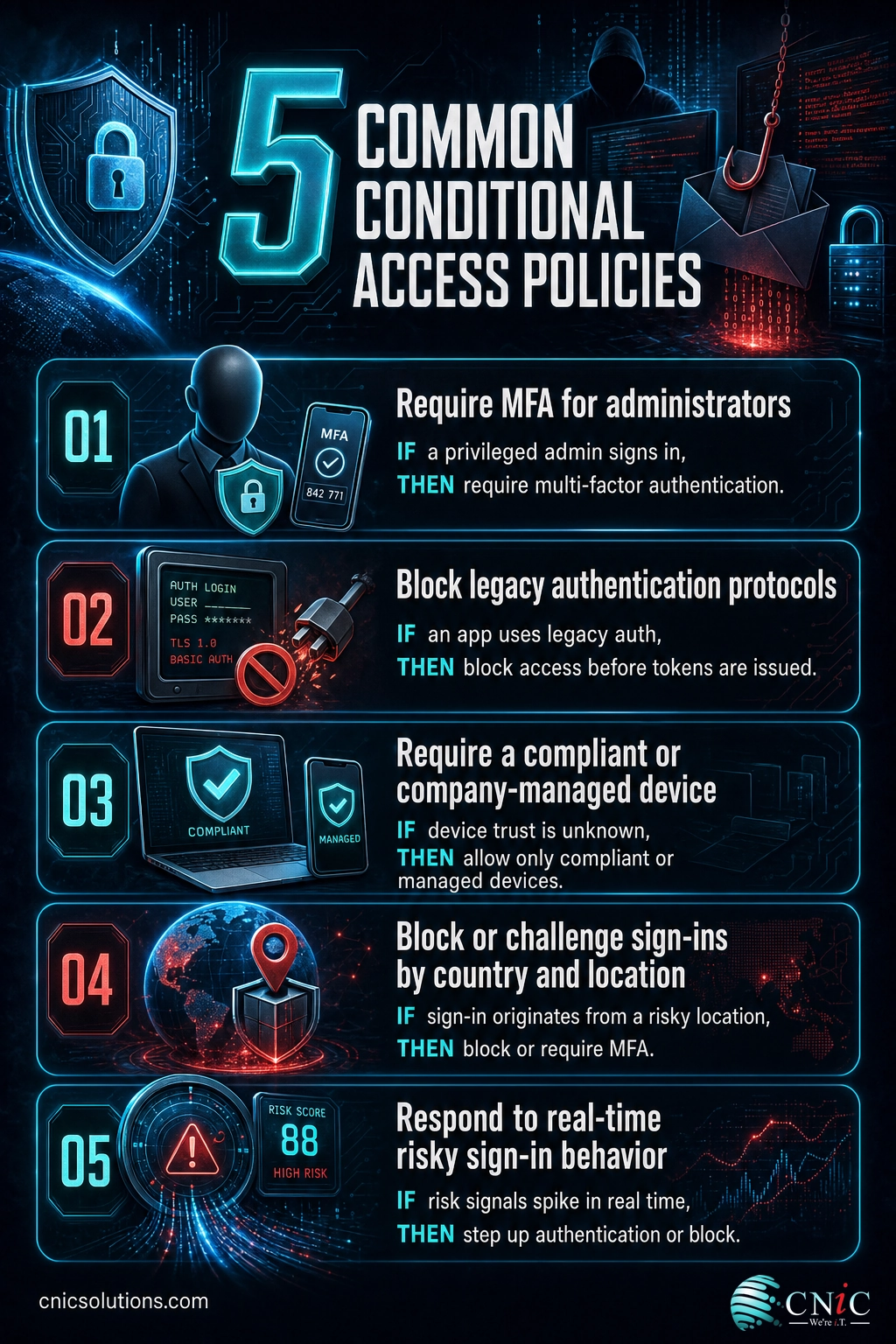
Conditional Access is only as useful as the rules you put in it. The good news is that a small set of well-chosen policies covers most of the real risk for a typical business. These are the ones security teams reach for first.
1Require MFA for administrators
Admin accounts are the crown jewels, so they get the strictest rule: multifactor authentication on every sign-in, no exceptions. A compromised admin account is a full-tenant compromise, which is why this policy is non-negotiable even in small environments.
2Block legacy authentication
Old protocols like POP, IMAP, and basic SMTP cannot enforce modern MFA, so attackers deliberately target them to slip past it. A policy that blocks legacy authentication shuts that side door, and it is one of the highest-value rules you can enable.
3Require a compliant or managed device
For sensitive applications, you can require that the device is company-managed or marked compliant by your mobile device management. This means a valid password from a personal, unpatched laptop still does not get in, because the device itself fails the check.
4Block or challenge by location
You can allow sign-ins only from the countries where your people actually work, and block or step up everything else. If your business operates entirely in Texas, a login attempt from overseas is a signal worth acting on.
5Respond to real-time risk
With Microsoft Entra ID Protection, policies can react to risky sign-in behavior, such as impossible travel or a login from a known malicious address, by forcing MFA or a password change on the spot. This turns detection into automatic enforcement.
Each of these is still an if-then rule under the hood, and they stack. A single sign-in might be evaluated against the admin rule, the device rule, and the location rule at once, with the most restrictive result winning. Getting the mix right (tight enough to matter, loose enough not to lock out legitimate work) is where experience pays off, and it pairs naturally with broader controls like separating your network into isolated zones and around-the-clock threat monitoring.
Source: Microsoft Entra Conditional Access documentation
Harden Your Microsoft 365 Security
How to Get Started with Conditional Access
Rolling out Conditional Access is less about clicking a switch and more about doing it in an order that does not lock out your own people. The feature is powerful enough to block everyone if a policy is written carelessly, so the sequence matters.
A sound rollout usually looks like this:
- Confirm your licensing. Conditional Access requires Microsoft Entra ID P1, which is included in Microsoft 365 Business Premium and the E3 and E5 plans. Risk-based policies need Entra ID P2. Many businesses already own this and simply have not turned it on.
- Protect the admins first. Start with MFA for all administrator roles and block legacy authentication. These two rules deliver the most protection for the least disruption.
- Use report-only mode. Every new policy can run in report-only mode, which logs what would have happened without actually enforcing it. This is how you catch a policy that would have locked out a whole department before it does.
- Roll out in waves. Apply a validated policy to a pilot group, watch the sign-in logs, then expand. Keep a break-glass emergency account excluded so you can never lock yourself out entirely.
- Review and tune. Sign-in patterns change as people travel, add devices, and adopt new apps. Conditional Access is not set-and-forget; it needs periodic review to stay both safe and usable.
None of this requires a giant security team, but it does reward a steady hand and someone who watches the logs. For many small and midsize businesses, the practical answer is to have a managed IT and security partner design, test, and maintain these policies as part of ongoing managed security services, so the rules stay current without pulling your staff off their day jobs. If identity strategy is a recurring gap, a virtual CIO can own the roadmap and keep it aligned with how your business actually works.
Source: Microsoft Entra Conditional Access documentation
Common Questions About Conditional Access
What is Conditional Access?
Is Conditional Access the same as MFA?
What license do I need for Conditional Access?
Does Conditional Access replace passwords?
What is an example of a Conditional Access policy?
Related Terms
- Multifactor authentication (MFA): a verification control that requires a second proof of identity beyond the password. It is one of the main actions Conditional Access can require at sign-in.
- Zero Trust: the security model that grants no implicit trust based on network location and verifies every request explicitly. Conditional Access is Microsoft’s enforcement engine for these principles.
- Microsoft Entra ID: Microsoft’s cloud identity and access management service (formerly Azure Active Directory) where Conditional Access policies are created and enforced.
- Single sign-on (SSO): letting users authenticate once to reach many applications. Conditional Access governs the conditions under which that single sign-on is granted.
- Phishing-resistant MFA: stronger authentication methods like passkeys and FIDO2 security keys that cannot be intercepted by fake login pages, which Conditional Access can require for sensitive roles.
- Social engineering: manipulating people into handing over credentials or access. Learn to spot the tactics attackers use, since these attacks are what Conditional Access is designed to blunt.
- Phishing: fraudulent messages that steal credentials, the most common source of the stolen passwords Conditional Access defends against. See the warning signs of a phishing email.
- Attack surface management: the practice of finding and reducing every exposed way into your systems, including the identity and access points Conditional Access protects.
About This Guide
The definition, signals, decisions, and licensing details for Conditional Access are drawn directly from Microsoft’s official Entra Conditional Access documentation. The multifactor authentication effectiveness figures (a 99.22% reduction in compromise risk overall and 98.56% for accounts with leaked credentials) come from a peer study conducted by Microsoft researchers and published in 2023. Breach-cause statistics are from the Verizon 2024 Data Breach Investigations Report. The Zero Trust framing follows NIST Special Publication 800-207. Figures are cited to their original sources and used to explain how identity policy protects accounts, not as a guarantee of any specific outcome.
Sources: Microsoft Entra Conditional Access documentation | Microsoft research, MFA effectiveness (2023) | Verizon 2024 DBIR | NIST SP 800-207, Zero Trust Architecture
Get a Free Security Audit From CNiC Solutions
Explore Managed IT Services



related posts
What Is Endpoint Security? How It Protects Your Business Devices
October 19, 2026Endpoint security is the practice of protecting the devices that connect to your network, such as…
What Is FinOps? A Guide to Managing and Optimizing Cloud Costs
October 19, 2026FinOps is an operational framework and cultural practice for managing and optimizing cloud costs by bringing…
What Is Encryption in Cybersecurity?
October 18, 2026Encryption in cybersecurity is the process of scrambling readable data into an unreadable code that only…
What Is DNS? How the Internet’s Address Book Works
October 18, 2026DNS (Domain Name System) is the internet's address book. It translates the human-friendly domain names you…