

Yes: almost every business that offers Wi-Fi to customers, clients, or visitors needs a separate guest network, and running everything on one network is one of the most common and most preventable security gaps we find. A guest network keeps the phones, laptops, and smart devices your visitors carry through the door on their own isolated lane, away from your point-of-sale system, file server, cameras, and staff computers. Set up correctly, it costs nothing extra and closes a door that malware, compromised devices, and casual snooping walk through every day.
- You give customers and vendors the same Wi-Fi password your staff uses.
- You could not say how many devices are on your network right now.
- Your POS terminal, cameras, or file server share the same Wi-Fi as the waiting room.
- Your “guest” Wi-Fi is really just your main network with a friendlier name.
- A guest network is not a courtesy feature. It is a security control that isolates untrusted devices from the systems your business runs on.
- Every visitor device is unmanaged and unpatched by you. On a flat network, one infected phone can reach everything else.
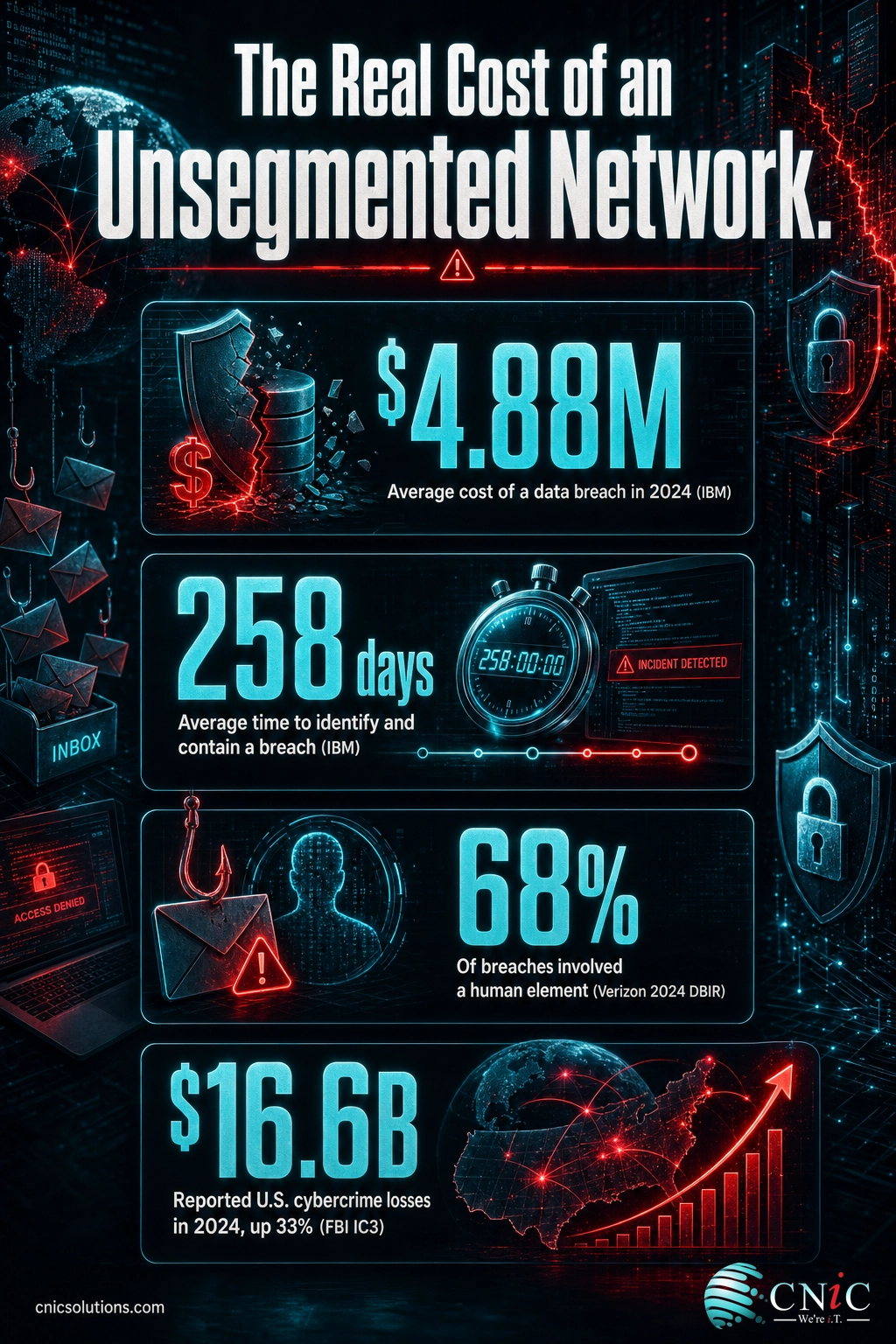
- The average data breach now costs $4.88 million and takes 258 days to identify and contain, according to IBM’s 2024 report.
- Segmentation is cheap. Most business routers already support a guest network or VLAN, so the fix is usually configuration, not new hardware.
- If you handle payment cards or regulated data, an isolated guest network helps keep visitor traffic out of scope for PCI DSS and similar rules.
What’s in This Guide
- What a Separate Guest Network Actually Is
- Sign #1: You Hand Everyone the Same Wi-Fi Password
- Sign #2: You Don’t Know What’s Connected Right Now
- Sign #3: Visitors Plug Personal Devices Into Your Network
- Sign #4: Your POS, Cameras, and Servers Share the Lobby Wi-Fi
- Sign #5: Your “Guest” Wi-Fi Is Just Your Main Network Renamed
- Sign #6: You Never Change the Password When Someone Leaves
- What Happens If You Ignore These Signs
- How to Set Up a Real Guest Network
- What to Do Next
- Frequently Asked Questions
- Sources
What a Separate Guest Network Actually Is
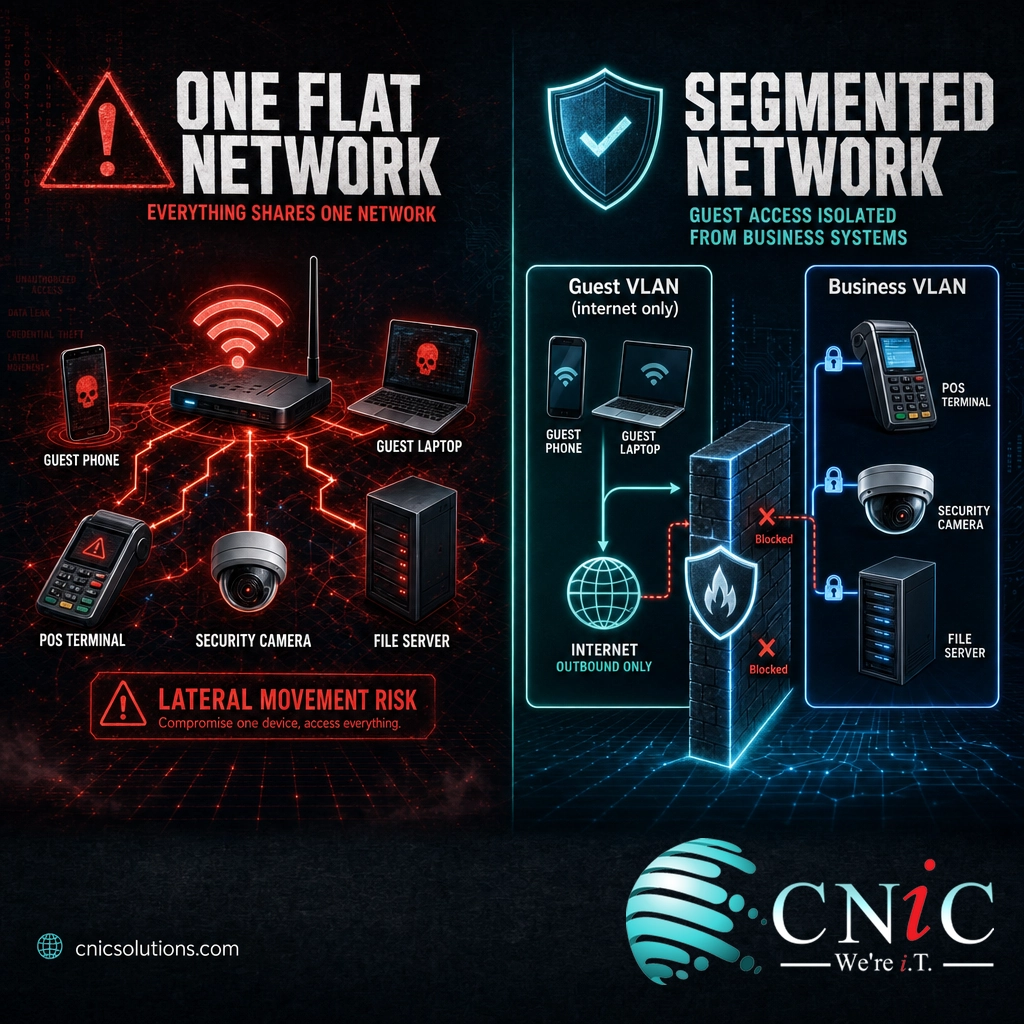
A guest network is a second wireless network that runs on the same equipment as your main one but keeps its traffic in a separate lane. Visitors connect, get internet, and go about their day, but their devices cannot see or reach the computers, servers, and hardware your business depends on. The isolation is the entire value. Without it, “guest Wi-Fi” is just extra people on the network that also holds your invoices, client files, and card readers.
The mechanism behind a good guest network is usually a VLAN, a way of splitting one physical network into logically separate ones. If you want the underlying concept in plain terms, see our explainer on how VLANs keep traffic in separate lanes. The guest network is the door visitors walk through; the VLAN is the wall that keeps their side of the building sealed off from yours.
A different network name (SSID) is not the same as isolation. Plenty of routers, especially consumer models, broadcast a second name while still placing those devices on the same underlying network as everything else. If a device on your guest Wi-Fi can ping your printer or reach a shared folder, you do not have a separate network. You have one network with two doors.
Sign #1: You Hand Everyone the Same Wi-Fi Password
The receptionist reads the same password to a delivery driver, a job candidate, a vendor rep, and the customer waiting for a quote. It is written on a whiteboard or printed on a card at the front desk. Everyone who has ever asked knows it, and it never changes.
Why it matters: That single password is the key to the same network your business systems live on. It has been shared with dozens or hundreds of people you do not control, on devices you have never seen. Any one of them, or any piece of malware riding along on their phone, is now inside your network perimeter rather than outside it.
What it usually indicates: There is no boundary between “people we trust” and “people we are just giving internet to.” Everyone lands in the same place.
What to do about it: Move every non-employee onto a dedicated guest network with its own password, and rotate that password on a schedule (or use a captive portal that does not expose your real credentials at all). Keep the network your staff and systems use on a name you never read aloud.
Source: IBM Cost of a Data Breach Report 2024
Sign #2: You Don’t Know What’s Connected Right Now
If someone asked you how many devices are on your network at this moment, you would have to guess. Phones, laptops, tablets, a smart TV in the conference room, a thermostat, a couple of printers, and an unknown number of visitor devices are all sharing the same space, and no one is keeping a list.
Why it matters: You cannot protect what you cannot see. When guest and business devices share one flat network, a compromised or rogue device can sit quietly and probe for weaknesses without ever tripping an alarm. The longer it goes unnoticed, the more damage it can do.
What it usually indicates: No segmentation and no monitoring. The network has grown organically, and visibility never kept up.
What to do about it: Separating guest traffic instantly shrinks the problem: everything on the guest side is, by definition, untrusted and isolated, so you only have to watch the business side closely. From there, a managed network with device visibility tells you exactly what is connected and flags anything new.
Source: IBM Cost of a Data Breach Report 2024
Sign #3: Visitors Plug Personal Devices Into Your Network
Clients pull out laptops during meetings. Contractors connect tablets to pull up plans. A vendor asks for the Wi-Fi to run a demo. Each of those devices is managed by someone else, patched (or not) on someone else’s schedule, and carrying whatever it picked up on every other network it has touched.
Why it matters: An unpatched personal device is one of the easiest ways for an attack to get a foothold. Attackers have leaned hard into exploiting known software weaknesses, and a visitor’s out-of-date laptop is exactly the kind of soft target that gives malware a place to land inside your walls.
What it usually indicates: Your network trusts devices based on who is holding them rather than what they are. That trust does not survive contact with a real threat.
What to do about it: Assume every visitor device is compromised and route it accordingly. A guest network treats unknown devices as untrusted by default, so an infected laptop reaches the internet and nothing else.
Source: Verizon 2024 Data Breach Investigations Report

Sign #4: Your POS, Cameras, and Servers Share the Lobby Wi-Fi
The same wireless network that visitors use in the waiting room also carries your point-of-sale terminal, your security cameras, and the server holding client records. There is no wall between the coffee-shop laptop by the window and the machine that processes payments.
Why it matters: These are the systems an attacker actually wants. Payment data, camera feeds, and file servers are the payoff, and putting them on the same network as anonymous guests hands out a direct route. If your business takes cards, this arrangement also runs headlong into PCI DSS, which expects public and guest wireless to be kept away from the systems that touch cardholder data.
What it usually indicates: Critical systems were connected to whatever Wi-Fi was already there, with no segmentation between “sensitive” and “everyone.”
What to do about it: Put sensitive systems on their own isolated segment, separate from both staff and guests, and keep the guest network furthest from anything that matters. This is standard network segmentation, and it is the single highest-value change most small businesses can make to their Wi-Fi.
Source: IBM Cost of a Data Breach Report 2024
Segment and Manage Your Network Infrastructure
Sign #5: Your “Guest” Wi-Fi Is Just Your Main Network Renamed
You did set up a guest network, or you think you did. It has its own name and maybe its own password. But behind the scenes, devices on it can still reach your printers, shared drives, and other computers. The name is different; the network is the same.
Why it matters: This is more dangerous than having no guest network at all, because it creates false confidence. You believe visitors are walled off, so you stop worrying about it, while in reality every guest device still has a path to your business systems.
What it usually indicates: The router is broadcasting a second SSID without client isolation or a dedicated VLAN behind it. Consumer and prosumer gear frequently does exactly this.
What to do about it: Verify isolation, do not assume it. Connect a device to your guest network and try to reach a printer or a shared folder. If it works, the network is not truly separate, and you need client isolation and a guest VLAN configured properly. A good starting point is our guide to setting up a small-business network the right way from the start.
Source: Verizon 2024 Data Breach Investigations Report
Sign #6: You Never Change the Password When Someone Leaves
An employee moves on. A contractor finishes a project. A seasonal hire wraps up. Their access badge gets collected, but the Wi-Fi password they memorized on day one is still the Wi-Fi password today, and it is still the same password that reaches your business systems.
Why it matters: Shared, static credentials are the quietest way into a network. A former insider (or anyone they shared the password with) keeps a working key long after they should. Stolen and reused credentials are consistently one of the top ways attackers get in.
What it usually indicates: Wi-Fi is treated as a single shared secret rather than managed access, and there is no separation between the network guests use and the one that matters.
What to do about it: Keep visitors on a guest network whose password you can rotate freely without disrupting operations, and protect the business network with credentials tied to individuals, not a shared phrase on a sticky note. When someone leaves, the guest password is easy to change and their business access is revoked with their account.
Source: IBM Cost of a Data Breach Report 2024
What Happens If You Ignore These Signs
A flat network is not a problem until it is a very expensive one. The cost of cybercrime keeps climbing, and small and midsize businesses are squarely in the blast radius because they are seen as easier targets with the same valuable data. The three numbers below are what “we never got around to separating the networks” can turn into.
None of these attacks require your network to be flat. But a flat network makes every one of them worse, because a single foothold becomes access to everything instead of access to a sealed-off guest lane.
Sources: FBI IC3 2024 Internet Crime Report | Verizon 2024 Data Breach Investigations Report
How to Set Up a Real Guest Network
The good news is that fixing this is mostly configuration, not a big purchase. Here is the short version of what a properly isolated guest network takes.
- Enable a true guest network with client isolation. On business-grade equipment, turn on the guest network feature and confirm client isolation is on, so guest devices cannot even see each other, let alone your systems.
- Back it with a dedicated VLAN. A guest VLAN is what actually keeps guest traffic in its own segment. If your gear cannot do VLANs, that is the signal to upgrade the hardware.
- Put sensitive systems on their own segment. Your POS, cameras, and servers belong on an isolated segment separate from both staff and guests, not on whatever network was closest.
- Give the guest network internet only. Block guest access to internal resources entirely, and consider bandwidth limits so a busy lobby does not slow down operations.
- Verify, then monitor. Test isolation by trying to reach an internal device from the guest side, and keep an eye on what connects over time.
Isolating untrusted wireless devices from internal systems is not a niche idea; it is a core recommendation in NIST’s guidelines for securing wireless networks. The details of doing it cleanly across your access points, switches, and firewall are where a managed provider earns its keep.
Source: NIST SP 800-153, Guidelines for Securing Wireless Local Area Networks
What to Do Next
If more than a couple of the signs above described your business, the fix is faster and cheaper than the breach it prevents. Start by finding out what is actually on your network and whether your guest Wi-Fi is truly isolated. A free security audit will tell you exactly where you stand, and what it would take to segment your network properly.
Frequently Asked Questions
What is a guest Wi-Fi network, and how is it different from my main network?
Does a separate guest network actually improve security, or is it just convenient?
Can I set up a guest network on my existing router, or do I need new equipment?
Is a guest network the same as a VLAN?
Does offering guest Wi-Fi create legal or compliance risk for my business?
Sources
- IBM, Cost of a Data Breach Report 2024: global average breach cost of $4.88M, 258-day average breach lifecycle, and stolen or compromised credentials as the top initial attack vector (16%).
- Verizon, 2024 Data Breach Investigations Report: human element in 68% of breaches, a 180% year-over-year rise in vulnerability exploitation as an initial access path, and third-party involvement in 15% of breaches.
- FBI Internet Crime Complaint Center (IC3), 2024 Internet Crime Report: $16.6B in reported losses (up 33% over 2023) across 859,532 complaints.
- NIST SP 800-153, Guidelines for Securing Wireless Local Area Networks (WLANs): isolation and segmentation of wireless access from internal networks.
Statistics reflect the most recent full-year figures available at the time of writing. Analysis combining IBM’s average breach cost and containment time is original to CNiC Solutions.



related posts
What Is Network Penetration Testing? Types and Process
October 25, 2026Network penetration testing is a controlled, authorized simulation of a real cyberattack on your network, run…
What Is NIST Compliance? Frameworks, Requirements, and Who Needs It
October 25, 2026NIST compliance means aligning your organization's security program with the cybersecurity standards published by the National…
What Is MFA? How Multi-Factor Authentication Protects Your Accounts
October 24, 2026Multi-factor authentication (MFA) is a security method that requires two or more separate proofs of identity…
What Is Mobile Device Management (MDM)? A Guide for Businesses
October 24, 2026Mobile Device Management (MDM) is software that lets an organization remotely enroll, configure, secure, and monitor…