
Phishing is a cyberattack in which criminals pose as a trusted person or organization to trick you into revealing sensitive information, clicking a malicious link, or approving a fraudulent payment. It arrives by email, text, phone, social media, and QR code, and it is the most-reported cybercrime in the United States.
Phishing is no longer one thing. What started as clumsy “Nigerian prince” emails has split into a whole family of attacks, each tuned to a different channel and a different weakness in how people work. A finance clerk who would never click a suspicious link might still wire money after a convincing phone call. An executive who ignores spam might open a text that looks like it came from the CEO. This guide breaks down the main types of phishing attacks every business should know, how each one works, and the layered defense that stops all of them.
Key Takeaways
- Phishing is the most-reported cybercrime. The FBI’s Internet Crime Complaint Center logged 193,407 phishing and spoofing complaints in 2024, more than any other crime type.
- There is no single “phishing.” The major types span email, spear phishing, whaling, clone phishing, smishing, vishing, angler phishing, and QR-code quishing.
- The channel is shifting. Voice phishing (vishing) rose 442 percent between the first and second half of 2024 as attackers moved to phone-based social engineering.
- Speed is the point. The median time to click a phishing link is 21 seconds, so awareness alone cannot be the only line of defense.
- Defense is layered, not a single tool: multi-factor authentication, email authentication, filtering, monitoring, and ongoing training working together.
What’s in This Guide
How Phishing Works
Every type of phishing is a form of social engineering: it manipulates a person into acting against their own interest by exploiting trust, urgency, or fear rather than breaking through technical defenses. The attacker does not need to defeat your firewall if they can convince an employee to open the door for them.
Underneath the different channels, the pattern is almost always the same:
- Impersonate. The attacker poses as someone the target already trusts: a bank, a vendor, a coworker, an IT help desk, or the CEO.
- Create pressure. A pretext gives the target a reason to act fast: a locked account, an overdue invoice, a shipping problem, or a request from the boss.
- Deliver the hook. A link, an attachment, a phone number, or a QR code routes the target toward a fake login page, a malicious file, or a live scammer.
- Harvest and exploit. Stolen credentials, payment approvals, or malware become the launch point for the next stage, often account takeover or wire fraud.
What changes from one type to the next is only the delivery channel and how targeted the message is. That is why understanding the categories matters: the defense for a bulk email is not the same as the defense for a spoofed phone call, and a business needs to cover every channel at once.
How Fast a Phishing Click Becomes a Breach (Verizon 2024 DBIR)
Users who fall for a phishing email typically click in about 21 seconds and hand over data within roughly a minute. Source: Verizon 2024 Data Breach Investigations Report.
Source: NIST Computer Security Resource Center: Phishing | CISA: Recognize and Report Phishing
Phishing vs. Spam vs. Spear Phishing
Before the types, it helps to clear up the three words people mix up most. Spam is unwanted bulk email that is usually just annoying. Phishing is spam with a malicious goal. Spear phishing is phishing aimed at one specific target.
| Aspect | Spam | Phishing | Spear Phishing |
|---|---|---|---|
| Goal | Advertise or annoy | Steal data, money, or access | Steal from a specific person or company |
| Audience | Sent in bulk | Sent in bulk | Sent to one researched target |
| Personalization | Generic | Generic | Highly tailored to the victim |
| Danger level | Low | High | Very high |
The practical takeaway: not all spam is phishing, but the most dangerous messages are the personalized ones. The more a message seems to know about you, your role, and your vendors, the more skeptical you should be, not less.
Source: NIST Computer Security Resource Center: Phishing

The Main Types of Phishing Attacks
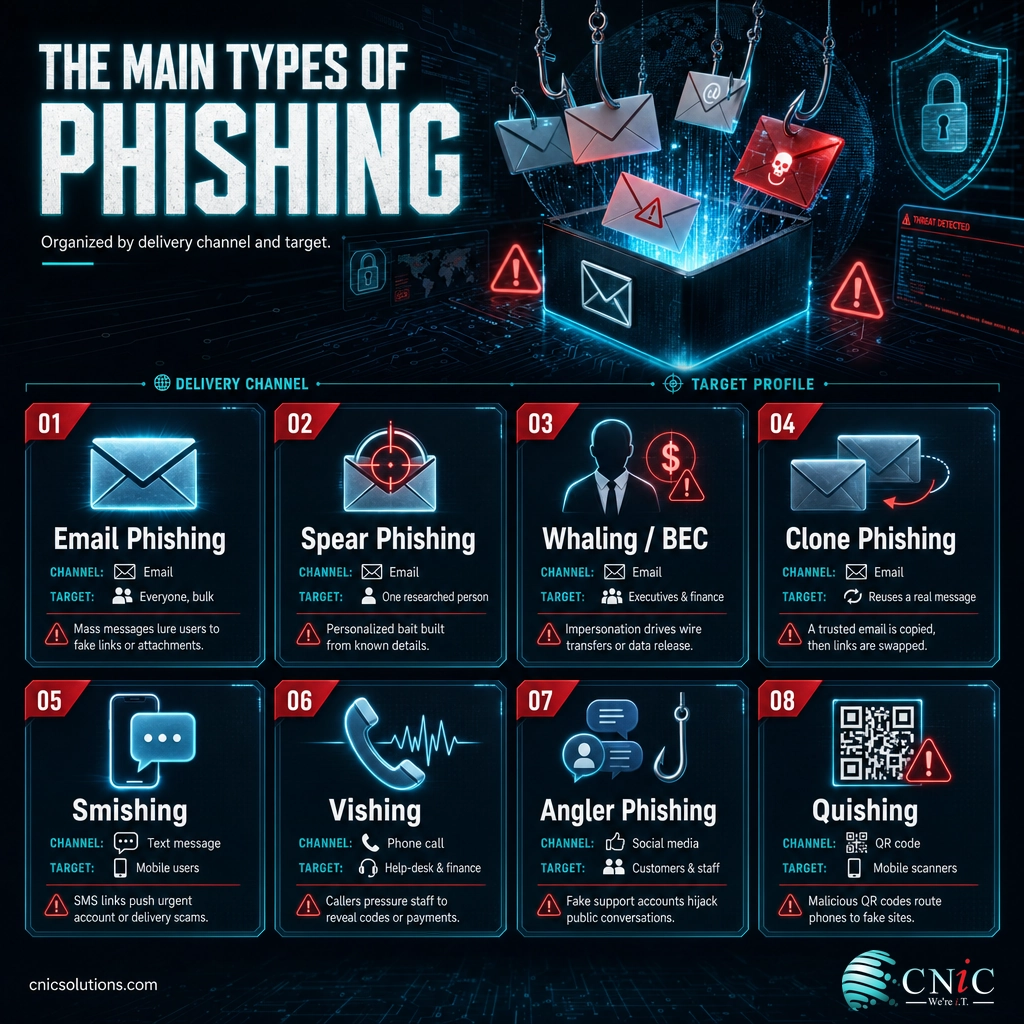
Phishing is best understood as a family of related attacks. Some are cast wide across thousands of inboxes; others are sniper shots aimed at one executive. Here are the types every business should be able to recognize.
1. Email Phishing (Bulk / Deceptive Phishing)
This is the classic and most common form. The attacker sends the same generic message to thousands of recipients, impersonating a well-known brand such as a bank, a delivery service, or Microsoft 365, and hopes a small percentage click. The message points to a fake login page that captures whatever you type. Volume is the strategy: even a fraction of a percent click rate is profitable at scale. Learning to read the warning signs of a phishing email is the single highest-value habit for most staff.
2. Spear Phishing
Spear phishing narrows the aim to one person or company. The attacker researches the target using LinkedIn, the company website, and past data breaches, then writes a message that references real projects, coworkers, or vendors. Because it is specific and personal, it slips past the instincts that catch bulk email. Spear phishing is the technique behind most serious business breaches, and it is the foundation for whaling and business email compromise below.
3. Whaling and Business Email Compromise (BEC)
Whaling is spear phishing aimed at the “big fish”: executives, finance leaders, and anyone who can move money or approve access. A related and overlapping attack, business email compromise, spoofs or hijacks a trusted business account to insert a fraudulent payment request into a real conversation. This category is the most financially damaging of all: the FBI attributes $2.77 billion in reported losses to business email compromise in 2024 alone. A single well-timed “please wire this today” email to the right person can cost six figures.
Executive-targeted attacks deserve their own deep dive; see our full explainer on whaling.
4. Clone Phishing
Clone phishing copies a real, legitimate email you already received, swaps its link or attachment for a malicious version, and resends it as a trusted-looking duplicate. Because the branding, wording, and formatting are genuine, the usual red flags are absent. The tells are contextual: an unexpected “resend” of something you already handled, or a link that quietly changed. It is one of the hardest variants to catch; our guide to clone phishing covers how it works in detail.
5. Smishing (SMS / Text-Message Phishing)
Smishing moves the attack to text messages. A text claims to be from your bank, a delivery company, or a toll authority, and pushes you toward a malicious link or a callback number. Texts feel personal and urgent, are read within minutes, and strip away most of the visual cues people rely on to judge an email. That combination makes smishing highly effective against staff using personal and work phones. Our explainer on smishing breaks down the common scripts and how to avoid them.
6. Vishing (Voice Phishing)
Vishing uses a phone call instead of a message. An attacker posing as IT support, a bank, or a vendor calls to talk the target into revealing credentials, approving a login, or granting remote access. It is the fastest-growing phishing channel: voice phishing surged 442 percent between the first and second half of 2024, driven partly by AI voice cloning that can imitate a familiar person from a short audio clip. Because there is no link to inspect, vishing defeats email filters entirely. See our guide to vishing for the warning signs of a scam call.
7. Angler Phishing (Social Media)
Angler phishing hides on social media. Attackers create fake customer-support accounts that mimic real brands, then intercept people who post complaints or questions, replying with a “help” link that leads to a credential-harvesting page. For a business, the risk is twofold: your staff can be tricked, and your customers can be scammed by accounts impersonating you. Monitoring for brand-impersonation accounts is part of a complete defense.
8. Quishing (QR-Code Phishing)
Quishing swaps the malicious link for a QR code, printed on a flyer, taped over a legitimate code, or embedded in an email or PDF. Scanning the code opens a fake site on the victim’s phone, a device that often has weaker security controls than a company laptop and no email filter in the path. QR codes also hide their true destination, so the usual advice to “hover before you click” does not apply. Treat an unexpected QR code the same way you would treat an unexpected link.
9. Pharming
Pharming skips the lure entirely. Instead of tricking you into clicking, it poisons the path your browser takes, through malware or a compromised DNS record, so that even typing the correct web address sends you to a fraudulent copy of the site. It is less common than the other types but harder to notice, because the victim did nothing that looks wrong. Strong DNS security and endpoint protection are the countermeasures here.
Myth: “We’re too small to be a phishing target.”
Small and midsize businesses are targeted precisely because attackers expect weaker defenses and fewer dedicated security staff. Bulk phishing does not care how big you are; it is sprayed at every address it can find. And spear phishing often treats a small vendor as the soft entry point into a larger client’s supply chain. Size is not protection. Layered controls are.
Source: FBI IC3: 2024 Internet Crime Report | CrowdStrike 2025 Global Threat Report
Why Phishing Matters for Your Business
Phishing is not a fringe nuisance. It is the leading way attackers get their first foothold, and the numbers behind it are documented in the most recent government and industry reports. These are the figures worth carrying into a budget conversation.
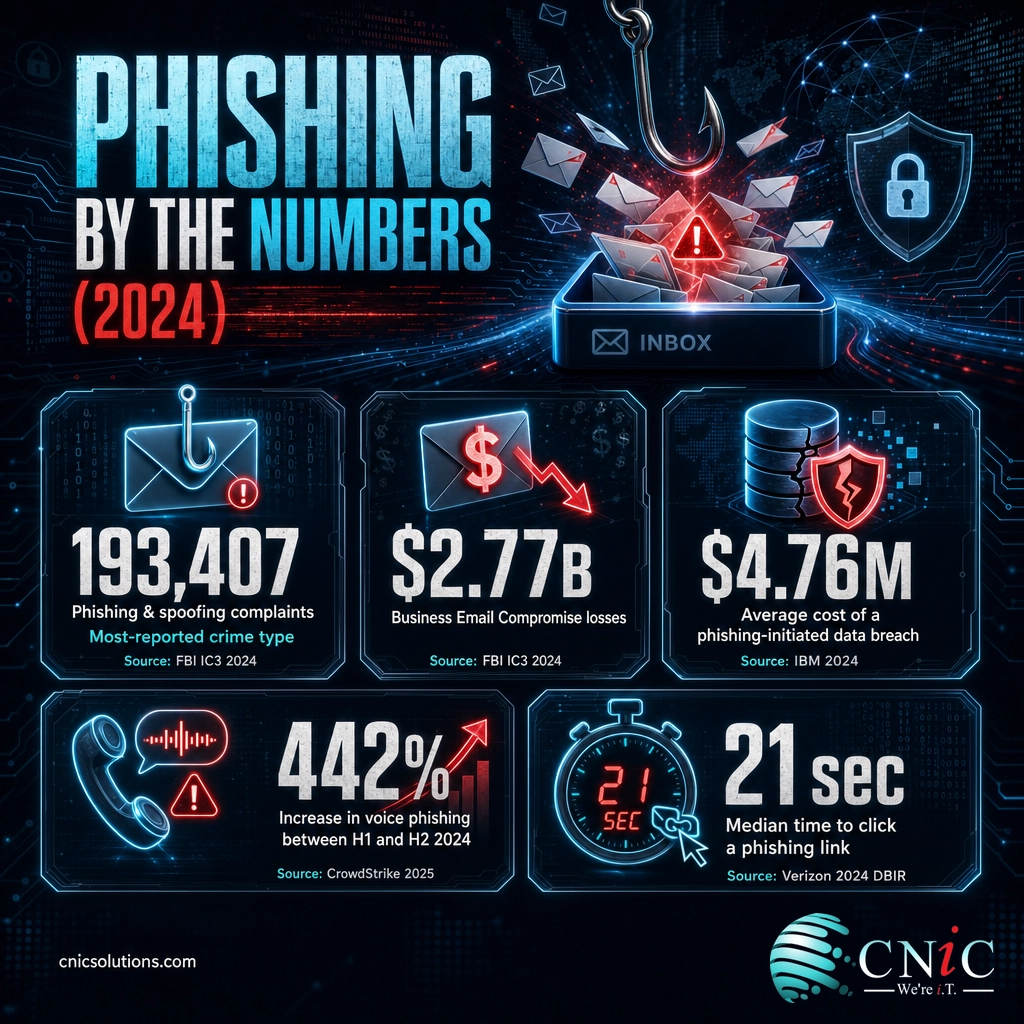
The pattern behind these numbers is that phishing is rarely the whole crime. It is the opening move. A single set of stolen credentials becomes account takeover, which becomes a launch point for the next phishing wave against your staff, clients, and vendors, or a quiet business email compromise that ends in a fraudulent wire. Human behavior sits at the center of it: the Verizon 2024 Data Breach Investigations Report found that 68 percent of breaches involved a non-malicious human element. When phishing does succeed and ransomware follows, tested backup and disaster recovery is often what stands between a bad day and a closed business. For the deeper trend data, see the latest phishing attack statistics.
Source: FBI IC3: 2024 Internet Crime Report | IBM: Cost of a Data Breach Report 2024 | Verizon: 2024 Data Breach Investigations Report
How to Protect Your Business From Every Type
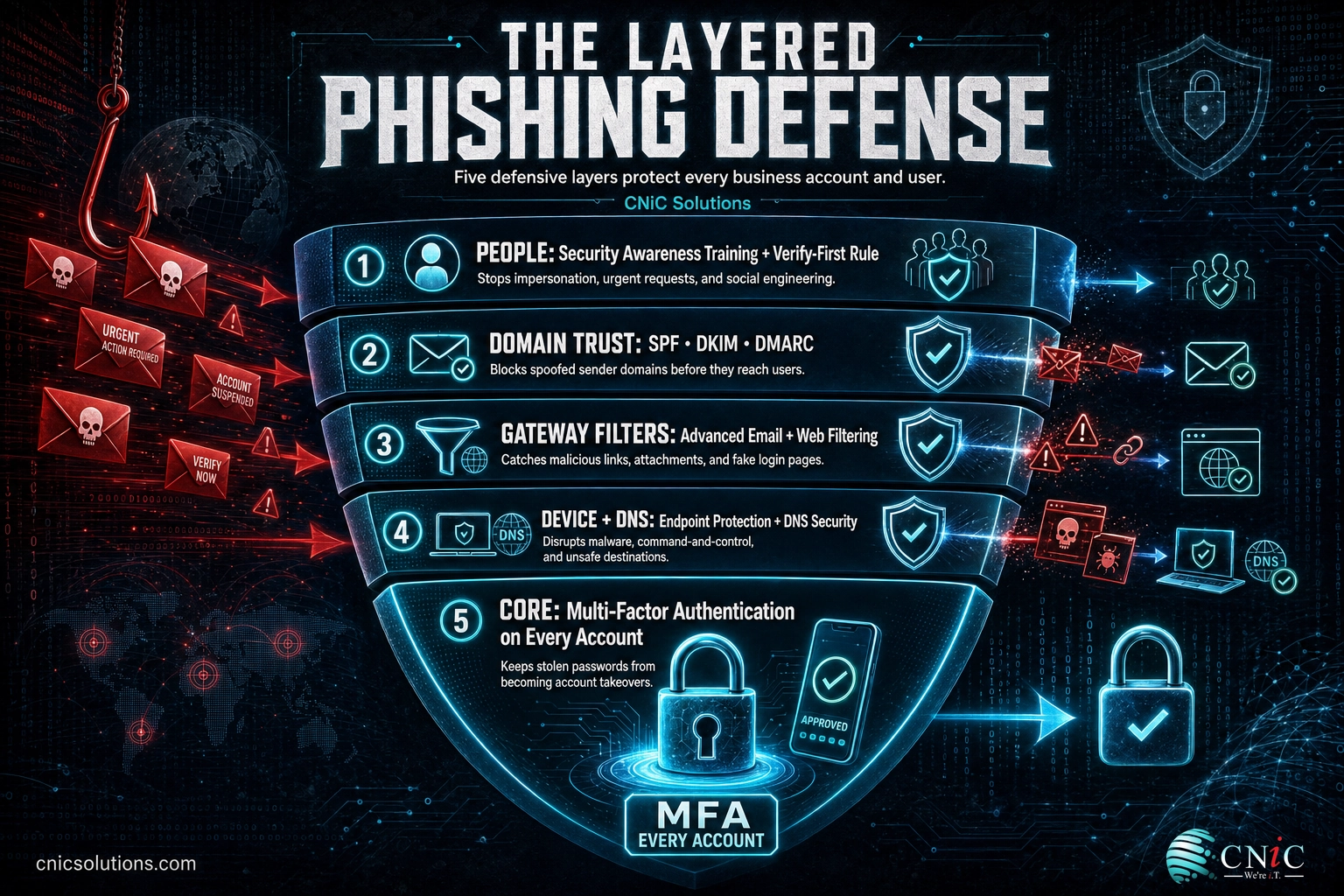
Because phishing spans email, text, voice, social media, and QR codes, no single product covers it. The reliable defense is a stack of controls that reduce how many attacks arrive, limit the damage when one gets through, and keep people alert.
Technical controls
- Multi-factor authentication (MFA) on every account, so a stolen password alone is not enough to take over a mailbox. This is the highest-impact single control.
- Email authentication (SPF, DKIM, and DMARC) to make it far harder for attackers to spoof your domain and to filter messages that fail those checks.
- Advanced email and web filtering that inspects links and attachments, sandboxes suspicious files, and blocks newly created lookalike domains.
- Endpoint protection and DNS security to catch malware and pharming redirects that never touch email at all.
- Continuous monitoring so an account takeover is caught in hours, not the 261-day average it takes to identify and contain a phishing-driven breach.
Human controls
- The verify-first rule. For any unexpected request involving payment, credentials, or sensitive data, confirm it through a separate channel, such as a phone call to a known number, before acting.
- Regular, realistic security awareness training, reinforced with simulated phishing across email, text, and voice, so recognition becomes a habit.
- Clear, blame-free reporting. Staff who can report a suspected message in one click without fear turn every employee into a sensor.
Standing these controls up once is straightforward. Keeping them correctly configured, current, and consistent across every account, device, and phone channel as your team changes is the hard part, and it is where gaps quietly open. That ongoing discipline is what managed security and a well-run program provide.
Source: IBM: Cost of a Data Breach Report 2024 | CISA: Recognize and Report Phishing
Get phishing defense managed across your business
A Virtual CIO can build phishing defense, staff training, and incident response into a broader security strategy rather than leaving each piece to chance. Understanding the tactics behind these attacks is easier with concrete examples: our library of real phishing email examples shows what each type looks like in a live inbox.
Build phishing defense into your security strategy
Related Terms
- Social engineering: The broad practice of manipulating people into giving up information or access. Phishing is its most common form, and it also includes physical tailgating into secure areas.
- Business Email Compromise (BEC): Fraud that uses a compromised or spoofed business account to trigger fraudulent payments or data disclosure.
- Credential harvesting: Capturing usernames and passwords through a fake login page, the payload behind most phishing.
- Pretexting: Inventing a believable scenario to lower a victim’s guard before making a request.
- Email spoofing: Forging an email’s sender information so a message appears to come from someone it does not.
- Account takeover: When an attacker gains full control of a legitimate account and uses it to launch further attacks.
Frequently Asked Questions
What are the main types of phishing attacks?
What is the most common type of phishing?
What is the difference between phishing and spear phishing?
Which type of phishing is most dangerous for businesses?
How can businesses protect against all types of phishing?
Sources
Statistics in this article come from primary and authoritative sources. Phishing and spoofing as the most-reported crime type (193,407 complaints), Business Email Compromise losses ($2.77 billion), and total internet-crime losses in 2024 come from the FBI Internet Crime Complaint Center (IC3) 2024 Internet Crime Report. The average cost of a phishing-initiated breach ($4.76 million) and the 261-day mean time to identify and contain it come from the IBM Cost of a Data Breach Report 2024. The 21-second median time to click and the 68 percent human-element figure come from the Verizon 2024 Data Breach Investigations Report. The 442 percent increase in voice phishing comes from the CrowdStrike 2025 Global Threat Report. Definitions follow NIST’s Computer Security Resource Center glossary, and detection guidance aligns with CISA’s phishing resources.
Primary and authoritative sources: FBI IC3 2024 Internet Crime Report, IBM Cost of a Data Breach Report 2024, Verizon 2024 Data Breach Investigations Report, CrowdStrike 2025 Global Threat Report, NIST CSRC: Phishing, CISA: Recognize and Report Phishing.



related posts
What Does Cyber Insurance Cover? A Guide for Small Businesses
October 2, 2026Cyber insurance is a business insurance policy that pays for the financial fallout of a cyberattack…
What Are TTPs in Cybersecurity? Tactics, Techniques, and Procedures Explained
October 2, 2026TTPs, short for tactics, techniques, and procedures, describe how a cyber attacker behaves: the goal they…
What Are Standard Operating Procedures (SOPs) for IT and Why They Matter
October 1, 2026An IT standard operating procedure (SOP) is a documented, step-by-step set of instructions for performing a…
What Are Passkeys? How Passwordless Login Works and Why It Matters
October 1, 2026Passkey, defined: A passkey is a phishing-resistant login credential that replaces your password with a cryptographic…