

A NAS (network-attached storage) is a dedicated storage device that connects to your network and lets multiple people store, share, and access files from one central place. It acts like a private, always-on shared drive for your whole business, with its own users, permissions, and built-in drive redundancy.
Almost every growing business hits the same wall: files scattered across laptops, a USB drive that only one person can plug in, and no single place where the team’s data actually lives. A NAS solves that. It puts your files on one always-on device on your network, shared securely with the people who need them and protected against a drive failure. This guide explains what a NAS is, how it works, how it differs from a SAN, direct-attached storage, and the cloud, the types available, and the one thing businesses most often get wrong about it: a NAS is not, by itself, a backup.
Key Takeaways
- A NAS is centralized file storage on your own network. One device, many users, shared securely with permissions.
- It serves files, not blocks. That is what separates a NAS from a SAN and makes it simpler and cheaper to run.
- RAID protects against a failed disk, not against disaster. A NAS is primary storage, not a backup.
- It complements the cloud rather than competing with it. Fast local access on site, cloud for offsite backup and sharing.
- Setup, security, and backup are where businesses slip. A NAS still needs updates, access control, and a real 3-2-1 backup plan.
What’s in This Guide
How a NAS Works
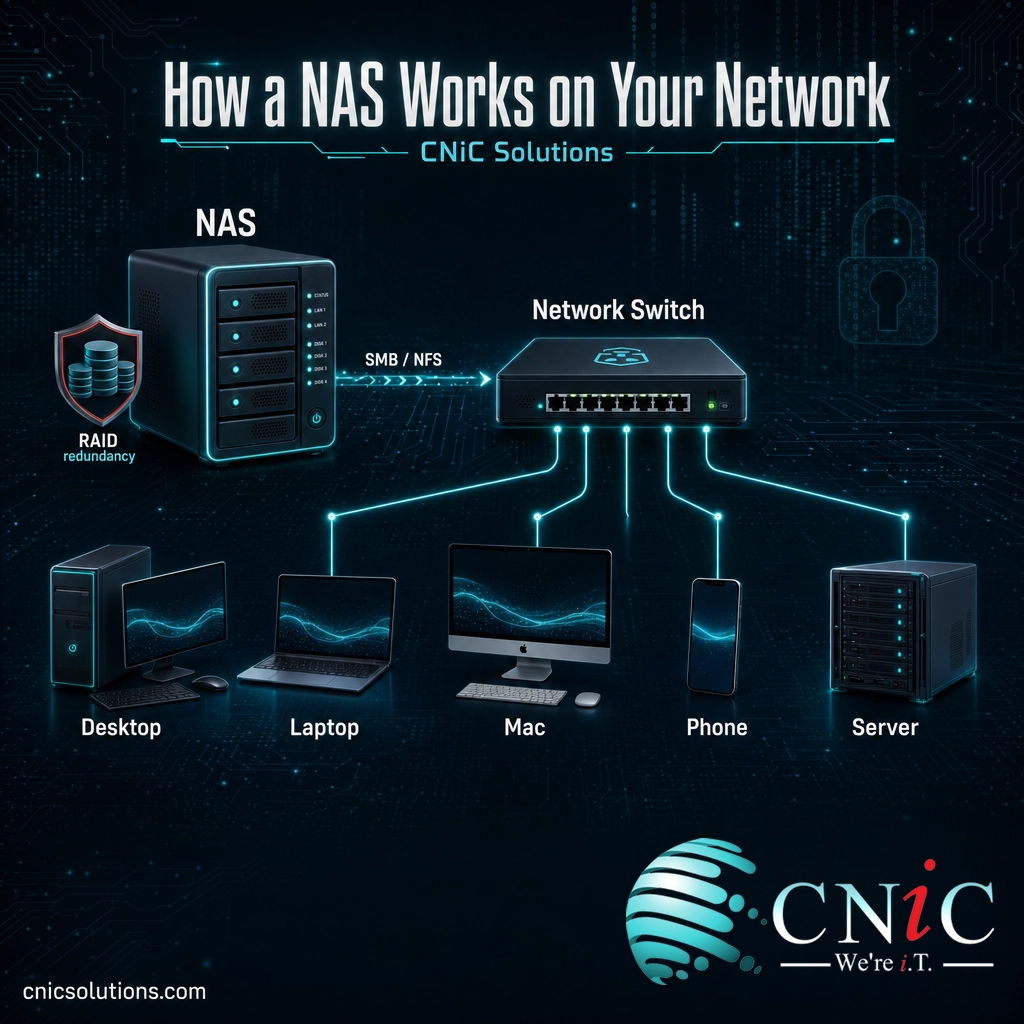
A NAS is, at heart, a small dedicated computer built to do one job well: hold drives full of files and serve them to everyone on your network. According to the Storage Networking Industry Association, network-attached storage is a device that connects to a network and provides file access to the computers on it, using an engine that implements the file services and one or more disks where the data lives.
Picture the shared filing cabinet for an office, except it never closes, everyone with a key can reach it from their own desk, and it keeps a spare copy of every page in case one gets damaged. In practice, a NAS works like this:
- It connects to your network, usually by plugging into a switch or router with an Ethernet cable, which gives it an address every device on the network can reach.
- It holds multiple hard drives configured together for capacity and redundancy, so the loss of a single drive does not lose your data (more on that below).
- It shares files using standard protocols. Windows machines connect over SMB, Linux and Unix systems over NFS, so a mixed office of PCs, Macs, and servers can all use the same storage.
- It enforces users and permissions, so the finance folder is visible only to finance and the shared drive is open to everyone, all managed from one place.
Because it serves whole files over the network you already have, a NAS is far simpler to set up and run than storage that requires its own specialized network. That simplicity is exactly why it became the default way for small and midsize businesses to centralize their files.
Source: SNIA: What Is NAS
NAS vs SAN vs DAS vs Cloud
NAS gets confused with three other things that all involve storing data. The clearest way to tell them apart is to ask two questions: does it use the network, and does it serve files or raw blocks?
- DAS (direct-attached storage) is a drive connected straight to one computer, like a USB external drive or the disk inside a server. It is fast and cheap, but only that one machine can use it, and it is not shared across the network.
- NAS (network-attached storage) connects to the network and serves whole files to many users at once. It is shared, easy to manage, and ideal for documents, media, and general business data.
- SAN (storage area network) serves raw blocks of storage over a separate high-speed network, which attached servers treat like local disks. As IBM describes the distinction, a NAS presents and manages a file system for its clients, while a SAN provides block-level access and leaves the file system to the connected systems. SANs power demanding workloads like large databases and virtualization, and cost and complexity rise to match.
| Factor | DAS | NAS | SAN | Cloud Storage |
|---|---|---|---|---|
| Connects to | One computer directly | Your local network | A dedicated storage network | The internet |
| Serves | Blocks (to one host) | Files | Blocks | Files / objects |
| Shared access | No | Yes, many users | Yes, servers | Yes, anywhere |
| Typical protocol | USB, SATA, SAS | SMB, NFS | Fibre Channel, iSCSI | HTTPS, S3 |
| Cost / complexity | Lowest | Moderate | Highest | Pay monthly |
| Best for | A single machine | Shared business files | Databases, heavy workloads | Offsite access, backup |
The simplest way to hold it in your head: DAS is a drive for one computer, a NAS is a shared drive for the whole network, a SAN is heavy-duty storage for servers, and the cloud is storage you rent over the internet. A NAS and the cloud are not rivals, either. Many businesses keep active, large, and frequently accessed files on a fast local NAS and use cloud solutions for offsite access, collaboration, and backup, getting the strengths of both.
Source: IBM: SAN vs NAS
Why a NAS Matters for Your Business
The case for a NAS is not really about hardware. It is about what happens to a business when its data has no home. Two trends make that home more important every year.
First, businesses are generating far more data than they used to. IDC’s Data Age study projected that the total amount of data in the world would grow to 175 zettabytes by 2025, a compound annual growth rate of about 61 percent. Your business is a small piece of that curve, but it feels the same pressure: more documents, more images, more video, more logs, every single year.
Second, most of that data is exactly the kind a NAS is built to hold. Estimates from Gartner and IDC put unstructured data, the files, documents, images, video, and backups that do not sit neatly in a database, at around 80 percent of all business data. Structured databases are what a SAN is for. The other 80 percent, the everyday working files of your business, is what lives beautifully on a NAS.
Put those together and the benefits become concrete:
- One source of truth. Files live in one managed place, not scattered across laptops and USB sticks, so the team always knows where the current version is.
- Real collaboration. Multiple people reach the same files at local network speed, which matters when those files are large.
- Redundancy against drive failure. RAID configurations keep the business running when a single disk dies, instead of a hardware failure becoming a data-loss event.
- Access control. Permissions decide who sees what, so sensitive folders stay restricted, which supports obligations under frameworks like HIPAA and PCI-DSS.
- A cost you own. A NAS is a one-time capital purchase you control on site, rather than an ever-growing monthly bill that scales with every gigabyte.
Source: IDC Data Age study (full report)
Types of NAS
A NAS is not one product. The right one depends on how many people rely on it and how much data you are protecting.
- Desktop NAS (small business): A compact unit with two to four drive bays that sits on a shelf or under a desk. This is the common starting point for a small team that needs a shared drive with redundancy, without a server room.
- Rackmount NAS (growing and enterprise): A larger, more powerful unit that mounts in a standard equipment rack, holds many more drives, and scales into hundreds of terabytes. This suits businesses with heavier storage needs, more users, or higher performance and uptime requirements.
- Hybrid and cloud-connected NAS: A NAS that syncs or tiers data to a cloud service, combining fast local access with an automatic offsite copy. This is an increasingly popular middle ground for businesses that want both.
Which fits most businesses? For a typical small or midsize business, a multi-bay desktop NAS with RAID is the natural entry point: enough capacity and redundancy for the whole team without the cost of rackmount gear. Hybrid setups that pair that NAS with cloud backup are common as the business grows. Sizing it correctly, both the capacity you need now and the growth you expect, is the decision that pays off later.
The Catch: A NAS Is Not a Backup
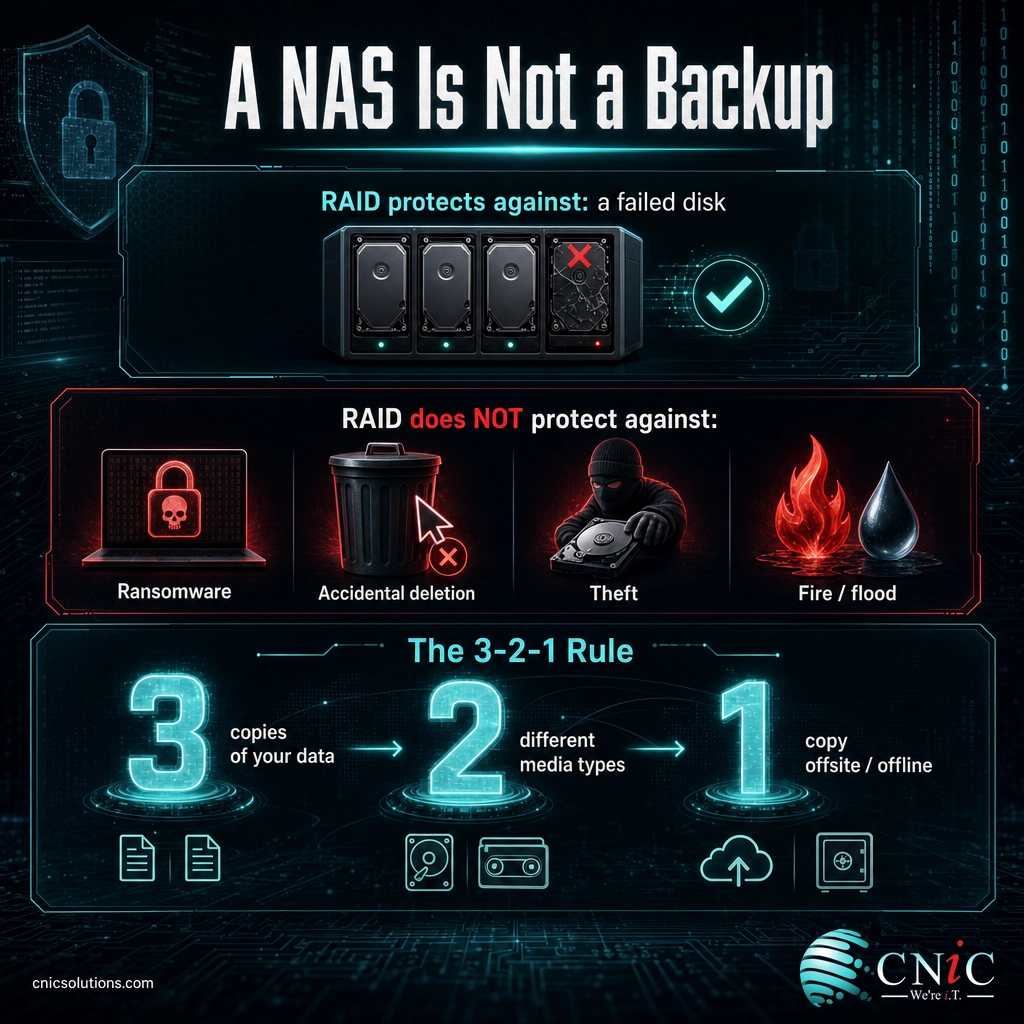
This is the single most important thing to understand about a NAS, and the place businesses most often get burned. It is easy to assume that because a NAS has RAID and keeps your files safe from a dying drive, your data is backed up. It is not. RAID and backup solve two different problems.
RAID (redundant array of independent disks), a technique first defined by researchers at UC Berkeley in the late 1980s, protects against hardware failure. If one drive in the array fails, the NAS keeps running and you replace the drive. What RAID does not protect against is everything else that destroys data:
Myth: “My files are on a RAID NAS, so they are backed up.”
RAID keeps your NAS running when a disk fails. It does nothing when ransomware encrypts every file on the share, when someone deletes the wrong folder, when the NAS is stolen or lost to fire or flood, or when the device itself fails. In all of those cases, a NAS with no separate backup means the data is simply gone. RAID is uptime insurance, not a backup.
The fix is the widely recommended 3-2-1 rule, echoed in ransomware guidance from CISA’s ransomware guidance: keep at least 3 copies of your data, on 2 different types of media, with 1 copy stored offsite and, ideally, offline or immutable so ransomware cannot reach it. A NAS can be one of those copies, and a good hub for the others, but it cannot be all three by itself.
This is exactly where a NAS goes from a storage device to part of a real data-protection strategy, and where most businesses benefit from help. CNiC Solutions helps small and midsize businesses deploy storage that is actually protected, pairing a NAS with a proper backup and recovery plan so a single incident does not become a business-ending data loss. If disaster recovery is your concern, our guide to disaster recovery as a service explains how recovery goes beyond simple copies.
Talk to CNiC about protecting your business data
Source: CISA and MS-ISAC Ransomware Guide
How to Get Started With a NAS
Buying a NAS is the easy part. Deploying one that is sized right, secured, and backed up is where it either becomes an asset or a liability. A sound rollout runs roughly in this order:
- Size it to your data and users. Estimate your current data, add realistic growth, and choose the number of drive bays and RAID level accordingly, so you are not out of space in a year.
- Plan the RAID and the backup together. Decide the RAID level for redundancy, then design the separate backup that satisfies the 3-2-1 rule. Never treat one as the other.
- Secure it from day one. Change default credentials, keep the firmware patched, restrict access with real permissions, and keep the NAS off the open internet unless it is deliberately and safely configured for remote access. NAS devices are a known ransomware target precisely because so many are left exposed and unpatched.
- Segment and monitor it. Place the NAS on an appropriate part of your business network, and monitor drive health so a failing disk is replaced before a second one fails.
None of this is exotic, but it is easy to skip a step, and the skipped step is usually the one that matters during an incident. For businesses that would rather not manage storage in-house, CNiC handles the whole lifecycle as part of infrastructure management: sizing, deployment, security, monitoring, and backup, so the storage your business depends on is both fast and genuinely protected. For a wider view of where storage fits in your technology plan, a Virtual CIO can align it with your budget and risk.

Related Terms
- DAS (direct-attached storage): Storage connected directly to a single computer, such as an internal disk or USB drive, not shared over a network.
- SAN (storage area network): A dedicated high-speed network that provides block-level storage to servers, used for databases and other demanding workloads.
- RAID: Redundant array of independent disks, a method of combining multiple drives for redundancy and performance so a single disk failure does not cause data loss.
- SMB and NFS: The standard file-sharing protocols a NAS uses so Windows (SMB) and Linux or Unix (NFS) clients can access the same storage.
- File-level vs block-level storage: File-level storage serves complete files (NAS); block-level storage serves raw chunks that a host assembles into a file system (SAN).
- 3-2-1 backup rule: A best practice of keeping three copies of data on two media types with one copy offsite, so no single event can destroy everything.
- Unstructured data: Files such as documents, images, and video that do not fit in a database, the majority of business data and the natural fit for a NAS.
Frequently Asked Questions
What is a NAS in simple terms?
What is the difference between NAS and a SAN?
Is a NAS the same as a backup?
Does a small business need a NAS or cloud storage?
How much storage does a business NAS hold?
Sources
The definition of network-attached storage and its file-level, protocol-based operation (SMB and NFS) reflect the characterization published by the Storage Networking Industry Association (SNIA), the storage industry’s standards body. The file-level versus block-level distinction between NAS and SAN follows IBM’s SAN vs NAS overview. The data-growth figure (175 zettabytes by 2025 at roughly 61 percent annual growth) is from IDC’s Data Age study, The Digitization of the World; the estimate that roughly 80 percent of business data is unstructured reflects widely cited Gartner and IDC figures. RAID refers to the redundant-array concept first defined by researchers at the University of California, Berkeley, in the late 1980s. The 3-2-1 backup practice is echoed in the CISA and MS-ISAC Ransomware Guide. RAID levels, capacities, and NAS form factors described are standard, widely documented characteristics of the storage industry; specific capacities vary by device and configuration.



related posts
What Is IT Asset Management (ITAM)? A Guide for Businesses
October 22, 2026IT asset management (ITAM) is the practice of tracking and managing an organization's hardware, software, and…
What Is ISO 27001? A Guide to the Information Security Standard
October 22, 2026ISO 27001 is the world's best-known standard for managing information security, and increasingly the certification customers…
What Is Infrastructure as Code (IaC)? A Guide for Businesses
October 21, 2026Infrastructure as Code (IaC) is the practice of managing and provisioning IT infrastructure, such as servers,…
What Is Infrastructure Security? A Guide for Businesses
October 21, 2026Infrastructure security is the practice of protecting the core technology systems a business runs on: its…