

Allowlisting is a security approach that permits only pre-approved applications, files, or connections to run, and blocks everything else by default. Instead of chasing known threats one at a time, it flips to a default-deny model: if something is not on the trusted list, it cannot execute. Allowlisting was formerly called whitelisting.
Most security tools work like a bouncer holding a photo book of troublemakers, turning away only the faces they recognize as bad. Allowlisting reverses that logic entirely. It hands the bouncer a guest list and turns away everyone whose name is not on it. That single change, from “block what we know is bad” to “allow only what we know is good,” is what makes allowlisting one of the most effective defenses against ransomware and unknown malware. This guide explains how it works in plain language, how it differs from blocklisting, the main types, and what it means for protecting your business.
Key Takeaways
- Allowlisting is a default-deny model. Only explicitly approved software, IP addresses, senders, or domains are permitted; everything else is blocked automatically.
- It is the opposite of blocklisting. Blocklisting blocks known-bad and allows the rest; allowlisting allows known-good and blocks the rest, which stops threats it has never seen before.
- It stops what antivirus can miss. Because unknown code is never on the list, brand-new (zero-day) malware and ransomware cannot run in the first place.
- “Allowlisting” and “whitelisting” mean the same thing. The industry, including NIST, is moving to the clearer term.
- The real cost is maintenance. Every update and new app must be approved, which is exactly why allowlisting works best as a managed, monitored discipline rather than a set-and-forget switch.
What’s in This Guide
How Allowlisting Works
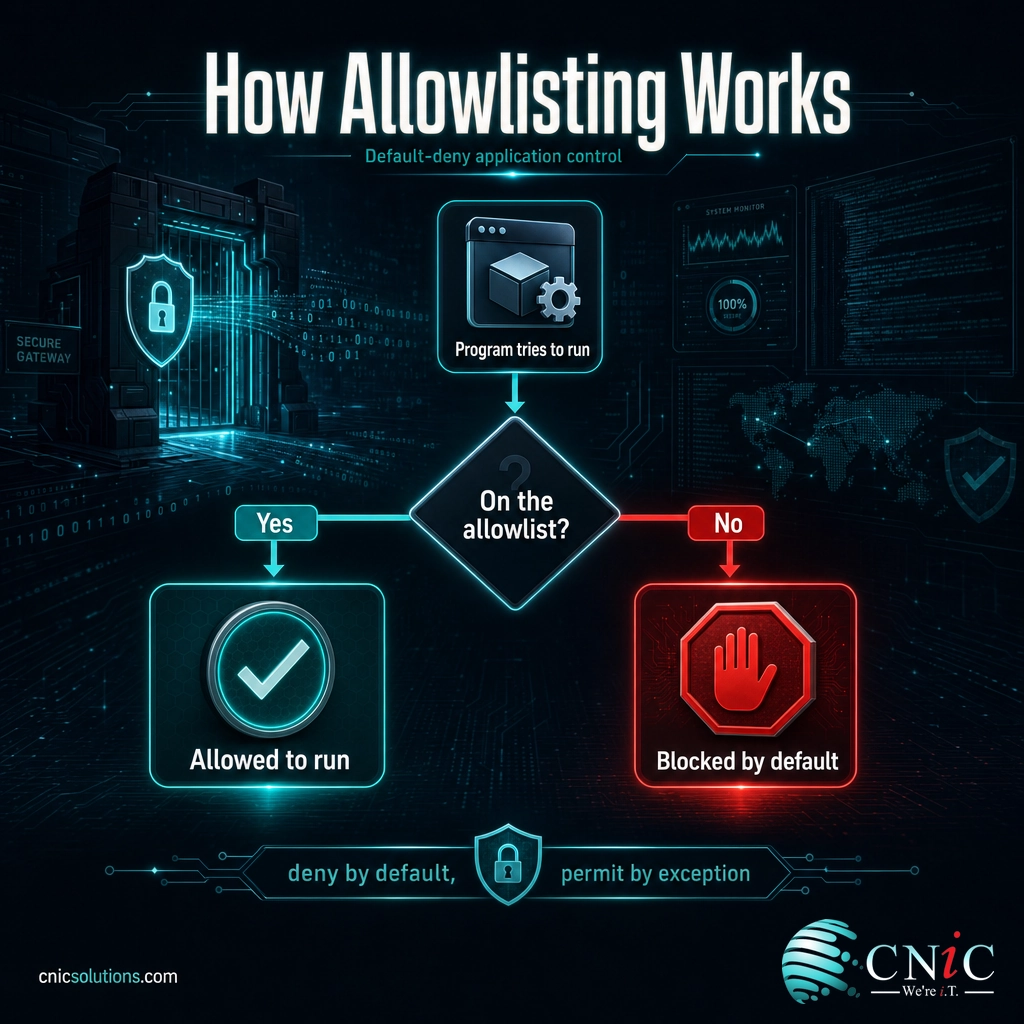
Allowlisting rests on one idea: deny by default, permit by exception. You build a list of trusted items, and the system enforces a simple rule. If something is on the list, it is allowed. If it is not, it is blocked, no questions asked. Nothing has to be recognized as malicious to be stopped; being unrecognized is enough.
Return to the private-event analogy. A guest list works not because the doorman knows every gate-crasher in the city, but because he does not need to. He only has to confirm each arrival against the approved names. Anyone missing from the list is turned away, whether they are a known troublemaker or a complete stranger. Allowlisting gives your systems that same guest list for software and traffic.
In practice, an application allowlisting tool sits between a program and the operating system. When any executable, script, or installer tries to run, the tool checks it against the allowlist first and permits it only if it matches an approved entry. According to NIST’s Guide to Application Whitelisting (SP 800-167), this is done to stop the execution of malware, unlicensed software, and other unauthorized software before it can act.
What an Allowlist Actually Checks
An allowlist does not blindly trust a file because of its name, which is easy to fake. NIST SP 800-167 describes several attributes that allowlisting technologies use to identify approved software, each with different strengths:
- File path: permits anything inside an approved folder. Convenient, but weak on its own unless the folder is locked down with strict access controls, since any malicious file dropped there would run.
- Filename and file size: too general to rely on alone. A file that is replaced or infected can keep the same name, so these are only useful when combined with stronger checks.
- Digital signature or publisher: verifies that software comes from a trusted vendor and has not been tampered with. This scales well because approved publishers cover many files.
- Cryptographic hash: a unique fingerprint of the exact file. This is the most precise attribute, but the hash changes with every update, so the list must be refreshed whenever software is patched.
NIST is explicit about the best practice: a combination of digital signature or publisher and cryptographic hash “generally provides the most accurate and comprehensive application whitelisting capability.” Good tools also control more than executables, extending the same trust rules to libraries, scripts, macros, browser extensions, and configuration files, closing the side doors attackers use.
Source: NIST SP 800-167, Guide to Application Whitelisting
Allowlisting vs. Blocklisting
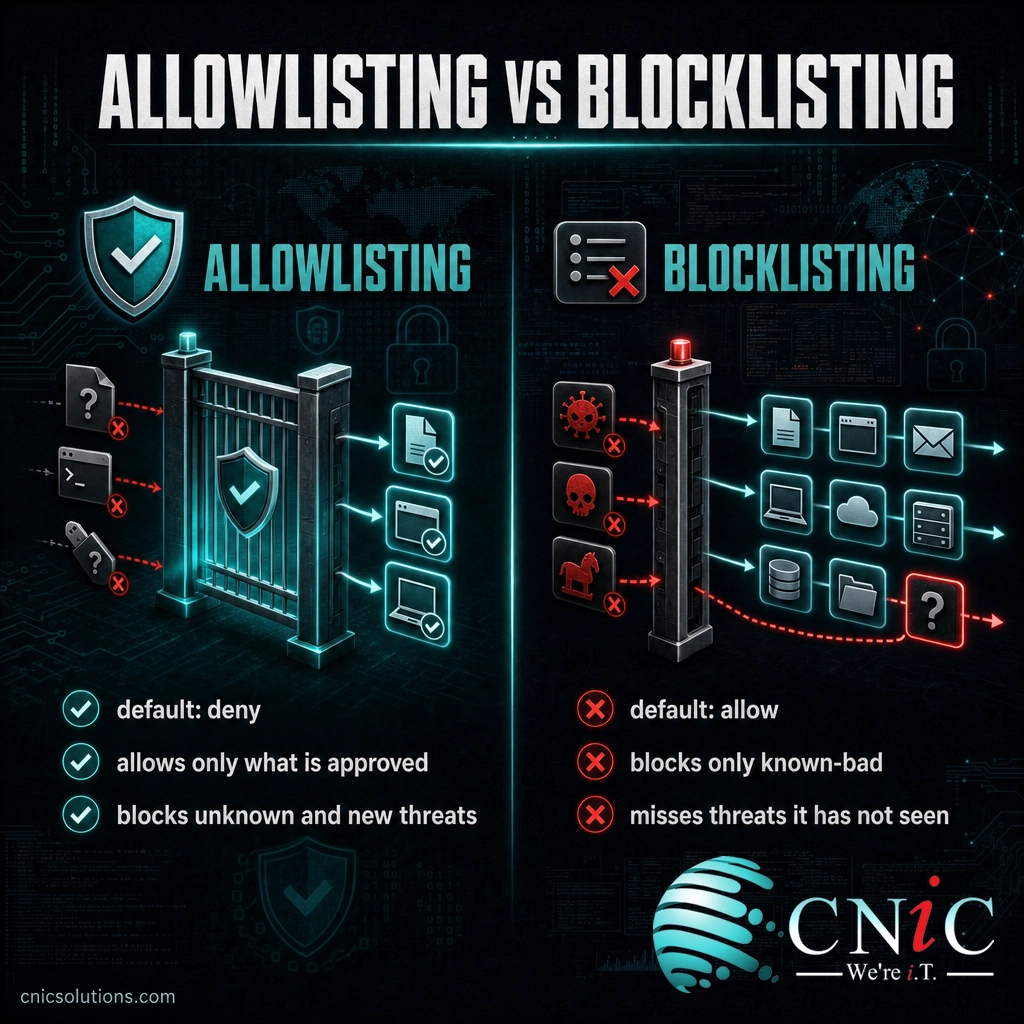
The fastest way to understand allowlisting is to set it beside its opposite. Blocklisting (once called blacklisting) is the model most people already know from traditional antivirus: keep a list of known-bad items and block them, while allowing everything else through. It is easy to live with because nothing legitimate gets stopped, but it has one structural flaw. It can only block threats it already recognizes, so anything brand-new sails past.
Allowlisting inverts the default. Everything is denied unless it is explicitly trusted, which means an unknown threat is blocked precisely because it is unknown. The trade-off is effort: someone has to define and maintain the list of what is allowed.
| Allowlisting | Blocklisting | |
|---|---|---|
| Default rule | Deny everything, allow the approved | Allow everything, deny the known-bad |
| Stops unknown threats? | Yes, unrecognized items are blocked | No, only recognized threats are blocked |
| Main strength | Very strong against new and zero-day malware | Low friction, easy to deploy |
| Main weakness | Requires ongoing list maintenance | Blind to threats it has not seen yet |
| Best suited for | Protecting sensitive systems and stopping ransomware | General-purpose, convenience-first filtering |
These are not either-or choices. Most mature security programs run both: a blocklist (antivirus) to sweep away common, recognized threats cheaply, and allowlisting on important systems to catch everything the blocklist misses. That layered use is exactly why CISA’s ransomware guidance advises organizations to “use allowlisting rather than attempting to list and deny every possible permutation of applications.”
Source: CISA: #StopRansomware Guide
The Main Types of Allowlisting
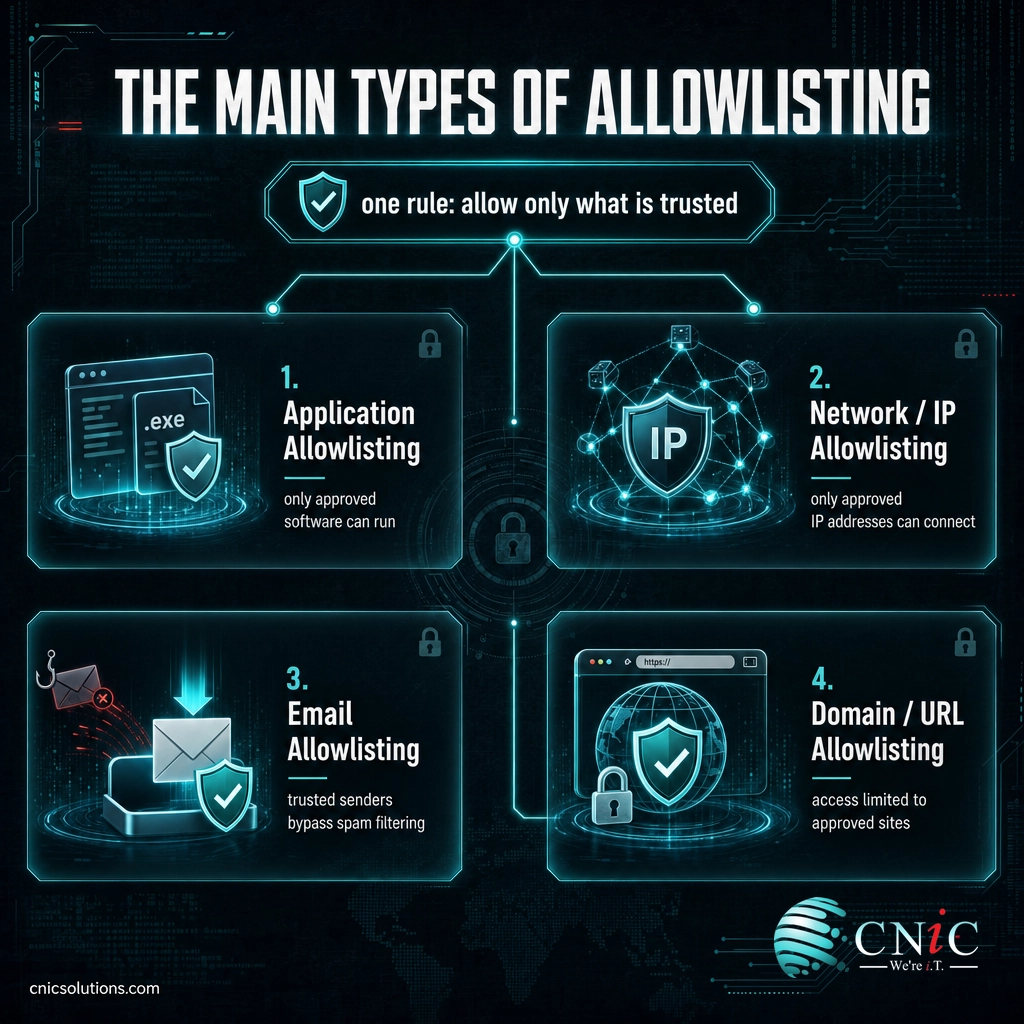
Allowlisting is a principle, not a single product, so it shows up in several places across a business network. The most impactful is application allowlisting, but the same default-deny logic applies to traffic, email, and web access.
- Application allowlisting: controls which programs, scripts, and installers are permitted to execute on a device. This is the form NIST documents and the one that most directly stops malware and ransomware from running.
- Network and IP allowlisting: permits connections only from approved IP addresses or ranges. It is commonly used to restrict access to sensitive systems, admin panels, and firewalls so that only known locations can reach them.
- Email allowlisting: designates trusted senders or domains whose messages bypass aggressive spam filtering, helping ensure important business email is never quarantined by mistake.
- Domain and URL allowlisting: restricts web or application access to an approved set of destinations, a common control for locked-down or high-security environments where browsing should be limited.
The unifying thread is the same in every case. Rather than trying to enumerate the near-infinite universe of bad things, you define the finite universe of good things and deny the rest. That is what makes the model both powerful and, without the right tooling, demanding to maintain.
Source: NIST SP 800-167, Guide to Application Whitelisting

Why Allowlisting Matters for Your Business
Allowlisting matters because it defends against the threat that hurts businesses most: the attack no one has seen before. Traditional, blocklist-based tools are always one step behind new malware, and ransomware crews design their payloads specifically to avoid recognition. Allowlisting removes that advantage. An unknown ransomware executable is not on the approved list, so it never gets to run, regardless of how novel or well-disguised it is.
That strength is why allowlisting is not a fringe idea. Application allowlisting is ranked among the highest-priority mitigations against ransomware and intrusions by CISA’s ransomware prevention guidance and by the CIS Critical Security Controls, which place inventory and control of software (including allowlisting) near the very top of their recommended safeguards. For businesses working toward frameworks like these, allowlisting is often an expected control, not an optional one.
The business payoff comes in three forms. It blocks unknown and zero-day malware by design, closing the gap antivirus leaves open. It eliminates unauthorized and shadow software, so unlicensed tools and unvetted apps cannot quietly run on company machines. And it supports compliance, giving you a documented, enforceable answer to the question every auditor eventually asks: how do you control what runs on your systems?
Myth: “Allowlisting replaces my antivirus and EDR.”
It does not, and treating it that way leaves gaps. Allowlisting controls what is permitted to run, but it does not investigate behavior, hunt for intrusions, or clean up an incident. Antivirus and endpoint detection and response tools watch for malicious activity and help you respond to it. The two are complementary layers of defense in depth: allowlisting slams the door on unknown code, while EDR watches what makes it through. Strong security uses both, not one instead of the other.
Source: CIS: Critical Security Controls | CISA: #StopRansomware Guide
How to Get Started with Allowlisting
Allowlisting fails when it is switched on abruptly and succeeds when it is rolled out in stages. The goal is to reach a strict default-deny state without blocking the legitimate software your team needs on day one. A sound sequence looks like this:
- Inventory what you actually run. You cannot approve software you do not know about. Start by discovering every application, script, and tool in active use across your devices, including the ones IT never formally installed.
- Build the initial allowlist. Approve trusted software using strong attributes, leaning on digital signature or publisher plus cryptographic hash, as NIST recommends, rather than easily faked filenames.
- Run in monitoring mode first. NIST specifically advises testing an allowlisting solution in a monitoring (audit) mode before enforcement, so you can see what would be blocked and fix gaps without disrupting anyone’s work.
- Switch to enforcement, then maintain it. Once the list is accurate, turn on default-deny, and build a routine for approving new apps and patches. This maintenance step is where allowlisting programs live or die.
None of this is conceptually hard, but doing it well across a fleet of machines, and keeping it current as software changes every week, is real ongoing work. That is precisely why most businesses run allowlisting as a managed service rather than a one-time project. A managed IT and security partner handles the inventory, the tuning, the monitoring-mode testing, and the day-to-day approvals, so you get the protection of default-deny without a flood of “why is this blocked” tickets.
Lock down which software can run with managed cybersecurity
Getting the policy right, deciding which applications belong on the list and how strictly to enforce it, is a leadership decision as much as a technical one. A Virtual CIO can align an allowlisting rollout with your compliance obligations and risk tolerance, and a fully managed IT team keeps it running across every device without slowing your business down.
Deploy and maintain allowlisting across every device
Related Terms
- Blocklisting (blacklisting): the opposite model, blocking known-bad items and allowing everything else by default.
- Default-deny: the core principle behind allowlisting, where anything not explicitly permitted is automatically blocked.
- Zero Trust: a broader security philosophy of “never trust, always verify” that allowlisting helps put into practice.
- Application control: another name for application allowlisting, used by NIST and many security vendors.
- Endpoint detection and response (EDR): tools that monitor devices for malicious behavior and support incident response, complementing allowlisting. See our guide to endpoint protection and EDR for small business.
- Least privilege: granting users and programs only the access they need, a companion principle to allowlisting.
- Data encryption: a separate control that protects information itself. Learn the basics in our data encryption explainer.
- Phishing: a common malware-delivery method that allowlisting helps neutralize by stopping the payload from executing. See how to spot a phishing email.
Frequently Asked Questions
What is allowlisting in simple terms?
What is the difference between allowlisting and blocklisting?
Is allowlisting the same as whitelisting?
What are the downsides of allowlisting?
Does my small business need application allowlisting?
Sources
This explainer anchors its technical claims to primary standards documentation. The definition of an application allowlist, the identifying attributes (file path, filename, file size, digital signature or publisher, and cryptographic hash), the guidance that a combination of digital signature or publisher and cryptographic hash provides the most accurate coverage, and the recommendation to test in monitoring mode before enforcement all follow NIST Special Publication 800-167, Guide to Application Whitelisting. The default-deny recommendation and allowlisting’s ranking as a leading ransomware mitigation reflect CISA’s #StopRansomware Guide and the CIS Critical Security Controls. Allowlisting and whitelisting are treated as synonyms, consistent with current industry and NIST usage.
Primary and authoritative sources: NIST SP 800-167 (Guide to Application Whitelisting), CISA #StopRansomware Guide, CIS Critical Security Controls.



related posts
What Is Calendar Phishing and How to Prevent It
October 13, 2026Calendar phishing is a scam that hides a malicious link inside a calendar invitation instead of…
What Is BYOD? Bring Your Own Device Explained for Businesses
October 13, 2026BYOD (Bring Your Own Device) is a policy that lets employees use their own personal devices,…
What Is an Evil Twin Attack? How Fake Wi-Fi Hotspots Steal Your…
October 12, 2026An evil twin attack is a fake Wi-Fi hotspot that copies the name of a network…
What Is an IP Address? A Plain-English Guide for Business
October 12, 2026An IP address (Internet Protocol address) is a unique number assigned to every device on a…