

An evil twin attack is a fake Wi-Fi hotspot that copies the name of a network you trust, such as a cafe or airport hotspot, to trick your device into connecting. Once you join, the attacker can intercept the data you send, including passwords and payment details, without you noticing anything is wrong.
Your laptop is built to be helpful. When it sees a Wi-Fi network with a name it recognizes, it reconnects automatically, no questions asked. An evil twin attack turns that convenience into a trap: the attacker stands up a hotspot with the exact same name as a real one, waits for nearby devices to join, and quietly reads everything that passes through. With cheap hardware and remote work sending employees to airports, hotels, and coffee shops every week, this is one of the easiest attacks to run and one of the hardest to notice. This guide explains how an evil twin attack works, how it differs from the terms it is confused with, and the practical steps that keep your business safe.
Key Takeaways
- An evil twin is a fake Wi-Fi hotspot that clones the name of a legitimate network so your device connects and the attacker can intercept your traffic.
- It is a type of rogue access point, distinguished by the fact that it deliberately impersonates a real, trusted network rather than just being unauthorized.
- Password prompts do not prove safety. Attackers can copy a network’s name and mimic its login page, capturing the credentials you type in.
- The payoff is stolen credentials and data, which feed the identity theft, account takeover, and financial fraud documented at scale by the FBI’s 2024 crime report.
- Defense is layered: a VPN on public Wi-Fi, multi-factor authentication, WPA3-secured office wireless with a separate guest network, and staff who verify network names before connecting.
What’s in This Guide
How an Evil Twin Attack Works
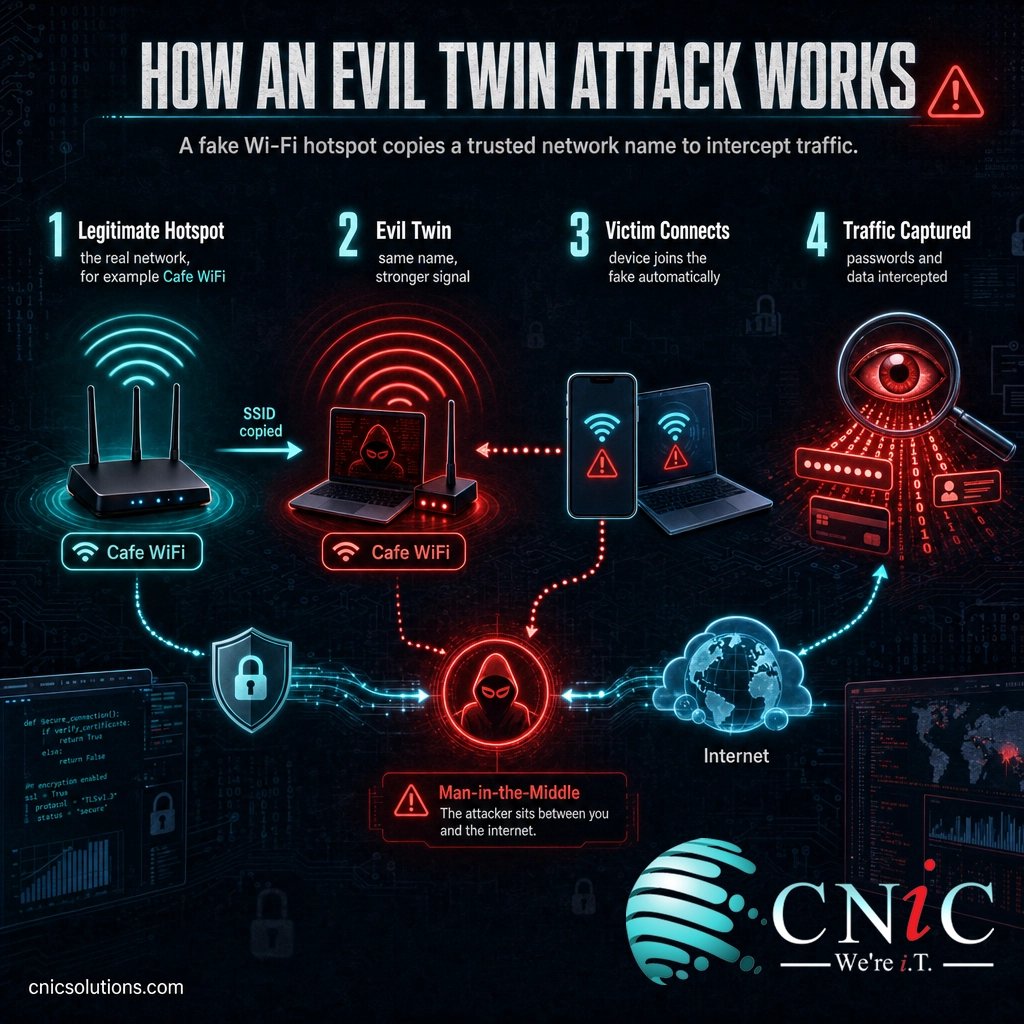
An evil twin attack is a form of man-in-the-middle attack: the attacker inserts themselves between you and the internet so that your traffic flows through equipment they control. What makes the evil twin variant effective is that it does not break into anything. It only offers a network that looks exactly like one you already trust, and lets your own device do the rest.
The attack usually unfolds in five steps:
- Pick a busy location. The attacker chooses somewhere with free public Wi-Fi and steady foot traffic, such as a coffee shop, hotel lobby, airport, or conference hall.
- Copy the network name. Using an ordinary laptop or a small portable router, they broadcast a new hotspot with the same network name, called the SSID, as the real one. Devices identify networks by that name, so the fake looks identical.
- Win the connection. The attacker positions the rogue hotspot close by so it broadcasts a stronger signal, and may knock devices off the real network so they reconnect to the more powerful evil twin automatically.
- Capture the traffic. Once you connect, everything you send passes through the attacker’s equipment. They can read unencrypted data, log the sites you visit, and present fake login pages that harvest usernames and passwords.
- Use what they steal. Captured credentials and session information are reused to break into email, banking, and business accounts, often minutes or hours later from somewhere else entirely.
Think of it like a valet stand set up outside a restaurant by someone who does not work there. The sign looks right, the uniform looks right, so you hand over your keys. By the time you realize no real valet was ever there, your car is gone. The evil twin works the same way: the name looks right, so your device hands over the connection.
Source: CISA: Securing Wireless Networks | NSA and CISA guidance on securing wireless devices in public
Evil Twin vs. Rogue Access Point
Evil twin is most often confused with rogue access point, and the two are closely related. The difference is one of intent and disguise. A rogue access point is any wireless access point connected to a network without authorization. That includes an employee who plugs a personal router into the office network for convenience, with no malice at all. An evil twin is a rogue access point built specifically to deceive: it copies a legitimate network’s name to impersonate it and lure people into connecting.
In short, every evil twin is a rogue access point, but not every rogue access point is an evil twin. The table below breaks down the distinction.
| Aspect | Evil Twin | Rogue Access Point |
|---|---|---|
| What it is | A fake hotspot that clones a trusted network’s name | Any unauthorized access point on a network |
| Intent | Always malicious, built to intercept data | Can be malicious or merely careless (an unapproved router) |
| Key trick | Impersonation: it uses a real network’s exact name | None required: it just is not supposed to be there |
| Who is targeted | People trying to join a network they trust | The network the device is attached to |
| Relationship | A specialized, deceptive type of rogue access point | The broad category that evil twins belong to |
The practical takeaway is the same for both: your business needs a way to see what wireless access points are broadcasting near your people and your office, because neither an evil twin nor an unauthorized router announces itself.
Myth: “If the network name is correct and it connects, it must be the real one.”
This is the exact assumption an evil twin is built to exploit. A network name is not a form of identity. Anyone can broadcast a hotspot called “Airport Free WiFi” or a copy of your favorite cafe’s network, and your device cannot tell the difference from the name alone. A password prompt is no guarantee either, since attackers can present a convincing fake login page and record whatever you enter. Treat the name as a label anyone can print, not proof of who is behind it.
Source: NIST SP 800-153: Guidelines for Securing Wireless Local Area Networks

Why Evil Twin Attacks Matter for Your Business
An evil twin rarely causes harm at the moment of connection. The damage comes from what it captures: the login credentials, session tokens, and sensitive data that let an attacker walk into your accounts later. That stolen access is the raw material behind identity theft, account takeover, and business email fraud, and the scale of that downstream problem is documented every year by the FBI’s Internet Crime Complaint Center.
For a small or midsize business, the risk is not just the traveling employee who checks email on hotel Wi-Fi. It is what one intercepted password unlocks. A single set of captured Microsoft 365 or VPN credentials can give an attacker a foothold in your systems, and from there the path to a mailbox, a payroll change, or a ransomware deployment is short. The employee never sees a warning, because from their side the connection worked normally. That invisibility is what makes evil twins worth defending against before an incident, not after.
Source: FBI IC3: 2024 Internet Crime Report
Where Evil Twin Attacks Happen and the Warning Signs
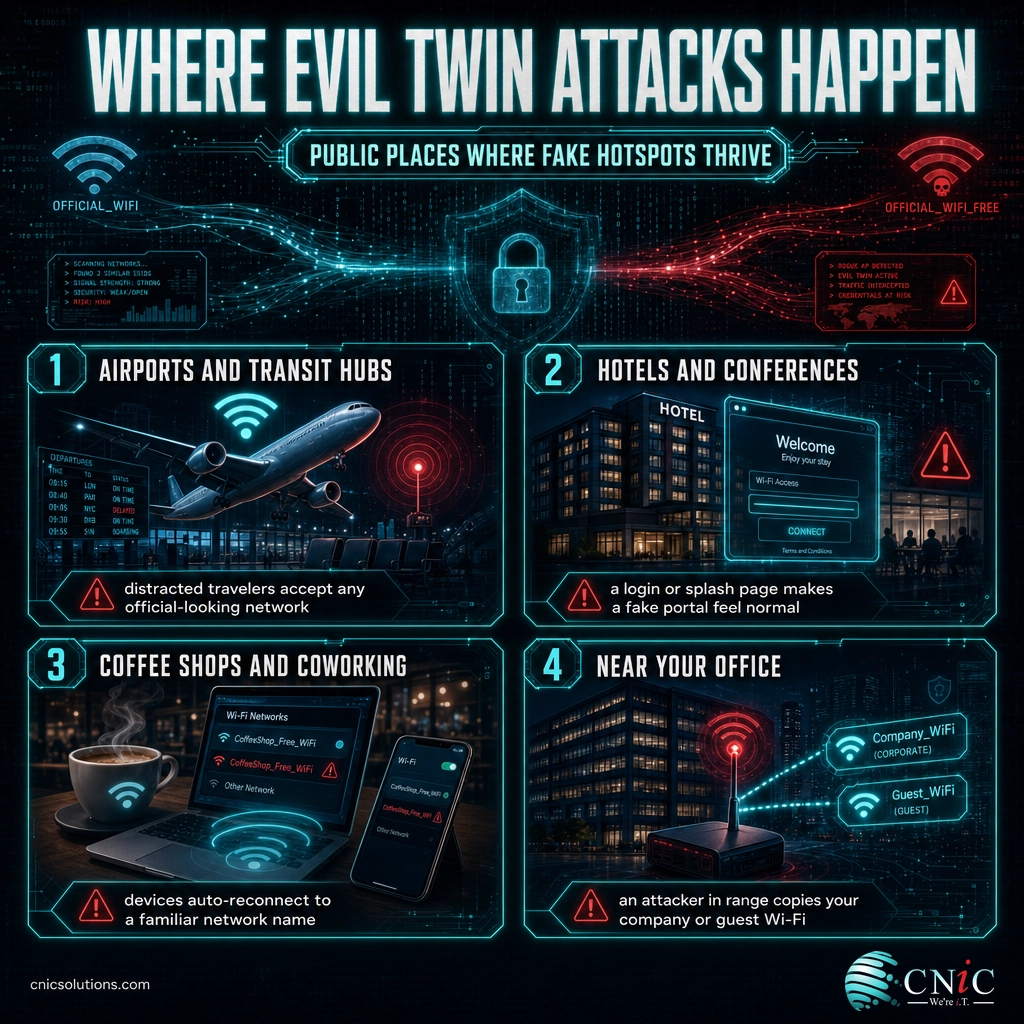
Evil twin attacks thrive wherever people expect free, open Wi-Fi and do not think twice about connecting. A few settings come up again and again:
- Airports and transit hubs. Travelers are distracted, in a hurry, and conditioned to accept whatever network looks official.
- Hotels and conferences. Guests expect a login or splash page, which makes a fake portal that harvests credentials feel completely normal.
- Coffee shops and coworking spaces. A regular’s device will auto-reconnect to a familiar network name, so an attacker only has to copy it.
- Near your own office. An attacker within range can broadcast a copy of your company or guest Wi-Fi to catch employees and visitors.
Because a well-run evil twin looks identical to the real network, the warning signs are subtle. Watch for a network that suddenly asks you to log in again when it never did before, a certificate or security warning you have not seen on that network, being disconnected and reconnected without explanation, or two networks broadcasting the same name in the same place. Any of these is a reason to disconnect and confirm the real network with staff before continuing.
Source: FTC consumer guidance on public Wi-Fi networks | CISA: Securing Wireless Networks
How to Protect Your Business from Evil Twin Attacks
Defending against evil twins takes two fronts working together: protecting employees when they use networks you do not control, and securing the wireless you do control so your own network is harder to clone and easier to monitor.
Protect people on public Wi-Fi
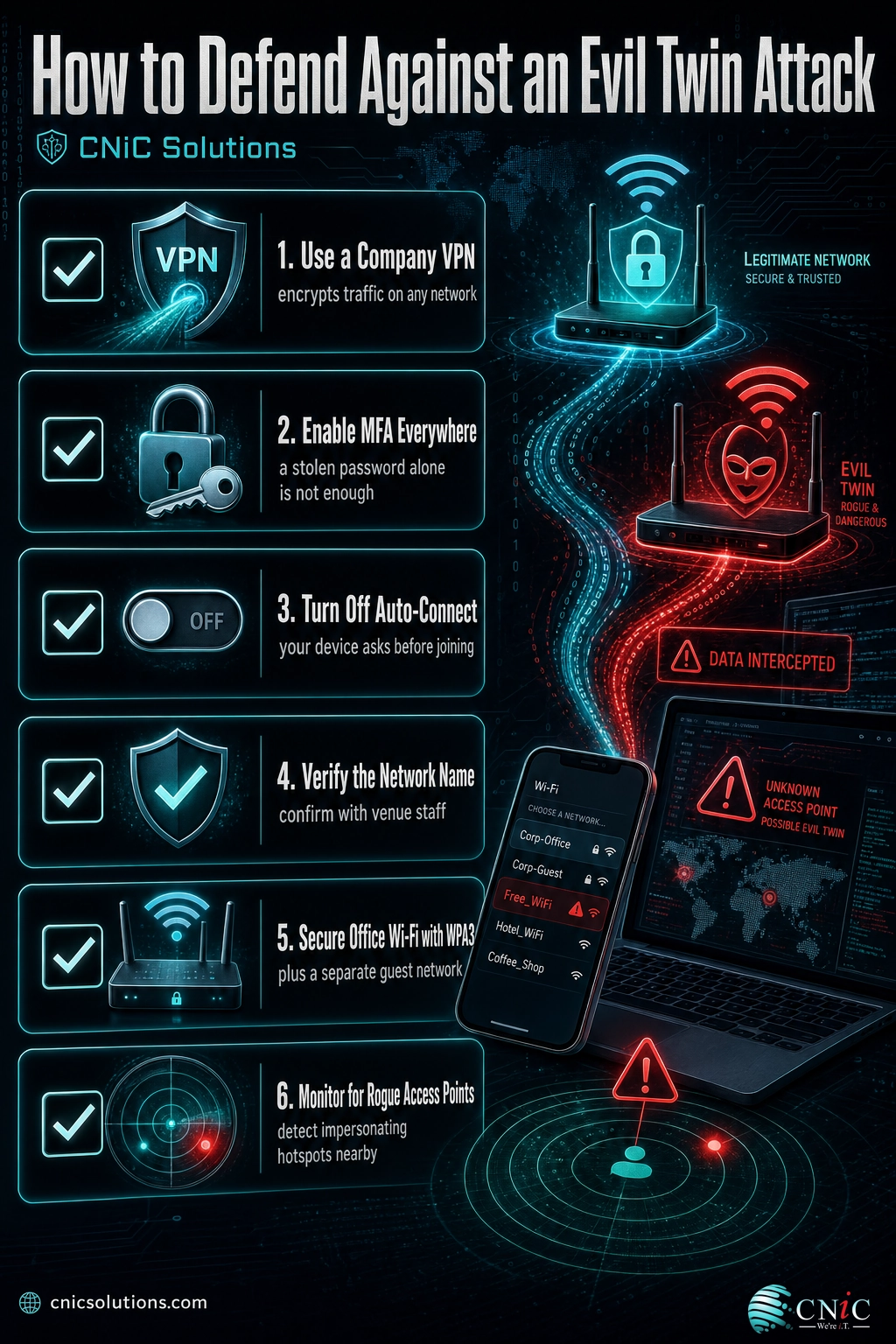
- Require a company VPN. A trustworthy VPN encrypts an employee’s traffic end to end, so even if they land on an evil twin the attacker sees only scrambled data. This is the single most effective control on open networks.
- Enforce multi-factor authentication everywhere. If a password is captured, MFA means the stolen credential alone is not enough to take over the account.
- Turn off auto-connect. Set devices to ask before joining known networks so a phone does not silently jump onto a fake hotspot that shares a name.
- Verify before you trust. Confirm the exact network name with venue staff, and avoid banking or entering credentials on open Wi-Fi unless the connection is protected by a VPN.
Secure the wireless you own
- Use strong encryption. Run office wireless on WPA3, or WPA2 at minimum, so your legitimate network is properly protected and harder to imitate convincingly.
- Separate your guest network. Keep visitor Wi-Fi isolated from the systems that run your business, so a compromised guest device cannot reach sensitive data. A dedicated business network built and segmented properly limits how far any single intrusion can spread.
- Monitor for rogue access points. Wireless monitoring detects unauthorized and impersonating access points broadcasting near your space, which is the only reliable way to catch an evil twin aimed at your team.
- Keep everything current. Access point firmware, device configurations, and security policies drift over time. Consistent patching and configuration management close the gaps attackers look for.
Setting up any one of these controls is straightforward. Keeping all of them configured correctly, updated, and consistent across every laptop, phone, and access point as your team grows is the hard part, and it is where protection quietly erodes. That ongoing discipline is what managed IT and security deliver. A Virtual CIO can fold wireless security, VPN policy, and employee training into a broader strategy rather than leaving each piece to chance.
Get your business Wi-Fi and devices managed and secured
Source: NSA and CISA guidance on securing wireless devices in public | FTC consumer guidance on public Wi-Fi networks
Related Terms
- Rogue access point: Any wireless access point connected to a network without authorization, whether malicious or careless.
- Man-in-the-middle attack: An attack in which someone secretly relays and can alter the traffic between two parties who believe they are communicating directly.
- SSID: The Service Set Identifier, or the broadcast name of a Wi-Fi network, which an evil twin copies to impersonate the real network.
- Deauthentication attack: A technique that forcibly disconnects devices from a network so they reconnect, sometimes to a stronger evil twin nearby.
- Captive portal: The login or splash page some networks show before granting access, which attackers can fake to harvest credentials.
- WPA3: The current Wi-Fi security and encryption standard that protects legitimate wireless networks and the data traveling over them.
- Credential harvesting: Collecting usernames and passwords, often through fake login pages, for later account takeover or fraud.
Frequently Asked Questions
What is an evil twin attack in simple terms?
How is an evil twin different from a rogue access point?
Can an evil twin attack work on a password-protected network?
Does a VPN protect against an evil twin attack?
How can a business protect employees from evil twin attacks?
Protect your business from wireless and network attacks
Sources
The scale figures in this article come from the FBI Internet Crime Complaint Center (IC3) 2024 Internet Crime Report: 859,532 complaints and more than $16.6 billion in reported losses in 2024, a 33 percent increase over the prior year, with personal data breaches among the three most-reported crime types at nearly 65,000 complaints. These figures describe the broader landscape of credential theft, identity theft, and fraud that intercepted data feeds; they are not a count of evil twin incidents specifically. The definition and mechanics of evil twin and rogue access points follow federal wireless security guidance from CISA, the NSA, and NIST. Public Wi-Fi safety recommendations align with FTC consumer guidance. No statistics in this article are estimated or invented.
Primary and authoritative sources: FBI IC3 2024 Internet Crime Report, CISA: Securing Wireless Networks, NSA and CISA: Securing Wireless Devices in Public Settings, NIST SP 800-153: Guidelines for Securing WLANs, FTC: Are Public Wi-Fi Networks Safe?



related posts
What Is Calendar Phishing and How to Prevent It
October 13, 2026Calendar phishing is a scam that hides a malicious link inside a calendar invitation instead of…
What Is BYOD? Bring Your Own Device Explained for Businesses
October 13, 2026BYOD (Bring Your Own Device) is a policy that lets employees use their own personal devices,…
What Is an IP Address? A Plain-English Guide for Business
October 12, 2026An IP address (Internet Protocol address) is a unique number assigned to every device on a…
What Is Allowlisting? How It Works and Why It Matters
October 11, 2026Allowlisting is a security approach that permits only pre-approved applications, files, or connections to run, and…