

Ransomware is malicious software that encrypts your files and locks you out of your own systems until you pay a ransom, and it has become one of the costliest threats a business can face. It showed up in 32% of all data breaches studied in the 2024 Verizon Data Breach Investigations Report, and the average recovery bill, before any ransom is even considered, now runs into the millions. This guide explains what ransomware is, exactly how an attack unfolds, what it really costs, and a clear 7-step plan to stop it.
- What it is: ransomware encrypts your data and holds it hostage, and modern attackers also steal a copy and threaten to leak it (double extortion).
- How it spreads: most attacks start with a phishing email, an unpatched vulnerability, or a compromised remote-access account.
- What it costs: the average recovery cost hit $2.73 million in 2024, with a median ransom of $2 million, and that is on top of downtime losses.
- Paying rarely helps: the FBI does not recommend paying, because it does not guarantee recovery and it funds the next attack.
- How to stop it: layered defense (patching, MFA, email security, EDR, segmentation, and tested offline backups) prevents the vast majority of attacks.
What’s in This Guide
What Is Ransomware?
Ransomware is a type of malware (malicious software) that blocks access to your data or systems, then demands payment to restore it. In most attacks the software encrypts your files so they cannot be opened, then displays a ransom note demanding cryptocurrency in exchange for the decryption key. The U.S. Cybersecurity and Infrastructure Security Agency describes it plainly: ransomware is designed to deny a user or organization access to files on their computer, and criminals then demand a ransom in exchange for restoring that access.
Two things make ransomware different from ordinary malware. First, the damage is immediate and visible: instead of quietly stealing data in the background, ransomware announces itself by shutting your business down. Second, it comes with a business model. Attackers are not looking to vandalize your systems, they are looking to get paid, which is why the whole attack is engineered around pressure, deadlines, and the fear of permanent data loss.
The people behind these attacks range from lone criminals to organized groups that operate like companies, complete with support desks for victims and affiliate programs. That professionalization is a big reason ransomware has grown from a nuisance into a top-tier business risk.
Source: CISA #StopRansomware | FBI ransomware guidance
How a Ransomware Attack Works, Step by Step
A ransomware attack is rarely a single event. It is a sequence, and understanding that sequence is what lets you break it at multiple points. Most attacks move through five stages.
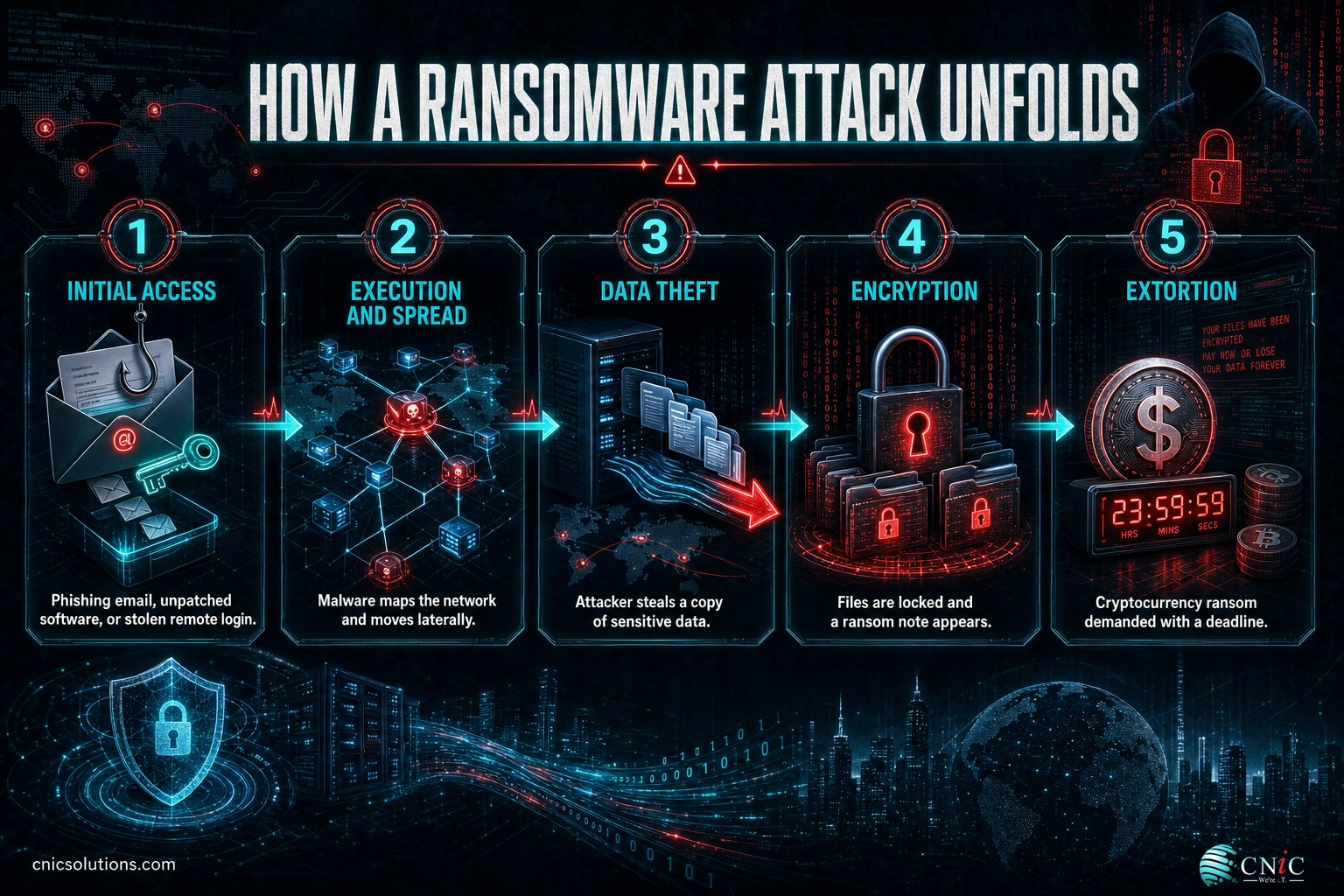
Stage 1: Initial access
The attacker gets a foothold. The three most common doors are a phishing email that tricks someone into clicking a malicious link or attachment, an unpatched vulnerability in software exposed to the internet, and a compromised remote-access account such as Remote Desktop or a VPN login with no multi-factor authentication. Learning to recognize the emails that carry these payloads is a frontline defense, which is why we cover the warning signs of a phishing email in depth.
Stage 2: Execution and spread
Once inside, the malware runs and quietly expands. It maps the network, escalates privileges, and moves laterally from the first machine toward servers, backups, and shared drives. Attackers frequently sit undetected for days or weeks during this stage, which is exactly when good detection tools can catch them.
Stage 3: Data theft (exfiltration)
Before locking anything, most modern groups copy your sensitive data out of the network. This gives them a second point of pressure: even if you restore from backups, they can threaten to publish the stolen files. This tactic is called double extortion, and it is now the norm rather than the exception.
Stage 4: Encryption
The attacker triggers the encryption payload, often after hours or over a weekend to slow your response. Files across local drives, attached storage, and networked computers become unusable, and a ransom note appears with payment instructions and a countdown.
Stage 5: Extortion and ransom demand
The demand lands. Payment is almost always requested in hard-to-trace cryptocurrency, and the amount is often tuned to what the attacker thinks your business can pay. Refuse, and they threaten permanent deletion of the key or a public leak of your data. Pay, and there is still no guarantee you get everything back.
Source: CISA #StopRansomware Guide | FBI ransomware guidance
The Main Types of Ransomware
“Ransomware” is an umbrella term. Knowing the variants helps you understand what you are defending against and why a single tool is never enough.
| Type | What it does | Why it matters |
|---|---|---|
| Crypto ransomware | Encrypts your files so they cannot be opened without a key. | The most common type. Good backups are the primary defense. |
| Locker ransomware | Locks you out of the entire device or operating system, not just files. | Blocks all access, often used against point-of-sale and kiosk systems. |
| Double extortion | Steals a copy of your data before encrypting, then threatens to leak it. | Backups alone will not stop the leak threat, so prevention matters more. |
| Ransomware-as-a-Service (RaaS) | Criminal developers rent their ransomware to affiliates for a cut. | Lowers the skill needed to attack, which multiplies the number of attackers. |
| Wiper (fake ransomware) | Looks like ransomware but destroys data with no real way to recover it. | Paying is pointless. Only tested backups protect you. |
The FBI’s most recent Internet Crime Report named LockBit, ALPHV/BlackCat, Akira, Royal, and Black Basta among the ransomware variants most often reported against critical-infrastructure organizations, a reminder that these are active, named operations, not abstract risks.
Source: FBI IC3 2023 Internet Crime Report
What a Ransomware Attack Really Costs
The ransom is only part of the bill, and often not the biggest part. Downtime, recovery labor, lost business, legal and notification costs, and higher insurance premiums all stack up. The industry benchmarks make the scale clear.
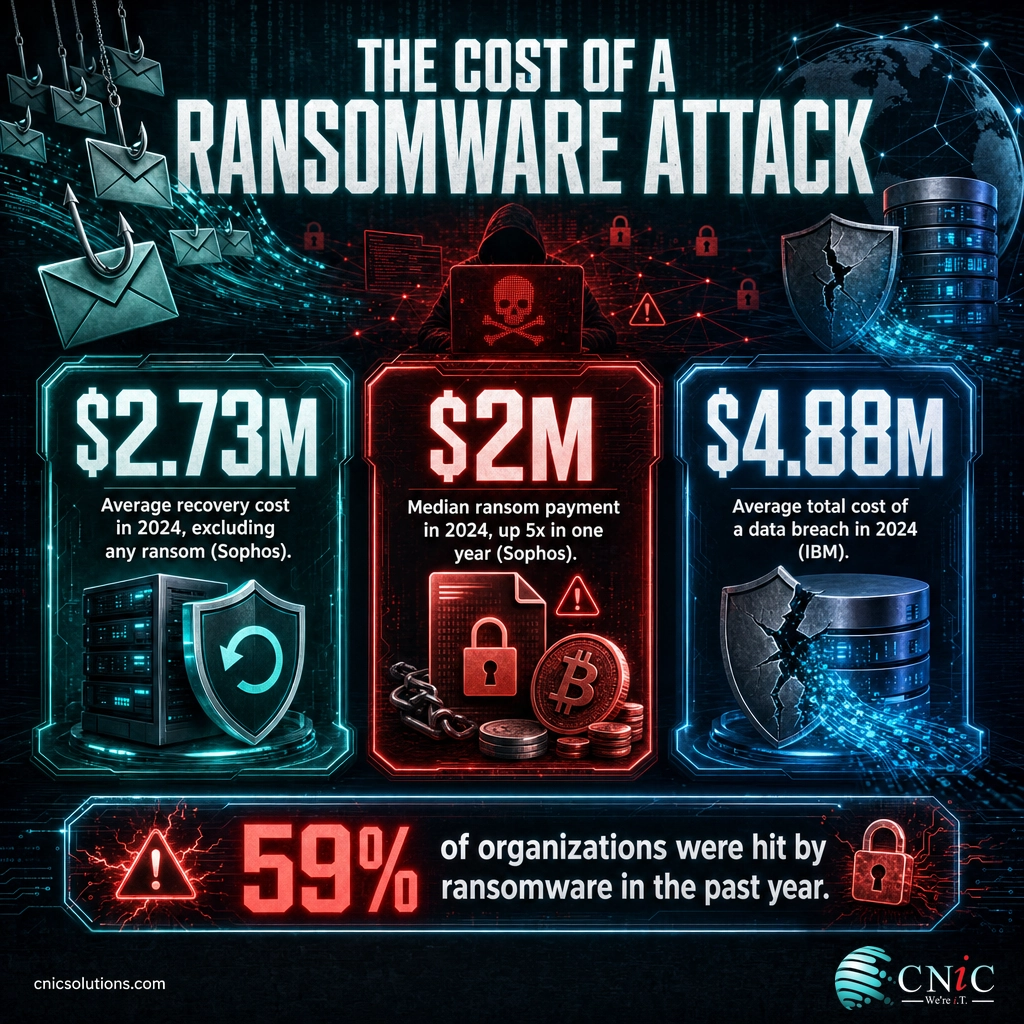
The Cost of a Ransomware Attack (2024 benchmarks)
Sources: Sophos State of Ransomware 2024 (ransom and recovery); IBM Cost of a Data Breach 2024 (overall breach cost).
Two numbers deserve extra attention. First, 59% of organizations surveyed by Sophos were hit by ransomware in the prior year, so this is a when-not-if risk. Second, the overall average cost of a data breach reached $4.88 million in IBM’s 2024 study, its highest level ever. For a small or midsize business, an incident of that size is not just an IT problem, it is an existential one. If you want the full picture, our roundup of current ransomware statistics breaks the trends down further, and the pattern of ransomware attacks hitting Texas businesses shows how local these threats have become.
The takeaway is simple: the cost of prevention is a rounding error next to the cost of recovery, and reliable, isolated backups are the single control that lets you recover without paying.
Explore Backup & Disaster Recovery
Source: Sophos State of Ransomware 2024 | IBM Cost of a Data Breach 2024
How to Stop Ransomware: A 7-Step Plan
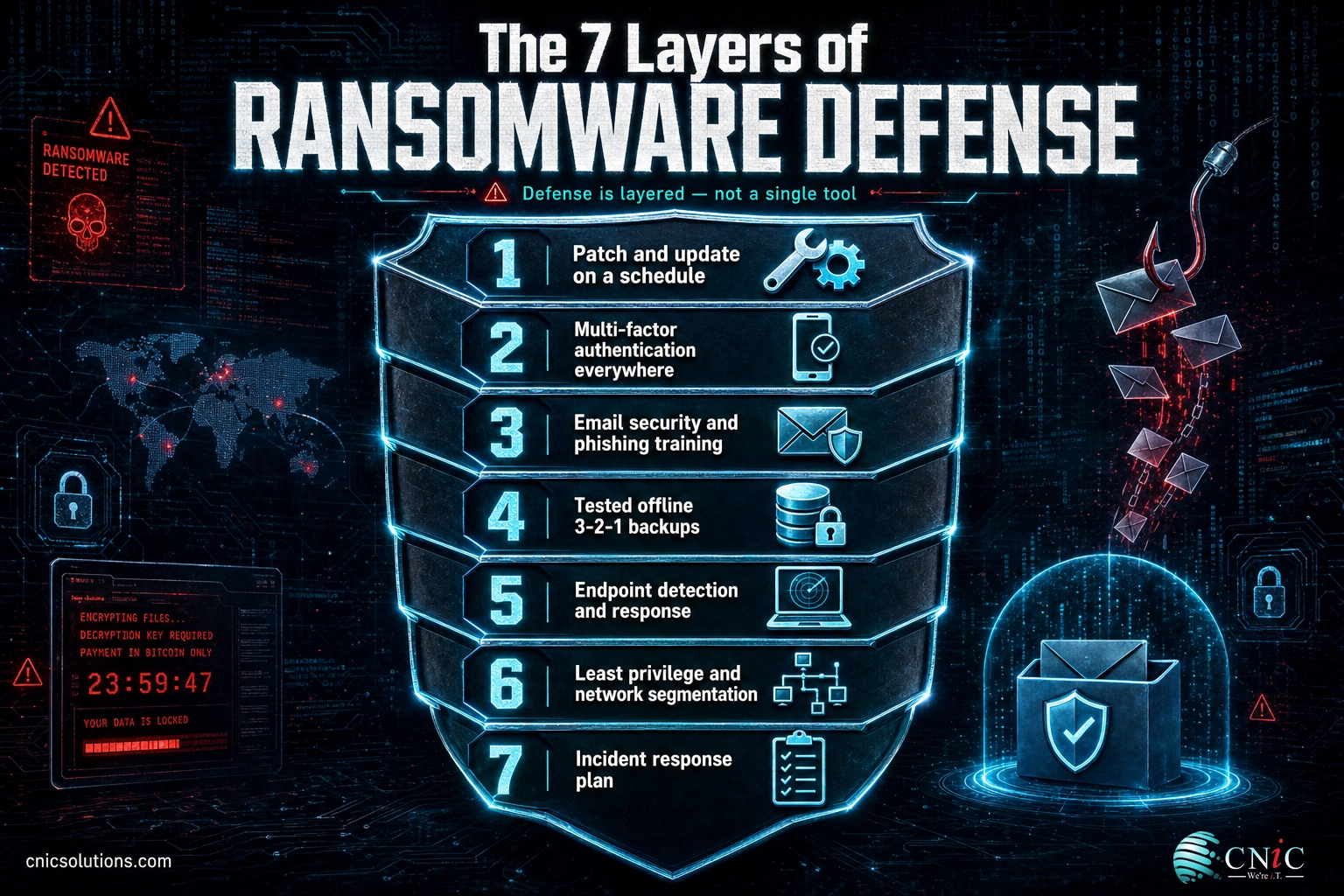
No single product stops ransomware. Effective defense is layered, so that when one control fails, another catches the attack. The seven steps below map directly to the guidance published by CISA and the FBI, ordered from the highest-impact, lowest-cost actions to the more involved ones.
Before you begin: you will get the most out of this plan if you first know what you are protecting. Take an inventory of your critical data, the systems that run your business, and every point where the internet touches your network (email, remote access, and public-facing servers). A cybersecurity risk assessment is the fastest way to build that inventory. Estimated effort: an initial hardening pass takes a focused week, then it becomes ongoing maintenance.
1 Patch and update everything on a schedule
What to do: keep operating systems, browsers, firmware, and third-party applications current. Turn on automatic updates where you can, and keep a list of anything that cannot auto-update so it gets patched manually.
Why it matters: unpatched vulnerabilities are one of the top ways attackers get in. Closing them removes the easy doors.
What success looks like: critical security patches are applied within days of release, and no internet-facing system is running unsupported software.
2 Turn on multi-factor authentication everywhere
What to do: require multi-factor authentication (MFA) on email, VPN, remote desktop, cloud applications, and especially administrator accounts.
Why it matters: MFA means a stolen or guessed password is not enough on its own to open your network. It is one of the single most effective controls you can deploy.
What success looks like: every account that can reach company data requires a second factor, with no exceptions for convenience.
3 Harden email and train people to spot phishing
What to do: filter malicious links and attachments at the email gateway, and run short, regular phishing-awareness training so staff know what a threat looks like.
Why it matters: phishing is the most common delivery method for ransomware. Your people are a control, not just a target.
What success looks like: staff report suspicious emails instead of clicking them, and simulated phishing click rates drop over time.
Myth to bust: “We’re too small to be a target.” The opposite is true. Attackers automate their hunt for easy prey, and small and midsize businesses are attractive precisely because they tend to have weaker defenses and fewer staff watching for trouble. Ransomware-as-a-Service has made attacking a small company cheap and scalable, so size is no protection.
4 Keep tested, offline backups using the 3-2-1 rule
What to do: keep three copies of your data on two different types of media, with at least one copy stored offline or in immutable (unchangeable) storage that ransomware cannot reach. Then test your restores on a schedule.
Why it matters: backups are what let you recover without paying a ransom. But attackers now hunt for and delete connected backups first, so an offline or immutable copy is essential. An untested backup is a guess, not a plan.
What success looks like: you have restored a real file from backup in the last quarter and know exactly how long a full recovery takes. For businesses that need guaranteed recovery times, disaster recovery as a service keeps a warm copy ready to spin up.
5 Deploy endpoint detection and response (EDR)
What to do: replace or supplement basic antivirus with endpoint detection and response, or a managed version of it, that watches for ransomware behavior and can isolate a device automatically.
Why it matters: modern ransomware routinely slips past traditional antivirus. EDR catches the behavior (mass file encryption, suspicious lateral movement) rather than relying on a known signature.
What success looks like: a suspicious process on one laptop is flagged and contained before it reaches a server.
6 Limit access and segment the network
What to do: give each user and system only the access they need (least privilege), remove local administrator rights where they are not required, and divide the network into segments so a breach in one area cannot reach everything.
Why it matters: this is what turns a single infected machine into a contained incident instead of a company-wide shutdown.
What success looks like: an attacker who compromises one workstation cannot automatically reach your finance systems or backups.
7 Write and rehearse an incident response plan
What to do: document who does what during an attack, store contact details and recovery steps offline (you will not be able to open a file on an encrypted network), and rehearse the plan with a tabletop exercise at least once a year.
Why it matters: the businesses that recover fastest are the ones that decided how to respond before the attack, not during it.
What success looks like: your team can name the first three actions to take in a ransomware incident without looking them up.
These steps work together as a system. For a broader foundation beyond ransomware specifically, our guide to essential cybersecurity measures for small businesses covers the wider set of controls every company should have in place.
Source: CISA #StopRansomware | CISA #StopRansomware Guide
When to Call a Professional
If you reach the point where you are unsure whether your backups are truly isolated, whether MFA covers every account, or whether an alert you are seeing is the early sign of an attack, that is the moment to bring in help. Most small and midsize businesses do not have a full-time security team, and ransomware groups count on that gap. A managed security provider closes it by monitoring your systems around the clock, keeping defenses current, and having a response plan ready before anything goes wrong. If you want senior security strategy without hiring a full-time executive, a virtual CIO can build and own your ransomware defense roadmap.
What to Do If You’re Already Infected
If ransomware is spreading right now, the order of your actions matters. Move quickly, but do not pay the ransom as a first move.
| Problem | What to do |
|---|---|
| The infection is still spreading | Isolate affected devices immediately: disconnect from the network and Wi-Fi, but do not power them off, since that can destroy evidence and data still in memory. |
| You don’t know how bad it is | Identify the scope. Determine which systems and backups are affected before you start recovery, so you do not reinfect a clean system. |
| You’re tempted to pay | Pause. Report the attack to the FBI and CISA first. They can sometimes help, may have a free decryptor, and payment does not guarantee recovery. |
| You need your data back | Restore from a clean, offline backup after the threat is fully removed. This is why tested backups are step four of prevention. |
| You’re not sure it’s fully gone | Bring in professional incident response. Attackers often leave a way back in, and a rushed cleanup invites a repeat attack. |
Do not pay the ransom on impulse. The FBI does not support paying, because payment does not guarantee you get your files back, it emboldens attackers to target more victims, and it may fund criminal or sanctioned groups. Report the incident at the FBI’s Internet Crime Complaint Center and to CISA, and lean on your backups and response plan instead.
Source: CISA #StopRansomware | FBI Internet Crime Complaint Center
Keep Your Defenses Current
Ransomware defense is not a project you finish, it is a practice you maintain. Attackers change tactics constantly, so the controls that protect you this quarter need review next quarter. A healthy program keeps patching on schedule, revisits who has access to what, tests backups and restores regularly, retrains staff as new phishing tricks appear, and rehearses the incident response plan so it stays sharp.
That ongoing discipline is exactly where a managed IT and security partner earns its keep. Instead of hoping nothing slips, you get continuous monitoring, routine testing, and a team whose job is to stay ahead of the threat. To see the full stack of controls in context, start with our overview of how to master cybersecurity basics, then layer ransomware-specific defenses on top.
Frequently Asked Questions
What is ransomware in simple terms?
Should you pay the ransom?
How does ransomware usually get into a business?
How much does a ransomware attack cost?
Can antivirus alone stop ransomware?
Sources & Methodology
This guide draws on primary cybersecurity sources and industry benchmark reports. Figures are current as of each source’s most recent publication at the time of writing.
- Verizon 2024 Data Breach Investigations Report: extortion and ransomware share of breaches (32%).
- Sophos, The State of Ransomware 2024: recovery costs ($2.73M), median ransom ($2M), and attack rate (59%).
- IBM Cost of a Data Breach 2024: average total breach cost ($4.88M).
- FBI IC3 2023 Internet Crime Report: reported ransomware variants and complaint data.
- CISA #StopRansomware and the #StopRansomware Guide: definitions and defensive guidance.



related posts
What Is Root Cause Analysis (RCA)? A Guide to Solving IT Problems…
October 27, 2026Root cause analysis (RCA) is a structured way to find the true underlying cause of a…
What Is Privileged Access Management (PAM)? A Guide for Businesses
October 26, 2026Privileged access management (PAM) is a set of cybersecurity tools and practices that control, secure, and…
What Is RAID? RAID Levels and How They Protect Your Data
October 26, 2026RAID (Redundant Array of Independent Disks) is a technology that combines multiple physical drives into a…
What Is Network Penetration Testing? Types and Process
October 25, 2026Network penetration testing is a controlled, authorized simulation of a real cyberattack on your network, run…