

RAID (Redundant Array of Independent Disks) is a technology that combines multiple physical drives into a single logical unit, spreading or copying data across them. Depending on the level you choose, it keeps your data available and your systems running when a drive fails, and it can also improve storage performance.
Every hard drive and SSD eventually fails. The only real question is whether that failure quietly takes your data and your business offline with it. RAID is the storage design that answers that question. By using several drives together instead of relying on one, RAID lets a server survive a dead drive without losing a byte or missing a beat. This guide explains what RAID is, walks through the RAID levels you will actually encounter, shows how each one protects your data, and clears up the single most dangerous misconception about it.
Key Takeaways
- RAID combines multiple drives into one logical unit, so a single drive failure does not have to mean data loss or downtime.
- Different RAID levels make different trade-offs between speed, usable capacity, and how many drives can fail before data is lost.
- RAID 1, 5, 6, and 10 are redundant; RAID 0 is not, and offers speed with zero protection.
- The most important rule: RAID is not a backup. It protects against hardware failure, not deletion, ransomware, corruption, fire, or theft.
- The right level depends on your workload, and a redundant array still needs monitoring, spare drives, and a real backup strategy behind it.
What’s in This Guide
How RAID Works
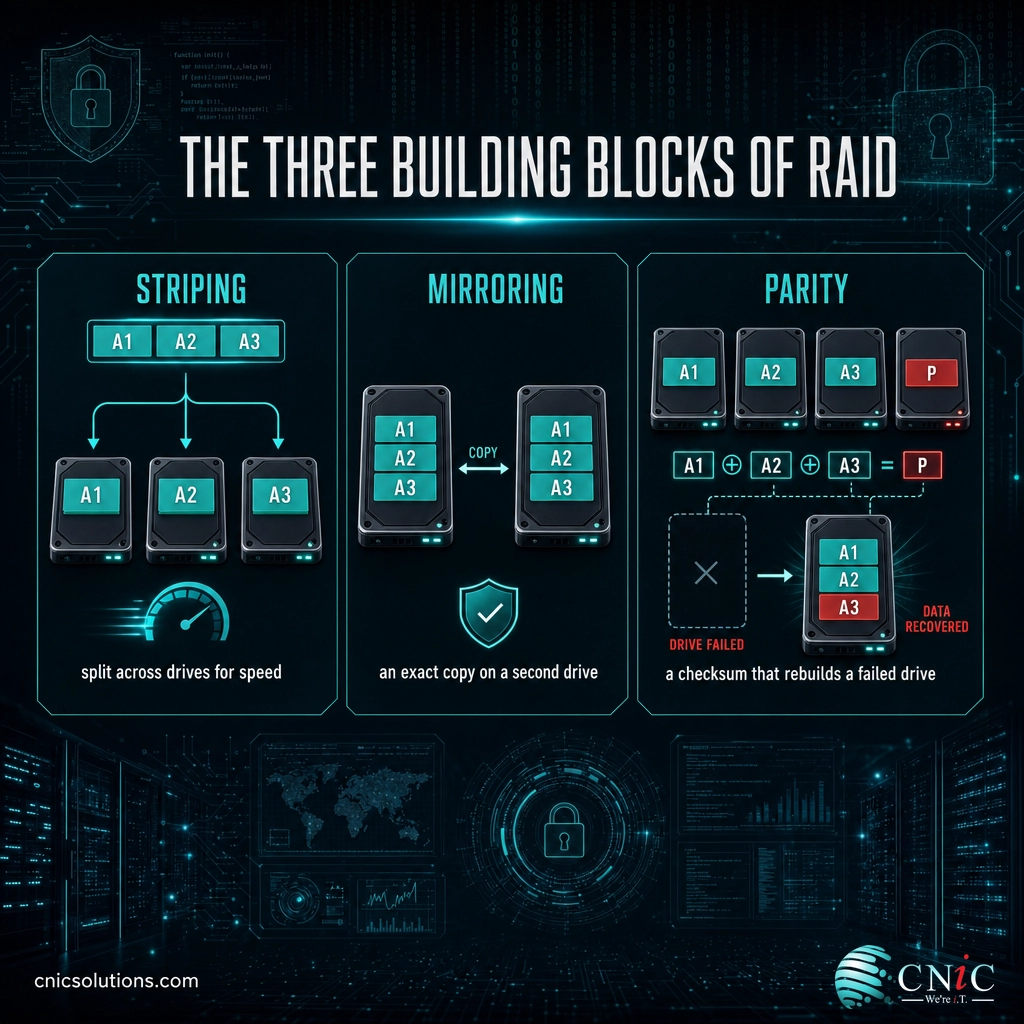
RAID takes two or more physical drives and presents them to your server or computer as one drive. Behind that single logical unit, a RAID controller decides how your data is arranged across the physical disks. Three techniques do all the work, and every RAID level is just a recipe that mixes them.
- Striping splits data into blocks and writes those blocks across several drives at once. Because multiple drives read and write in parallel, striping is fast, but on its own it adds no protection.
- Mirroring writes an identical copy of your data to a second drive. If one drive dies, its twin already holds a complete copy, so nothing is lost.
- Parity is a mathematical checksum calculated from your data and stored alongside it. If a drive fails, the controller uses the parity information plus the surviving data to reconstruct exactly what was lost.
A simple analogy: imagine a filing system spread across several identical cabinets. Striping is filing one page in each cabinet so a team can grab pages simultaneously. Mirroring is keeping a second, complete set of cabinets as a duplicate. Parity is keeping a clever index that, if any one cabinet burns down, lets you rebuild every missing page from the cabinets that remain. RAID levels differ only in how aggressively they use these three ideas, and that choice decides how fast the array is, how much usable space you get, and how many drives can fail before you are in trouble.
Source: SNIA: Berkeley RAID Levels | UC Berkeley: A Case for Redundant Arrays of Inexpensive Disks
RAID vs. Backup: The Most Important Distinction
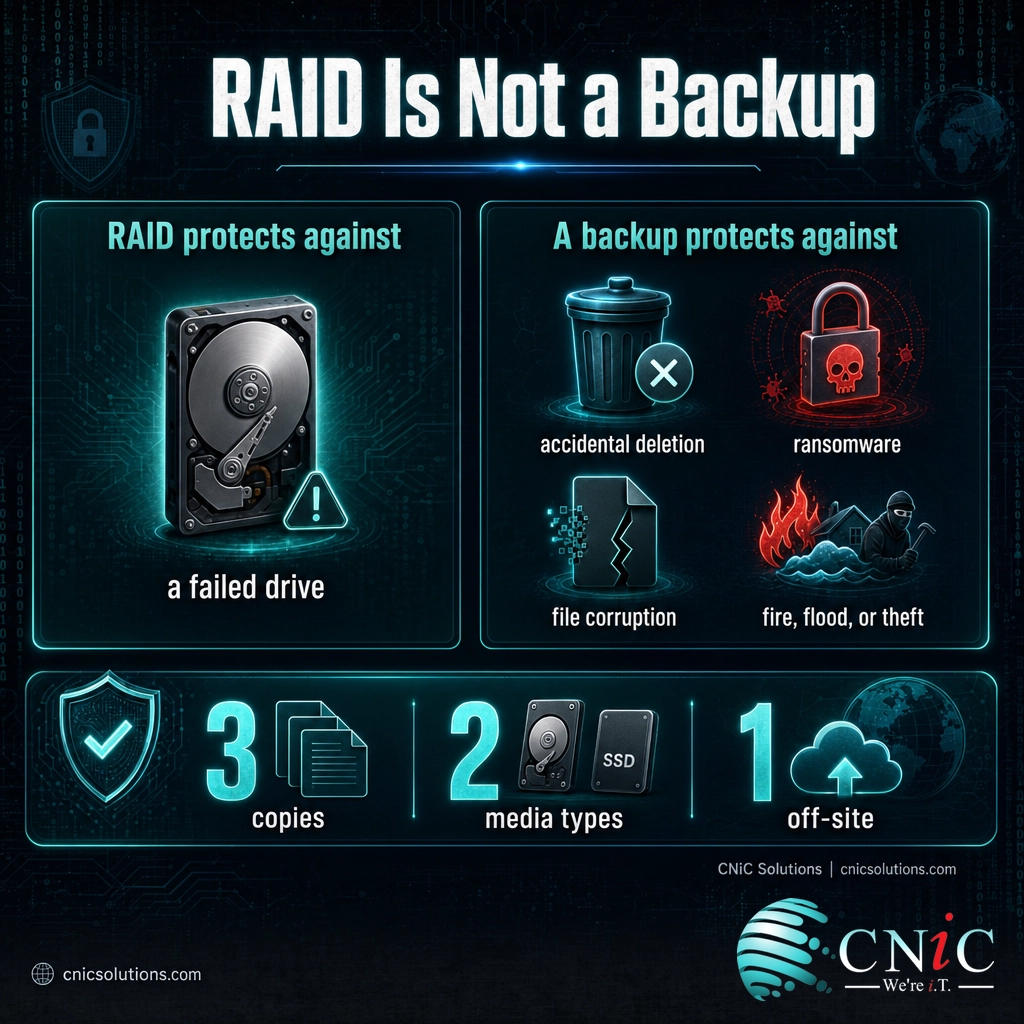
Before any discussion of levels, one point matters more than all the others, because getting it wrong has cost businesses everything: RAID is not a backup. The two solve completely different problems, and the confusion between them is the single most common and most damaging misconception in data storage.
RAID protects against one specific event: a physical drive failing. That is genuinely valuable, because drives fail constantly. But most data loss does not come from a drive dying. It comes from someone deleting the wrong folder, a ransomware attack encrypting your files, an application corrupting a database, or a fire, flood, or theft affecting the whole machine. In every one of those cases, RAID faithfully copies the problem across all its drives instantly. A deleted file is deleted on the mirror too. Ransomware encrypts the striped data and the parity alike.
| Question | RAID | Backup |
|---|---|---|
| Protects against a failed drive? | Yes (except RAID 0) | Yes, by restoring from a copy |
| Protects against deletion or ransomware? | No, it copies the change instantly | Yes, restore an earlier version |
| Protects against fire, flood, or theft? | No, all drives are in one place | Yes, if a copy is kept off-site |
| Keeps systems running during a failure? | Yes, that is its main job | No, recovery takes time |
| Recovers a file from last week? | No, only the current state | Yes, that is its main job |
Myth: “We run RAID, so our data is backed up.”
RAID keeps your systems available when a drive fails. It does nothing when a file is deleted, encrypted by ransomware, or lost to fire or theft, because those events hit every drive in the array at the same instant. A real strategy uses RAID for uptime and a separate backup for recovery. The widely used benchmark is the CISA-recommended 3-2-1 rule: keep three copies of your data, on two different types of media, with one copy stored off-site. RAID is not any of those three copies.
Set up real backup and disaster recovery for your business
Source: CISA: Data Backup Options
The Main RAID Levels Explained
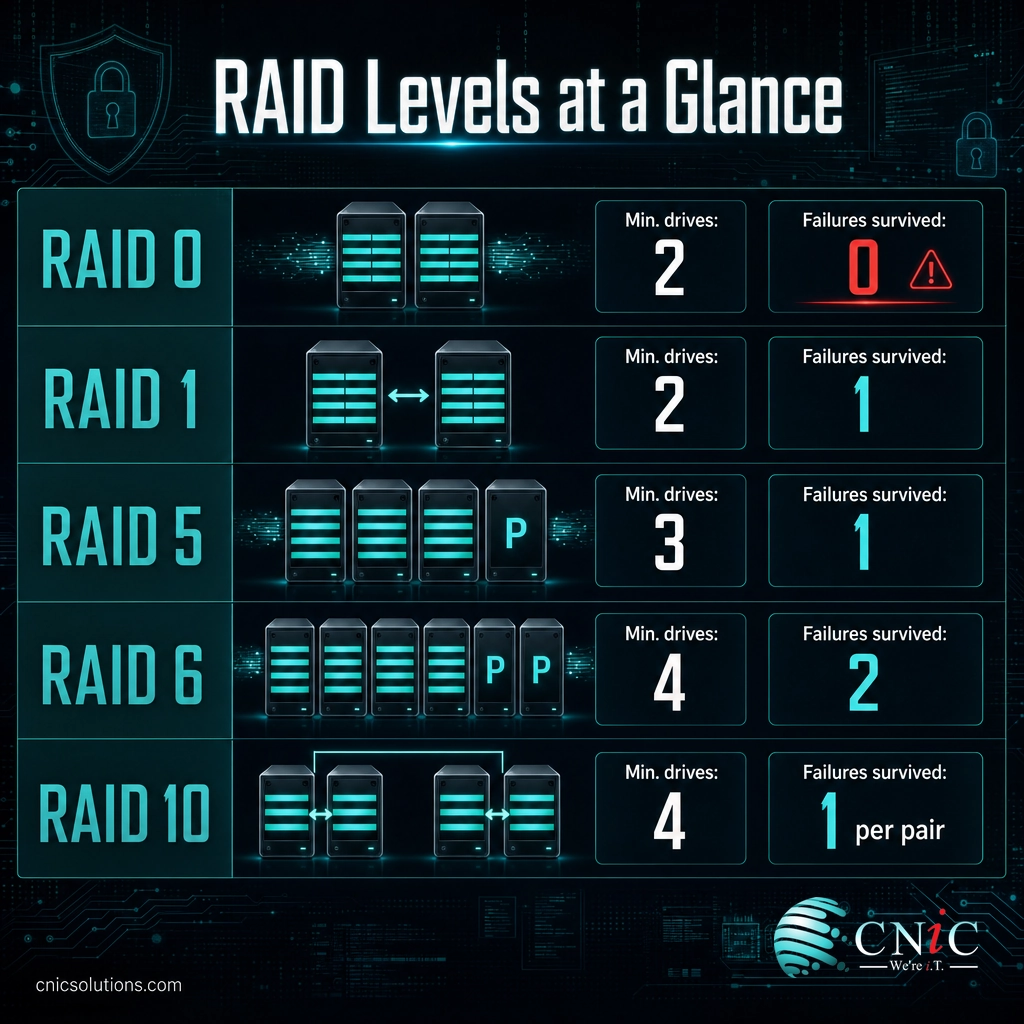
The RAID levels were first defined in 1988 by researchers at the University of California, Berkeley, and the common configurations have since been standardized by the Storage Networking Industry Association. You will run into five of them in practice. Each one is a specific mix of striping, mirroring, and parity, and each makes a clear trade between speed, usable capacity, and fault tolerance.
| Level | Technique | Min. drives | Drive failures survived | Usable capacity | Best suited for |
|---|---|---|---|---|---|
| RAID 0 | Striping only | 2 | 0 | 100% | Speed-critical scratch data with no lasting value |
| RAID 1 | Mirroring | 2 | 1 (of the pair) | 50% | Boot drives, small servers, simple redundancy |
| RAID 5 | Striping + single parity | 3 | 1 | 67% to 94% | General file and application servers |
| RAID 6 | Striping + double parity | 4 | 2 | 50% to 88% | Large arrays and archives needing strong protection |
| RAID 10 | Mirroring + striping | 4 | 1 per mirror set | 50% | Databases and high-traffic, performance-critical workloads |
RAID 0 (Striping): Speed, No Safety Net
RAID 0 stripes data across all its drives for maximum speed and uses 100% of your total capacity, but it stores no redundancy at all. If any single drive fails, the entire array is lost. Worse, adding more drives increases the odds that one will fail. RAID 0 is only appropriate for temporary data you can afford to lose instantly, such as video-editing scratch space. It is the one common level that offers no protection whatsoever, which is why it is misleading that it carries the RAID name at all.
RAID 1 (Mirroring): The Simple Safe Choice
RAID 1 writes the same data to two drives at once. If one fails, the other has a full copy and the system keeps running. It is simple, reliable, and fast to recover, but you only get to use half your total capacity, since every gigabyte is stored twice. RAID 1 is a common, sensible choice for the boot drives of a server or for smaller systems where two drives are enough.
RAID 5 (Striping With Parity): The Popular Balance
RAID 5 stripes data across three or more drives and distributes parity information among them. It survives any single drive failure by rebuilding the lost data from parity, while using more of your capacity than mirroring does. With three drives you keep two-thirds of the space; with more drives you keep even more. This balance of usable capacity and protection made RAID 5 the workhorse of general-purpose servers for years. Its main caution is that on very large drives, rebuilding after a failure can take a long time, during which a second failure would be fatal.
RAID 6 (Double Parity): Protection at Scale
RAID 6 works like RAID 5 but stores two independent sets of parity, so it can survive two simultaneous drive failures. That extra safety margin matters most in large arrays, where the long rebuild time after one failure creates a real window for a second. You trade a bit more capacity for that protection, and RAID 6 has become the standard for sizable storage where losing the data is not an option.
RAID 10 (Mirror + Stripe): Speed and Redundancy Together
RAID 10, also written RAID 1+0, mirrors your data and then stripes across those mirrors, combining the speed of striping with the redundancy of mirroring. It needs at least four drives and gives you half your capacity, but it delivers excellent performance and fast rebuilds, and it can survive multiple drive failures as long as no single mirrored pair loses both drives. This makes RAID 10 the preferred choice for databases and other demanding workloads where both speed and safety are non-negotiable.
Source: SNIA: Berkeley RAID Levels | Computer History Museum: U.C. Berkeley RAID paper

Why RAID Matters for Your Business
For a business, the value of RAID is not academic. It is the difference between a failed drive being a routine, planned swap and a failed drive being an emergency that shuts down operations. Three points make the case.
Uptime and business continuity. A redundant RAID level lets a server keep running through a drive failure with no downtime and no lost work. Staff keep working, customers keep being served, and the failed drive is replaced on your schedule rather than in a panic. For any system your business depends on hour to hour, that continuity is the whole point.
Performance. Because striping spreads reads and writes across several drives working in parallel, the right RAID level can meaningfully speed up storage-heavy workloads such as databases, virtual machines, and shared file servers. Protection and performance are not always a trade-off; levels like RAID 10 deliver both.
Predictable, planned maintenance. Drives are consumable parts with a limited lifespan. RAID turns their inevitable failure from a crisis into routine maintenance, especially when paired with a hot spare that the array can rebuild onto automatically the moment a drive dies.
Usable Capacity in a Four-Drive Array of Identical Disks
The pattern is clear: the more protection a level provides, the more raw capacity you give up to redundancy. That trade-off, not any single “best” level, is what makes choosing the right configuration a business decision rather than a purely technical one.
Source: SNIA: Berkeley RAID Levels
Hardware RAID vs. Software RAID
RAID can be implemented in two ways, and the distinction affects cost, performance, and management.
Hardware RAID uses a dedicated controller card with its own processor to manage the array independently of the operating system. It typically delivers better performance for demanding, parity-based levels, offloads the work from your server’s main CPU, and often includes a battery-backed cache to protect writes during a power loss. The trade-offs are added cost and a dependency on the controller itself, which should be documented so a compatible replacement can be found if it ever fails.
Software RAID is built into the operating system (such as Windows Storage Spaces or Linux mdadm) and uses the server’s own CPU to manage the array. It is lower cost and more flexible, and modern hardware handles it well for many workloads, though very heavy parity calculations can add CPU load. For most small and midsize business servers, either approach can be sound. The right choice depends on the workload, the level you need, and how the rest of your infrastructure is managed.
How to Choose a RAID Level and Get Started
You do not need to memorize parity math to make a good decision. You need to match the level to what the data is for. A practical way to think about it:
- Databases and performance-critical systems: RAID 10, for its speed and strong redundancy.
- General file and application servers: RAID 5 or RAID 6, balancing usable capacity against protection, with RAID 6 preferred as drive sizes grow.
- Large storage, archives, and backup targets: RAID 6, for its ability to survive two failures during long rebuilds.
- Boot drives and simple two-drive redundancy: RAID 1.
- Temporary scratch data you can lose: RAID 0, and nothing you actually care about.
Choosing the level is only the start. A RAID array has to be monitored so a failed drive is noticed and replaced quickly rather than sitting silently until a second drive fails. It needs compatible spare drives on hand, a documented controller configuration, and periodic checks that rebuilds actually work. Most damaging of all is treating RAID as the finish line for data protection when it is really the floor. A sound setup pairs the right RAID level with a genuine backup and disaster recovery plan, and increasingly with resilient cloud storage and infrastructure as well.
This is exactly the kind of ongoing oversight that managed IT and infrastructure services exist to provide: designing the array around your workload, monitoring drive health, handling replacements before a small problem becomes data loss, and making sure a real backup strategy sits behind it. A Virtual CIO can also weigh these storage decisions against your budget and growth plans rather than leaving them to a one-time setup.
Get your storage and IT infrastructure professionally managed
Talk to a managed IT provider about your servers and storage
Related Terms
- Striping: Splitting data into blocks written across multiple drives at once for parallel speed.
- Mirroring: Writing an identical copy of data to a second drive for redundancy.
- Parity: A calculated checksum that lets a controller reconstruct data from a failed drive.
- Fault tolerance: The number of drives that can fail before the array loses data.
- Hot spare: A standby drive the array rebuilds onto automatically when a drive fails.
- Rebuild: The process of recreating a failed drive’s data onto its replacement.
- RAID controller: The hardware or software that manages how data is arranged across the drives.
- JBOD: “Just a Bunch of Disks,” multiple drives used individually with no RAID protection.
Frequently Asked Questions
What is RAID in simple terms?
Is RAID a backup?
Which RAID level is best for a business?
How many drives does RAID need?
What happens when a drive fails in a RAID array?
Sources
This explainer anchors its technical claims to primary and standards-based sources. The origin of RAID and its levels follows the 1988 University of California, Berkeley paper by Patterson, Gibson, and Katz. The definitions and standardization of the Berkeley RAID levels, including minimum drives, fault tolerance, and usable capacity, follow the Storage Networking Industry Association. Backup best practice and the 3-2-1 rule reflect CISA guidance. Usable-capacity figures are the standard results of each level’s data layout for identical drives.
Primary and authoritative sources: UC Berkeley, A Case for Redundant Arrays of Inexpensive Disks, SNIA Berkeley RAID Levels, Computer History Museum, CISA Back Up Business Data.



related posts
What Is Privileged Access Management (PAM)? A Guide for Businesses
October 26, 2026Privileged access management (PAM) is a set of cybersecurity tools and practices that control, secure, and…
What Is Network Penetration Testing? Types and Process
October 25, 2026Network penetration testing is a controlled, authorized simulation of a real cyberattack on your network, run…
What Is NIST Compliance? Frameworks, Requirements, and Who Needs It
October 25, 2026NIST compliance means aligning your organization's security program with the cybersecurity standards published by the National…
What Is MFA? How Multi-Factor Authentication Protects Your Accounts
October 24, 2026Multi-factor authentication (MFA) is a security method that requires two or more separate proofs of identity…