

Privileged access management (PAM) is a set of cybersecurity tools and practices that control, secure, and monitor the accounts with elevated permissions in your systems, such as administrators, IT staff, and service accounts. PAM vaults those credentials, enforces least privilege, and records privileged sessions so a single stolen admin login cannot compromise the whole business.
If an attacker steals a regular employee’s password, they get one desk. If they steal an administrator’s password, they get the building. Privileged accounts are the “keys to the kingdom,” and they are exactly what modern attacks are built to reach. Privileged access management is how you keep those keys locked up, handed out only when needed, and watched every time they are used.
- PAM protects your most powerful accounts. It secures admin, root, and service accounts, the logins that can change anything or reach everything.
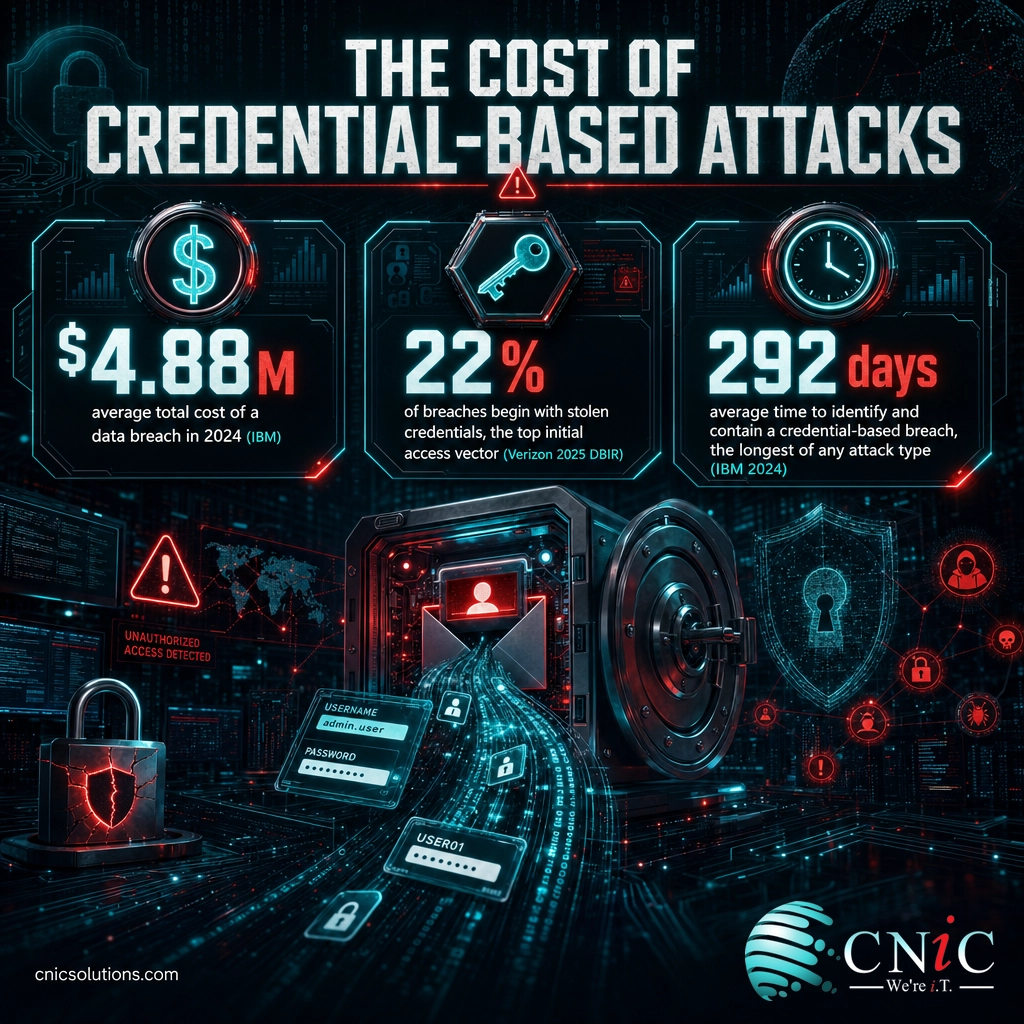
- Stolen credentials are the number-one way breaches start. Verizon’s 2025 report ties 22% of breaches to stolen credentials, and IBM found credential-based breaches take the longest to contain.
- PAM is not the same as IAM. IAM manages access for everyone; PAM is the tighter layer that governs privileged accounts specifically.
- Core controls are simple to name. Vault credentials, enforce least privilege, add MFA, and record privileged sessions.
- It is now an insurance and compliance expectation. Carriers require MFA on admin accounts, and SOC 2, HIPAA, and PCI DSS all expect privileged access to be controlled.
- Small businesses need it too. A lightweight PAM approach materially lowers the odds that one stolen login becomes a full breach.
What’s in This Guide
How Privileged Access Management Works
Every business runs on a small number of accounts that can do almost anything: reset passwords, install software, change security settings, reach financial and customer records, and shut systems down. These are privileged accounts. PAM works by treating those accounts as high-value assets that never sit unlocked and never go unwatched.
In plain terms, think of PAM as a hotel front desk for your most sensitive rooms. Nobody keeps a master key in their pocket. When a housekeeper needs to enter a room, the desk issues a key that works for that room, for that shift, and logs who took it. When the shift ends, the key stops working. PAM does the same thing for administrator and service accounts.
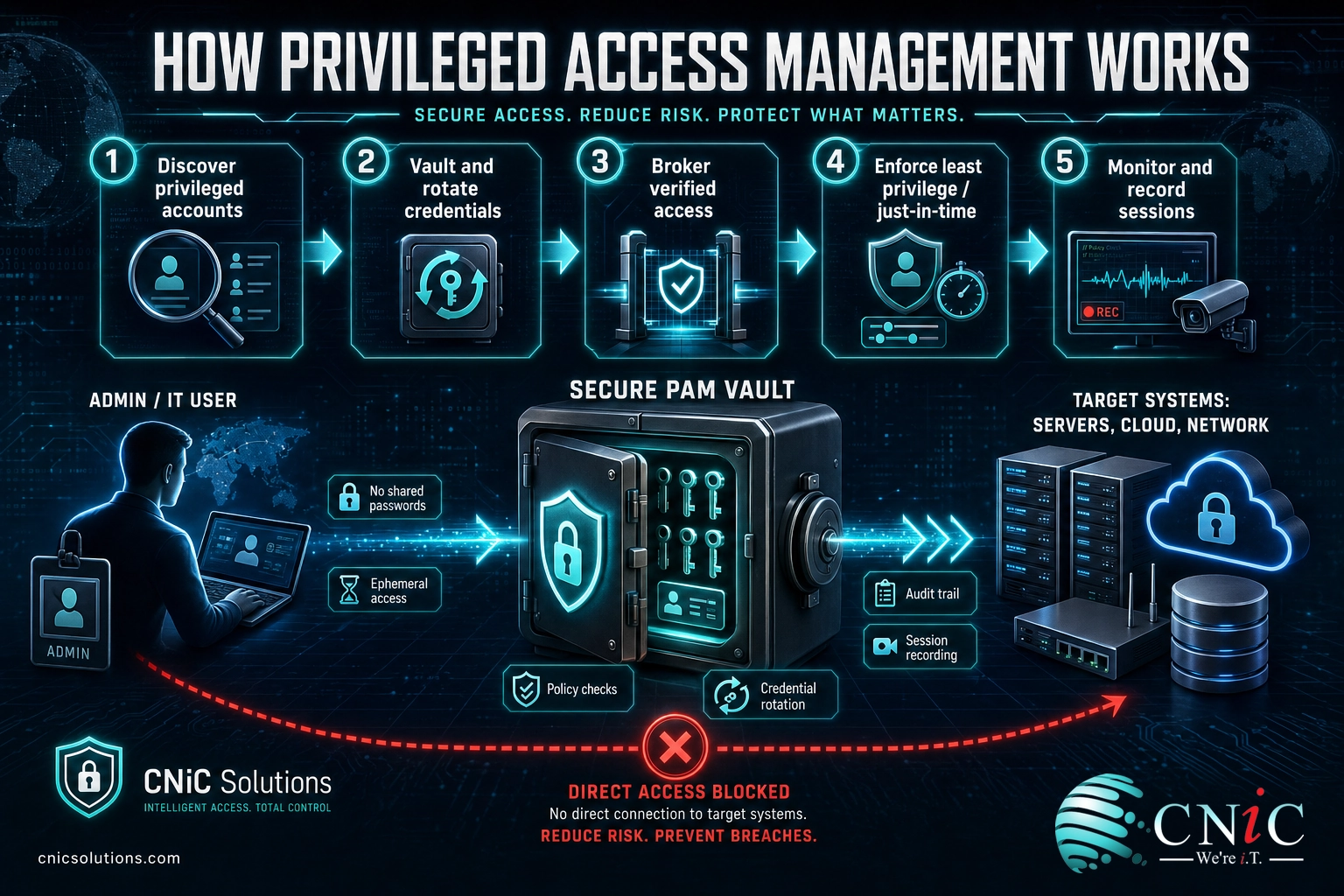
Most PAM programs follow the same basic flow:
- Discover. Find every privileged account across servers, workstations, cloud platforms, network gear, and applications. Most organizations have far more than they expect.
- Vault. Move privileged credentials into a secure, encrypted vault instead of leaving them in spreadsheets, sticky notes, or browsers. Passwords are rotated automatically so nobody actually memorizes them.
- Broker access. When someone needs privileged access, they request it. PAM verifies who they are, checks the rules, and connects them to the target system without exposing the raw password.
- Enforce least privilege. Grant only the specific access needed, and often only for a limited time (called just-in-time access), rather than leaving standing admin rights switched on around the clock.
- Monitor and record. Log and, where warranted, record privileged sessions so activity can be reviewed, alerted on, and audited later.
The goal at every step is the same: shrink the number of powerful accounts sitting exposed, and make sure the ones that remain are used deliberately and traceably. That authoritative principle, restricting rights to the minimum required, is what security standards bodies call least privilege.
Source: NIST’s least privilege definition | CISA’s Zero Trust Maturity Model
PAM vs. IAM: Clearing Up the Confusion
The single most common point of confusion is the difference between PAM and IAM. They sound similar and they overlap, but they solve different problems, and buying one does not mean you have the other.
Identity and access management (IAM) is the broad system that decides who your users are and what everyday access they get. It handles employee logins, single sign-on, provisioning new hires, and removing access when people leave. IAM is about giving the right people the right routine access at scale.
Privileged access management (PAM) is a specialized layer that sits inside that world and focuses only on the high-power accounts. IAM makes sure a new marketing hire can reach the marketing tools. PAM makes sure the person who can wipe the marketing tools, and everything else, cannot do so without being verified, limited, and recorded.
| Aspect | IAM (Identity & Access Management) | PAM (Privileged Access Management) |
|---|---|---|
| Who it covers | Every user identity: employees, contractors, sometimes customers | Only privileged accounts: admins, root, service accounts |
| Main goal | Right people get the right everyday access | Tightly control and watch the most powerful accounts |
| Typical controls | Single sign-on, user provisioning, directories, MFA for staff | Credential vaulting, just-in-time access, session recording, least privilege |
| Risk if it fails | Wrong access to routine resources | Full environment takeover, the “keys to the kingdom” |
| How to think of it | The broad foundation for all access | A hardened vault for your riskiest accounts |
A useful way to remember it: IAM manages the many, PAM guards the few. A complete access strategy needs both, and strong everyday controls like multi-factor authentication and passwordless sign-in support both layers.
Why PAM Matters for Your Business
Privileged accounts are not a niche IT concern. They sit on the shortest path between an attacker and a business-ending event, which is why the data on credential-based attacks is so stark.
Credentials are the front door. IBM’s 2024 research found that compromised credentials were the most common way breaches began, and that those breaches were both costly and the slowest to detect. Attackers do not need to break down walls when a working password lets them walk in and look like a legitimate employee.
Most Common Initial Attack Vectors, 2024 (Share of Breaches)
Source: IBM Cost of a Data Breach Report 2024
There is a business-continuity angle too. Once an attacker holds a privileged account, they can disable defenses, delete backups, and deploy ransomware across the whole network. That is the difference between an incident that a good incident response plan contains in an afternoon and one that takes a business offline for weeks.
Myth: “PAM is only for large enterprises.” This is one of the most expensive misconceptions in small-business IT. Attackers automate their targeting and go after whatever is exposed, and smaller organizations are frequent ransomware victims precisely because they assume they are too small to notice. Meanwhile the accounts that need protecting, domain admins, cloud root logins, and service accounts, exist in a ten-person company just as they do in a ten-thousand-person one. PAM scales down: a small business can vault its handful of admin accounts and add MFA in days, not months.
Finally, PAM has moved from “nice to have” to “expected.” Cyber insurance carriers now ask directly about privileged access controls on their applications and require MFA on administrative accounts before they will write a policy. Compliance frameworks point the same way, which is why regulated businesses in healthcare, financial services, and legal treat privileged access as a baseline control, not an upgrade.
Talk to CNiC about protecting your business
Source: IBM Cost of a Data Breach Report | Verizon Data Breach Investigations Report

Types of Privileged Accounts
You cannot protect what you have not named. Part of the value of a PAM program is the act of cataloging every account that carries elevated power, because most of these are easy to forget until they are abused. The common categories:
- Local administrator accounts. Built-in admin logins on individual laptops and servers. Often share the same password across many machines, which is exactly how attackers spread.
- Domain administrator accounts. The most powerful accounts in a Windows environment. Control over a domain admin account is effectively control over everything joined to it.
- Cloud root and admin accounts. The master accounts for platforms like Microsoft 365, Google Workspace, and AWS. They can reconfigure security, billing, and every user under them.
- Service and application accounts. Non-human accounts that let software, scripts, and integrations talk to each other. They rarely have MFA, seldom change passwords, and are frequently over-permissioned.
- Break-glass (emergency) accounts. High-power accounts reserved for emergencies when normal access fails. They must exist, but they need tight vaulting and alerting.
- Privileged business users. Non-IT staff who can reach highly sensitive data, such as finance leaders in accounting systems or HR staff in payroll.
Service accounts deserve special attention. They are invisible in day-to-day work, so they get created and then forgotten, accumulating permissions and never rotating their passwords. Attackers love them for exactly that reason, and a good PAM program brings them under management alongside human admin accounts.
The Core Capabilities of a PAM Program
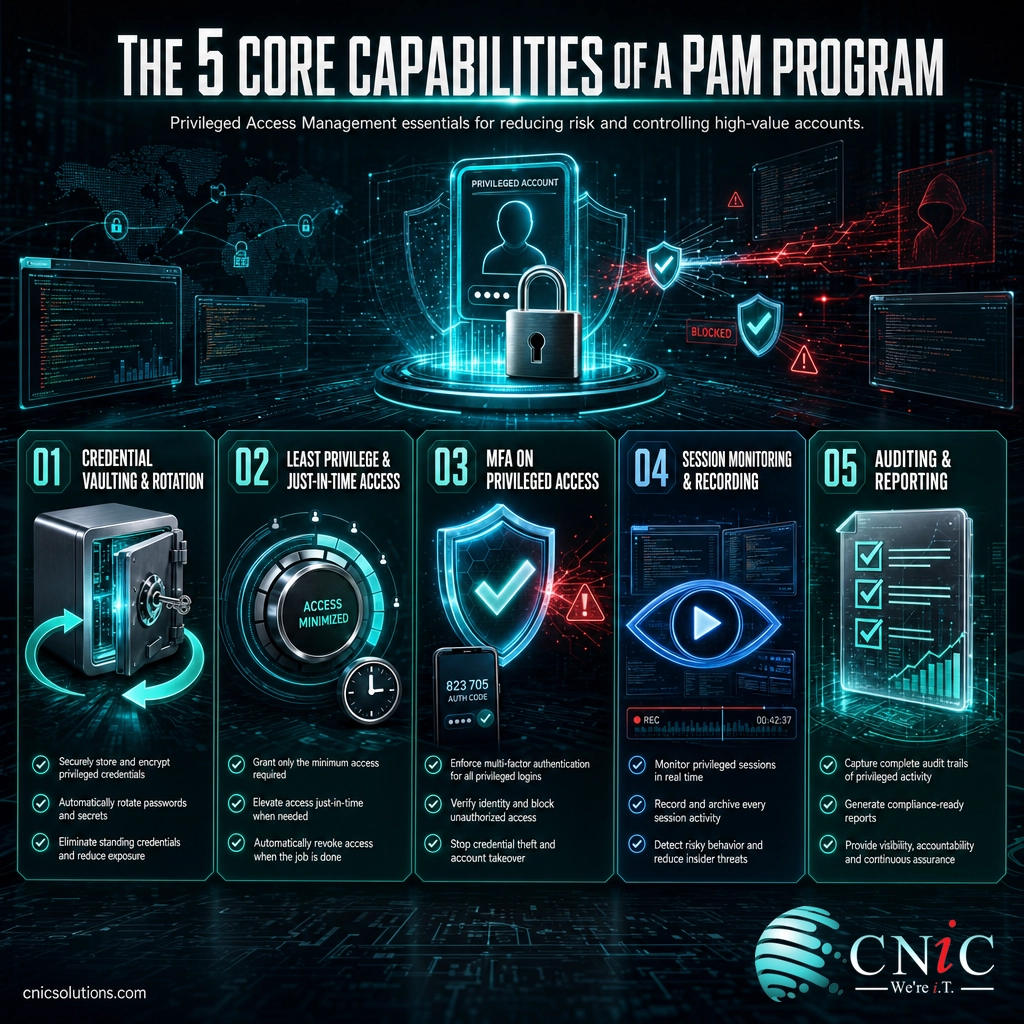
PAM is a discipline more than a single product, but effective programs share a recognizable set of capabilities. When you evaluate an approach or a tool, these are the pillars to look for.
Credential vaulting and rotation
Privileged passwords, keys, and secrets live in an encrypted vault, not in people’s heads or in a spreadsheet. The vault issues access on demand and rotates passwords automatically, so a credential stolen today is useless tomorrow.
Least privilege and just-in-time access
Instead of leaving admin rights permanently switched on, PAM grants the minimum access needed for a specific task and, ideally, only for the window it is needed. Standing privilege is the exception, not the default.
Multi-factor authentication on privileged access
Every privileged session should require a second factor. This is the single control cyber insurers most consistently require, and it neutralizes the majority of attacks that rely on a stolen password alone.
Session monitoring and recording
Privileged sessions are logged and, for the most sensitive systems, recorded. That creates an audit trail, enables real-time alerts on unusual behavior, and shortens investigations when something does go wrong.
Auditing and reporting
PAM produces the evidence that auditors, insurers, and leadership ask for: who has privileged access, how it is used, and how access decisions are made. This is often what turns a security control into a passed SOC 2 audit or a defensible data-protection posture.
How to Get Started With PAM
Rolling out privileged access management does not have to be a year-long enterprise project. The most effective approach is staged, tackling the highest-risk accounts first and expanding from there. A practical sequence:
- Inventory your privileged accounts. List every admin, root, service, and break-glass account across on-premises, cloud, and network systems. You cannot protect accounts you do not know exist.
- Vault and rotate the crown jewels. Start with domain admins, cloud root accounts, and shared local admin passwords. Get them into a vault and turn on automatic rotation.
- Add MFA to every privileged login. This delivers the biggest risk reduction for the least effort and satisfies the most common insurance requirement.
- Remove standing privilege. Switch admins to just-in-time access so elevated rights are granted for a task and then revoked, rather than left on permanently.
- Monitor, record, and review. Turn on session logging, set alerts for unusual privileged activity, and review access regularly so permissions do not creep back up.
For many small and midsize businesses, the practical challenge is not knowing what to do but having the time and expertise to do it consistently. That is where a managed security partner or a Virtual CIO earns its keep: bringing the tools, the process, and the ongoing discipline so privileged access stays locked down long after the initial project ends. PAM also fits naturally alongside broader managed IT support and controls like endpoint security.
Get a free security consultation
Common Questions About PAM
What is privileged access management in simple terms?
What is the difference between PAM and IAM?
Does my small business need PAM?
What accounts are considered privileged?
Is PAM required for cyber insurance or compliance?
Related Terms
- Multi-factor authentication (MFA): Requiring a second proof of identity beyond a password; the single most effective control on privileged accounts.
- Passkeys: A passwordless, phishing-resistant way to sign in that removes the stolen-password risk entirely.
- Identity and access management (IAM): The broad system that governs access for every user; PAM is the specialized layer inside it for privileged accounts.
- Least privilege: Giving every account only the minimum access it needs to do its job, and nothing more; the core principle PAM enforces.
- Zero trust: A security model that verifies every access request rather than trusting anything by default; PAM is a foundational piece of it.
- Endpoint security: Protecting the laptops and servers where privileged accounts are used and often first compromised.
- SOC 2 Type 2: A compliance report that examines, among other things, how a business controls privileged access over time.
- Just-in-time access: Granting elevated rights only for a specific task and revoking them afterward, instead of leaving admin access permanently on.
About This Guide
This guide draws on primary cybersecurity research to explain privileged access management for a business audience. Breach frequency, cost, and detection-time figures are drawn from the IBM Cost of a Data Breach Report 2024 and the Verizon 2025 Data Breach Investigations Report. Definitions of least privilege and privileged access follow guidance from the National Institute of Standards and Technology (NIST) and the Cybersecurity and Infrastructure Security Agency (CISA). No statistics in this article are estimated or invented.
Sources:
IBM Cost of a Data Breach Report |
Verizon Data Breach Investigations Report |
NIST least privilege definition |
CISA Zero Trust Maturity Model



related posts
What Is RAID? RAID Levels and How They Protect Your Data
October 26, 2026RAID (Redundant Array of Independent Disks) is a technology that combines multiple physical drives into a…
What Is Network Penetration Testing? Types and Process
October 25, 2026Network penetration testing is a controlled, authorized simulation of a real cyberattack on your network, run…
What Is NIST Compliance? Frameworks, Requirements, and Who Needs It
October 25, 2026NIST compliance means aligning your organization's security program with the cybersecurity standards published by the National…
What Is MFA? How Multi-Factor Authentication Protects Your Accounts
October 24, 2026Multi-factor authentication (MFA) is a security method that requires two or more separate proofs of identity…