

Root cause analysis (RCA) is a structured way to find the true underlying cause of a problem so you can fix it once, instead of patching the same symptom over and over. In IT, that difference is expensive: more than half of organizations say their most recent major outage cost over $100,000, and the leading trigger inside the “human error” category is people not following a process. RCA is how you turn a recurring fire into a solved problem.
- RCA fixes causes, not symptoms. The goal is to identify the underlying condition that, if removed, would have prevented the problem, then eliminate it so the issue does not recur.
- The stakes are real. Over 90% of mid-size and large enterprises say a single hour of downtime costs more than $300,000, so preventing repeat incidents pays for itself quickly.
- Five methods cover almost every case: the 5 Whys, the fishbone (Ishikawa) diagram, Pareto analysis, fault tree analysis, and FMEA.
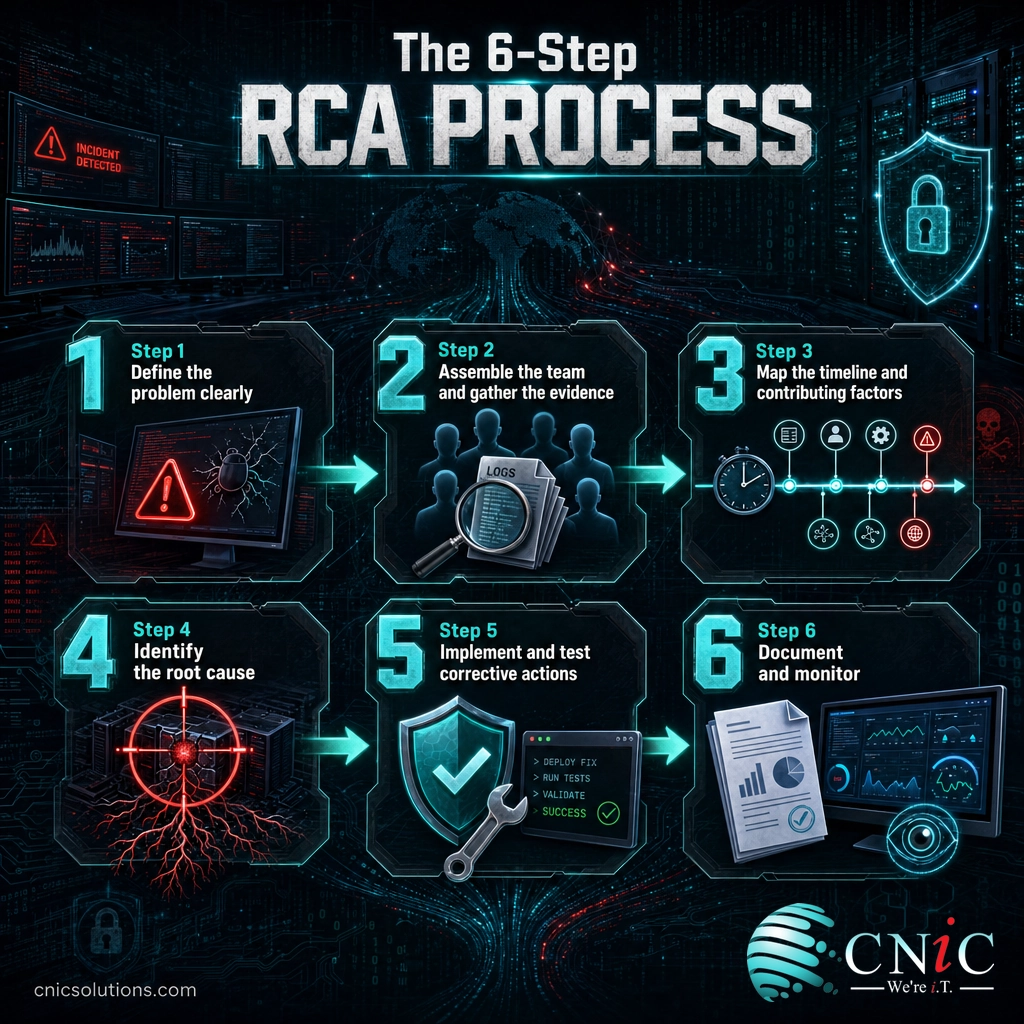
- The process is six steps: define the problem, gather evidence, map the timeline, identify the root cause, implement and test a fix, then document and monitor.
- RCA is blame-free. The most useful analyses focus on why a process allowed the error, not on who to point at.
You do not need special software to run a root cause analysis, but you do need a few things in place first:
- Prerequisites: a problem that has actually occurred (or a near miss worth investigating), and access to the people and systems involved.
- Tools: your monitoring and logging data, a change or ticketing history, and a whiteboard or shared document for the 5 Whys or a fishbone diagram. That is enough for most investigations.
- Estimated time: from about 30 minutes for a focused 5 Whys on a simple incident to several days for a complex, multi-system failure that needs a fault tree or FMEA.
- Skill level: beginner-friendly. Anyone who can ask “why” honestly and follow the evidence can run a basic RCA; deeper methods reward practice.
What’s in This Guide
What Is Root Cause Analysis (RCA)?
Root cause analysis is a systematic process for identifying the fundamental cause of a problem, defect, or incident. The core idea is simple: most problems you see are symptoms, and the fastest way to make a problem stop for good is to remove the deeper condition that keeps producing it. The American Society for Quality describes RCA as a collective term for approaches used to uncover the causes of problems, and the point is prevention, not a temporary patch.
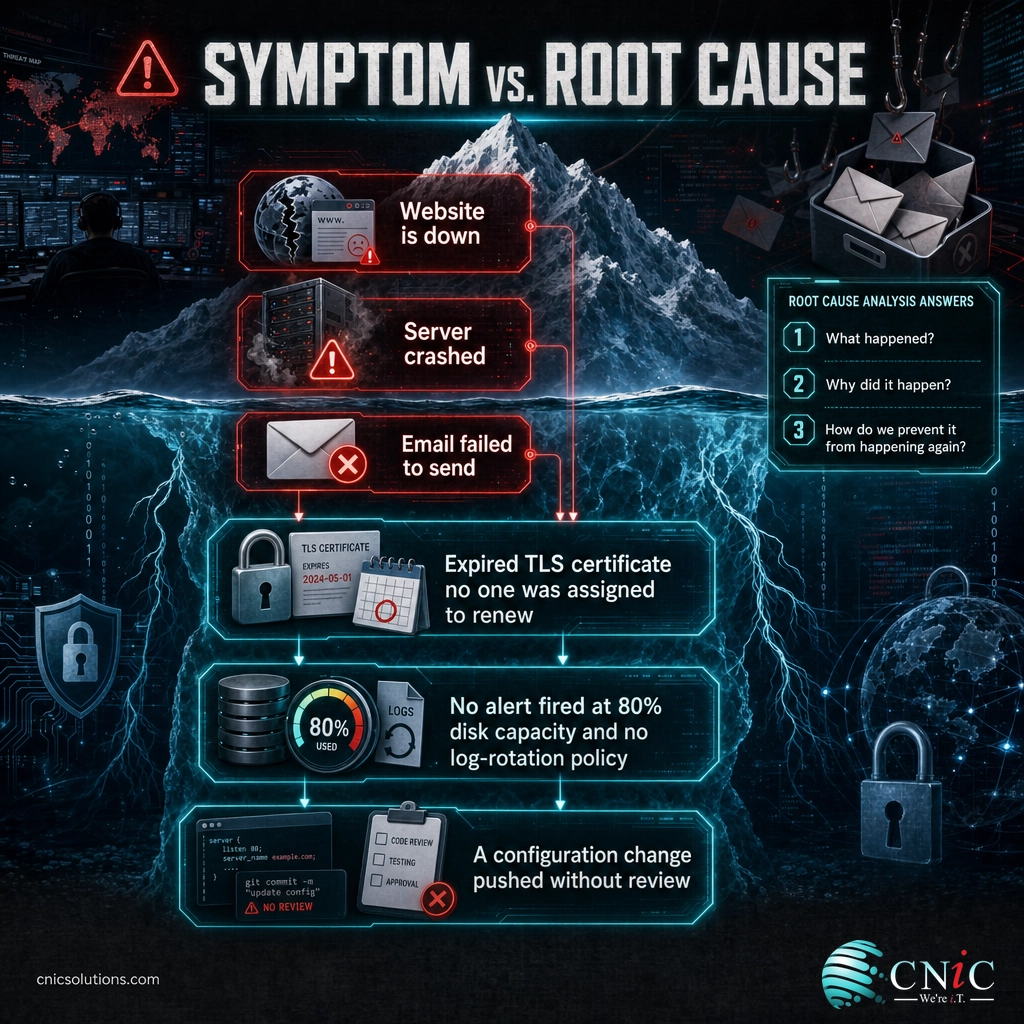
A good root cause analysis answers three questions in order:
- What happened? A precise, factual description of the problem and its impact.
- Why did it happen? The chain of causes that led to it, traced down to the underlying condition.
- How do we prevent it from happening again? The corrective and preventive actions that remove the root cause.
The key distinction is between a symptom and a root cause. If a company website goes offline, “the site is down” is the symptom. The root cause might be an expired TLS certificate that no one was assigned to renew. You can restart the server and bring the site back (treating the symptom), but until someone owns certificate renewal, the outage will return on schedule. A root cause is not just a plausible story; it is a cause supported by evidence and connected clearly to the observed problem.
RCA is most valuable when a problem is recurring, high-impact, or hard to explain. A one-off glitch that never comes back may not justify a full analysis, but an incident that has happened three times, or one that took a critical system offline, almost always does. Done well, RCA is one of the core building blocks of continuous improvement, and it produces documentation that helps the whole team next time.
Source: American Society for Quality (ASQ) on root cause analysis
Why Root Cause Analysis Matters for IT
In IT, the cost of solving the wrong problem compounds fast. Every repeat incident consumes staff time, erodes user trust, and risks another outage. The data on downtime shows why getting to the true cause is worth the effort.
Those numbers explain why “restart it and move on” is a costly habit. If the underlying cause is still there, you are paying the downtime bill again and again. A large share of incidents also trace back to process gaps rather than pure technology failures, which is exactly what RCA is built to surface.
Notice what those last two figures have in common: the trigger is usually a person acting inside a weak process, not a person being careless in isolation. That is the mindset RCA depends on. When you treat “human error” as the final answer, you stop one step too early. When you ask why the process let the error happen, you find a fixable root cause, such as a missing checklist, an unclear handoff, or no second set of eyes on a risky change. Protecting against those failures is a core reason businesses invest in backup and disaster recovery and layered cybersecurity services, so a single mistake does not become a crisis.
“Human error” is where a lazy analysis stops, not where a good one ends. If a technician typed the wrong command, the real question is why the system allowed a single typo to cause an outage. Was there no change review? No staging environment? No rollback plan? Blaming the person fixes nothing and teaches everyone to hide mistakes. Fixing the process that let the error through prevents the next ten. The most effective RCA culture is blame-free by design.
Source: Uptime Institute Annual Outage Analysis 2024 | ITIC 2024 Hourly Cost of Downtime Report | Verizon 2024 DBIR

The 5 Core RCA Methods
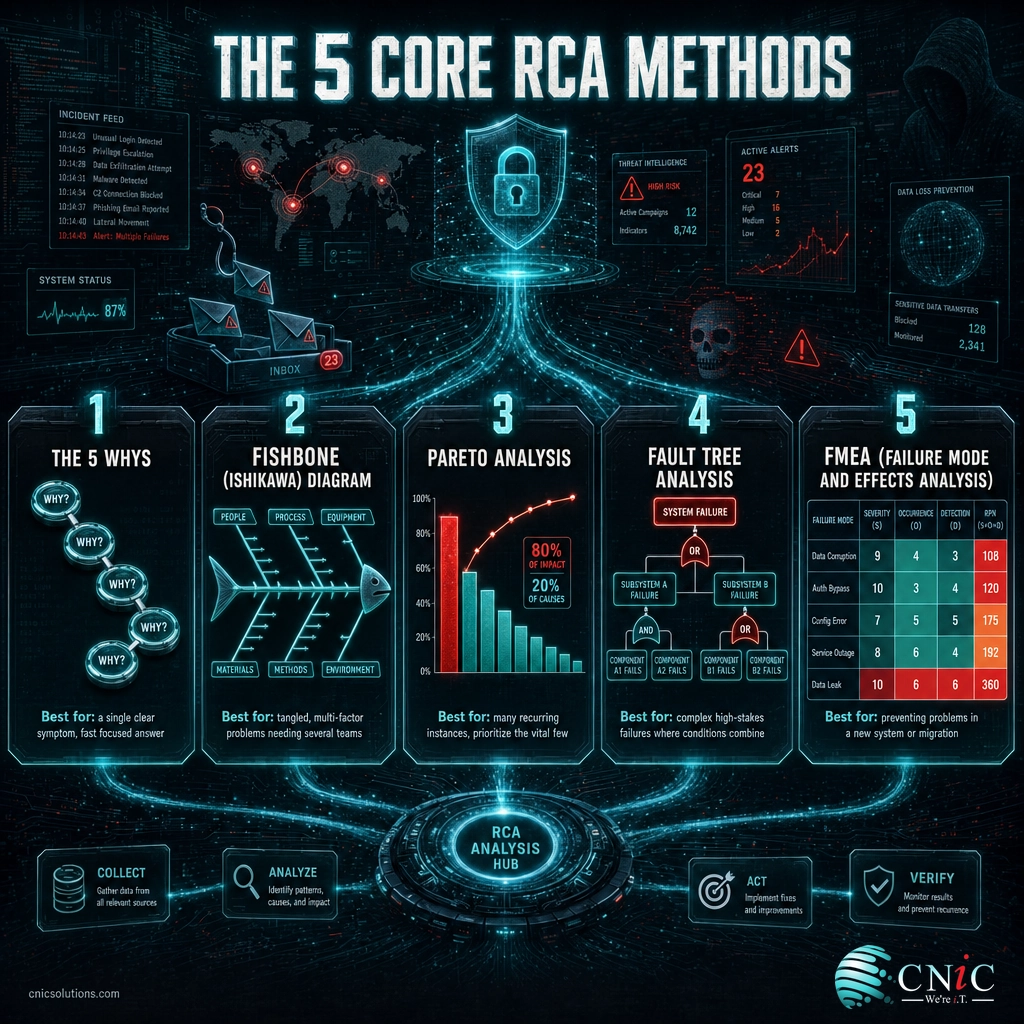
You do not need all five methods for every problem. Most IT teams reach for one or two, matched to how tangled the problem is and how many people need to weigh in. Here is when each one earns its place.
1. The 5 Whys
Ask “why” repeatedly (about five times is typical) until you move from the symptom to the underlying cause. It needs no special tools and works fast.
- Best for: a single, clear symptom where you want a quick, focused answer.
- Watch out for: stopping at a convenient answer, or following only one branch when several causes contributed.
2. The Fishbone (Ishikawa) Diagram
A cause-and-effect diagram that sorts possible causes into categories, commonly people, process, technology, materials, environment, and management. It gives a team a shared map to brainstorm against.
- Best for: tangled, multi-factor problems that need input from more than one team.
- Pairs well with: the 5 Whys, used to drill into the most likely branches the fishbone surfaces.
3. Pareto Analysis
Based on the 80/20 principle: a small number of causes usually account for most of the impact. Pareto analysis ranks issues by frequency or cost so you fix the “vital few” first.
- Best for: recurring problems with many instances, where you need to prioritize what to fix first.
4. Fault Tree Analysis
A top-down logic diagram that starts with the failure at the top and branches downward through the conditions that could produce it, using “AND” and “OR” logic to show how factors combine.
- Best for: complex, high-stakes failures where several conditions have to line up, such as a redundant system that still went down.
5. FMEA (Failure Mode and Effects Analysis)
A proactive method used during design or planning. It lists the ways a system could fail and scores each by severity, likelihood, and how easily it would be detected, so you can shore up the riskiest gaps before they cause an incident.
- Best for: preventing problems in a new system, migration, or process, rather than investigating one after the fact.
Source: American Society for Quality (ASQ) root cause analysis resources
How to Do a Root Cause Analysis: Step by Step
The methods above are the tools. This is the process that puts them to work. These six steps apply whether you are investigating a five-minute outage or a company-wide failure, and they keep an analysis honest and evidence-based.
Step 1: Define the Problem Clearly
What to do: Write one specific, factual problem statement. Capture what is happening, where, when it started, and the measurable impact. “Email is broken” is not a problem statement; “Outbound email from the Houston office has failed since 9:10 a.m., affecting roughly 40 users” is.
Why it matters: A vague problem statement sends the whole investigation in the wrong direction. A precise one narrows the search and makes it obvious when you have actually solved the right thing.
What success looks like: Everyone in the room agrees on the exact problem, its scope, and its impact, and no assumed cause is baked into the wording.
Step 2: Assemble the Team and Gather the Evidence
What to do: Bring in the people closest to the affected system, and collect the facts before forming any theory: logs, monitoring data, recent configuration or code changes, tickets, and a rough timeline. Let the evidence lead.
Why it matters: Memory is unreliable and theories are seductive. The single most common reason an RCA lands on the wrong cause is that someone decided the answer first, then went looking for support.
What success looks like: You have a shared, timestamped record of what changed and what was observed, gathered from systems rather than from opinion.
In the rush to restore service, teams often reboot, reconfigure, or clear logs, and destroy the very data that would have revealed the cause. Restore service if you must, but snapshot the logs, error messages, and current state first. You cannot analyze evidence you have already overwritten.
Step 3: Map the Timeline and Contributing Factors
What to do: Lay the events out in order. What was the last thing that changed before the problem appeared? Then group the possible contributing factors, a fishbone diagram is ideal here, into categories such as people, process, technology, and environment.
Why it matters: Most IT problems are triggered by a change. Ordering events almost always narrows the field quickly, and grouping factors stops you from fixating on the first idea.
What success looks like: A clear “before and after” timeline and a short list of credible contributing factors, each of which you can test against the evidence.
Step 4: Identify the Root Cause
What to do: Take your most likely contributing factors and drill down with the 5 Whys until you reach the underlying condition that, if removed, would have prevented the problem. Then confirm it against the evidence rather than accepting it because it sounds right.
Why it matters: This is the step people rush. A root cause you cannot support with evidence is just a better-sounding guess, and it will not stop the problem from recurring.
What success looks like: You can state the root cause in one sentence, point to the evidence that confirms it, and explain how it produced the symptom you started with.
“The server ran out of disk space” is a symptom of a deeper cause: why did no alert fire at 80% capacity, and why was there no log-rotation policy? Keep asking until the next “why” points to a process or design gap you can actually fix, not just another technical event in the chain.
Step 5: Implement and Test Corrective Actions
What to do: Fix the root cause, not just the symptom, and separate the two kinds of action. A corrective action removes the cause; a preventive action stops the same class of problem elsewhere. Then verify the fix in a controlled way and confirm the problem no longer reproduces.
Why it matters: An unverified fix is a hope, not a solution. Testing is what turns “we think that was it” into “the issue is closed.”
What success looks like: The problem no longer reproduces under the conditions that triggered it, and you have added the safeguard (an alert, a checklist, a review step) that prevents a repeat.
Step 6: Document and Monitor
What to do: Write a short RCA report and keep it factual. A useful report covers the problem statement, impact, timeline, evidence reviewed, the confirmed root cause, the corrective and preventive actions, and how you will monitor for recurrence. Then actually watch the metric or alert that would tell you the fix held.
Why it matters: The report is how the lesson survives past the people who were in the room, and monitoring is how you prove the root cause is truly gone rather than just quiet for now.
What success looks like: A one-page (or shorter) report the next engineer can understand at a glance, plus a monitor confirming the problem has not returned over a meaningful window.
When to Call a Professional
If you reach Step 4 and the root cause still will not come into focus, or the same incident keeps returning after you were sure you fixed it, that is the signal to bring in help. Deep, cross-system failures often have a root cause that lives outside the team investigating it: a misconfiguration upstream, a capacity limit no one is watching, or a monitoring blind spot. A managed IT partner does this daily, has the monitoring and change history to reconstruct a timeline quickly, and can put preventive controls in place so the same class of problem does not recur. If recurring incidents are eating your team’s week, structured managed IT support turns firefighting back into planned work.
Troubleshooting Common RCA Problems
Even experienced teams run into the same traps. Here are the most common ways a root cause analysis goes sideways, and how to get it back on track.
| Problem | Why it happens | How to fix it |
|---|---|---|
| The analysis blames a person | The investigation stopped at “human error” instead of asking why the process allowed it | Reframe every “who” as a “why the process let this happen,” and keep the report blame-free |
| You found a cause but the problem recurs | You fixed a symptom or a contributing factor, not the true root cause | Return to Step 4 and keep asking “why” until you reach a process or design gap you can remove |
| The team can’t agree on the cause | Theories are competing without evidence to settle them | Go back to the data: test each theory against logs, timelines, and change records, not opinion |
| Evidence is missing | Logs were cleared or the system was changed before anyone captured its state | Snapshot logs and state before remediation next time; add log retention and rotation policies |
| The RCA takes forever | The problem is too broadly scoped, so the search space is enormous | Tighten the problem statement in Step 1; a narrower, precise scope shrinks the investigation |
Maintain and Monitor After the Fix
A root cause analysis is not finished when the ticket closes. The value shows up over the following weeks, in the incident that does not happen. Three habits make that payoff stick.
Watch the right signal. Every RCA should end with a specific thing to monitor: the disk-space alert you added, the certificate-expiry reminder, the error rate that spiked. If you cannot name what you are watching, you have not really confirmed the fix.
Build the fix into the process. The strongest corrective actions are the ones that make the mistake hard to repeat: a required change-review step, a staging environment, an automated check. Turning a one-time fix into standing infrastructure is where proactive infrastructure monitoring earns its keep, catching the conditions that lead to failure before they become incidents.
See Proactive Infrastructure Monitoring
Feed patterns back into strategy. When you run RCAs consistently, patterns emerge: the same category of cause keeps showing up, and that is a roadmap for where to invest. A virtual CIO can turn a stack of RCA reports into a prioritized plan, so budget goes to the gaps actually causing your downtime rather than to guesses.
Frequently Asked Questions
What is the goal of root cause analysis?
What is the difference between a root cause and a symptom?
How do you do a root cause analysis?
How do you write a root cause analysis report?
Should I use the 5 Whys or a fishbone diagram?
Recurring IT problems are rarely bad luck; they are usually an unfixed root cause waiting to resurface. If the same issues keep pulling your team off plan, CNiC Solutions can help you find the source, put the safeguards in place to keep it gone, and turn what you learn into a clear IT plan.
Turn Your RCA Findings Into an IT Roadmap



related posts
What Is Ransomware? How It Works and How to Stop It
October 27, 2026Ransomware is malicious software that encrypts your files and locks you out of your own systems…
What Is Privileged Access Management (PAM)? A Guide for Businesses
October 26, 2026Privileged access management (PAM) is a set of cybersecurity tools and practices that control, secure, and…
What Is RAID? RAID Levels and How They Protect Your Data
October 26, 2026RAID (Redundant Array of Independent Disks) is a technology that combines multiple physical drives into a…
What Is Network Penetration Testing? Types and Process
October 25, 2026Network penetration testing is a controlled, authorized simulation of a real cyberattack on your network, run…