

Every laptop and phone your team uses for work is also a way into your business. That is the uncomfortable truth behind Mobile Device Management. Verizon’s 2025 Mobile Security Index found that 85% of organizations reported an increase in mobile device attacks, and small businesses are the most exposed: 57% of SMBs say they lack the resources to respond effectively to an attack. MDM software is how a small business turns a scattered collection of personal and company devices into a fleet it can actually see, secure, and control. This guide ranks the best MDM solutions for small business by the type of business each one fits best, so you can shortlist the right platform, or decide to have it managed for you.
How We Evaluated MDM Solutions
We assessed these platforms against the criteria that matter to a small business with a lean (or no) IT team, not a global enterprise:
- Ease of deployment: How quickly can you enroll devices and be running without specialist staff?
- Platform coverage: Does it manage your actual mix (Apple, Windows, Android, or all three)?
- Core security controls: Encryption enforcement, passcode policies, and remote lock or wipe for lost devices.
- BYOD support: Can it separate work and personal data on employee-owned devices?
- Cost fit: Is there a free or affordable entry tier, and are the features you need included rather than gated behind an enterprise plan?
- Manageability: Can a small team (or an MSP on your behalf) actually operate it day to day?
An important note on our approach: CNiC Solutions is not an MDM vendor, so this ranking is genuinely vendor-neutral. We are a Houston managed IT and cybersecurity partner that helps businesses select, deploy, and manage MDM. We have also avoided quoting specific per-device prices, which change often and vary by tier; we describe pricing positioning instead and recommend confirming current rates with each vendor.
Key Takeaways
- The best MDM is the one that fits your device mix. Apple-only, Microsoft-first, and mixed fleets each have a natural choice.
- Ease of deployment matters more than feature count for a small business. The most powerful platform is useless if no one can run it.
- Remote lock and wipe is the non-negotiable core. A lost device should never become a data breach.
- BYOD support via containerization lets you secure work data without touching employees’ personal devices.
- You do not have to run it yourself. Many small businesses have a managed IT partner deploy and operate MDM, getting the security without the admin burden.
What’s in This Guide
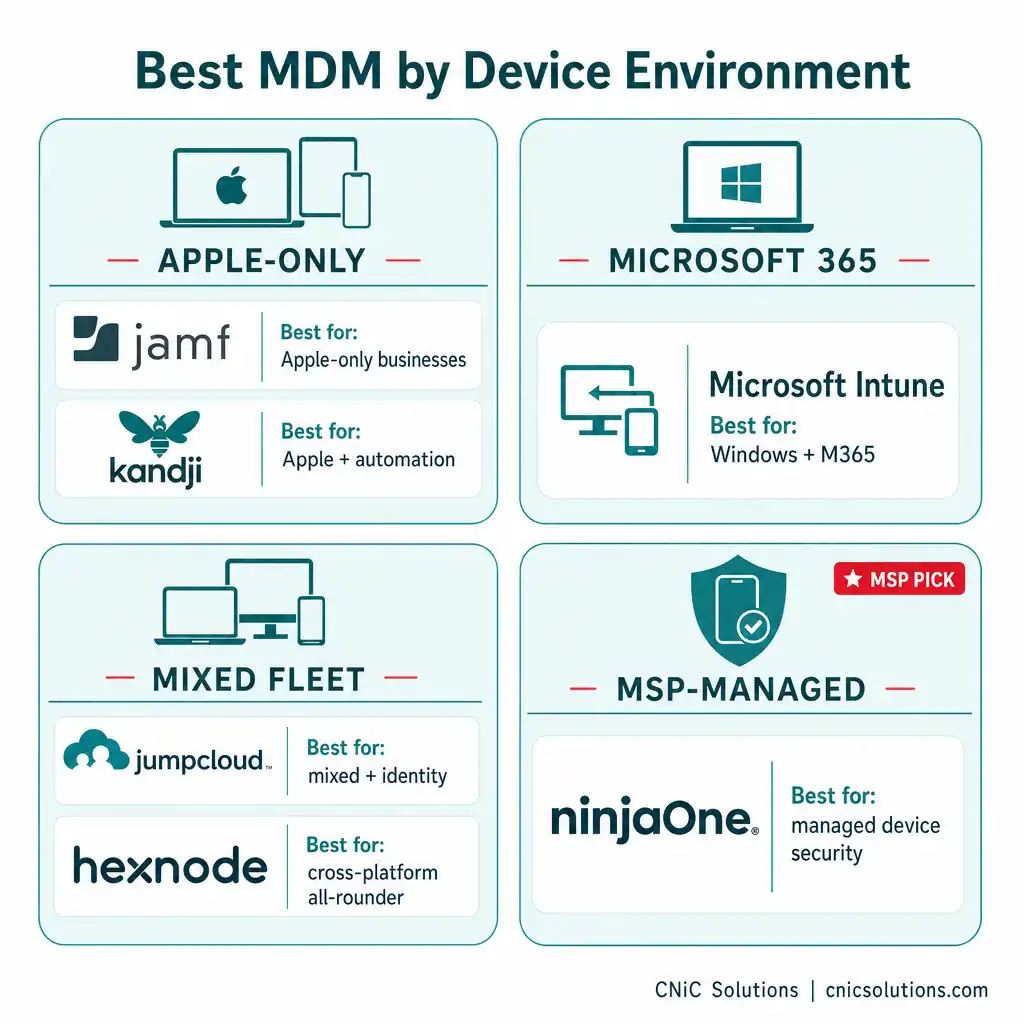
- Jamf: Best for Apple-Only Businesses
- Kandji: Best for Apple Teams Wanting Automation
- Microsoft Intune: Best for Microsoft 365 Businesses
- JumpCloud: Best for Mixed Fleets and Identity
- Hexnode: Best Cross-Platform All-Rounder
- NinjaOne: Best for MSP-Managed Device Security
- Side-by-Side Comparison
- How to Choose the Right MDM
- Frequently Asked Questions
1Jamf: Best for Apple-Only Businesses
Best for: Businesses running entirely on Apple devices (Mac, iPhone, iPad).
Jamf is the long-standing category leader for Apple device management, with deep, native integration into Apple’s frameworks. Its SMB-focused product (Jamf Now) handles enrollment and policies for small Apple fleets without enterprise complexity, while Jamf Pro scales to larger needs.
Strengths:
- The deepest Apple integration available, with native support for Apple Business Manager and zero-touch enrollment.
- An SMB-tier product tuned for fast setup without an enterprise learning curve.
- Mature, reliable policy and lifecycle management for Mac, iPhone, and iPad.
- A free starting tier for a small number of devices, easy to evaluate.
Fit considerations:
- Apple-only by design; it does not manage Android or Windows, so mixed fleets need a different tool.
| Criterion | Rating | Notes |
|---|---|---|
| Apple management | Excellent | Category leader, deepest integration |
| Ease of deployment | Strong | Jamf Now tuned for SMB scale |
| Cross-platform | N/A | Apple only |
| Cost fit | Good | Free starter tier; per-device beyond |
2Kandji: Best for Apple Teams Wanting Automation
Best for: Apple-centric businesses that want heavy automation and a modern, polished console.
Kandji is a cloud-first Apple device management platform known for its automation library and clean interface. Its pre-built automation (often called blueprints) reduces setup time and keeps device configurations consistent as you grow, which is appealing for Apple teams without dedicated IT staff.
Strengths:
- Strong automation that enforces consistent configurations with less manual work.
- Modern, intuitive admin experience designed for simplicity.
- Built-in compliance and security templates aligned to common frameworks.
- Fast, polished onboarding for Apple fleets.
Fit considerations:
- Like Jamf, it is Apple-focused, so it is not the answer for Windows or Android-heavy environments.
| Criterion | Rating | Notes |
|---|---|---|
| Apple management | Excellent | Automation-first approach |
| Ease of deployment | Excellent | Blueprints reduce setup time |
| Cross-platform | Limited | Apple-centric |
| Cost fit | Moderate | Premium positioning |
3Microsoft Intune: Best for Microsoft 365 Businesses
Best for: Businesses already running on Microsoft 365 and Windows.
Microsoft Intune is the natural MDM choice for organizations invested in the Microsoft ecosystem. It integrates tightly with Microsoft’s identity and management stack, and Windows Autopilot can simplify provisioning of new machines. For a business already paying for Microsoft 365, Intune may already be within reach of your licensing.
Strengths:
- Deep integration with Microsoft 365, Entra ID, and the broader Microsoft identity stack.
- Windows Autopilot makes zero-touch Windows provisioning smoother.
- Cross-platform management of Windows, plus Apple and Android devices.
- Often bundled into Microsoft 365 plans many businesses already hold.
Fit considerations:
- It is most powerful, and most cost-effective, inside a Microsoft-first environment; benefits shrink if you are not on Microsoft 365.
- Configuration can be complex, which is why many SMBs have it set up and managed for them.
| Criterion | Rating | Notes |
|---|---|---|
| Microsoft integration | Excellent | Native to the M365 stack |
| Cross-platform | Strong | Windows, Apple, Android |
| Ease of deployment | Moderate | Powerful but can be complex |
| Cost fit | Strong | Often included in M365 licensing |
4JumpCloud: Best for Mixed Fleets and Identity
Best for: Businesses with a mix of operating systems that also want identity and access management in one place.
JumpCloud combines cross-platform device management with identity and access management, so you can manage who can log in and what devices they use from a single platform. For a small business juggling Mac, Windows, and Linux alongside user accounts and single sign-on, that consolidation is the draw.
Strengths:
- Manages mixed fleets (Apple, Windows, Linux) from one console.
- Combines device management with identity, access, and single sign-on.
- Reduces tool sprawl by unifying directory and device control.
- Scales reasonably from small teams upward.
Fit considerations:
- The identity-plus-device breadth can be more than a very small, single-platform shop needs.
| Criterion | Rating | Notes |
|---|---|---|
| Cross-platform | Excellent | Apple, Windows, Linux |
| Identity / access | Excellent | Device + identity in one |
| Ease of deployment | Strong | Unified console |
| Cost fit | Good | Scales from small teams |
5Hexnode: Best Cross-Platform All-Rounder
Best for: Small and midsize businesses managing diverse device types that want feature depth without enterprise pricing.
Hexnode is a cross-platform UEM solution that balances broad capability with approachable deployment. It supports Apple, Android, Windows, and specialized kiosk environments, with ready-made policy templates that help teams without dedicated IT staff get running faster.
Strengths:
- Broad platform coverage including Apple, Android, Windows, and kiosk modes.
- Template-based policy configuration shortens initial setup.
- Strong device lockdown and kiosk capabilities for shared or frontline devices.
- A clear admin console designed for everyday usability.
Fit considerations:
- As a feature-rich all-rounder, it may offer more configuration than the simplest single-platform fleets require.
| Criterion | Rating | Notes |
|---|---|---|
| Cross-platform | Excellent | Apple, Android, Windows, kiosk |
| Ease of deployment | Strong | Policy templates speed setup |
| Kiosk / frontline | Excellent | Strong lockdown controls |
| Cost fit | Good | SMB-friendly tiers |
6NinjaOne: Best for MSP-Managed Device Security
Best for: Businesses that want device management folded into broader, professionally managed IT.
NinjaOne combines MDM with wider endpoint management, including patch management, automation, and monitoring, which is why it is popular with managed service providers running device security on behalf of their clients. For a small business, the appeal is less about operating NinjaOne yourself and more about having a partner manage your entire device fleet through a platform built for exactly that.
Strengths:
- Combines MDM with patch management, automation, and endpoint monitoring.
- Built for managing many devices (and many clients) from one console, ideal for MSP delivery.
- Cross-platform endpoint coverage beyond just mobile.
- Strong fit for businesses that want device security delivered as a managed service.
Fit considerations:
- Its depth and pricing suit managed or complex environments more than a tiny self-run, basic-needs setup.
| Criterion | Rating | Notes |
|---|---|---|
| Endpoint breadth | Excellent | MDM + patch + monitoring |
| MSP-managed fit | Excellent | Built for managed delivery |
| Self-run simplicity | Moderate | Depth suits managed use |
| Cross-platform | Strong | Beyond mobile endpoints |
Side-by-Side Comparison
| Solution | Best For | Platforms | Standout |
|---|---|---|---|
| Jamf | Apple-only businesses | Apple | Deepest Apple integration |
| Kandji | Apple teams wanting automation | Apple | Automation blueprints |
| Microsoft Intune | Microsoft 365 businesses | Windows, Apple, Android | M365 integration |
| JumpCloud | Mixed fleets + identity | Apple, Windows, Linux | Device + identity in one |
| Hexnode | Cross-platform all-rounder | Apple, Android, Windows, kiosk | Broad coverage, easy setup |
| NinjaOne | MSP-managed device security | Cross-platform endpoints | MDM + patch + monitoring |
How to Choose the Right MDM
The right MDM follows from a few honest answers about your business. Work through these before committing to any platform:
- What is your device mix? All Apple points to Jamf or Kandji; Microsoft 365 and Windows points to Intune; a true mix points to JumpCloud or Hexnode.
- Who will run it? If you have no IT staff, weight ease of deployment heavily, or have a managed IT partner operate it for you.
- Do you have BYOD? If employees use personal devices, confirm strong containerization to separate work and personal data.
- What are your compliance needs? Regulated data (HIPAA, PCI-DSS) raises the bar on enforcement and reporting, so prioritize platforms with solid compliance controls.
Red Flags When Choosing an MDM
- No remote lock and wipe. This is the core protection against a lost or stolen device becoming a breach. It is non-negotiable.
- No support for a platform you actually use. An Apple-only tool cannot help your Windows laptops.
- Essential features gated behind an enterprise tier you cannot justify, leaving the base plan too thin to be useful.
- A console so complex it goes unused. An MDM nobody operates provides no protection. Match complexity to who will run it.
- No BYOD separation if you rely on personal devices, risking employee privacy and your control at once.
The Managed Option: Let Someone Else Run It
Here is what most “best MDM” lists leave out: choosing the tool is the easy part. Enrolling every device, writing sensible policies, keeping them enforced, responding when a device goes missing, and proving it all for a compliance audit is ongoing work that a lean team rarely has time for. This is exactly where a managed IT partner earns its place. As a Houston managed IT and cybersecurity provider, CNiC Solutions deploys and manages MDM for businesses, so you get centralized device security without having to operate the console yourself. Because we are vendor-neutral, we recommend and run the platform that genuinely fits your environment, not the one we happen to sell.
Let CNiC secure and manage your business devices
MDM is one layer of a complete security posture. To see where device management fits alongside encryption, access control, and the rest, see our IT compliance checklist for small business.

Frequently Asked Questions
What is an MDM solution?
Does a small business really need MDM?
What is the best MDM for a small business?
Can MDM manage personal (BYOD) devices?
What is the difference between MDM, EMM, and UEM?
Methodology and Sources
Solutions are ranked by best-fit use case rather than a single overall score, because the right MDM depends heavily on your device mix, IT resources, and budget. Platform characterizations reflect each vendor’s documented positioning and capabilities. We intentionally avoid quoting specific per-device prices, which change frequently and vary by tier; confirm current pricing directly with each vendor. The mobile threat figures cited come from the Verizon 2025 Mobile Security Index. CNiC Solutions is a managed IT and cybersecurity partner, not an MDM vendor, so this comparison is vendor-neutral.
Primary source: Verizon 2025 Mobile Security Index.



related posts
What Is SIEM? Security Information and Event Management Explained
October 29, 2026A SIEM (security information and event management) is a security platform that collects log and event…
What Is Shadow IT? Risks, Examples, and How to Manage It
October 29, 2026Shadow IT is any hardware, software, cloud service, or AI tool that employees use for work…
What Is SD-WAN? How Software-Defined WAN Works
October 28, 2026SD-WAN (software-defined wide area network) is a way of building a business network that uses software…
What Is SASE (Secure Access Service Edge)? How It Works
October 28, 2026Secure access service edge (SASE) is a cloud-delivered model that combines wide-area networking (SD-WAN) with a…