

IaaS, PaaS, and SaaS are the three ways businesses buy computing from the cloud, and the only thing that really separates them is who manages what. IaaS rents you raw infrastructure and leaves the rest to you. PaaS hands you a ready-made platform to build on. SaaS gives you finished software you just log in and use. Understanding the tradeoff between control and convenience is now a core business decision, not an IT footnote: Gartner forecasts worldwide public cloud spending to reach $723.4 billion in 2025, and nearly every company already runs on some mix of all three.
- One question sorts them out: how much of the technology stack do you want to manage yourself? IaaS = most control and most responsibility, SaaS = least of both, PaaS sits in between.
- SaaS is the biggest and fastest-adopted model, forecast at $299.1 billion in 2025, because ready-to-use software removes the most work for the buyer.
- The shared responsibility model applies to all three. The provider secures the infrastructure; you always own your data, user accounts, and configuration. This is where most cloud breaches actually happen.
- Most businesses run all three at once. The practical goal is not to pick one model but to match each workload to the model that fits it best.
- Cost and control move in opposite directions. More control (IaaS) means more management overhead; more convenience (SaaS) means less flexibility and potential per-seat costs that add up.
What’s in This Guide
- Understanding the Landscape: What “As a Service” Really Means
- IaaS: Infrastructure as a Service
- PaaS: Platform as a Service
- SaaS: Software as a Service
- IaaS vs. PaaS vs. SaaS: Side by Side
- Where Each Model Wins
- How to Choose the Right Model for Your Business
- What CNiC Solutions Recommends
- Frequently Asked Questions
Understanding the Landscape: What “As a Service” Really Means
Every business application runs on a stack of technology: physical servers and networking at the bottom, then virtualization, storage, an operating system, the tools and runtime that applications need, the application itself, and finally your data on top. For decades, companies bought and managed that entire stack in a server closet down the hall. Cloud computing changed the model by letting a provider own and operate part of that stack for you, delivered over the internet and billed as a service.
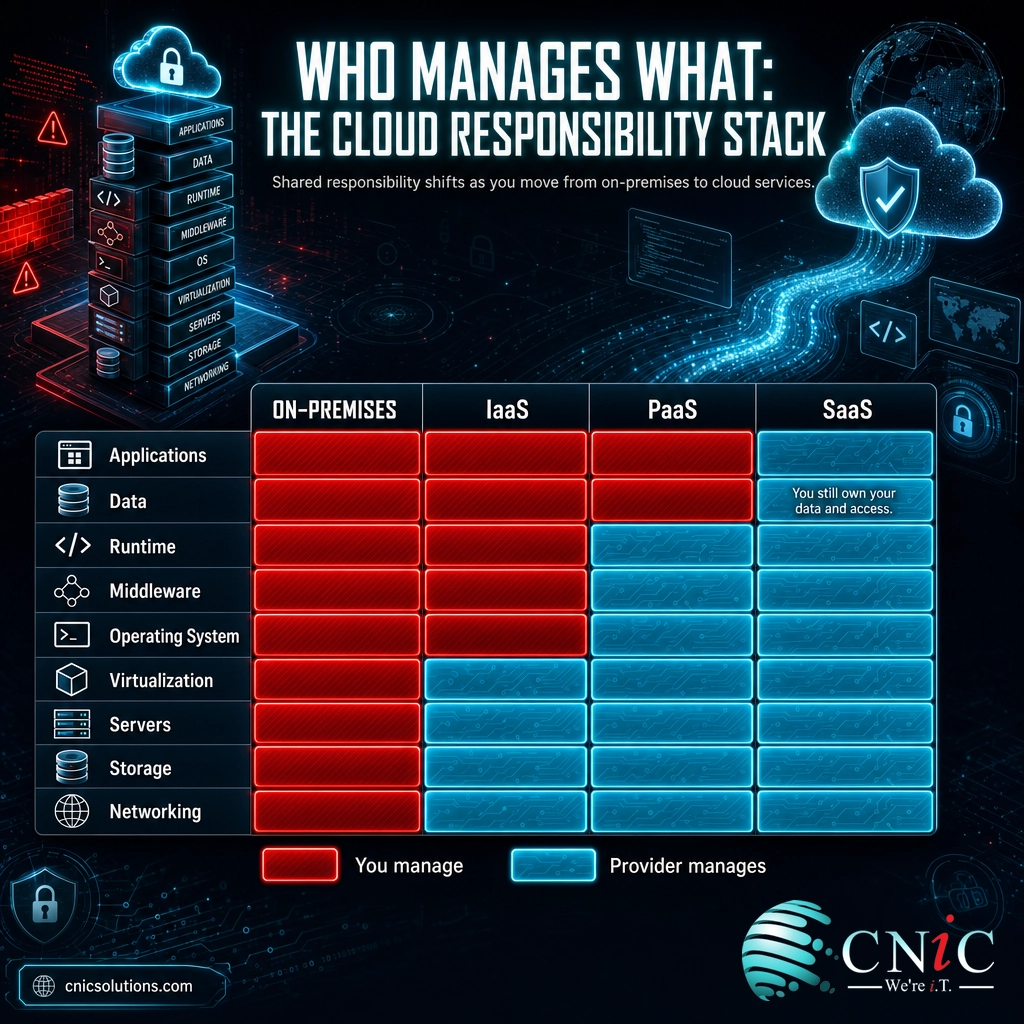
The three service models are simply three different dividing lines on that stack. The U.S. National Institute of Standards and Technology defined them in its foundational cloud computing standard, and the definitions still anchor how the industry, federal procurement, and compliance frameworks talk about the cloud today. IaaS gives the provider the bottom of the stack. PaaS moves the line higher so the provider also runs the operating system and development platform. SaaS moves the line nearly to the top, leaving you responsible for little more than your data and who can access it.
A useful way to picture it: think of getting dinner on the table. Running your own data center is cooking a meal from scratch in your own kitchen. IaaS is like renting a fully equipped commercial kitchen: the building, power, and appliances are handled, but you still bring the ingredients and do the cooking. PaaS is a meal kit: the ingredients and recipe arrive prepped, and you just assemble and cook. SaaS is dining at a restaurant: you order, you eat, and someone else owns the entire operation behind the kitchen door.
The shared responsibility model: the part everyone forgets
No matter which model you choose, security and management are always split between you and the provider. This is called the shared responsibility model, and it is the single most misunderstood idea in cloud computing. The provider secures the layers it operates. You secure everything above that line, and you always own your data, your user identities, and your configuration settings, no matter how far up the stack the provider goes.
This split matters because it is where most cloud incidents originate. Gartner estimated that through 2025, 99 percent of cloud security failures would be the customer’s fault, driven overwhelmingly by misconfiguration rather than by a provider being breached. Choosing SaaS does not mean security is “handled.” It means the technical surface you are responsible for is smaller, not that it is zero.
Myth: “We moved to the cloud, so security is the provider’s problem now.” This is the assumption behind a large share of real-world cloud breaches. The provider guarantees the security of the cloud; you are always responsible for security in the cloud, which means your accounts, your access rules, your sharing settings, and your data. A misconfigured storage bucket or an over-permissioned login is your responsibility in every model, including SaaS. Treat the shared responsibility line as the first thing to map, not an afterthought.
How big is each market?
The relative size of each model reflects how much work it removes for the buyer. SaaS is the largest segment because finished software removes the most effort, and it is where the average business already spends the most. IaaS and PaaS are close behind and growing quickly as companies migrate infrastructure and build custom applications in the cloud.
Source: Gartner forecast, November 2024. Total public cloud spending projected at $723.4 billion for 2025.
The takeaway for a business owner is not the raw dollar figures but the shape of the market: all three models are large, mainstream, and here to stay. This is not a bet on an emerging technology. It is a decision about which established model fits each job.
Source: NIST Special Publication 800-145, The NIST Definition of Cloud Computing | Gartner public cloud spending forecast
IaaS: Infrastructure as a Service
Infrastructure as a Service delivers the raw building blocks of computing over the internet: virtual servers, storage, and networking that you provision on demand and pay for as you use. Instead of buying physical servers and racking them in an office, you spin up the equivalent capacity in a provider’s data center in minutes and scale it up or down as your needs change. Amazon Web Services EC2, Microsoft Azure Virtual Machines, and Google Compute Engine are the best-known examples.
How it works
The provider owns and runs the physical hardware, the virtualization layer, and the data center itself: power, cooling, and network connectivity. You get virtual machines that behave like servers you fully control. From there, everything is yours to manage: you install and patch the operating system, configure the network rules, install middleware and runtimes, deploy your applications, and manage your data. It is the closest cloud model to running your own servers, minus the hardware you no longer have to buy, house, or replace.
Best use case
IaaS fits businesses that need control over their environment or are moving existing systems to the cloud without redesigning them. A “lift and shift” migration, where you move current servers and applications into the cloud largely as they are, runs on IaaS. It also suits workloads with unusual requirements, spiky or unpredictable demand, legacy line-of-business applications, and any situation where you need to configure the operating system and network exactly the way you want.
Strengths
- Maximum flexibility and control. You decide the operating system, configuration, and software down to the details.
- Pay for what you use. Capacity scales with demand, converting large upfront hardware purchases into predictable operating costs.
- No hardware to own or refresh. The provider handles the physical layer, including replacement and data center upkeep.
- Fast to scale. Adding servers is a configuration change, not a purchase order and a two-week wait.
Limitations
- You carry the most management responsibility. Patching, security hardening, backups, and monitoring are all on you or your IT partner.
- It requires real technical skill. IaaS assumes someone can administer servers competently, which is where unmanaged deployments get into trouble.
- Costs can creep. Idle or oversized resources quietly run up the bill without active cost management.
Best for: businesses migrating existing servers to the cloud, teams that need deep control over their environment, and workloads with variable or specialized requirements, provided they have skilled management in place. When that in-house skill is thin, IaaS is where disciplined backup and disaster recovery, patching, and monitoring earn their keep.
Source: Flexera 2025 State of the Cloud Report
PaaS: Platform as a Service
Platform as a Service gives your developers a ready-made environment to build, test, and run applications without managing the servers underneath. The provider handles the infrastructure and the operating system, plus development tools, databases, and the runtime your code needs. Your team writes and deploys the application and manages the data, and the platform takes care of everything below that. Common examples include Microsoft Azure App Service, Google App Engine, AWS Elastic Beanstalk, and Heroku.
How it works
With PaaS, you never log into a server to patch an operating system or configure a database engine. You push your application code to the platform, and it provisions the resources, runs the code, and scales it automatically as traffic rises and falls. The dividing line moves up: the provider now manages the operating system, middleware, and runtime, and your responsibility narrows to the application logic and the data it handles.
Best use case
PaaS is built for organizations that develop their own software, whether that is a customer-facing web application, an internal tool, or an API that connects systems together. It removes the undifferentiated work of server administration so developers can focus on the product. It is also well suited to teams that want to move fast, ship frequently, and let the platform handle scaling during demand spikes.
Strengths
- Faster development. Developers build on a ready environment instead of standing up and maintaining servers first.
- Less to manage. Operating system patching, runtime updates, and much of the scaling are handled by the platform.
- Built-in tools. Databases, development frameworks, and deployment pipelines come included.
- Automatic scaling. The platform adds capacity under load without manual intervention.
Limitations
- Less control of the environment. You accept the platform’s choices for the operating system and runtime versions.
- Potential for lock-in. Applications built around one platform’s specific services can be harder to move later.
- Only useful if you are building software. A business that does not develop its own applications has little use for PaaS.
Best for: businesses that build and maintain their own applications and want their developers focused on the product rather than on server maintenance. If you outsource software development or rely entirely on off-the-shelf tools, PaaS is probably not your model.
Source: Gartner public cloud spending forecast
SaaS: Software as a Service
Software as a Service delivers finished, ready-to-use applications over the internet. There is nothing to install or maintain: you sign in through a browser or app, and the provider runs everything behind the scenes, from the servers to the software updates. It is the model most business owners already use every day, often without thinking of it as “cloud.” Microsoft 365, Google Workspace, Salesforce, QuickBooks Online, Dropbox, and Zoom are all SaaS, and modern business phone systems delivered as cloud communications and UCaaS belong here too.
How it works
The provider owns and manages the entire stack: infrastructure, operating system, application, and updates. You do not patch anything, you do not manage servers, and you never see a version upgrade as a project because the provider deploys it for everyone at once. Your responsibility shrinks to two things that still matter enormously: your data and your user accounts, including who has access to what and how that access is secured.
Best use case
SaaS fits any standard business function that a vendor already solves well: email, document collaboration, accounting, customer relationship management, video conferencing, help desk ticketing, and payroll. If a proven application already does what you need, buying it as SaaS is almost always faster and cheaper than building or hosting your own. The model is designed for speed of adoption and predictable per-user pricing.
Strengths
- Fastest to deploy. Sign up and start using it the same day, with no infrastructure to build.
- Almost no maintenance burden. Updates, patching, and uptime are the provider’s job.
- Predictable subscription pricing. Costs are typically per user per month, which is easy to budget.
- Access anywhere. Browser-based delivery supports remote and hybrid work by default.
Limitations
- Least customization. You work within the features the vendor provides and cannot re-engineer the software.
- Per-seat costs add up. At scale, subscription fees across many tools and users can rival or exceed hosting your own.
- Data and integration questions. Your data lives in the vendor’s environment, so exit strategy, integrations, and access control deserve attention up front.
Best for: standard business functions with a mature vendor solution, and any organization that wants results without managing technology. The catch worth remembering is account security: SaaS handles the software, but protecting logins and data is still your job, which is where layered account and identity protection earns its keep.
Source: Gartner public cloud spending forecast
IaaS vs. PaaS vs. SaaS: Side by Side
The clearest way to see the three models is to line them up against the same criteria. The pattern is consistent: as you move from IaaS to PaaS to SaaS, the provider takes on more, you manage less, control decreases, and convenience increases.
| Criterion | IaaS | PaaS | SaaS |
|---|---|---|---|
| You manage | OS, runtime, apps, data | Apps and data only | Data and user access only |
| Provider manages | Servers, storage, network, virtualization | Everything up to the runtime | The entire stack |
| Control | Highest | Moderate | Lowest |
| Setup speed | Slower (you build it) | Fast (deploy code) | Fastest (sign in) |
| Technical skill needed | High | Moderate (developers) | Low |
| Cost model | Pay per resource used | Pay per resource or app | Per user, per month |
| Best fit | Migrating or controlling servers | Building custom apps | Ready-to-use business software |
| Common example | AWS EC2, Azure VMs | Azure App Service, Heroku | Microsoft 365, Salesforce |
Where Each Model Wins
A side-by-side table shows the pattern, but real decisions turn on which criteria matter most for a specific workload. Here is how the models compare on the five factors business buyers weigh most.
Control: IaaS wins
If you need to dictate the operating system, network configuration, and software environment down to the version number, IaaS is the only model that gives it to you. PaaS constrains you to the platform’s choices, and SaaS gives you configuration options but not control over the software itself. Control is a genuine advantage for specialized, regulated, or legacy workloads, and a liability for teams without the skill to use it well.
Speed to deploy: SaaS wins
Nothing beats signing in to finished software and using it the same afternoon. SaaS has no build phase. PaaS is fast once your application is written, and IaaS is the slowest because you assemble the environment before anything runs. For a standard business need with a mature vendor, SaaS turns a months-long project into a same-week decision.
Cost predictability: SaaS wins for most, with a caveat
SaaS per-user pricing is the easiest to forecast, which is why finance teams like it. IaaS and PaaS usage-based billing is flexible but can surprise you when resources are left running or oversized. The caveat is scale: a growing headcount multiplied across many SaaS subscriptions can quietly become one of the larger lines in the budget, which is exactly the pressure behind the finding that 84 percent of organizations struggle to manage cloud spend.
Maintenance burden: SaaS wins
SaaS offloads nearly all maintenance to the provider, PaaS offloads the infrastructure and platform, and IaaS leaves patching, hardening, and monitoring with you. For a business without a large internal IT team, the maintenance question often decides the model on its own.
Flexibility to grow and change: IaaS and PaaS win
When your needs are unusual or evolving, the control of IaaS and the developer freedom of PaaS let you build exactly what the business requires. SaaS is efficient precisely because it is standardized, which means you adapt to the software rather than the software adapting to you.
How to Choose the Right Cloud Model for Your Business
The goal is not to crown one model the winner. It is to match each job to the model that fits it. In practice, that decision usually comes down to a short series of questions about what you are trying to run, how much control you need, and what skills you have on hand.
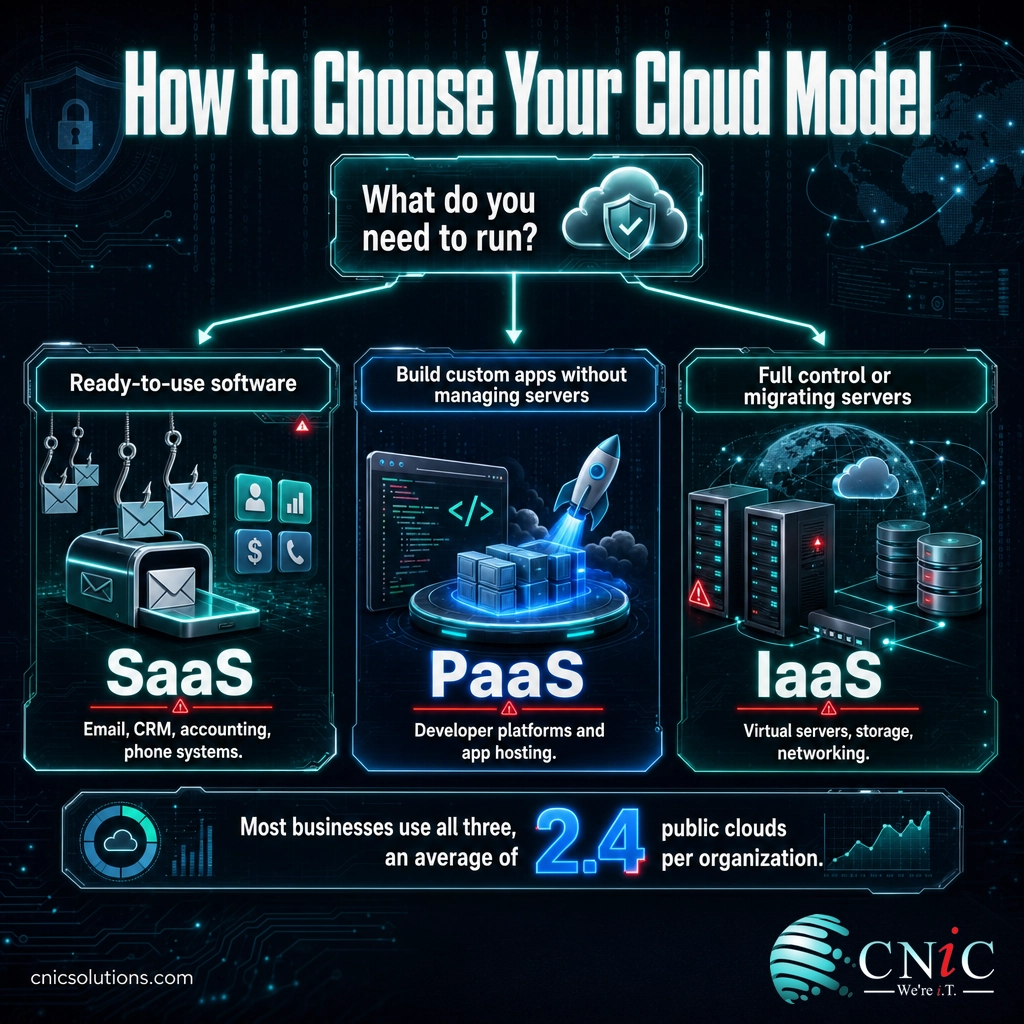
Choose SaaS if you need a standard business capability (email, accounting, CRM, video, phone system) and a proven vendor already offers it. You want results without managing technology, and predictable per-user pricing suits your budgeting.
Choose PaaS if your team builds or maintains custom software and you want developers focused on the application rather than on servers. You value fast deployment and automatic scaling, and you accept the platform’s environment choices in exchange.
Choose IaaS if you are migrating existing servers to the cloud, need full control over the operating system and network, or run specialized and legacy workloads. You have the in-house or partnered skill to manage servers securely.
Three practical factors sharpen the choice. First, technical skill: the more control a model gives you, the more expertise it demands, so honestly assess whether you have it. Second, compliance: regulated industries such as healthcare, legal, and finance carry obligations under frameworks like HIPAA, PCI-DSS, and SOC 2 that shape where data can live and how it must be protected, regardless of model. Third, total cost over time: compare not just the sticker price but the management, security, and staffing each model requires.
The most important point is that this is rarely an either-or decision. Most businesses run all three models side by side: SaaS for standard tools, PaaS for custom applications, and IaaS for the systems that need it. Flexera’s 2025 State of the Cloud Report found organizations use an average of 2.4 public cloud providers, and mixing service models across them is normal. The real work is mapping each workload to the right model and managing the whole environment coherently.
Source: Flexera 2025 State of the Cloud Report
Get Help Mapping Your Workloads
What CNiC Solutions Recommends
For most small and midsize businesses, the practical answer is a deliberate blend, not a single model. Run standard functions on SaaS where a mature vendor already solves the problem well. Use IaaS for the servers and legacy applications that need control or are being migrated from an aging server room. Reserve PaaS for the situations where your team is genuinely building software. Then manage the whole picture as one environment, because the risk is rarely any single model, it is an unmanaged sprawl of accounts, configurations, and costs that no one owns.
That last point is where the shared responsibility model gets real. In every model, your data, your identities, and your configuration are yours to protect, and misconfiguration is the leading cause of cloud incidents. A coherent cloud strategy pairs the right model for each workload with disciplined security, access control, backup, and cost management across all of them. That is the work a managed IT partner or a Virtual CIO is built to do: translate the business goal into the right mix of models and keep the environment secure, compliant, and predictable as it grows.
CNiC Solutions helps businesses design, migrate to, and manage the right combination of cloud service models, so you get the convenience of the cloud without inheriting its hidden management and security burden.
Frequently Asked Questions
What is the main difference between IaaS, PaaS, and SaaS?
Is Microsoft 365 an example of SaaS, PaaS, or IaaS?
Do most businesses use only one cloud service model?
Which cloud model is the most secure?
How do I decide between IaaS, PaaS, and SaaS?
Sources and Methodology
This guide draws on primary industry and standards sources. Service-model definitions follow the U.S. National Institute of Standards and Technology’s foundational cloud computing standard. Market and adoption figures are drawn from Gartner and Flexera. Security responsibility framing reflects Gartner’s published analysis of cloud security failure causes.
- NIST Special Publication 800-145, The NIST Definition of Cloud Computing (three service models: IaaS, PaaS, SaaS)
- Gartner, Worldwide Public Cloud End-User Spending Forecast (November 2024): total $723.4B in 2025; SaaS $299.1B; IaaS $211.9B; PaaS $208.6B
- Gartner, “Is the Cloud Secure?” (through 2025, an estimated 99% of cloud security failures would be the customer’s fault)
- Flexera 2025 State of the Cloud Report (84% of organizations struggle to manage cloud spend; average of 2.4 public cloud providers per organization)
Figures reflect the most recent published data available at the time of writing. Interpretation and the model-selection framework are original to CNiC Solutions.



related posts
What Is Virtualization? A Business Guide to Virtual Machines and Hypervisors
November 1, 2026Virtualization is technology that uses software to turn one physical computer into several separate virtual ones,…
What Is the Cyber Kill Chain? The 7 Stages Explained
November 1, 2026The cyber kill chain is a model that breaks a cyberattack into seven sequential stages, from…
What Is SOC 2 Type 2? A Guide to the Compliance Report
October 31, 2026SOC 2 Type 2 is an independent audit report in which a licensed CPA firm examines…
What Is the 3-2-1 Backup Rule? How It Protects Your Business Data
October 31, 2026The 3-2-1 backup rule is a data protection standard that says to keep three copies of…