

Cloud-native security is the practice of building protection directly into applications that are designed to run in the cloud, using containers, microservices, and automation. Instead of bolting security on after launch, it embeds safeguards across the entire lifecycle, from writing code to running it in production.
The way modern software is built has changed, and the way it is secured has to change with it. Applications no longer live on one server you can lock behind a firewall. They run as dozens of small, disposable pieces that spin up and disappear across cloud platforms in seconds. Cloud-native security is the discipline of protecting that kind of software on its own terms. This guide explains what cloud-native security actually is, how it works across the layers of a modern application, how it differs from the traditional cloud security you may already have, why it has become a business issue rather than a purely technical one, and how to get started without a full security team of your own.
Key Takeaways
- Security moves left. Cloud-native security builds protection into the development pipeline, so problems are caught while code is being written, not after it is live.
- It is layered. The widely used model covers four layers, Code, Container, Cluster, and Cloud, and a gap in any one of them exposes the others.
- The customer owns most of the risk. Gartner projects that through 2025, 99% of cloud security failures will be the customer’s fault, most often a misconfiguration.
- Cloud-native is now the norm. In the 2025 CNCF survey, 98% of organizations reported adopting cloud-native techniques, which means these risks touch nearly everyone.
- Automation is not optional. The scale and speed of containers and microservices make manual checking impossible, so continuous, automated security is the only approach that keeps up.
What’s in This Guide
What Cloud-Native Security Is
To understand cloud-native security, it helps to be clear about what “cloud-native” means first. A cloud-native application is not just an old program moved onto a cloud server. It is software designed from the start to take advantage of the cloud: broken into small independent services (microservices), packaged into lightweight, portable units called containers, and orchestrated by systems like Kubernetes that start, stop, and move those pieces automatically based on demand.
That design brings speed and flexibility, and it also breaks the assumptions traditional security was built on. There is no single machine to guard and no fixed perimeter to draw a line around. A container might exist for three minutes and then vanish. A firewall rule written for a server that no longer exists protects nothing. Cloud-native security is the set of practices and tools built for this reality: it protects applications where the pieces are numerous, short-lived, and constantly in motion.
The grounding for the technical side is well established. The National Institute of Standards and Technology addresses this environment directly in its NIST Application Container Security Guide (SP 800-190), which catalogs the container-specific risks that older security models miss entirely. The point worth holding onto is simple: cloud-native security is not traditional security with a cloud label. It is a different approach for a different kind of software, and it works alongside the broader move to cloud computing that most businesses are already partway through.
How Cloud-Native Security Works
Cloud-native security rests on two big ideas. The first is that security should be built in from the beginning rather than added at the end, an approach usually called “shifting left.” The second is that protection is layered, applied at every level of a modern application at once.
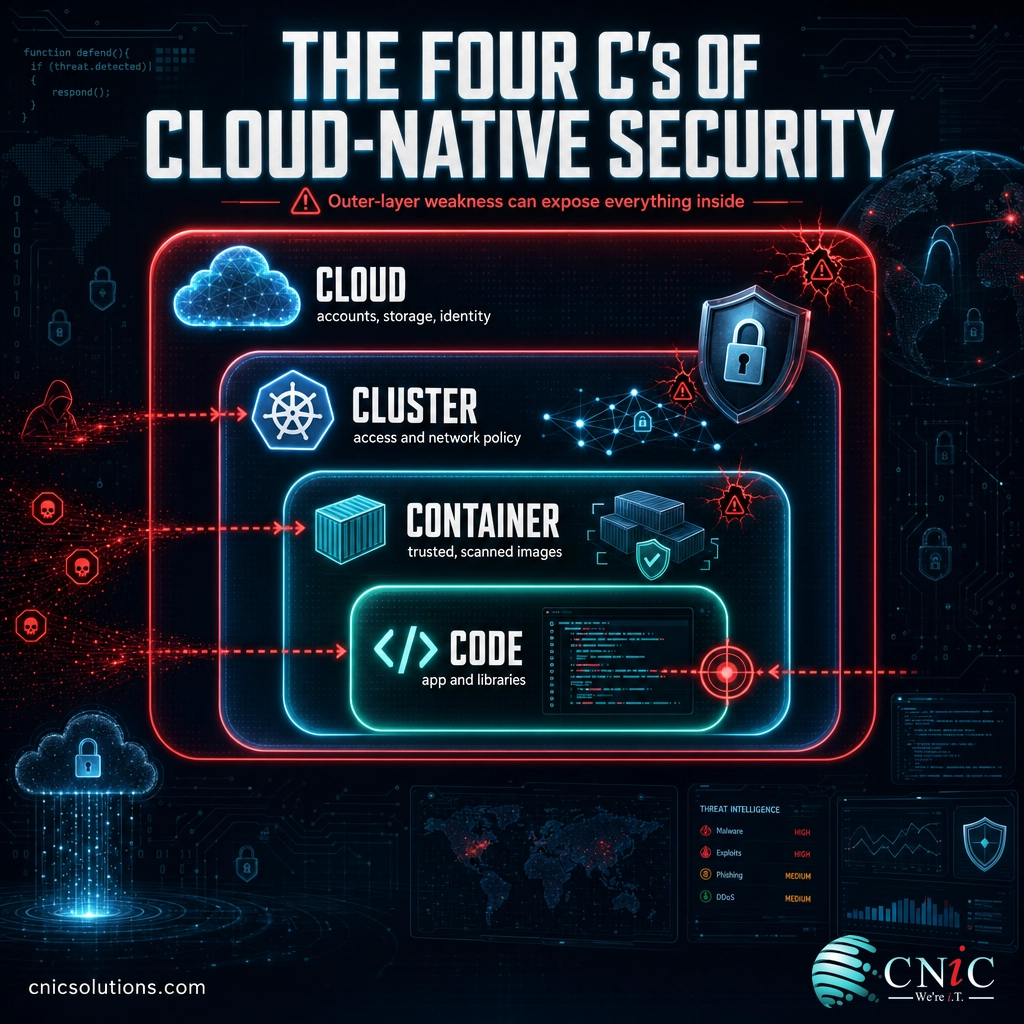
The most common way to picture those layers is the “four C’s” model, which reads from the inside out. Think of it like a set of nested boxes: each layer sits inside the next, and a weakness in an outer layer undermines everything within it.
- Code. The application code itself, plus the open-source libraries it depends on. Security here means scanning for known vulnerabilities and coding flaws before anything is packaged.
- Container. The portable unit the code is bundled into. Security here means using trusted base images, scanning them for vulnerabilities, and removing anything the application does not need.
- Cluster. The orchestration layer, usually Kubernetes, that runs and coordinates the containers. Security here covers access controls, network policies between services, and hardened configuration.
- Cloud. The underlying cloud infrastructure the whole system runs on. Security here means correct configuration of accounts, storage, and identity, the layer where the most damaging mistakes tend to happen.
Because containers are created and destroyed far faster than any person could track, “shifting left” is what makes the four C’s practical. Security checks are wired into the automated pipeline that builds and ships software, so a container image with a known flaw is flagged the moment it is built, and a misconfiguration is caught before it ever reaches production. The work does not stop at launch either: runtime protection watches the running application for suspicious behavior, because new threats appear after code goes live. In practice, cloud-native security is continuous rather than a one-time gate.
Cloud-Native Security vs. Traditional Cloud Security
This is the distinction that causes the most confusion, so it is worth drawing clearly. “Cloud security” is the broad umbrella of protecting anything you run in the cloud. “Cloud-native security” is a focused discipline within it, built specifically for applications designed the cloud-native way. The difference is not marketing. The two approaches make opposite assumptions about the thing they are protecting.
| Dimension | Traditional cloud security | Cloud-native security |
|---|---|---|
| What it protects | Servers and applications lifted into the cloud | Containers and microservices built for the cloud |
| Core assumption | A fairly fixed environment with a defined perimeter | A constantly changing environment with no fixed edge |
| When security is applied | Mainly after deployment, at the perimeter | Across the whole lifecycle, starting in development |
| How it scales | Manual rules and periodic review | Automated, continuous checks in the pipeline |
| Main failure point | An unpatched or exposed server | A misconfiguration or a vulnerable container image |
The practical takeaway: if your business only runs conventional applications hosted in the cloud, traditional cloud security may cover you. The moment developers start using containers, Kubernetes, or microservices, the older model has blind spots, and cloud-native security fills them. Most organizations end up needing both, because they run a mix of old and new. Knowing which of your systems fall into which camp is itself a useful first step, and it overlaps closely with a broader cybersecurity risk assessment of where your business is exposed.
Why Cloud-Native Security Matters for Your Business
It is tempting to file this under “developer problem,” but the numbers point the other way. Cloud-native technology is no longer a niche used by tech giants. It is how ordinary software gets built, which means the associated risks now sit under nearly every business.
Read those three figures together and the business case writes itself. Cloud-native tools are almost everywhere, the responsibility for securing them falls on you rather than the cloud provider, and the cost of a serious mistake is measured in millions. The adoption curve is still climbing, too, which means the exposure is growing, not leveling off.
Organizations Running Kubernetes in Production, 2023 to 2025
Source: CNCF Annual Cloud Native Surveys, 2023 to 2025. Kubernetes, the engine behind most cloud-native applications, is now in production use at the large majority of organizations.
Sources: CNCF Annual Cloud Native Survey | IBM Cost of a Data Breach Report 2025
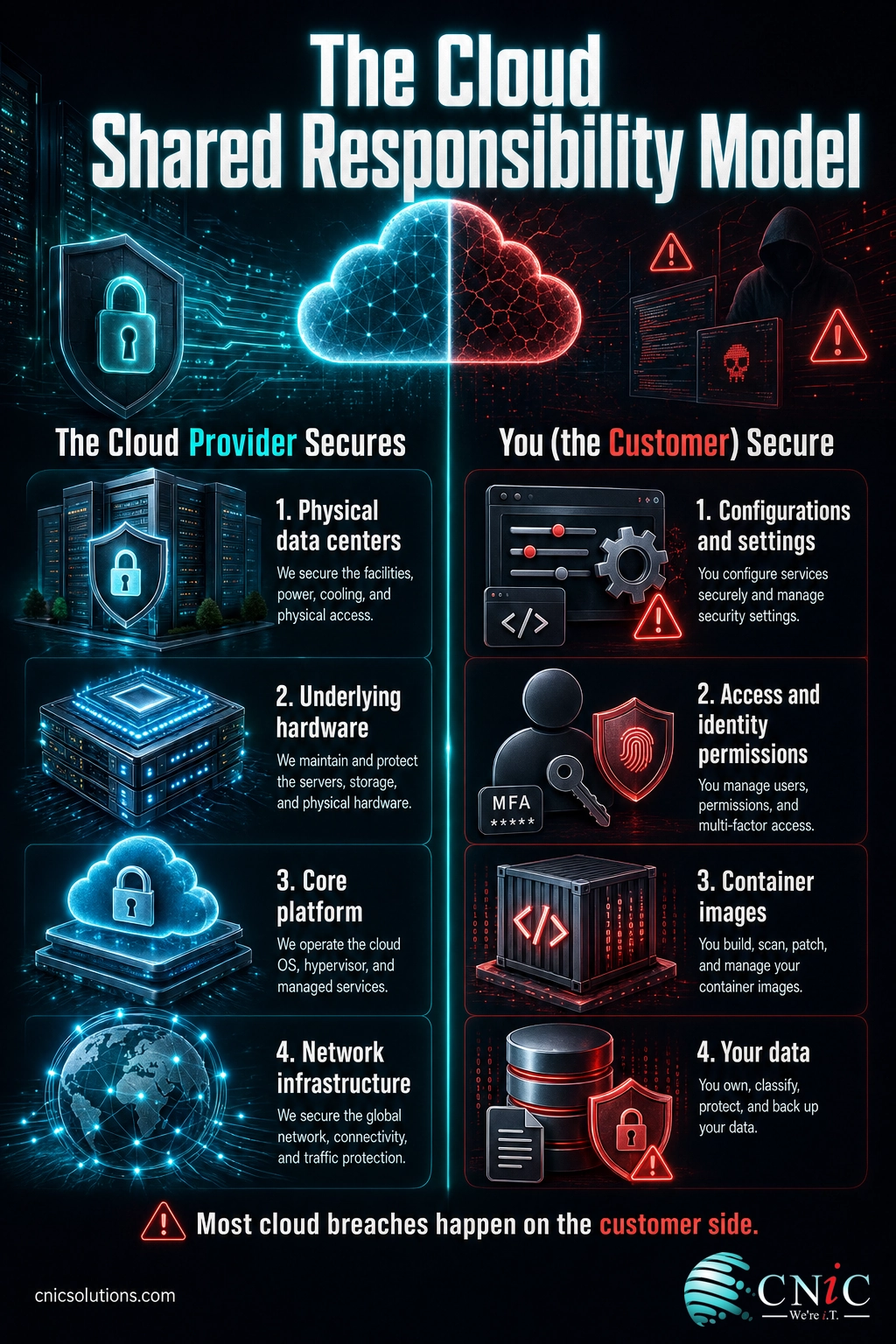
The reason so much of the risk lands on the customer comes down to how cloud responsibility is divided. The provider secures the physical data centers and the underlying platform. Everything you put on top, your configurations, your access controls, your container images, your data, is yours to secure. The U.S. government makes this explicit: in the NSA and CISA guidance on mitigating cloud vulnerabilities, misconfiguration is named the most prevalent cloud vulnerability, and one that requires only low attacker sophistication to exploit. In plain terms, the most common way cloud systems are breached is a settings mistake that an unskilled attacker can walk through.
Myth: “The cloud provider handles our security.” This is the single most expensive misunderstanding in cloud computing. Providers secure the infrastructure their platform runs on, but under the shared responsibility model, your configurations, access permissions, container images, and data are yours to protect. Gartner’s projection that 99% of cloud security failures will be the customer’s fault is a direct measure of this gap. Assuming the provider has it covered is exactly how the misconfigurations that cause most cloud breaches slip through.
None of this means cloud-native architecture is unsafe. Built correctly, it can be more secure than the systems it replaced, because protection is automated and consistent rather than left to memory. The risk is not the technology itself. It is adopting it without adjusting how you secure it, which is where an experienced partner and a deliberate plan make the difference.

The Core Components of Cloud-Native Security
Cloud-native security is not one product. It is a set of capabilities that work together, and the market has grown a small alphabet of acronyms to name them. Here is what each one actually does, in plain language.
CSPM (Cloud Security Posture Management). Continuously scans your cloud configuration for the misconfigurations that cause most breaches, such as a storage bucket left open to the public or overly broad permissions. Given that misconfiguration is the top cloud vulnerability, this is often where a business sees the fastest return.
CWPP (Cloud Workload Protection Platform). Protects the workloads themselves, the running containers and the servers behind them, by scanning images for vulnerabilities and watching for suspicious behavior while they run.
CIEM (Cloud Infrastructure Entitlement Management). Manages identities and permissions, enforcing the principle of least privilege so every user and service has only the access it genuinely needs. Poor access control sits right beside misconfiguration on the list of widespread cloud weaknesses.
CNAPP (Cloud-Native Application Protection Platform). A newer, unified category that combines the functions above into a single platform, so a small team is not stitching together four separate tools and four separate alert streams.
Container and Kubernetes security. The controls specific to the cluster layer: hardening the orchestration platform, setting network policies between microservices, and restricting what a container is allowed to do. Some of these ideas mirror the way traditional networks use network segmentation to isolate systems, applied inside the cluster.
Runtime detection and response. Because new threats surface after code is live, cloud-native security includes ongoing monitoring for active threats, closely related to the managed detection and response capability behind broader security operations. Knowing your full attack surface is what tells you where that monitoring needs to point.
How to Get Started
You do not need to buy every tool above on day one. For most small and midsize businesses, the sensible path is sequential, and it starts with visibility rather than a purchase.
- Find out what you actually run. Many businesses are more cloud-native than they realize, because developers or a software vendor adopted containers without a formal decision. You cannot secure what you have not inventoried.
- Fix the configuration basics first. Since misconfiguration is the leading cause of cloud breaches, posture management and tightened access controls deliver the biggest early wins for the least effort.
- Build security into the pipeline. Add automated image scanning and configuration checks to the process that builds and ships your software, so problems are caught before they reach production.
- Add runtime monitoring. Once the front end is covered, extend protection to the running application so live threats are detected and answered, not discovered after the fact.
- Get expert help for the parts you cannot staff. Cloud-native security is specialized, and few small businesses can hire for it. This is where a managed IT and security partner supplies both the tools and the judgment.
This last point is where working with a provider earns its keep. A good partner does not hand you a dashboard and walk away; they help you decide what matters, configure it correctly, and keep it current as your applications change. That is how CNiC Solutions approaches it. Our cybersecurity team builds layered protection around the risks that matter most to your specific environment, delivered alongside the managed IT services that keep those protections maintained day to day. For businesses weighing bigger platform decisions, a Virtual CIO can make sure security is part of the plan from the start rather than an afterthought.
Get a free security assessment for your business

Frequently Asked Questions
What is cloud-native security?
How is cloud-native security different from traditional cloud security?
What are the four C’s of cloud-native security?
Do small and midsize businesses need cloud-native security?
What tools are used for cloud-native security?
Related Terms
- Container: a lightweight, portable package that bundles an application with everything it needs to run, the basic building block of cloud-native software.
- Microservices: an architecture that splits an application into many small, independent services instead of one large program.
- Kubernetes: the most widely used system for orchestrating containers, automatically starting, stopping, and moving them based on demand.
- Shared responsibility model: the division of security duties between the cloud provider and the customer, and the source of most cloud confusion.
- Shift left: the practice of moving security checks earlier in development so issues are caught while code is written, not after launch.
- DevSecOps: a way of working that makes security a shared responsibility built into development and operations rather than a separate final step.
- Cloud migration: the process of moving applications and data into the cloud, covered in our guide to what cloud migration involves for a business.
About This Guide and Its Sources
This explainer describes cloud-native security using the widely recognized four C’s layering model and the container-specific risks documented by the U.S. National Institute of Standards and Technology in its Application Container Security Guide (SP 800-190). Shared-responsibility and misconfiguration findings are drawn from the NSA and CISA guidance on mitigating cloud vulnerabilities. All statistics are attributed to named primary sources: adoption and Kubernetes figures are from the CNCF Annual Cloud Native Surveys (2023 to 2025); the projection that 99% of cloud security failures will be the customer’s fault is from Gartner’s “Is the Cloud Secure?” research; and the average U.S. breach cost is from the IBM Cost of a Data Breach Report 2025. No figures were estimated or invented.



related posts
What Is Cloud Computing? A Beginner’s Guide for Businesses
October 14, 2026Cloud computing is the on-demand delivery of computing resources (servers, storage, databases, software, and networking) over…
What Is BYOD? Bring Your Own Device Explained for Businesses
October 13, 2026BYOD (Bring Your Own Device) is a policy that lets employees use their own personal devices,…
What Is Calendar Phishing and How to Prevent It
October 13, 2026Calendar phishing is a scam that hides a malicious link inside a calendar invitation instead of…
What Is an Evil Twin Attack? How Fake Wi-Fi Hotspots Steal Your…
October 12, 2026An evil twin attack is a fake Wi-Fi hotspot that copies the name of a network…