

An IT compliance checklist turns a wall of regulations into a set of specific, assignable tasks you can actually complete and prove. For a small business, that proof is what stands between you and a denied insurance claim, a lost contract, or a regulatory fine. The hard truth from real-world reviews in 2026 is that most businesses do not fail because they lack security tools. They fail because they cannot demonstrate that those tools are configured correctly, enforced consistently, and owned by someone. This checklist is built around what auditors, cyber insurers, and clients actually look for, organized so you can work through it and assign each item an owner.
How to Use This Checklist
A checklist only helps if it drives action. Work through it like this:
- Assign an owner to every item. A control with no named owner is a control nobody maintains. This is the single most common reason businesses fail reviews.
- Set a review frequency for each item (daily, monthly, quarterly, annually) rather than treating compliance as a one-time project.
- Document as you go. Auditors and insurers want evidence: logs, timestamps, records, and policies, not verbal assurances or screenshots alone.
- Start with the Quick Wins near the end if you need momentum, then work through each section by priority.
- Confirm which rules actually apply to you first. If you do not yet know your obligations, start with our overview of how to navigate IT compliance and regulations, then return here to execute.
Key Takeaways
- Compliance is proof, not tools. The question is not what you own, but whether you can demonstrate it works, consistently, with evidence.
- Every control needs an owner. Unassigned controls are the most common point of failure in real reviews.
- It is ongoing, not annual. The businesses that pass treat compliance as a daily operational habit, not a pre-audit scramble.
- It applies to nearly everyone. If you hold customer data, take payments, or sign client contracts, compliance is already part of your risk picture.
- Documentation is the deliverable. Logs, policies, and records are what turn “we do that” into “we can prove that.”
What’s in This Checklist
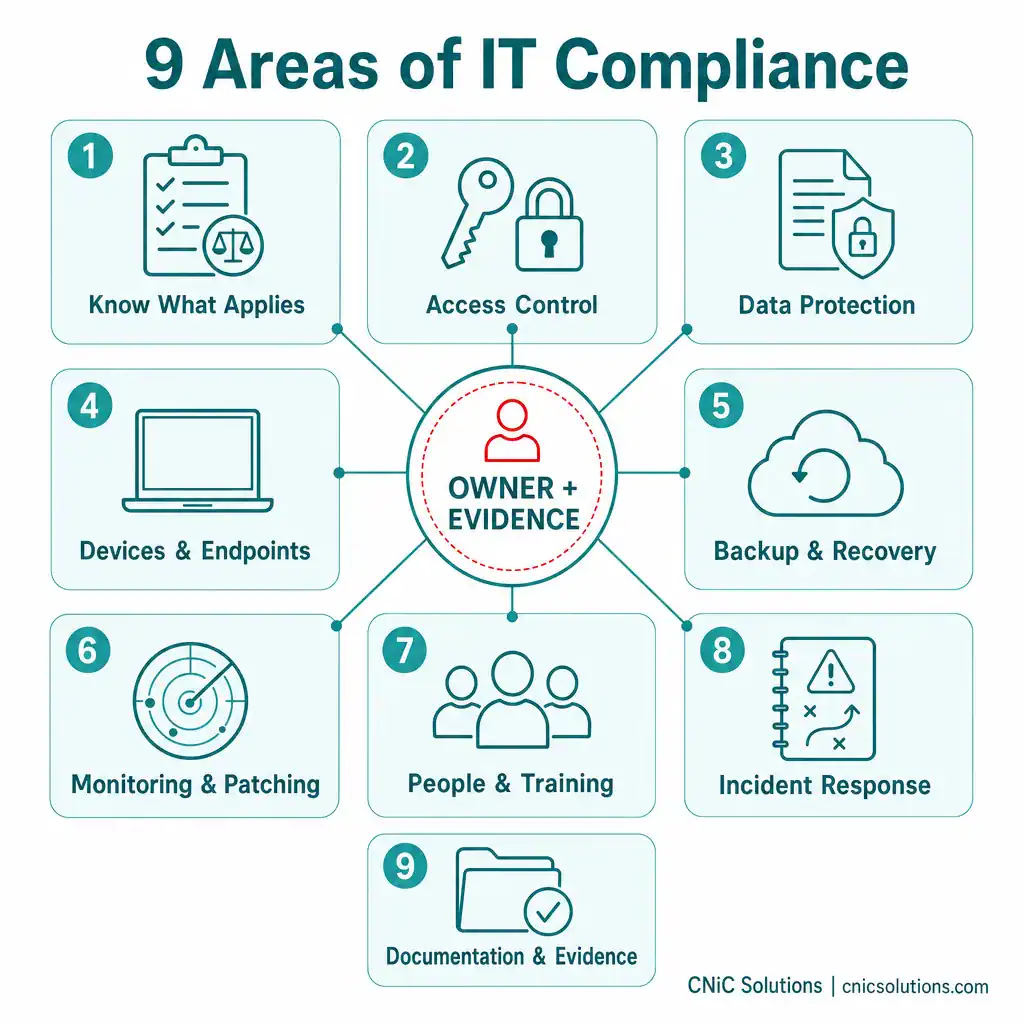
- 1. Know What Applies to You
- 2. Identity and Access Control
- 3. Data Protection and Encryption
- 4. Devices and Endpoints
- 5. Backup and Recovery
- 6. Monitoring, Logging, and Patching
- 7. People, Policies, and Training
- 8. Incident Response
- 9. Documentation and Evidence
- Priority Matrix
- Quick Wins You Can Do Today
- Frequently Asked Questions
1Know What Applies to You
You cannot comply with rules you have not identified. Before any control, map your obligations to your actual business: your industry, the data you handle, your location, and what your clients and insurers require of you.
- Identify every regulation and framework that applies, such as HIPAA (healthcare), PCI-DSS (card payments), SOC 2 (service providers), and any client-contract or cyber-insurance requirements.
- Inventory the sensitive data you hold and where it lives: customer records, payment data, health information, employee records, and intellectual property.
- Map data flows, noting how sensitive data enters, moves through, and leaves your systems, including cloud services and third-party vendors.
- Confirm vendor and contract obligations, since clients increasingly pass security requirements down to you through agreements and questionnaires.
- Re-check applicability after any major change, such as entering a new market, taking on a regulated client, or adopting a new platform.
Why this section comes first: every other item on this list depends on knowing which standards you are being held to. For a deeper look at the major frameworks and what they require, see our guide to navigating IT compliance and regulations.
2Identity and Access Control
Who can access what is the foundation of nearly every compliance framework. Most reviews scrutinize access controls first, because compromised or over-permissioned accounts are behind so many breaches.
- Enforce multi-factor authentication (MFA) on every account that supports it, especially email, remote access, and administrative logins.
- Apply least-privilege access, giving each employee only the access their role requires, and nothing more.
- Use unique accounts for every user, with no shared logins, so activity can always be traced to an individual.
- Review access regularly and remove it promptly when someone changes roles or leaves the company.
- Secure and limit administrator accounts, tracking who holds elevated privileges and why.
- Keep records of access changes, since reviewers want a history of who was granted or removed access and when.
The most common audit failure
Reviewers repeatedly find businesses that have MFA available but not enforced, or former employees whose access was never revoked. Having the capability is not enough. You must be able to show MFA is enforced everywhere and that offboarding consistently removes access. Proof, not intent.
3Data Protection and Encryption
Protecting sensitive data, both where it is stored and as it moves, is a core expectation of every major framework.
- Encrypt data at rest on servers, laptops, and mobile devices, so a lost or stolen device does not become a breach.
- Encrypt data in transit using TLS for web traffic and a VPN for remote connections to internal resources.
- Encrypt sensitive email containing regulated or confidential information.
- Classify your data so the most sensitive information receives the strongest protection.
- Control removable media and file sharing, limiting how sensitive data can leave approved systems.
Encryption is foundational but frequently misunderstood. If you want to understand the difference between encrypting data at rest and in transit, and what your business actually needs, see our explainer on data encryption for business.
Get expert help securing and documenting your controls
4Devices and Endpoints
Every laptop, phone, and workstation is a potential entry point. Frameworks expect consistent protection across all of them, not just the office desktops.
- Deploy endpoint protection (antivirus or endpoint detection and response) on every device, and keep it current.
- Enforce device encryption on all company laptops and mobile devices.
- Manage mobile devices with policies that allow remote wipe of lost or stolen hardware.
- Maintain an asset inventory so you know every device that touches business data, including personal devices if you allow them.
- Standardize secure configurations, disabling unnecessary services and changing default credentials.
5Backup and Recovery
Backups are both a compliance requirement and your last line of defense against ransomware. Reviewers increasingly want proof that backups not only exist but actually restore.
- Back up critical data automatically on a defined schedule, with no reliance on someone remembering to do it.
- Keep backups encrypted and, ideally, immutable, so ransomware cannot alter or delete them.
- Follow a tested backup strategy, keeping multiple copies across separate locations.
- Test restores regularly, because an untested backup is only a hope, not a safeguard.
- Document backup and restore results, since “we have backups” means little without evidence they work.
“We have backups” is not enough
One of the most damaging assumptions a business can make is that backups will work when needed. Reviewers, and ransomware, both expose untested backups quickly. A documented, successful restore test is the only thing that proves your safety net actually holds.
Let CNiC manage backups and recovery for you
6Monitoring, Logging, and Patching
Compliance frameworks expect you to both prevent problems and detect them, with records to prove it. This is where ongoing operations matter most.
- Patch systems and software promptly, on a defined schedule, since unpatched vulnerabilities are a leading breach cause and a frequent audit finding.
- Enable and retain logs of sign-ins, access changes, and administrative activity, because logs are the evidence reviewers ask for first.
- Monitor for suspicious activity continuously, rather than discovering issues after the damage is done.
- Configure alerts for high-risk events and document how your team responds to them.
- Review logs regularly, not just collect them, so anomalies are actually noticed.
Why this is the hardest section to do alone: monitoring, logging, and patching are continuous, around-the-clock work. They are exactly the activities that slip when an owner is busy or absent, which is why they are also where reviews most often find gaps. This is the core of what managed IT and security services are built to handle.
7People, Policies, and Training
Most breaches involve human error, so frameworks require that your people, and the policies that guide them, are part of your compliance program.
- Maintain written security policies covering acceptable use, access, data handling, and incident response.
- Train employees on security awareness regularly, including phishing recognition, with records of completion.
- Run phishing simulations to measure and improve real-world resilience.
- Build security into onboarding and offboarding, so access is granted and revoked consistently and promptly.
- Document that training happened, since “we tell our staff to be careful” is not evidence; completion records are.
8Incident Response
Frameworks assume incidents will happen and judge you on whether you are prepared to respond. A written, tested plan is the expectation, not a nice-to-have.
- Maintain a written incident response plan with clear steps for containment, investigation, notification, and recovery.
- Assign roles and responsibilities so everyone knows their part during an incident.
- Know your breach notification obligations, including the timelines your regulations require.
- Test the plan with tabletop exercises, because a plan that has never been rehearsed rarely works under pressure.
- Keep incident records, documenting what happened and how you responded, which reviewers and insurers will ask to see.
Build a compliance-ready strategy with a Virtual CIO
9Documentation and Evidence
This is the section businesses most often underestimate, and the one reviewers care about most. In a compliance review, what you cannot prove effectively did not happen.
- Keep your policies current and dated, with a record of reviews and updates.
- Retain logs and records for the periods your frameworks require.
- Document control ownership, naming who is responsible for each control and how often they review it.
- Maintain evidence of enforcement: MFA reports, access-review records, patch history, backup-restore tests, and training completion.
- Centralize your documentation so evidence can be produced quickly during an audit, insurance renewal, or client questionnaire.
Proof beats explanations
In real reviews, logs matter more than screenshots, and ownership matters more than assurances. A business with modest tools and excellent documentation routinely outperforms one with expensive tools and no evidence. Build the habit of documenting as you go, not the night before an audit.
Priority Matrix
Not every item carries equal weight or cadence. Use this matrix to sequence the work and assign ownership and frequency.
| Control Area | Priority | Suggested Owner | Frequency |
|---|---|---|---|
| MFA enforced on all accounts | Critical | IT / MSP | Continuous + quarterly review |
| Access review and offboarding | Critical | IT / HR | On change + quarterly |
| Backups encrypted and restore-tested | Critical | IT / MSP | Daily backup + quarterly test |
| Patching and updates | Critical | IT / MSP | Ongoing / monthly |
| Data encryption (rest + transit) | High | IT / MSP | Verify quarterly |
| Endpoint protection on all devices | High | IT / MSP | Continuous |
| Logging and monitoring | High | IT / MSP | Continuous + monthly review |
| Security awareness training | High | HR / IT | Quarterly or annually |
| Incident response plan tested | Medium | Leadership / IT | Annually |
| Documentation and evidence current | High | Owner per control | Ongoing |
| Regulation/scope re-check | Medium | Leadership | Annually + on change |
Quick Wins You Can Do Today
If the full list feels daunting, these five high-impact items can be started today and meaningfully improve both your security and your audit readiness:
- Turn on MFA for email and remote access if it is not already enforced everywhere.
- Review who has access and revoke anything for former employees or unused accounts.
- Confirm your backups ran and run a single test restore to prove they work.
- Check that all laptops are encrypted using built-in tools like BitLocker or FileVault.
- Write down who owns what, assigning a named person to each major control area.
Working through this checklist is achievable, but keeping every item enforced, current, and documented, month after month, is where most small businesses run out of time. That ongoing discipline is precisely what a managed IT and security partner provides: enforcing controls across every device, maintaining the logs and evidence reviewers ask for, and keeping you audit-ready year round rather than scrambling before each renewal. If compliance has become a recurring source of stress, that is the signal it should be managed rather than handled ad hoc.
Make your business audit-ready with managed IT
Frequently Asked Questions
What is an IT compliance checklist?
Does IT compliance only apply to regulated industries?
How often should a small business review IT compliance?
Does having security tools mean my business is compliant?
What happens if a small business fails IT compliance?
A Note on Sources
This checklist reflects how IT compliance reviews work in practice, drawing on the controls and evidence that auditors, cyber insurers, and client security questionnaires consistently require, and aligning with widely adopted frameworks including HIPAA, PCI-DSS, SOC 2, and the NIST Cybersecurity Framework. For framework-level detail, see our companion guide on navigating IT compliance and regulations, and for the financial stakes of getting it wrong, our cybersecurity compliance statistics.

related posts
What Is DRaaS (Disaster Recovery as a Service)?
June 25, 2026DRaaS (Disaster Recovery as a Service) is a cloud-based model in which a third-party provider replicates…
What Is a Virtual CIO and Why You Need One
June 25, 2026A Virtual CIO (vCIO) is an outsourced technology executive who provides the same strategic IT leadership…
What Are Bots? Good Bots, Bad Bots, and How to Defend Against…
June 25, 2026A bot is an automated software program that carries out predefined tasks without human intervention, working…
IT Budgeting Guide for Small Business
June 25, 2026An IT budget is a plan for what your business will spend on technology over a…