

A message lands in your inbox: a coworker shared a document with you, or your cloud account is almost full and files will be deleted unless you act now. It looks routine, so you click, sign in, and move on. That single sign-in is the whole point of the scam. The fake page just captured your password, and if the account connects to your company email, one click can open the door to everything behind it. Phishing was the most-reported cybercrime in the United States in 2024, with 193,407 complaints to the FBI, and cloud storage emails have become one of its most convincing disguises.
Before You Begin
What this guide helps you do: recognize a fake cloud storage email on sight and verify a real one safely, without handing your login to a scammer.
- Time needed: about 10 minutes to learn the checks, seconds to apply them to any future email.
- Skill level: none. Every step works on a phone or a computer with no special tools.
- Have ready: the official app or bookmarked web address for any cloud service you actually use, and multi-factor authentication turned on where possible.
- Golden rule: never sign in through a link inside an unexpected message. Always go to the service directly.
Key Takeaways
- The scam wears two main disguises: a fake “a file was shared with you” notification, and a “your storage is full” or “account suspended” threat. Both funnel you to a copycat login page.
- The goal is your credentials, not your files. The email is bait to capture a password and multi-factor code that unlock your real account and any company systems tied to it.
- Recognition comes down to a few checks: do you use the service, does the real sender address match, where does the link actually go, and is the message trying to rush you.
- The safest habit is going direct. Verify a share or a storage warning by opening the official app or typing the known web address yourself, never by clicking the email.
- For businesses it is a shared risk. Phishing led U.S. cybercrime reports in 2024, and a stolen cloud login often becomes the first step toward email and invoice fraud.
What’s in This Guide
- What a Cloud Storage Email Scam Looks Like
- Why This Scam Works and What It Costs
- Step 1: Check Whether You Use That Service
- Step 2: Inspect the Real Sender Address
- Step 3: Examine the Link Before You Touch It
- Step 4: Read the Message for Urgency and Threats
- Step 5: Verify by Going Direct
- Step 6: Report and Delete the Message
- When to Call a Professional
- What to Do If You Already Clicked
- Maintain and Monitor
- Related Terms
- Frequently Asked Questions
What a Cloud Storage Email Scam Looks Like
A cloud storage email scam is a phishing email that impersonates a service you trust with your files, such as Google Drive, Microsoft OneDrive or SharePoint, Dropbox, or Apple iCloud. It does not break into your account. It convinces you to open the door yourself by mimicking a message these services really do send. Almost every version comes in one of two flavors, and knowing both is half the battle.
The fake “a file was shared with you” notification
This one copies the exact email you get when a colleague shares a document. It shows a familiar logo, a file name like “Q3 Invoice” or “Payroll Update,” and a big button that says View Document or Open in OneDrive. The button leads to a login page that looks identical to the real one. The moment you enter your email and password to “see the file,” the scammer has them. Because these emails imitate a normal part of the workday, they slip past busy people who share files constantly.
The “your storage is full” or “account suspended” threat
The second version manufactures a problem. It warns that your storage is full, your account is over its limit, or access has been suspended, and that your photos, contacts, and files will be deleted unless you upgrade or verify right now. In July 2025 the Federal Trade Commission published a specific alert about these messages impersonating Apple, Microsoft, and Google, warning that the goal is to steal your personal and payment information or install malware. The threat of losing your files is the hook, and the countdown is the pressure.
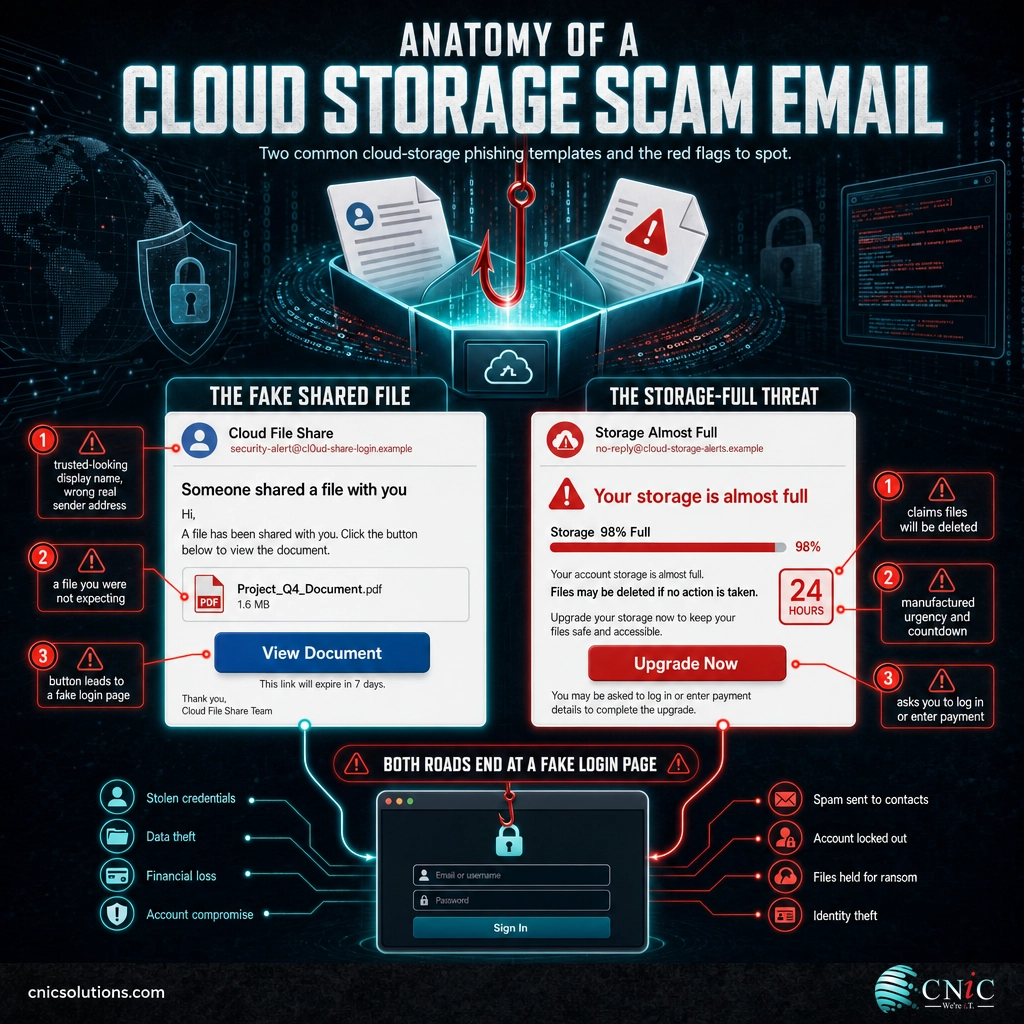
Both variants end at the same place: a page that asks you to log in. That is the tell that ties them together. A real notification takes you to a file or your account settings. A scam always needs your credentials first, because your credentials are the entire prize.
Source: FTC Consumer Alert: Are you really out of Cloud storage, or is that message a scam? | NIST Computer Security Resource Center: Phishing
Why This Scam Works and What It Costs
Cloud storage scams succeed because they hide inside a habit. Sharing a file and getting a storage nudge are ordinary events, so the fake versions do not look out of place. They also target the one credential that unlocks the most: your cloud and email login. For a small or midsize business, that login often connects to documents, contacts, saved payment methods, and the multi-factor prompts that guard everything else.
The real cost is rarely the single email. It is what a captured login unlocks. Once an attacker is inside your mailbox and cloud account, they can read past invoices, copy contacts, and send new scams from your genuine address to your staff, customers, and vendors. That is the path from one clicked link to business email compromise and wire fraud, which cost victims nearly $2.8 billion in 2024 alone. Defending against a fake storage email is not a personal chore; it is part of protecting the business, which is why companies invest in professional managed cybersecurity protection instead of leaving each inbox to fend for itself.
Source: FBI: 2024 Internet Crime Report release | FBI IC3: 2024 Internet Crime Report (PDF)

Step 1: Check Whether You Use That Service
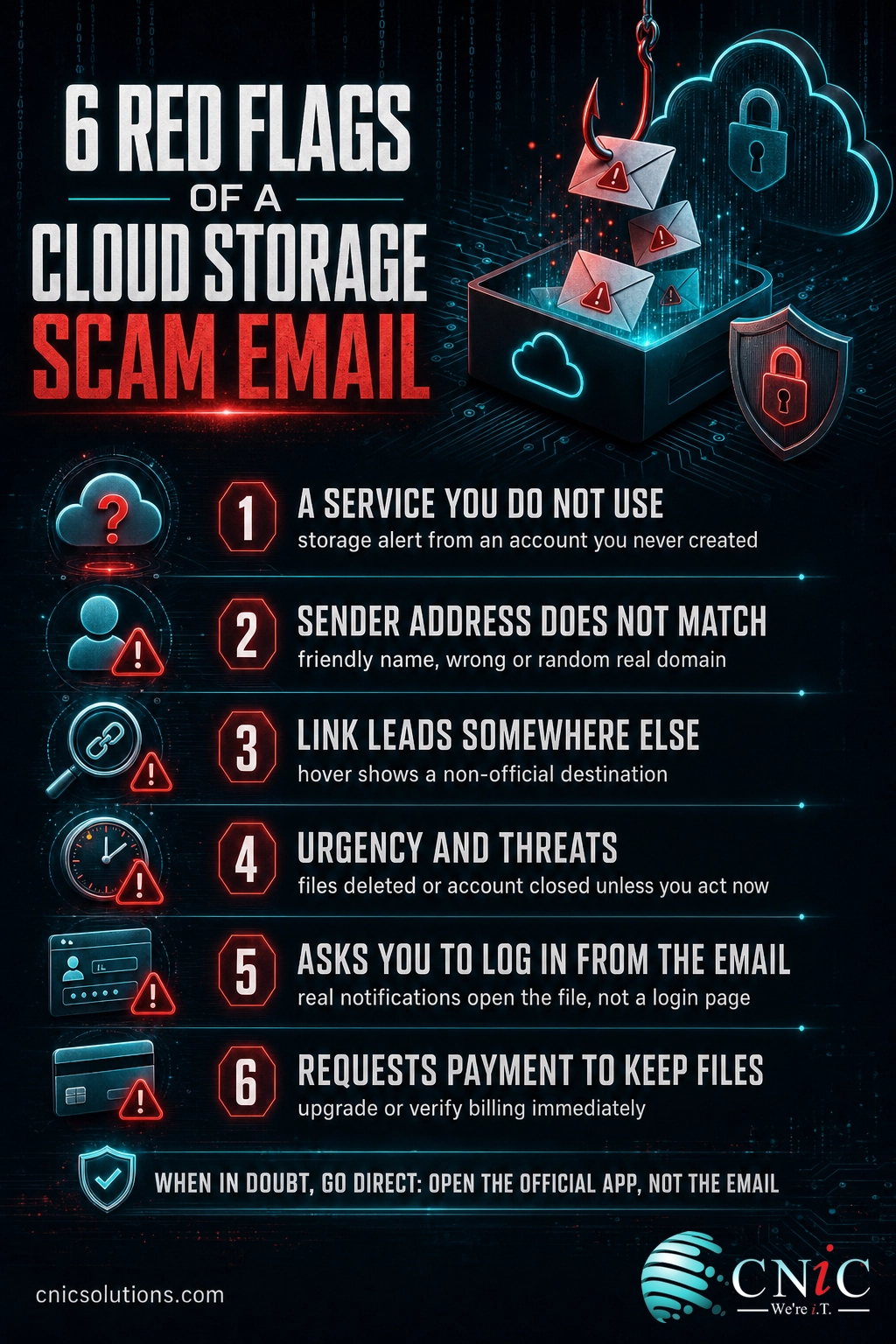
What to do: Before anything else, ask a simple question. Do you actually have an account with the company that supposedly sent this? If an email says your Dropbox is full but you have never used Dropbox, or a file was shared through a service your company does not use, you are done. It is a scam.
Why this step matters: Scammers send the same message to huge lists of addresses, betting that some recipients use the service. When you are not one of them, the mismatch exposes the whole thing instantly.
What success looks like: You can name every cloud service your household or company actually uses, so any alert from an unfamiliar one is an easy delete.
Step 2: Inspect the Real Sender Address
What to do: Do not trust the display name. Tap or click the sender to expand the full email address behind it. A genuine message from Microsoft, Google, Dropbox, or Apple comes from that company’s own domain. A scam hides behind a friendly name like “OneDrive” or “Cloud Storage” while the real address is a string of random characters or an unrelated domain.
Why this step matters: The display name is the easiest thing in an email to fake. The underlying address is much harder to disguise convincingly, so it is where the truth usually shows.
What success looks like: You confirm the sender’s real domain matches the company it claims to be, or you catch the mismatch that gives the scam away.
Myth: “If the logo and design look right, the email is legitimate.”
Logos, colors, and layouts are trivial for scammers to copy, because the images are pulled straight from the real company’s website. A polished, professional-looking email is not proof of anything. Some fakes look better than the genuine article. Judge the message by the sender address, the link destination, and whether it pressures you, never by how good the branding looks. The design is the disguise, not the credential.
Step 3: Examine the Link Before You Touch It
What to do: On a computer, hover your mouse over the View Document or Upgrade button without clicking, and read the real URL that appears at the bottom of the screen. On a phone, press and hold the link to preview its destination. If the address does not lead to the provider’s official domain, do not click. Watch for lookalike tricks such as extra words, misspellings, or the brand name buried inside a longer unrelated address.
Why this step matters: The link is the trapdoor. Everything else in the email is set dressing designed to get you to press it. Reading the destination first defuses the scam before it can start.
What success looks like: You can preview any link and tell whether it points to the genuine service or to a copycat address, and you never sign in on a page you reached by clicking an email.
Step 4: Read the Message for Urgency and Threats
What to do: Slow down and read what the message is actually asking. Cloud storage scams lean on pressure: your account will be closed, your files will be deleted, your storage is full, verify within 24 hours. Treat that urgency as a warning sign in itself. Real providers give you time and rarely threaten to erase your data by email.
Why this step matters: Urgency is the engine of every phishing attack. It is engineered to push you past your own judgment and into a fast, unthinking click. Naming the pressure takes away its power.
What success looks like: When a message tries to rush you, that pressure becomes your cue to stop and verify rather than a reason to hurry.
Step 5: Verify by Going Direct
What to do: If any part of you wonders whether the message might be real, verify it the safe way. Close the email. Open the provider’s official app, or type the web address you already know into your browser, and check your storage, your shared files, or your account status there. If a file was genuinely shared with you, it will be waiting in your account. If your storage really is full, the app will say so.
Why this step matters: Going direct removes the attacker from the path entirely. You interact only with the real service, so even a flawless fake email has nowhere to send you.
What success looks like: You resolve every storage warning and share notification through the official app or website, and the email link becomes irrelevant.
Common mistake: replying to “check” if it is real
Replying to a suspicious email, or calling a phone number printed inside it, does not verify anything. It only reaches the scammer, who will happily confirm that the message is genuine and walk you the rest of the way in. Verification means contacting the company through channels you found yourself, such as the number on the back of your card or the support page on their official site, never the contact details the message provides.
Step 6: Report and Delete the Message
What to do: Once you have confirmed an email is a scam, put it to work against the scammers. Forward phishing emails to the Anti-Phishing Working Group at reportphishing@apwg.org, report the fraud to the FTC at ReportFraud.ftc.gov, and, at work, send it to your IT or security team so they can block the sender and warn colleagues. Then delete it.
Why this step matters: Reporting feeds the filters and threat intelligence that catch the next wave, and a single early report at a company can stop a scam that was sent to everyone.
What success looks like: Suspicious emails are reported and removed, and at work your team hears about a new scam quickly instead of discovering it one victim at a time.
Source: FTC: How To Recognize and Avoid Phishing Scams | CISA: Recognize and Report Phishing
When to Call a Professional
If you reach a point where the checks above are not enough, that is the moment to bring in help rather than guess. Call in a professional when a cloud storage email got past someone and a work account may be exposed, when the same fake messages keep hitting your staff, when you spot logins or file activity you cannot explain, or when you are not sure whether your business has multi-factor authentication and email filtering set up correctly across every account.
For a home account, a password reset and multi-factor authentication usually settle it. For a business, a single compromised cloud login can reach shared drives, email, and connected apps, so containing it and confirming nothing else was touched is a job for people who do it every day. A Virtual CIO can fold phishing defense, monitoring, and employee training into one security strategy instead of leaving each inbox on its own.
Get expert help securing your business
What to Do If You Already Clicked
Clicking a link or even entering a password is not the end of the story, as long as you move quickly. The right response depends on how far it went. Find your situation below and act on it now, in order.
| What happened | What to do right now |
|---|---|
| I clicked the link but entered nothing | Close the page without typing anything. Do not enter credentials to “see what happens.” Run a security scan on the device, and stay alert for follow-up messages. |
| I entered my password | Change that password immediately from a device you trust, and change it anywhere you reused it. Turn on or reset multi-factor authentication and sign out all active sessions. |
| I entered a multi-factor code too | Treat the account as compromised. Reset the password and MFA, sign out every session, and review recent logins and shared-file activity for anything you did not do. |
| It was a work account | Tell your IT or security team right away, before doing anything else. Fast reporting lets them contain the account and check whether the attacker moved to email or other systems. |
| I entered payment details | Call your bank or card issuer using the number on your card, report the card as compromised, and watch your statements for unfamiliar charges. |
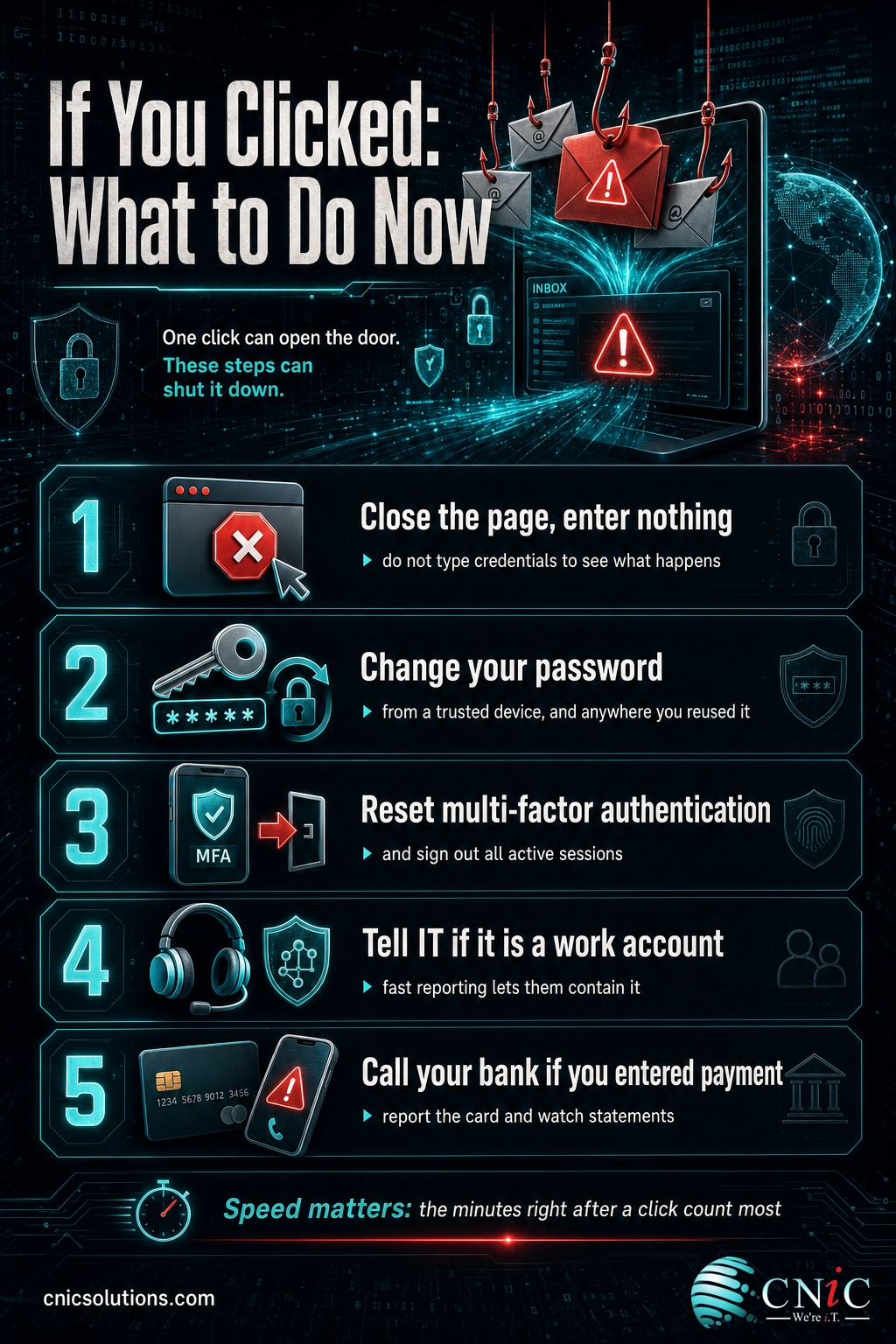
The common thread is speed. Attackers act on stolen credentials fast, so the minutes right after a click matter most. Changing the password, resetting multi-factor authentication, and signing out active sessions closes the window before they can use what they took.
Source: CISA: Recognize and Report Phishing
Maintain and Monitor
Recognizing one scam is a good day. Making sure the next one cannot hurt you is the real goal, and that comes from a few standing habits and controls rather than constant vigilance. Individual awareness is essential, but it cannot be the whole plan, because attackers only need one busy person to slip once.
- Turn on phishing-resistant multi-factor authentication on every cloud and email account, so a stolen password alone cannot open the door.
- Keep email filtering and security current so most fake share and storage emails are caught before anyone sees them.
- Give people a simple, blame-free way to report suspicious emails, so a new scam is flagged in minutes instead of quietly deleted.
- Run short, regular security awareness training that includes cloud storage scams and simulated phishing, not just generic examples.
- Back up business data independently so a threat to “delete your files” holds no power over you in the first place.
Standing these controls up once is the easy part. Keeping them current and consistent across every new hire, device, and account is where gaps quietly appear, and it is exactly what a managed security program is built to handle. That combination of protected accounts, filtered email, reliable backup and recovery, and trained people is what turns a scary-looking email into a non-event.
Set up reliable backup and recovery
Related Terms
- Phishing email warning signs: The red flags that reveal a fraudulent email, all of which apply to fake cloud storage messages.
- Types of phishing attacks: The broader family of scams this one belongs to, from mass email to targeted spear phishing.
- Clone phishing: An attack that copies a real message you already trusted and swaps in a malicious link, a close cousin of the fake share notification.
- DocuSign email scam: The same shared-document trick aimed at e-signature notifications instead of cloud files.
- Smishing: The same con delivered by text message, sometimes carrying the very same fake storage warning.
- How to prevent phishing attacks: The business playbook for stopping these scams across a whole team.
- Credential harvesting: The technique behind the scam, tricking someone into entering a username and password on a fake login page.
- Business email compromise (BEC): The invoice and wire fraud that a stolen cloud or email login most often leads to next.
Frequently Asked Questions
What is a cloud storage email scam?
How can I tell if a shared file notification is fake?
What happens if I click the link in a cloud storage scam email?
I already entered my password. What should I do?
How do businesses protect employees from cloud storage scams?
Build phishing defense into your security strategy
Sources
Statistics in this article come from the FBI Internet Crime Complaint Center (IC3) 2024 Internet Crime Report, which recorded 193,407 phishing and spoofing complaints as the most-reported crime type, $16.6 billion in total reported losses (a 33 percent increase over 2023), and roughly $2.77 billion lost to business email compromise. The description of the current cloud storage scam and its recognize-and-avoid guidance follows the Federal Trade Commission’s July 2025 consumer alert on fake cloud storage messages, the FTC’s guidance on recognizing and avoiding phishing scams, and CISA’s Recognize and Report Phishing resource. The definition of phishing as social engineering follows the NIST Computer Security Resource Center glossary. Example email subject lines and file names are illustrative templates based on documented scam patterns, not quotations of specific incidents.
Primary and authoritative sources: FBI IC3 2024 Internet Crime Report, FBI: 2024 Internet Crime Report release, FTC Consumer Alert: Are you really out of Cloud storage, or is that message a scam?, FTC: How To Recognize and Avoid Phishing Scams, CISA: Recognize and Report Phishing, NIST CSRC: Phishing.



related posts
Zero Trust Statistics for 2026: Adoption, Maturity, and Breach Impact
November 3, 2026Zero trust has become the default security strategy on paper, but not yet in practice. Okta's…
What Is ZTNA (Zero Trust Network Access)?
November 3, 2026Zero Trust Network Access (ZTNA) is a security service that grants a verified user access to…
What Is XDR (Extended Detection and Response) and How Does It Protect…
November 2, 2026Extended detection and response (XDR) is a security platform that collects and correlates threat data from…
What Is Zero Trust Security? A Guide for Small Businesses
November 2, 2026Zero Trust security is a cybersecurity model built on one rule: never trust, always verify. Instead…