
Smishing (SMS phishing) is a social engineering attack that uses text messages to trick you into clicking a malicious link, revealing sensitive information, or sending money. The name combines SMS and phishing. Because a text feels personal and urgent, smishing often works where a scam email would be ignored.
You already know not to trust a sketchy email. A text message is a different story. It lands on the one device you keep in your hand all day, it looks like a note from a friend, and it usually asks for a decision in the next thirty seconds. That is exactly why scammers have moved to your phone. This guide explains what smishing is, shows you real examples of the texts businesses and their employees actually receive, and walks through the practical steps that stop these attacks before they cost you.
Key Takeaways
- Smishing is phishing by text message. It combines SMS with phishing to trick people into clicking, replying, or paying through impersonation and urgency.
- It is a business problem, not just a consumer one. Employee phones connect to email, cloud apps, and multi-factor logins, so one tapped link can open the door to company systems.
- The losses are real. Consumers reported losing $330 million to text scams in 2022, with a median reported loss of $1,000, according to the FTC.
- Phishing is the most-reported cybercrime. The FBI’s IC3 logged 193,407 phishing and spoofing complaints in 2024, a category that includes smishing, more than any other crime type.
- The defense is a routine, not a gadget: verify through a separate channel, never click links in unexpected texts, and back human habits with mobile security and multi-factor authentication.
What’s in This Guide
How Smishing Works
Smishing is a form of social engineering, which means it manipulates a person into making a mistake rather than breaking through any technical defense. The attacker is not hacking your phone. They are hacking your trust, and a text message is a nearly perfect tool for the job. According to the authoritative definition of phishing from the standards body, it works by masquerading as a trustworthy entity to lure a victim into handing over information or access.
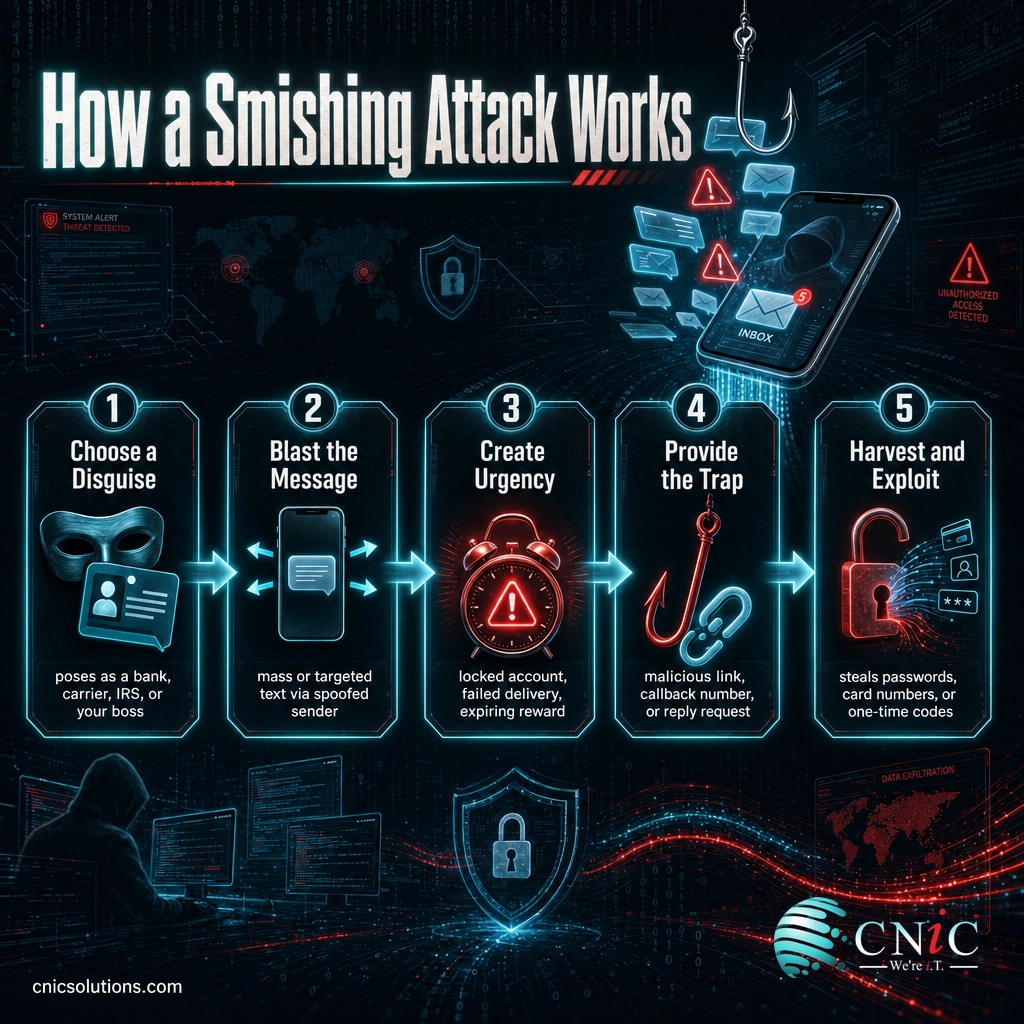
A typical smishing attack follows five steps:
- Choose a disguise. The scammer picks a sender you are likely to trust: your bank, a delivery company, a well-known retailer, the IRS, or even your own manager or IT department.
- Blast the message. Using cheap automated tools and spoofed sender IDs, they send the same text to thousands of numbers, or target a specific company’s staff.
- Create urgency. The message manufactures a reason to act right now: a locked account, a failed delivery, a suspicious charge, or a gift that expires today.
- Provide the trap. There is a link to a convincing fake login page, a phone number that connects to the scammer, or a request to reply with a code or details.
- Harvest and exploit. Whatever you enter, a password, a card number, a one-time passcode, flows straight to the attacker, who uses it to drain an account, take over a login, or launch the next attack.
Think of it like a stranger in a delivery uniform knocking on your door and saying there is a problem with a package you are expecting. The uniform does most of the work. You are not suspicious of the person; you are focused on the package. Smishing wears that uniform in text form, and the “package” is whatever worry it can attach to.
Source: NIST Computer Security Resource Center: Phishing | FTC: How To Recognize and Report Spam Text Messages
Smishing vs. Phishing vs. Vishing
These three terms describe the same con delivered through different channels, and they get mixed up constantly. Sorting them out makes every one of them easier to spot, because the giveaway is usually the mismatch between the channel and the request.
Phishing is the umbrella term for scams that impersonate a trusted source to steal information or money. Smishing is phishing carried out by text message. Vishing is the same play made over a phone call or voicemail. A single attack often chains them together, such as a text that tells you to call a number, which then connects you to a live “agent.”
| Aspect | Phishing | Smishing | Vishing |
|---|---|---|---|
| Channel | Email (usually) | Text message / SMS | Phone call or voicemail |
| Typical hook | A link or attachment in a message | A short link and urgent one-liner | A live person applying pressure |
| Why it works | Volume and familiar branding | Texts feel personal and get opened fast | A human voice is hard to doubt in the moment |
| Main giveaway | Sender address that does not match | Unexpected text with a link from an unknown number | Unsolicited call demanding action or secrecy |
The common defense across all three is the same one sentence: if a message pressures you to act immediately, stop and verify it through a channel you already trust before you do anything. For the phone-based version of this scam, see our guide to voice phishing and how to shut it down.
Myth: “Smishing only targets regular consumers, not businesses.”
This is the assumption that gets companies breached. Your employees carry phones that log into company email, cloud apps, and multi-factor prompts. A scammer who impersonates your IT team by text and captures one login code can reach the same systems as a full email breach. Personal and work life share a single device now, and attackers know it. Every business phone is a potential entry point, which is why smishing belongs in your security plan, not just your personal spam filter.
Source: NIST Computer Security Resource Center: Phishing

Why Smishing Matters for Your Business
Text-based fraud is not a nuisance you can shrug off. It is one of the fastest-growing scam channels, and the money involved is significant and rising. The figures below come from federal reporting, and they only count what victims actually reported, so the true totals are almost certainly higher.
For a small or midsize business, the real cost of smishing is rarely the single tapped link. It is what that tap unlocks. A stolen password or one-time passcode can hand an attacker a mailbox, and a compromised mailbox becomes the launch point for the next scam sent to your staff, your customers, and your vendors. From there, the path runs straight into invoice fraud and wire fraud, the same territory that made phishing the most-reported cybercrime in the country. Protecting against text scams is not a personal chore; it is part of protecting the business, which is why companies invest in professional cybersecurity services rather than leaving each phone to fend for itself.
Source: FBI IC3: 2024 Internet Crime Report | FTC: The Top Text Scams of 2022
Real Smishing Examples
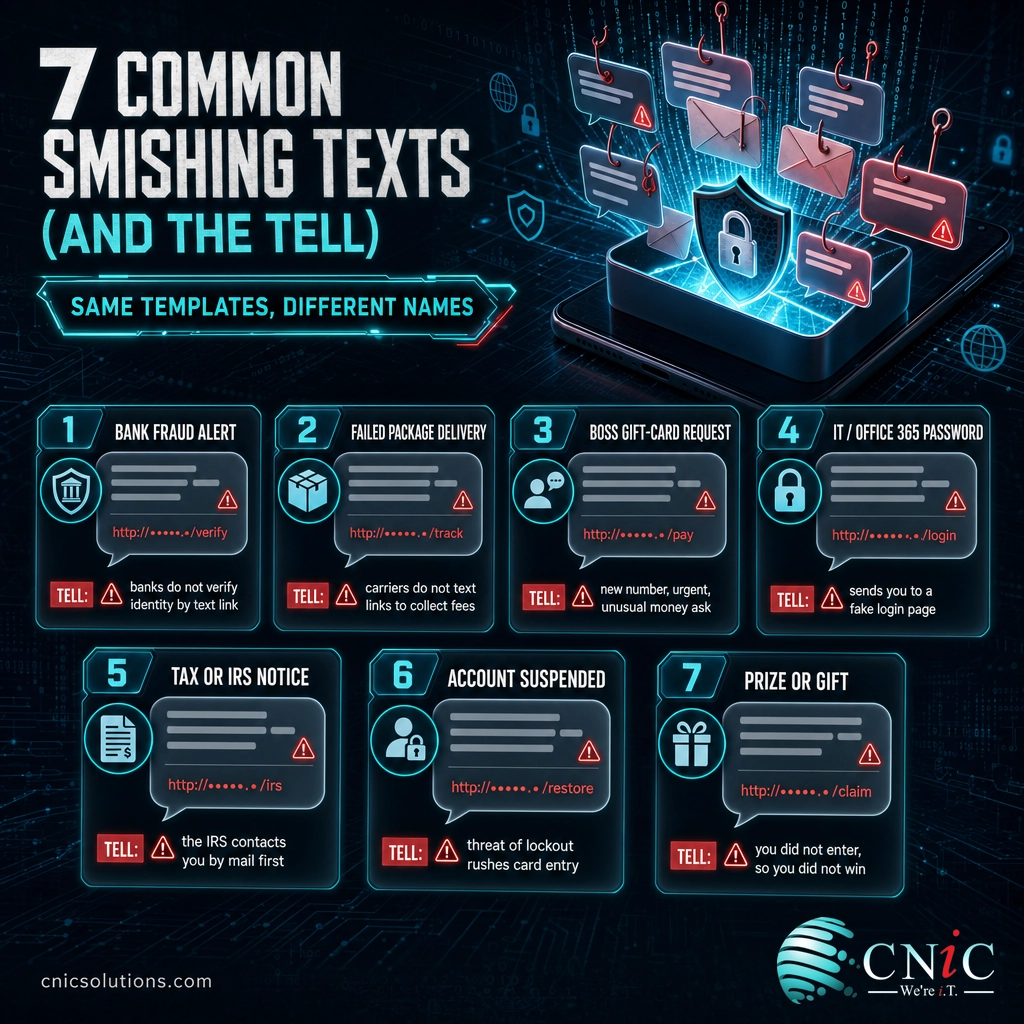
Smishing texts are effective because they imitate messages you get for legitimate reasons every week. The wording changes constantly, but the templates stay the same. Here are the most common ones businesses and their employees see, and the tell that gives each one away.
- The bank fraud alert. “USAA Alert: Did you attempt a $499.00 transfer? Reply YES or NO, or verify at [link].” Impersonating a bank has been the single most reported text scam. Real banks do not ask you to verify identity through a link in a text.
- The failed package delivery. “USPS: Your parcel is on hold due to an unpaid fee of $1.99. Update your details: [link].” A tiny fee lowers your guard and captures your card number. Carriers do not text random links to collect delivery fees.
- The boss or CEO request. “Hi, this is [Manager Name]. I’m in a meeting and need you to grab some gift cards for a client. Can you help? Text me here.” This targets employees directly. A new number claiming to be a leader with an urgent, unusual money request is the classic tell.
- The IT or Microsoft 365 warning. “IT Helpdesk: Your Office 365 password expires today. Re-verify to avoid lockout: [link].” It sends staff to a fake login page to harvest credentials and multi-factor codes.
- The tax or government notice. “IRS: You have an unclaimed refund of $978.20. Claim before it expires: [link].” Government agencies contact you by mail first, not by surprise text with a link.
- The account suspension. “Netflix: Your payment failed. Your account is suspended. Update billing: [link].” The threat of losing access rushes you to type card details on a copycat page.
- The prize or gift. “Congratulations! You’ve been selected for a $100 reward. Confirm your address: [link].” If you did not enter anything, you did not win anything.
Notice the pattern across all seven: a trusted name, a specific-sounding detail, a countdown, and a single link or number to tap. Once you see the template, the individual message stops being convincing.
Source: FTC: How To Recognize and Report Spam Text Messages | CISA: Recognize and Report Phishing
How to Avoid Smishing
Avoiding smishing comes down to one habit backed by a few controls. The habit is refusing to act on an unexpected text until you have verified it independently. The controls make sure that when someone does slip, the damage is contained.
What people should do
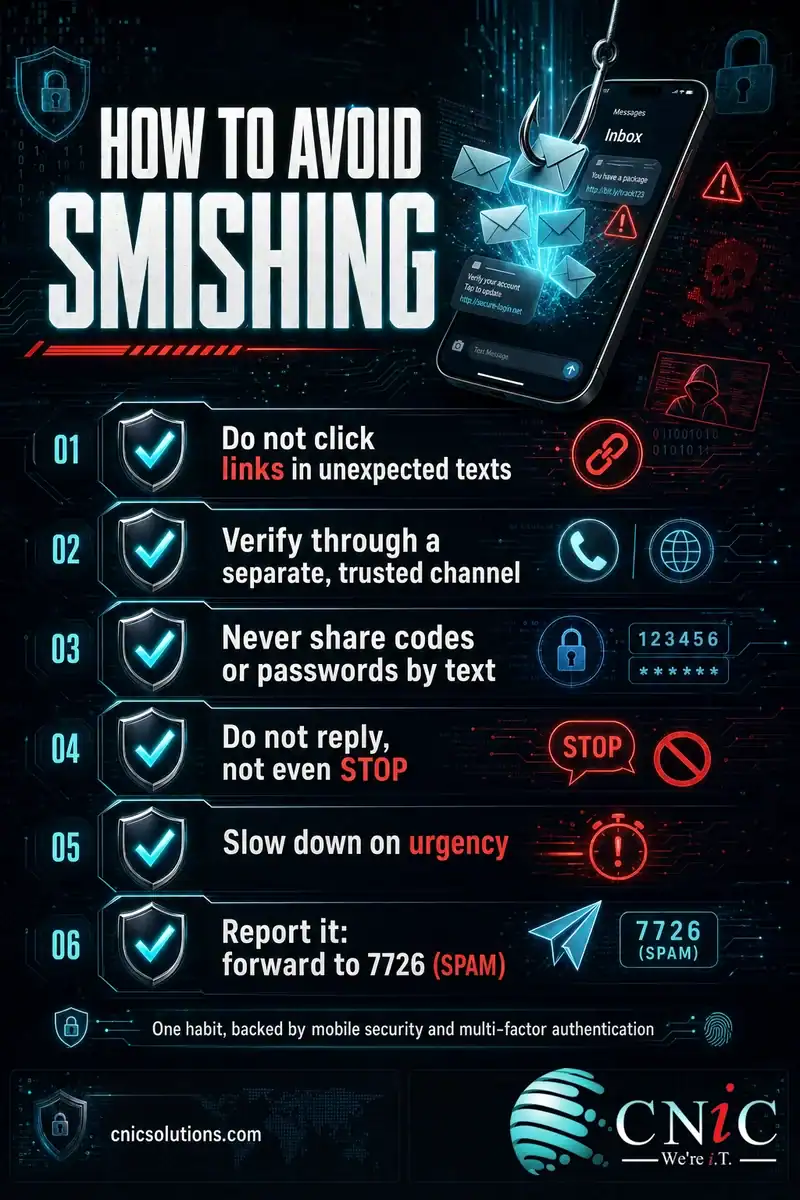
- Do not click links in unexpected texts. If a message claims to be your bank, delivery service, or a login you use, open the official app or type the known web address yourself instead of tapping the link.
- Verify through a separate channel. Got a text from “your boss” or “IT” with an urgent request? Confirm it with a phone call or in person using a number you already have, not the one in the message.
- Never share codes or passwords by text. No legitimate company will ever ask you to text back a one-time passcode, PIN, or password. That request alone is proof of a scam.
- Do not reply, not even STOP. Replying to a scam text confirms your number is active and invites more. Delete it, or use your phone’s report-junk option.
- Slow down on urgency. Locked accounts, expiring rewards, and last-chance warnings are engineered to stop you from thinking. Treat pressure as a reason to pause, not to hurry.
- Report it. Forward suspected spam texts to 7726 (SPAM), report them in your messaging app, and, at work, tell your IT or security team so they can warn everyone else.
What businesses should put in place
Individual awareness is essential, but it cannot be the whole plan, because attackers only need one busy person to slip once. A resilient business layers controls so a single bad tap does not become a breach:
- Phishing-resistant multi-factor authentication so a stolen password or code alone cannot take over an account.
- Mobile device management and mobile security to keep work data protected on the phones that connect to your systems.
- A simple, blame-free reporting path so employees flag suspicious texts quickly instead of quietly deleting them.
- Short, regular security awareness training that includes text scams and simulated smishing, not just email examples.
Standing these controls up once is the easy part. Keeping them current and consistent across every new hire, device, and app is where gaps quietly appear, and it is exactly what a managed security program is built to handle. A Virtual CIO can fold phishing and smishing defense into a full security strategy instead of leaving it to chance on individual phones.
Get your business security managed end to end
Related Terms
- Social engineering: The broad practice of manipulating people into security mistakes, which smishing is one channel of.
- Vishing: Voice phishing, the same con delivered by phone call or voicemail instead of text.
- Phishing email warning signs: The red flags that reveal a fraudulent email, many of which apply to texts too.
- Phishing email examples: Real scam emails broken down so you can recognize the patterns.
- Clone phishing: An attack that copies a real message you already trusted and swaps in a malicious link.
- Whaling: Phishing aimed at executives and finance leaders, often the goal behind a boss-impersonation text.
- Spoofing: Faking the sender name or number so a scam text looks like it comes from a trusted source.
- One-time passcode (OTP) theft: Tricking someone into sharing a login code so an attacker can bypass multi-factor authentication.
Frequently Asked Questions
What is smishing in simple terms?
What is the difference between smishing and phishing?
What should I do if I get a smishing text?
Can a smishing text harm you if you do not click the link?
How can businesses protect employees from smishing?
Build smishing defense into your security strategy
Sources
Statistics in this article come from two federal sources. The Federal Trade Commission’s Data Spotlight, The Top Text Scams of 2022, reported that consumers lost $330 million to scams that started with a text message in 2022, more than double the prior year, with a median individual reported loss of $1,000, and that bank impersonation was the most reported text scam. The FBI Internet Crime Complaint Center (IC3) 2024 Internet Crime Report recorded 193,407 phishing and spoofing complaints, its most-reported crime category, which the IC3 defines to include smishing and vishing. The definition of phishing as social engineering follows the NIST Computer Security Resource Center glossary, and detection and reporting guidance aligns with the FTC and CISA. Example text messages are illustrative templates based on documented scam patterns, not quotations of specific incidents.
Primary and authoritative sources: FTC Data Spotlight: The Top Text Scams of 2022, FBI IC3 2024 Internet Crime Report, NIST CSRC: Phishing, FTC: How To Recognize and Report Spam Text Messages, CISA: Recognize and Report Phishing.



related posts
What Is FinOps? A Guide to Managing and Optimizing Cloud Costs
October 19, 2026FinOps is an operational framework and cultural practice for managing and optimizing cloud costs by bringing…
What Is Endpoint Security? How It Protects Your Business Devices
October 19, 2026Endpoint security is the practice of protecting the devices that connect to your network, such as…
What Is DNS? How the Internet’s Address Book Works
October 18, 2026DNS (Domain Name System) is the internet's address book. It translates the human-friendly domain names you…
What Is Encryption in Cybersecurity?
October 18, 2026Encryption in cybersecurity is the process of scrambling readable data into an unreadable code that only…