

A checksum is a small value calculated from a block of digital data, used to detect errors or tampering. You compute it once, then recompute it later and compare the two. If they match, the data is intact. If they differ, even by a single bit, the data has changed.
Every time you download software, restore a backup, or move a file across a network, you are trusting that what arrives is exactly what left. A checksum is the simple math that lets you verify that trust instead of assuming it. It turns “the file probably came through fine” into a definite yes or no. This guide explains what a checksum is, how it works, how it differs from a hash, which algorithms to use in 2026, and how to check a file yourself in about thirty seconds.
Key Takeaways
- A checksum is a data fingerprint. It condenses a file into a short value; if the file changes at all, the value changes.
- Verification is a compare, not a repair. A checksum tells you whether data changed, not how or where. Matching values mean intact; different values mean altered.
- Not all checksums are secure. Simple checksums like CRC-32 catch accidental corruption. Only cryptographic hashes like SHA-256 resist deliberate tampering.
- MD5 and SHA-1 are broken for security. They still flag accidental errors, but attackers can forge matching values, so NIST is retiring SHA-1 by the end of 2030.
- SHA-256 is the current default. When integrity actually matters, downloads, backups, and compliance, use SHA-256 or another SHA-2 or SHA-3 algorithm.
What’s in This Guide
How a Checksum Works
A checksum is produced by running data through a mathematical function that always returns a fixed-size value, no matter how large the input. Feed it a one-page memo or a ten-gigabyte disk image and you still get a short string of characters out the other end. That string is the checksum, sometimes called a digest or a hash value. The formal NIST definition of a checksum reads: “a value computed on data to detect error or manipulation.”
Think of it like a tamper-evident seal on a bottle. The seal itself is not the medicine, and it does not tell you what is inside. It only tells you one thing very reliably: whether the contents have been disturbed since it was applied. A checksum does the same job for data. It is a compact witness that the data is exactly as it was when the value was first calculated.
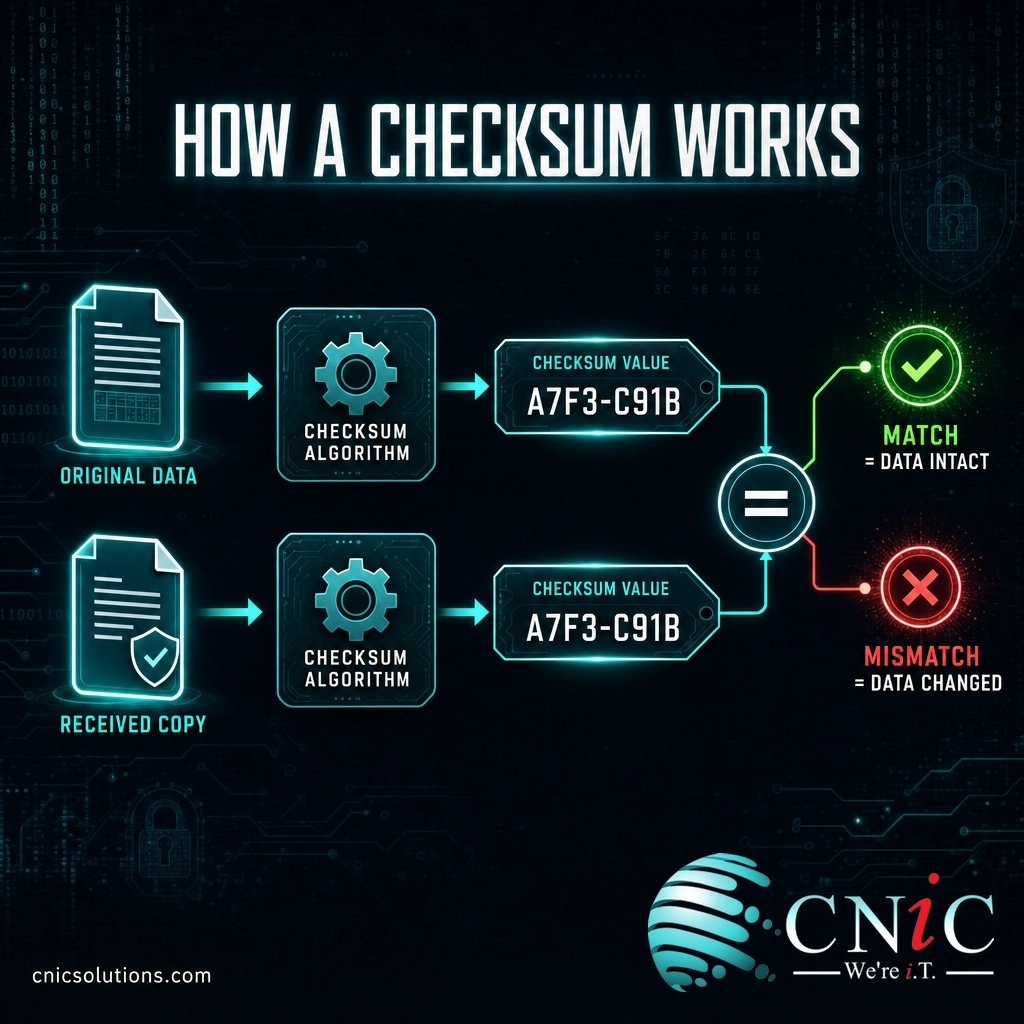
The verification process is always the same four steps:
- Compute. The original data is run through a checksum algorithm, producing a value.
- Share or store. That value travels with the data or is published next to it, such as the checksum listed on a software download page.
- Recompute. When the data reaches its destination, the receiver runs the identical algorithm on the copy they now hold.
- Compare. The two values are checked against each other. Identical values mean the data is intact. Different values mean something changed.
The property that makes this work is sensitivity to change. A well-designed checksum function produces a wildly different output when even one bit of the input flips. Change a single character in a document, and the checksum does not shift slightly, it becomes an entirely different value. That is why a checksum can catch a corruption as small as one flipped bit in a massive file.
Source: NIST Computer Security Resource Center: Checksum
Checksum vs. Hash vs. Cryptographic Hash
These three terms get used interchangeably, which causes real confusion. They are related, but they are not the same, and the difference matters when security is on the line.
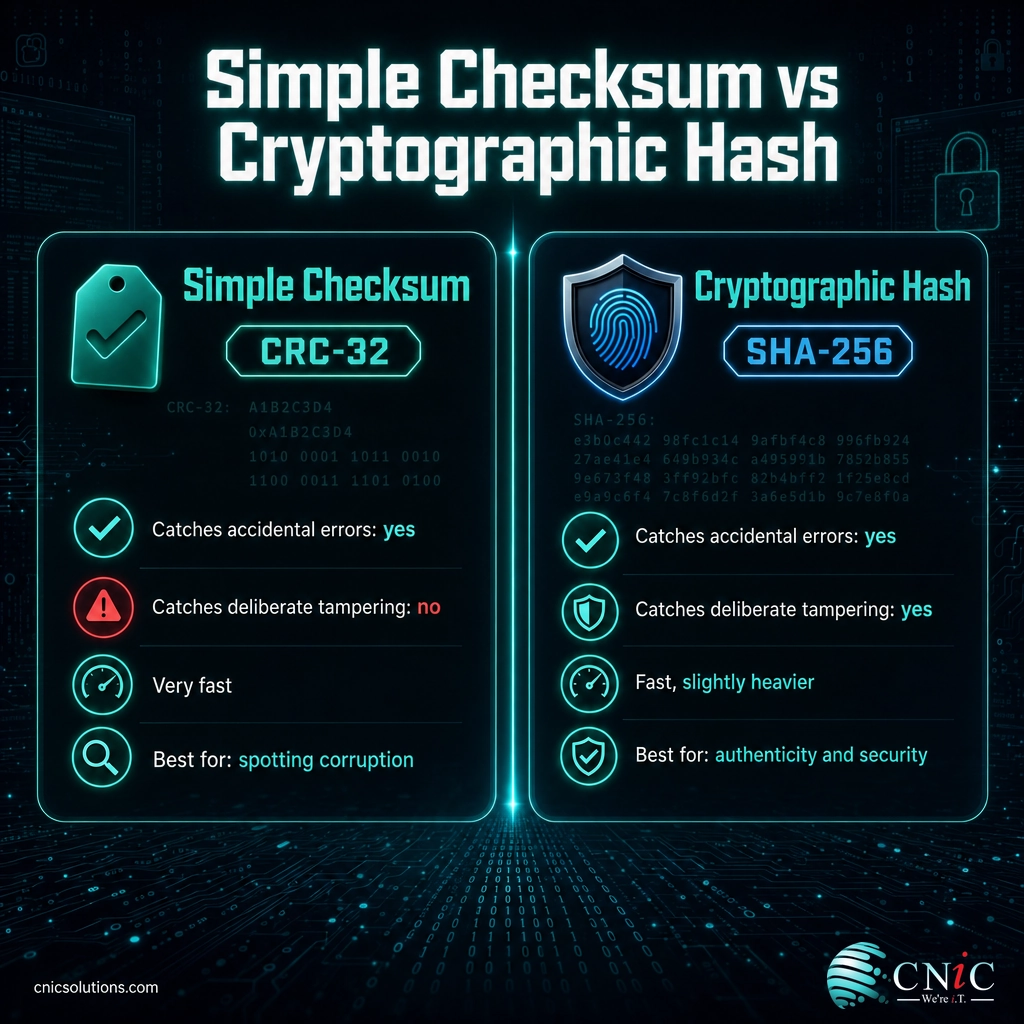
A hash function is the general mathematical tool that turns any input into a fixed-size value. A checksum is any such value used specifically to detect errors. A cryptographic hash is a special, hardened hash function built to withstand a deliberate attacker, not just random noise. The simplest way to hold it in your head: every checksum is a fingerprint of data, but only a cryptographic hash is a fingerprint an adversary cannot forge.
| Simple checksum | Cryptographic hash | |
|---|---|---|
| Example | CRC-32 | SHA-256 |
| Catches accidental errors | Yes | Yes |
| Catches deliberate tampering | No | Yes |
| Speed | Very fast | Fast, slightly heavier |
| Best for | Spotting corruption in transfers and storage | Verifying authenticity and security |
Here is the practical rule that follows. If you only need to know whether a file got scrambled by a flaky network or a failing drive, a simple checksum like CRC-32 is fast and fine. If you need to know whether a file is the genuine, untampered original, because you are installing software or restoring sensitive data, you need a cryptographic hash. The two jobs look identical from the outside, but only one of them holds up when someone is actively trying to fool you.
Source: NIST: FIPS 180-4, Secure Hash Standard
Common Checksum Algorithms
A handful of named algorithms do nearly all the checksum work you will encounter. They differ in the size of the value they produce and, crucially, in whether they are still safe to trust.
| Algorithm | Output size | Use it for | Security status |
|---|---|---|---|
| CRC-32 | 32-bit | Detecting accidental corruption in network transfers, archives, and storage. | Not a security tool. Fast error detection only. |
| MD5 | 128-bit | Legacy file identification and deduplication. | Broken. Do not rely on it to prove a file is untampered. |
| SHA-1 | 160-bit | Legacy systems and older version control. | Deprecated. NIST is retiring it by December 31, 2030. |
| SHA-256 | 256-bit | File integrity, software signing, backups, compliance. | Current recommended standard (SHA-2 family). |
The larger the output, the more possible values exist, and the harder it becomes for two different files to accidentally or deliberately share one. That is a large part of why the industry has moved from the 128-bit MD5 to the 256-bit SHA-256.
Myth: “The checksum matched, so the file is safe.”
A matching checksum only proves the file matches the value you compared it against. If that published value came from an attacker, or you used a broken algorithm like MD5, a match proves nothing about safety. Researchers have long been able to build two entirely different files, one clean and one malicious, that produce the identical MD5 value. Always get the reference checksum from the official source, and use SHA-256 rather than MD5 or SHA-1 when security matters.
For any use where integrity has to hold up against a motivated attacker, NIST recommends migrating off SHA-1 to a SHA-2 algorithm such as SHA-256 or to SHA-3. The math behind older algorithms has not gotten weaker on its own, but computing power has grown enough to make forging them practical.
Source: NIST: Transitioning Away From SHA-1 for All Applications | NIST FIPS 180-4

Why Checksums Matter for Your Business
Checksums are quiet infrastructure. Most people never see them, but they underpin whether the data your business runs on can actually be trusted. Three areas make the case concrete.
Software and supply-chain integrity. When you download an installer, a driver, or an update, the vendor publishes a checksum so you can confirm the file was not corrupted in transit or swapped out for a malicious version. Verifying it is one of the cheapest defenses against tampered software entering your environment, a common early step in modern attacks.
Backup and storage reliability. A backup you cannot trust is not a backup. Reputable backup and storage systems checksum data when it is written and re-verify it over time to catch silent corruption, the slow bit-rot that can quietly ruin an archive long before you ever try to restore it. The checksum is what turns “we have backups” into “we have backups that will actually restore.”
Tamper detection and compliance. Because any change to a file changes its checksum, checksums are a core building block of file-integrity monitoring, which watches critical files and alerts you the moment one is altered unexpectedly. That capability is expected under security frameworks your regulated clients may require, including HIPAA, PCI-DSS, and SOC 2.
None of this requires your team to become cryptographers. It requires that integrity checking is actually turned on, using current algorithms, across your downloads, backups, and critical systems, and that someone is watching when a check fails. That consistent oversight is exactly what managed IT and cybersecurity services are built to provide.
Protect your data integrity with managed cybersecurity
How to Verify a File With a Checksum
You do not need any special software to check a file yourself. Every major operating system has a built-in command. The goal is to compute the file’s checksum and compare it to the value the publisher listed on their official download page.
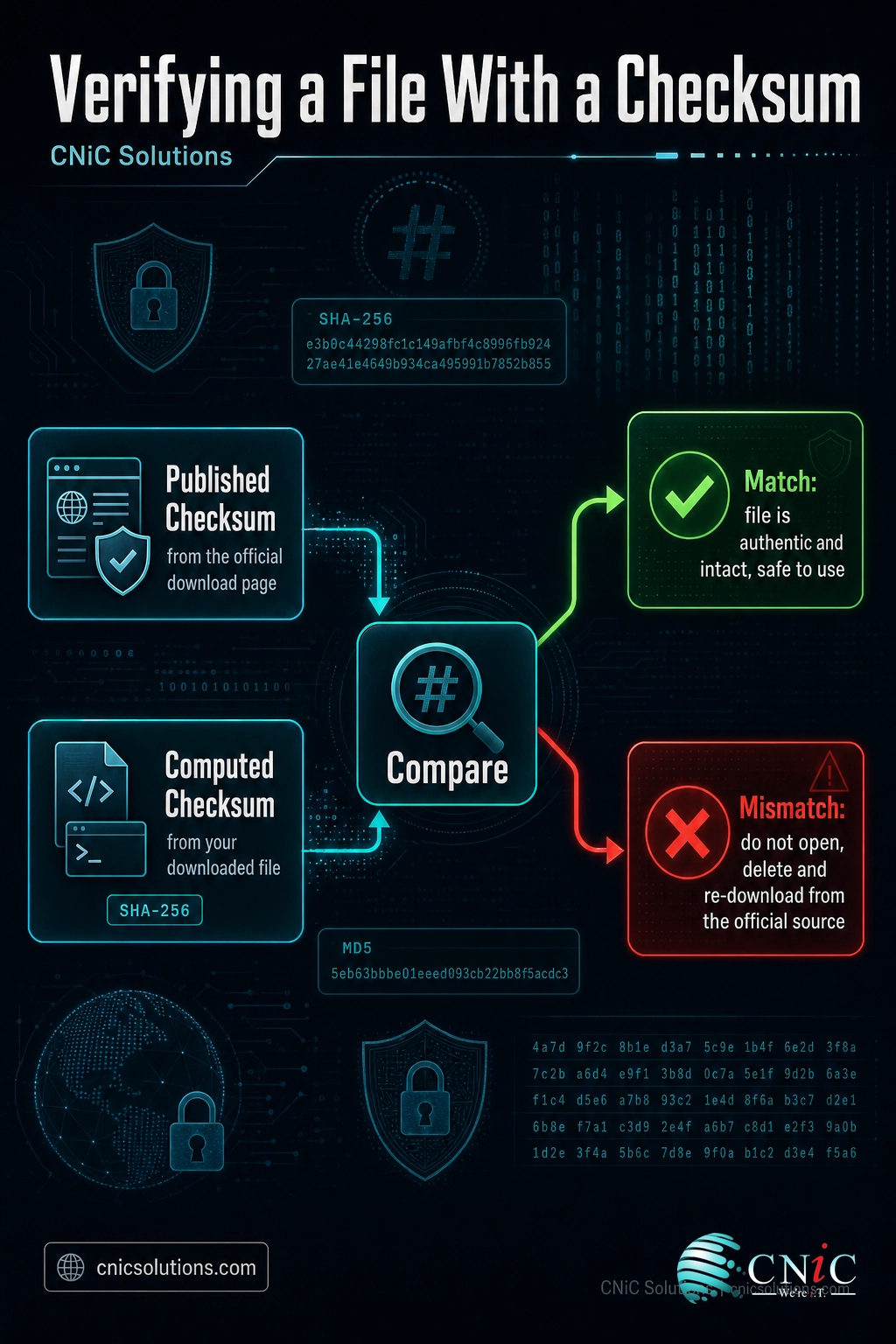
- Find the official checksum. On the download page, look for a published SHA-256 value next to the file. Get it from the real source, not a mirror or a forum post.
- Compute your file’s checksum. Open a terminal or command prompt and run the command for your system:
- Windows:
certutil -hashfile yourfile.exe SHA256 - macOS:
shasum -a 256 yourfile.dmg - Linux:
sha256sum yourfile.iso
- Windows:
- Compare the two values. The comparison is case-insensitive, so uppercase and lowercase letters are equivalent. The strings must otherwise match exactly, character for character.
- Act on the result. If they match, the file is authentic and intact, and you can proceed. If they differ, do not open or install it. Delete it and download again from the official source.
For a single download this is a thirty-second habit. Across an entire organization, doing it consistently on every installer, backup, and critical file is a process, not a one-time task, and that is where verification quietly slips. Building integrity checks into how software is deployed and how backups are validated is part of running IT as a managed discipline rather than a series of manual chances to forget.
Make sure your backups verify and actually restore
Related Terms
- Hash function: The mathematical tool that converts any input into a fixed-size value, the engine behind most checksums.
- Cryptographic hash: A hardened hash (such as SHA-256) built to resist deliberate tampering, not just accidental errors.
- SHA-256: A member of the SHA-2 family and the current standard for integrity and security checksums.
- CRC (cyclic redundancy check): A fast, non-security checksum used to catch accidental corruption in transfers and storage.
- Collision: When two different inputs produce the same checksum, the flaw that makes MD5 and SHA-1 unsafe for security.
- Digest: Another name for the output value a hash or checksum produces.
- Data encryption: A related but distinct control that scrambles data for confidentiality rather than verifying it. See our companion guide, data encryption explained.
- File-integrity monitoring: A security practice that uses checksums to detect unauthorized changes to important files.
Integrity is one layer of a complete data-protection strategy, and it works best when someone is accountable for keeping it configured, current, and monitored. A managed IT partner builds verification into your everyday operations so it holds up when it counts.
Frequently Asked Questions
What is a checksum in simple terms?
What is the difference between a checksum and a hash?
How does a checksum verify data integrity?
Is MD5 still safe to use for checksums?
How do I check a file’s checksum?
Sources
This explainer anchors its technical claims to primary standards documentation. The definition of a checksum follows the NIST Computer Security Resource Center glossary. Algorithm details, digest sizes, and the SHA family follow NIST Federal Information Processing Standard 180-4 (Secure Hash Standard) and FIPS 202 (SHA-3). The SHA-1 retirement date of December 31, 2030 reflects NIST’s official transition guidance. No statistics in this article are estimated or invented; every technical claim is definitional or standards-based.
Primary and authoritative sources: NIST CSRC Glossary: Checksum, NIST FIPS 180-4 Secure Hash Standard, NIST: Transitioning Away From SHA-1.



related posts
What Is a Brute Force Attack? How It Works and How to…
October 3, 2026A brute force attack is a trial-and-error method for cracking a password, PIN, or encryption key…
What Are TTPs in Cybersecurity? Tactics, Techniques, and Procedures Explained
October 2, 2026TTPs, short for tactics, techniques, and procedures, describe how a cyber attacker behaves: the goal they…
What Does Cyber Insurance Cover? A Guide for Small Businesses
October 2, 2026Cyber insurance is a business insurance policy that pays for the financial fallout of a cyberattack…
What Are Passkeys? How Passwordless Login Works and Why It Matters
October 1, 2026Passkey, defined: A passkey is a phishing-resistant login credential that replaces your password with a cryptographic…