

To identify a fake text message, judge it on four things at once: who sent it, how it makes you feel, where its link goes, and what it asks you to do. A real company texts from a consistent number, gives you time, links only to its own domain, and never asks for a password, a one-time code, or payment by text. A fake text usually fails at least one of those tests, and the stakes are real: U.S. consumers reported losing $470 million to scams that started with a text message in 2024, roughly five times the level reported in 2020, according to the Federal Trade Commission.
- Four-part test: sender, urgency, link, and ask. A message that trips two or more is almost certainly a scam.
- The sender is not proof. The FCC warns that names and numbers are easily spoofed, so a text can show your bank’s name and still be fake.
- Links are the trap. Press and hold to preview the real address. Lookalike domains, shortened links, and extra words before the brand name are red flags.
- Real organizations never text for secrets. No bank, retailer, or agency asks for passwords, one-time codes, gift cards, or crypto by text.
- Fake package delivery is the most-reported text scam of 2024, followed by bogus job offers, phony bank fraud alerts, fake unpaid tolls, and wrong-number openers (FTC).
- Do not reply, even STOP. Forward the message to 7726, report it at ReportFraud.ftc.gov, block, and delete.
- Businesses are targets too. One employee tapping a smishing link can expose company logins, which is where security awareness training and managed IT come in.
What’s in This Guide
- Why Fake Text Messages Keep Rising
- How to Identify a Fake Text Message, Step by Step
- Real Examples of Fake Texts (and the Tell in Each)
- When to Call a Professional
- What to Do If You Got, or Fell For, a Fake Text
- How to Report and Block Fake Texts
- Protecting a Whole Team from Smishing
- Frequently Asked Questions
Why Fake Text Messages Keep Rising
Text message scams, known as smishing (SMS phishing), work because people trust their text inbox far more than their email. Open rates are high, messages feel personal, and a phone screen hides most of the clues that give a scam away. Attackers have noticed. The Federal Trade Commission reports that losses to scams starting with a text reached $470 million in 2024, about five times the 2020 total, even though the number of reports actually fell. Fewer people are reporting, but the ones who lose money are losing more.
The threat is not limited to consumers. In its 2024 Internet Crime Report, the FBI’s Internet Crime Complaint Center (IC3) named phishing and spoofing the single most-reported crime type, with 193,407 complaints, out of more than 859,000 total complaints and over $16 billion in reported losses. Smishing rides the same wave: fake toll-payment texts alone drove tens of thousands of complaints. For a business, the math is uncomfortable. It only takes one employee tapping one link on a personal phone to hand an attacker a working password.
The good news: fake texts follow patterns. Once you know what to look for, most are easy to spot in seconds. The rest of this guide walks the exact checks, then shows real-world examples and what to do when a message slips through.
Source: FTC Top Text Scams of 2024 | FBI IC3 2024 Internet Crime Report
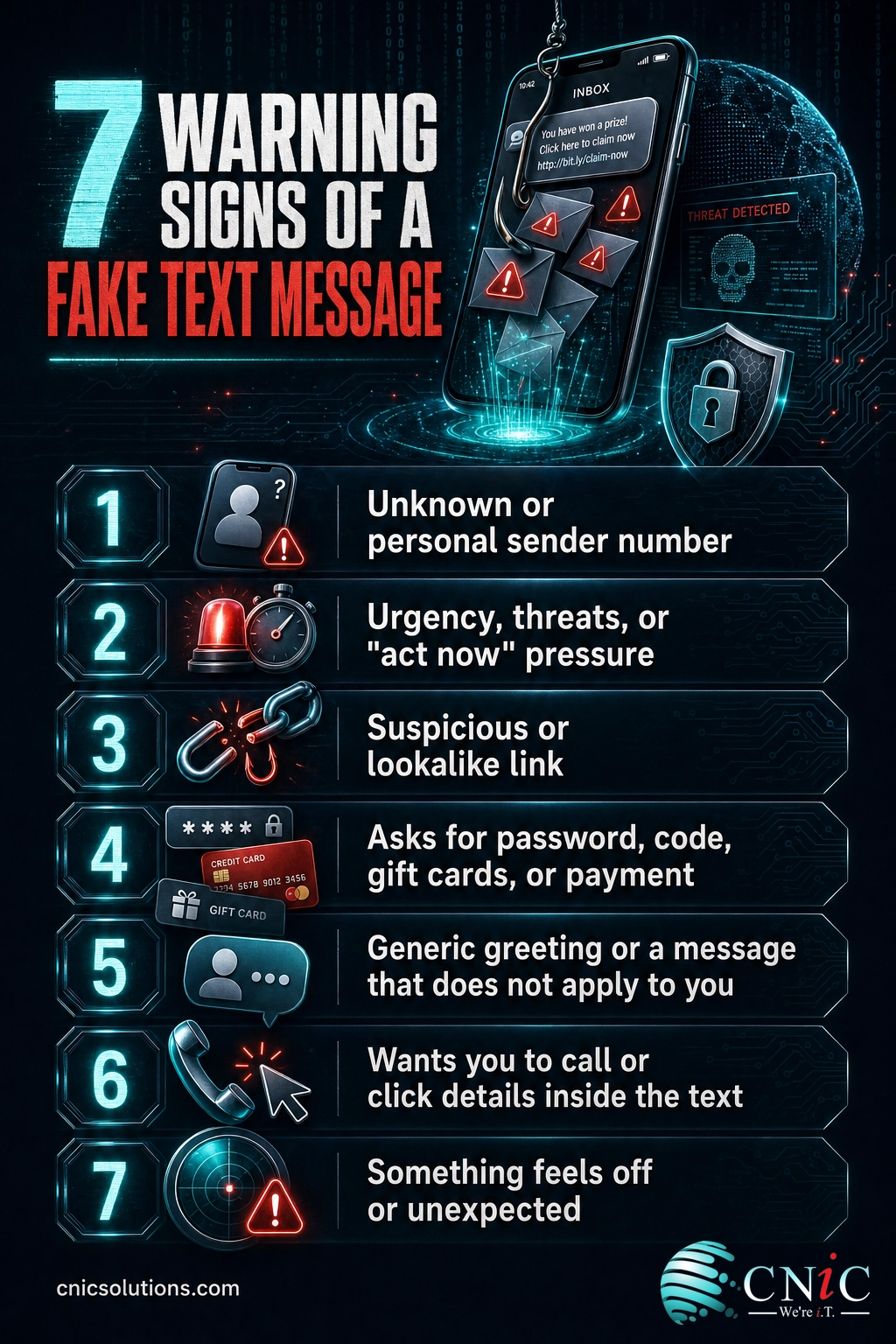
How to Identify a Fake Text Message, Step by Step
Run these seven checks in order. You will usually have your answer before you reach the end, because scam texts tend to fail several at once. Each step lists what to do, why it matters, and what a clean result looks like.
Step 1: Check Who Actually Sent the Message
Look at the number or name the text came from. Real companies use a consistent five- or six-digit short code, or a verified business sender, and they use the same one every time. A message that claims to be your bank but arrives from a personal 10-digit cell number, an unfamiliar international number, or an email-to-text address (something ending in a full email) is a strong warning sign.
Why it matters: the sender is your first filter, but not your last. What success looks like: the sender matches the short code the company has used before, or you can confirm it on the company’s website.
Step 2: Watch for Pressure, Urgency, or Threats
Scam texts are engineered to make you act before you think. Classic lines include “your account has been locked,” “your package is on hold,” “suspicious charge detected, confirm now,” or “final notice.” The goal is to trigger fear so you skip the checks in this guide.
Why it matters: urgency is the scammer’s main tool, so treating it as a red flag disarms most attacks. What success looks like: a legitimate message informs you and lets you act on your own schedule through the official app, without threatening instant loss.
Step 3: Inspect Every Link Before You Tap It
Most smishing texts want one thing: a tap. Before you give it, press and hold the link (do not tap) to preview the real destination. Read the domain from right to left, and find the true site name just before the first single slash. Watch for lookalike domains (usps-track.com instead of usps.com), extra words stuffed before the brand, shortened links that hide the destination, and small misspellings.
Why it matters: the link is where credentials and card numbers are stolen. What success looks like: the link points to the company’s real, correctly spelled domain, or you skip the link entirely and open the official app yourself.
Step 4: Spot Requests for Money, Gift Cards, or Personal Information
Ask what the message ultimately wants. No legitimate bank, retailer, delivery service, or government agency will ask you by text for a password, a full card number, a Social Security number, a one-time verification code, gift card codes, or cryptocurrency. The FCC is blunt on this point: anyone insisting on gift cards or crypto as the only way to pay is a scammer.
Why it matters: this is the payload of the scam, the actual theft. What success looks like: the message shares information (a real order status you can confirm in the app) instead of demanding secrets or payment.
Step 5: Notice Generic Greetings and Out-of-Context Messages
Because scam texts are blasted to thousands of numbers at once, they tend to be vague. Watch for greetings with no name or a mismatched name, awkward grammar, and topics that do not apply to you at all: a delivery you never ordered, a toll from a road you have not driven, or a “Hi, is this Sarah?” wrong-number opener from a stranger who then tries to strike up a friendly chat.
Why it matters: relevance is hard to fake at scale, so irrelevance is a reliable tell. What success looks like: the message references something you actually did, using details only the real company would have, and even then you still verify before acting.

Step 6: Verify Through an Official Channel You Look Up Yourself
When a message might be genuine, confirm it without touching anything in the text. Call the number printed on the back of your card, log in through the official app, or type the company’s known web address into your browser. If a real problem exists, it will be waiting for you there.
Why it matters: independent verification closes the loophole scammers rely on, that you will use the contact details they provided. What success looks like: the official app or agent confirms the issue, or tells you no such alert exists, which means the text was fake.
Step 7: Do Not Reply, Then Report and Delete
Once you have decided a text is fake, resist the urge to answer it, even to type STOP. A reply confirms your number is active and monitored, which usually brings more scams. Instead, forward the message to 7726 (SPAM) so your carrier can trace and block it, report it to the FTC at ReportFraud.ftc.gov, use the report junk option in your messaging app, block the sender, and delete the message.
Why it matters: reporting feeds carrier and federal blocking systems that protect everyone, while silence protects you. What success looks like: the message is reported, the sender is blocked, and nothing in the text was tapped, called, or answered.
Source: FCC Caller ID Spoofing guide | FTC guidance on recognizing and reporting spam texts
Real Examples of Fake Texts (and the Tell in Each)
The FTC’s data on the most-reported text scams of 2024 doubles as a field guide to the messages you are most likely to see. Each one has a signature tell. Learn the pattern, not just the specific wording, because scammers rotate the details constantly.
| Scam type | What the text says | The tell |
|---|---|---|
| Fake package delivery | “USPS: your package is on hold due to an incomplete address. Update here to reschedule delivery.” | An unexpected delivery, a “fee” to release it, and a link to a non-official domain. Real carriers do not text for redelivery fees. |
| Bogus job or “task” offer | “We saw your resume. Earn $200 a day completing simple online tasks. Reply to start.” | Unsolicited, vague employer, pay that is too good, and eventually a request that you deposit your own money. |
| Phony bank fraud alert | “Bank alert: did you attempt a $780.00 charge? Reply YES or NO, or call to dispute.” | Impersonates your bank’s fraud team to get you to call their number and read out codes or card details. |
| Fake unpaid toll | “You have an outstanding toll of $6.99. Pay now to avoid a late fee and penalties.” | A small, plausible amount plus urgency, sent to people who may never have used that toll road, linking to a fake payment page. |
| “Wrong number” opener | “Hi David, are we still on for lunch Thursday?” then friendly chit-chat with a stranger. | A misdirected message that is not really a mistake. It builds rapport before steering you toward a fake investment or crypto site. |
Notice the shared DNA: an unexpected message, a reason to act quickly, and a path that leads to a link, a phone call, or a payment. Match the pattern and the specific brand or dollar amount stops mattering.
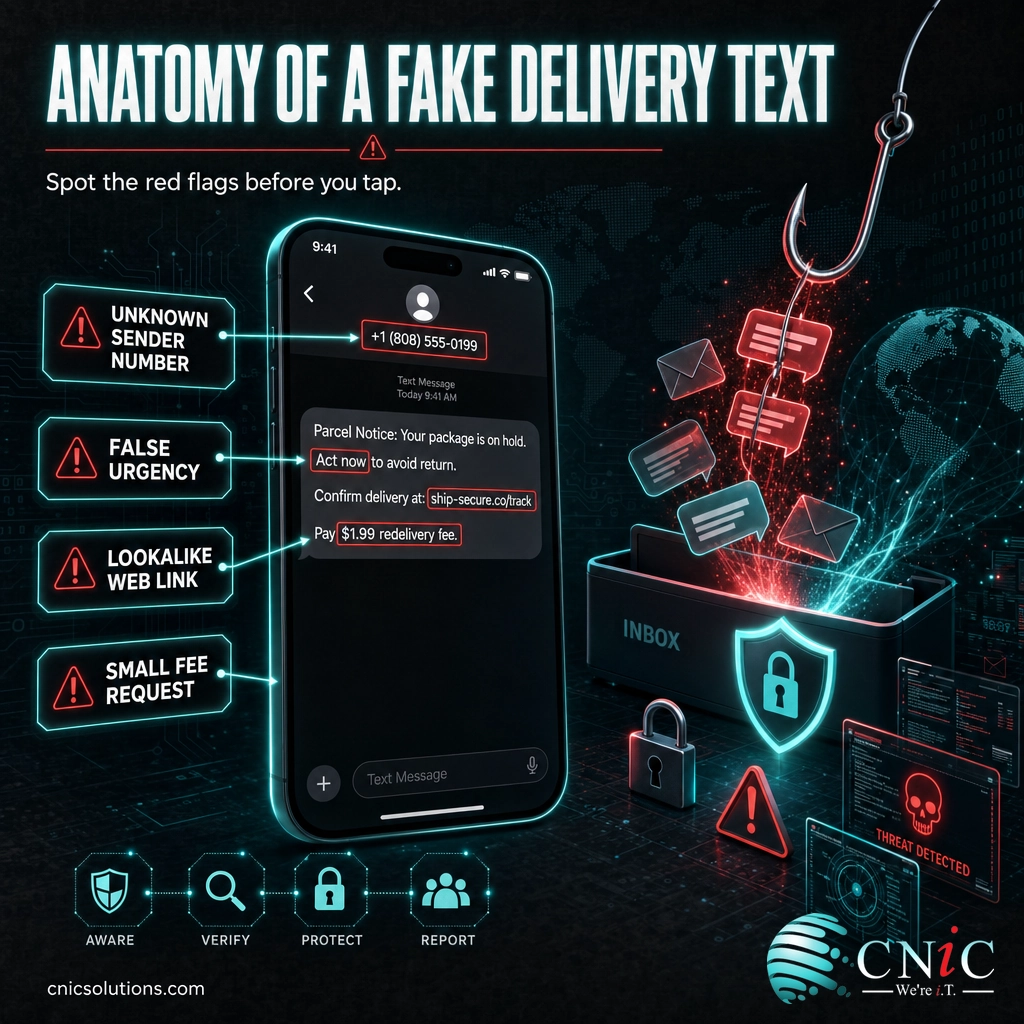
Source: FTC Top Text Scams of 2024 | FCC How to Avoid Package Delivery Scams
When to Call a Professional
If you reach this step and the text targeted a work account, tricked an employee into tapping a link, or asked for company credentials, treat it as a business security incident, not just a personal annoyance. A single smishing hit on a staff member’s phone can expose email logins, cloud file access, or customer data, and attackers often follow a successful text with a phishing email or a fake “IT support” call. If an employee entered a company password after tapping a texted link, reset that password now, enable or reset multi-factor authentication, and review recent account activity. When you are seeing repeated, targeted texts aimed at your team, or you are not certain whether an account was reached, that is the point to bring in help. CNiC Solutions can lock down accounts, run phishing-resistant multi-factor authentication, and train staff to spot the next attempt.
What to Do If You Got, or Fell For, a Fake Text
Getting a scam text is not a problem. Almost everyone does. The problem starts only if you interact with it. Use this table to match what happened to the right response.
| What happened | Do this now |
|---|---|
| You received it but did nothing | Do not reply. Forward to 7726, report as junk, block the sender, and delete. No further action needed. |
| You tapped the link but entered nothing | Close the page, do not enter anything, and clear the browser tab. Watch the linked account for unusual activity over the next few days. |
| You entered a password | Change that password immediately, and change it anywhere you reused it. Turn on multi-factor authentication for that account. |
| You shared a card or bank number | Call your bank or card issuer using the number on the card, report the exposure, and ask about a freeze or a new card. |
| You sent money, gift cards, or crypto | Contact the payment provider right away to try to stop or reverse it, then report the loss to the FTC and local police. |
| It reached a work account or device | Notify your IT or security provider immediately so they can reset credentials and check for wider compromise. |
Speed is what limits the damage. Stolen passwords and card numbers are worth the most in the first hours, so acting quickly, and asking for help early, is what turns a scare into a non-event.
How to Report and Block Fake Texts
Reporting is not busywork. It feeds the systems your carrier and the government use to block scam numbers, and it takes under a minute. Do all three:
- Forward the text to 7726 (SPAM). Your wireless carrier uses these reports to spot and block similar messages. Your carrier may reply asking for the sender’s number, which helps it trace the source.
- Report it to the FTC at ReportFraud.ftc.gov. This adds the scam to the federal Consumer Sentinel database that investigators and law enforcement draw on.
- Use your messaging app’s report option. On both iPhone and Android, unknown-sender messages offer a “report junk” or “report spam” control that blocks and reports in one step.
For a suspected fake delivery text, the U.S. Postal Inspection Service also accepts forwarded messages at 7726. After reporting, block the sender and delete the message.
Source: FTC How to Recognize and Report Spam Text Messages | FCC Stop Unwanted Robocalls and Texts
Protecting a Whole Team from Smishing
Teaching one person to spot a fake text is useful. Protecting a company means assuming that, eventually, someone will tap the wrong link on a busy day, and building so the damage stops there. A few layers do most of the work.
The layers that matter most for a business are practical, not exotic. Turn on phishing-resistant multi-factor authentication so a stolen password alone is not enough to log in. Run regular security awareness training and simulated phishing so employees recognize smishing before it costs anything. Keep mobile devices and company accounts managed so access can be revoked fast if a phone is compromised. And make sure reliable backups exist so a bad click never becomes a bad week.
This is the day-to-day work of a managed IT and security partner. If your team relies on email, cloud apps, and mobile phones, and every team does, ongoing protection beats reacting after the fact.
Explore CNiC Cybersecurity Services
Related reading: our team also covers day-to-day IT support and monitoring and security strategy and planning for growing businesses.
Frequently Asked Questions
How can you tell if a text message is real or fake?
What happens if you click a link in a scam text?
Should you reply STOP to a spam text?
Can scammers fake the sender name or number on a text?
Where do I report a fake text message?
About This Guide and Its Sources
This guide is written by CNiC Solutions, a managed IT and cybersecurity provider, to help individuals and businesses recognize and respond to fake text messages. Figures and reporting guidance come from primary U.S. government sources, cited inline throughout.
- Federal Trade Commission, New FTC Data Show Top Text Message Scams of 2024 (April 2025)
- FBI, 2024 Internet Crime Report (IC3)
- FTC Consumer Advice, How to Recognize and Report Spam Text Messages
- Federal Communications Commission, Caller ID Spoofing
- FCC, How to Identify and Avoid Package Delivery Scams



related posts
What Is Network Penetration Testing? Types and Process
October 25, 2026Network penetration testing is a controlled, authorized simulation of a real cyberattack on your network, run…
What Is NIST Compliance? Frameworks, Requirements, and Who Needs It
October 25, 2026NIST compliance means aligning your organization's security program with the cybersecurity standards published by the National…
What Is Mobile Device Management (MDM)? A Guide for Businesses
October 24, 2026Mobile Device Management (MDM) is software that lets an organization remotely enroll, configure, secure, and monitor…
What Is MFA? How Multi-Factor Authentication Protects Your Accounts
October 24, 2026Multi-factor authentication (MFA) is a security method that requires two or more separate proofs of identity…