

A fake McAfee renewal email is one of the most common scams landing in business inboxes right now: a slick “your subscription auto-renewed” notice claiming you owe $299 to $499 for antivirus you never bought, with a phone number begging you to call and dispute it. It is not a billing mistake. It is phishing, and phishing was the single most reported cybercrime in the United States in 2024, with 193,407 complaints to the FBI. This guide walks you and your team through exactly how to tell a fake McAfee notice from a real one, in seven quick checks, plus what to do if one already got a click.
- Real McAfee billing emails never tell you to call a phone number. A prominent “call now” number is the clearest single sign of a scam.
- The surprise charge (commonly $299 to $499) and a fake order number are bait designed to make you panic and respond.
- Check the sender’s full email address, not the display name. Legitimate mail comes only from official mcafee.com addresses.
- Never use the links or numbers in the email to verify a charge. Open mcafee.com yourself, or check your card statement.
- On a work device, one click can compromise the whole network, so treat these as a business threat, not just a personal nuisance.
What’s in This Guide
- What a Fake McAfee Renewal Email Actually Is
- Why These Scams Work, and Who They Target
- Step 1: Check the Sender’s Real Email Address
- Step 2: Read the Greeting and Personalization
- Step 3: Question the Charge Amount and Order Details
- Step 4: Spot the “Call This Number” Trap
- Step 5: Hover Over Every Link Before Clicking
- Step 6: Watch for Urgency, Threats, and Errors
- Step 7: Verify Directly Through McAfee
- When to Involve Your IT Team
- What to Do If You Already Clicked or Called
- How to Keep These Emails Away From Your Team
- Frequently Asked Questions
What a Fake McAfee Renewal Email Actually Is
A fake McAfee renewal email is a phishing message disguised as an automated billing receipt. It tells you a McAfee antivirus subscription just renewed, or is about to renew, for a large amount you do not recognize, then offers an easy way to “cancel” or “get a refund.” That easy way is the trap. It is usually a phone number, sometimes a link, and both lead straight to the criminal, not to McAfee.
McAfee is impersonated so often for a simple reason: it is a household security brand, and a message about your own antivirus feels urgent and believable. Attackers pair that trust with a scam pattern security researchers call telephone-oriented attack delivery, better known as callback phishing. Instead of hiding a malicious link, the email invites you to dial a “support” line. A person on the other end then talks you into installing remote-access software, reading out card details, or approving a “refund” that quietly drains your account.
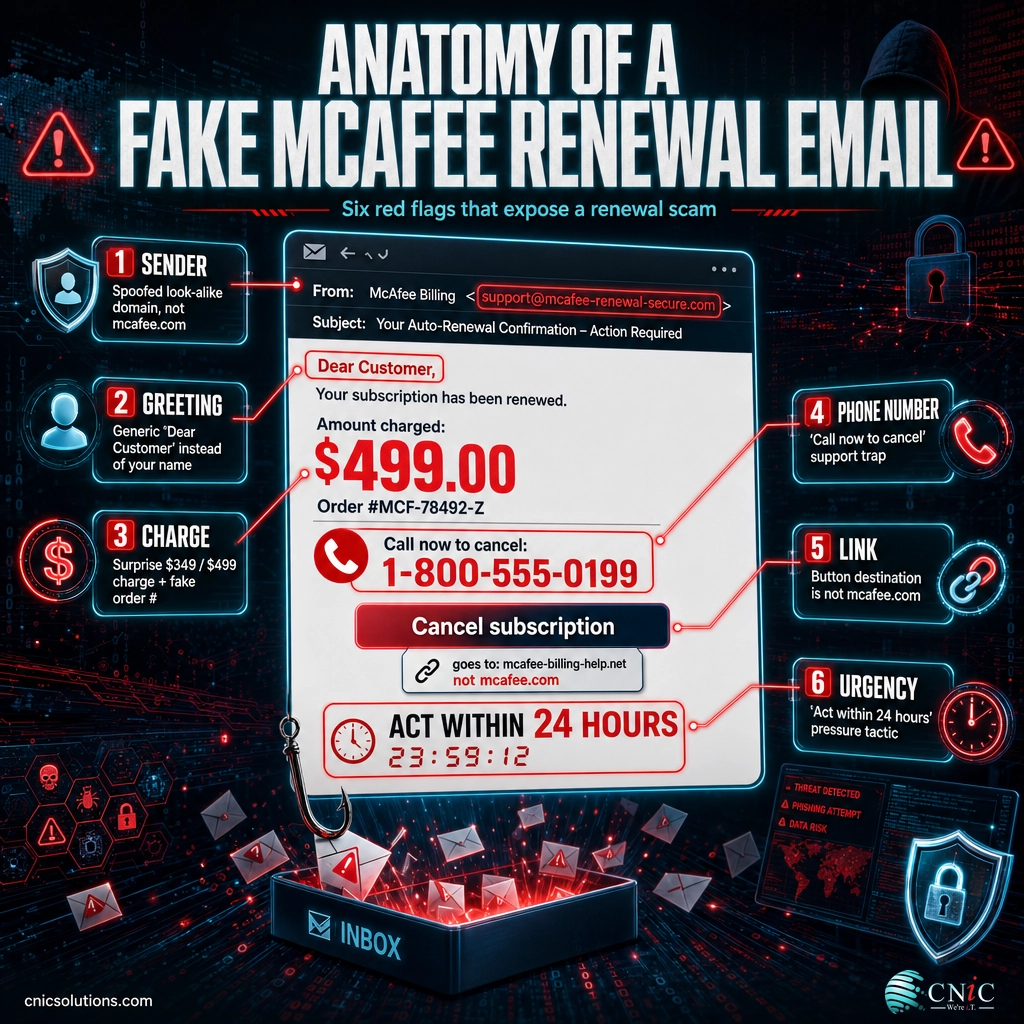
Because the whole scheme can run over a phone call, these emails often look cleaner than classic phishing: fewer typos, real-looking logos, and a professional layout. The giveaway is not the design. It is the behavior the email wants from you, which the seven steps below break down one flag at a time.
Source: McAfee Customer Scam Awareness
Why These Scams Work, and Who They Target
These emails keep circulating because they pay. In 2024, U.S. consumers reported losing $12.5 billion to fraud, a 25 percent jump in a single year, and email was the most common way scammers first made contact, for the second year running. Impersonation is the engine behind much of it: imposter scams alone accounted for $2.95 billion in reported losses.
The scale of reported fraud and cybercrime in 2024 (U.S.)
The FBI and FTC measure different, partly overlapping populations, so these totals are not additive. Sources: FBI IC3 2024 Internet Crime Report; FTC 2024 Consumer Sentinel Network Data Book.
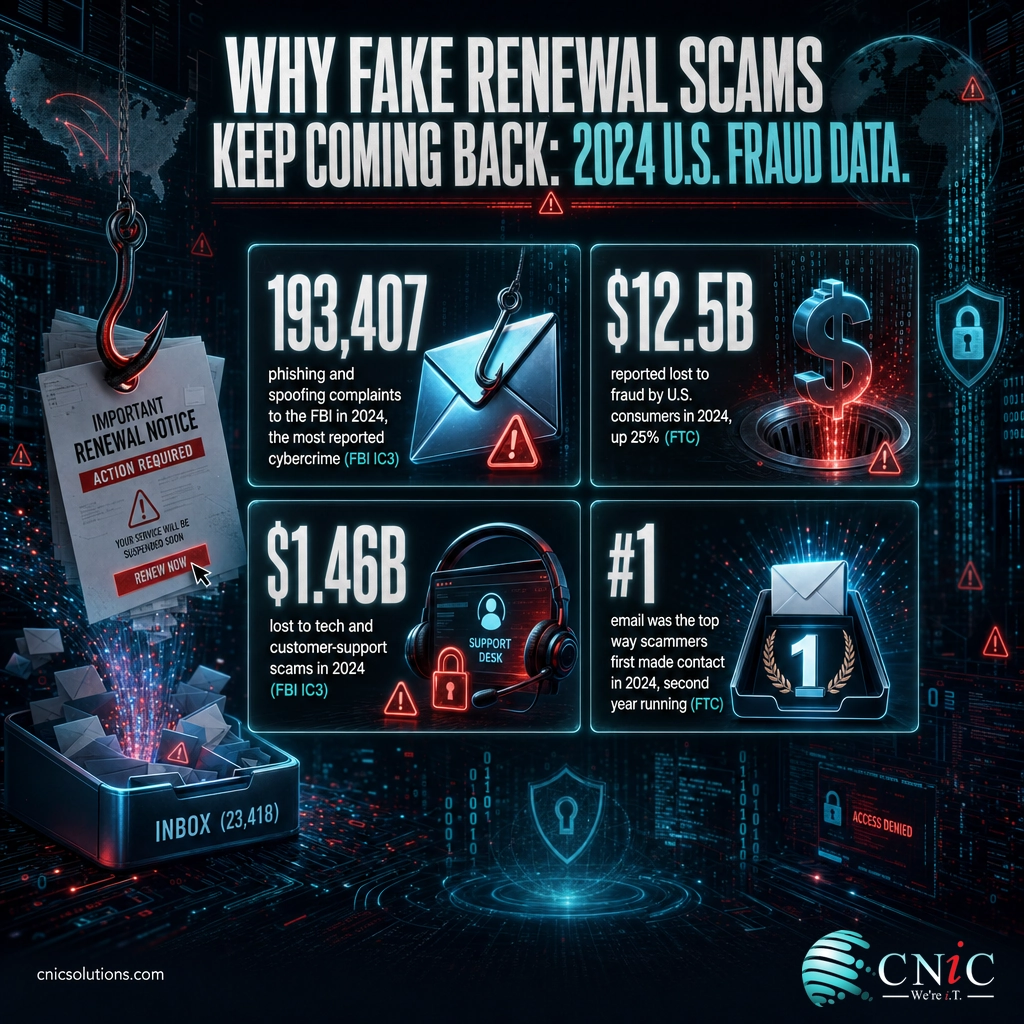
For a business, the target is not really “you,” it is your access. Employees receive these notices on the same laptops they use for email, banking, and client files. A staff member who calls the number and grants remote “help” can hand an attacker the keys to shared drives, saved passwords, and the wider network. That is why phishing shows up again and again in real attack data as the front door to bigger incidents, a pattern our team breaks down in our 2026 phishing statistics report, and why small and midsize firms are squarely in scope, as our small business attack data shows.
Source: FTC: New Data Show a Big Jump in Reported Fraud Losses | FBI IC3 2024 Internet Crime Report
Step 1: Check the Sender’s Real Email Address
Start with the one field scammers cannot fully fake: the sending address. The display name is easy to forge, so ignore “McAfee” or “McAfee Billing” in bold and expand the actual address behind it. On most mail apps you tap or click the sender name to reveal the full address.
What to do: read the domain after the @ sign. McAfee sends legitimate mail only from official addresses on the mcafee.com domain, such as donotreply@mcafee.com or consumersupport@mcafee.com. Anything else is suspect.
Why this matters: the sending domain is the fastest single tell. A convincing layout with the wrong domain is still a scam.
What success looks like: you can state, out loud, the exact domain the email came from. If it is a public inbox (gmail.com, outlook.com), a look-alike (mcafee-billing.com, mcafee.security-alerts.com), or a string of random characters, you are done. It is fake.
Step 2: Read the Greeting and Personalization
Real billing systems know who you are. When McAfee actually charges a card, the receipt is tied to your account and typically addresses you by the name on file.
What to do: look at the opening line and the body. Does it use your name, or a generic label like “Dear Customer,” “Dear User,” or your email address in place of a name?
Why this matters: scammers blast the same template to millions of addresses at once, so they cannot personalize it. Generic greetings are a direct symptom of mass-sent fraud.
What success looks like: a genuine receipt greets you correctly and references real account details. A vague greeting on a message about money is a clear warning to slow down and finish the checklist.
Step 3: Question the Charge Amount and Order Details
The dollar figure is doing a job. Fake McAfee notices show a charge large enough to alarm you, commonly in the $299 to $499 range, often for a multi-year “total protection” plan you have no memory of buying.
What to do: ask three questions. Do I even have a McAfee subscription? Does this amount match what I actually pay? Do I recognize this order or invoice number? A fake order number is designed to look official while pointing nowhere real.
Why this matters: the surprise charge is the emotional hook. It is meant to push you from reading into reacting, which is exactly when people call the number or click the link.
What success looks like: you have separated the feeling (“I might be charged $400”) from the facts (whether any real charge exists). The only place to confirm a real charge is your own account or card statement, never the email itself. Step 7 covers how.
Step 4: Spot the “Call This Number” Trap
This is the most reliable flag of all, so give it the most weight. Fake McAfee renewals almost always feature a phone number and urge you to call to cancel, dispute, or claim a refund.
What to do: if you see a number you are told to call, stop treating the message as legitimate. Do not call it, even just “to be sure.” The people staffing that line are trained to sound helpful while walking you toward remote access or payment.
What success looks like: you recognize the call-to-phone as the core of the scam, not a customer-service convenience, and you close the email without dialing.

Step 5: Hover Over Every Link Before Clicking
Some versions skip the phone number and lean on a “Cancel subscription” or “Get refund” button instead. The visible text and the real destination are two different things.
What to do: on a computer, rest your cursor over the button or link without clicking and read the URL that appears at the bottom of the screen or in a tooltip. On a phone, press and hold the link to preview the address. If the destination is not on mcafee.com, do not open it.
Why this matters: a link that reads “mcafee.com” can point anywhere. The preview shows where it truly goes, and scam links lead to convincing fake login and payment pages built to harvest what you type.
What success looks like: you have read the real destination of every link before clicking any of them, and nothing pointed off mcafee.com. When in doubt, do not click. Use step 7 instead.
Step 6: Watch for Urgency, Threats, and Errors
Scams run on pressure. The whole message is engineered to make you act before you think, so the tone itself is evidence.
What to do: notice the emotional levers. Countdown timers (“cancel within 24 hours”), threats (“your card will be charged automatically”), and warnings that your device is “at risk” all exist to short-circuit your judgment. Then scan for small cracks: odd spacing, off grammar, a logo that is slightly wrong, or a subject line that does not match the body.
Why this matters: legitimate billing is calm and factual. It does not threaten you or demand you act this minute. Manufactured urgency is one of the most consistent signatures of fraud.
What success looks like: you can name the pressure tactic the email is using. Once you see the manipulation for what it is, the message loses its grip and the decision gets easy.
Step 7: Verify Directly Through McAfee
If any doubt remains, this final step settles it without ever touching the email. The principle is simple: verify through a channel you open yourself, not one the message hands you.
What to do: open a fresh browser tab and type mcafee.com yourself, or use a bookmark you already trust, then log in and check your subscription and billing status. To confirm whether a charge is real, look at your bank or card statement directly. If you genuinely have McAfee and something looks off, contact McAfee through the support details on their official site, not the email.
Why this matters: every link and number inside a phishing email is controlled by the attacker. Going direct removes their control entirely, so even a flawless-looking fake cannot mislead you.
What success looks like: you have confirmed your real status from a source you navigated to on your own. If there is no matching charge in your account, you can delete the email with confidence.
When to Involve Your IT Team
If you reach this point and the email arrived on a work device, or you are responsible for a team that receives these, this is the natural moment to bring in professional help rather than handle it alone. Involve your IT team or managed security provider when any of these are true: a staff member clicked a link, called the number, or entered credentials; the same fake renewal is hitting multiple mailboxes at once; or you just want these filtered out before employees ever see them. A managed security partner can quarantine the message across every inbox, check whether anyone interacted with it, and tighten the email defenses that let it through. If you would rather not carry that judgment call in-house, that is exactly what our team handles for businesses every day.
What to Do If You Already Clicked or Called
If you interacted with one of these emails, do not panic, and do not stay quiet. Fast, calm action limits the damage. Find your situation in the table and act on it now.
| What happened | What to do right now |
|---|---|
| You clicked the link but entered nothing | Close the page, do not enter any details, and run a scan with your real security software. Report the email to your IT team so they can block the sender for everyone. |
| You typed your McAfee or email password | Change that password immediately from a different, trusted device, and turn on multi-factor authentication. Change it anywhere else you reused the same password. |
| You entered card or bank details | Call your bank or card issuer now to freeze or reissue the card and watch for unauthorized charges. Report it at reportfraud.ftc.gov. |
| You called the number and installed software or gave remote access | Disconnect the device from the internet and contact your IT provider immediately. Assume the attacker may still have access until a professional confirms the device is clean. |
| It happened on a work computer | Tell your IT or security team before anything else. One compromised work device can expose the whole network, so speed matters more than embarrassment. |
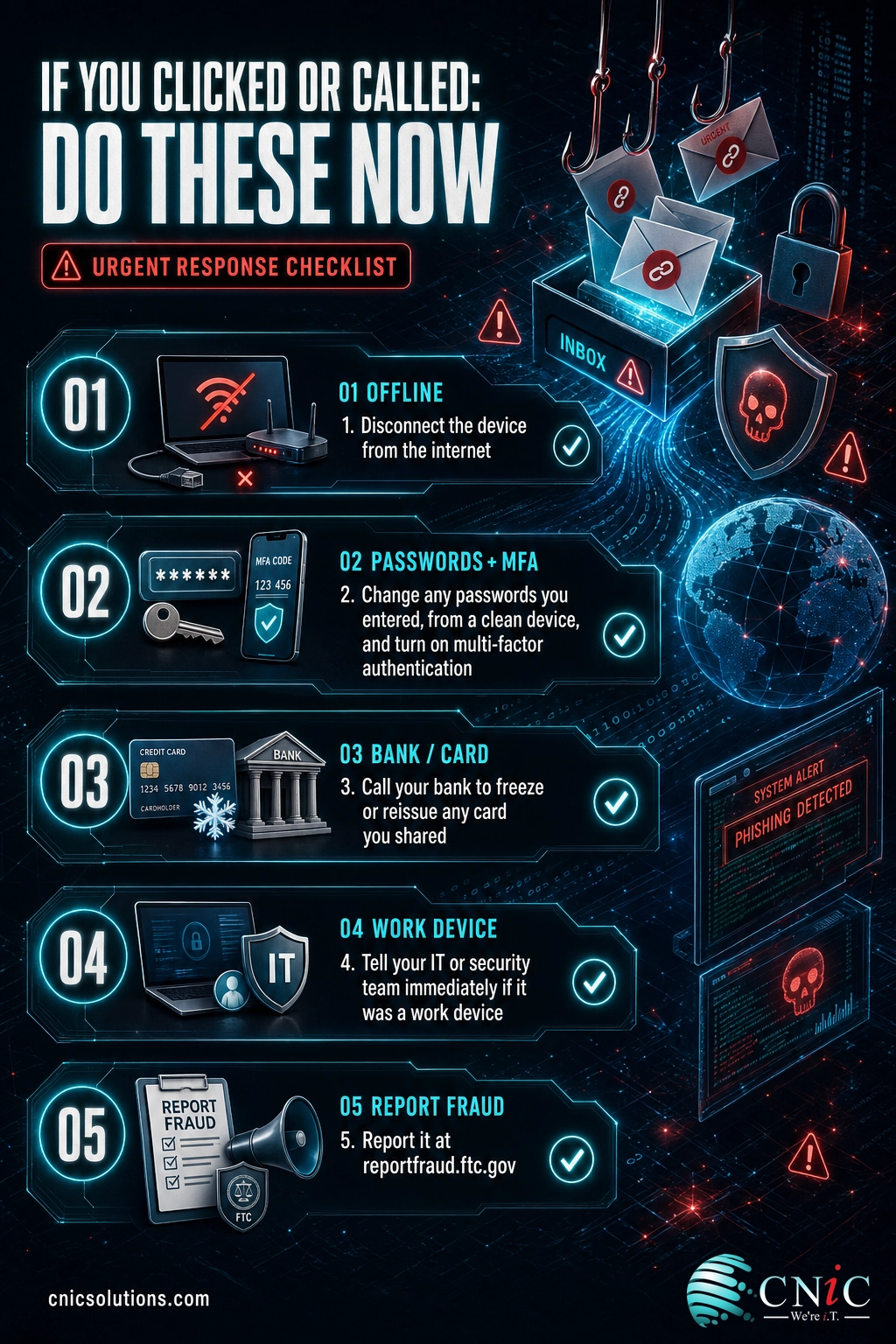
Recovering cleanly from a click sometimes means restoring files or rebuilding a device from a known-good copy, which is far easier when reliable backups already exist. If a scam ever escalates to malware or ransomware, a tested backup and recovery plan is what turns a crisis into an inconvenience.
See Backup and Recovery Options
Source: FBI IC3: Tech and Customer Support Impersonation | FTC Report Fraud
How to Keep These Emails Away From Your Team
Spotting a scam one message at a time works, but it puts the whole burden on every employee being alert every single time. For a business, the stronger play is to stop most of these before they ever reach an inbox, and to make sure the ones that slip through get recognized fast. That takes a few layers working together.
Filter and authenticate email. Modern email security combined with sender-authentication records (SPF, DKIM, and DMARC) blocks a large share of spoofed and impersonation mail before delivery. Properly configured DMARC in particular makes it much harder for anyone to send mail that appears to come from a domain you trust.
Train the humans. Employees who have seen the pattern catch it. Short, regular security awareness training turns “that looks suspicious” into a reliable, repeatable response, and it measurably lowers how often staff fall for simulated phishing over time.
Have someone watching. Even good filters and trained staff miss the occasional message. A managed security team monitors for what gets through, responds when someone interacts with a scam, and keeps your defenses current as the tactics shift. Ongoing managed IT support is what keeps all three layers maintained instead of set-and-forgotten.
No single control catches everything, which is the whole point. Layered together, filtering, training, and monitoring turn a constant stream of scam mail into a manageable, mostly invisible background risk.
Talk to Our Team About Email Protection
Frequently Asked Questions
Is the McAfee renewal email I received real or a scam?
What happens if I click a link in a fake McAfee email?
Will McAfee ever ask me to call a phone number to cancel a charge?
I already called the number and spoke to someone. What should I do now?
How do I stop fake McAfee emails from reaching my employees?
Methodology and Sources
How we sourced this guide
The scam-identification guidance reflects the official warnings published by McAfee about impersonation emails, combined with the current fraud reporting from U.S. government agencies. Every statistic in this article is drawn from a primary source and cited at the end of the section where it appears. Dollar and complaint figures are reported totals for calendar year 2024, the most recent full-year data available from these agencies at the time of writing.
Fake McAfee renewal notices are not going away, because impersonation is cheap and it works. The good news is that the same seven checks catch every version: the wrong sender, the generic greeting, the surprise charge, the call-this-number demand, the mismatched links, the manufactured urgency, and the refusal to survive independent verification. Teach your team to run that checklist, back it with real email defenses, and these emails become what they should be: deleted.



related posts
Zero Trust Statistics for 2026: Adoption, Maturity, and Breach Impact
November 3, 2026Zero trust has become the default security strategy on paper, but not yet in practice. Okta's…
What Is ZTNA (Zero Trust Network Access)?
November 3, 2026Zero Trust Network Access (ZTNA) is a security service that grants a verified user access to…
What Is XDR (Extended Detection and Response) and How Does It Protect…
November 2, 2026Extended detection and response (XDR) is a security platform that collects and correlates threat data from…
What Is Zero Trust Security? A Guide for Small Businesses
November 2, 2026Zero Trust security is a cybersecurity model built on one rule: never trust, always verify. Instead…