

Here is the short answer most buyers do not expect: Microsoft 365 Business Premium costs less than Office 365 E3 and includes more security. On an annual commitment, Microsoft prices Business Premium at $22.00 per user per month and Office 365 E3 at $26.00, yet Business Premium bundles endpoint protection, device management, and advanced identity controls that Office 365 E3 leaves out. The real decision is not “which plan is better.” It is whether your business fits under the 300-user ceiling, and how much compliance and governance you actually need.
- Business Premium is cheaper and more secure out of the box. $22.00 per user per month versus $26.00 for Office 365 E3, and it includes Defender for Business, Intune, and Entra ID Plan 1 that Office 365 E3 does not.
- Office 365 E3 is a productivity and compliance suite, not a security suite. It wins on scale, storage, and governance tools like eDiscovery, but you must license identity and endpoint security separately.
- The 300-user cap is the hard dividing line. Business Premium is only available up to 300 users. Above that, most businesses move to Microsoft 365 E3 at $39.00 per user per month.
- Watch the naming trap. “Office 365 E3” and “Microsoft 365 E3” are different products. The Microsoft 365 version rebuilds the security stack Office 365 E3 lacks.
- Licenses can be mixed. Most teams do best giving the majority Business Premium and reserving enterprise plans for the roles with real compliance needs.
What’s in This Guide
- Understanding the Landscape: Three Plans, One Confusing Name
- Microsoft 365 Business Premium
- Office 365 E3
- Microsoft 365 E3: The Upgrade Path
- Business Premium vs Office 365 E3 vs Microsoft 365 E3, Side by Side
- The Criteria That Actually Decide It
- Your Decision Framework
- What CNiC Solutions Recommends
- Frequently Asked Questions
- Methodology and Sources
Understanding the Landscape: Three Plans, One Confusing Name
Most Microsoft licensing confusion comes from a single naming problem. There are two product families that both use the letter “E3,” and they are not the same thing. Office 365 E3 is an enterprise productivity plan: email, the Office apps, SharePoint, Teams, and a strong set of compliance tools. Microsoft 365 E3 is that same productivity plan plus a full security and management stack plus Windows 11 Enterprise. When a business tells us “we’re comparing Business Premium to E3,” the first job is always to find out which E3 they mean, because the answer changes everything about cost and security.
To make a clean decision, it helps to see all three plans on the same spectrum. Business Premium sits at the small and midsize end, built to give a company under 300 users enterprise-grade security without an enterprise-grade bill. Office 365 E3 sits in the middle: no user cap and richer governance, but a productivity focus that assumes you will handle security elsewhere. Microsoft 365 E3 sits at the enterprise end, rebuilding the security Office 365 E3 leaves out and adding the Windows Enterprise licensing that larger, regulated organizations need.
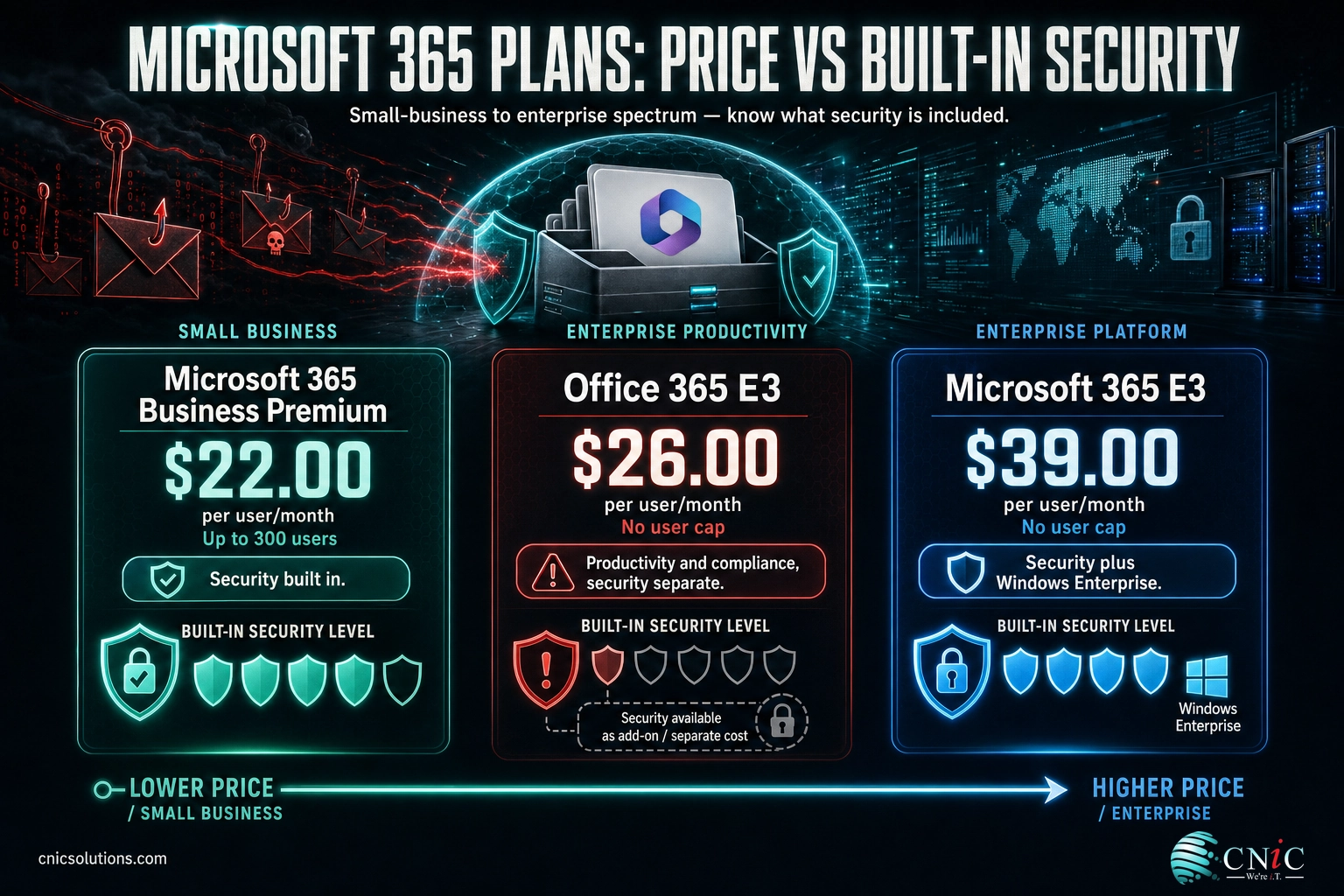
The pattern that trips people up is the price-to-security relationship. Buyers expect price and protection to rise together, so they assume the pricier, enterprise-branded Office 365 E3 must be the more secure choice. It is not. Here is what the three list prices actually look like on an annual commitment:
List Price per User per Month (Annual Commitment)
Source: Microsoft official plan and pricing pages, 2026. Business Premium is the least expensive of the three and the only one capped at 300 users.
The cheapest plan on that chart is also the one with built-in endpoint protection, device management, and advanced identity. That inversion is the single most important thing to understand before you spend a dollar. The sections below break down each plan on its own terms, using the same evaluation lens, so you can see exactly what your money buys.
Source: Microsoft 365 Business Premium plan page | Office 365 enterprise plans and pricing
Microsoft 365 Business Premium
Business Premium is Microsoft’s flagship plan for small and midsize businesses, and it is the most complete package for any company that fits its size limits. It starts from the same productivity base as the other plans, then layers on a genuine security and management stack that most SMBs would otherwise have to assemble from separate products.
How it works
You get the installed desktop apps plus web and mobile versions of Word, Excel, PowerPoint, and Outlook, along with Microsoft Teams, Exchange email, SharePoint, and 1 TB of OneDrive storage per user. On top of that productivity core, Business Premium adds four things Office 365 E3 does not include on its own: Microsoft Defender for Business for endpoint protection, full Microsoft Intune for device management, Microsoft Entra ID Plan 1 for conditional access and multifactor policies, and Microsoft Purview information protection for data loss prevention. Microsoft confirms all of these directly: Business Premium subscribers are licensed for full Intune capabilities, Entra ID P1 is included, and managed PCs are protected by Defender for Business.
Best use case
Business Premium is the right default for the vast majority of businesses under 300 employees that want strong security without hiring a security team to run it. It is especially well suited to companies in regulated or target-rich fields such as healthcare, legal, financial services, and professional services, where a single compromised laptop can trigger a reportable incident. Defender for Business was designed specifically for organizations of this size, so the tooling matches the team that has to operate it. If you want a closer look at how those endpoint tools compare, our guide to how endpoint detection and response tools stack up for smaller teams goes deeper on that layer.
Key strengths
- Built-in endpoint security. Defender for Business protects managed PCs, Macs, and mobile devices from ransomware, malware, and phishing with no extra license.
- Full device management. Intune enforces encryption, app policies, and remote wipe across company-owned and personal (BYOD) devices.
- Advanced identity. Entra ID Plan 1 unlocks conditional access and stronger multifactor rules, the controls that actually stop most account takeovers.
- Lowest total cost of the three. At $22.00 per user per month you get more protection than Office 365 E3 for less money.
Key limitations
- The 300-user ceiling. You cannot buy or renew Business Premium above 300 users. Fast-growing companies eventually outgrow it.
- Lighter enterprise governance. Advanced retention, records management, and extended eDiscovery are thinner than what the E3 plans offer.
- No Windows Enterprise edition. If you need Windows 11 Enterprise licensing, Business Premium does not include it.
Best for: Businesses up to 300 users that want enterprise-grade security and device management at the lowest cost, without running a separate security stack.
Source: Microsoft Learn: Business Premium security FAQ | Microsoft 365 Business Premium official page
Office 365 E3
Office 365 E3 is where the naming confusion does the most damage. It is a real, capable, enterprise plan, but it is a productivity and compliance plan. If you buy it expecting the security posture of an enterprise security suite, you will be exposed in ways that are easy to miss until something goes wrong.
How it works
Office 365 E3 gives you the desktop, web, and mobile Office apps, Exchange email, SharePoint, Microsoft Teams, and large per-user cloud storage tiers. Where it pulls ahead of Business Premium is at the governance layer: it includes Microsoft Purview eDiscovery at the Standard level and Purview Data Loss Prevention, along with more generous mailbox, archiving, and retention capacity. What it does not include, on its own, is the security stack: no Microsoft Intune, no Microsoft Entra ID Plan 1, and no Defender for Business or Defender for Endpoint. Microsoft’s own Microsoft 365 E3 page makes this explicit by listing Entra ID P1, Defender for Endpoint, and Intune as capabilities that Microsoft 365 E3 adds beyond the Office 365 E3 base. If they were already in Office 365 E3, there would be nothing to add.
This is the most expensive misunderstanding in Microsoft licensing. Office 365 E3 costs $4.00 more per user per month than Business Premium, but it ships without endpoint protection, device management, and advanced identity, all of which Business Premium includes. Buying Office 365 E3 for security is paying more to get less. If security is the goal, Business Premium or Microsoft 365 E3 are the plans that actually deliver it.
Best use case
Office 365 E3 makes the most sense for larger organizations that have already passed the 300-user cap, or that have a mature security program running separately and only need Microsoft for productivity and compliance. It is also a sensible fit where the priority is records management, legal hold, and eDiscovery rather than endpoint defense, for example an organization that handles litigation-sensitive records and manages device security through a third-party platform.
Key strengths
- No user cap. Office 365 E3 scales past 300 users, where Business Premium simply stops.
- Stronger governance and storage. Larger mailbox and archiving tiers, advanced retention, and Standard eDiscovery for organizations with real compliance obligations.
- Enterprise productivity apps. Extras like Planner, Forms, To Do, and Lists round out the collaboration toolkit.
Key limitations
- No built-in endpoint security. Defender for Business is not included, so devices are unprotected until you license it separately.
- No device management. Intune is not included, so enforcing encryption and BYOD policies requires an add-on. Our overview of the mobile device management options built for smaller teams explains what that layer normally costs.
- No advanced identity. Conditional access and premium multifactor policies require Entra ID P1, which is an extra license.
- Higher price than Business Premium. You pay $26.00 to Business Premium’s $22.00 and still have security gaps to fill.
Best for: Organizations above 300 users, or those with a separate security program, that need enterprise productivity plus advanced compliance and eDiscovery rather than built-in endpoint defense.
Source: Office 365 enterprise plans and pricing | Microsoft 365 E3 plan page (add-on list)

Microsoft 365 E3: The Upgrade Path
You cannot have an honest comparison of Business Premium and Office 365 E3 without naming the plan that resolves the whole debate. Microsoft 365 E3 is Office 365 E3 with the security and management stack added back in, at $39.00 per user per month on an annual commitment. It is the plan most businesses land on when they outgrow Business Premium’s 300-user cap but still need real security.
How it works
Microsoft 365 E3 bundles everything in Office 365 E3, then adds Microsoft Entra ID Plan 1, Microsoft Defender for Endpoint Plan 1, Microsoft Defender for Office 365 Plan 1, Microsoft Purview Information Protection Plan 1, Microsoft Intune Plan 1, and Windows 11 Enterprise E3. In practical terms, it restores the protection that Business Premium had all along, and then goes further with Windows Enterprise licensing and deeper enterprise controls that only matter at larger scale.
Best use case
Microsoft 365 E3 is the natural destination for organizations that have crossed 300 users and refuse to give up security, and for regulated enterprises that need Windows 11 Enterprise, advanced identity governance, and mature compliance in a single license. It is also the plan to assign selectively to high-risk or compliance-heavy roles even in a smaller company, while the rest of the team stays on Business Premium.
Key strengths and limitations
- Strength: the full security stack plus Windows 11 Enterprise, with no user cap.
- Strength: the cleanest single-license answer for organizations past 300 users that still want strong protection.
- Limitation: at $39.00 per user per month it is the most expensive of the three, so licensing every employee at this tier when only some need it wastes budget.
Best for: Organizations above 300 users that need enterprise security and Windows 11 Enterprise in one plan, or specific high-risk roles inside a smaller company.
Source: Microsoft 365 enterprise plans and pricing
Business Premium vs Office 365 E3 vs Microsoft 365 E3, Side by Side
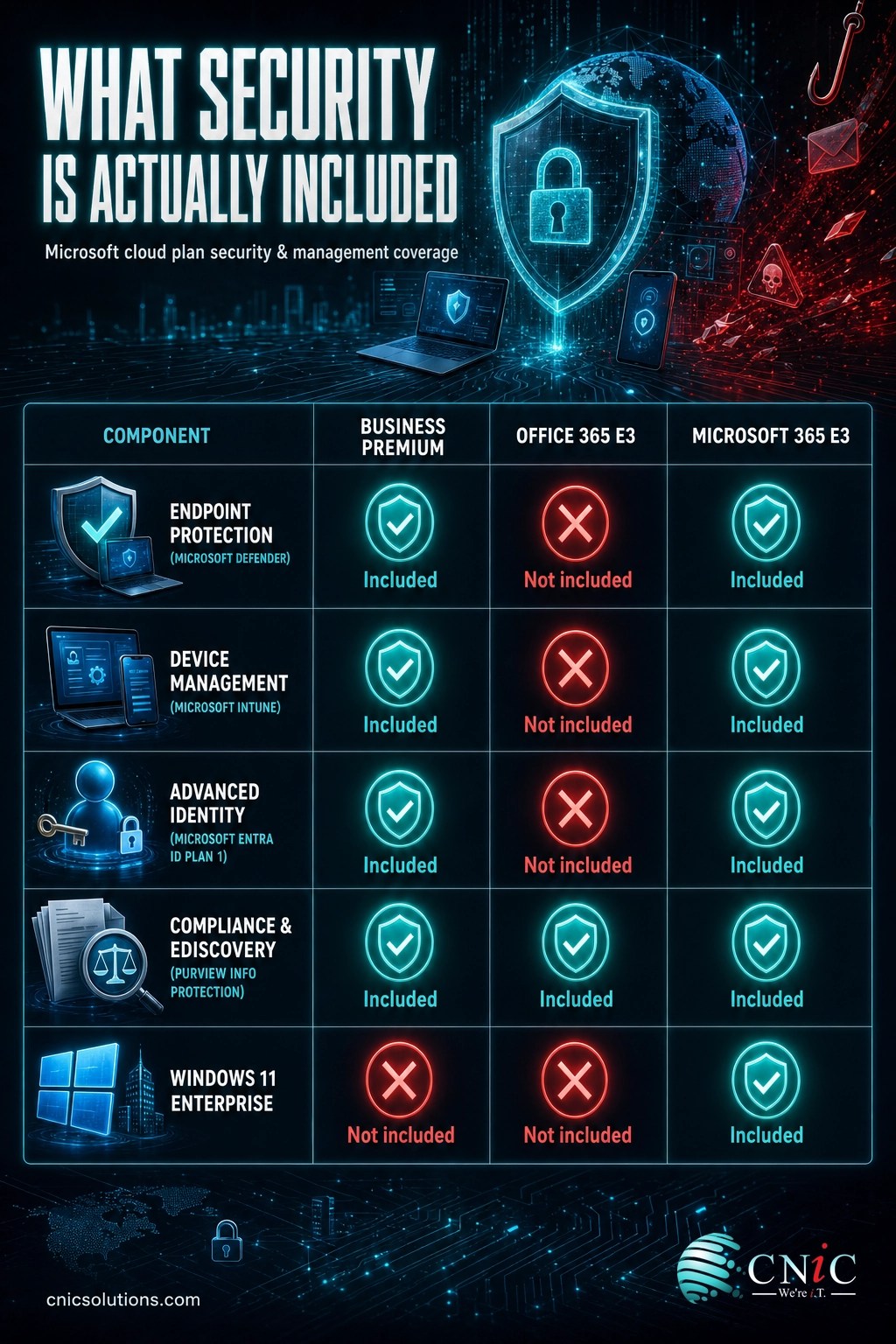
The table below puts the three plans against the same criteria. Read it top to bottom and one theme stands out: Business Premium matches or beats Office 365 E3 on every security row while costing less, and the only rows where Office 365 E3 pulls ahead are scale and enterprise governance.
| Criterion | Business Premium | Office 365 E3 | Microsoft 365 E3 |
|---|---|---|---|
| Price (annual, per user/mo) | $22.00 | $26.00 | $39.00 |
| User cap | Up to 300 | No cap | No cap |
| Desktop Office apps | Yes | Yes | Yes |
| Endpoint protection (Defender) | Defender for Business, included | Not included | Defender for Endpoint P1, included |
| Device management (Intune) | Full Intune, included | Not included | Intune Plan 1, included |
| Advanced identity (Entra ID P1) | Included | Not included | Included |
| Compliance and eDiscovery | Purview info protection | Purview DLP + eDiscovery (Standard) | Purview DLP + eDiscovery (Standard) |
| Windows 11 Enterprise | No | No | Yes |
| Best fit | SMBs wanting security value | Large orgs, productivity + governance | Large orgs wanting security in one plan |
Source: Microsoft 365 Business Premium | Office 365 E3 | Microsoft 365 E3
The Criteria That Actually Decide It
A comparison table shows the facts, but four criteria carry most of the decision. Here is who wins each, and why it matters.
1. Price
Winner: Business Premium. At $22.00 per user per month it is the least expensive plan in the comparison, and it undercuts Office 365 E3 by $4.00 while including more. Across a 50-person company that difference is $2,400 per year, and Business Premium delivers a stronger security posture for the lower number. Price only stops favoring Business Premium when you cross 300 users and it is no longer available.
2. Built-in security
Winner: Business Premium (over Office 365 E3). This is the criterion that reverses buyer expectations. Business Premium includes Defender for Business, Intune, and Entra ID Plan 1. Office 365 E3 includes none of those without add-ons. Against Microsoft 365 E3 the two are comparable on the core stack, with E3 edging ahead on Windows Enterprise and deeper governance. But head to head with Office 365 E3, Business Premium is clearly the more secure plan, and it is cheaper. Given that IBM’s 2025 Cost of a Data Breach Report put the global average breach at $4.44 million, paying more for a plan with weaker built-in defense is a hard position to justify.
3. Scale and the 300-user cap
Winner: Office 365 E3 and Microsoft 365 E3. This is where the enterprise plans earn their place. Business Premium is capped at 300 users, full stop. If you are at 250 people and hiring, plan your license path now rather than scrambling at the ceiling. Both E3 plans scale without limit, which is exactly why growing organizations migrate to them. When that migration involves moving mailboxes and data, it pays to know what to expect when you move your email into Microsoft 365 before you start.
4. Compliance and governance
Winner: the E3 plans. If your obligations run to legal hold, records management, advanced retention, and extended eDiscovery, Office 365 E3 and Microsoft 365 E3 provide a deeper toolset than Business Premium. Purview eDiscovery at the Standard level and larger archiving tiers matter in litigation-sensitive industries. For most SMBs the Business Premium compliance set is sufficient, but organizations with formal governance mandates should weight this row heavily.
Source: IBM Cost of a Data Breach Report 2025 | Microsoft Learn: Business Premium security FAQ
Your Decision Framework
Choose Microsoft 365 Business Premium if you have 300 users or fewer, want the strongest security posture for the lowest cost, and would rather have endpoint protection, device management, and advanced identity built into one plan than assembled from add-ons. This is the right answer for most small and midsize businesses.
Choose Office 365 E3 if you are above 300 users, already run a separate security program, and need enterprise productivity plus advanced compliance and eDiscovery more than built-in endpoint defense. Go in knowing you will license identity and endpoint security separately.
Choose Microsoft 365 E3 if you have crossed 300 users and refuse to lose the security Business Premium gave you, or you need Windows 11 Enterprise and enterprise-grade governance in a single license. It is also the plan to assign selectively to your highest-risk roles while the rest of the team stays on Business Premium.
Mix your licenses if you have a mostly-standard team with a few compliance-heavy roles. Give the majority Business Premium and reserve E3 or E5 for the people who genuinely need legal hold, advanced retention, or the highest security. Paying enterprise rates for every seat when only a handful need them is the most common licensing overspend we see.
What CNiC Solutions Recommends
For the small and midsize businesses we work with across Houston, Texas, and nationally, Microsoft 365 Business Premium is the right starting plan in the large majority of cases. It gives a company under 300 users a security posture that used to require an enterprise budget, at the lowest price of any option here, and it consolidates endpoint protection, device management, and identity into one plan our team can actually manage well. When a client has genuine enterprise-scale or heavy-governance needs, we move specific roles, or the whole organization, to Microsoft 365 E3 rather than defaulting everyone to a plan they will not use.
The plan is only half the job. Business Premium’s security features protect a business only when they are actually turned on, configured, and monitored, and Microsoft ships them switched off by default. That is the work: enabling conditional access, enrolling devices in Intune, tuning Defender, and matching licenses to roles so you are not overpaying. CNiC Solutions handles that deployment and ongoing management for businesses that would rather run their company than run their tenant. Our team can map your headcount and compliance needs to the right mix of licenses, deploy the security stack correctly, and manage it day to day.
If security and compliance are driving your decision, these two teams handle the layers this article compared:
See CNiC’s Cybersecurity Services
Frequently Asked Questions
Is Office 365 E3 more secure than Microsoft 365 Business Premium?
Which is cheaper, Microsoft 365 Business Premium or Office 365 E3?
What happens when my business grows past 300 users?
Does Office 365 E3 include the desktop versions of Word, Excel, and Outlook?
Can I mix Microsoft 365 licenses across my team?
Methodology and Sources
How we built this comparison
All pricing and feature details were taken from Microsoft’s official plan and pricing pages and Microsoft Learn documentation in 2026. Prices shown are U.S. list prices on an annual commitment and exclude tax and promotional or partner discounts. Microsoft adjusts list prices and plan contents periodically, so confirm current figures on Microsoft’s pages before purchasing. The breach-cost figure is the global average from IBM’s 2025 Cost of a Data Breach Report and is included for context on why built-in security matters, not as a small-business-specific number.
Primary sources:



related posts
Zero Trust Statistics for 2026: Adoption, Maturity, and Breach Impact
November 3, 2026Zero trust has become the default security strategy on paper, but not yet in practice. Okta's…
What Is ZTNA (Zero Trust Network Access)?
November 3, 2026Zero Trust Network Access (ZTNA) is a security service that grants a verified user access to…
What Is XDR (Extended Detection and Response) and How Does It Protect…
November 2, 2026Extended detection and response (XDR) is a security platform that collects and correlates threat data from…
What Is Zero Trust Security? A Guide for Small Businesses
November 2, 2026Zero Trust security is a cybersecurity model built on one rule: never trust, always verify. Instead…