
Data center colocation (often shortened to “colo”) is the practice of renting space in a third-party data center to house your own servers and IT hardware. You own and manage the equipment, while the provider supplies the building, power, cooling, physical security, and network connectivity. It gives a business enterprise-grade infrastructure without the cost of building a private data center.
Most businesses reach a point where the server closet is no longer enough, but building a real data center is wildly out of reach. Colocation exists for exactly that gap. It lets you keep ownership and control of your hardware while housing it in a facility engineered for reliability that almost no individual business could justify building alone. This guide explains what colocation is, how it compares to cloud and on-premise, the types and benefits, and how to decide whether colo is the right move for your business.
Key Takeaways
- Colocation means renting space, not servers. You own and control your hardware; the provider runs the facility around it.
- It is a third option alongside on-premise and cloud, blending the control of owning hardware with the reliability of a professional facility.
- The core trade is capital for operating cost. Colo turns the huge upfront cost of building a data center into a predictable monthly expense.
- Reliability and compliance are the big draws. Tier III and IV facilities deliver uptime and certifications most businesses cannot achieve in-house.
- Colo still leaves you managing your hardware, which is why many businesses pair it with a managed IT partner to handle the equipment remotely.
What’s in This Guide
How Colocation Works
Think of colocation like renting space in a professionally managed building rather than buying property and maintaining it yourself. You bring your own equipment; the landlord keeps the lights on, the climate controlled, the doors secure, and the connectivity flowing.
In practice, the responsibilities split cleanly:
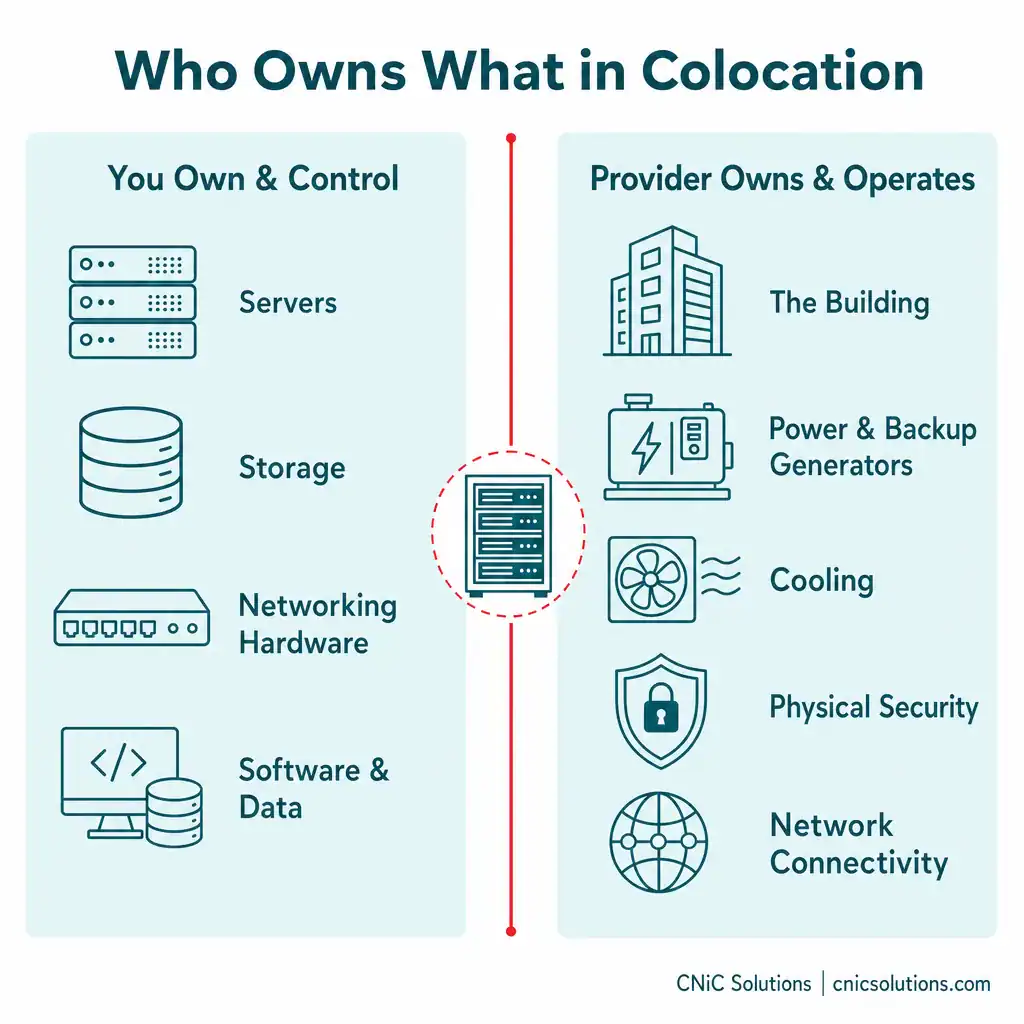
- You own and control: your servers, storage, and networking hardware, plus the software and data running on them.
- The provider owns and operates: the building, the power systems (including backup generators and battery UPS), the cooling, the physical security, and the connection to network carriers.
You rent space measured in racks, cabinets, cages, or larger suites, along with the power and bandwidth your equipment needs. The provider guarantees the environment around your gear through a service level agreement, while you retain full ownership and know exactly where your hardware physically sits. That division is the defining feature of colocation, and it is what separates it from both running your own server room and renting computing power in the cloud.
Source: Uptime Institute
Colocation vs Cloud vs On-Premise
Colocation is easiest to understand as the middle path between two options most businesses already know: keeping everything in-house (on-premise) and renting everything from a cloud provider. CNiC has a separate guide comparing cloud vs on-premise infrastructure in depth; colocation slots in as a third option that borrows from both.
The clearest way to see the difference is who owns the hardware and who runs the facility:
| Factor | On-Premise | Colocation | Cloud |
|---|---|---|---|
| Who owns the hardware | You | You | Provider |
| Who runs the facility | You | Provider | Provider |
| Upfront cost | High (build + gear) | Moderate (gear only) | Low |
| Control over hardware | Full | Full | None (virtual) |
| Scalability | Slow (buy + install) | Moderate (add racks) | Instant |
| Uptime / redundancy | Limited by your budget | Enterprise-grade | Enterprise-grade |
| Best for | Full control, fixed needs | Owned gear + reliability | Flexible, variable workloads |
The simplest way to remember it: on-premise means you own the hardware and the building, cloud means you own neither, and colocation means you own the hardware but rent the building. Colo appeals to businesses that want to keep control of their physical equipment, often for performance, compliance, or existing investment reasons, but do not want to run the power, cooling, and security themselves.
Types of Colocation
Colocation is not one-size-fits-all. Facilities offer different footprints to match the size of your infrastructure.
- Retail colocation: you rent a smaller footprint, typically a rack, a cabinet, or a caged-off area within a shared data hall. This is the common entry point for small and midsize businesses that need a few servers professionally housed.
- Wholesale colocation: you lease a much larger space, such as an entire data hall or a significant portion of the facility, usually at a lower per-unit rate. This suits enterprises with substantial infrastructure requirements.
- Hybrid colocation: colocation space combined with direct cloud connectivity, so you can keep some systems on your own hardware in the colo while integrating cloud services for others. This is increasingly popular for businesses balancing control and flexibility.
Which fits most businesses? For the typical small or midsize business, retail colocation is the starting point: enough professionally managed space for your servers without committing to a data hall you will not fill. Hybrid arrangements are common as businesses add cloud services alongside their owned hardware.
The Benefits of Colocation
Colocation is popular for a handful of concrete reasons, most of which come down to getting enterprise-grade infrastructure without enterprise-scale construction.
Reliability and Uptime
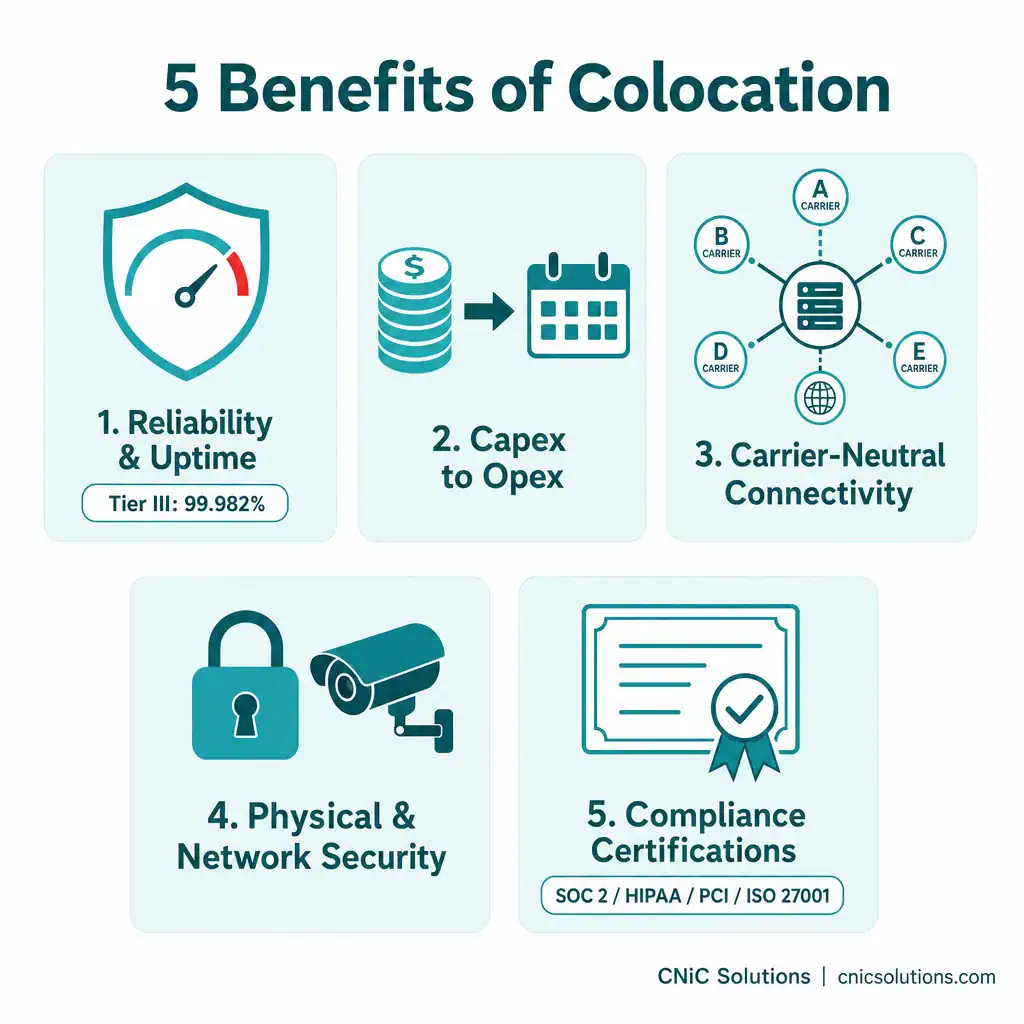
This is often the single biggest draw. Professional data centers are built with redundant power, backup generators, battery systems, and precision cooling that deliver uptime almost no business can replicate in a server room. The industry measures this with tier ratings defined by the Uptime Institute: a Tier III facility targets 99.982% availability (under about 1.6 hours of downtime per year), and a Tier IV facility targets 99.995% (roughly 26 minutes per year). Achieving that level in-house is technically possible but prohibitively expensive, which is the whole point of colocation: the facility spreads that cost across many tenants.
Cost Predictability (Capex to Opex)
Building a private data center is a massive capital expense in space, power infrastructure, cooling, and staff. Colocation converts that into a predictable operating expense, where you pay for the space, power, and bandwidth you use. For most businesses, the economics favor colo over building and running a facility for a single tenant.
Carrier-Neutral Connectivity
Most quality colocation facilities are carrier-neutral, meaning multiple network carriers and internet providers are available in the same building. You can choose the connectivity that fits your performance and cost needs, switch carriers without moving your hardware, and often access direct, low-latency on-ramps to major cloud platforms.
Physical and Network Security
Data centers invest in layered security that goes well beyond a typical office: 24/7 monitoring, controlled access to cages and cabinets, surveillance, and fire suppression, alongside network-level protections. For sensitive hardware, this is far more secure than a locked office closet.
Compliance Certifications
Quality colocation facilities maintain certifications such as SOC 2, PCI-DSS, HIPAA, and ISO 27001 that many businesses would struggle to obtain for their own server room. For regulated industries, housing infrastructure in a compliant facility can simplify audits and reduce risk.
Source: Uptime Institute: Tier Standards
Is Colocation Right for Your Business?
Colocation is powerful, but it is not the right answer for everyone. The honest way to decide is to match it against your situation.
Colocation tends to fit when:
- You already own server hardware you want to keep controlling, for performance, licensing, or investment reasons.
- You are outgrowing an on-premise server room and running short on space, power, or cooling.
- Uptime is critical, and your current environment cannot deliver the reliability you need.
- You operate in a regulated industry and benefit from a facility with compliance certifications.
- You want carrier-neutral connectivity or direct, low-latency cloud on-ramps.
Colocation may not fit when:
- You are very small or just starting out, with minimal hardware. A fully cloud-based setup is often simpler and cheaper.
- Your workloads are highly dynamic and need to scale up and down rapidly. The cloud handles that elasticity far better than physical racks.
- You do not want to own or manage any hardware at all. Colo still leaves the equipment as your responsibility.
- You need staff physically present at the hardware constantly, since the facility is offsite.
For many businesses, the answer is not purely one model but a blend: some systems in colocation, some in the cloud, and a clear plan for how they work together. Getting that mix right is a strategic decision, not just a technical one, which is where having an advisor who is not selling you a specific facility pays off.
The Catch: You Still Have to Manage Your Hardware
Here is the part that gets overlooked. Colocation solves the facility problem (power, cooling, security, connectivity), but it does not solve the management problem. Your servers are still yours to patch, monitor, secure, maintain, and troubleshoot, and now they live in a building you have to drive to. A common surprise for businesses new to colo is realizing that “renting space” still leaves them responsible for everything running inside that space.
This is exactly where a managed IT partner changes the equation. Rather than dispatching your own staff to a data center, you can have your colocated infrastructure monitored, maintained, and managed remotely, so you get the reliability of a professional facility and the convenience of not running the equipment yourself. As a Houston managed IT and infrastructure management partner, CNiC Solutions helps businesses decide whether colocation fits, select the right facility and footprint, and then manage the hardware inside it. Because we are vendor-neutral, our advice is about what fits your business, not about filling a particular data center.
Get expert help planning and managing your infrastructure
If you are weighing colocation as part of a bigger infrastructure decision, a Virtual CIO can map it against your cloud and on-premise options and build a strategy around where each workload belongs.
Related Terms
- Data center: A facility that houses IT infrastructure such as servers and networking equipment in a secure, controlled environment.
- On-premise infrastructure: Technology systems physically located and operated within your own business facilities.
- Cloud infrastructure: Computing resources rented from a provider and accessed over the internet, with no hardware ownership.
- Hybrid infrastructure: A mix of on-premise, colocation, and cloud systems working together.
- Tier rating: An Uptime Institute classification (Tier I to IV) indicating a data center’s redundancy and expected availability.
- Carrier-neutral: A facility offering multiple network carriers, letting tenants choose and switch providers freely.
- Cross-connect: A direct physical link inside a data center between your equipment and a carrier, cloud, or partner.
Frequently Asked Questions
What is data center colocation in simple terms?
What is the difference between colocation and the cloud?
What are the main types of colocation?
Is colocation cheaper than building your own data center?
Who should consider colocation?
Sources
The data center tier definitions and availability figures (Tier III at 99.982% and Tier IV at 99.995%) reflect the classification system established by the Uptime Institute, the recognized authority on data center reliability standards. The colocation models, responsibility split, and benefits described are standard, widely documented characteristics of the colocation industry. Compliance certifications referenced (SOC 2, PCI-DSS, HIPAA, ISO 27001) are the frameworks colocation facilities commonly maintain.
Primary and authoritative source: Uptime Institute Tier Standards.



related posts
What Is Cloud Computing? A Beginner’s Guide for Businesses
October 14, 2026Cloud computing is the on-demand delivery of computing resources (servers, storage, databases, software, and networking) over…
What Is Cloud-Native Security? Protecting Applications Built for the Cloud
October 14, 2026Cloud-native security is the practice of building protection directly into applications that are designed to run…
What Is Calendar Phishing and How to Prevent It
October 13, 2026Calendar phishing is a scam that hides a malicious link inside a calendar invitation instead of…
What Is BYOD? Bring Your Own Device Explained for Businesses
October 13, 2026BYOD (Bring Your Own Device) is a policy that lets employees use their own personal devices,…