

Choosing between a standalone VoIP phone system and Microsoft Teams Phone is one of the highest-stakes technology decisions a small or midsize business makes, because the phone system touches every customer conversation and every employee’s day. The confusing part is that Teams Phone is itself a form of VoIP, so the real question is not “which technology,” it is “where should your phone system live”: in a dedicated platform built purely for voice, or inside the Microsoft 365 apps your team already opens every morning. Get the fit right and you cut costs while improving how people communicate. Get it wrong and you pay for features you never use, or you outgrow a system that cannot do what your phone team needs. This guide compares the two head to head on integration, features, cost, call quality, and IT management, so you can match the choice to your business instead of to a sales pitch.
- Both are VoIP. The decision is standalone VoIP (a dedicated cloud phone platform) versus Teams Phone (calling built into Microsoft 365), not internet calling versus something older.
- Teams Phone wins on integration for Microsoft 365 shops: one app for chat, meetings, and calls, with contacts and presence already in place.
- Standalone VoIP wins on advanced calling: contact-center routing, real-time queue monitoring, call whisper and barge, and deep analytics are native rather than add-ons.
- Cost depends on what you already own. Already on Microsoft 365, Teams Phone reuses that license; a Forrester study commissioned by Microsoft found a 146 percent three-year ROI for an SMB composite, with payback under six months.
- Teams Phone needs separate PSTN connectivity through a Calling Plan, Operator Connect, or Direct Routing before it can call regular phone numbers.
- Call quality is a network question, not a platform one: both need bandwidth, low latency, and QoS to sound good.
- The right answer is buyer-specific, and an MSP can deploy, connect, and manage either one so the technology fits the business.
What’s in This Guide
- Standalone VoIP vs Teams Phone at a Glance
- Understanding Standalone VoIP
- Understanding Microsoft Teams Phone
- Microsoft 365 Integration and Collaboration
- Calling Features and Contact Center
- Cost and Licensing
- Call Quality, Reliability, and PSTN Connectivity
- Management and IT Overhead
- The Full Comparison Table
- Who Should Choose Standalone VoIP
- Who Should Choose Microsoft Teams Phone
- The Final Verdict
- Frequently Asked Questions
- Methodology and Sources
Standalone VoIP vs Teams Phone at a Glance
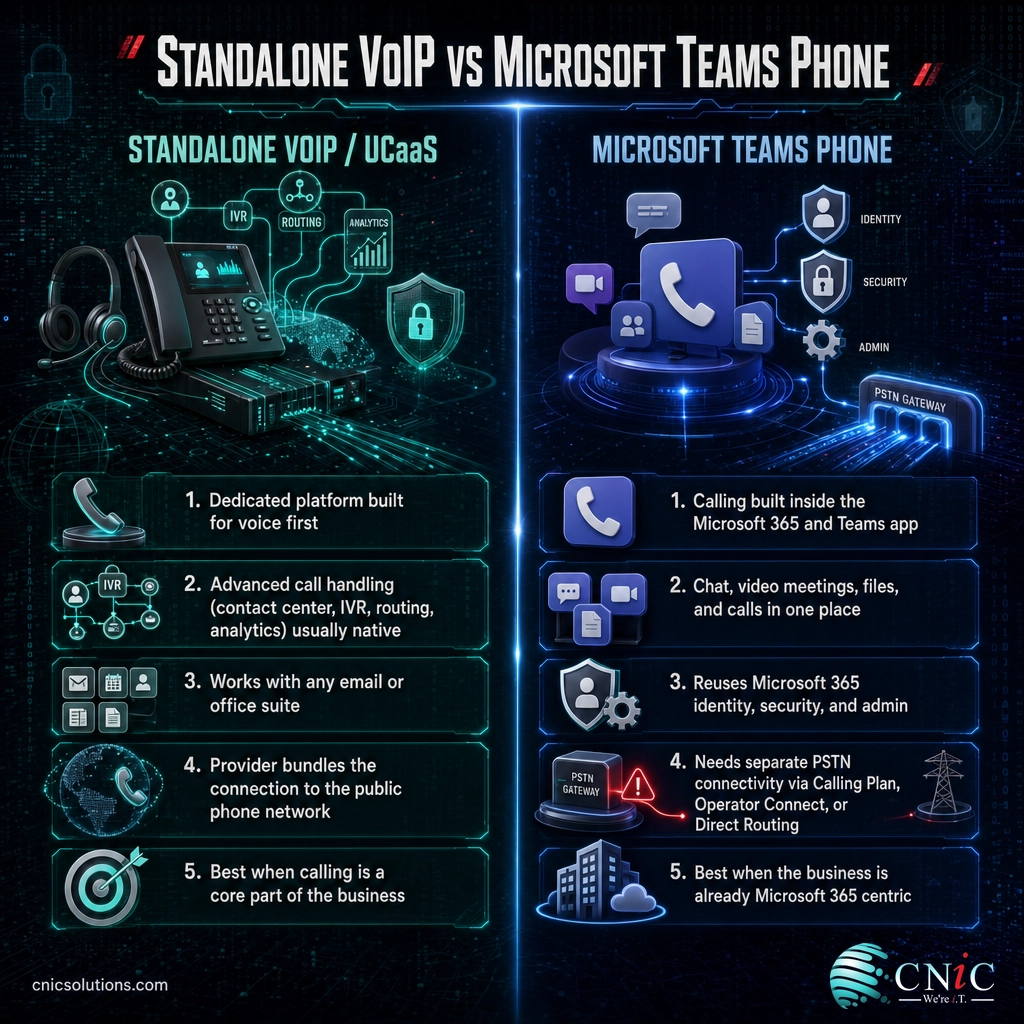
Before the detail, here is the short version. A standalone VoIP system is a cloud phone platform whose entire job is voice and, in its broader UCaaS form, the messaging and video that surround it. Microsoft Teams Phone is a calling capability that turns the Teams app most Microsoft 365 businesses already run into a full phone system. Both make calls over the internet. They differ in focus, in what comes bundled, and in what you have to add.
- A dedicated platform built and tuned for voice first.
- Advanced call handling (contact center, IVR, routing, analytics) is usually native.
- Works regardless of which email or office suite you use.
- The provider typically bundles the connection to the public phone network.
- Best when calling is a core part of the business day.
Microsoft Teams Phone
- Calling added inside the Microsoft 365 and Teams app staff already use.
- Chat, video meetings, files, and calls live in one place.
- Reuses Microsoft 365 identity, security, and admin controls.
- Needs separate public-network connectivity (Calling Plan, Operator Connect, or Direct Routing).
- Best when the business is already Microsoft 365 centric.
The myth that clears up the whole debate: “VoIP versus Teams” is not VoIP versus something better. Microsoft Teams Phone is a VoIP service. It carries voice as data packets over the internet exactly like any other cloud phone system. So nobody is choosing between old and new technology here. The genuine choice is architectural: do you want a phone system that stands on its own and is purpose-built for calling, or a phone system woven into the productivity suite your company already lives in? Frame the decision that way and the marketing noise falls away.
Source: FCC on Voice Over Internet Protocol | Microsoft Teams Phone official page
Understanding Standalone VoIP
A standalone VoIP system is a cloud-hosted phone platform delivered by a provider whose product is the phone system itself. You buy extensions or seats, the provider hosts the call-handling in the cloud, and your desk phones and softphones register to it over the internet. In its fuller form, the platform becomes UCaaS (Unified Communications as a Service), adding team messaging, video meetings, SMS, and presence around the core voice service. The defining trait is focus: every feature exists to make business calling work well.
That focus shows up in call handling. Purpose-built voice platforms tend to ship advanced routing, interactive voice response menus, call queues, ring groups, call recording, and reporting as standard, along with contact-center capabilities for teams that live on the phone. Because voice is the whole product, the settings that matter to a busy phone team, things like how a call cascades through a group or how an after-hours menu behaves, are usually deep and easy to reach.
The trade-off is that a standalone system is one more platform to run alongside your email and office apps. Directory, presence, and contacts may not line up automatically with Microsoft 365 unless the platform offers an integration, and staff switch between the phone app and their productivity tools. For many businesses that separation is a feature, not a bug: the phone system keeps working exactly the same no matter what happens to the office suite. Whichever platform you pick, its call quality still rides on your network, so the underlying bandwidth, latency, and QoS requirements every VoIP system depends on apply here just as they do to Teams.
Explore Business Telecommunications
Source: FCC: Voice Over Internet Protocol | FCC: VoIP and Cyber Security
Understanding Microsoft Teams Phone
Microsoft Teams Phone adds enterprise calling to Teams, turning the app your staff already use for chat and meetings into a business phone system. A user can take a call, join a meeting, and send a message from the same window on the same identity, and administrators manage phones from the Microsoft 365 admin center rather than a separate voice console. For an organization that already standardizes on Microsoft 365, that consolidation is the whole appeal.
The one thing Teams Phone does not do by itself is reach the regular telephone network. Out of the box it can call other Teams users; to dial and receive calls from ordinary phone numbers you add public switched telephone network (PSTN) connectivity through one of three routes. A Microsoft Calling Plan buys calling minutes directly from Microsoft as a cloud add-on. Operator Connect brings a participating telecom carrier into Teams as a managed service with no hardware to run. Direct Routing connects your own chosen carrier through a certified Session Border Controller, which gives the most flexibility and is common when a business wants to keep an existing carrier contract. Microsoft’s own documentation lays out all three, and the choice materially affects both cost and management.
That connectivity requirement is the detail buyers most often miss. The advertised Teams Phone price is the calling app; the true cost also includes the PSTN route and the Microsoft 365 license underneath it. None of that is a drawback if you are already invested in Microsoft 365, because much of the foundation is already paid for, but it does mean the comparison has to be like for like. If you are weighing this move, our step-by-step VoIP migration checklist covers number porting, connectivity, and cutover in order.
Get Help Managing Microsoft 365 Voice
Source: Microsoft Learn: PSTN connectivity options | Microsoft Learn: Plan Direct Routing
Microsoft 365 Integration and Collaboration
This is the criterion where the two options separate most cleanly. If your business runs on Microsoft 365, Teams Phone folds calling into the same app as chat, video, calendar, and files. A colleague’s presence tells you whether they are on a call before you transfer to them, contacts come from the shared directory, and there is no second app to install, learn, or license. For staff who already spend the day in Teams, the phone simply becomes another button in a place they already are.
A standalone VoIP platform can integrate with Microsoft 365 too, and the better ones offer presence sync, click-to-dial from Outlook, and directory connectors. But that is an integration to configure and maintain, not a native state. The experience is usually very good; it is just not the single-pane-of-glass that Teams delivers when calling lives inside the collaboration app itself. For a Microsoft-centric workforce, fewer apps and one identity is a real, daily productivity gain.
The counterpoint matters for the rest of this comparison: integration is only an advantage if you are actually a Microsoft 365 shop. A business standardized on Google Workspace or a mixed environment gets little of this benefit, and for them the integration edge largely disappears. So weigh this criterion by how deeply your company already lives inside Microsoft’s ecosystem.
Source: Microsoft Teams Phone | Microsoft Learn: What you get with Teams Phone
Calling Features and Contact Center
For everyday calling, both options cover the essentials well: auto attendants, call queues, voicemail, transfers, forwarding, and shared lines. If your requirement is a competent business phone system for a professional office, either platform meets it, and this criterion is close to a tie at the basic level.
The gap opens at the advanced end. Teams that treat the phone as the core of their work, sales floors, support desks, dispatch, and scheduling teams, tend to need contact-center capabilities: skills-based routing, real-time queue and agent monitoring, supervisor tools like call whisper and barge, wallboards, and detailed historical analytics. Native Teams Phone handles queues and attendants, but its out-of-the-box contact-center depth is limited, and organizations that need the full set typically add a Microsoft-certified contact-center partner product on top. Many purpose-built VoIP and UCaaS platforms include a larger share of those capabilities natively, without a separate product to license and connect.
The practical rule is to match feature depth to how the phone is used. An office that mostly makes and takes normal calls will never miss the contact-center layer and should not pay for it. A team whose day is measured in queue times and call outcomes will feel a thin feature set immediately. If either platform is sounding choppy rather than missing features, that is a different problem entirely, and our guide to the most common VoIP call-quality problems and their fixes addresses it.
Source: Microsoft Learn: Contact center for Teams | Microsoft Learn: Teams Phone features
Cost and Licensing
Cost is where the “it depends” answer is most true, because the honest comparison is not sticker price against sticker price, it is total cost against total cost for your specific starting point.
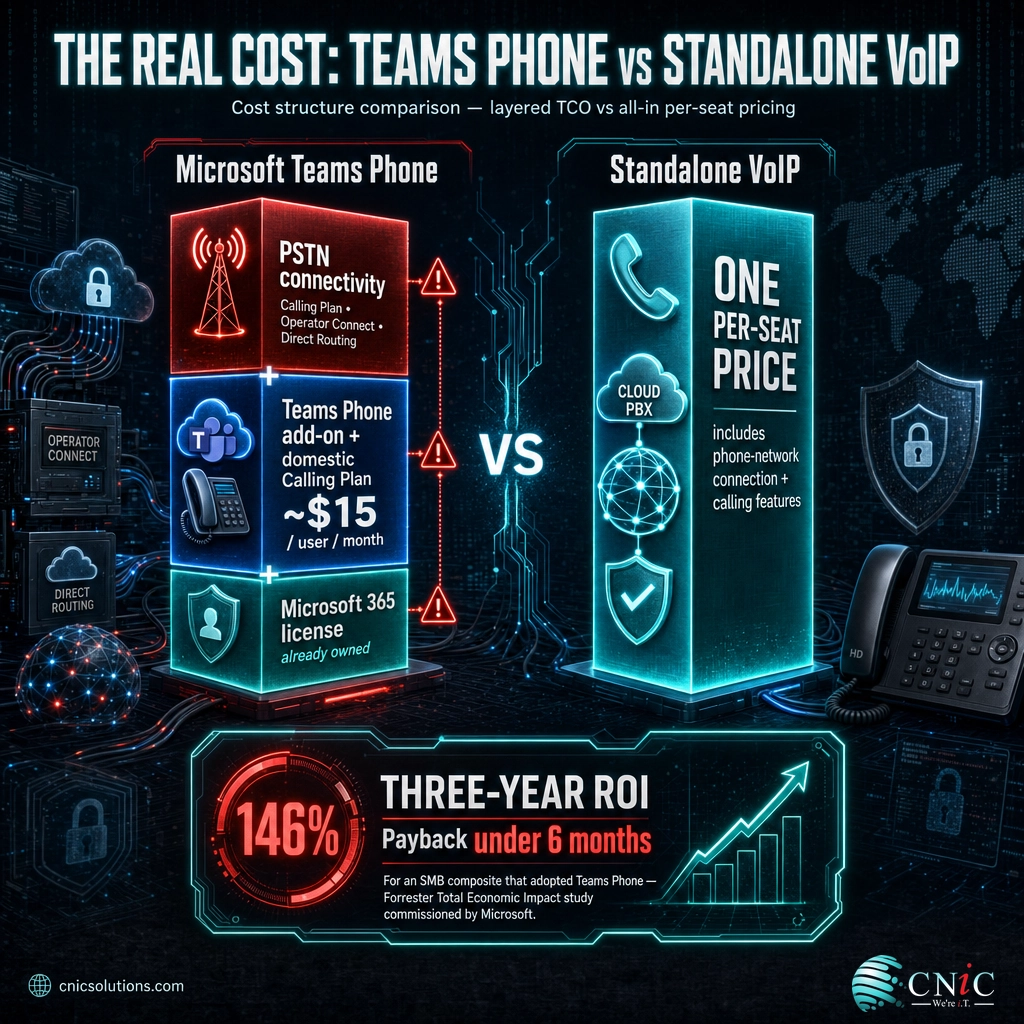
Teams Phone is priced as a calling add-on to Microsoft 365. Microsoft lists Teams Phone with a domestic Calling Plan at roughly 15 US dollars per user per month, but that sits on top of a Microsoft 365 license and, depending on the connectivity route you pick, PSTN service costs. If you already pay for Microsoft 365, that reuse is exactly why the economics can be strong: you are extending infrastructure you already own rather than buying a separate system. A Forrester Total Economic Impact study commissioned by Microsoft modeled a small-and-midsize-business composite reaching a 146 percent three-year return on investment with a payback period of under six months, driven largely by retiring duplicate telephony contracts and simplifying management.
Standalone VoIP flips the math. A dedicated platform is usually a single all-in per-seat price that already includes the connection to the phone network and most calling features, with nothing else required. For a business that is not on Microsoft 365, that is almost always the cheaper and simpler route, because buying the entire Microsoft stack just to obtain a phone system would be paying for a great deal you do not need. The deciding question is blunt: are you already a Microsoft 365 customer? If yes, Teams Phone has a cost tailwind. If no, a standalone platform typically wins on price.
Whichever way it leans for you, price the whole picture: license, connectivity, phones, and the support effort to run it. A quick modeling exercise against your current phone bill usually makes the answer obvious.

Source: Microsoft Teams Phone pricing | Forrester: Total Economic Impact of Microsoft Teams Phone
Call Quality, Reliability, and PSTN Connectivity
Here is the criterion buyers worry about most and where, counterintuitively, the two platforms are closest. Call quality is overwhelmingly a function of your network, not your provider. Both standalone VoIP and Teams Phone send voice as packets across the internet, and both sound excellent on a healthy network and terrible on a poor one. The standards that matter are the same for both: keep one-way latency at or under 150 milliseconds, per ITU-T Recommendation G.114, keep jitter and packet loss low, and give voice priority with Quality of Service so it beats other traffic when the link gets busy.
Where they differ is in how they connect to the outside phone network, and that affects reliability planning. A standalone provider typically owns and manages that connection end to end, so you have one company accountable for dial tone. With Teams Phone, reliability depends partly on which PSTN route you chose: a Microsoft Calling Plan puts Microsoft in charge of connectivity, Operator Connect leans on a partner carrier, and Direct Routing makes you (or your MSP) responsible for the Session Border Controller and carrier links. None is inherently more reliable, but each spreads accountability differently, which is worth deciding deliberately rather than by default.
Both options should be backed by internet redundancy, because a cloud phone system is only as available as the connection under it. A secondary internet link with automatic failover keeps calls alive when the primary drops, and cloud platforms can reroute inbound calls to mobiles if a site goes dark. That continuity thinking is the same logic behind good data backup and recovery planning, applied to voice.
Secure and Harden Your Voice Traffic
Source: ITU-T Recommendation G.114 | Microsoft Learn: PSTN connectivity options
Management and IT Overhead
The last criterion is who has to run the thing day to day. Teams Phone is administered from the Microsoft 365 admin center, so a business already managing Microsoft 365 identities, security policies, and licenses manages voice in the same console with the same team. There is no separate voice platform to learn, and user provisioning ties into the identity you already control. For a Microsoft-centric organization, that consolidation genuinely reduces the number of systems IT has to master.
A standalone VoIP platform is a second admin console, which sounds like more overhead and sometimes is. But standalone systems are often designed for non-technical administration, and a hosted provider carries much of the operational load for you. The Direct Routing flavor of Teams Phone, by contrast, can actually be the most demanding option of all, because someone has to own the Session Border Controller and carrier integration. In other words, “Teams is simpler to manage” holds for Calling Plan and Operator Connect, and reverses for Direct Routing.
For most small and midsize businesses, the realistic answer to “who manages it” is a managed IT partner either way. An MSP can run Teams Phone inside your Microsoft 365 tenant, stand up and support a standalone platform, or operate the Direct Routing connection, so the management-overhead question becomes less about the platform and more about whether you have the right partner. Distributed teams add their own wrinkle, which we cover in our guide to the best business phone systems for remote and hybrid teams.
Source: Microsoft Learn: Manage Teams Phone | Microsoft Learn: Plan Direct Routing
The Full Comparison Table
The whole comparison in one place. Remember that several “winners” flip based on whether you are already a Microsoft 365 business, which is the single most important variable in the decision.
| Criterion | Standalone VoIP / UCaaS | Microsoft Teams Phone | Better fit for |
|---|---|---|---|
| Core technology | Internet voice (VoIP) | Internet voice (VoIP) | Tie: both are VoIP |
| Microsoft 365 integration | Via configured integration | Native, single app and identity | Teams Phone |
| Everyday calling features | Full and native | Full and native | Tie |
| Contact center / advanced routing | Often native | Usually needs a certified add-on | Standalone VoIP |
| Cost if already on Microsoft 365 | Additional separate platform | Reuses owned licenses | Teams Phone |
| Cost if not on Microsoft 365 | All-in per seat | Requires the M365 stack too | Standalone VoIP |
| Public network connectivity | Bundled by provider | Add Calling Plan, Operator Connect, or Direct Routing | Standalone VoIP (simpler) |
| Call quality driver | Your network | Your network | Tie |
| Day-to-day management | Separate console (often simple) | Microsoft 365 admin center | Teams Phone (except Direct Routing) |
| Number porting | Supported | Supported | Tie |
Source: Microsoft Teams Phone | Microsoft Learn: PSTN connectivity
Who Should Choose Standalone VoIP
A standalone VoIP or UCaaS platform is the stronger fit when calling is central to how the business runs, or when Microsoft 365 is not the center of gravity. Look for yourself in these profiles:
- You run a phone-heavy team. Sales floors, support desks, dispatch, scheduling, and any contact-center work benefit from native advanced routing, live monitoring, and analytics.
- You are not a Microsoft 365 shop. If you use Google Workspace or a mixed stack, the integration advantage of Teams disappears and a dedicated platform is cheaper and cleaner.
- You want one company accountable for dial tone. A provider that owns voice end to end, including the connection to the phone network, gives you a single throat to choke.
- You want the phone system insulated from your office suite. A separate platform keeps calling stable no matter what changes in your productivity apps.
- You need specialized telephony features such as complex IVR, call-center wallboards, or deep call recording as standard rather than as paid add-ons.
Source: FCC: Voice Over Internet Protocol
Who Should Choose Microsoft Teams Phone
Microsoft Teams Phone is the stronger fit when your business already lives in Microsoft 365 and values consolidation over specialized calling depth. These profiles point to Teams:
- You are already all-in on Microsoft 365. Reusing the licenses, identity, and admin tools you own is where Teams Phone’s cost and simplicity advantages come from.
- Your staff already work in Teams all day. Adding calling to the app people already have open removes a separate phone tool and the training that goes with it.
- Your calling needs are mainstream. Standard business calling, auto attendants, and queues, rather than full contact-center operations, are well served natively.
- You want fewer systems for IT to run. Managing voice in the same console as the rest of Microsoft 365 reduces the number of platforms your team supports (using Calling Plan or Operator Connect).
- You have hybrid and remote workers who need to call, chat, and meet from one app on any device, tied to a single company identity.
Source: Microsoft Teams Phone | Forrester TEI of Microsoft Teams Phone
The Final Verdict
There is no universal winner, and any article that declares one is selling something. The decision turns on a single question: how central is Microsoft 365 to your business, and how demanding is your calling? If you are already a Microsoft 365 organization with mainstream calling needs, Teams Phone is usually the smarter, lower-friction choice, because it reuses what you own and puts communication in one place. If calling is the heart of your operation, or you are not a Microsoft shop, a standalone VoIP or UCaaS platform will serve you better and often cost less.
The most expensive mistake is choosing on brand familiarity or a headline price instead of on fit, then discovering the gap after the numbers are ported. The reliable way to avoid that is to model both options against your real starting point (your current phone bill, your Microsoft 365 status, your calling patterns) and to run a network readiness check before committing, since call quality on either platform depends on the same network fundamentals. That assessment is exactly the work an experienced managed IT and communications partner does before recommending a direction, and because CNiC Solutions deploys, connects, and manages both standalone VoIP and Microsoft Teams Phone, the recommendation follows your business rather than a single product line.
Talk to CNiC About the Right Phone System
Source: Microsoft Learn: PSTN connectivity options | Forrester: Total Economic Impact of Microsoft Teams Phone
Frequently Asked Questions
Is Microsoft Teams Phone the same as VoIP?
Does Microsoft Teams Phone need a separate calling plan?
Which is cheaper, standalone VoIP or Teams Phone?
Is Teams Phone good enough for a call center?
Can I keep my existing phone numbers with either option?
Methodology and Sources
How this comparison was built
This comparison treats both options as what they are: internet-based (VoIP) phone systems that differ in architecture rather than in underlying technology. Product capabilities, PSTN connectivity options (Microsoft Calling Plan, Operator Connect, and Direct Routing), and administration models are drawn from Microsoft’s official product pages and Microsoft Learn documentation. The return-on-investment figure is from a Forrester Total Economic Impact study commissioned by Microsoft and reflects a modeled composite organization, so treat it as directional rather than a guarantee for any single business. Call-quality thresholds follow ITU-T Recommendation G.114 and apply equally to both platforms because both carry voice over the internet. Pricing references Microsoft’s published Teams Phone pricing and can change; confirm current figures before budgeting. Where this guide labels a “winner,” the judgment is CNiC Solutions’ assessment for a typical small or midsize business and is explicitly conditioned on whether the organization already uses Microsoft 365.
- Microsoft: Teams Phone product page
- Microsoft Learn: PSTN connectivity options
- Microsoft Learn: Plan Direct Routing
- Microsoft Learn: What you get with Teams Phone
- Forrester: Total Economic Impact of Microsoft Teams Phone (commissioned by Microsoft)
- ITU-T Recommendation G.114: One-Way Transmission Time
- FCC: Voice Over Internet Protocol
Last Updated: August 2026

related posts
What Is Calendar Phishing and How to Prevent It
October 13, 2026Calendar phishing is a scam that hides a malicious link inside a calendar invitation instead of…
What Is BYOD? Bring Your Own Device Explained for Businesses
October 13, 2026BYOD (Bring Your Own Device) is a policy that lets employees use their own personal devices,…
What Is an IP Address? A Plain-English Guide for Business
October 12, 2026An IP address (Internet Protocol address) is a unique number assigned to every device on a…
What Is an Evil Twin Attack? How Fake Wi-Fi Hotspots Steal Your…
October 12, 2026An evil twin attack is a fake Wi-Fi hotspot that copies the name of a network…